Latest — Jun 30, 2025
How to protect your online business from cyberattacks

Introduction

Imagine waking up one morning to find your business crippled by a cyber attack — your customer data stolen, your systems locked, and your reputation hanging by a thread. It’s a nightmare scenario, but one faced by countless businesses every year. Cybersecurity is no longer optional; it’s a necessity. Whether you're running a small business or managing a large enterprise, understanding how to prevent cyber attacks is critical to staying ahead of increasingly sophisticated threats.

In this article, we’ll dive into practical strategies for protecting your business from cyber attacks, ranging from securing networks to educating employees. We’ll also explore how tools like Passwork password manager can play a pivotal role in fortifying your defenses. Ready to safeguard your business? Let’s get started.

What is a cyberattack?

A cyberattack is an intentional attempt by hackers or malicious actors to compromise the security of a system or network. These attacks come in various forms, including phishing, ransomware, denial-of-service (DoS), and malware. For businesses, the stakes are high — financial loss, data breaches, and damaged reputations are just the tip of the iceberg.

Common types of cyber attacks on businesses


Phishing

Phishing involves fraudulent emails or messages designed to trick employees into revealing sensitive information, such as login credentials or financial data.

Reports: Phishing remains one of the most prevalent and damaging forms of cyberattacks. In Q4 2024 alone, 989,123 phishing attacks were detected globally (APWG).

Example: In 2023, attackers impersonated Microsoft in a phishing campaign targeting over 120,000 employees across industries. The emails mimicked legitimate notifications, resulting in compromised credentials for several corporate accounts.

Ransomware

Ransomware attacks involve hackers encrypting your systems and demanding payment for decryption keys.

Reports: In 2024, 59% of organizations were hit by ransomware attacks, with 70% of these attacks resulting in data encryption. The average ransom demand increased to $2.73 million, a sharp rise from $1.85 million in 2023 (Varonis Ransomware Statistics).

Example: In 2024, the Colonial Pipeline ransomware attack crippled fuel supply across the eastern U.S. The company paid a $4.4 million ransom to regain access to its systems, highlighting the severe operational and financial impacts of such attacks.

DDoS (Distributed Denial of Service)

DDoS attacks aim to disrupt operations by overwhelming servers with traffic.

Reports: In 2023, the largest recorded DDoS attack peaked at 71 million requests per second, targeting Google Cloud.

Example: In 2024, the GitHub DDoS attack brought down the platform for hours, affecting millions of developers globally. The attack exploited botnets to flood GitHub’s servers with malicious traffic.

Credential stuffing

Attackers use stolen login credentials from one breach to gain access to other systems due to password reuse. Attackers use stolen credentials from one breach to gain access to other systems.

Reports: With 65% of users reusing passwords, credential stuffing remains a critical threat.

Example: In 2023, attackers used credential stuffing to breach Zoom accounts, exposing private meetings and sensitive data. The attack leveraged credentials leaked in earlier breaches of unrelated platforms.

Malware

Malware refers to malicious software, such as viruses, worms, or spyware, that infiltrates systems to steal data or cause damage.

Reports: Malware-related email threats accounted for 39.6% of all email attacks in 2024, and the global financial impact of malware exceeded $20 billion annually (NU Cybersecurity Report).

Example: The Emotet malware campaign in 2023 targeted financial institutions worldwide, stealing banking credentials and causing widespread disruptions.

Social engineering

Social engineering manipulates individuals into revealing confidential information or granting access to secure systems.

Reports: In 2024, 68% of breaches involved the human element, often through social engineering tactics like pretexting, baiting, and tailgating (Verizon DBIR).

Example: In 2023, an attacker posing as a senior executive tricked an employee at Toyota Boshoku Corporation into transferring $37 million to a fraudulent account.

Supply chain attacks

Supply chain attacks exploit vulnerabilities in third-party vendors or suppliers to infiltrate larger organizations.

Reports: In 2023, 62% of system intrusions were traced back to supply chain vulnerabilities (IBM X-Force).

Example: The SolarWinds attack remains one of the most damaging supply chain incidents. Hackers compromised the Orion software update, affecting thousands of organizations, including government agencies and Fortune 500 companies.

Data breaches

Data breaches involve unauthorized access to sensitive customer or company information.

Reports: In 2024, the average cost of a data breach reached $4.45 million, a 15% increase over three years (IBM Cost of a Data Breach Report 2024). These breaches often result from weak passwords, phishing, or insider threats.

Example: In 2023, the T-Mobile data breach exposed the personal information of 37 million customers, including names, addresses, and phone numbers, leading to significant reputational damage and regulatory scrutiny.

Understanding these threats is the first step toward prevention.

How to protect your online business from cyber attacks

Protecting your business from cyber threats requires a multi-layered approach. Below are actionable strategies to fortify your defenses.

Secure your networks and databases

Your network is the backbone of your business operations, making it a prime target for attackers. Implement these measures to secure it:

Install firewalls
Firewalls act as a barrier between your internal network and external threats.

Use VPNs
Encrypt data transfers with Virtual Private Networks to prevent interception.

Segment networks
Divide your network into smaller sections to contain breaches.

Recommendation: Reduce the risk of data breaches by segmenting your network. Isolate sensitive customer data from general operations to limit unauthorized access and minimize potential exposure in case of a breach.

Educate your employees

Your employees are your first line of defense — and often the weakest link. Training them on cybersecurity best practices can significantly reduce risks.

Conduct regular workshops
Teach employees how to recognize phishing emails and suspicious links.

Simulate cyber attacks
Run mock scenarios to test their response and improve preparedness.

Create a reporting system
Encourage employees to report potential threats immediately.

Recommendation: Since 95% of cybersecurity breaches are caused by human error, prioritize educating your team. Implement regular cybersecurity training to raise awareness and equip employees with the knowledge to identify and prevent potential threats.

Ensure proper password management

Weak passwords are an open invitation for hackers. Proper password management is essential to protecting your systems.

Use strong passwords
Encourage the use of complex passwords with a mix of letters, numbers, and symbols.

Adopt a password manager
Implement a secure solution like Passwork to simplify password management, encourage unique passwords for each account, and reduce the risk of breaches.

Change passwords regularly
Implement policies for periodic password updates.

Recommendation: Use a secure password manager to generate and store complex, unique passwords for all accounts, enforce regular password updates, and eliminate the risks associated with weak or reused credentials.

Carefully manage access and identity

Controlling who has access to sensitive data is crucial. Follow these steps:

Role-based access control (RBAC)
Assign access based on job roles.

Monitor access logs
Regularly review who accessed what and when.

Deactivate unused accounts
Immediately revoke access for former employees.

Set up multi-factor authentication (MFA)

Passwords alone aren’t enough. MFA adds an extra layer of security by requiring multiple forms of verification.

SMS or email codes
Require a code sent to the user’s phone or email.

Biometric authentication
Use fingerprint or facial recognition for secure access.

App-based authentication
Tools like Passwork 2Fa and Google Authenticator offer reliable MFA solutions.

Encrypt your data

Encryption ensures that even if data is intercepted, it remains unreadable to unauthorized users.

Encrypt files
Use advanced encryption algorithms for sensitive documents.

Secure communication channels
Encrypt emails and messaging platforms.

Adopt end-to-end encryption
Particularly important for customer-facing applications.

Create backups

Backups are your safety net in the event of a ransomware attack or accidental data loss.

Automate backups
Use cloud services to schedule regular backups.

Keep multiple copies
Store backups both online and offline.

Test recovery
Periodically test your ability to restore data from backups.

Ensure your software is kept up-to-date

Outdated software is a goldmine for hackers. Regular updates close known vulnerabilities.

Enable automatic updates
Ensure your systems update without manual intervention.

Patch management
Use tools to monitor and apply security patches.

Audit software
Regularly review third-party applications for potential risks.

Create security policies and practices

Formal policies provide a clear framework for cybersecurity.

Draft a cybersecurity policy
Include guidelines for data handling, password use, and incident response.

Conduct regular audits
Review compliance with security protocols.

Update policies
Adapt your policies to evolving threats.

Inform your customers

Transparency builds trust. Inform customers about your cybersecurity measures and educate them on protecting their data.

Send security tips
Share advice via newsletters or blogs.

Offer secure payment options
Use encrypted payment gateways.

Respond to breaches
Communicate openly and promptly if an incident occurs.

Understand what data you have and classify it

Knowing what data you store — and its value — is key to prioritizing protection.

Inventory your data
Create a list of sensitive information, such as customer details and financial records.

Classify data
Separate high-risk data from less critical information.

Limit data collection
Only collect what’s necessary for business operations.

How Passwork protects your business from cyberattacks

Passwork password manager is a game-changer for businesses aiming to strengthen their cybersecurity. Here’s how:

Centralized password management
Simplifies and secures access for teams.

Role-based permissions
Ensures employees only access what they need.

Audit trails
Tracks password usage for accountability.

Encrypted storage
Keeps passwords safe from unauthorized access.

FAQ

What’s the most common type of cyberattack on businesses?
Phishing is the most prevalent, accounting for over 80% of reported incidents.

How does Passwork enhance password security?
Passwork provides encrypted storage, role-based permissions, and audit trails for secure password management.

How often should I update my software?
Software should be updated as soon as patches are available to close vulnerabilities.

What’s the importance of encryption in cybersecurity?
Encryption ensures that intercepted data remains unreadable to unauthorized users.

Can small businesses afford cybersecurity measures?
Yes, many affordable tools and strategies cater specifically to small businesses. Passwork provides flexible and cost-effective plans tailored for small businesses.

What should I do if my business suffers a cyberattack?
Immediately contain the breach, inform stakeholders, and consult cybersecurity professionals.

How can I educate employees about cybersecurity?
Conduct regular workshops, simulate attacks, and provide easy-to-follow guidelines.

Conclusion

Cybersecurity isn’t just a technical issue — it’s a business imperative. By implementing the strategies outlined above, you can protect your online business from cyberattacks, safeguard sensitive data, and build trust with your customers. Tools like Passwork make it easier than ever to stay secure without sacrificing efficiency.

Ready to take the first step? Try Passwork with a free demo and explore practical ways to protect your business.

Further reading:

Four ways to make users love password security
Why do employees ignore cybersecurity policies?
Employees often ignore cybersecurity rules not out of laziness, but because they feel generic, irrelevant, or disconnected from real work. True change starts with empathy, leadership, and context-driven policies. Read the full article to learn how to make security stick.
Recommendations for the safe integration of AI systems
AI technologies are changing industries fast and most companies are already using or will use AI in the next few years. While AI brings many benefits — increased efficiency, customer satisfaction and revenue growth — its also introduces unique risks that need to be addressed proactively. From reputation damage to compliance violations

How to protect your online business from cyberattacks

Protect your online business from cyber threats with actionable strategies, from employee education to advanced tools like Passwork. Learn about phishing, ransomware, and more while discovering how to enhance security with simple yet effective measures. Stay protected — read the full article!

Jun 19, 2025 — 2 min read
Passwork 7.0.7 Release

Das Update Passwork 7.0.7 ist im Kundenportal verfügbar.

  • Fehlerhafte Migration von Anhängen und Passwort-Versionen zu Passwork 7 behoben
  • Problem behoben, bei dem die API-Sitzung nach der Token-Erneuerung zurückgesetzt werden konnte
  • Allgemeine Leistung und Stabilität verbessert
Alle Informationen zu Passwork-Updates finden Sie in unseren Release Notes
Passwork 7 Release
In Passwork 7 wurde alles verbessert: Der Code wurde mit neuesten Technologien komplett neu geschrieben, eine vollwertige API implementiert, die Benutzeroberfläche aktualisiert, Gruppen und Rollen neu gestaltet, die automatische Hinzufügung von Systemadministratoren zu Tresoren abgeschafft und die Verwaltung von Zugriffsrechten noch flexibler gestaltet. Dies wird den Komfort der Administration erheblich verbessern
Passwork 7.1: Tresortypen
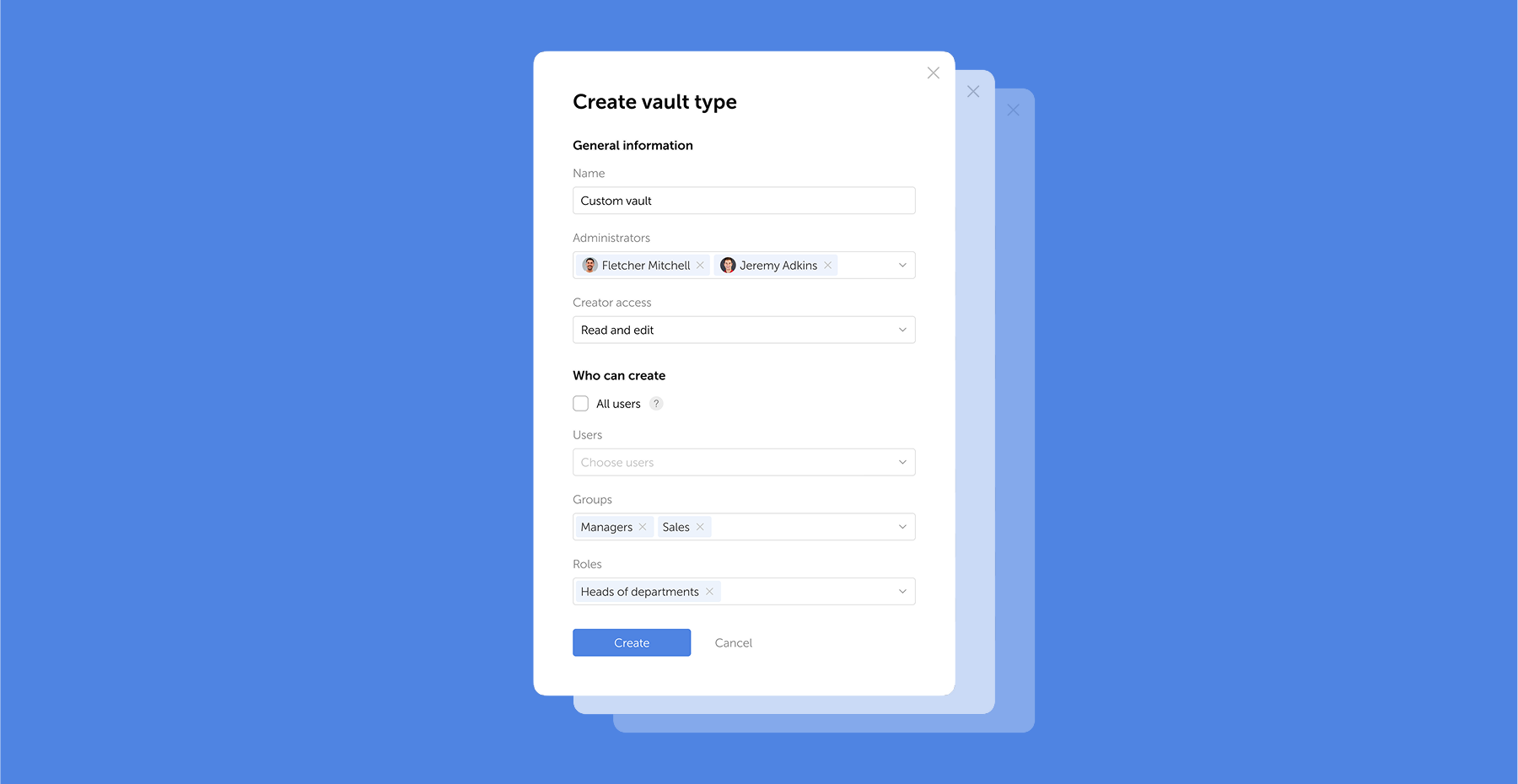
Tresortypen Passwork 7.1 führt eine robuste Tresortypen-Architektur ein, die eine unternehmenstaugliche Zugriffskontrolle für verbesserte Sicherheit und Verwaltung bietet. Tresortypen lösen eine zentrale Herausforderung für Administratoren: die Kontrolle des Datenzugriffs und die Delegation der Tresorverwaltung in großen Organisationen. Zuvor war die Auswahl auf zwei Typen beschränkt. Jetzt können Sie
Passwork 7.2 Release
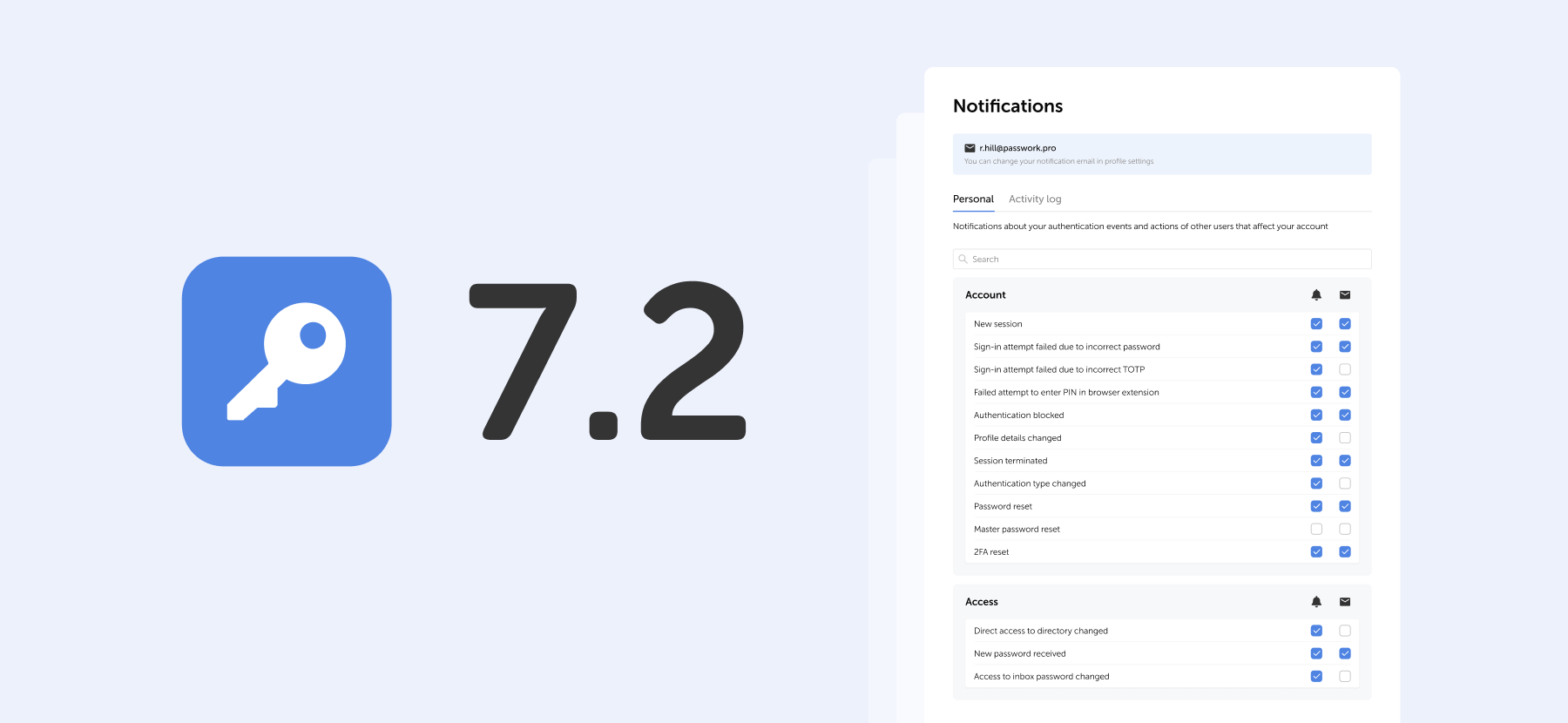
Die neue Version führt anpassbare Benachrichtigungen mit flexiblen Zustellungsoptionen, verbesserte Beschreibungen der Ereignisprotokollierung, erweiterte CLI-Funktionalität, serverseitige PIN-Code-Speicherung für die Browser-Erweiterung und die Möglichkeit ein, clientseitige Verschlüsselung während der Erstkonfiguration von Passwork zu aktivieren. Benachrichtigungseinstellungen Es wurde ein spezieller Bereich für Benachrichtigungseinstellungen hinzugefügt, in dem Sie Benachrichtigungen

Passwork 7.0.7 Release

Jun 19, 2025 — 2 min read
Lanzamiento de Passwork 7.0.7

La actualización Passwork 7.0.7 está disponible en el portal de clientes.

  • Se corrigió la migración incorrecta de archivos adjuntos y ediciones de contraseñas a Passwork 7
  • Se solucionó un problema donde la sesión de API podía restablecerse después de la renovación del token
  • Se mejoró el rendimiento general y la estabilidad
Puede encontrar toda la información sobre las actualizaciones de Passwork en nuestras notas de la versión
Lanzamiento de Passwork 7
En Passwork 7, mejoramos todo: reescribimos completamente el código utilizando las últimas tecnologías, implementamos una API completa, actualizamos la interfaz, rediseñamos grupos y roles, abandonamos la adición automática de administradores del sistema a las bóvedas e hicimos la gestión de derechos de acceso aún más flexible. Esto mejorará significativamente la comodidad de la administración
Passwork 7.1: Tipos de bóveda
Tipos de bóveda Passwork 7.1 introduce una arquitectura robusta de tipos de bóveda, proporcionando control de acceso de nivel empresarial para una seguridad y gestión mejoradas. Los tipos de bóveda abordan un desafío clave para los administradores: controlar el acceso a los datos y delegar la gestión de bóvedas en grandes organizaciones. Anteriormente, la elección estaba limitada a dos tipos. Ahora, puede crear
Lanzamiento de Passwork 7.2
La nueva versión introduce notificaciones personalizables con opciones de entrega flexibles, descripciones mejoradas del registro de eventos, funcionalidad ampliada de CLI, almacenamiento del código PIN en el servidor para la extensión del navegador y la capacidad de habilitar el cifrado del lado del cliente durante la configuración inicial de Passwork. Configuración de notificaciones Hemos añadido una sección dedicada de configuración de notificaciones donde puede elegir las opciones de notificación

Lanzamiento de Passwork 7.0.7

Jun 19, 2025 — 2 min read
Passwork 7.0.7 release

Passwork 7.0.7 update is available in the Customer portal.

  • Fixed incorrect migration of attachments and password editions to Passwork 7
  • Fixed an issue where the API session could be reset after token renewal
  • Improved overall performance and stability
You can find all information about Passwork updates in our release notes
Passwork 7 release
In Passwork 7, we improved everything: completely rewrote the code using the latest technologies, implemented a full-fledged API, updated the interface, redesigned groups and roles, abandoned the automatic addition of system administrators to vaults, and made access rights management even more flexible. This will significantly enhance the convenience of administration
Passwork 7.1: Vault types
Vault types Passwork 7.1 introduces a robust vault types architecture, providing enterprise-grade access control for enhanced security and management. Vault types address a key challenge for administrators: controlling data access and delegating vault management across large organizations. Previously, the choice was limited to two types. Now, you can create
Passwork 7.2 release
The new version introduces customizable notifications with flexible delivery options, enhanced event logging descriptions, expanded CLI functionality, server-side PIN code storage for the browser extension, and the ability to enable client-side encryption during initial Passwork configuration. Notification settings We’ve added a dedicated notification settings section where you can choose notification

Passwork 7.0.7 release

Jun 6, 2025 — 2 min read
Passwork 7.0.6 Release

Das Update Passwork 7.0.6 ist im Kundenportal verfügbar.

  • Fehlerhafter Name der Hintergrundaufgabe für die LDAP-Synchronisierung im Testmodus wurde korrigiert
  • Ein Problem wurde behoben, bei dem Änderungen an Rolleneinstellungen nach dem Festlegen der minimalen Refresh-Token-Lebensdauer nicht gespeichert werden konnten
  • Die allgemeine Systemstabilität und Leistung wurden verbessert
Alle Informationen zu Passwork-Updates finden Sie in unseren Release Notes
Passwork 7.1 Release
In der neuen Version wurde die Möglichkeit eingeführt, benutzerdefinierte Tresortypen mit automatisch zugewiesenen Administratoren zu erstellen. Die Vererbung gruppenbasierter Zugriffsrechte und die Handhabung von TOTP-Code-Parametern wurden verfeinert sowie zahlreiche Fehlerbehebungen und Verbesserungen vorgenommen. Tresortypen In Passwork 7.1 können Sie benutzerdefinierte Tresortypen erstellen
Passwork 7.2 Release
Die neue Version führt anpassbare Benachrichtigungen mit flexiblen Zustellungsoptionen ein, erweiterte Ereignisprotokollbeschreibungen, erweiterte CLI-Funktionalität, serverseitige PIN-Code-Speicherung für die Browser-Erweiterung sowie die Möglichkeit, clientseitige Verschlüsselung während der Erstkonfiguration von Passwork zu aktivieren. Benachrichtigungseinstellungen Es wurde ein dedizierter Bereich für Benachrichtigungseinstellungen hinzugefügt, in dem Sie Benachrichtigungen auswählen können
Passwork 7.1: Tresortypen
Tresortypen Passwork 7.1 führt eine robuste Tresortypen-Architektur ein, die unternehmensgerechte Zugriffskontrolle für verbesserte Sicherheit und Verwaltung bietet. Tresortypen lösen eine zentrale Herausforderung für Administratoren: die Kontrolle des Datenzugriffs und die Delegation der Tresorverwaltung in großen Organisationen. Zuvor war die Auswahl auf zwei Typen beschränkt. Jetzt können Sie erstellen

Passwork 7.0.6 Release

Jun 6, 2025 — 2 min read

La actualización Passwork 7.0.6 está disponible en el portal de clientes.

  • Se corrigió el nombre incorrecto de la tarea en segundo plano para la sincronización LDAP en modo de prueba
  • Se corrigió un problema por el cual los cambios en la configuración de roles no se podían guardar después de establecer el tiempo de vida mínimo del token de actualización
  • Se mejoró la estabilidad general del sistema y el rendimiento
Puede encontrar toda la información sobre las actualizaciones de Passwork en nuestras notas de la versión
Lanzamiento de Passwork 7.1
En la nueva versión, se ha introducido la capacidad de crear tipos de bóvedas personalizados con administradores asignados automáticamente, se ha refinado la herencia de derechos de acceso basados en grupos y el manejo de parámetros de códigos TOTP, así como numerosas correcciones y mejoras. Tipos de bóvedas En Passwork 7.1, puede crear tipos de bóvedas personalizados
Lanzamiento de Passwork 7.2
La nueva versión introduce notificaciones personalizables con opciones de entrega flexibles, descripciones mejoradas del registro de eventos, funcionalidad ampliada de CLI, almacenamiento del código PIN en el servidor para la extensión del navegador y la capacidad de habilitar el cifrado del lado del cliente durante la configuración inicial de Passwork. Configuración de notificaciones Se ha añadido una sección dedicada de configuración de notificaciones donde puede elegir las notificaciones
Passwork 7.1: Tipos de bóvedas
Tipos de bóvedas Passwork 7.1 introduce una arquitectura robusta de tipos de bóvedas, proporcionando control de acceso de nivel empresarial para una seguridad y gestión mejoradas. Los tipos de bóvedas abordan un desafío clave para los administradores: controlar el acceso a los datos y delegar la gestión de bóvedas en grandes organizaciones. Anteriormente, la elección estaba limitada a dos tipos. Ahora, puede crear

Lanzamiento de Passwork 7.0.6

Jun 6, 2025 — 2 min read
Passwork 7.0.6 release

Passwork 7.0.6 update is available in the Customer portal.

  • Fixed incorrect background task name for LDAP synchronization in test mode
  • Fixed an issue where changes in role settings could not be saved after setting the minimum refresh token lifetime
  • Improved overall system stability and performance
You can find all information about Passwork updates in our release notes
Passwork 7.1 release
In the new version, we have introduced the capability to create custom vault types with automatically assigned administrators, refined the inheritance of group-based access rights and handling of TOTP code parameters, as well as made numerous fixes and improvements. Vault types In Passwork 7.1, you can create custom vault
Passwork 7.2 release
The new version introduces customizable notifications with flexible delivery options, enhanced event logging descriptions, expanded CLI functionality, server-side PIN code storage for the browser extension, and the ability to enable client-side encryption during initial Passwork configuration. Notification settings We’ve added a dedicated notification settings section where you can choose notification
Passwork 7.1: Vault types
Vault types Passwork 7.1 introduces a robust vault types architecture, providing enterprise-grade access control for enhanced security and management. Vault types address a key challenge for administrators: controlling data access and delegating vault management across large organizations. Previously, the choice was limited to two types. Now, you can create

Passwork 7.0.6 release

Jun 5, 2025 — 3 min read
Passwork erhält das Best Ease of Use 2025 Abzeichen auf Capterra

Passwork wurde von Capterra, einer führenden Plattform für Softwarebewertungen, mit dem „Best Ease of Use 2025"-Award in der Kategorie Passwortverwaltung ausgezeichnet. Diese Auszeichnung basiert auf authentischen Nutzerbewertungen und spiegelt das Vertrauen, die Zufriedenheit und die positiven Erfahrungen unserer Kunden wider.

Was Kunden über uns sagen

Der Capterra-Award festigt Passworks Ruf als bevorzugte Lösung für Unternehmen, die eine Kombination aus robuster Sicherheit und herausragender Benutzerfreundlichkeit suchen — und unsere Kunden stimmen dem zu.

„Das Beste ist, dass es nahezu keine Probleme bei Endnutzern gibt — die Software ist so intuitiv, dass keiner der Benutzer nach der ersten Einführung weitere Fragen hatte." — CTO

Die Auszeichnung unterstreicht unser Engagement, Unternehmen weltweit intuitive und benutzerfreundliche Lösungen für die Passwortverwaltung bereitzustellen.

„Die intuitive Oberfläche und teamfreundlichen Funktionen machen es zu einer fantastischen Wahl für Unternehmen und Einzelpersonen, die eine sichere und flexible Passwortverwaltungslösung suchen." — Leiter IT

Über die Plattform

Capterra ist eine US-amerikanische Online-Plattform, die Unternehmen dabei hilft, Softwarelösungen zu entdecken, zu vergleichen und auszuwählen. Sie bietet verifizierte Nutzerbewertungen, Produktvergleiche, Preisinformationen und Kategorierankings für Tausende von Softwaretypen. Unternehmen nutzen Capterra, um Tools auf Basis von echtem Kundenfeedback zu recherchieren, während Softwareanbieter die Plattform nutzen, um ihre Produkte zu präsentieren und mit potenziellen Käufern in Kontakt zu treten.

Bei Passwork sind wir der Überzeugung, dass Cybersicherheit nicht kompliziert sein muss. Deshalb setzen wir uns dafür ein, eine Lösung bereitzustellen, die nicht nur sicher und effizient, sondern auch unglaublich einfach zu bedienen ist.

„Die Akzeptanz von Passwork ist sehr gut: Mitarbeiter gewöhnen sich schnell an neue Funktionen. Sie organisieren bereits den Bereich entsprechend ihrer Struktur und überlegen, wie sie Tresore gestalten können." — Systemadministrator

Wir sind unseren Kunden für ihr Vertrauen und ihr Feedback dankbar, das uns antreibt, Passwork noch besser zu machen. 

Erfahren Sie, wie Passwork das Lifecycle-Management von Anmeldedaten in Ihrer Infrastruktur automatisiert. Holen Sie sich eine kostenlose Demo mit vollem API-Zugriff.

Passwork gewinnt Best Customer Support 2026 von Software Advice
Wir freuen uns, mitteilen zu können, dass der Kundensupport von Passwork als der beste in der Kategorie Passwort-Manager von Software Advice ausgezeichnet wurde.
Passwork 7 Release
In Passwork 7 wurde alles verbessert: Der Code wurde mit den neuesten Technologien komplett neu geschrieben, eine vollwertige API implementiert, die Oberfläche aktualisiert, Gruppen und Rollen neu gestaltet, das automatische Hinzufügen von Systemadministratoren zu Tresoren abgeschafft und die Verwaltung von Zugriffsrechten noch flexibler gemacht. Dies verbessert den Komfort der Administration erheblich.
Fallstudie: Stadt Melle und Passwork
Passwork hat die interne Sicherheit der Stadt Melle verbessert, indem ein zuverlässiges System für die Passwortverwaltung geschaffen wurde.

Passwork erhält Best Ease of Use 2025 Auszeichnung auf Capterra

Passwork wurde von Capterra mit der Auszeichnung „Best Ease of Use 2025" in der Kategorie Passwortverwaltung ausgezeichnet.

Jun 5, 2025 — 3 min read
Passwork obtiene la insignia Best Ease of Use 2025 en Capterra

Passwork ha sido reconocido con el premio «Best Ease of Use 2025» en la categoría de gestión de contraseñas por Capterra, una plataforma líder de reseñas de software. Este premio se basa en reseñas reales de usuarios, lo que proporciona un reflejo preciso de la confianza, satisfacción y experiencias positivas de nuestros clientes.

Lo que dicen nuestros clientes

El premio de Capterra consolida la reputación de Passwork como la solución preferida para empresas que buscan una combinación de seguridad robusta y usabilidad incomparable — y nuestros clientes están de acuerdo.

«Lo mejor es que prácticamente no hay problemas con los usuarios finales — es tan intuitivo que ninguno de los usuarios tuvo preguntas adicionales después de la primera introducción al software.» — CTO

El premio destaca nuestro compromiso de proporcionar a empresas de todo el mundo soluciones de gestión de contraseñas intuitivas y fáciles de usar.

«La interfaz intuitiva y las funciones orientadas al trabajo en equipo lo convierten en una opción fantástica para empresas y particulares que buscan una solución de gestión de contraseñas segura y flexible.» — Director de TI

Acerca de la plataforma

Capterra es una plataforma en línea con sede en Estados Unidos que ayuda a las empresas a descubrir, comparar y elegir soluciones de software. Incluye reseñas verificadas de usuarios, comparaciones de productos lado a lado, información de precios y clasificaciones por categorías en miles de tipos de software. Las empresas utilizan Capterra para investigar herramientas basándose en comentarios reales de clientes, mientras que los proveedores de software la utilizan para mostrar sus productos y conectar con compradores potenciales.

En Passwork, creemos que la ciberseguridad no debería ser complicada. Por eso estamos comprometidos a ofrecer una solución que no solo sea segura y eficiente, sino también increíblemente sencilla de usar.

«La adopción de Passwork está siendo muy buena: los empleados se están adaptando fácilmente a las nuevas funciones. Ya están organizando el espacio para ajustarlo a su estructura, pensando en cómo diseñar las bóvedas.» — Administrador de sistemas

Estamos agradecidos a nuestros clientes por su confianza y comentarios, que nos impulsan a mejorar Passwork continuamente. 

Descubra cómo Passwork automatiza la gestión del ciclo de vida de credenciales en su infraestructura. Obtenga una demostración gratuita con acceso completo a la API.

Passwork gana Best Customer Support 2026 de Software Advice
Nos complace compartir que el soporte al cliente de Passwork ha sido reconocido como el mejor en la categoría de gestores de contraseñas por Software Advice.
Lanzamiento de Passwork 7
En Passwork 7, mejoramos todo: reescribimos completamente el código utilizando las últimas tecnologías, implementamos una API completa, actualizamos la interfaz, rediseñamos los grupos y roles, abandonamos la adición automática de administradores del sistema a las bóvedas e hicimos la gestión de derechos de acceso aún más flexible. Esto mejorará significativamente la comodidad de la administración
Caso de estudio: la ciudad de Melle y Passwork
Passwork ha mejorado la seguridad interna en la ciudad de Melle creando un sistema fiable para la gestión de contraseñas.

Passwork obtiene la insignia Best Ease of Use 2025 en Capterra

Passwork ha sido reconocido con el premio «Best Ease of Use 2025» en la categoría de gestión de contraseñas por Capterra.

Jun 5, 2025 — 3 min read
Passwork earnes Best Ease of Use 2025 badge on Capterra

Passwork has been recognized with the "Best Ease of Use 2025" award in the password management category by Capterra, a leading software review platform. This award is based on genuine user reviews, providing an accurate reflection of our customers' trust, satisfaction, and positive experiences.

What customers say about us

The Capterra award solidifies Passwork's reputation as the go-to solution for businesses seeking a combination of robust security and unparalleled usability — and our clients agree.

"The best thing is the near-zero end-user problems — it's so intuitive that none of the users had any further questions after first introducing the software." — CTO

The award highlights our commitment to providing businesses worldwide with intuitive, user-friendly password management solutions.

"Intuitive interface and team-friendly features make it a fantastic choice for businesses and individuals looking for a secure and flexible password management solution." — Head of IT

About the platform

Capterra is a U.S.-based online platform that helps businesses discover, compare, and choose software solutions. It features verified user reviews, side-by-side product comparisons, pricing information, and category rankings across thousands of software types. Companies use Capterra to research tools based on real customer feedback, while software vendors use it to showcase their products and connect with potential buyers.

At Passwork, we believe that cybersecurity shouldn't be complicated. That’s why we’re committed to delivering a solution that’s not only secure and efficient but also incredibly simple to use.

"Passwork adoption is getting very good: employees are taking to new features easily. They are already organizing space to fit their structure, thinking about how to design vaults."  — System administrator

We are grateful to our customers for their trust and feedback, which drive us to make Passwork even better. 

See how Passwork automates credential lifecycle management in your infrastructure. Get free demo with full API access.

Passwork wins Best Customer Support 2026 by Software Advice
We’re excited to share that Passwork’s customer support has been recognized as the best in the Password Managers category by Software Advice.
Passwork 7 release
In Passwork 7, we improved everything: completely rewrote the code using the latest technologies, implemented a full-fledged API, updated the interface, redesigned groups and roles, abandoned the automatic addition of system administrators to vaults, and made access rights management even more flexible. This will significantly enhance the convenience of administration
Case study: City of Melle and Passwork
Passwork has improved the internal security at the City of Melle by creating a reliable system for password management.

Passwork earnes Best Ease of Use 2025 badge on Capterra

Passwork has been recognized with the "Best Ease of Use 2025" award in the password management category by Capterra.

Jun 3, 2025 — 3 min read
Passwork 7.0.5 Release

In der neuen Version wurden die Sortieralgorithmen für Tresore, Passwörter und Shortcuts verbessert, die Einstellungen für Autorisierungspasswortrichtlinien erweitert sowie zahlreiche Verbesserungen an der Benutzeroberfläche und Lokalisierung vorgenommen.

Verbesserungen

  • Neue Einstellungen Passwort-Wiederverwendung einschränken und Passwort-Verlaufslänge zu den Komplexitätsrichtlinien für Autorisierungspasswörter hinzugefügt
  • Option hinzugefügt, um aus Kürzlich und Favoriten zum ursprünglichen Passwortverzeichnis zu navigieren
  • Tooltips für lange Gruppen-, Ordner-, Passwort- und Shortcut-Namen hinzugefügt
  • Erstellung von zusätzlichen Feldern mit doppelten Namen oder Namen, die bereits in Systemfeldern verwendet werden, verhindert — identische Namen mit unterschiedlicher Groß-/Kleinschreibung sind erlaubt
  • Filter in Benutzerverwaltung und Aktivitätsprotokoll verbessert
  • Benutzeroberfläche, dunkles Theme und Lokalisierung verbessert

Fehlerbehebungen

  • Sortierung von Tresoren, Ordnern, Passwörtern und Shortcuts in Favoriten, Posteingang, Suche und Papierkorb korrigiert
  • Problem behoben, bei dem das SMTP-Passwortfeld manchmal Leer anzeigte, obwohl ein Passwort festgelegt war
  • Problem behoben, bei dem der Versuch, ein Passwort mit vielen Zeichen im Passwort-Feld zu öffnen, das Öffnen von Karten verhinderte und Benutzer zu Kürzlich weitergeleitet wurden
  • Problem behoben, bei dem nach der Anmeldung über LDAP manchmal eine Aufforderung zur Änderung des lokalen Passworts erschien
  • Problem behoben, bei dem die Einstellungen für die Masterpasswort-Komplexitätsrichtlinie in den Rolleneinstellungen erschienen, wenn die clientseitige Verschlüsselung deaktiviert war
  • Problem behoben, bei dem einige Systembenachrichtigungen nicht an Administratoren und Benutzer mit Berechtigung zur Ansicht gesendet wurden
  • Problem behoben, bei dem manuell importierte Daten beim Zurückkehren zur Datenzuordnung zurückgesetzt wurden
  • Falsche Anzeige von Zugangsstufen im Ereignis Systemeinstellungen geändert korrigiert
  • Sortierung nach Datum im Papierkorb korrigiert
Alle Informationen zu Passwork-Updates finden Sie in unseren Release Notes
Passwork 7.1 Release
In der neuen Version wurde die Möglichkeit eingeführt, benutzerdefinierte Tresortypen mit automatisch zugewiesenen Administratoren zu erstellen, die Vererbung von gruppenbasierten Zugriffsrechten und die Handhabung von TOTP-Code-Parametern verfeinert sowie zahlreiche Korrekturen und Verbesserungen vorgenommen. Tresortypen In Passwork 7.1 können Sie benutzerdefinierte Tresortypen erstellen
Passwork 7.2 Release
Die neue Version führt anpassbare Benachrichtigungen mit flexiblen Zustelloptionen, erweiterte Ereignisprotokollbeschreibungen, erweiterte CLI-Funktionalität, serverseitige PIN-Code-Speicherung für die Browser-Erweiterung und die Möglichkeit ein, clientseitige Verschlüsselung während der Erstkonfiguration von Passwork zu aktivieren. Benachrichtigungseinstellungen Es wurde ein dedizierter Bereich für Benachrichtigungseinstellungen hinzugefügt, in dem Sie Benachrichtigungen auswählen können
Passwork 7.1: Tresortypen
Tresortypen Passwork 7.1 führt eine robuste Tresortypen-Architektur ein, die unternehmenstaugliche Zugangskontrolle für verbesserte Sicherheit und Verwaltung bietet. Tresortypen adressieren eine zentrale Herausforderung für Administratoren: die Kontrolle des Datenzugriffs und die Delegation der Tresorverwaltung in großen Organisationen. Zuvor war die Auswahl auf zwei Typen beschränkt. Jetzt können Sie erstellen

Passwork 7.0.5 Release

Jun 3, 2025 — 3 min read

En la nueva versión, se han mejorado los algoritmos de ordenación para bóvedas, contraseñas y accesos directos, se han ampliado los ajustes para las políticas de contraseñas de autorización y se han realizado numerosas mejoras en la interfaz de usuario y la localización.

Mejoras

  • Se han añadido los nuevos ajustes Restringir reutilización de contraseñas y Longitud del historial de contraseñas a las políticas de complejidad de contraseñas de autorización.
  • Se ha añadido una opción para navegar al directorio inicial de la contraseña desde Recientes y Favoritos.
  • Se han añadido tooltips para nombres largos de grupos, carpetas, contraseñas y accesos directos.
  • Se ha impedido la creación de campos adicionales con nombres duplicados o nombres ya utilizados en campos del sistema — se permiten nombres idénticos con diferentes mayúsculas y minúsculas.
  • Se han mejorado los filtros en Gestión de usuarios y Registro de actividad.
  • Se han mejorado la interfaz de usuario, el tema oscuro y la localización.

Corrección de errores

  • Se ha corregido la ordenación de bóvedas, carpetas, contraseñas y accesos directos en Favoritos, Bandeja de entrada, Búsqueda y Papelera.
  • Se ha corregido un problema donde el campo de contraseña SMTP a veces mostraba Vacío aunque se había establecido una contraseña.
  • Se ha corregido un problema donde al intentar abrir una contraseña con muchos caracteres en el campo Contraseña se impedía la apertura de las tarjetas y los usuarios eran redirigidos a Recientes.
  • Se ha corregido un problema donde a veces aparecía un mensaje para cambiar la contraseña local después de iniciar sesión a través de LDAP.
  • Se ha corregido un problema donde los ajustes de política de complejidad de contraseña maestra aparecían en la configuración de roles cuando el cifrado del lado del cliente estaba desactivado.
  • Se ha corregido un problema donde algunas notificaciones del sistema no se enviaban a los administradores y usuarios con permiso para verlas.
  • Se ha corregido un problema donde los datos importados manualmente se restablecían al volver al mapeo de datos.
  • Se ha corregido la visualización incorrecta de los niveles de acceso en el evento Configuración del sistema cambiada.
  • Se ha corregido la ordenación por fecha en la Papelera.
Puede encontrar toda la información sobre las actualizaciones de Passwork en nuestras notas de la versión
Lanzamiento de Passwork 7.1
En la nueva versión, se ha introducido la capacidad de crear tipos de bóvedas personalizados con administradores asignados automáticamente, se ha perfeccionado la herencia de derechos de acceso basados en grupos y el manejo de parámetros de códigos TOTP, además de numerosas correcciones y mejoras. Tipos de bóvedas En Passwork 7.1, puede crear tipos de bóvedas personalizados
Lanzamiento de Passwork 7.2
La nueva versión introduce notificaciones personalizables con opciones de entrega flexibles, descripciones mejoradas del registro de eventos, funcionalidad CLI ampliada, almacenamiento del código PIN del lado del servidor para la extensión del navegador y la capacidad de habilitar el cifrado del lado del cliente durante la configuración inicial de Passwork. Ajustes de notificaciones Se ha añadido una sección dedicada de ajustes de notificaciones donde puede elegir las opciones de notificación
Passwork 7.1: Tipos de bóvedas
Tipos de bóvedas Passwork 7.1 introduce una arquitectura robusta de tipos de bóvedas, proporcionando control de acceso de nivel empresarial para una seguridad y gestión mejoradas. Los tipos de bóvedas abordan un desafío clave para los administradores: controlar el acceso a los datos y delegar la gestión de bóvedas en grandes organizaciones. Anteriormente, la elección estaba limitada a dos tipos. Ahora, puede crear

Lanzamiento de Passwork 7.0.5

Jun 3, 2025 — 3 min read
Passwork 7.0.5 release

In the new version, we’ve improved sorting algorithms for vaults, passwords, and shortcuts, extended settings for authorization password policies, and made numerous improvements to the UI and localization.

Improvements

  • Added new settings Restrict password reuse and Password history length to the authorization password complexity policies
  • Added an option to navigate to the initial password directory from the Recents and Favorites
  • Added tooltips for long group, folder, password, and shortcut names
  • Prevented creation of additional fields with duplicate names or names already used in system fields — identical names with different cases are allowed
  • Improved filters in User management and Activity log
  • Improved the UI, dark theme, and localization

Bug fixes

  • Fixed sorting of vaults, folders, passwords, and shortcuts in Favorites, Inbox, Search, and Bin
  • Fixed an issue where the SMTP password field sometimes displayed Empty even though a password was set
  • Fixed an issue where trying to open a password with a lot of characters in the Password field prevented cards from opening and users were redirected to the Recents
  • Fixed an issue where a prompt to change the local password sometimes appeared after logging in via LDAP
  • Fixed an issue where the Master password complexity policy settings appeared in role settings when the client-side encryption was disabled
  • Fixed an issue where some system notifications were not sent to administrators and users with permission to view them
  • Fixed an issue where manually imported data was reset when returning to data mapping
  • Fixed incorrect display of access levels in the System settings changed event
  • Fixed sorting by date in the Bin
You can find all information about Passwork updates in our release notes
Passwork 7.1 release
In the new version, we have introduced the capability to create custom vault types with automatically assigned administrators, refined the inheritance of group-based access rights and handling of TOTP code parameters, as well as made numerous fixes and improvements. Vault types In Passwork 7.1, you can create custom vault
Passwork 7.2 release
The new version introduces customizable notifications with flexible delivery options, enhanced event logging descriptions, expanded CLI functionality, server-side PIN code storage for the browser extension, and the ability to enable client-side encryption during initial Passwork configuration. Notification settings We’ve added a dedicated notification settings section where you can choose notification
Passwork 7.1: Vault types
Vault types Passwork 7.1 introduces a robust vault types architecture, providing enterprise-grade access control for enhanced security and management. Vault types address a key challenge for administrators: controlling data access and delegating vault management across large organizations. Previously, the choice was limited to two types. Now, you can create

Passwork 7.0.5 release

May 16, 2025 — 5 min read
Unpacking the gap between compliance and culture

Introduction

Companies spend millions on cybersecurity policies — but often overlook the human side of enforcement. Why do employees ignore security rules, even when they’re clearly defined and regularly updated? And how can organizations shift from checkbox compliance to genuine behavioral change?

These were the big questions tackled in our latest Passwork cybersecurity webinar, featuring ISO 27001 consultant and ISMS Copilot founder, Tristan Roth. Together, we explored how companies can strengthen security culture, align leadership and compliance teams, and ultimately get employees to care about cybersecurity policies.

This article highlights the key insights from that discussion, offering a practical roadmap for businesses aiming to turn policy fatigue into proactive security awareness.

The compliance trap: Why policies fall flat

According to a 2024 ISACA survey, just 38% of organizations believe their compliance efforts have improved their actual security posture. The rest? Going through the motions.

They want to be ISO-certified in three weeks. They write 50 documents, sign them, and think the job is done. But there’s no substance. And without substance, there’s nothing to embed into company culture.
— Tristan Roth

Tristan noted that many companies pursue ISO 27001 purely for external reasons — sales pressure, vendor demands, regulatory requirements. But this "checkbox compliance" mindset often leads to rushed implementations, shallow training, and policies that nobody reads.

That’s precisely why meaningful certifications stand out. As a case in point, Passwork itself recently achieved ISO/IEC 27001:2022 certification — a milestone that underscores our commitment not just to technical excellence, but to real, operational security practices. You can view the certification details here. For us, it’s not about the certificate on the wall — it’s about living the standard in our day-to-day approach to product design, customer trust, and internal controls.

The real reason employees tune out

It's easy to blame employees for ignoring security policies. But in many cases, they’re not wrong to do so.

Tristan described how companies often copy-paste policy templates from the internet without adapting them to their specific context. A policy meant for
a university might get handed to a startup team. A remote work rule might ignore hybrid realities.

If a policy obviously doesn’t reflect your real work environment, of course employees will skip it. They know when no effort was made.

This disconnect between policy and reality creates distrust. Employees learn
to view documentation as bureaucracy, not guidance.

Training vs. transformation

Security training is everywhere — but it’s often treated like background noise.

Tristan emphasized that truly effective awareness programs require empathy, relevance, and context. Instead of one-size-fits-all e-learning modules, what works best is direct, human conversation. Sitting down with small groups. Tailoring sessions to different roles. Explaining why a policy exists, not just what it says.

Sometimes, the most effective approach is doing things that don’t scale. A 10-person training session can do more than a 2-hour video everyone skips.

This type of pedagogy isn’t flashy — but it changes behavior. It creates a feedback loop between employees and security teams that policy documents alone can’t.

Third-party risk: The unseen threat

In 2024, over 60% of data breaches were linked to third parties. Yet many organizations still conduct vendor assessments as a one-time task during onboarding — and never revisit them.

The companies I work closest with — I know the people. And if something changes, I can ask for proof, or pivot fast. That’s the mindset companies need to adopt.

Tristan warned against over-relying on surface-level due diligence. He stressed the importance of designating a responsible person (even in small companies) to build real relationships with vendors, revisit risk exposure over time, and keep alternative solutions in mind for business continuity.

According to Verizon’s Data Breach Investigations Report (DBIR), over 80% of hacking-related breaches still involve stolen or reused credentials.

Despite having password policies in place, many companies don’t monitor whether employees actually follow them. Shared passwords in messaging apps, weak variations of old passwords, or resistance to using MFA — these are all symptoms of convenience overriding policy.

A good password policy isn’t enough. You need to design systems assuming passwords will be compromised — and build defenses like MFA around that assumption.

Passwork and similar tools offer self-hosted or cloud-based solutions, but Tristan’s advice was clear: tools help, but they don’t replace responsibility. Compliance teams need to combine tech with empathy, audits, and clear communication.

Automating GRC without alienation

Automation can cut Governance, Risk management and Compliance (GRC) workloads by up to 60%, but it’s not a silver bullet. Poorly implemented tools can actually increase policy fatigue.

Some platforms take ten times longer than Excel. People go back to Excel — not because they don’t believe in compliance, but because the tool wasn’t built with their workflow in mind.

Instead of aiming for “full automation,” companies should focus on effective automation — solutions that reduce friction, not increase it. This means assigning a project owner, setting realistic expectations, and piloting changes before rolling them out at scale.

Leadership role in building security-first culture

Cybersecurity is often seen as an IT issue, but real change starts with leadership.

A recent PWC survey found that 80% of executives say they prioritize security — yet only 30% of CISOs feel supported. Tristan argued that this misalignment often stems from poor communication.

Security leaders need to speak the language of business. Not vulnerability management. Risk in financial terms. Loss potential. Mitigation cost. Impact.

CISOs must become translators — connecting security risks to business outcomes. When leadership understands the stakes in terms they care about, support and budget follow.

Final thoughts

Employees ignore cybersecurity policies not because they’re lazy — but because the policies feel irrelevant, the training feels generic, and the tools feel like obstacles.

Shifting that mindset requires a cultural transformation: from compliance to care, from documentation to dialogue. As Tristan put it, be the captain of your own security ship. Know your context. Use the tools wisely. But lead with empathy and clarity.

Ready to take the first step? Request a free demo and explore how Passwork helps your team move from policy fatigue to security-first thinking.

Further reading:

Four ways to make users love password security
Identifying fake apps on your smartphone
The necessity of cyber hygiene training in today’s digital world
Information security (IS) courses are needed not only for IS department employees and not even only for certain employees of a company but for everyone. Information security training in today’s world, where virtually all areas of life have been digitized, should be on par with fire safety and other fundamental

Why do employees ignore cybersecurity policies?

Employees often ignore cybersecurity rules not out of laziness, but because they feel generic, irrelevant, or disconnected from real work. True change starts with empathy, leadership, and context-driven policies. Read the full article to learn how to make security stick.

May 6, 2025 — 6 min read
Passwork 7

In Passwork 7 wurde alles verbessert: Der Code wurde mit den neuesten Technologien komplett neu geschrieben, eine vollwertige API implementiert, die Oberfläche aktualisiert, Gruppen und Rollen neu gestaltet, das automatische Hinzufügen von Systemadministratoren zu Tresoren abgeschafft und die Verwaltung der Zugriffsrechte noch flexibler gestaltet. Dies wird den Komfort der Administration und Passwortverwaltung erheblich verbessern sowie die Entwicklung neuer Funktionen deutlich beschleunigen.

Aktualisierte Oberfläche

Die Passwork-Oberfläche wurde neu gestaltet und alle wichtigen Bereiche aktualisiert — viele Anfragen wurden berücksichtigt und logische sowie funktionale Fehler behoben, während die gewohnte Benutzerfreundlichkeit bei der Arbeit mit Passwörtern erhalten blieb. Außerdem wurde die Möglichkeit hinzugefügt, Spaltenbreiten anzupassen und Oberflächenelemente zu verschieben — jeder Benutzer kann sie an seine Bedürfnisse anpassen.

Passwortsuche über Browser-Erweiterung

Erweiterte API-Funktionalität

Die API-Funktionalität wurde erheblich erweitert — sie ermöglicht nun die vollständige Interaktion mit allen Passwork-Funktionen: vom Kopieren von Passwörtern bis zur Verwaltung von Benutzern und Sicherheitseinstellungen.

Um die Arbeit mit der API zu vereinfachen, wurde ein offizieller Python-Connector vorbereitet — eine Entwicklerbibliothek, die die Integration von Passwork mit Anwendungen und Skripten in Python ermöglicht, sowie das Dienstprogramm Passwork-CLI, das die Arbeit mit der API über die Befehlszeile ermöglicht.

Anstelle von API-Schlüsseln werden nun Tokens verwendet — eine modernere und zuverlässigere Methode für den Systemzugriff. Darüber hinaus wurden die API-Zugriffseinstellungen auf die Rollenseite verschoben.

Neues Backend und Frontend

Der Code wurde mit moderneren Methoden vollständig aktualisiert — dies wird die Leistung verbessern und die Erstinstallation von Passwork vereinfachen. Darüber hinaus wird der neue Code die Grundlage für die Entwicklung von Desktop-Anwendungen bilden und die Einführung neuer Funktionen erheblich beschleunigen.

Benutzerrollen

Das Statussystem wurde aktualisiert, indem administrative Rechte und Benutzereinstellungen kombiniert und in Rollen umbenannt wurden — anstelle der zwei Standardstatus Administrator und Mitarbeiter kann nun eine unbegrenzte Anzahl von Rollen mit individuellen Rechten und Einstellungen erstellt werden.

Passwortsuche über Browser-Erweiterung

Benutzergruppen

Was in früheren Versionen Rollen hieß, wurde in Gruppen umbenannt, wodurch der Benutzerverwaltungsprozess intuitiver wird und näher an gängigen Standards liegt, wie sie beispielsweise in Active Directory verwendet werden. Gruppen ermöglichen die Einschränkung des Benutzerzugriffs auf Tresore basierend auf bestimmten Berechtigungen.

Passwortsuche über Browser-Erweiterung

Aktualisierte Tresorstruktur

Die Tresorstruktur wurde vereinfacht — anstelle von Organisationstresoren und persönlichen Tresoren können Benutzer nun private Tresore erstellen. Ein privater Tresor wird zu einem geteilten Tresor, wenn andere Benutzer hinzugefügt werden. Gleichzeitig werden Administratoren nicht mehr automatisch zu neuen Tresoren hinzugefügt.

Die aktualisierte Tresorstruktur gewährleistet eine zuverlässige Verschlüsselung und bietet neue Möglichkeiten für die Passwortverwaltung, wodurch der Prozess komfortabler und sicherer wird.

Passwortsuche über Browser-Erweiterung

Bestätigung des Tresorzugriffs

Wenn Benutzer zu Gruppen hinzugefügt werden, erhalten sie nicht mehr automatisch Zugriff auf die Tresore anderer Benutzer — der Zugriff erfordert eine Bestätigung durch den Tresoradministrator. Benutzer, die während der LDAP-Synchronisierung Zugriff auf einen Tresor erhalten haben, müssen ebenfalls bestätigt werden. Dies bietet zusätzliche Kontrolle und verhindert unbefugten Zugriff auf Tresorinhalte.

Passwortsuche über Browser-Erweiterung

Änderung der Zugangslevel

Das Zugangslevel-System wurde überarbeitet und eine Reihe von Änderungen an einigen davon eingeführt:

  • Das Navigations-Level wurde durch die Möglichkeit ersetzt, alle übergeordneten Verzeichnisse des Ordners anzuzeigen, auf den das Zugangslevel angewendet wird.
  • Benutzer mit dem Zugangslevel „Vollständiger Zugang" können nun Zugangslevel anderer Benutzer einsehen, zusätzlichen Zugriff verwalten, den Änderungsverlauf innerhalb des Verzeichnisses anzeigen und die ihnen zur Verfügung stehenden Passwörter über das Security-Dashboard analysieren.
  • Die Möglichkeit wurde hinzugefügt, Benutzern in Ordnern Administratorrechte zuzuweisen. Das Zugangslevel „Administration" wird an untergeordnete Ordner vererbt, ohne die Möglichkeit, es zu ändern.
Passwortsuche über Browser-Erweiterung

Aktionsverlauf und Benachrichtigungen

Die Liste der protokollierten Aktionen wurde erweitert, ihre Beschreibungen aktualisiert und das Benachrichtigungssystem vollständig überarbeitet. Kurz nach der Veröffentlichung werden Benachrichtigungseinstellungen eingeführt, die mehr Flexibilität bei der Verfolgung wichtiger Änderungen und Benutzeraktionen bieten.

Passwortsuche über Browser-Erweiterung

Verwendung von Shortcuts

Um die Sicherheit zu erhöhen, wurden einige Änderungen an der Funktionsweise von Shortcuts vorgenommen:

  • Es ist nun nicht mehr möglich, Shortcuts für Passwörter zu kopieren, bei denen die Shortcut-Erstellung nicht erlaubt ist.
  • Ordner, die Shortcuts enthalten, die einem Benutzer nicht zur Verfügung stehen, werden nun ohne diese kopiert.

Hinzufügen von Tags zu Passwörtern

Beim Erstellen oder Bearbeiten eines Passworts kann nun ein Tag aus einer Liste bereits erstellter Tags ausgewählt werden. Dies hat den zusätzlichen Vorteil, dass die Erstellung von Tags mit demselben Namen verhindert wird (sales ↔ Sales usw.). Bei der Auswahl von Tags werden nur diejenigen angezeigt, die in den Tresoren des Benutzers verfügbar sind.

Passwortsuche über Browser-Erweiterung

Änderungen am 2FA-Zurücksetzungsprozess

Beim Zurücksetzen des Autorisierungspassworts wird die Zwei-Faktor-Authentifizierung nun nicht mehr automatisch mit zurückgesetzt. Benutzer können 2FA nicht ohne eine erfolgreiche Anmeldung zurücksetzen, was die Sicherheit erhöht.

Kontosperrungsoption

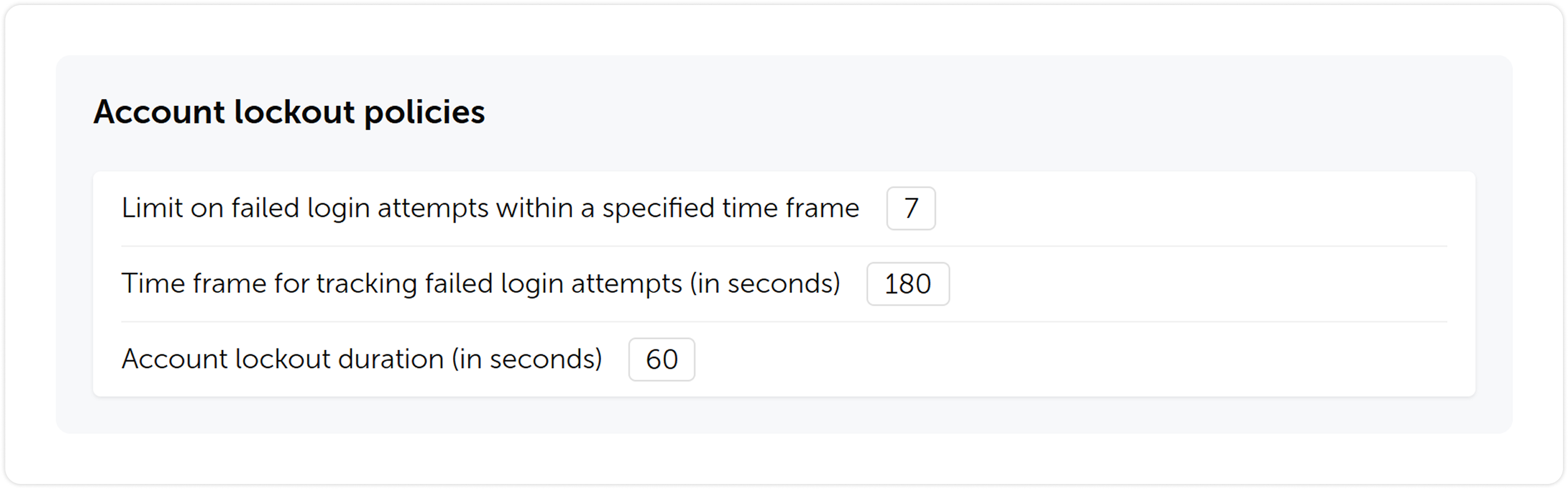
Eine Kontosperrungsfunktion wurde eingeführt. Es können ein Limit für fehlgeschlagene Anmeldeversuche, ein Zeitrahmen für die Verfolgung der fehlgeschlagenen Versuche und eine Sperrdauer festgelegt werden.

Passwortsuche über Browser-Erweiterung

Weitere Änderungen

  • Die Einstellungen wurden aufgeräumt, indem ihre Struktur übersichtlicher gestaltet wurde.
  • Automatischer Abruf von E-Mail und Name aus Single Sign-On-Systemen (SSO) hinzugefügt.
  • Einstellungen für die automatische Bereinigung von Sitzungen, Benachrichtigungen und Hintergrundaufgaben hinzugefügt.
  • Die Möglichkeit wurde hinzugefügt, ein Systembanner zu aktivieren, das für alle Passwork-Benutzer sichtbar ist. Es kann für wichtige Benachrichtigungen, Warnungen oder Anweisungen verwendet werden.
  • Die Möglichkeit wurde hinzugefügt, eine Zeitzone sowie ein Datums- und Zeitformat auszuwählen.
  • Filter in wichtigen Bereichen für eine schnellere und einfachere Suche aktualisiert.

Upgrade auf Passwork 7

Für das Upgrade auf Version 7.0 muss Passwork auf Version 6.5 aktualisiert, die Daten migriert und dies im Kundenportal bestätigt werden. Eine Upgrade-Anleitung ist hier zu finden.

Es wird empfohlen, die neuen Funktionen und Besonderheiten der Datenmigration in einer Testumgebung zu erkunden, bevor die Self-hosted-Version aktualisiert wird. Für Tests kann Passwork 7 auf einem separaten Server bereitgestellt werden — dies ermöglicht die Überprüfung aller Änderungen in der neuen Version, ohne die aktuelle Arbeitsumgebung zu beeinträchtigen.
Passwork 7.1: Tresortypen
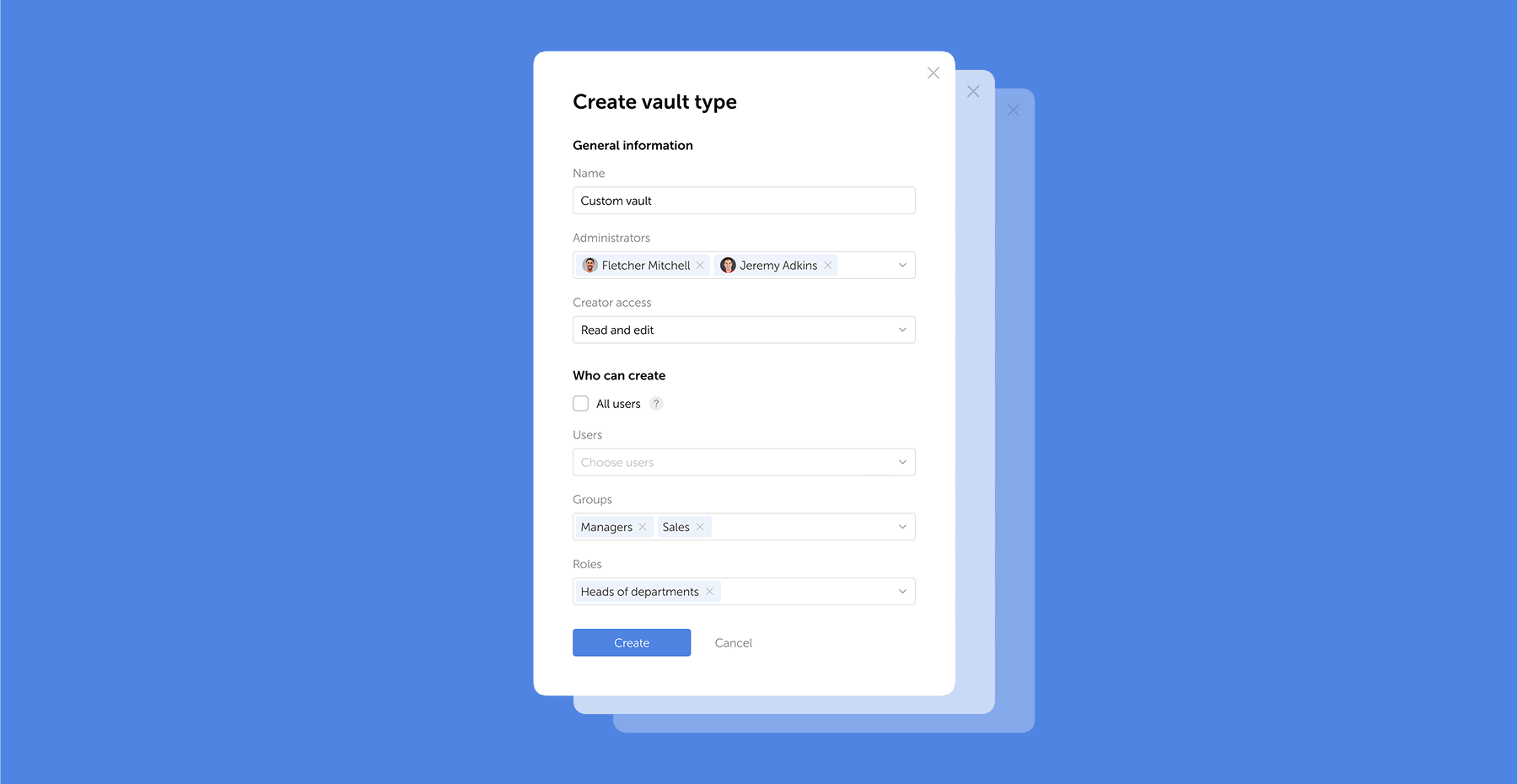
Tresortypen Passwork 7.1 führt eine robuste Tresortypen-Architektur ein, die unternehmensgerechte Zugangskontrolle für verbesserte Sicherheit und Verwaltung bietet. Tresortypen lösen eine zentrale Herausforderung für Administratoren: die Kontrolle des Datenzugriffs und die Delegation der Tresorverwaltung in großen Organisationen. Zuvor war die Auswahl auf zwei Typen beschränkt. Jetzt können Sie erstellen
Passwork 7.2 Release
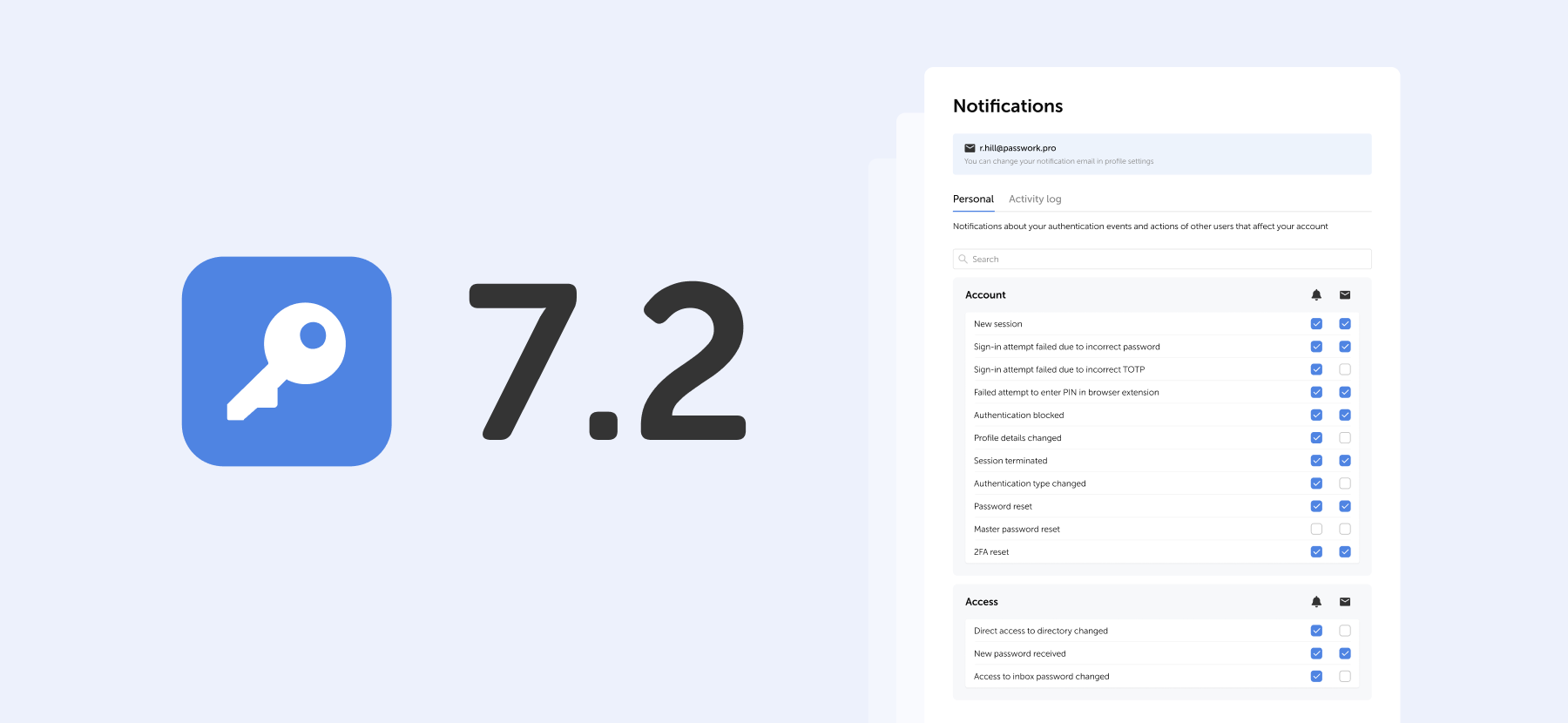
Die neue Version führt anpassbare Benachrichtigungen mit flexiblen Zustellungsoptionen ein, verbesserte Beschreibungen der Ereignisprotokollierung, erweiterte CLI-Funktionalität, serverseitige PIN-Code-Speicherung für die Browser-Erweiterung und die Möglichkeit, clientseitige Verschlüsselung während der Erstkonfiguration von Passwork zu aktivieren. Benachrichtigungseinstellungen Ein dedizierter Bereich für Benachrichtigungseinstellungen wurde hinzugefügt, in dem Benachrichtigungen ausgewählt werden können
Passwork: Secrets-Management und Automatisierung für DevOps
Einführung In Unternehmensumgebungen nimmt die Anzahl der Passwörter, Schlüssel und digitalen Zertifikate rapide zu, und Secrets-Management wird zu einer der kritischen Aufgaben für IT-Teams. Secrets-Management befasst sich mit dem gesamten Lebenszyklus sensibler Daten: von der sicheren Generierung und verschlüsselten Speicherung bis hin zur automatisierten Rotation und Audit-Trails. Da

Passwork 7 Release

May 6, 2025 — 6 min read
Passwork 7

En Passwork 7, mejoramos todo: reescribimos completamente el código utilizando las últimas tecnologías, implementamos una API completa, actualizamos la interfaz, rediseñamos los grupos y roles, abandonamos la adición automática de administradores del sistema a las bóvedas e hicimos la gestión de derechos de acceso aún más flexible. Esto mejorará significativamente la comodidad de la administración y la gestión de contraseñas, además de acelerar considerablemente el desarrollo de nuevas funcionalidades.

Interfaz actualizada

Rediseñamos la interfaz de Passwork y actualizamos todas las secciones clave — tuvimos en cuenta muchas solicitudes y corregimos errores lógicos y funcionales, preservando la comodidad familiar de trabajar con contraseñas. También añadimos la posibilidad de personalizar el ancho de las columnas y mover elementos de la interfaz — cada usuario podrá adaptarla a sus necesidades.

Búsqueda de contraseña mediante extensión del navegador

Funcionalidad de API ampliada

Ampliamos significativamente la funcionalidad de la API — ahora permite una interacción completa con todas las características de Passwork: desde copiar contraseñas hasta gestionar usuarios y configuraciones de seguridad.

Para simplificar el trabajo con la API, preparamos un conector oficial de Python — una biblioteca para desarrolladores que permite integrar Passwork con aplicaciones y scripts en Python, y la utilidad Passwork-CLI, que permite trabajar con la API desde la línea de comandos.

En lugar de claves API, ahora se utilizan tokens — una forma más moderna y fiable de acceder al sistema. Además, la configuración de acceso a la API se ha trasladado a la página de roles.

Nuevo backend y frontend

Actualizamos completamente el código utilizando métodos más modernos — esto mejorará el rendimiento y simplificará la instalación inicial de Passwork. Además, el nuevo código se convertirá en la base para desarrollar aplicaciones de escritorio y acelerará significativamente la introducción de nuevas funcionalidades.

Roles de usuario

Actualizamos el sistema de estados combinando los derechos administrativos y la configuración de usuarios, y los renombramos como Roles — ahora, en lugar de dos estados estándar Administrador y Empleado, puede crear un número ilimitado de roles con derechos y configuraciones individuales.

Búsqueda de contraseña mediante extensión del navegador

Grupos de usuarios

Lo que se llamaba Roles en versiones anteriores ha sido renombrado a Grupos, haciendo el proceso de gestión de usuarios más intuitivo y cercano a los estándares comunes, como los utilizados en Active Directory. Los grupos permiten restringir el acceso de los usuarios a las bóvedas según ciertos privilegios.

Búsqueda de contraseña mediante extensión del navegador

Estructura de bóvedas actualizada

Simplificamos la estructura de las bóvedas — en lugar de bóvedas de organización y bóvedas personales, los usuarios podrán crear bóvedas privadas. Una bóveda privada se convierte en compartida cuando se añaden otros usuarios. Al mismo tiempo, los administradores ya no se añaden automáticamente a las nuevas bóvedas.

La estructura de bóvedas actualizada garantiza un cifrado fiable y ofrece nuevas posibilidades para la gestión de contraseñas, haciendo el proceso más cómodo y seguro.

Búsqueda de contraseña mediante extensión del navegador

Confirmación de acceso a bóvedas

Al añadir usuarios a grupos, ya no recibirán automáticamente acceso a las bóvedas de otros usuarios — el acceso requerirá confirmación del administrador de la bóveda. Los usuarios que obtuvieron acceso a una bóveda durante la sincronización LDAP también necesitan ser confirmados. Esto proporciona control adicional y previene el acceso no autorizado al contenido de las bóvedas.

Búsqueda de contraseña mediante extensión del navegador

Cambios en los niveles de acceso

Hemos reformulado el sistema de niveles de acceso e introducido una serie de cambios en algunos de ellos:

  • El nivel de navegación ha sido reemplazado por la capacidad de ver todos los directorios principales de la carpeta a la que se aplica el nivel de acceso.
  • Los usuarios con el nivel de acceso completo ahora pueden ver los niveles de acceso de otros usuarios, gestionar el acceso adicional, ver el historial de cambios dentro del directorio y analizar las contraseñas disponibles para ellos a través del panel de seguridad.
  • Se ha añadido la capacidad de asignar derechos administrativos a usuarios en carpetas. El nivel de acceso de administración se hereda a las carpetas secundarias sin posibilidad de modificarlo.
Búsqueda de contraseña mediante extensión del navegador

Historial de acciones y notificaciones

Hemos ampliado la lista de acciones que se registran, actualizado sus descripciones y reformulado completamente el sistema de notificaciones. Poco después del lanzamiento, introduciremos la configuración de notificaciones, que añadirá flexibilidad para realizar un seguimiento de los cambios importantes y las acciones de los usuarios.

Búsqueda de contraseña mediante extensión del navegador

Uso de accesos directos

Para mejorar la seguridad, hemos realizado algunos cambios en la forma en que funcionan los accesos directos:

  • Ahora es imposible copiar accesos directos para contraseñas que no permiten la creación de accesos directos.
  • Las carpetas que incluyen accesos directos no disponibles para un usuario ahora se copiarán sin ellos.

Añadir etiquetas a las contraseñas

Ahora, cuando cree o edite una contraseña, podrá seleccionar una etiqueta de una lista de las ya creadas. Esto tiene el beneficio adicional de prevenir la creación de etiquetas con el mismo nombre (ventas ↔ Ventas, etc.). Al seleccionar etiquetas, solo se mostrarán aquellas disponibles en las bóvedas del usuario.

Búsqueda de contraseña mediante extensión del navegador

Cambios en el flujo de restablecimiento de 2FA

Cuando restablezca su contraseña de autorización, la autenticación de dos factores ya no se restablecerá junto con ella. Los usuarios no podrán restablecer 2FA sin un inicio de sesión exitoso, lo que aumenta la seguridad.

Opción de bloqueo de cuenta

Hemos introducido una función de bloqueo de cuenta. Podrá establecer un límite de intentos de inicio de sesión fallidos, un período de tiempo para el seguimiento de los intentos fallidos y la duración del bloqueo.

Búsqueda de contraseña mediante extensión del navegador

Otros cambios

  • Organizamos la configuración haciendo su estructura más clara.
  • Se añadió la recuperación automática de correo electrónico y nombre desde sistemas de inicio de sesión único (SSO).
  • Se añadió configuración para la limpieza automática de sesiones, notificaciones y tareas en segundo plano.
  • Se añadió la capacidad de habilitar un banner del sistema que será visible para todos los usuarios de Passwork. Puede usarlo para notificaciones importantes, alertas o instrucciones.
  • Se añadió la capacidad de elegir una zona horaria y formato de fecha y hora.
  • Se actualizaron los filtros en las secciones clave para una búsqueda más rápida y sencilla.

Actualización a Passwork 7

Para actualizar a la versión 7.0, necesitará actualizar su Passwork a la versión 6.5, migrar sus datos y confirmar esto en el portal del cliente. Las instrucciones de actualización se pueden encontrar aquí.

Recomendamos explorar las nuevas funcionalidades y las especificaciones de la migración de datos en un entorno de prueba antes de actualizar su versión autoalojada. Para las pruebas, puede desplegar Passwork 7 en un servidor separado — esto le permitirá revisar todos los cambios en la nueva versión sin afectar su entorno de trabajo actual.
Passwork 7.1: Tipos de bóvedas
Tipos de bóvedas Passwork 7.1 introduce una arquitectura robusta de tipos de bóvedas, proporcionando control de acceso de nivel empresarial para una seguridad y gestión mejoradas. Los tipos de bóvedas abordan un desafío clave para los administradores: controlar el acceso a los datos y delegar la gestión de bóvedas en grandes organizaciones. Anteriormente, la elección se limitaba a dos tipos. Ahora, puede crear
Lanzamiento de Passwork 7.2
La nueva versión introduce notificaciones personalizables con opciones de entrega flexibles, descripciones mejoradas del registro de eventos, funcionalidad CLI ampliada, almacenamiento del código PIN en el servidor para la extensión del navegador y la capacidad de habilitar el cifrado del lado del cliente durante la configuración inicial de Passwork. Configuración de notificaciones Hemos añadido una sección dedicada de configuración de notificaciones donde puede elegir la notificación
Passwork: Gestión de secretos y automatización para DevOps
Introducción En el entorno corporativo, el número de contraseñas, claves y certificados digitales está aumentando rápidamente, y la gestión de secretos se está convirtiendo en una de las tareas críticas para los equipos de TI. La gestión de secretos aborda el ciclo de vida completo de los datos sensibles: desde la generación segura y el almacenamiento cifrado hasta la rotación automatizada y los registros de auditoría. A medida que

Lanzamiento de Passwork 7

May 6, 2025 — 6 min read
Passwork 7

In Passwork 7, we improved everything: completely rewrote the code using the latest technologies, implemented a full-fledged API, updated the interface, redesigned groups and roles, abandoned the automatic addition of system administrators to vaults, and made access rights management even more flexible. This will significantly enhance the convenience of administration and password management, as well as greatly accelerate the development of new features.

Updated interface

We redesigned the Passwork interface and updated all key sections — took into account many requests and fixed logical and functional errors while preserving the familiar convenience of working with passwords. We also added the ability to customize column widths and move interface elements — each user will be able to adapt it to their needs.

Searching password by browser extension

Expanded API functionality

We significantly expanded the API functionality — now it allows full interaction with all Passwork features: from copying passwords to managing users and security settings.

To simplify working with the API, we prepared an official Python connector — a developer library that allows integrating Passwork with applications and scripts in Python, and the Passwork-CLI utility, which enables working with the API from the command line.

Instead of API keys, tokens are now used — a more modern and reliable way to access the system. In addition, API access settings have been moved to the role page.

New backend and frontend

We completely updated the code using more modern methods — this will improve performance and simplify the initial installation of Passwork. Moreover, the new code will become the basis for developing desktop applications and will significantly speed up the introduction of new features.

User roles

We updated the status system by combining administrative rights and user settings, and renamed them to Roles — now, instead of two standard statuses Administrator and Employee, you can create an unlimited number of roles with individual rights and settings.

Searching password by browser extension

User groups

What was called Roles in previous versions has been renamed to Groups, making the user management process more intuitive and closer to common standards, such as those used in Active Directory. Groups allow restricting user access to vaults based on certain privileges.

Searching password by browser extension

Updated vault structure

We simplified the vault structure — instead of organization vaults and personal vaults, users will be able to create private vaults. A private vault becomes shared when other users are added to it. At the same time, administrators are no longer automatically added to new vaults.

The updated vault structure ensures reliable encryption and offers new possibilities for password management, making the process more convenient and secure.

Searching password by browser extension

Vault access confirmation

When adding users to groups, they will no longer automatically receive access to other users' vaults — access will require confirmation from the vault administrator. Users who gained access to a vault during LDAP synchronization also need to be confirmed. This provides additional control and prevents unauthorized access to vault contents.

Searching password by browser extension

Changing access levels

We’ve reworked the access level system and introduced a number of changes to some of them:

  • Navigation level has been replaced by an ability to view all parent directories of the folder the access level is applied to
  • Users with the Full access level now can view access levels of other users, manage additional access, view the history of changes within the directory and analyze passwords available to them via Security dashboard
  • Added the ability to assign administrative rights to users in folders. The Administration access level is inherited by child folders without the ability to change it
Searching password by browser extension

History of actions and notifications

We’ve expanded the list of actions that are logged, updated their descriptions and completely reworked the notification system. Soon after the release we are going to introduce notification settings, which will add flexibility to keeping track of important changes and user actions.

Searching password by browser extension

Using shortcuts

In order to enhance security, we’ve made some changes to the way shortcuts work:

  • It is now impossible to copy shortcuts for passwords which don’t allow shortcut creation
  • Folders which include shortcuts unavailable to a user will now be copied without them

Adding tags to passwords

Now when you create or edit a password, you will be able to pick a tag from a list of already created ones. This has an added benefit of preventing creation of tags with the same name (sales ↔ Sales, etc.). When selecting tags, only those available in the user's vaults will be displayed.

Searching password by browser extension

Changes to 2FA reset flow

When you reset your authorization password, two-factor authentication now won’t be reset along with it. Users won’t be able to reset 2FA without a successful login, which increases security.

Account locking option

We’ve introduced an account locking feature. You will be able to set a limit on failed login attempts, timeframe for tracking the failed attempts and lockout duration.

Searching password by browser extension

Other changes

  • Tidied settings up by making their structure more clear
  • Added automatic retrieval of email and name from single sign-on systems (SSO)
  • Added settings for automatic clearing of sessions, notifications and background tasks
  • Added the ability to enable a system banner that will be visible to all Passwork users. You can use it for important notifications, alerts or instructions
  • Added an ability to choose a time zone and date & time format
  • Updated filters in key sections for faster and simpler search

Upgrading to Passwork 7

To upgrade to version 7.0, you’ll need to update your Passwork to version 6.5, migrate your data, and confirm this in the customer portal. Upgrade instructions can be found here.

We recommend exploring the new features and data migration specifics in a test environment before updating your self-hosted version. For testing, you can deploy Passwork 7 on a separate server — this will allow you to review all the changes in the new version without affecting your current working environment.
Passwork 7.1: Vault types
Vault types Passwork 7.1 introduces a robust vault types architecture, providing enterprise-grade access control for enhanced security and management. Vault types address a key challenge for administrators: controlling data access and delegating vault management across large organizations. Previously, the choice was limited to two types. Now, you can create
Passwork 7.2 release
The new version introduces customizable notifications with flexible delivery options, enhanced event logging descriptions, expanded CLI functionality, server-side PIN code storage for the browser extension, and the ability to enable client-side encryption during initial Passwork configuration. Notification settings We’ve added a dedicated notification settings section where you can choose notification
Passwork: Secrets management and automation for DevOps
Introduction In corporate environment, the number of passwords, keys, and digital certificates is rapidly increasing, and secrets management is becoming one of the critical tasks for IT teams. Secrets management addresses the complete lifecycle of sensitive data: from secure generation and encrypted storage to automated rotation and audit trails. As

Passwork 7 release

Nov 8, 2024 — 4 min read

Kindernothilfe (KNH) ist eine deutsche gemeinnützige Organisation, die sich der Unterstützung gefährdeter Kinder in verarmten und benachteiligten Regionen weltweit widmet. Seit ihrer Gründung im Jahr 1959 hat sie als eine der größten europäischen Wohltätigkeitsorganisationen im Bereich Kinderhilfe bedeutende Beiträge geleistet.

In über 30 Ländern tätig, betont Kindernothilfe die Bedeutung der Sicherung von Kinderrechten und des Zugangs zu Bildung, Gesundheitsversorgung, Kinderschutz und Gemeindeentwicklungsinitiativen — alles mit dem Ziel, die Lebensbedingungen von Kindern zu verbessern und Armut zu beseitigen.

Unternehmen: Kindernothilfe
Standort: Duisburg, Deutschland
Branche: Gemeinnützige Organisation
Unternehmensgröße: Über 300 Mitarbeiter in mehr als 30 Ländern

Die Herausforderung: Eine sichere und benutzerfreundliche Lösung für globale Teams finden

Vor der Entscheidung für Passwork setzte Kindernothilfe auf KeePass — eine Lösung, die die Skalierbarkeit einschränkte und keine benutzerfreundlichen Funktionen bot, die für eine global operierende Organisation unerlässlich sind. Mit über 300 Mitarbeitern in mehr als 30 Ländern benötigte die Organisation eine sichere, skalierbare und intuitive Lösung für die Passwortverwaltung.

Quelle: Betterfuturejobs

Dies war entscheidend, um den wachsenden Anforderungen des internationalen Teams gerecht zu werden — insbesondere zur Verbesserung der Passwortfreigabe und der Zugriffsverwaltung für remote arbeitende Mitarbeiter.

Die Lösung: Wechsel zu Passwork für verbesserte Sicherheit und vereinfachten Benutzerzugriff

Kindernothilfe entschied sich für Passwork aufgrund seiner robusten Self-Hosting-Funktionen, die optimale Datenkontrolle und Sicherheit gewährleisten. Die nahtlose Integration mit SAML2 für Single Sign-On (SSO) vereinfachte die Zugriffsverwaltung über mehrere Plattformen hinweg.

Darüber hinaus ermöglichten die intuitive Benutzeroberfläche von Passwork sowie die mobile App und Browser-Erweiterung eine mühelose Passwortverwaltung von jedem Gerät aus. Die sicheren Funktionen zur Passwortfreigabe verbesserten die Teamzusammenarbeit, reduzierten menschliche Fehler erheblich und optimierten die gesamten Sicherheitsprotokolle.

Die Implementierung: Schrittweise Einführung und Aufbau einer sicheren Infrastruktur

Der Implementierungsprozess dauerte etwa zwei Monate. Der Schwerpunkt lag auf dem Aufbau und der gründlichen Prüfung der Infrastruktur, um sicherzustellen, dass Passwork die Sicherheitsanforderungen von Kindernothilfe erfüllt. Die Integration von SAML2 für Single Sign-On (SSO) verlief reibungslos und wurde innerhalb kurzer Zeit abgeschlossen.

Um die erfolgreiche Implementierung von Passwork zu ermöglichen, entschied sich Kindernothilfe für eine schrittweise Einführung anstelle einer sofortigen organisationsweiten Bereitstellung der Passwortverwaltungslösung. Die Organisation begann mit einer kleineren Gruppe von Mitarbeitern, um die Vorteile des Systems zu demonstrieren, und förderte die Nutzung schrittweise.

Quelle: Kindernothilfe

Durch die Organisation verschiedener Werbe- und Schulungsaktivitäten wie „Lunch and Learn"-Veranstaltungen ermutigte die Organisation die Mitarbeiter, sich mit Passwork vertraut zu machen. Das Ziel war es, dass mindestens 50 % der Belegschaft Passwork aktiv nutzen, bevor das System auf die gesamte Organisation ausgeweitet wird.

Die Ergebnisse: Steigerung der operativen Effizienz für länderübergreifende Teams

Derzeit nutzen etwa 50 % der Belegschaft aktiv Passwork — eine zentralisierte, sichere und benutzerfreundliche Lösung für die Passwortfreigabe. Dieser schrittweise Ansatz sorgte nicht nur für ein höheres Benutzerengagement, sondern stärkte auch die Sicherheitsprotokolle in der gesamten Organisation erheblich.

Quelle: Kindernothilfe

Durch die Verbesserung der Passwortverwaltungsprozesse steigerte Kindernothilfe die gesamte operative Effizienz, insbesondere für länderübergreifende Teams. Schulungsinitiativen wie „Lunch and Learn"-Sitzungen trugen maßgeblich dazu bei, das Bewusstsein für Passwork zu schärfen und die erfolgreiche Einführung in der gesamten Organisation zu fördern.

„Passwork erfüllte unsere Anforderungen mit seiner erschwinglichen Preisgestaltung und Benutzerfreundlichkeit und ist damit ein unverzichtbares Werkzeug für unsere globale Belegschaft." — Bernd Schlürmann, Netzwerk- und Sicherheitsmanager
CTA Image

Machen auch Sie den ersten Schritt! Starten Sie Ihre kostenlose Passwork-Testversion und erleben Sie, wie einfach sichere Passwortverwaltung sein kann.
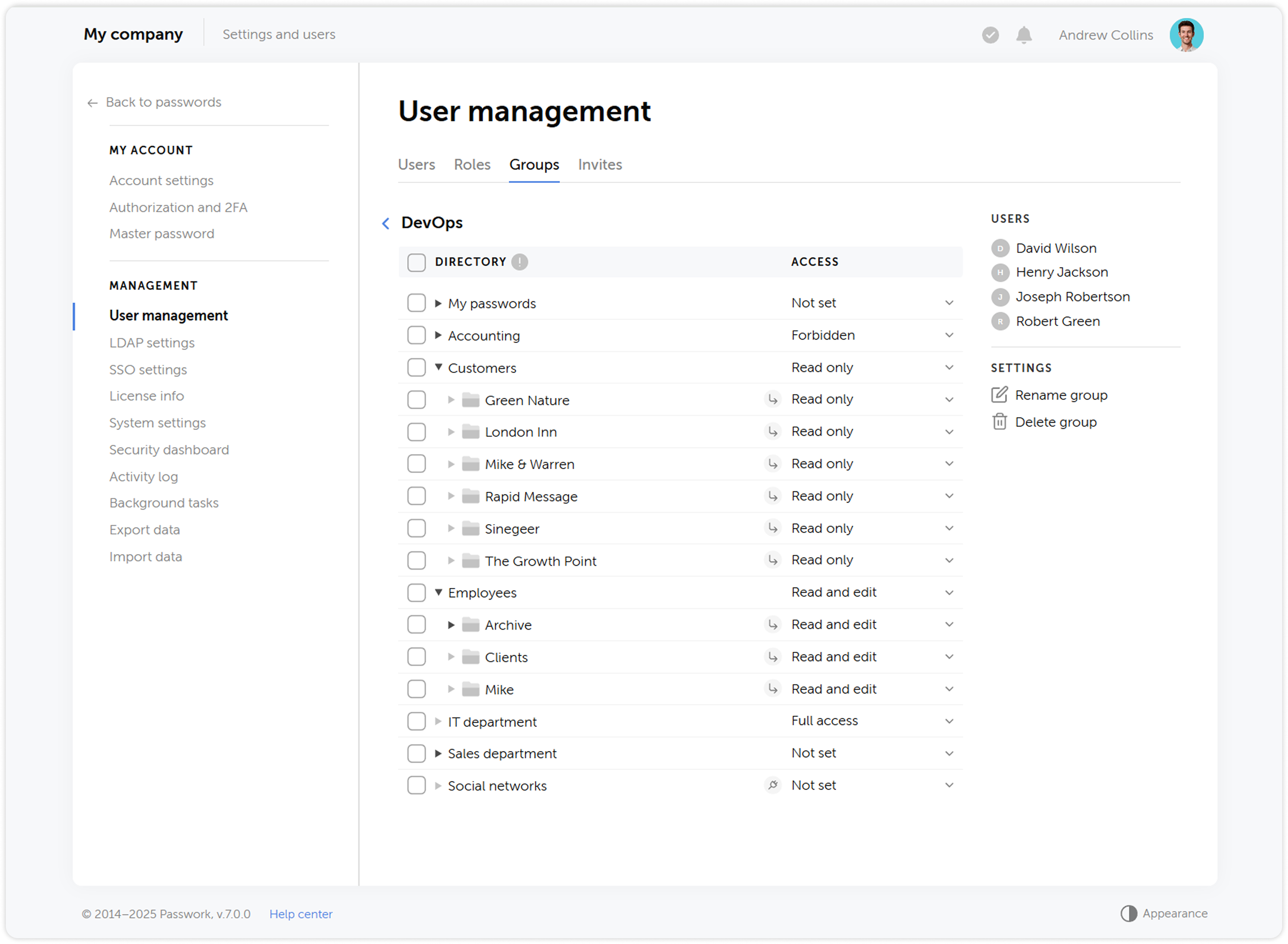
Die Cybersicherheits-Checkliste 2025 für kleine Unternehmen: Ein vollständiger Leitfaden | Passwork
Passworks Cybersicherheits-Checkliste 2025, basierend auf dem NIST-Framework, bietet umsetzbare Schritte zur Vermeidung von Datenschutzverletzungen und finanziellen Verlusten.
Fallstudie: Stadt Melle und Passwork
Passwork hat die interne Sicherheit der Stadt Melle durch die Schaffung eines zuverlässigen Systems für die Passwortverwaltung verbessert.
Was ist ein Passkey? Leitfaden zur passwortlosen Anmeldung
Ein Passkey ist eine phishing-resistente Zugangsdaten auf Ihrem Gerät. Anmeldung per biometrischem Touch — kein Passwort nötig. Der Leitfaden deckt Technik, Plattform-Setup, Leistungsdaten und den Unternehmensübergang ab.

Kindernothilfe: Vereinfachung der globalen Zusammenarbeit mit Passwork

Die Kindernothilfe benötigte eine sichere Passwortlösung für ein global verteiltes Team. Mit Passwork gelangen SSO-Integration, kontrolliertes Self-Hosting und eine schrittweise Einführung, die Sicherheit und Zusammenarbeit über Ländergrenzen hinweg verbesserte.