Back

Product updates

Latest — Jun 6, 2025
Passwork 7.0.6 release

Passwork 7.0.6 update is available in the Customer portal.

  • Fixed incorrect background task name for LDAP synchronization in test mode
  • Fixed an issue where changes in role settings could not be saved after setting the minimum refresh token lifetime
  • Improved overall system stability and performance
You can find all information about Passwork updates in our release notes
Passwork 7.1 release
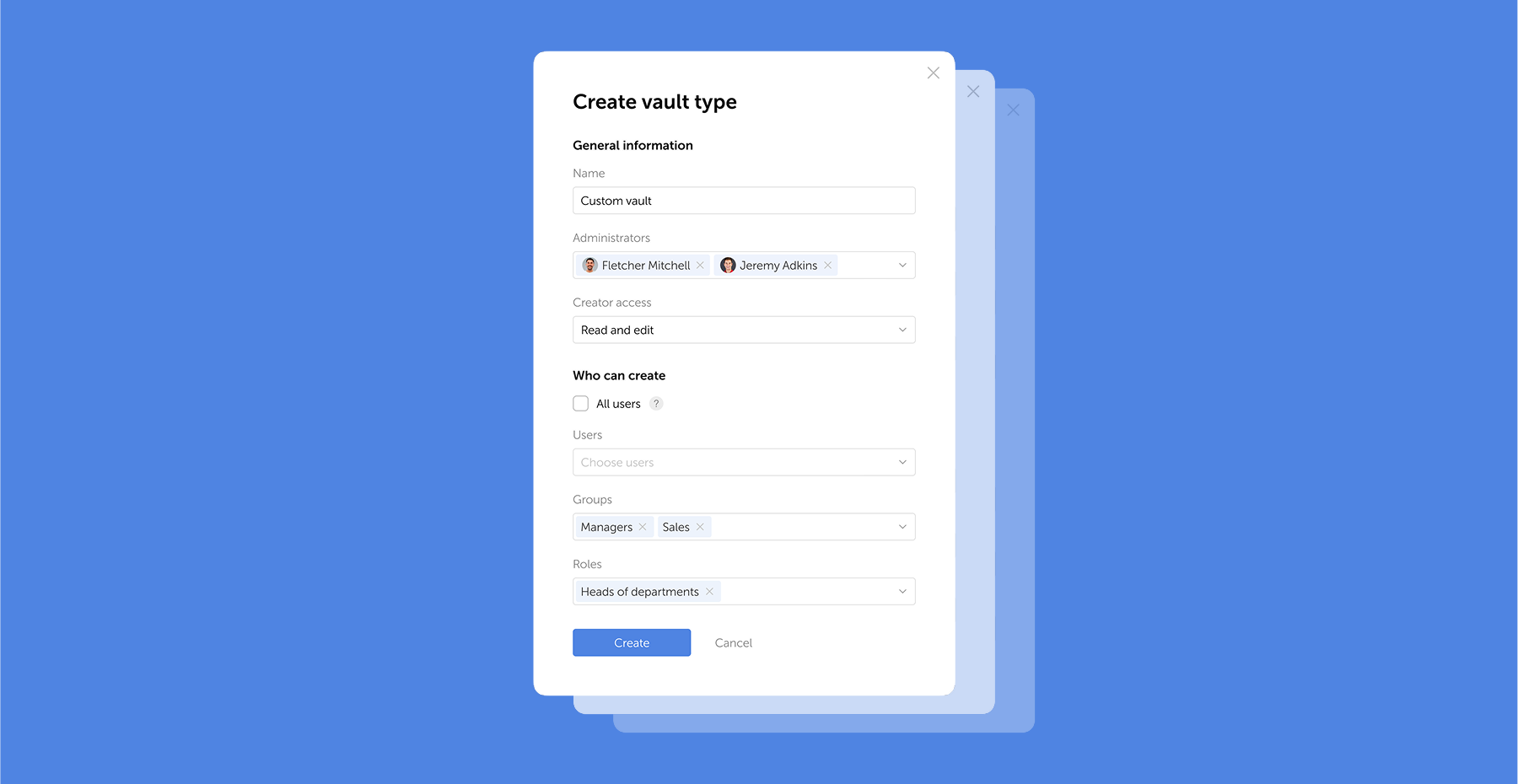
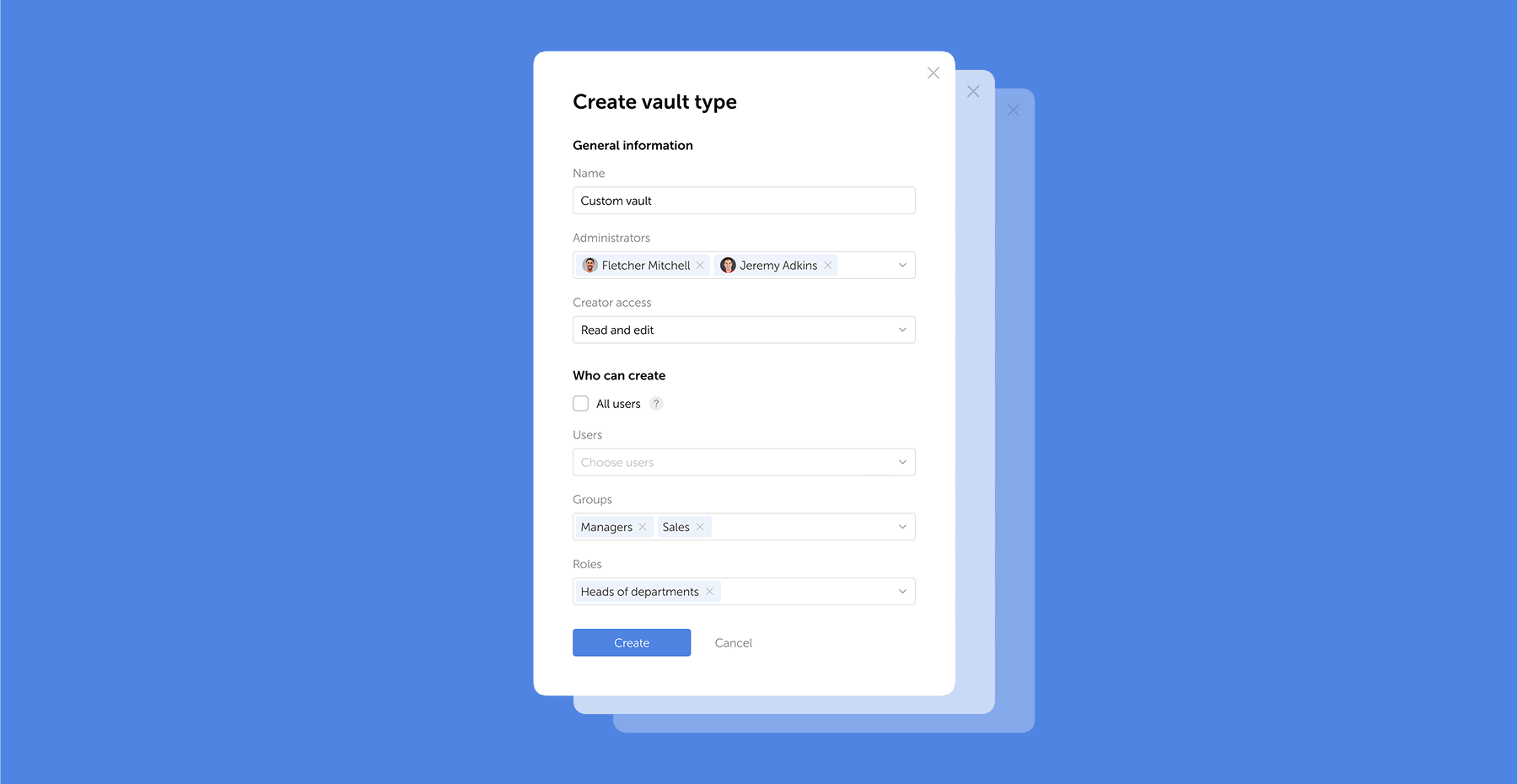
In the new version, we have introduced the capability to create custom vault types with automatically assigned administrators, refined the inheritance of group-based access rights and handling of TOTP code parameters, as well as made numerous fixes and improvements. Vault types In Passwork 7.1, you can create custom vault
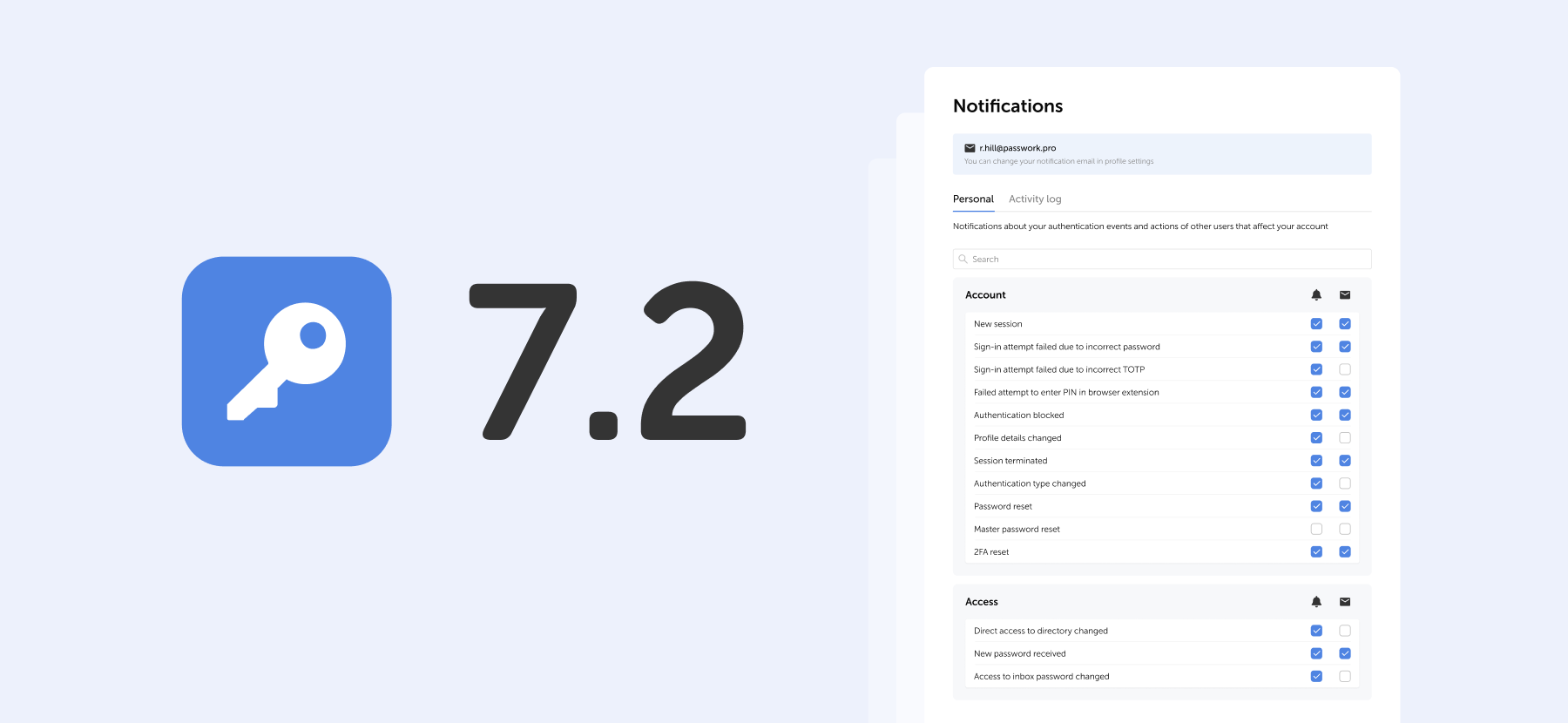
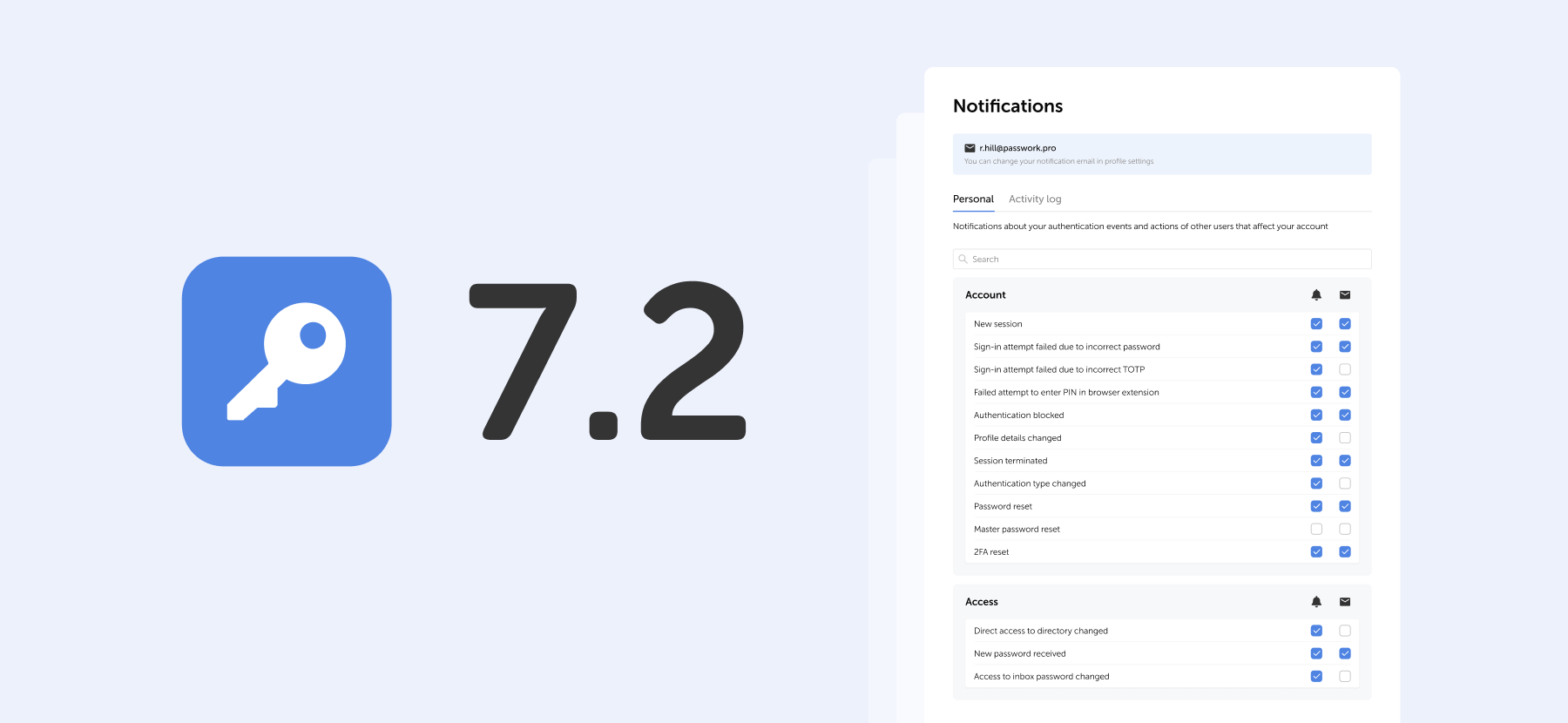
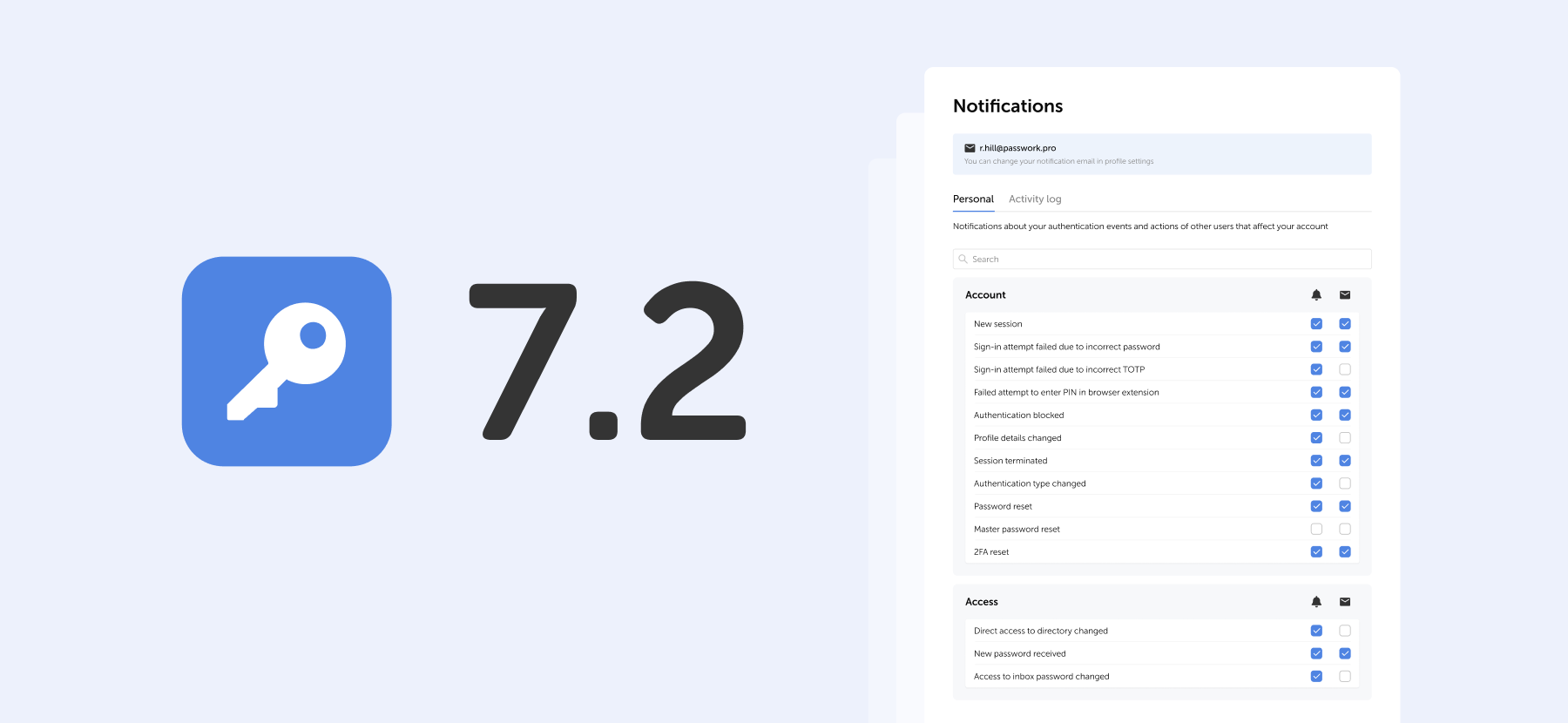
Passwork 7.2 release
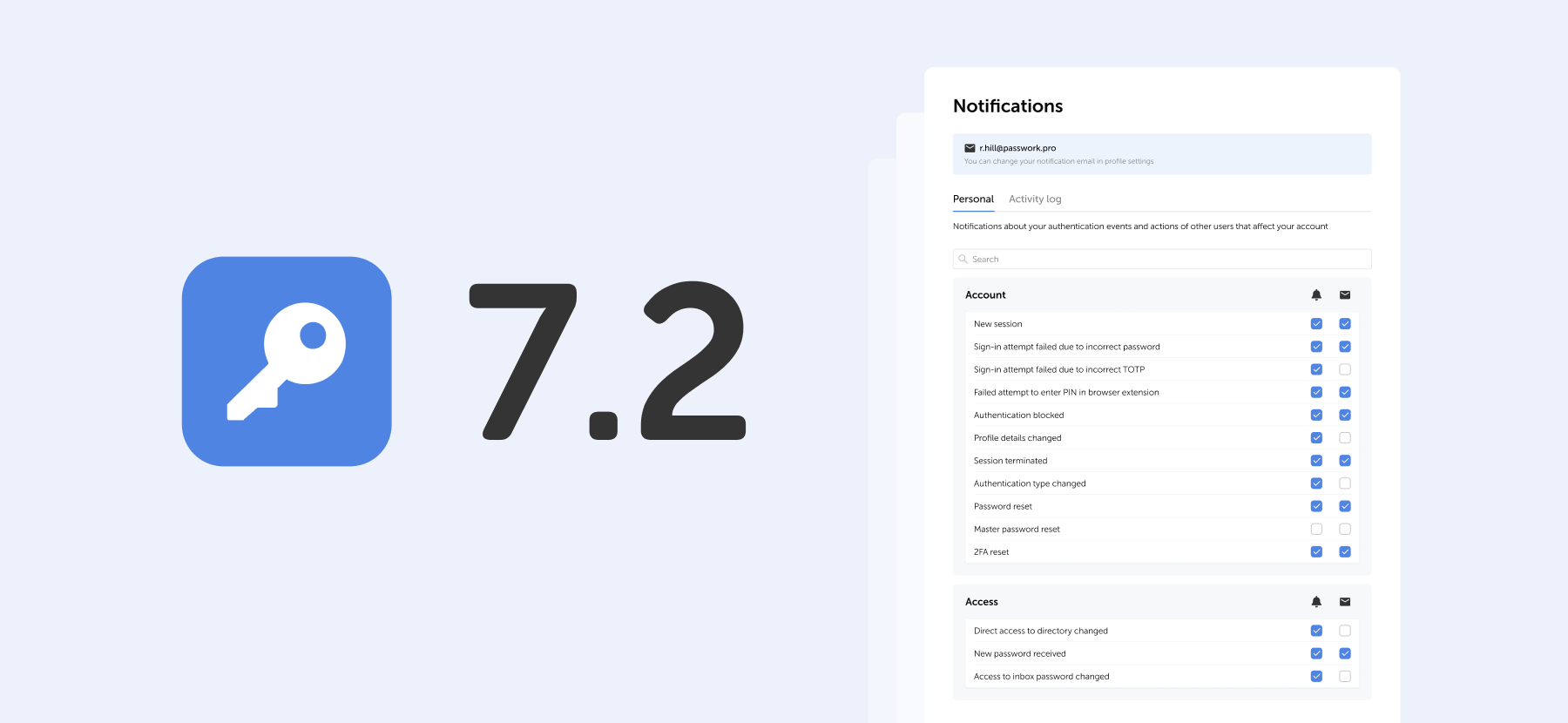
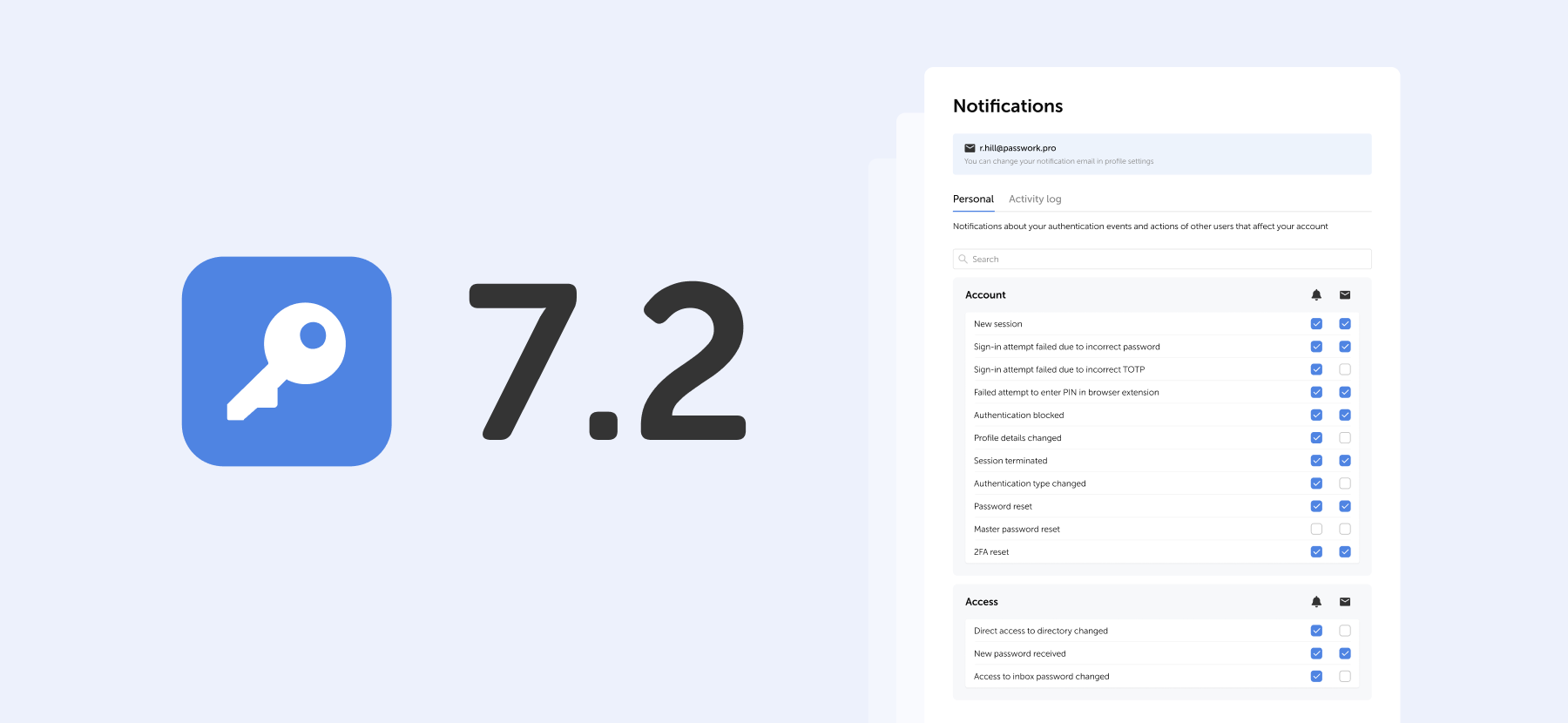
The new version introduces customizable notifications with flexible delivery options, enhanced event logging descriptions, expanded CLI functionality, server-side PIN code storage for the browser extension, and the ability to enable client-side encryption during initial Passwork configuration. Notification settings We’ve added a dedicated notification settings section where you can choose notification
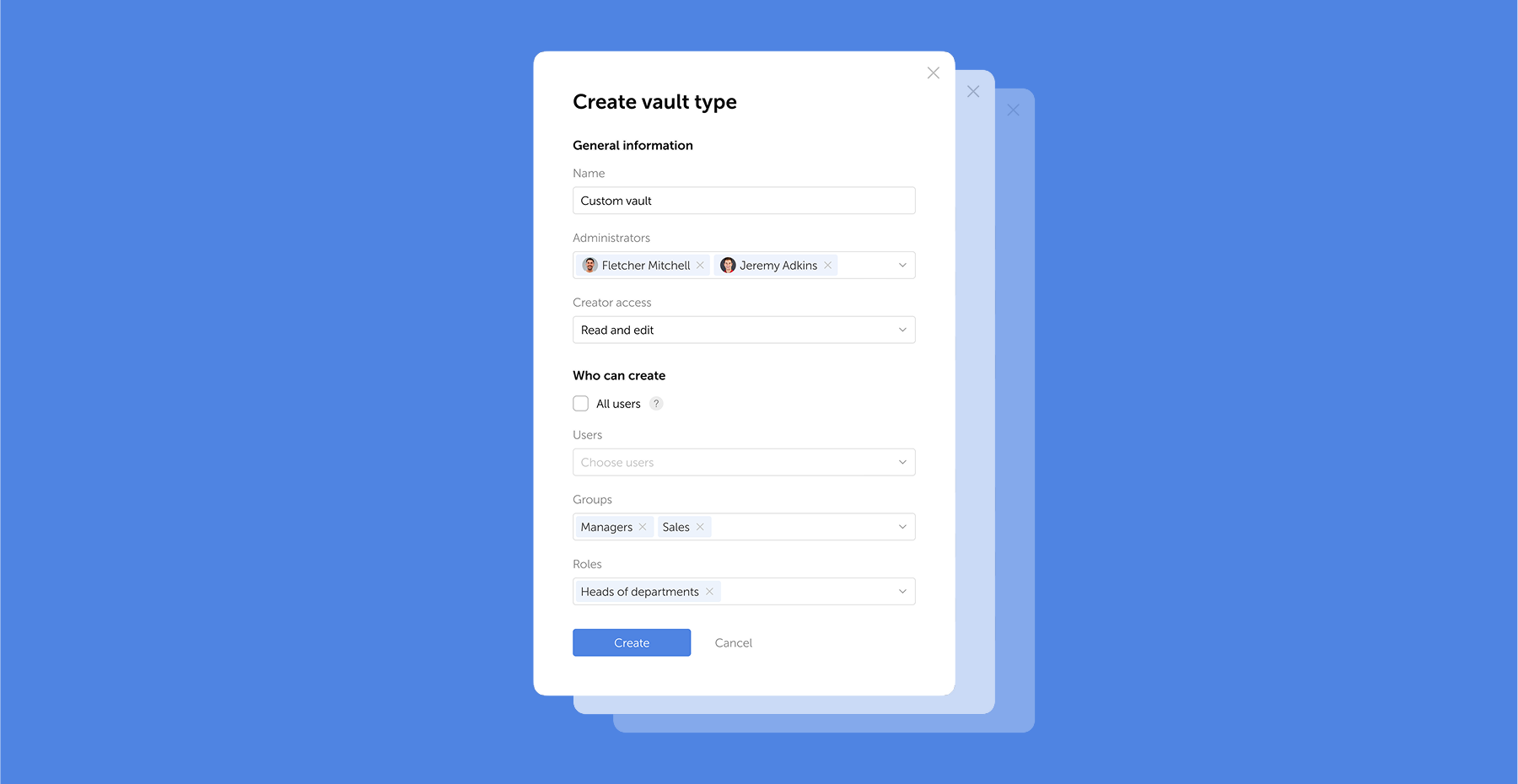
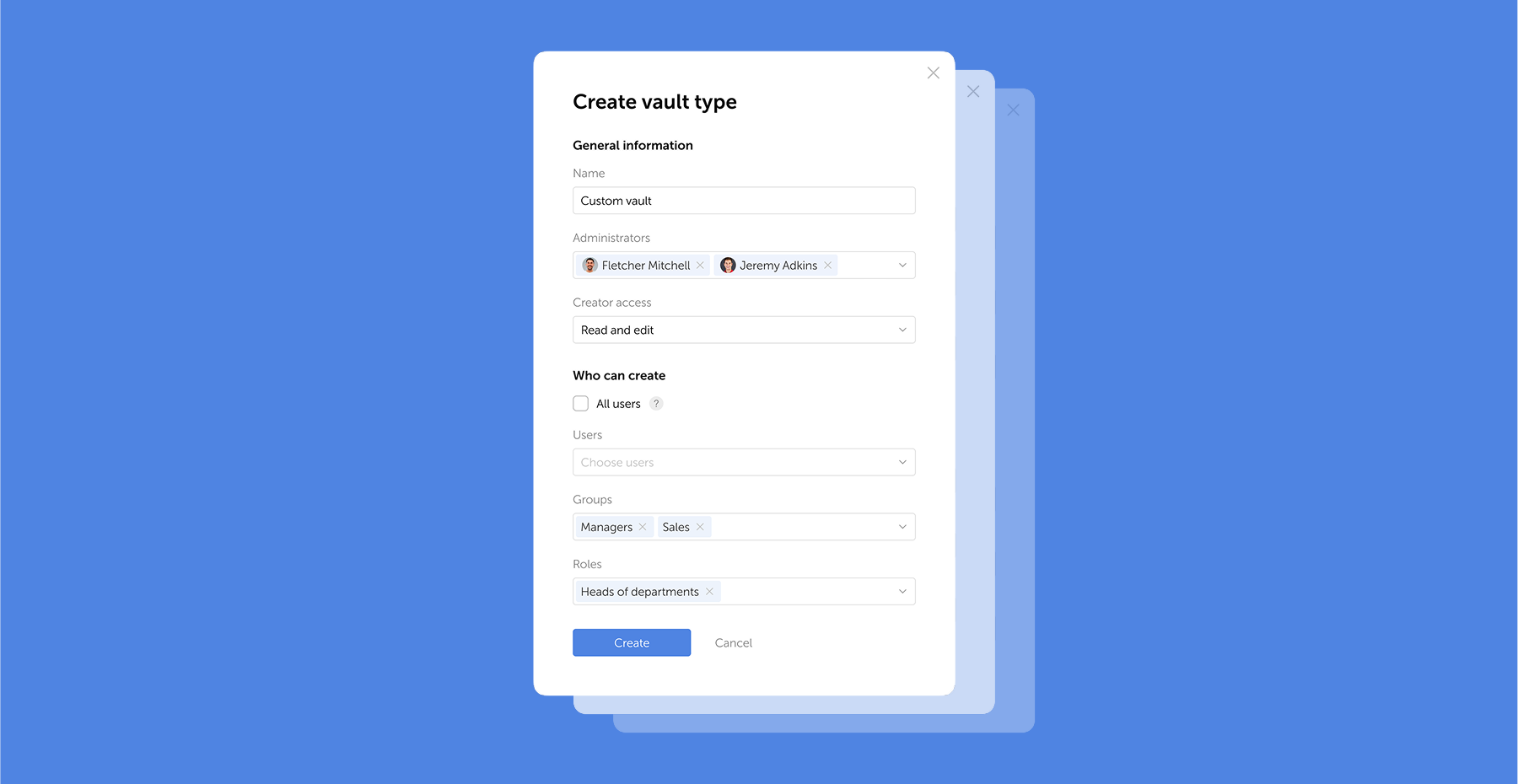
Passwork 7.1: Vault types
Vault types Passwork 7.1 introduces a robust vault types architecture, providing enterprise-grade access control for enhanced security and management. Vault types address a key challenge for administrators: controlling data access and delegating vault management across large organizations. Previously, the choice was limited to two types. Now, you can create

Passwork 7.0.6 release

Jun 3, 2025 — 3 min read
Passwork 7.0.5 Release

In der neuen Version wurden die Sortieralgorithmen für Tresore, Passwörter und Shortcuts verbessert, die Einstellungen für Autorisierungspasswortrichtlinien erweitert sowie zahlreiche Verbesserungen an der Benutzeroberfläche und Lokalisierung vorgenommen.

Verbesserungen

  • Neue Einstellungen Passwort-Wiederverwendung einschränken und Passwort-Verlaufslänge zu den Komplexitätsrichtlinien für Autorisierungspasswörter hinzugefügt
  • Option hinzugefügt, um aus Kürzlich und Favoriten zum ursprünglichen Passwortverzeichnis zu navigieren
  • Tooltips für lange Gruppen-, Ordner-, Passwort- und Shortcut-Namen hinzugefügt
  • Erstellung von zusätzlichen Feldern mit doppelten Namen oder Namen, die bereits in Systemfeldern verwendet werden, verhindert — identische Namen mit unterschiedlicher Groß-/Kleinschreibung sind erlaubt
  • Filter in Benutzerverwaltung und Aktivitätsprotokoll verbessert
  • Benutzeroberfläche, dunkles Theme und Lokalisierung verbessert

Fehlerbehebungen

  • Sortierung von Tresoren, Ordnern, Passwörtern und Shortcuts in Favoriten, Posteingang, Suche und Papierkorb korrigiert
  • Problem behoben, bei dem das SMTP-Passwortfeld manchmal Leer anzeigte, obwohl ein Passwort festgelegt war
  • Problem behoben, bei dem der Versuch, ein Passwort mit vielen Zeichen im Passwort-Feld zu öffnen, das Öffnen von Karten verhinderte und Benutzer zu Kürzlich weitergeleitet wurden
  • Problem behoben, bei dem nach der Anmeldung über LDAP manchmal eine Aufforderung zur Änderung des lokalen Passworts erschien
  • Problem behoben, bei dem die Einstellungen für die Masterpasswort-Komplexitätsrichtlinie in den Rolleneinstellungen erschienen, wenn die clientseitige Verschlüsselung deaktiviert war
  • Problem behoben, bei dem einige Systembenachrichtigungen nicht an Administratoren und Benutzer mit Berechtigung zur Ansicht gesendet wurden
  • Problem behoben, bei dem manuell importierte Daten beim Zurückkehren zur Datenzuordnung zurückgesetzt wurden
  • Falsche Anzeige von Zugangsstufen im Ereignis Systemeinstellungen geändert korrigiert
  • Sortierung nach Datum im Papierkorb korrigiert
Alle Informationen zu Passwork-Updates finden Sie in unseren Release Notes
Passwork 7.1 Release
In der neuen Version wurde die Möglichkeit eingeführt, benutzerdefinierte Tresortypen mit automatisch zugewiesenen Administratoren zu erstellen, die Vererbung von gruppenbasierten Zugriffsrechten und die Handhabung von TOTP-Code-Parametern verfeinert sowie zahlreiche Korrekturen und Verbesserungen vorgenommen. Tresortypen In Passwork 7.1 können Sie benutzerdefinierte Tresortypen erstellen
Passwork 7.2 Release
Die neue Version führt anpassbare Benachrichtigungen mit flexiblen Zustelloptionen, erweiterte Ereignisprotokollbeschreibungen, erweiterte CLI-Funktionalität, serverseitige PIN-Code-Speicherung für die Browser-Erweiterung und die Möglichkeit ein, clientseitige Verschlüsselung während der Erstkonfiguration von Passwork zu aktivieren. Benachrichtigungseinstellungen Es wurde ein dedizierter Bereich für Benachrichtigungseinstellungen hinzugefügt, in dem Sie Benachrichtigungen auswählen können
Passwork 7.1: Tresortypen
Tresortypen Passwork 7.1 führt eine robuste Tresortypen-Architektur ein, die unternehmenstaugliche Zugangskontrolle für verbesserte Sicherheit und Verwaltung bietet. Tresortypen adressieren eine zentrale Herausforderung für Administratoren: die Kontrolle des Datenzugriffs und die Delegation der Tresorverwaltung in großen Organisationen. Zuvor war die Auswahl auf zwei Typen beschränkt. Jetzt können Sie erstellen

Passwork 7.0.5 Release

Jun 3, 2025 — 3 min read

En la nueva versión, se han mejorado los algoritmos de ordenación para bóvedas, contraseñas y accesos directos, se han ampliado los ajustes para las políticas de contraseñas de autorización y se han realizado numerosas mejoras en la interfaz de usuario y la localización.

Mejoras

  • Se han añadido los nuevos ajustes Restringir reutilización de contraseñas y Longitud del historial de contraseñas a las políticas de complejidad de contraseñas de autorización.
  • Se ha añadido una opción para navegar al directorio inicial de la contraseña desde Recientes y Favoritos.
  • Se han añadido tooltips para nombres largos de grupos, carpetas, contraseñas y accesos directos.
  • Se ha impedido la creación de campos adicionales con nombres duplicados o nombres ya utilizados en campos del sistema — se permiten nombres idénticos con diferentes mayúsculas y minúsculas.
  • Se han mejorado los filtros en Gestión de usuarios y Registro de actividad.
  • Se han mejorado la interfaz de usuario, el tema oscuro y la localización.

Corrección de errores

  • Se ha corregido la ordenación de bóvedas, carpetas, contraseñas y accesos directos en Favoritos, Bandeja de entrada, Búsqueda y Papelera.
  • Se ha corregido un problema donde el campo de contraseña SMTP a veces mostraba Vacío aunque se había establecido una contraseña.
  • Se ha corregido un problema donde al intentar abrir una contraseña con muchos caracteres en el campo Contraseña se impedía la apertura de las tarjetas y los usuarios eran redirigidos a Recientes.
  • Se ha corregido un problema donde a veces aparecía un mensaje para cambiar la contraseña local después de iniciar sesión a través de LDAP.
  • Se ha corregido un problema donde los ajustes de política de complejidad de contraseña maestra aparecían en la configuración de roles cuando el cifrado del lado del cliente estaba desactivado.
  • Se ha corregido un problema donde algunas notificaciones del sistema no se enviaban a los administradores y usuarios con permiso para verlas.
  • Se ha corregido un problema donde los datos importados manualmente se restablecían al volver al mapeo de datos.
  • Se ha corregido la visualización incorrecta de los niveles de acceso en el evento Configuración del sistema cambiada.
  • Se ha corregido la ordenación por fecha en la Papelera.
Puede encontrar toda la información sobre las actualizaciones de Passwork en nuestras notas de la versión
Lanzamiento de Passwork 7.1
En la nueva versión, se ha introducido la capacidad de crear tipos de bóvedas personalizados con administradores asignados automáticamente, se ha perfeccionado la herencia de derechos de acceso basados en grupos y el manejo de parámetros de códigos TOTP, además de numerosas correcciones y mejoras. Tipos de bóvedas En Passwork 7.1, puede crear tipos de bóvedas personalizados
Lanzamiento de Passwork 7.2
La nueva versión introduce notificaciones personalizables con opciones de entrega flexibles, descripciones mejoradas del registro de eventos, funcionalidad CLI ampliada, almacenamiento del código PIN del lado del servidor para la extensión del navegador y la capacidad de habilitar el cifrado del lado del cliente durante la configuración inicial de Passwork. Ajustes de notificaciones Se ha añadido una sección dedicada de ajustes de notificaciones donde puede elegir las opciones de notificación
Passwork 7.1: Tipos de bóvedas
Tipos de bóvedas Passwork 7.1 introduce una arquitectura robusta de tipos de bóvedas, proporcionando control de acceso de nivel empresarial para una seguridad y gestión mejoradas. Los tipos de bóvedas abordan un desafío clave para los administradores: controlar el acceso a los datos y delegar la gestión de bóvedas en grandes organizaciones. Anteriormente, la elección estaba limitada a dos tipos. Ahora, puede crear

Lanzamiento de Passwork 7.0.5

Jun 3, 2025 — 3 min read
Passwork 7.0.5 release

In the new version, we’ve improved sorting algorithms for vaults, passwords, and shortcuts, extended settings for authorization password policies, and made numerous improvements to the UI and localization.

Improvements

  • Added new settings Restrict password reuse and Password history length to the authorization password complexity policies
  • Added an option to navigate to the initial password directory from the Recents and Favorites
  • Added tooltips for long group, folder, password, and shortcut names
  • Prevented creation of additional fields with duplicate names or names already used in system fields — identical names with different cases are allowed
  • Improved filters in User management and Activity log
  • Improved the UI, dark theme, and localization

Bug fixes

  • Fixed sorting of vaults, folders, passwords, and shortcuts in Favorites, Inbox, Search, and Bin
  • Fixed an issue where the SMTP password field sometimes displayed Empty even though a password was set
  • Fixed an issue where trying to open a password with a lot of characters in the Password field prevented cards from opening and users were redirected to the Recents
  • Fixed an issue where a prompt to change the local password sometimes appeared after logging in via LDAP
  • Fixed an issue where the Master password complexity policy settings appeared in role settings when the client-side encryption was disabled
  • Fixed an issue where some system notifications were not sent to administrators and users with permission to view them
  • Fixed an issue where manually imported data was reset when returning to data mapping
  • Fixed incorrect display of access levels in the System settings changed event
  • Fixed sorting by date in the Bin
You can find all information about Passwork updates in our release notes
Passwork 7.1 release
In the new version, we have introduced the capability to create custom vault types with automatically assigned administrators, refined the inheritance of group-based access rights and handling of TOTP code parameters, as well as made numerous fixes and improvements. Vault types In Passwork 7.1, you can create custom vault
Passwork 7.2 release
The new version introduces customizable notifications with flexible delivery options, enhanced event logging descriptions, expanded CLI functionality, server-side PIN code storage for the browser extension, and the ability to enable client-side encryption during initial Passwork configuration. Notification settings We’ve added a dedicated notification settings section where you can choose notification
Passwork 7.1: Vault types
Vault types Passwork 7.1 introduces a robust vault types architecture, providing enterprise-grade access control for enhanced security and management. Vault types address a key challenge for administrators: controlling data access and delegating vault management across large organizations. Previously, the choice was limited to two types. Now, you can create

Passwork 7.0.5 release

May 6, 2025 — 6 min read
Passwork 7

In Passwork 7 wurde alles verbessert: Der Code wurde mit den neuesten Technologien komplett neu geschrieben, eine vollwertige API implementiert, die Oberfläche aktualisiert, Gruppen und Rollen neu gestaltet, das automatische Hinzufügen von Systemadministratoren zu Tresoren abgeschafft und die Verwaltung der Zugriffsrechte noch flexibler gestaltet. Dies wird den Komfort der Administration und Passwortverwaltung erheblich verbessern sowie die Entwicklung neuer Funktionen deutlich beschleunigen.

Aktualisierte Oberfläche

Die Passwork-Oberfläche wurde neu gestaltet und alle wichtigen Bereiche aktualisiert — viele Anfragen wurden berücksichtigt und logische sowie funktionale Fehler behoben, während die gewohnte Benutzerfreundlichkeit bei der Arbeit mit Passwörtern erhalten blieb. Außerdem wurde die Möglichkeit hinzugefügt, Spaltenbreiten anzupassen und Oberflächenelemente zu verschieben — jeder Benutzer kann sie an seine Bedürfnisse anpassen.

Passwortsuche über Browser-Erweiterung

Erweiterte API-Funktionalität

Die API-Funktionalität wurde erheblich erweitert — sie ermöglicht nun die vollständige Interaktion mit allen Passwork-Funktionen: vom Kopieren von Passwörtern bis zur Verwaltung von Benutzern und Sicherheitseinstellungen.

Um die Arbeit mit der API zu vereinfachen, wurde ein offizieller Python-Connector vorbereitet — eine Entwicklerbibliothek, die die Integration von Passwork mit Anwendungen und Skripten in Python ermöglicht, sowie das Dienstprogramm Passwork-CLI, das die Arbeit mit der API über die Befehlszeile ermöglicht.

Anstelle von API-Schlüsseln werden nun Tokens verwendet — eine modernere und zuverlässigere Methode für den Systemzugriff. Darüber hinaus wurden die API-Zugriffseinstellungen auf die Rollenseite verschoben.

Neues Backend und Frontend

Der Code wurde mit moderneren Methoden vollständig aktualisiert — dies wird die Leistung verbessern und die Erstinstallation von Passwork vereinfachen. Darüber hinaus wird der neue Code die Grundlage für die Entwicklung von Desktop-Anwendungen bilden und die Einführung neuer Funktionen erheblich beschleunigen.

Benutzerrollen

Das Statussystem wurde aktualisiert, indem administrative Rechte und Benutzereinstellungen kombiniert und in Rollen umbenannt wurden — anstelle der zwei Standardstatus Administrator und Mitarbeiter kann nun eine unbegrenzte Anzahl von Rollen mit individuellen Rechten und Einstellungen erstellt werden.

Passwortsuche über Browser-Erweiterung

Benutzergruppen

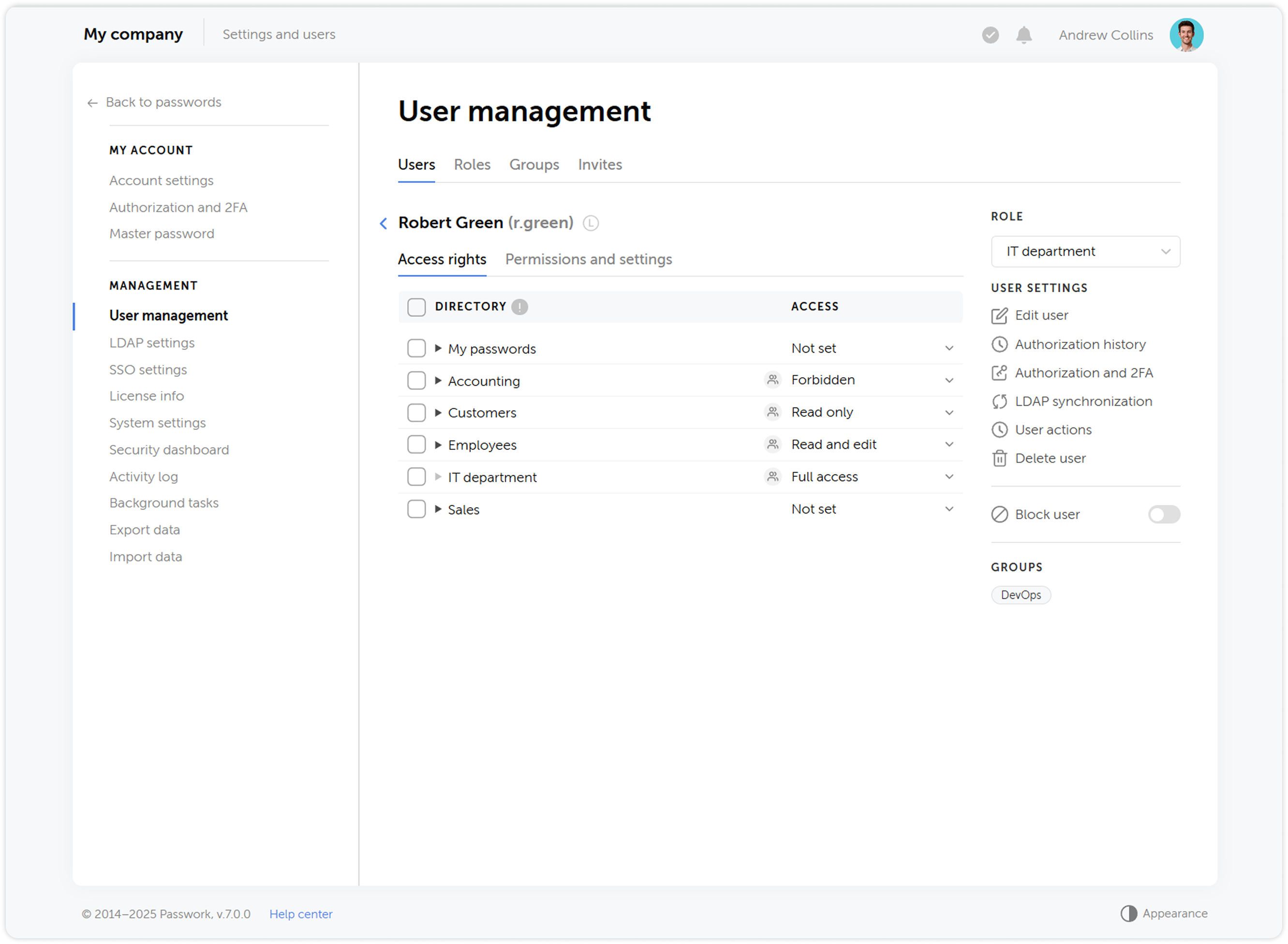
Was in früheren Versionen Rollen hieß, wurde in Gruppen umbenannt, wodurch der Benutzerverwaltungsprozess intuitiver wird und näher an gängigen Standards liegt, wie sie beispielsweise in Active Directory verwendet werden. Gruppen ermöglichen die Einschränkung des Benutzerzugriffs auf Tresore basierend auf bestimmten Berechtigungen.

Passwortsuche über Browser-Erweiterung

Aktualisierte Tresorstruktur

Die Tresorstruktur wurde vereinfacht — anstelle von Organisationstresoren und persönlichen Tresoren können Benutzer nun private Tresore erstellen. Ein privater Tresor wird zu einem geteilten Tresor, wenn andere Benutzer hinzugefügt werden. Gleichzeitig werden Administratoren nicht mehr automatisch zu neuen Tresoren hinzugefügt.

Die aktualisierte Tresorstruktur gewährleistet eine zuverlässige Verschlüsselung und bietet neue Möglichkeiten für die Passwortverwaltung, wodurch der Prozess komfortabler und sicherer wird.

Passwortsuche über Browser-Erweiterung

Bestätigung des Tresorzugriffs

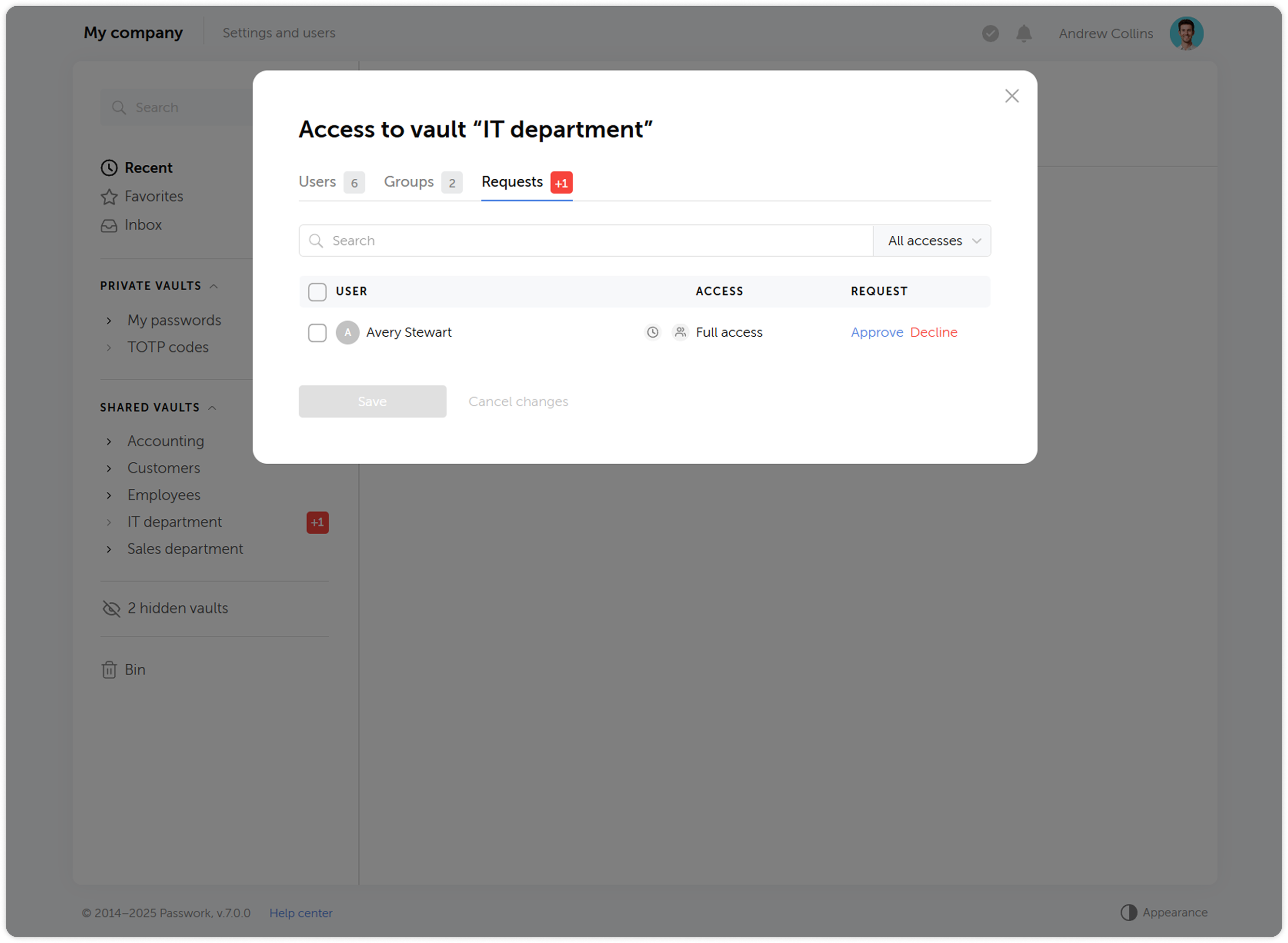
Wenn Benutzer zu Gruppen hinzugefügt werden, erhalten sie nicht mehr automatisch Zugriff auf die Tresore anderer Benutzer — der Zugriff erfordert eine Bestätigung durch den Tresoradministrator. Benutzer, die während der LDAP-Synchronisierung Zugriff auf einen Tresor erhalten haben, müssen ebenfalls bestätigt werden. Dies bietet zusätzliche Kontrolle und verhindert unbefugten Zugriff auf Tresorinhalte.

Passwortsuche über Browser-Erweiterung

Änderung der Zugangslevel

Das Zugangslevel-System wurde überarbeitet und eine Reihe von Änderungen an einigen davon eingeführt:

  • Das Navigations-Level wurde durch die Möglichkeit ersetzt, alle übergeordneten Verzeichnisse des Ordners anzuzeigen, auf den das Zugangslevel angewendet wird.
  • Benutzer mit dem Zugangslevel „Vollständiger Zugang" können nun Zugangslevel anderer Benutzer einsehen, zusätzlichen Zugriff verwalten, den Änderungsverlauf innerhalb des Verzeichnisses anzeigen und die ihnen zur Verfügung stehenden Passwörter über das Security-Dashboard analysieren.
  • Die Möglichkeit wurde hinzugefügt, Benutzern in Ordnern Administratorrechte zuzuweisen. Das Zugangslevel „Administration" wird an untergeordnete Ordner vererbt, ohne die Möglichkeit, es zu ändern.
Passwortsuche über Browser-Erweiterung

Aktionsverlauf und Benachrichtigungen

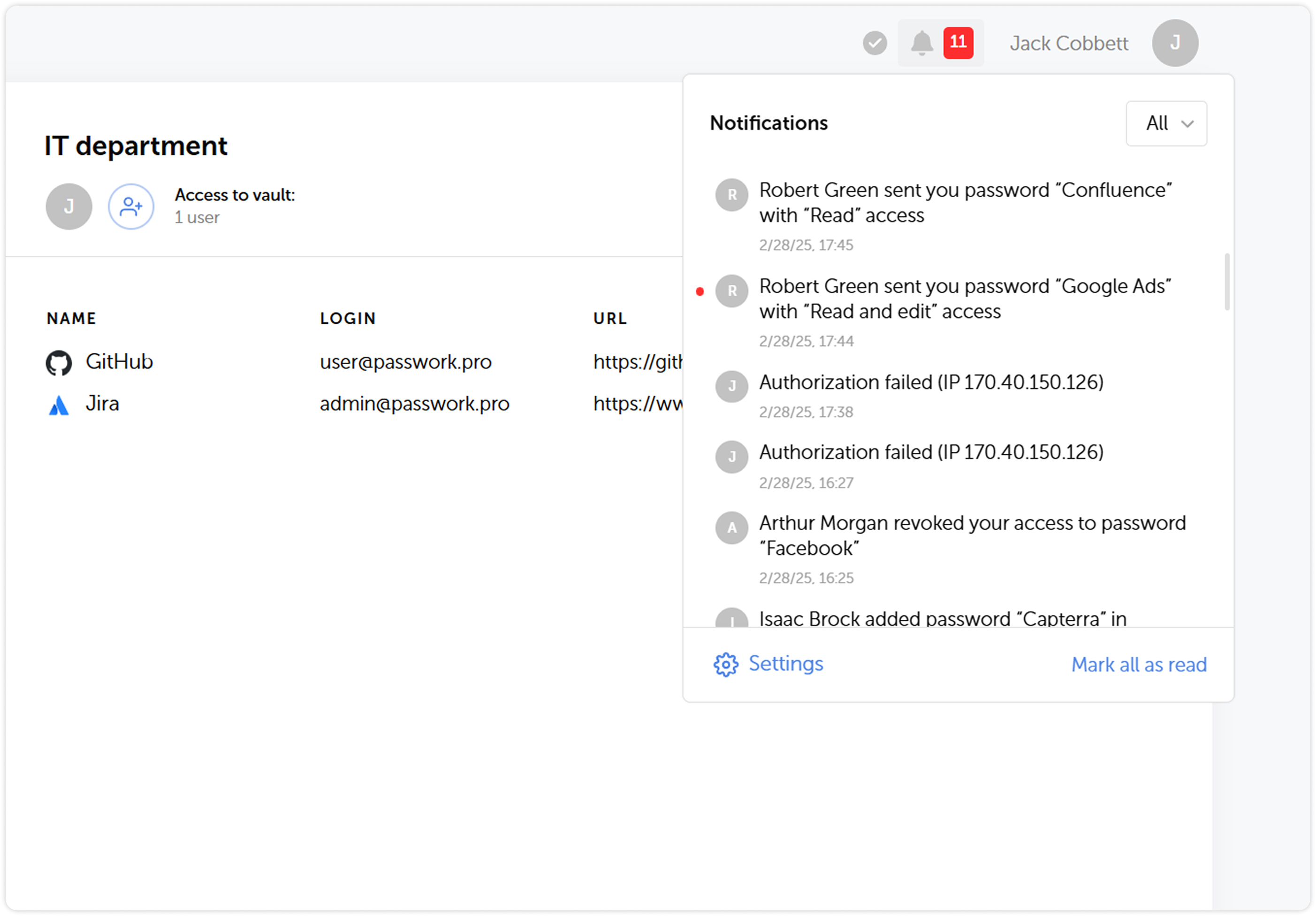
Die Liste der protokollierten Aktionen wurde erweitert, ihre Beschreibungen aktualisiert und das Benachrichtigungssystem vollständig überarbeitet. Kurz nach der Veröffentlichung werden Benachrichtigungseinstellungen eingeführt, die mehr Flexibilität bei der Verfolgung wichtiger Änderungen und Benutzeraktionen bieten.

Passwortsuche über Browser-Erweiterung

Verwendung von Shortcuts

Um die Sicherheit zu erhöhen, wurden einige Änderungen an der Funktionsweise von Shortcuts vorgenommen:

  • Es ist nun nicht mehr möglich, Shortcuts für Passwörter zu kopieren, bei denen die Shortcut-Erstellung nicht erlaubt ist.
  • Ordner, die Shortcuts enthalten, die einem Benutzer nicht zur Verfügung stehen, werden nun ohne diese kopiert.

Hinzufügen von Tags zu Passwörtern

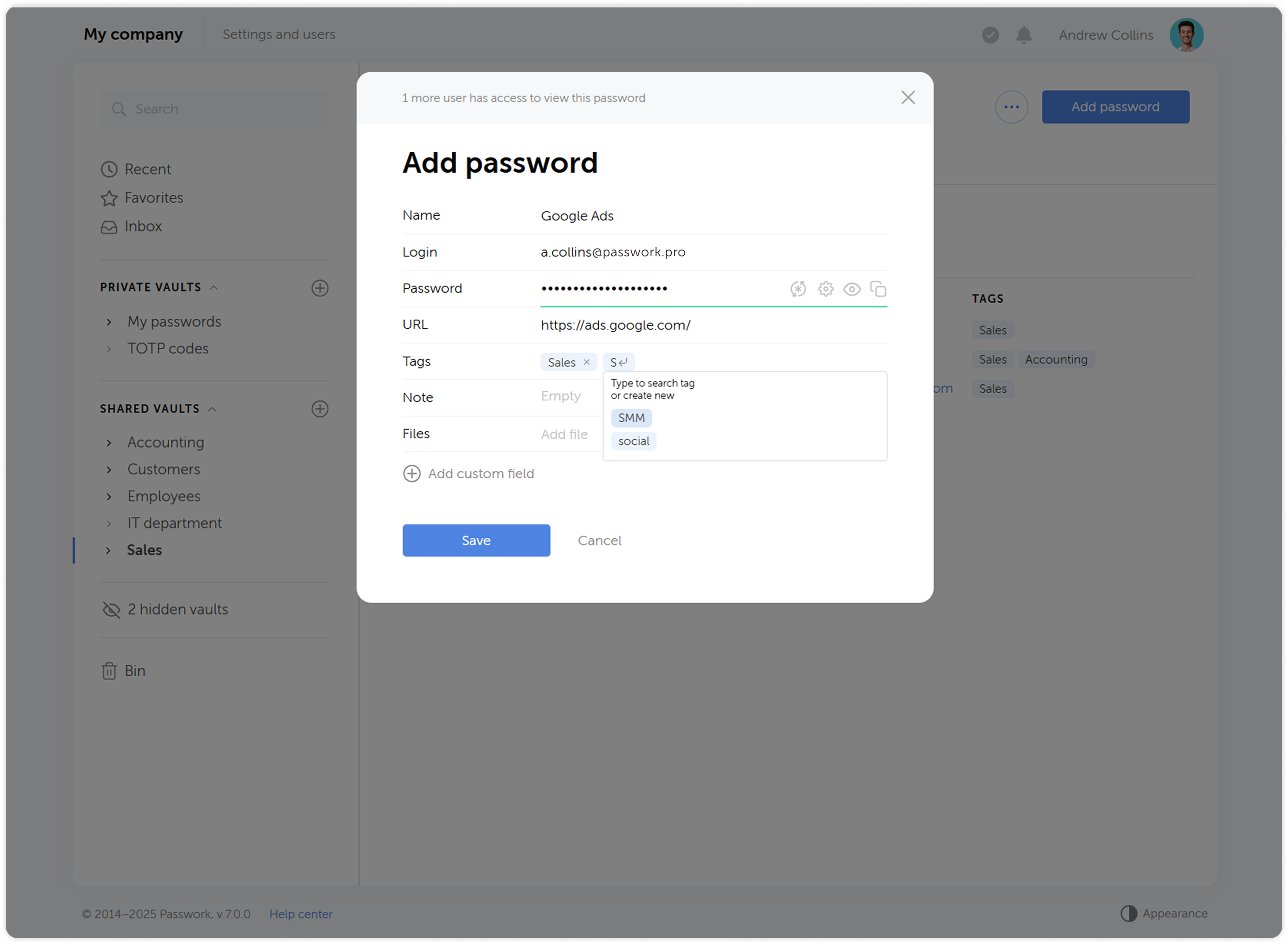
Beim Erstellen oder Bearbeiten eines Passworts kann nun ein Tag aus einer Liste bereits erstellter Tags ausgewählt werden. Dies hat den zusätzlichen Vorteil, dass die Erstellung von Tags mit demselben Namen verhindert wird (sales ↔ Sales usw.). Bei der Auswahl von Tags werden nur diejenigen angezeigt, die in den Tresoren des Benutzers verfügbar sind.

Passwortsuche über Browser-Erweiterung

Änderungen am 2FA-Zurücksetzungsprozess

Beim Zurücksetzen des Autorisierungspassworts wird die Zwei-Faktor-Authentifizierung nun nicht mehr automatisch mit zurückgesetzt. Benutzer können 2FA nicht ohne eine erfolgreiche Anmeldung zurücksetzen, was die Sicherheit erhöht.

Kontosperrungsoption

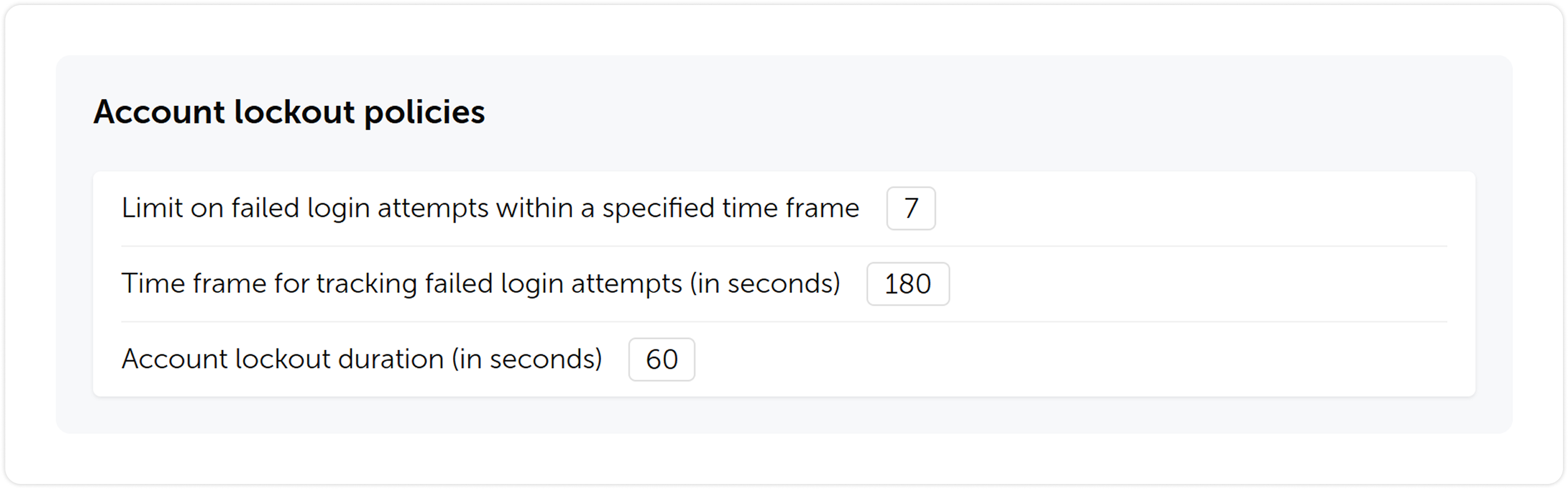
Eine Kontosperrungsfunktion wurde eingeführt. Es können ein Limit für fehlgeschlagene Anmeldeversuche, ein Zeitrahmen für die Verfolgung der fehlgeschlagenen Versuche und eine Sperrdauer festgelegt werden.

Passwortsuche über Browser-Erweiterung

Weitere Änderungen

  • Die Einstellungen wurden aufgeräumt, indem ihre Struktur übersichtlicher gestaltet wurde.
  • Automatischer Abruf von E-Mail und Name aus Single Sign-On-Systemen (SSO) hinzugefügt.
  • Einstellungen für die automatische Bereinigung von Sitzungen, Benachrichtigungen und Hintergrundaufgaben hinzugefügt.
  • Die Möglichkeit wurde hinzugefügt, ein Systembanner zu aktivieren, das für alle Passwork-Benutzer sichtbar ist. Es kann für wichtige Benachrichtigungen, Warnungen oder Anweisungen verwendet werden.
  • Die Möglichkeit wurde hinzugefügt, eine Zeitzone sowie ein Datums- und Zeitformat auszuwählen.
  • Filter in wichtigen Bereichen für eine schnellere und einfachere Suche aktualisiert.

Upgrade auf Passwork 7

Für das Upgrade auf Version 7.0 muss Passwork auf Version 6.5 aktualisiert, die Daten migriert und dies im Kundenportal bestätigt werden. Eine Upgrade-Anleitung ist hier zu finden.

Es wird empfohlen, die neuen Funktionen und Besonderheiten der Datenmigration in einer Testumgebung zu erkunden, bevor die Self-hosted-Version aktualisiert wird. Für Tests kann Passwork 7 auf einem separaten Server bereitgestellt werden — dies ermöglicht die Überprüfung aller Änderungen in der neuen Version, ohne die aktuelle Arbeitsumgebung zu beeinträchtigen.
Passwork 7.1: Tresortypen
Tresortypen Passwork 7.1 führt eine robuste Tresortypen-Architektur ein, die unternehmensgerechte Zugangskontrolle für verbesserte Sicherheit und Verwaltung bietet. Tresortypen lösen eine zentrale Herausforderung für Administratoren: die Kontrolle des Datenzugriffs und die Delegation der Tresorverwaltung in großen Organisationen. Zuvor war die Auswahl auf zwei Typen beschränkt. Jetzt können Sie erstellen
Passwork 7.2 Release
Die neue Version führt anpassbare Benachrichtigungen mit flexiblen Zustellungsoptionen ein, verbesserte Beschreibungen der Ereignisprotokollierung, erweiterte CLI-Funktionalität, serverseitige PIN-Code-Speicherung für die Browser-Erweiterung und die Möglichkeit, clientseitige Verschlüsselung während der Erstkonfiguration von Passwork zu aktivieren. Benachrichtigungseinstellungen Ein dedizierter Bereich für Benachrichtigungseinstellungen wurde hinzugefügt, in dem Benachrichtigungen ausgewählt werden können
Passwork: Secrets-Management und Automatisierung für DevOps
Einführung In Unternehmensumgebungen nimmt die Anzahl der Passwörter, Schlüssel und digitalen Zertifikate rapide zu, und Secrets-Management wird zu einer der kritischen Aufgaben für IT-Teams. Secrets-Management befasst sich mit dem gesamten Lebenszyklus sensibler Daten: von der sicheren Generierung und verschlüsselten Speicherung bis hin zur automatisierten Rotation und Audit-Trails. Da

Passwork 7 Release

May 6, 2025 — 6 min read
Passwork 7

En Passwork 7, mejoramos todo: reescribimos completamente el código utilizando las últimas tecnologías, implementamos una API completa, actualizamos la interfaz, rediseñamos los grupos y roles, abandonamos la adición automática de administradores del sistema a las bóvedas e hicimos la gestión de derechos de acceso aún más flexible. Esto mejorará significativamente la comodidad de la administración y la gestión de contraseñas, además de acelerar considerablemente el desarrollo de nuevas funcionalidades.

Interfaz actualizada

Rediseñamos la interfaz de Passwork y actualizamos todas las secciones clave — tuvimos en cuenta muchas solicitudes y corregimos errores lógicos y funcionales, preservando la comodidad familiar de trabajar con contraseñas. También añadimos la posibilidad de personalizar el ancho de las columnas y mover elementos de la interfaz — cada usuario podrá adaptarla a sus necesidades.

Búsqueda de contraseña mediante extensión del navegador

Funcionalidad de API ampliada

Ampliamos significativamente la funcionalidad de la API — ahora permite una interacción completa con todas las características de Passwork: desde copiar contraseñas hasta gestionar usuarios y configuraciones de seguridad.

Para simplificar el trabajo con la API, preparamos un conector oficial de Python — una biblioteca para desarrolladores que permite integrar Passwork con aplicaciones y scripts en Python, y la utilidad Passwork-CLI, que permite trabajar con la API desde la línea de comandos.

En lugar de claves API, ahora se utilizan tokens — una forma más moderna y fiable de acceder al sistema. Además, la configuración de acceso a la API se ha trasladado a la página de roles.

Nuevo backend y frontend

Actualizamos completamente el código utilizando métodos más modernos — esto mejorará el rendimiento y simplificará la instalación inicial de Passwork. Además, el nuevo código se convertirá en la base para desarrollar aplicaciones de escritorio y acelerará significativamente la introducción de nuevas funcionalidades.

Roles de usuario

Actualizamos el sistema de estados combinando los derechos administrativos y la configuración de usuarios, y los renombramos como Roles — ahora, en lugar de dos estados estándar Administrador y Empleado, puede crear un número ilimitado de roles con derechos y configuraciones individuales.

Búsqueda de contraseña mediante extensión del navegador

Grupos de usuarios

Lo que se llamaba Roles en versiones anteriores ha sido renombrado a Grupos, haciendo el proceso de gestión de usuarios más intuitivo y cercano a los estándares comunes, como los utilizados en Active Directory. Los grupos permiten restringir el acceso de los usuarios a las bóvedas según ciertos privilegios.

Búsqueda de contraseña mediante extensión del navegador

Estructura de bóvedas actualizada

Simplificamos la estructura de las bóvedas — en lugar de bóvedas de organización y bóvedas personales, los usuarios podrán crear bóvedas privadas. Una bóveda privada se convierte en compartida cuando se añaden otros usuarios. Al mismo tiempo, los administradores ya no se añaden automáticamente a las nuevas bóvedas.

La estructura de bóvedas actualizada garantiza un cifrado fiable y ofrece nuevas posibilidades para la gestión de contraseñas, haciendo el proceso más cómodo y seguro.

Búsqueda de contraseña mediante extensión del navegador

Confirmación de acceso a bóvedas

Al añadir usuarios a grupos, ya no recibirán automáticamente acceso a las bóvedas de otros usuarios — el acceso requerirá confirmación del administrador de la bóveda. Los usuarios que obtuvieron acceso a una bóveda durante la sincronización LDAP también necesitan ser confirmados. Esto proporciona control adicional y previene el acceso no autorizado al contenido de las bóvedas.

Búsqueda de contraseña mediante extensión del navegador

Cambios en los niveles de acceso

Hemos reformulado el sistema de niveles de acceso e introducido una serie de cambios en algunos de ellos:

  • El nivel de navegación ha sido reemplazado por la capacidad de ver todos los directorios principales de la carpeta a la que se aplica el nivel de acceso.
  • Los usuarios con el nivel de acceso completo ahora pueden ver los niveles de acceso de otros usuarios, gestionar el acceso adicional, ver el historial de cambios dentro del directorio y analizar las contraseñas disponibles para ellos a través del panel de seguridad.
  • Se ha añadido la capacidad de asignar derechos administrativos a usuarios en carpetas. El nivel de acceso de administración se hereda a las carpetas secundarias sin posibilidad de modificarlo.
Búsqueda de contraseña mediante extensión del navegador

Historial de acciones y notificaciones

Hemos ampliado la lista de acciones que se registran, actualizado sus descripciones y reformulado completamente el sistema de notificaciones. Poco después del lanzamiento, introduciremos la configuración de notificaciones, que añadirá flexibilidad para realizar un seguimiento de los cambios importantes y las acciones de los usuarios.

Búsqueda de contraseña mediante extensión del navegador

Uso de accesos directos

Para mejorar la seguridad, hemos realizado algunos cambios en la forma en que funcionan los accesos directos:

  • Ahora es imposible copiar accesos directos para contraseñas que no permiten la creación de accesos directos.
  • Las carpetas que incluyen accesos directos no disponibles para un usuario ahora se copiarán sin ellos.

Añadir etiquetas a las contraseñas

Ahora, cuando cree o edite una contraseña, podrá seleccionar una etiqueta de una lista de las ya creadas. Esto tiene el beneficio adicional de prevenir la creación de etiquetas con el mismo nombre (ventas ↔ Ventas, etc.). Al seleccionar etiquetas, solo se mostrarán aquellas disponibles en las bóvedas del usuario.

Búsqueda de contraseña mediante extensión del navegador

Cambios en el flujo de restablecimiento de 2FA

Cuando restablezca su contraseña de autorización, la autenticación de dos factores ya no se restablecerá junto con ella. Los usuarios no podrán restablecer 2FA sin un inicio de sesión exitoso, lo que aumenta la seguridad.

Opción de bloqueo de cuenta

Hemos introducido una función de bloqueo de cuenta. Podrá establecer un límite de intentos de inicio de sesión fallidos, un período de tiempo para el seguimiento de los intentos fallidos y la duración del bloqueo.

Búsqueda de contraseña mediante extensión del navegador

Otros cambios

  • Organizamos la configuración haciendo su estructura más clara.
  • Se añadió la recuperación automática de correo electrónico y nombre desde sistemas de inicio de sesión único (SSO).
  • Se añadió configuración para la limpieza automática de sesiones, notificaciones y tareas en segundo plano.
  • Se añadió la capacidad de habilitar un banner del sistema que será visible para todos los usuarios de Passwork. Puede usarlo para notificaciones importantes, alertas o instrucciones.
  • Se añadió la capacidad de elegir una zona horaria y formato de fecha y hora.
  • Se actualizaron los filtros en las secciones clave para una búsqueda más rápida y sencilla.

Actualización a Passwork 7

Para actualizar a la versión 7.0, necesitará actualizar su Passwork a la versión 6.5, migrar sus datos y confirmar esto en el portal del cliente. Las instrucciones de actualización se pueden encontrar aquí.

Recomendamos explorar las nuevas funcionalidades y las especificaciones de la migración de datos en un entorno de prueba antes de actualizar su versión autoalojada. Para las pruebas, puede desplegar Passwork 7 en un servidor separado — esto le permitirá revisar todos los cambios en la nueva versión sin afectar su entorno de trabajo actual.
Passwork 7.1: Tipos de bóvedas
Tipos de bóvedas Passwork 7.1 introduce una arquitectura robusta de tipos de bóvedas, proporcionando control de acceso de nivel empresarial para una seguridad y gestión mejoradas. Los tipos de bóvedas abordan un desafío clave para los administradores: controlar el acceso a los datos y delegar la gestión de bóvedas en grandes organizaciones. Anteriormente, la elección se limitaba a dos tipos. Ahora, puede crear
Lanzamiento de Passwork 7.2
La nueva versión introduce notificaciones personalizables con opciones de entrega flexibles, descripciones mejoradas del registro de eventos, funcionalidad CLI ampliada, almacenamiento del código PIN en el servidor para la extensión del navegador y la capacidad de habilitar el cifrado del lado del cliente durante la configuración inicial de Passwork. Configuración de notificaciones Hemos añadido una sección dedicada de configuración de notificaciones donde puede elegir la notificación
Passwork: Gestión de secretos y automatización para DevOps
Introducción En el entorno corporativo, el número de contraseñas, claves y certificados digitales está aumentando rápidamente, y la gestión de secretos se está convirtiendo en una de las tareas críticas para los equipos de TI. La gestión de secretos aborda el ciclo de vida completo de los datos sensibles: desde la generación segura y el almacenamiento cifrado hasta la rotación automatizada y los registros de auditoría. A medida que

Lanzamiento de Passwork 7

May 6, 2025 — 6 min read
Passwork 7

In Passwork 7, we improved everything: completely rewrote the code using the latest technologies, implemented a full-fledged API, updated the interface, redesigned groups and roles, abandoned the automatic addition of system administrators to vaults, and made access rights management even more flexible. This will significantly enhance the convenience of administration and password management, as well as greatly accelerate the development of new features.

Updated interface

We redesigned the Passwork interface and updated all key sections — took into account many requests and fixed logical and functional errors while preserving the familiar convenience of working with passwords. We also added the ability to customize column widths and move interface elements — each user will be able to adapt it to their needs.

Searching password by browser extension

Expanded API functionality

We significantly expanded the API functionality — now it allows full interaction with all Passwork features: from copying passwords to managing users and security settings.

To simplify working with the API, we prepared an official Python connector — a developer library that allows integrating Passwork with applications and scripts in Python, and the Passwork-CLI utility, which enables working with the API from the command line.

Instead of API keys, tokens are now used — a more modern and reliable way to access the system. In addition, API access settings have been moved to the role page.

New backend and frontend

We completely updated the code using more modern methods — this will improve performance and simplify the initial installation of Passwork. Moreover, the new code will become the basis for developing desktop applications and will significantly speed up the introduction of new features.

User roles

We updated the status system by combining administrative rights and user settings, and renamed them to Roles — now, instead of two standard statuses Administrator and Employee, you can create an unlimited number of roles with individual rights and settings.

Searching password by browser extension

User groups

What was called Roles in previous versions has been renamed to Groups, making the user management process more intuitive and closer to common standards, such as those used in Active Directory. Groups allow restricting user access to vaults based on certain privileges.

Searching password by browser extension

Updated vault structure

We simplified the vault structure — instead of organization vaults and personal vaults, users will be able to create private vaults. A private vault becomes shared when other users are added to it. At the same time, administrators are no longer automatically added to new vaults.

The updated vault structure ensures reliable encryption and offers new possibilities for password management, making the process more convenient and secure.

Searching password by browser extension

Vault access confirmation

When adding users to groups, they will no longer automatically receive access to other users' vaults — access will require confirmation from the vault administrator. Users who gained access to a vault during LDAP synchronization also need to be confirmed. This provides additional control and prevents unauthorized access to vault contents.

Searching password by browser extension

Changing access levels

We’ve reworked the access level system and introduced a number of changes to some of them:

  • Navigation level has been replaced by an ability to view all parent directories of the folder the access level is applied to
  • Users with the Full access level now can view access levels of other users, manage additional access, view the history of changes within the directory and analyze passwords available to them via Security dashboard
  • Added the ability to assign administrative rights to users in folders. The Administration access level is inherited by child folders without the ability to change it
Searching password by browser extension

History of actions and notifications

We’ve expanded the list of actions that are logged, updated their descriptions and completely reworked the notification system. Soon after the release we are going to introduce notification settings, which will add flexibility to keeping track of important changes and user actions.

Searching password by browser extension

Using shortcuts

In order to enhance security, we’ve made some changes to the way shortcuts work:

  • It is now impossible to copy shortcuts for passwords which don’t allow shortcut creation
  • Folders which include shortcuts unavailable to a user will now be copied without them

Adding tags to passwords

Now when you create or edit a password, you will be able to pick a tag from a list of already created ones. This has an added benefit of preventing creation of tags with the same name (sales ↔ Sales, etc.). When selecting tags, only those available in the user's vaults will be displayed.

Searching password by browser extension

Changes to 2FA reset flow

When you reset your authorization password, two-factor authentication now won’t be reset along with it. Users won’t be able to reset 2FA without a successful login, which increases security.

Account locking option

We’ve introduced an account locking feature. You will be able to set a limit on failed login attempts, timeframe for tracking the failed attempts and lockout duration.

Searching password by browser extension

Other changes

  • Tidied settings up by making their structure more clear
  • Added automatic retrieval of email and name from single sign-on systems (SSO)
  • Added settings for automatic clearing of sessions, notifications and background tasks
  • Added the ability to enable a system banner that will be visible to all Passwork users. You can use it for important notifications, alerts or instructions
  • Added an ability to choose a time zone and date & time format
  • Updated filters in key sections for faster and simpler search

Upgrading to Passwork 7

To upgrade to version 7.0, you’ll need to update your Passwork to version 6.5, migrate your data, and confirm this in the customer portal. Upgrade instructions can be found here.

We recommend exploring the new features and data migration specifics in a test environment before updating your self-hosted version. For testing, you can deploy Passwork 7 on a separate server — this will allow you to review all the changes in the new version without affecting your current working environment.
Passwork 7.1: Vault types
Vault types Passwork 7.1 introduces a robust vault types architecture, providing enterprise-grade access control for enhanced security and management. Vault types address a key challenge for administrators: controlling data access and delegating vault management across large organizations. Previously, the choice was limited to two types. Now, you can create
Passwork 7.2 release
The new version introduces customizable notifications with flexible delivery options, enhanced event logging descriptions, expanded CLI functionality, server-side PIN code storage for the browser extension, and the ability to enable client-side encryption during initial Passwork configuration. Notification settings We’ve added a dedicated notification settings section where you can choose notification

Passwork: Secrets management and automation for DevOps
Introduction In corporate environment, the number of passwords, keys, and digital certificates is rapidly increasing, and secrets management is becoming one of the critical tasks for IT teams. Secrets management addresses the complete lifecycle of sensitive data: from secure generation and encrypted storage to automated rotation and audit trails. As

Passwork 7 release

Jun 4, 2024 — 4 min read

Passwork 6.4, we have introduced a number of changes which enhance our browser extension security, make user permissions settings more flexible, and improve the logging of settings related changes:

  • Mandatory extension PIN code
  • Logging of all changes related to settings
  • User access to history of actions with passwords
  • Automatic updating of LDAP group lists

Mandatory extension PIN code

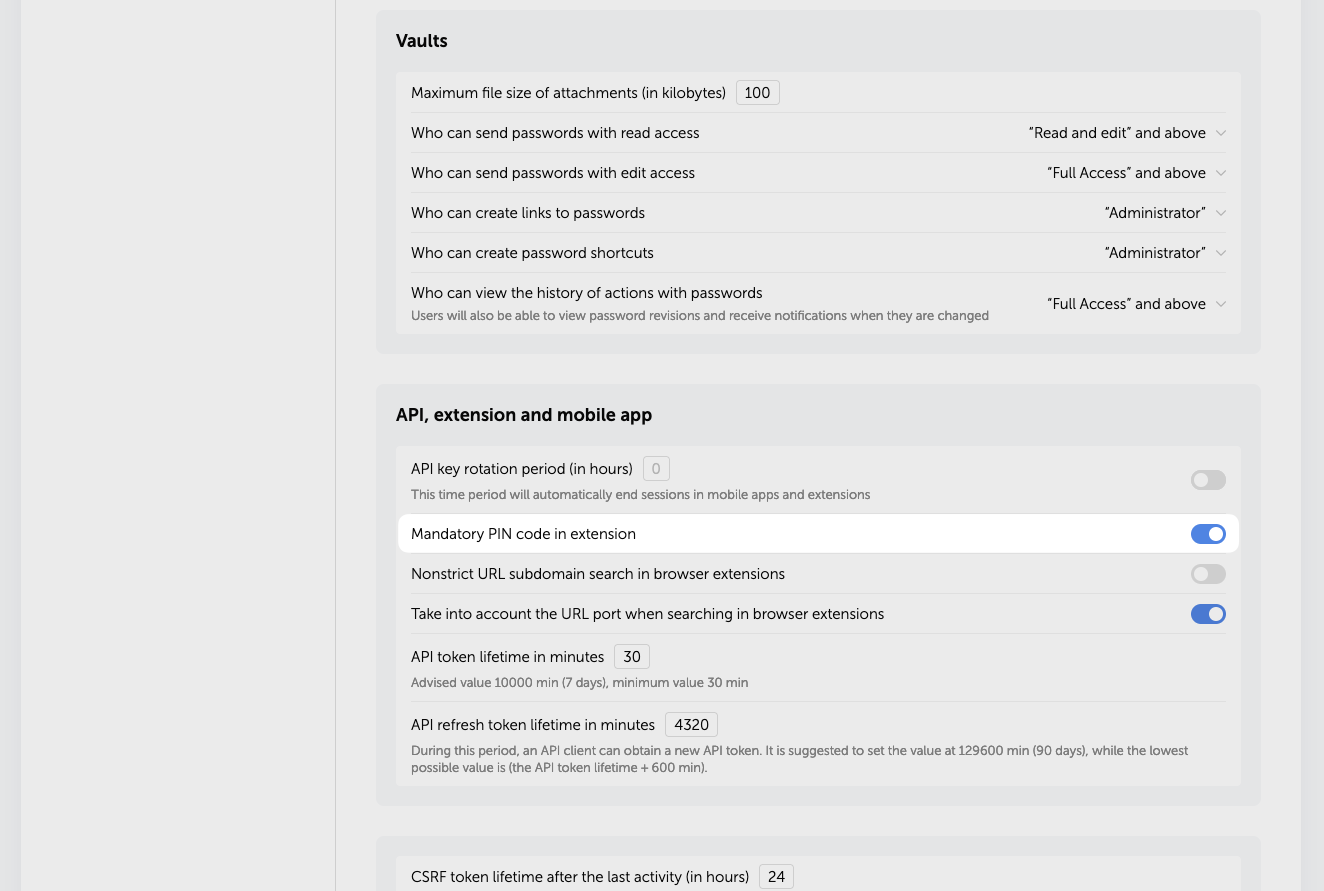
With the new setting ‘Mandatory PIN code in extension’, administrators can set a mandatory browser extension PIN code for all users, minimizing potential unauthorized access. Once enabled, users who have not yet set a PIN code will be prompted to do so upon their next login to the extension. Users will be able to configure their auto-lock timeout and change the PIN code, but they cannot disable these functions.

The ‘Mandatory PIN code in extension’ setting is located in the ‘API, extension and mobile app’ section of the System settings

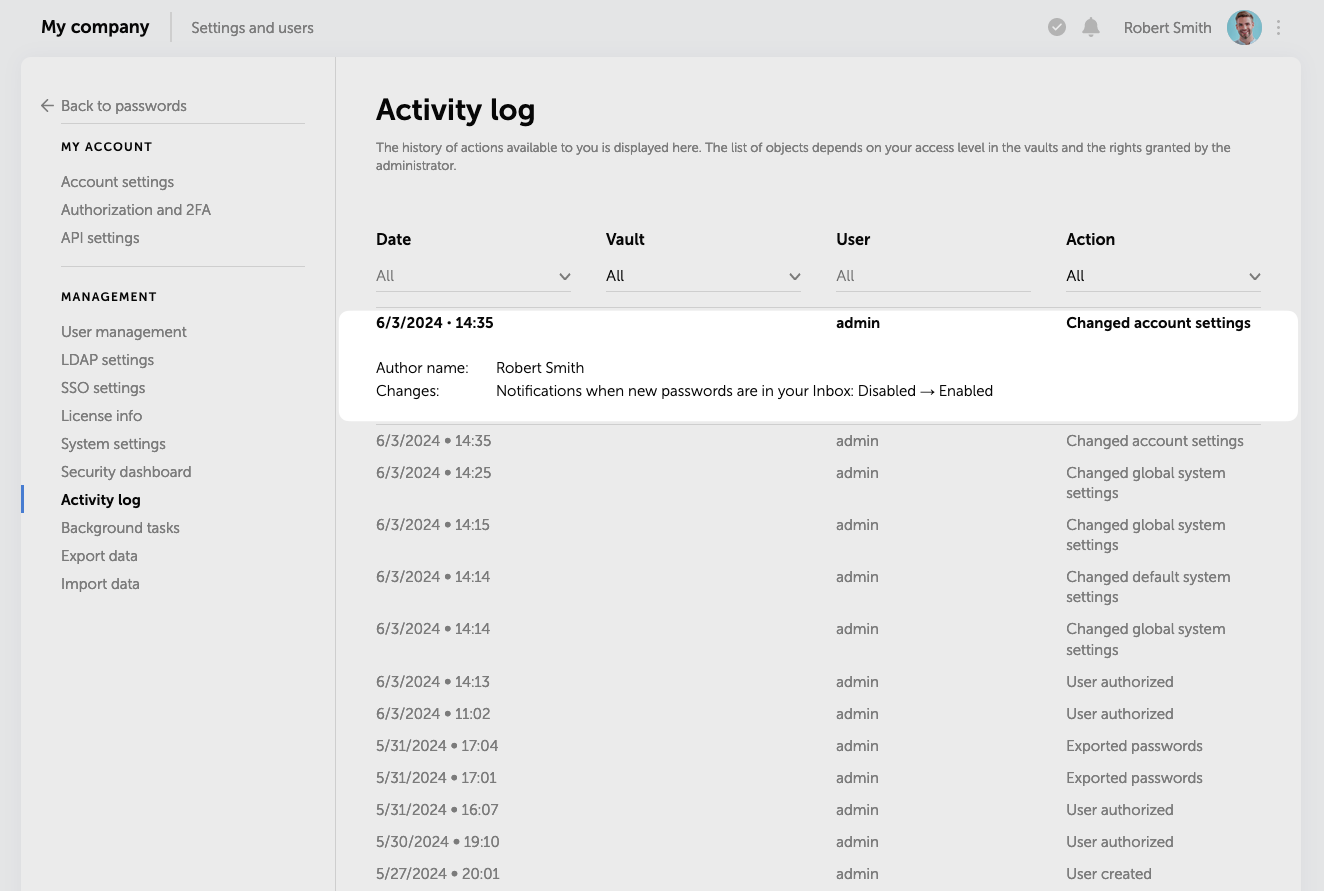
Now all changes in the Account settings, User management, LDAP settings, SSO settings, License info, and Background tasks are displayed in the Activity log.

All changes related to settings logged in the Activity log in the Settings and users

History of actions with passwords

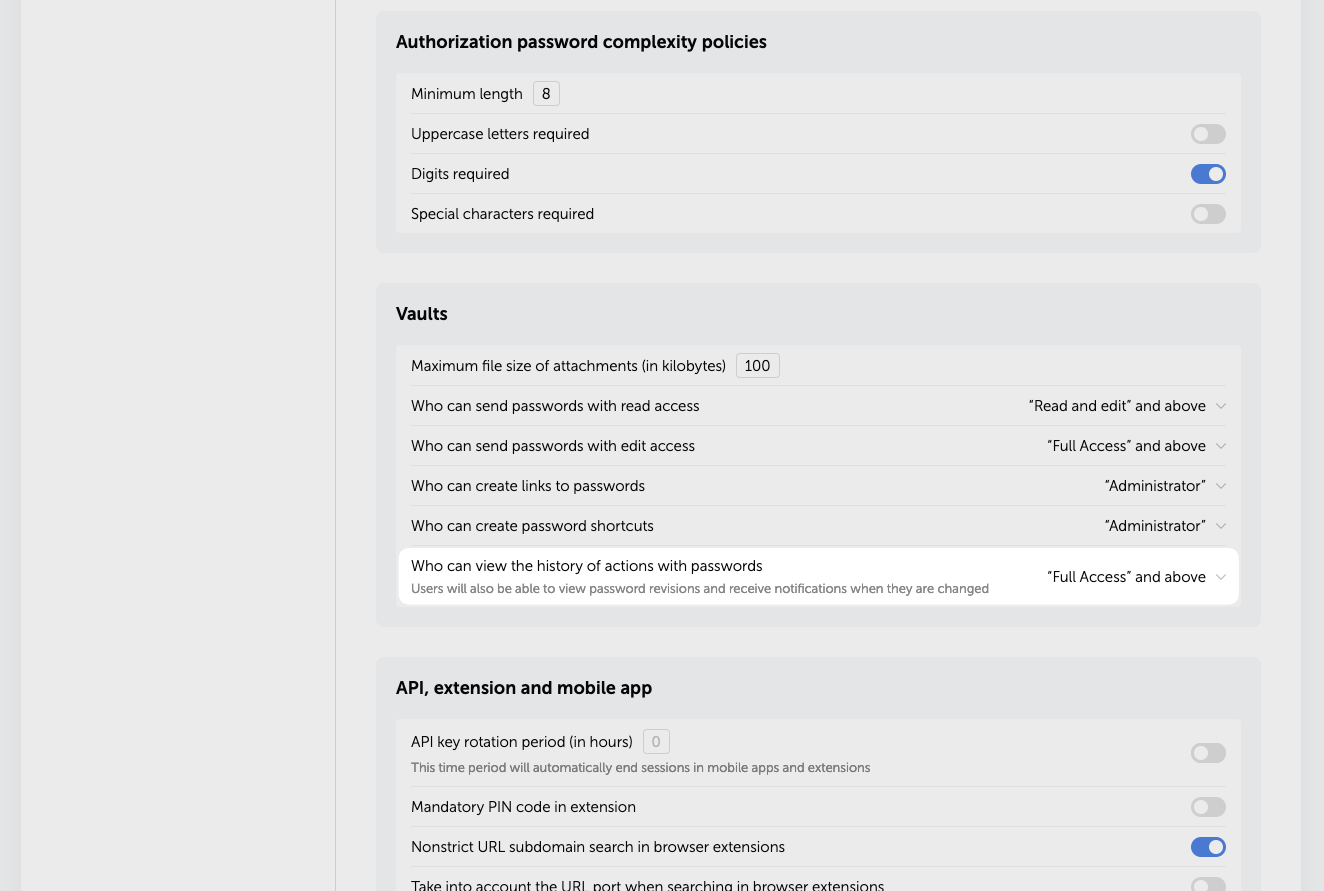
The new setting ‘Who can view the history of actions with passwords’ makes it possible for vault administrators to let other users view password history, password editions, and receive notifications related to their changes. Previously, these features were available only to vault administrators.

You can customize this feature in the Vaults section of the System settings

Automatic updating of LDAP group lists

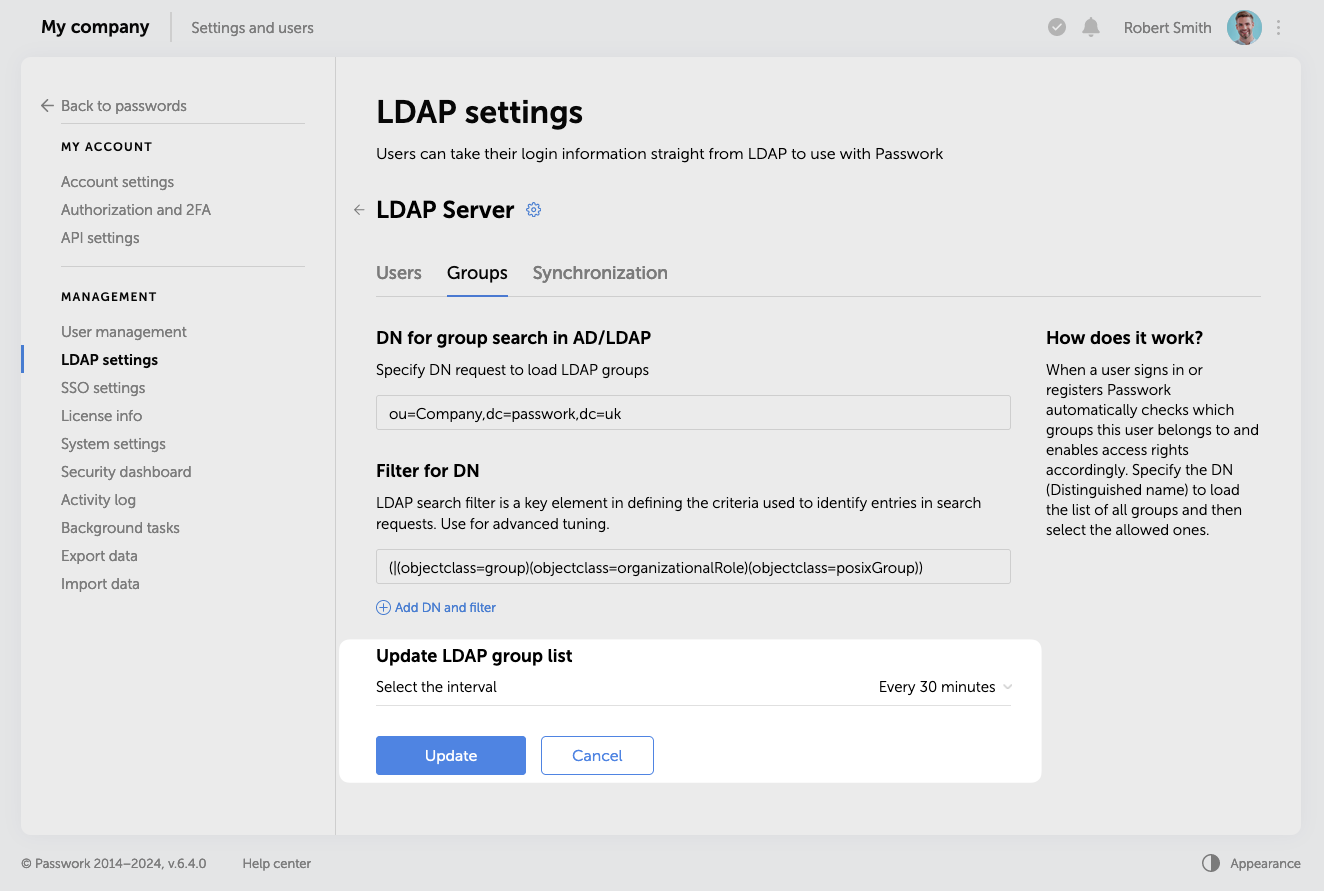
Automatic updating of LDAP group lists can now be configured on the Groups tab in the LDAP settings. The update is performed through background tasks with a selected time interval.

To configure LDAP group list updates, select LDAP server, go to the Groups tab, and click the Edit settings button

Other improvements

  • Added pop-up notifications when exporting data or moving data to the Bin
  • Improved display of dropdown lists on the Activity log page
  • Changed time display format of the ‘Automatic logout when inactive’ and ‘Maximum lifetime of the session when inactive’ settings
  • Changed the Enabled / Disabled dropdown lists on the System settings and LDAP settings pages with toggles
  • Increased minimum length of generated passwords to six characters

Bug fixes

  • Fixed an issue in the Password generator where selected characters were sometimes missing in the generated password
  • Fixed an issue where local users could not independently recover their account password when an LDAP server was enabled
  • Fixed an issue where local users could not register in Passwork when an LDAP server was enabled
  • Fixed an issue which occurred after moving a folder with shortcuts to another vault and shortcuts not being displayed in the new vault
  • Fixed an issue that occurred when trying to move a shortcut found in search results without opening any vaults right after logging into Passwork
  • Fixed an issue that occurred when trying to copy a password found in search results without opening any vaults right after logging into Passwork
  • Fixed an issue that occurred when a password was sent to another user and remained on the recipient's Recents and Starred pages after the initial password was moved to the Bin
  • Fixed the value in the time field for the ‘API key rotation period (in hours)’ setting which was reset to zero after disabling it
  • Fixed incorrect event logging in the Activity log after changing folder permissions
  • Fixed incorrect text notification about assigning access rights to a user through a role
  • Fixed incorrect tooltip text when hovering over the username of a recently created user
  • Fixed incorrect display of long invitation titles
  • Removed the local registration page when the LDAP server is enabled

Passwork: Secrets management and automation for DevOps
Introduction In corporate environment, the number of passwords, keys, and digital certificates is rapidly increasing, and secrets management is becoming one of the critical tasks for IT teams. Secrets management addresses the complete lifecycle of sensitive data: from secure generation and encrypted storage to automated rotation and audit trails. As
Cyber insurance: A false sense of security?
Introduction As cyber threats and data breaches become more frequent and sophisticated, many organizations are looking to cyber insurance as a way to manage risk. But is cyber insurance a true safety net — or is it just a false sense of security? This question was at the core of the
Comprehensive guide: Cybersecurity vocabulary – terms and phrases you need to know
Cybersecurity — as complex as it sounds — is an essential concept that we all need to be aware of in this day and age. Computers, phones, and smart devices have become an extension of our bodies at this point, which makes their security paramount. From your family photos to your bank

Passwork 6.4

Feb 14, 2024 — 4 min read

In Passwork 6.3, we have implemented numerous changes that significantly improve organization management efficiency, provide more flexible user permission settings, and increase security:

  • Administrative rights
  • Hidden vaults
  • Improved private vaults
  • Improved settings interface

Administrative rights

Available with the Advanced license

Now there is no need to make users administrators in order to grant them specific administrative rights. This option is a response to one of the most frequent requests from our customers.

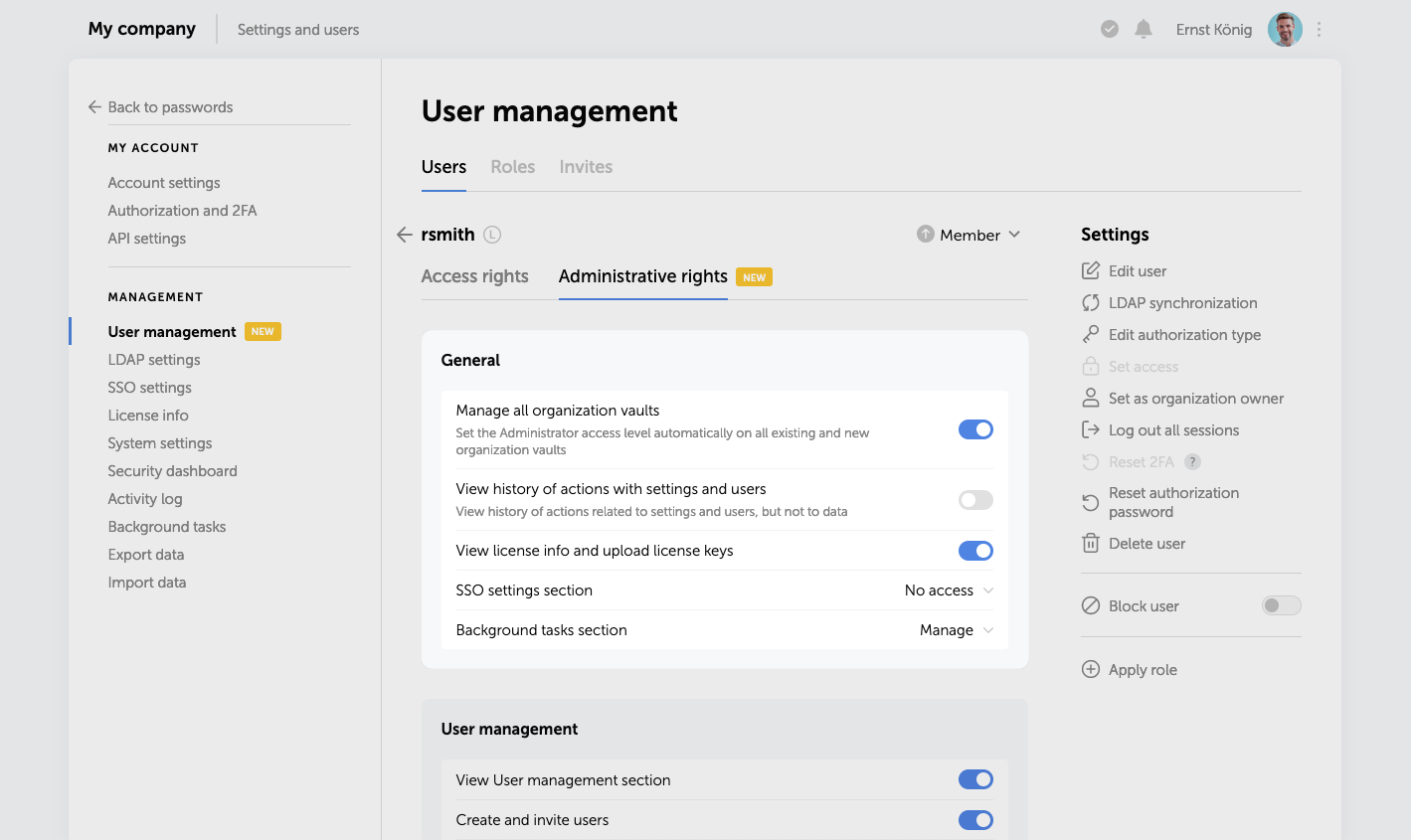
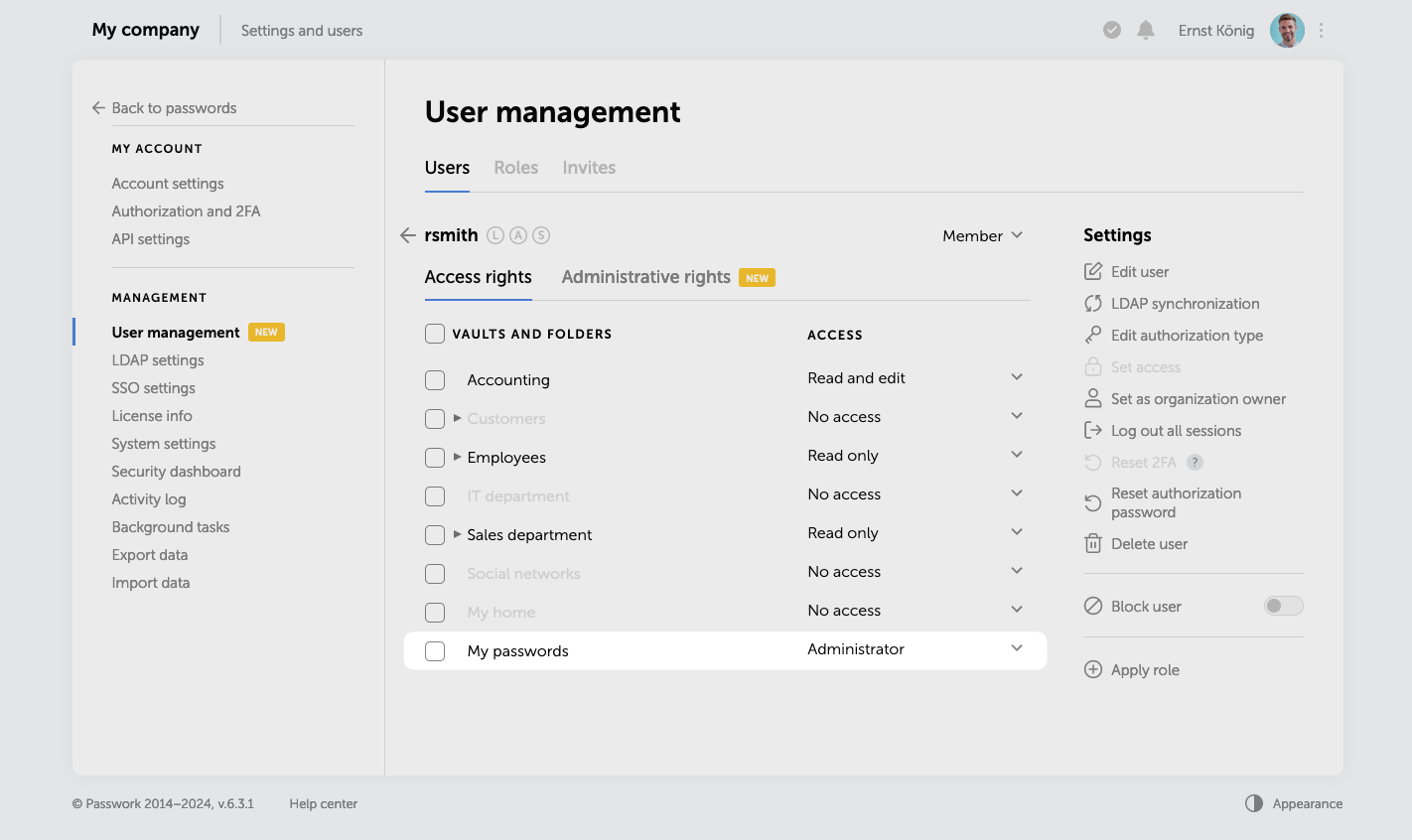
Administrators can grant only those rights or permissions that are necessary for users to fulfill their duties and flexibly customize access to settings sections and manage Passwork. For instance, you can grant employees the right to create and edit new users, view the history of user activity, track settings changes, while restricting access to organization vaults and System settings.

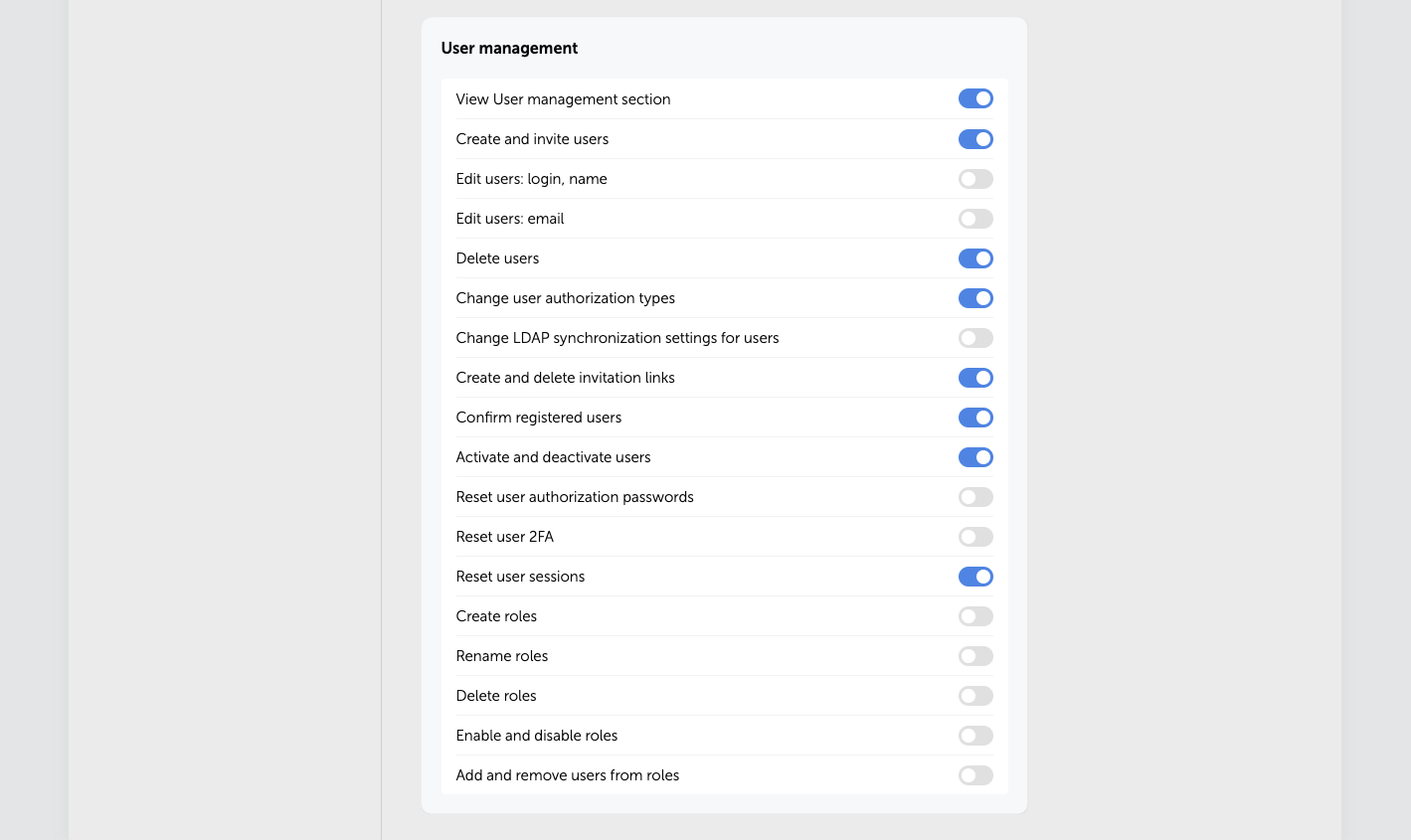
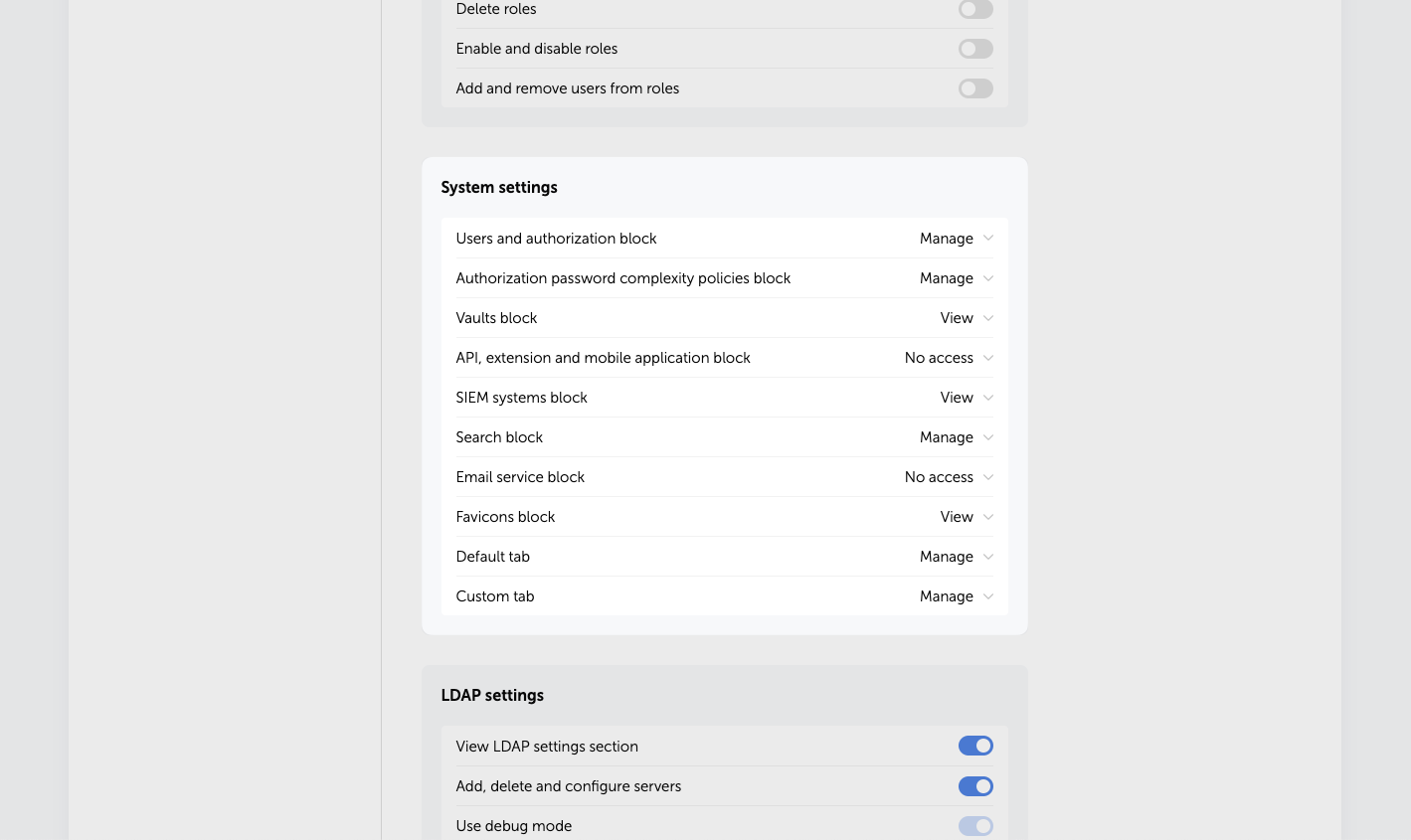
You can configure additional rights on the Administrative rights tab in User management. There are four settings sections to flexibly customize Passwork for your business:

General
In this section, you can grant users access rights to manage all existing and new organization vaults, view the history of actions with settings and users, access license info and upload license keys, view and modify the parameters of SSO settings and Background tasks.

User management
In this section, you can grant users access rights to view and modify User management parameters. This includes performing any necessary actions with users and roles, such as creating, deleting, and editing users, changing their authorization type and sending invitations.

System settings
In this section of settings, you can grant users the right to view and modify specific groups of System settings.

LDAP settings
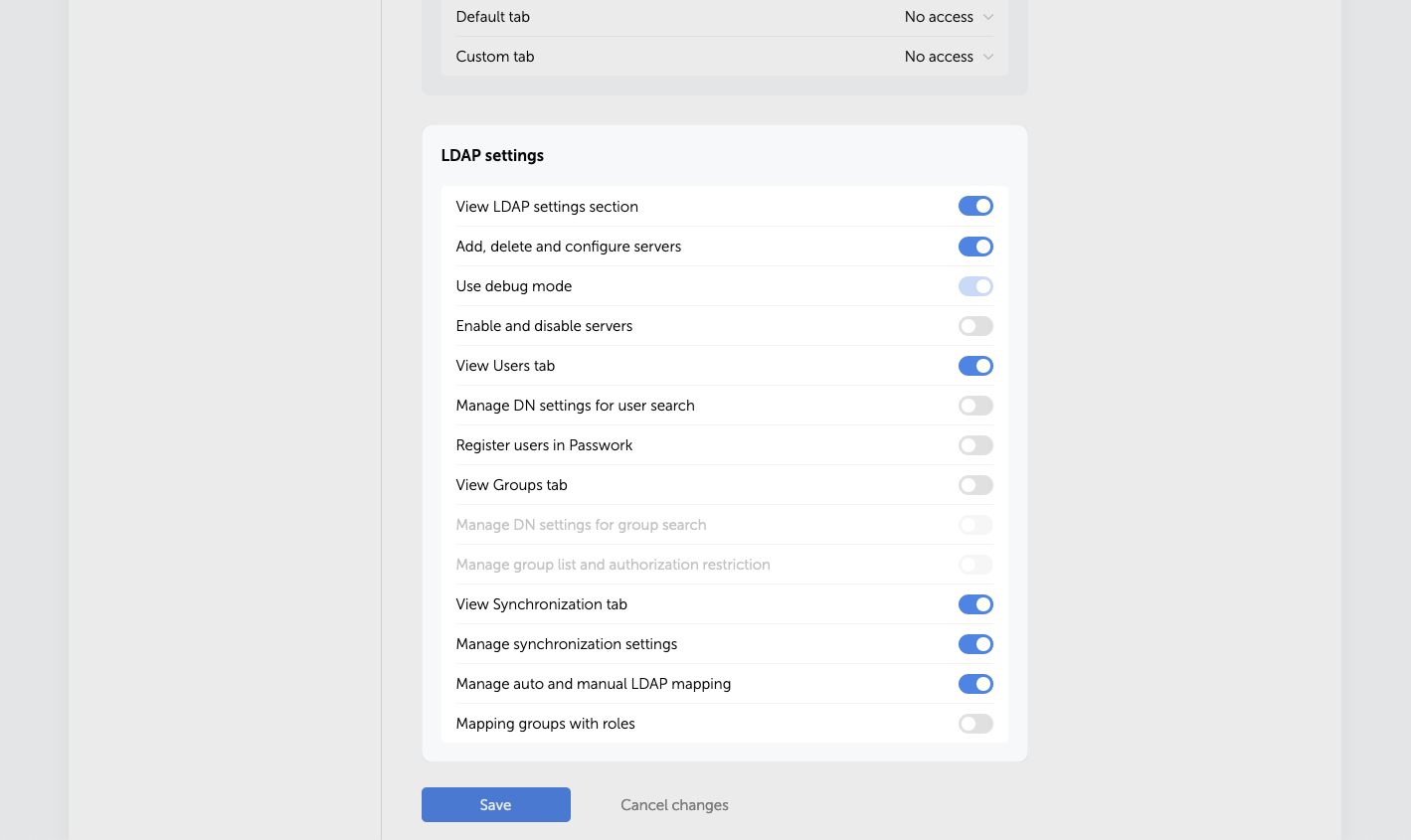
In this section, you can grant users the right to view and modify LDAP parameters which include adding and deleting servers, registering new users, managing group lists, viewing and configuring synchronization settings.

Activity log
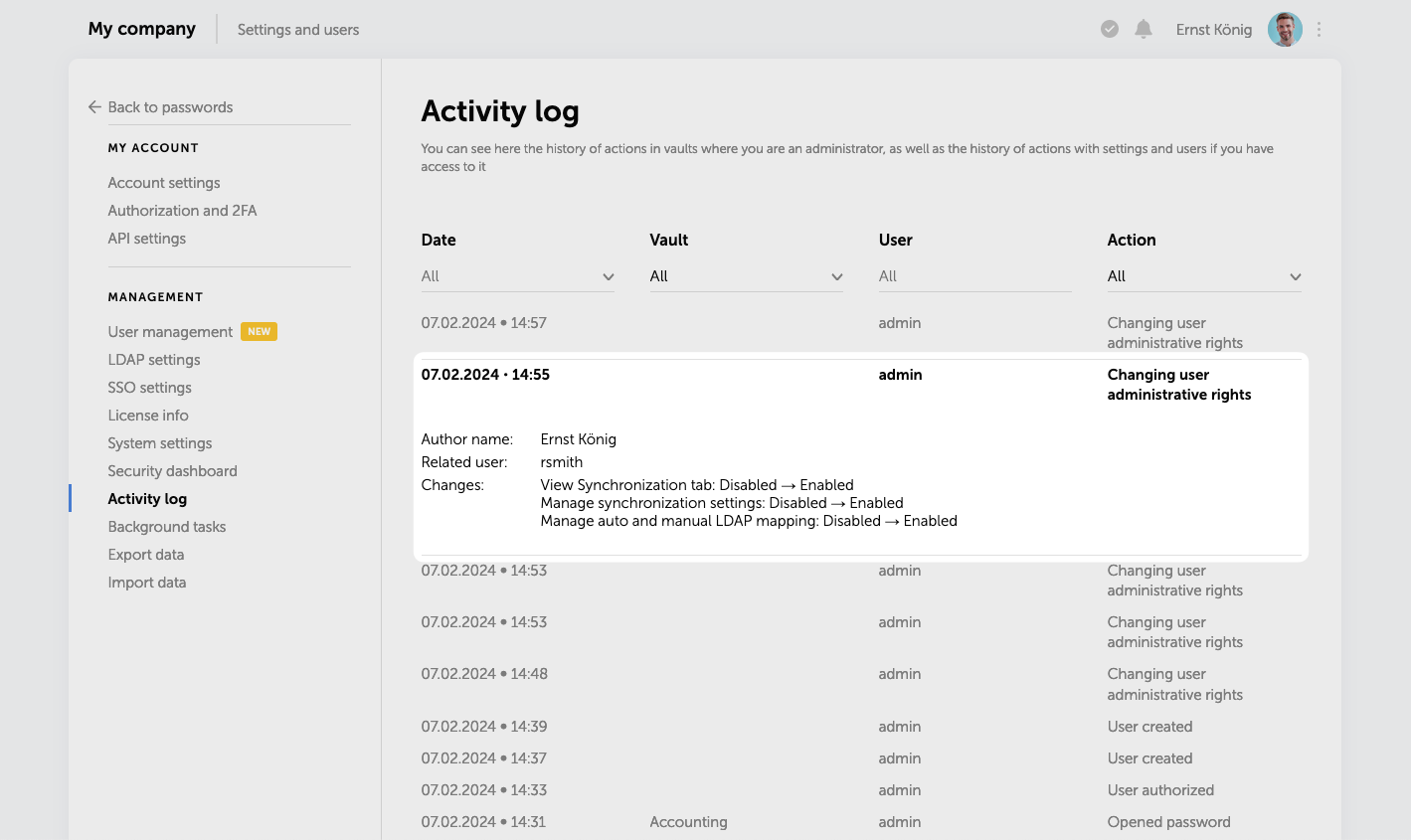
The event of changing user administrative rights has been added to the Activity log. All changes are now recorded in the Activity log, that includes the users who initiated such changes as well as each setting that was modified with its previous and current values.

Interface improvements

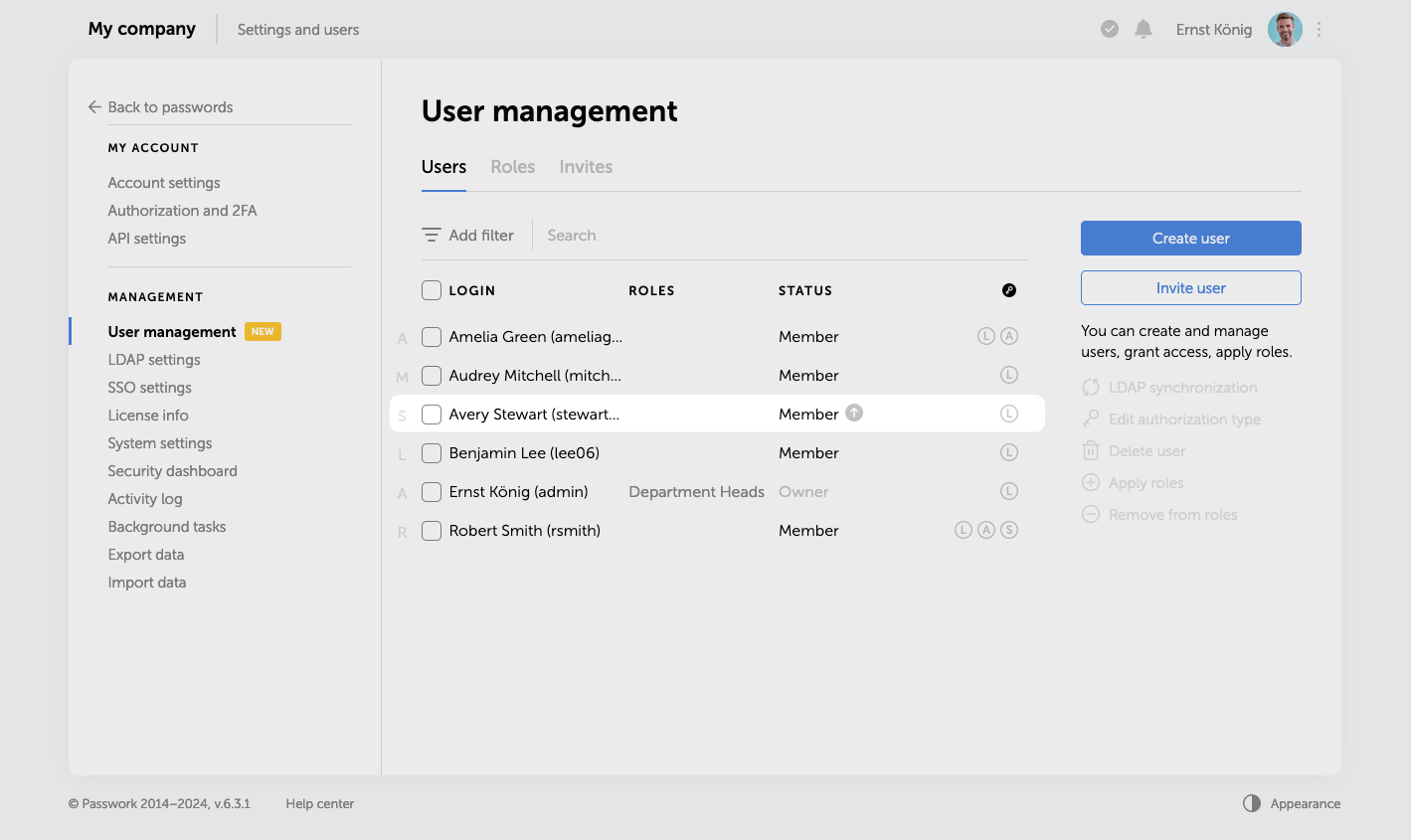
Users with additional administrative rights are marked with a special icon next to their user status.

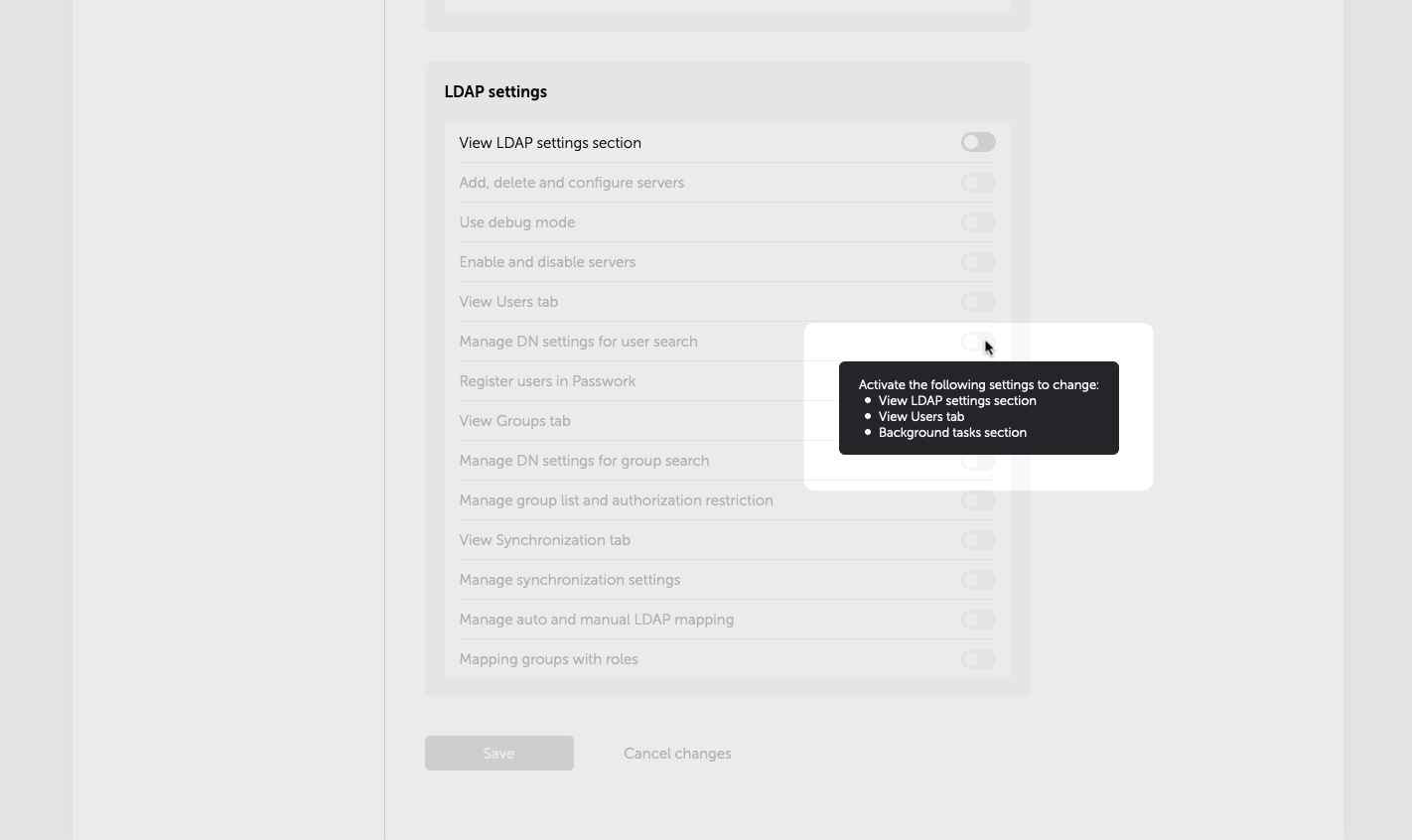
Some items remain unavailable until the necessary settings have been activated. When hovering your cursor over such items, a tooltip with information regarding dependent settings will be displayed.

Hidden vaults

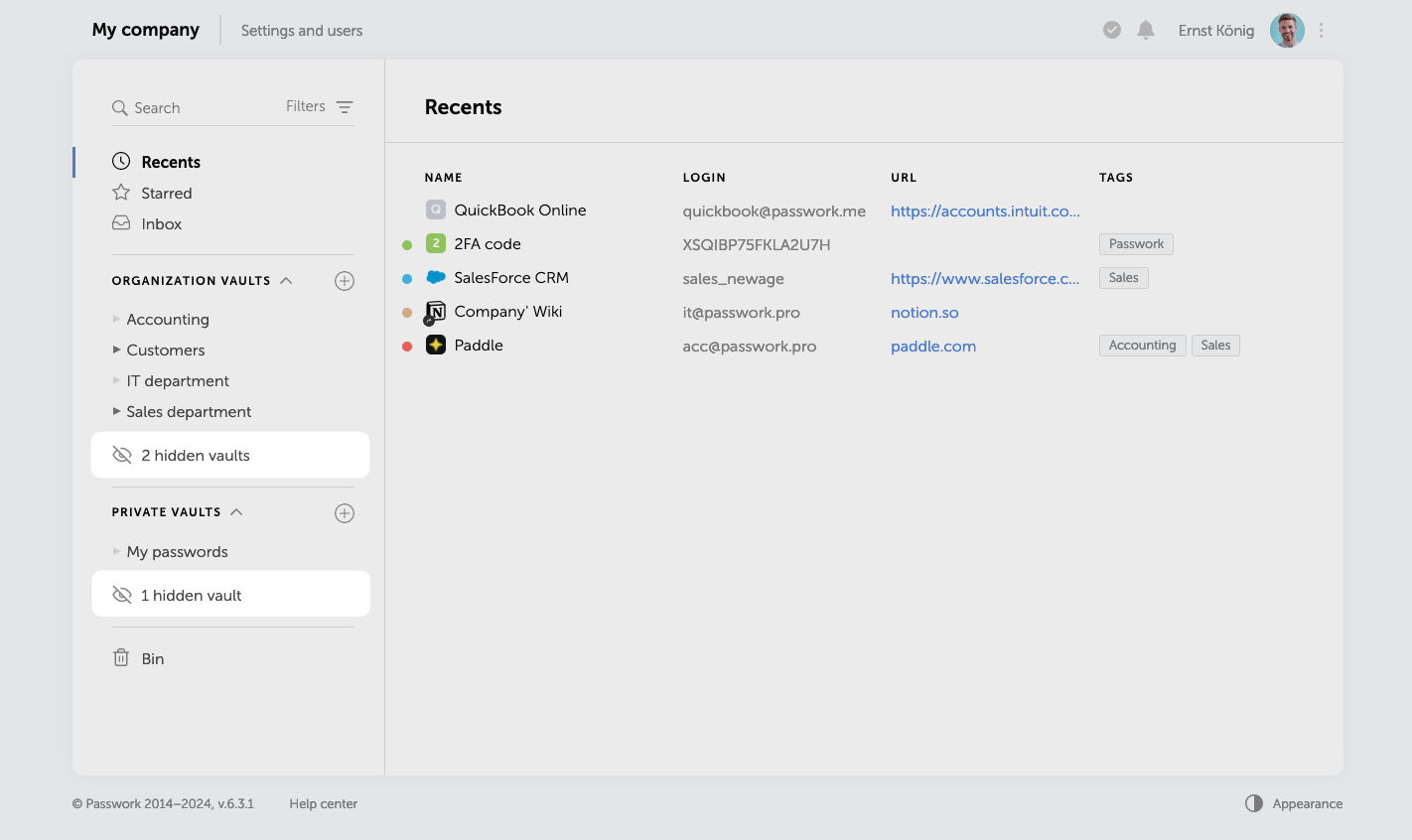
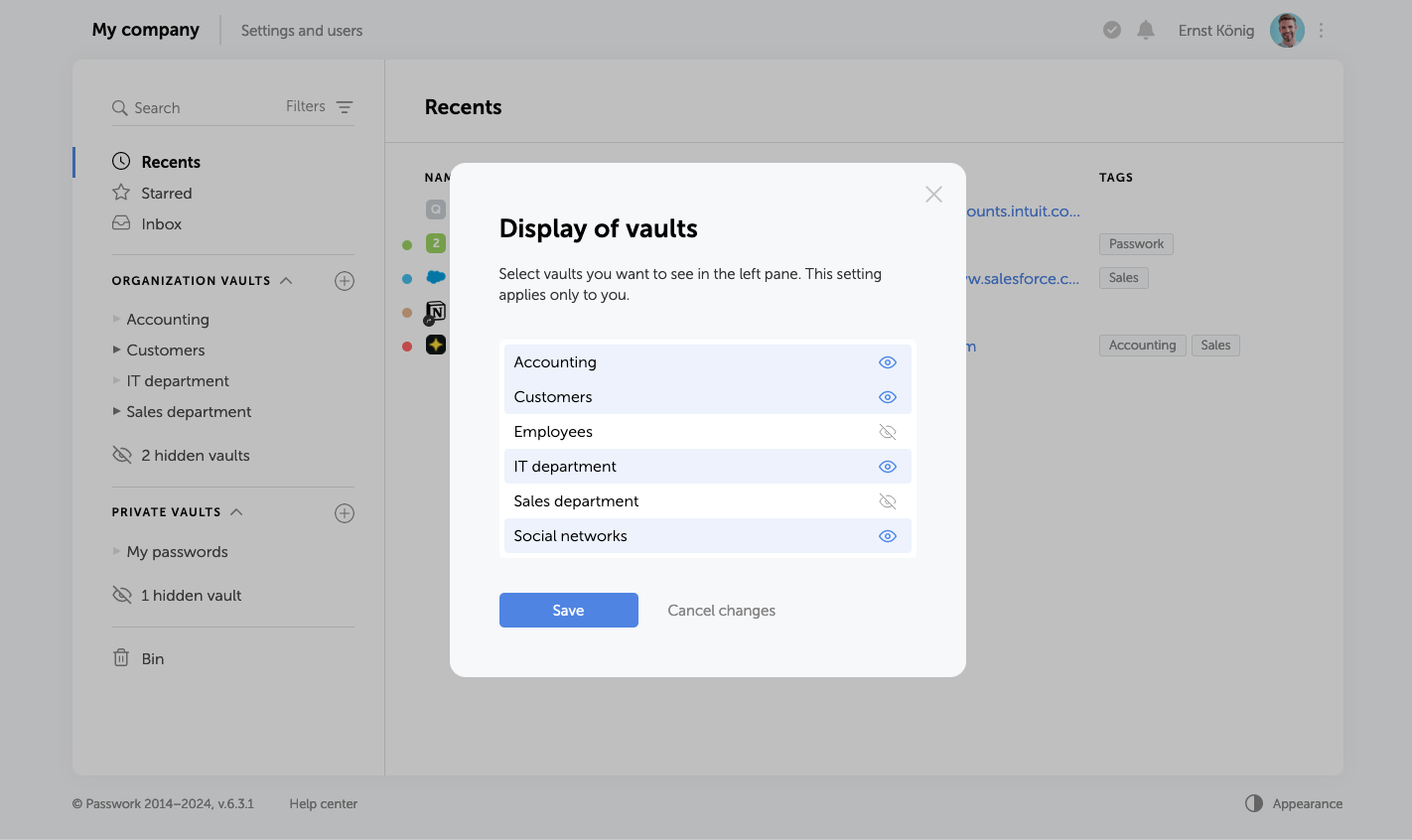
In the previous versions of Passwork only organization administrators were able to hide vaults. Also, only organization vaults could be hidden. In this new version, all users can hide any vaults. Hiding makes vaults invisible only to the users who choose to do it and does not affect others.

Hidden vault management is now carried out in a new window, which is available directly from the list of vaults. You can view the list of all available vaults and customize their visibility there.

Private vault improvements

Displaying private vaults in User management
Besides hiding private vaults, employees with User management access can now see all vaults which they administer (including private vaults). The new feature which makes it possible to add users to private vaults has also been added to User management.

Logging of events in private vaults
Private vault administrators can view all events related to their vaults in the Activity log.

Other changes

  • Fixed an issue which prevented users from changing their temporary master password
  • Fixed an issue which prevented users from setting the minimum length for authorization and master passwords
  • Fixed an issue in User management which made administrator self-deletion possible
  • Minor improvements to the settings interface

Python connector 0.1.5: Automated secrets management
The new Python connector version 0.1.5 expands CLI utility capabilities. We’ve added commands that solve critical tasks for DevOps engineers and developers — secure retrieval and updating of secrets in automated pipelines. What this solves Hardcoded secrets, API keys, tokens, and database credentials create security vulnerabilities and operational bottlenecks.
The 2025 small business cybersecurity checklist: A complete guide | Passwork
Passwork’s 2025 cybersecurity checklist, based on the NIST framework, provides actionable steps to prevent data breaches and financial loss.
Passwork: Secrets management and automation for DevOps
Introduction In corporate environment, the number of passwords, keys, and digital certificates is rapidly increasing, and secrets management is becoming one of the critical tasks for IT teams. Secrets management addresses the complete lifecycle of sensitive data: from secure generation and encrypted storage to automated rotation and audit trails. As

Introducing Passwork 6.3

Jan 19, 2024 — 4 min read

In Passwork 6.2 we have introduced a range of features aimed at enhancing your security and convenience:

  • Bin
  • Protection against accidental removal of vault
  • Protection against 2FA brute force
  • Accelerated synchronization with LDAP
  • Improved API settings
  • Bug fixes in role management

Bin

Now, when deleting folders and passwords, they will be moved to the Bin. If needed, they can be restored while preserving previously set access permissions. Vaults are deleted without being moved to the Bin — they can only be restored from a backup.

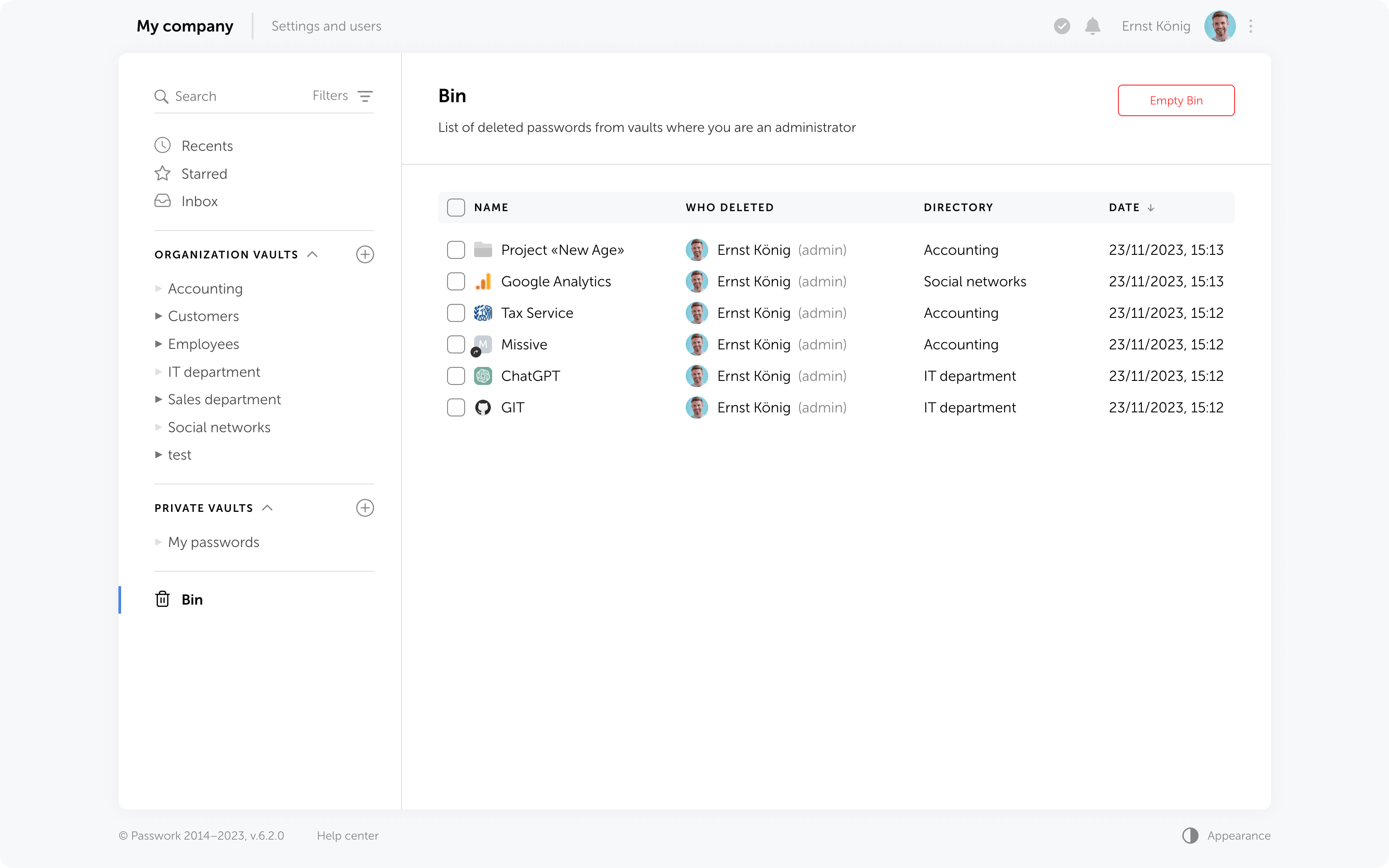
Who can view deleted passwords and folders in the Bin?

Inside the bin users can see the deleted items from those vaults in which they are administrators. For instance, an employee who is not an administrator of organization vaults will only see the deleted passwords and folders from his personal vaults when opening the Bin.

In addition to object names, the Bin also displays the usernames of people who deleted data. You can also see the initial directory name and the deletion date.

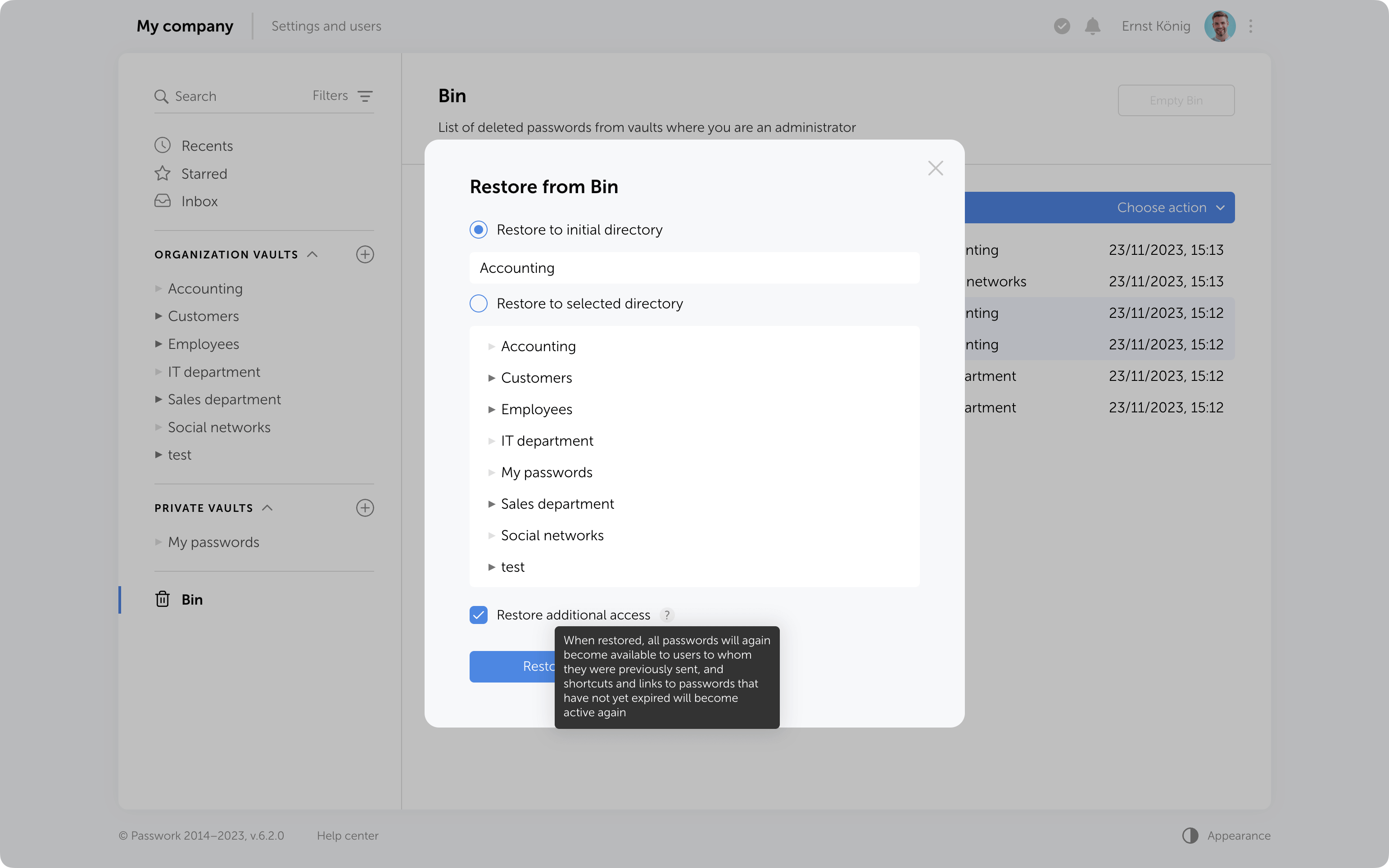
Object restoration

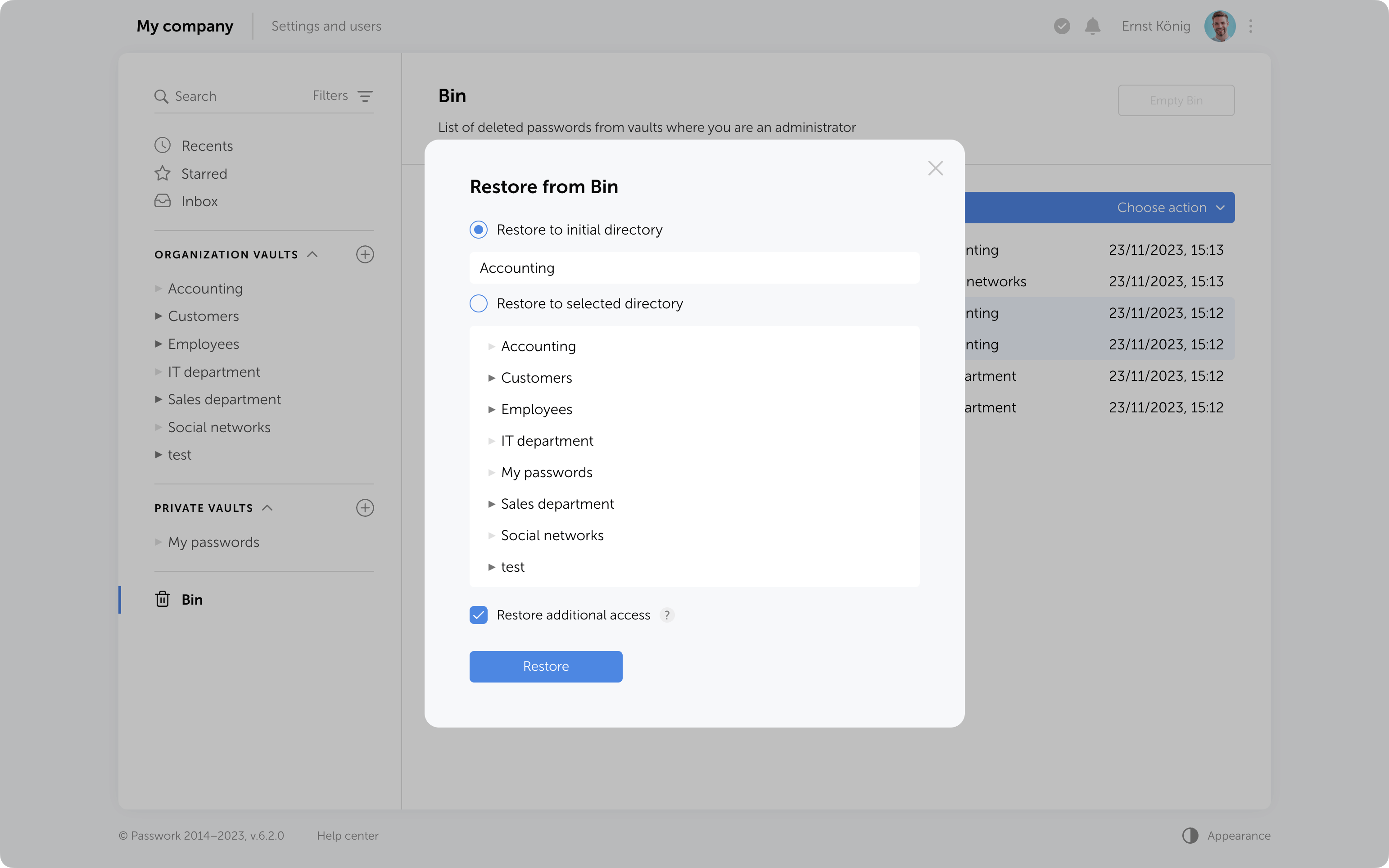
Objects from the Bin can be restored to their initial directory if it has not been deleted or moved. Alternatively, you can choose any other directory where you have edit and higher access levels.

When restoring deleted folders to their initial directories, user and role access levels will also be restored exactly as they were previously manually set in these folders. Other access permissions will be set based on the current permissions in the initial directory.

When restoring folders to a directory different from the initial, access levels will always depend on the current permissions in the selected directory.

Additional access to deleted passwords

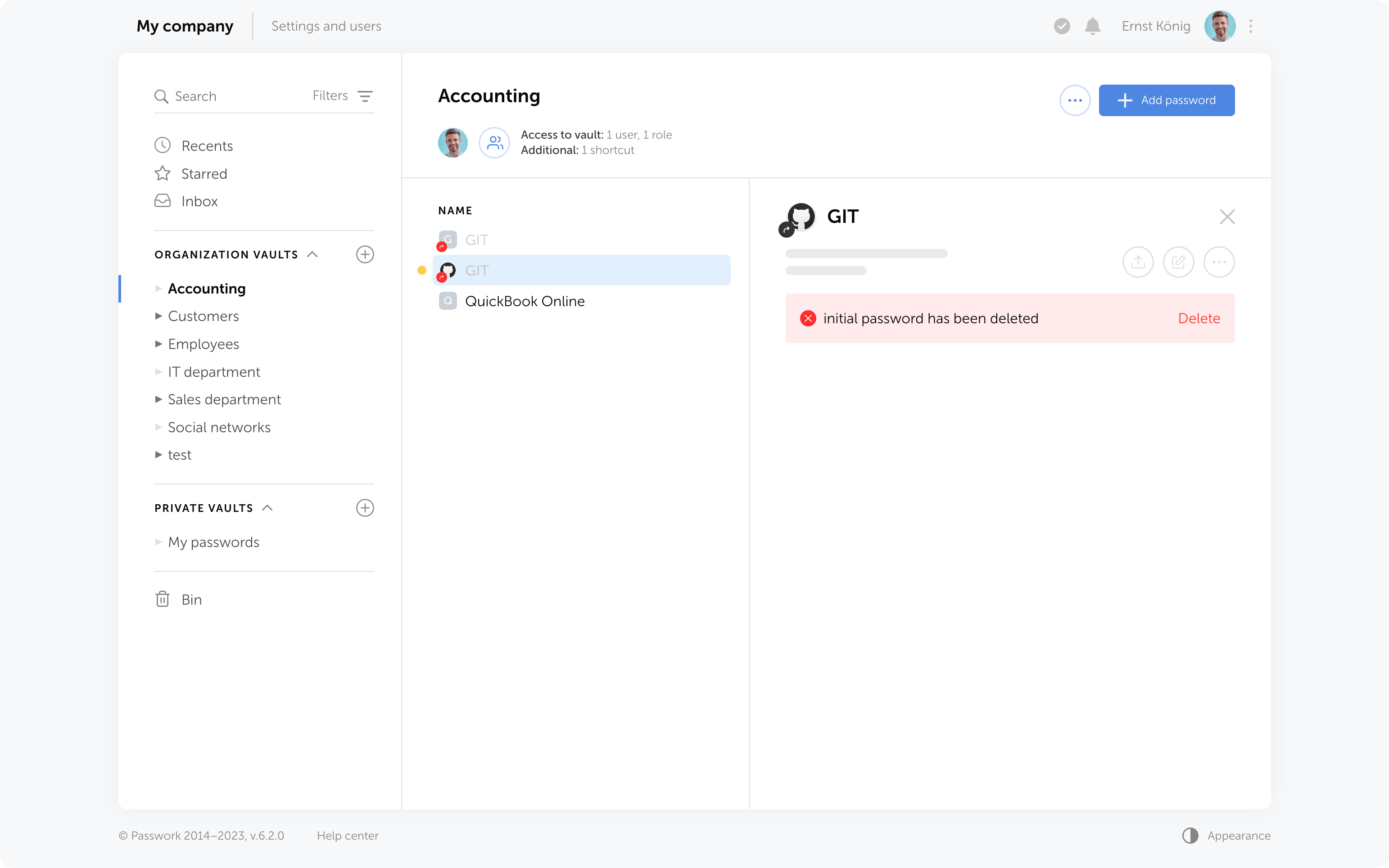
If passwords have been shared with users, moving them to the Bin will remove them from the “Inbox” section, and any shortcuts or links to these passwords will become nonfunctional.

Restoring additional access

When restoring from the Bin, it is possible to regain additional access levels to passwords. Passwords that were shared with users will reappear in their “Inbox” section, access to passwords through shortcuts will be restored, and links that have not expired will become functional again.

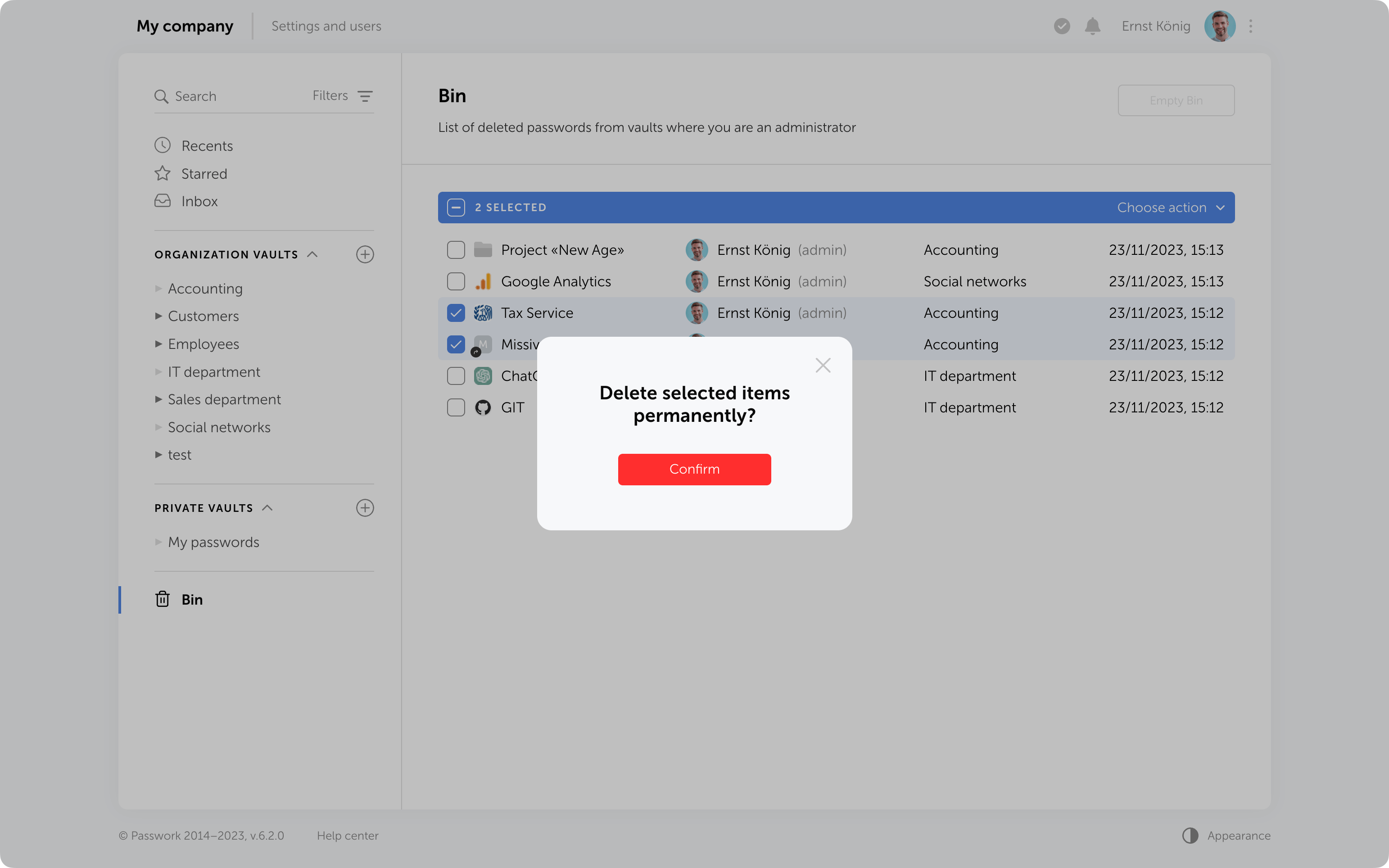
Bin cleanup

You can delete selected items from the Bin or use the "Empty Bin" button to remove all items contained inside.

It's important to note that in the Bin you only see the items which were deleted from the vaults where you are an administrator. Objects from other vaults are not visible, and clearing the Bin will not affect them.

In future, the option to configure automatic Bin cleanup will be added.

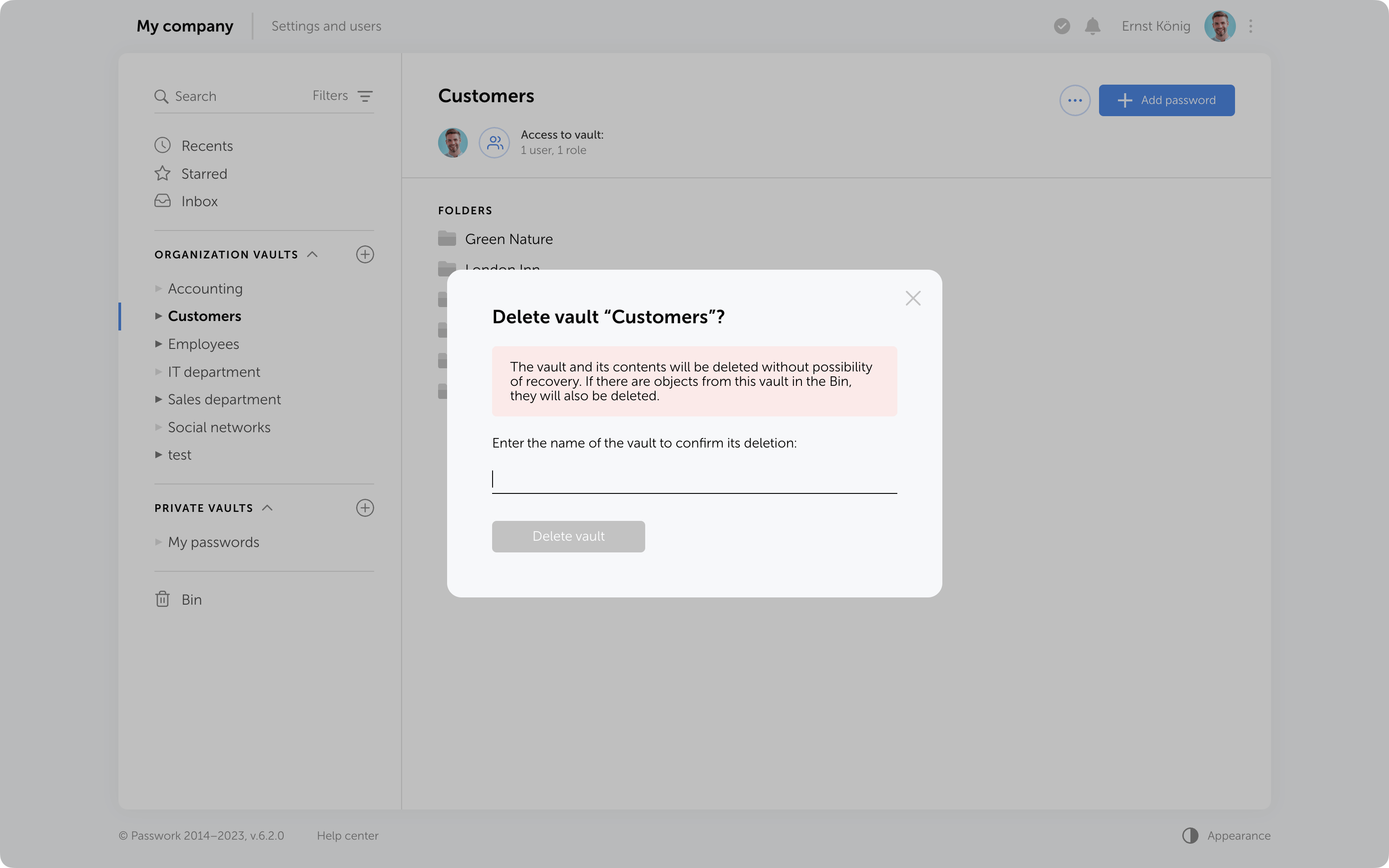
Protection against accidental removal of vault

To confirm the deletion of a vault, you now need to enter its name. It will be permanently deleted along with all the data inside. Additionally, if there are passwords or folders from this vault in the Bin, they will also be removed.

Protection against 2FA brute force

Protection against 2FA brute-force attacks has been added. After several incorrect attempts to enter the 2FA code, the user will be temporarily locked. The number of attempts, input intervals, and the lockout time are set in the config.ini file.
Other changes

  • LDAP synchronization has been accelerated
  • Descriptions of parameters and minimum allowable values for API token expiration time and API refresh token expiration time have been added to the API settings section
  • Automatic assignment of "Navigation" to parent folders in role management has been fixed
  • The issue when a vault administrator could not add roles to a vault and manage its permissions has been fixed
  • The issue with showing additional access rights to passwords when moved to another vault has been fixed

Why do employees ignore cybersecurity policies?
Employees often ignore cybersecurity rules not out of laziness, but because they feel generic, irrelevant, or disconnected from real work. True change starts with empathy, leadership, and context-driven policies. Read the full article to learn how to make security stick.
Python connector 0.1.5: Automated secrets management
The new Python connector version 0.1.5 expands CLI utility capabilities. We’ve added commands that solve critical tasks for DevOps engineers and developers — secure retrieval and updating of secrets in automated pipelines. What this solves Hardcoded secrets, API keys, tokens, and database credentials create security vulnerabilities and operational bottlenecks.
The 2025 small business cybersecurity checklist: A complete guide | Passwork
Passwork’s 2025 cybersecurity checklist, based on the NIST framework, provides actionable steps to prevent data breaches and financial loss.

Introducing Passwork 6.2

Aug 8, 2023 — 5 min read

This latest update demonstrates our focus on refining user experience and enhancing collaborative password management.

No longer will you need to create password copies in various vaults — we've introduced shortcuts. With these handy labels, you can easily organize access to passwords from different directories.

The new enhanced settings provide administrators with more control over configurations and user rights, and all changes require approvals, preventing any unintentional actions.

LDAP user management has now become simpler with its cleaner interface and background data updates.

In addition to that, Passwork 6.0 brings new notifications and interface improvements. All these enhancements contribute to a more comfortable user experience while ensuring the security of passwords and sensitive data.

Shortcuts

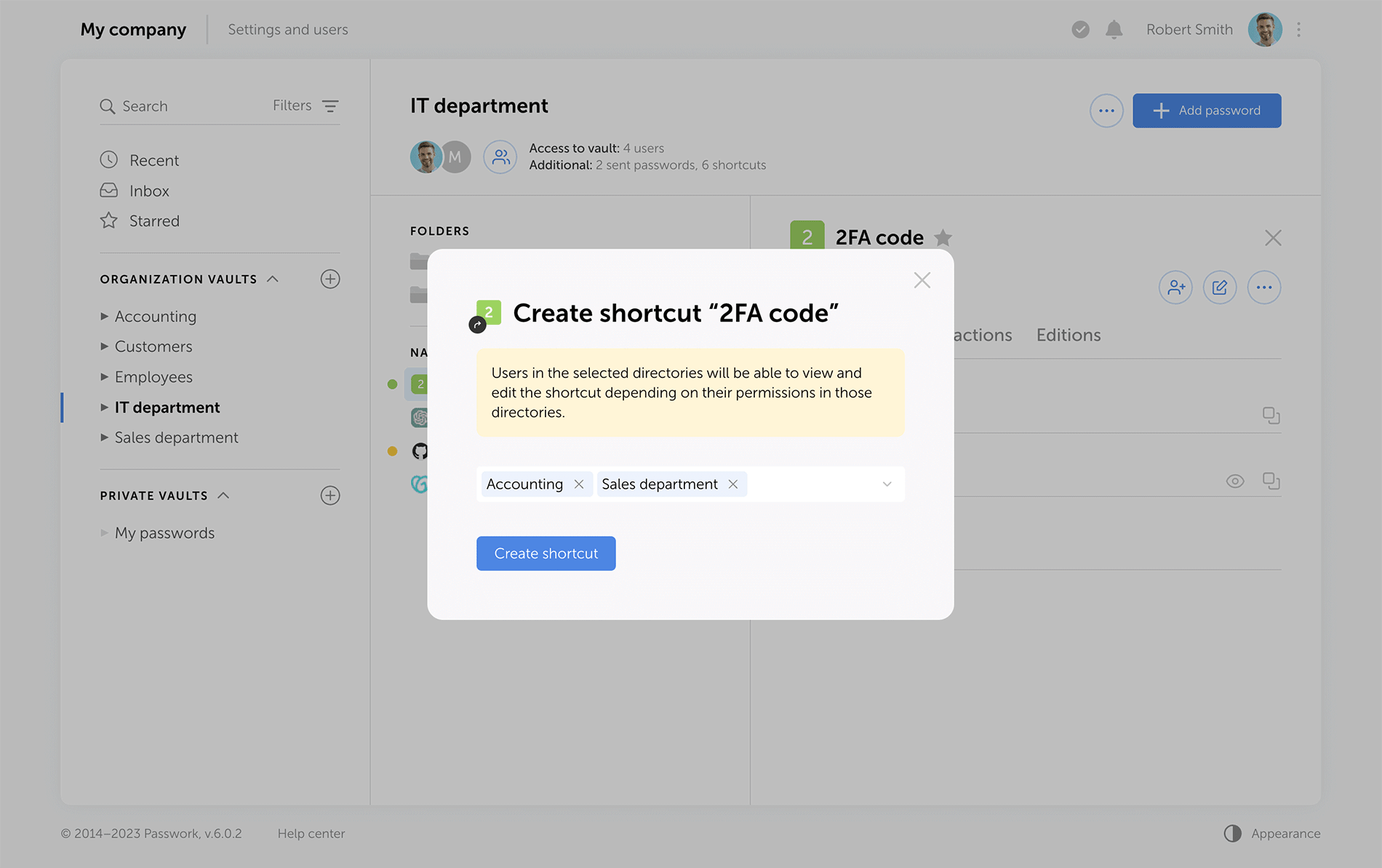
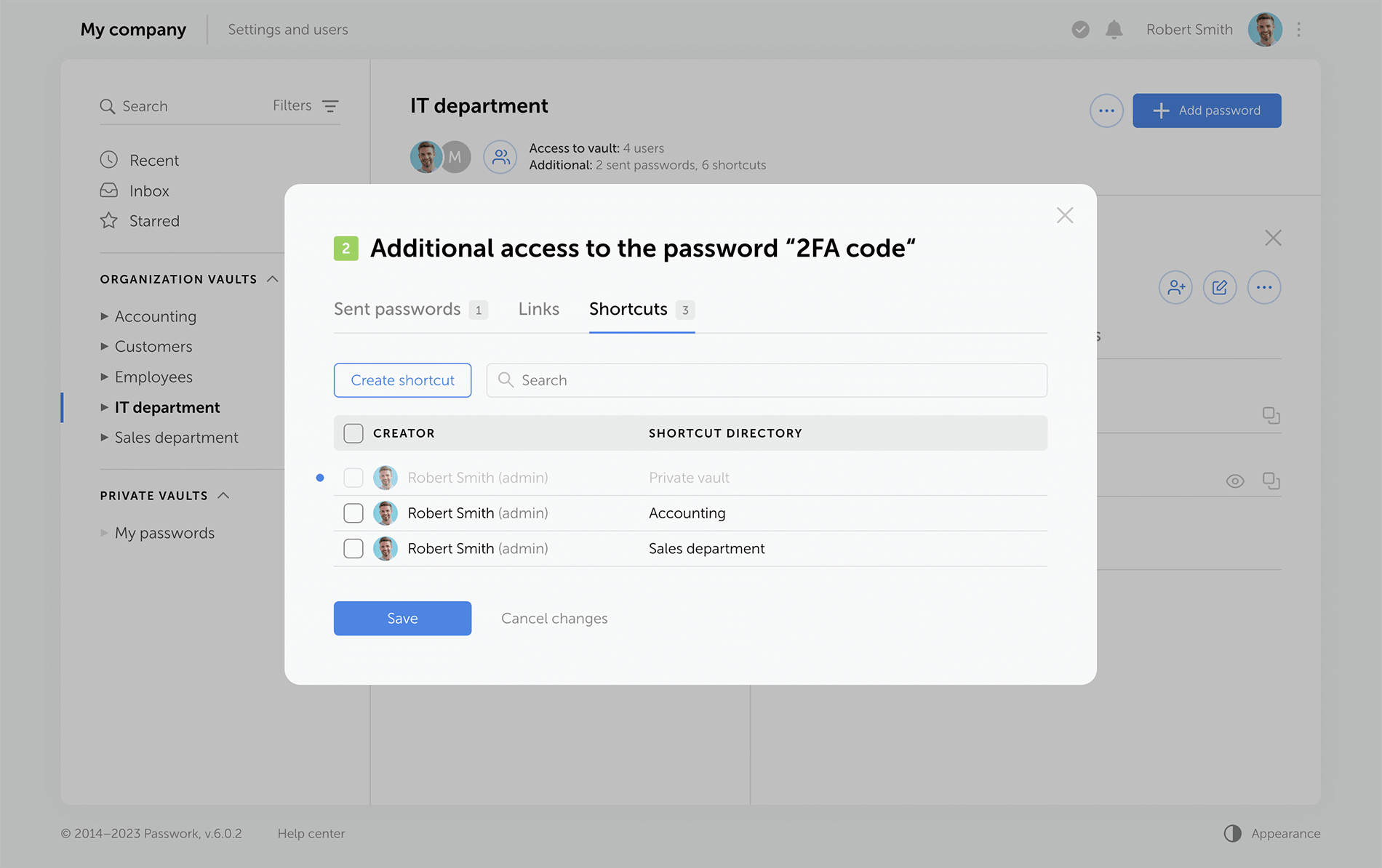
Shortcuts are a new way to share passwords, enhancing collaboration flexibility. There's no need for creating password duplicates in different vaults — instead, create multiple shortcuts in required directories. All changes to original passwords are reflected in shortcuts, keeping your team up to date. Users can view or edit data via shortcuts according to their access rights.

Choose the directories where you would like to create shortcuts
View the complete list of shortcuts to passwords created in a specific vault

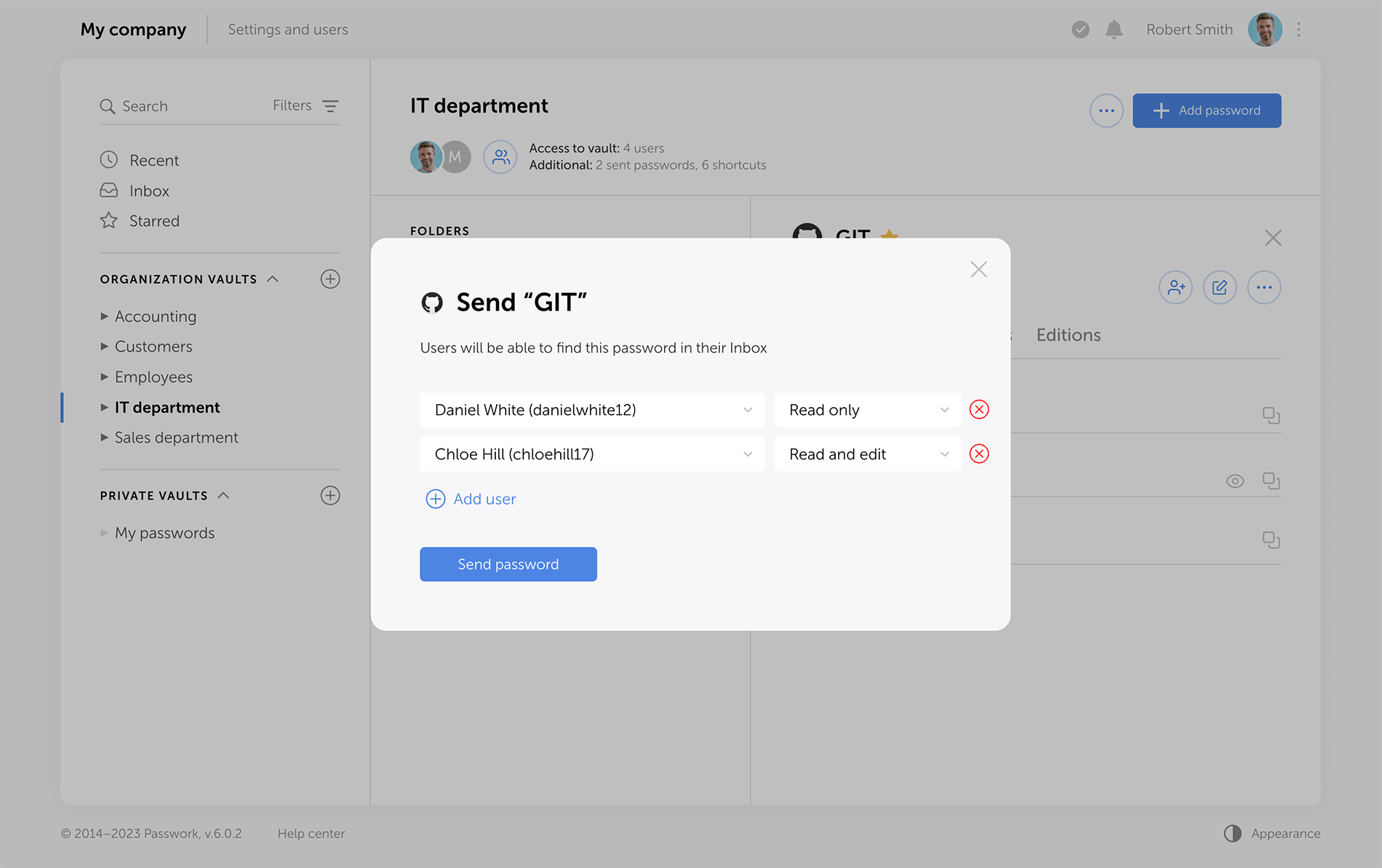
Sending passwords without granting partial access to vaults

Previous versions of Passwork encrypt passwords at the vault level. This type of encryption gives users partial access to vaults even when a single password is shared with them. Now, when users access passwords via their "Inbox" or a shortcut, they receive keys to specific passwords, but not their vaults.

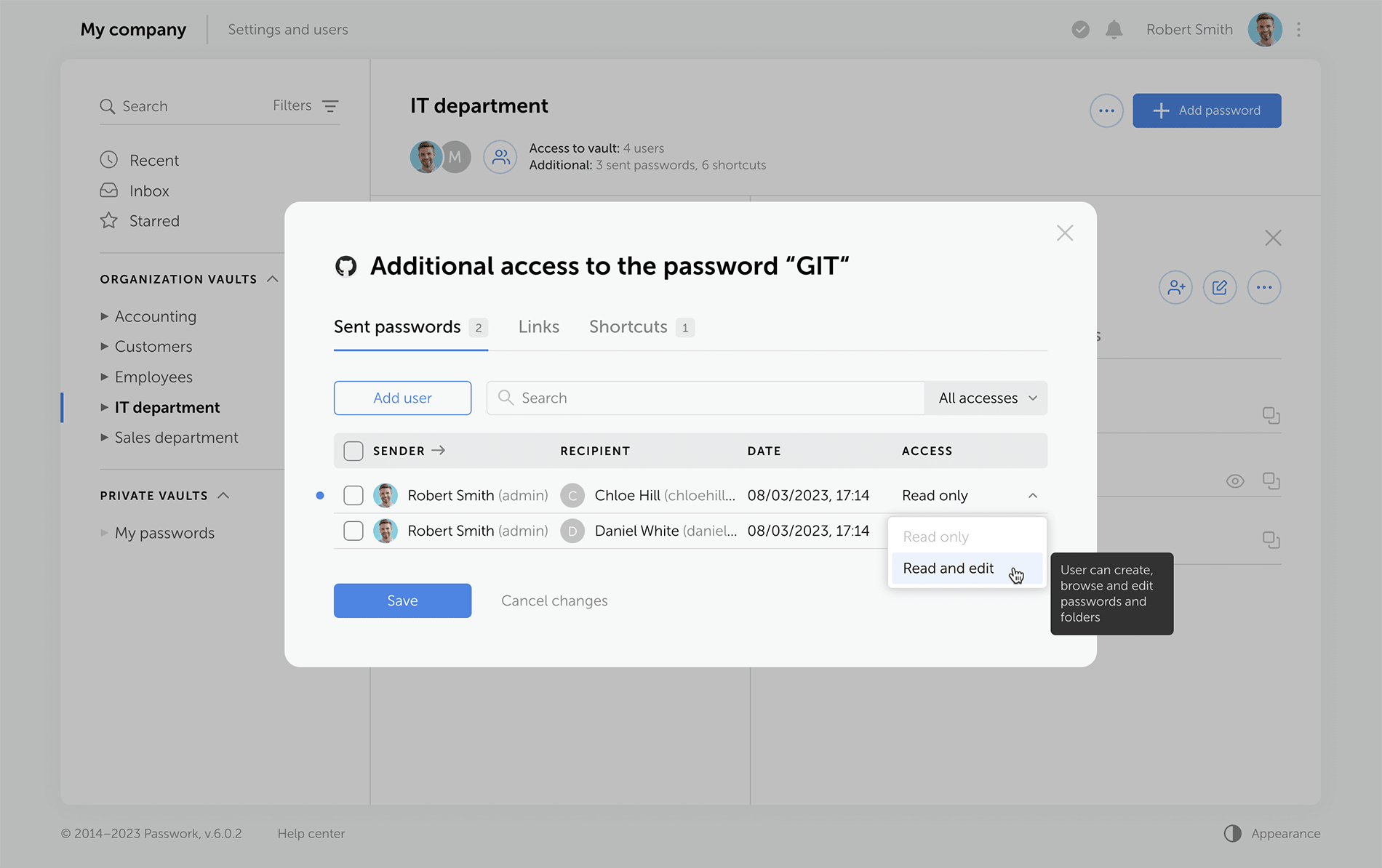
Administrators can clearly see who has vault access rights, and who can only work with specific passwords.

Send passwords to users with necessary access rights
View the complete list of all passwords that were sent from a specific vault

LDAP

The LDAP interface is now cleaner and more intuitive, with a reimagined user management logic. Adding new LDAP users is simpler and safer, especially with the client-side encryption enabled.

Previously, admins had to add an employee and provide a master password. Now, users set their master passwords upon the first login, and admins confirm them afterwards.

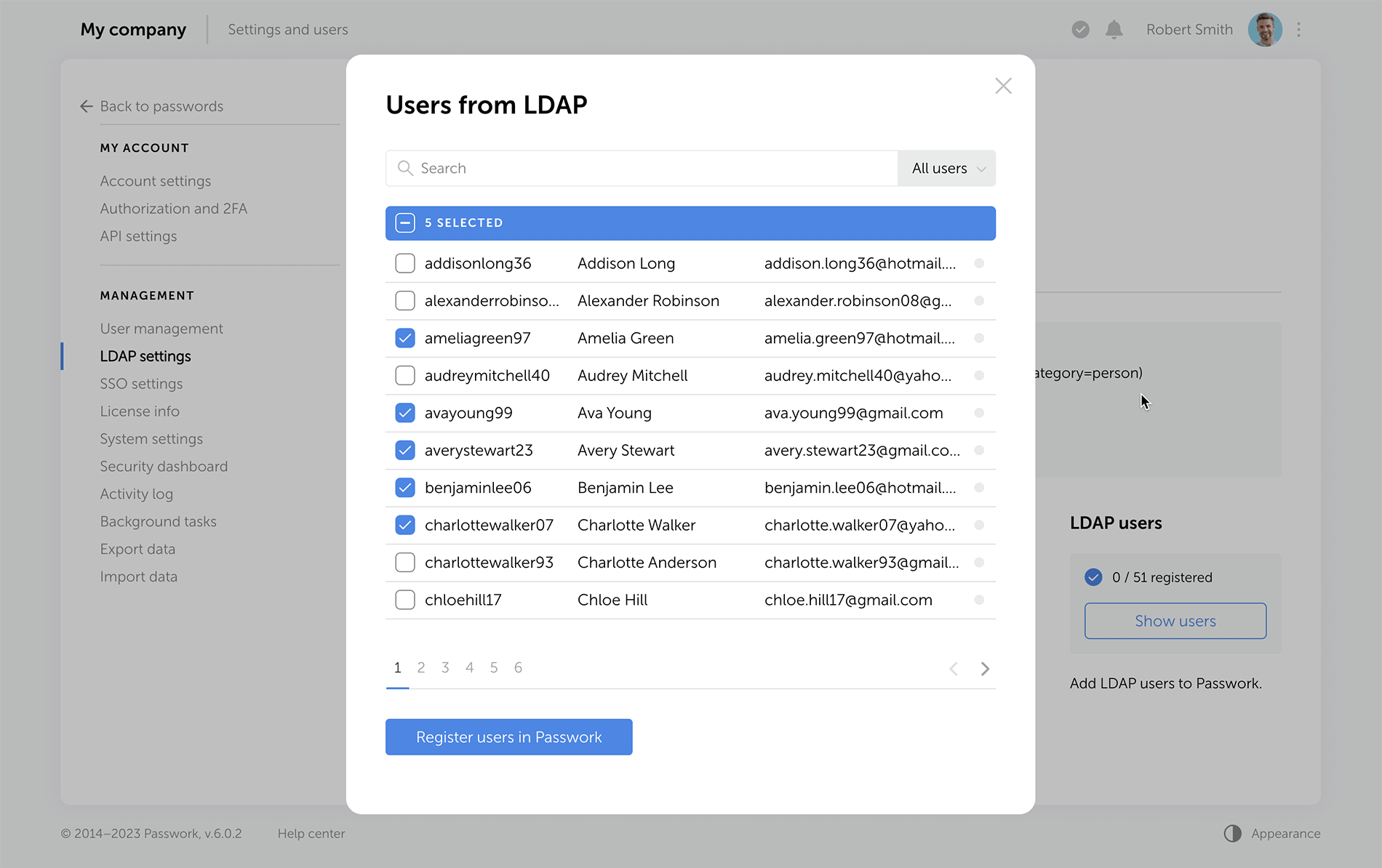
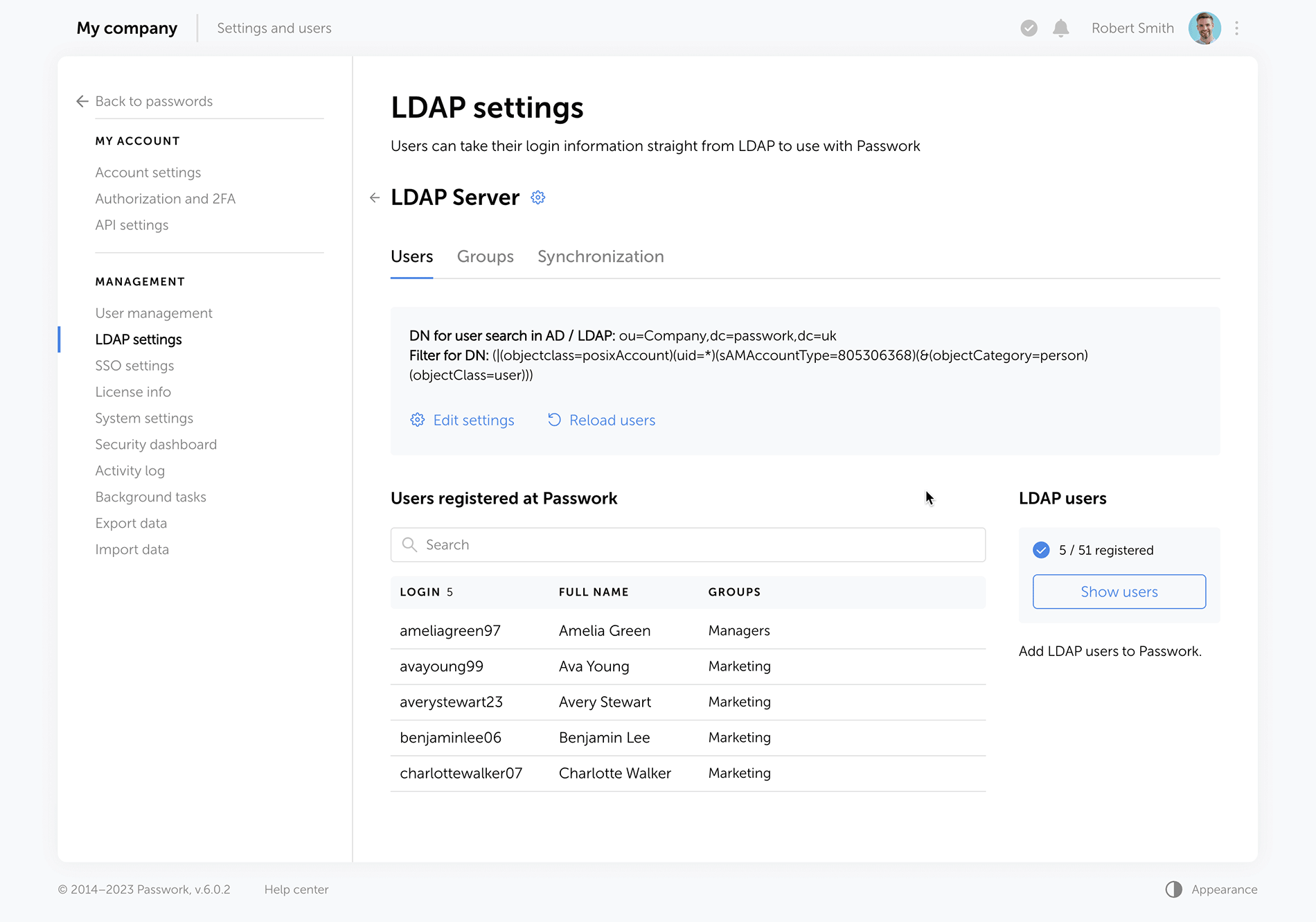
The "Users" tab shows registered users, and there is a separate window for adding new ones. LDAP user data updates take place in the background, allowing admins to navigate elsewhere without waiting for data refresh.

View your LDAP user list and add users to Passwork
Set up your LDAP integration in the updated interface

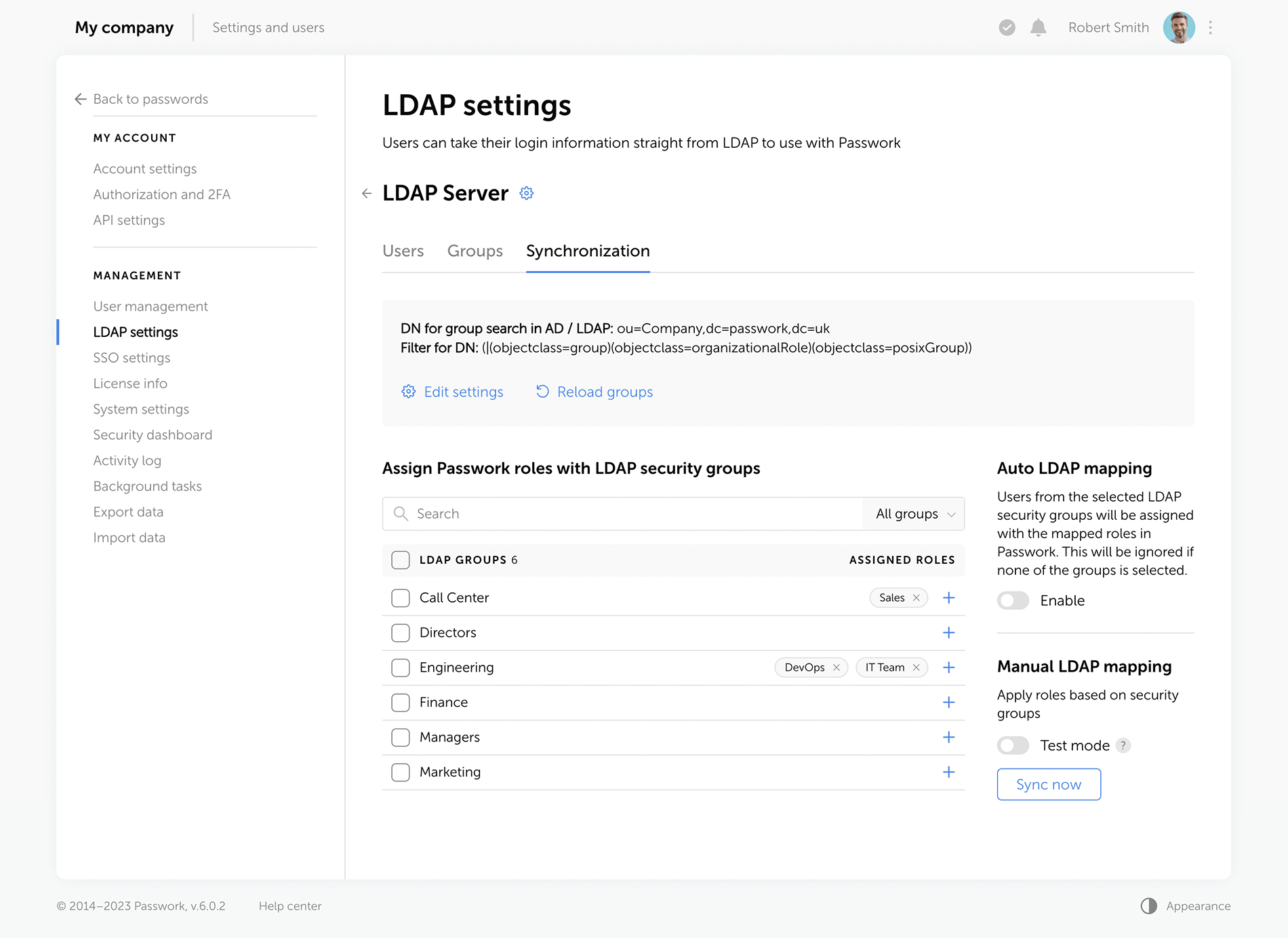
Passwork now provides more detailed security group information. The groups that are linked to roles are marked with special tags, and the groups which were not loaded from LDAP during the last update are marked as "Deleted", alerting admins to adjust the search settings or remove such groups. Also, you can now see the members of each security group.

Map your LDAP groups with Passwork roles and set up their automatic synchronization

Improved settings

We've redesigned all settings sections for a unified visual style and enhanced functionality, reimagined the logics of some settings.

Rights for links, tags, and password sharing
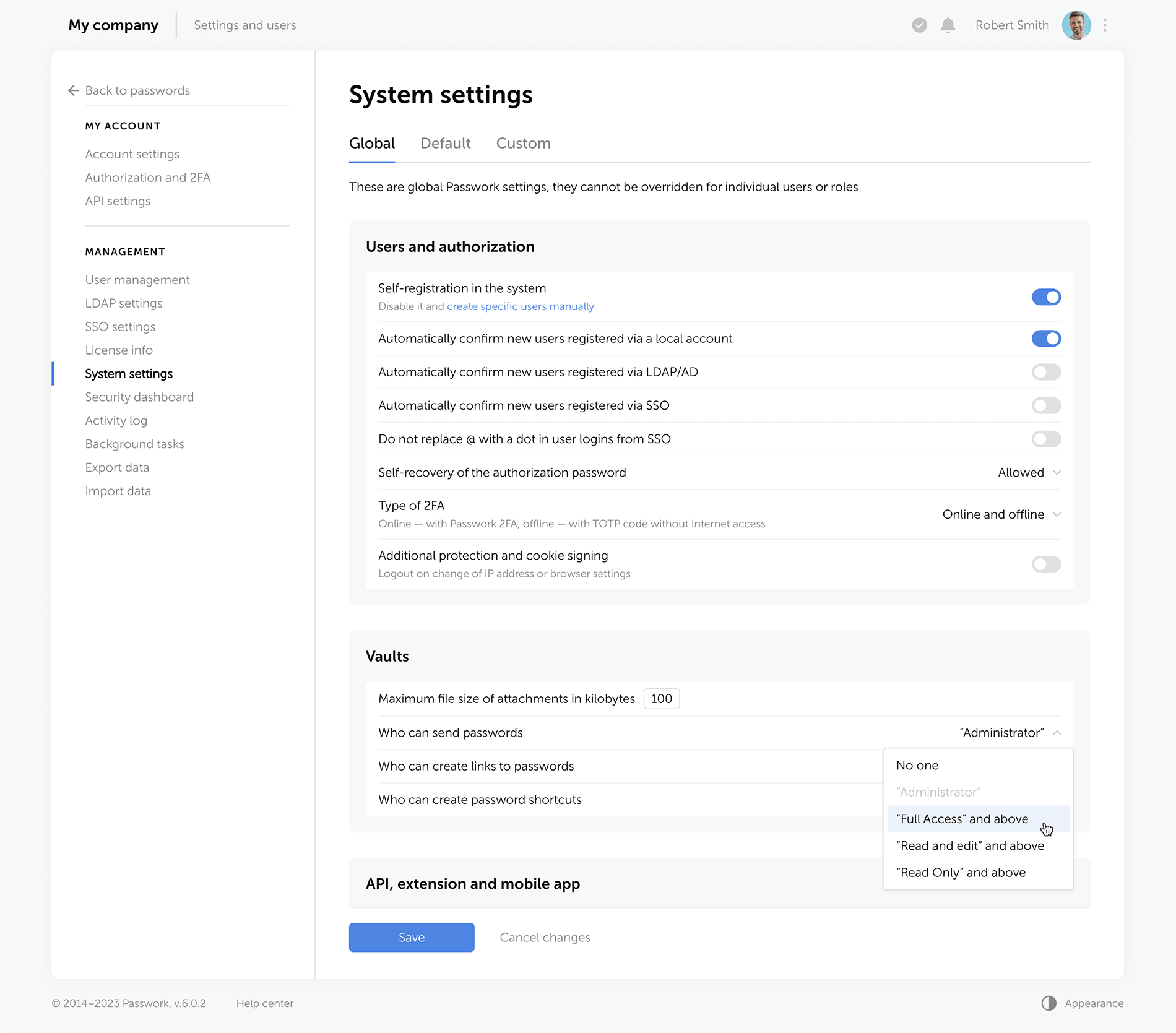
Previously, these settings were applied individually to each user. Now, they are applied to everyone with a certain level of vault access. For example, anyone with the “Edit” access rights or higher can create hyperlinks to passwords. These parameters are located in the system settings under the “Global” tab.

Change confirmation
We've added “Save” and “Cancel changes” buttons in system settings. Now, any changes to settings must be confirmed — this helps to prevent accidental actions.

Custom auto-logout time
Users can now set these parameters individually, and admins specify the maximum inactivity time period before automatic logout.

Language selection
In the new version of Passwork, admins can allow employees to choose their interface language.

Choose the required access level which will make it possible to send passwords, create links and shortcuts

Interface enhancements

Improved drag and drop
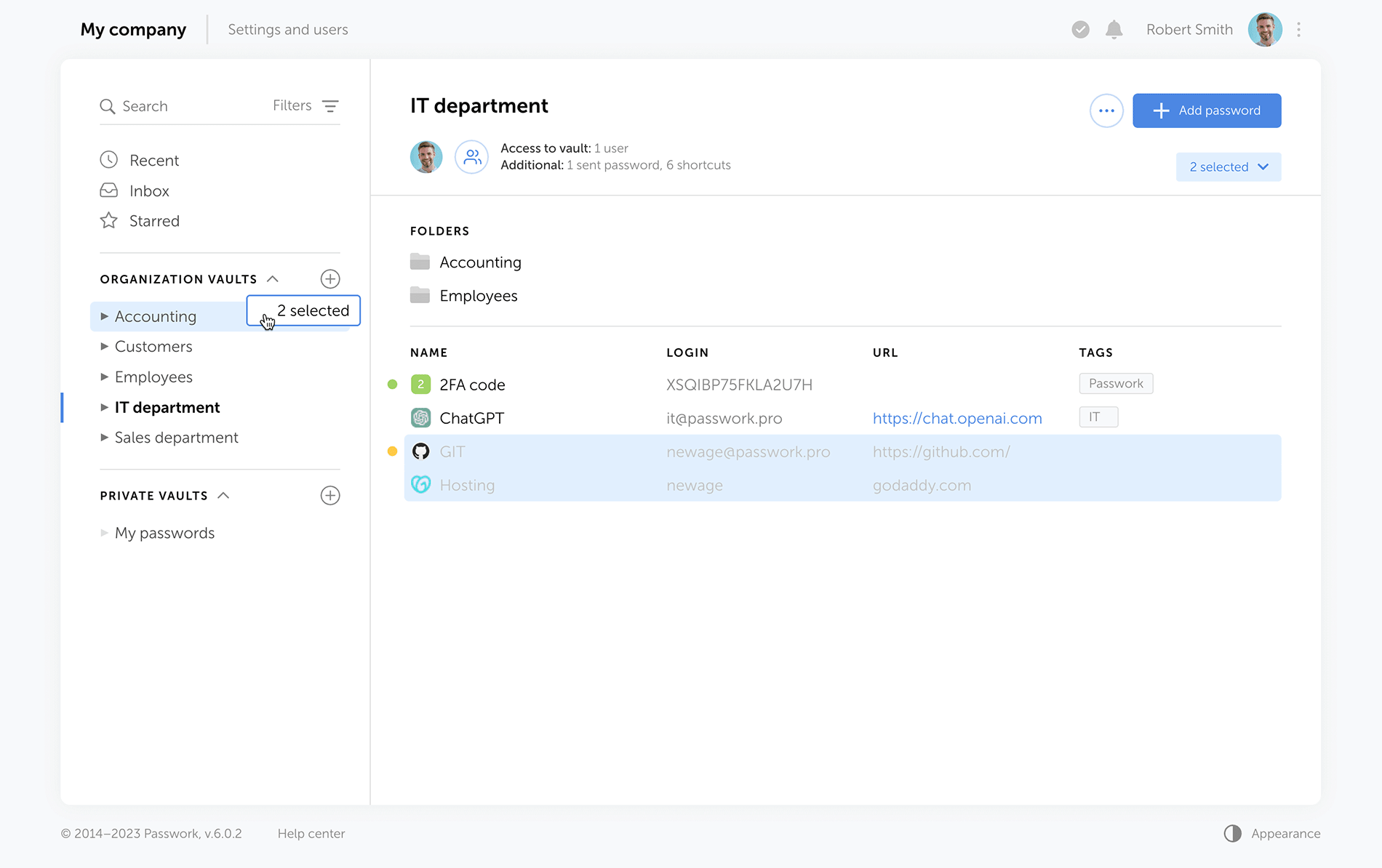
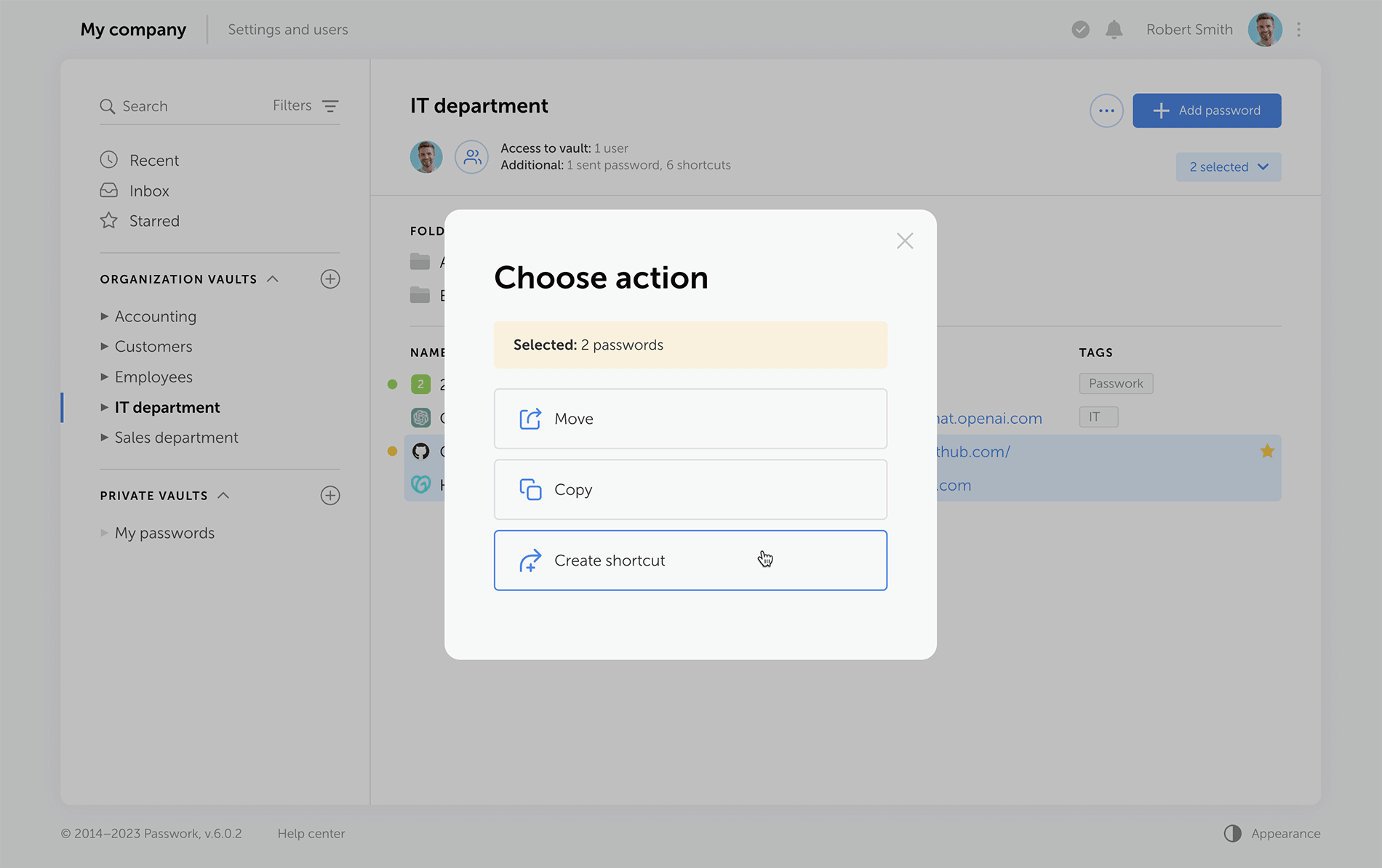
Now, when dragging and dropping passwords and folders into desired directories, Passwork displays selectable actions — move, copy, or create a shortcut.

Select folders and passwords, then drag and drop them to the required directory
Choose actions for the selected objects: move, copy, create shortcuts

Other improvements

Separate windows for access to the vault and additional access
Vault access info is now split into two easy-to-read windows. One window shows users who has access to a specific vault, and the other displays alternative ways passwords from this vault can be accessed — shortcuts, hyperlinks, or shared passwords.

Redesigned password action buttons
On the password panel, we've added the "Edit" button and grouped together all actions for additional password access via shortcuts, links, or direct user sharing.

Additional fields for password import and export
Passwork 6.0 supports the use of custom fields, that means you can transfer not only login and password but also additional information stored within password cards.

New notifications
Administrators will receive notifications about new unconfirmed users, and employees will be notified of new passwords in the "Incoming" section.


HIPAA requirements for password management
Introduction In the complex ecosystem of modern healthcare, patient data is essential for secure management. In 2024, the U.S. healthcare sector experienced over 700 large-scale data breaches, marking the third consecutive year with such a high volume of incidents. This surge compromised over 275 million patient records, a significant
GDPR password security: Guide to effective staff training
Learn proven strategies to train employees for GDPR password security compliance. Reduce breach risks with practical training methods.
Cyber insurance: A false sense of security?
Introduction As cyber threats and data breaches become more frequent and sophisticated, many organizations are looking to cyber insurance as a way to manage risk. But is cyber insurance a true safety net — or is it just a false sense of security? This question was at the core of the

Introducing Passwork 6.0

Sep 8, 2022 — 3 min read

Running tasks in the background

A new mechanism for handling tasks allows you to run them in the background. For example, you can run an LDAP synchronization task and still work in Passwork. Your synchronization task will run in the background.

You can see scheduled and completed tasks on the “Tasks” page. Here you can also find the configuration instructions for your operating system.

Display a favicon in the password list

The Passwork interface has become even more user friendly and convenient. If a password has a URL, a website icon will be displayed next to its name.

Automatic favicon loading can be set up by administrators on the “Company settings” page. In this case background tasks should be set up.

Other changes

  • Automatic session termination in the mobile app and Passwork extension when API key is changed
  • Removed white background in the dark theme when loading pages
  • Fixed bug displaying the results of an outdated search query
  • Improved validation of TOTP keys
  • Fixed empty messages in Syslog
  • Added login validation with UTF-8 encoding
  • Added automatic LDAP host swap :\\ → ://
  • Fixed errors in LDAP code related to the migration to PHP 8
  • Redesigned login and registration forms

Passwork: Secrets management and automation for DevOps
Introduction In corporate environment, the number of passwords, keys, and digital certificates is rapidly increasing, and secrets management is becoming one of the critical tasks for IT teams. Secrets management addresses the complete lifecycle of sensitive data: from secure generation and encrypted storage to automated rotation and audit trails. As
How SHA-256 works
If you’ve heard of ‘SHA’ in various forms but aren’t sure what it stands for or why it’s essential — you’re in luck! We’ll attempt to shed some light on the family of cryptographic hash algorithms today. But, before we get into SHA, let’s go over what a hash function
How to create a secure password
Of course you want to keep your data safe. So why are so many security precautions frequently overlooked? Many accounts, for example, are protected by weak passwords, making it easy for hackers to do their work. There is a fine line between selecting a password that no one can guess

Introducing Passwork 5.1

Jun 15, 2022 — 4 min read

Migration to PHP 8

The new version of Passwork now runs on PHP 8. Previous versions of PHP are no longer supported.

New access rights window

The window with access settings for vaults and folders has been completely redesigned. All users and roles having access to a vault or folder are now collected here as well as links and sent passwords.

The rights can now be edited on each tab by selecting multiple objects at once. All modified and deleted objects are marked by an indicator until you save changes. Search filters allow you to display all objects with a certain access right.

Ability to quickly view who accessed vaults and folders

When hovering over an icon next to the name of a vault or folder you can see some brief information about the number of users, roles, links and sent passwords.

Clicking on a list opens up the window for access rights management inside a given vault or folder.

Granting access to individual passwords without adding users to a vault

In previous versions of Passwork, it was possible to send a password copy to users. In the new version, users will see the original password in the Inbox, which will be updated when the original vault changes.

That means you can now give access directly to a password without adding users to a vault or folder.

You can send a password and enable users to edit it, then when a user changes this password, it will be updated for you as well.

Ability to add TOTP keys and then generate 2FA codes

When adding and editing a password, you can add a TOTP field and enter a secret code to generate 2FA codes. The generated code is updated every 30 seconds.

The "Password" field is now optional, so you can keep 2FA codes separate from main passwords.

Adding TOTP keys and generating 2FA codes is available in the web version, browser extension, and mobile app.

Failed login attempts are now displayed in the action history

The action history displays all failed user authorization attempts. This allows you to better track unauthorized access attempts and the actions of blocked users.

You can see all failed login attempts on the Activity Log page by enabling a filter in the Action column.

Ability to enable priority authorization using SSO

The new version of Passwork now allows you to enable SSO priority authorization for all users. You can enable it in the "SSO settings" section.

With this option enabled, only the "Sign in via SSO" button is displayed on the authorization page, the login and password fields appear only when switching to the standard authorization.

Optimized work with a large number of users

Passwork has been tested and optimized for 20,000+ users.

Improved LDAP integration

  • Test mode for LDAP roles and groups linking
  • Saving LDAP logs to a CSV file
  • Updating user attributes during synchronization with LDAP directory

Mobile app update

  • Passwork 5 support
  • Ability to copy passwords on long press
  • New home screen view with separating by type of vault
  • Inbox passwords
  • Improved search mechanism
  • Debug mode

Python connector 0.1.5: Automated secrets management
The new Python connector version 0.1.5 expands CLI utility capabilities. We’ve added commands that solve critical tasks for DevOps engineers and developers — secure retrieval and updating of secrets in automated pipelines. What this solves Hardcoded secrets, API keys, tokens, and database credentials create security vulnerabilities and operational bottlenecks.
GDPR password security: Guide to effective staff training
Learn proven strategies to train employees for GDPR password security compliance. Reduce breach risks with practical training methods.
HIPAA requirements for password management
Introduction In the complex ecosystem of modern healthcare, patient data is essential for secure management. In 2024, the U.S. healthcare sector experienced over 700 large-scale data breaches, marking the third consecutive year with such a high volume of incidents. This surge compromised over 275 million patient records, a significant

Introducing Passwork 5.0