For decades, the answer to "how do I make a strong password?" was: add a capital letter, throw a symbol at the end, append a number. The problem is that humans under rules are predictable. The capital goes at the front. The symbol and number go at the back. Cracking tools know this, because they were trained on billions of real passwords from people who followed exactly the same instinct.
Both human memory and cracking algorithms run on patterns. That's the conflict, and it doesn't go away by adding @ to the end of your dog's name. This guide explains the mechanics, the one exception, and what a sustainable credential system actually looks like.
Key takeaways
The easier a password is to remember, the easier it is to crack. Memorability and security pull in opposite directions. That tension is structural: it comes from how human memory works.
Symbol substitutionsand complexity rules do not meaningfully increase security. Modern password-cracking algorithms are trained specifically on these predictable human patterns, allowing attackers to bypass them with optimized brute-force attacks.
The latest NIST SP 800-63B guidelines officially drop mandatory complexity rules and 90-day rotations, establishing a new recommended minimum of 15 characters.
The only password type that is both memorable and cryptographically strong is a Diceware passphrase: random words chosen by dice, not by you.
You need to memorize exactly one password: the master passphrase that unlocks your password manager. Every other credential should be randomly generated and stored in the vault.
What is a strong password
A strong password is a credential that resists both automated guessing and targeted attacks. NIST SP 800-63B sets the minimum at 8 characters, recommends systems accept up to 64 characters, and drops mandatory complexity rules entirely in favor of length and uniqueness. The practical working baseline for most security teams is 12-16 randomly generated characters, with entropy above 75 bits.
Four parameters define whether a password meets that baseline:
Length. The single most effective variable. Each additional character multiplies the search space exponentially. At 12 characters, a fully random alphanumeric string requires billions of years to brute-force at current hardware speeds. At 8, that window collapses to hours.
Randomness. Human-chosen passwords cluster around predictable patterns: names, dates, dictionary words with substitutions. A password generator removes that clustering entirely. If you chose it, it is probably weaker than it looks.
Uniqueness. One credential per account. A single compromised password grants access to every system where it appears. Reuse transforms an isolated breach into a lateral movement opportunity.
No expiration without cause. NIST SP 800-63B explicitly deprecates mandatory periodic rotation. Forced rotation produces predictable increments (Password1 → Password2) and trains users to choose weaker base passwords. Change a credential when there is evidence of compromise.
The memorability paradox: Why your brain is a liability
Any property that makes a password easier to remember also makes it easier to guess. Human memory encodes information through patterns, associations, and meaning. A password that sticks in your mind does so because it connects to something you already know: a word, a date, a name, a keyboard shape. Those same connections are exactly what cracking tools exploit.
PassGAN (Generative Adversarial Network for password cracking) and similar tools are trained on billions of leaked credentials. They do not try aaaaaaa before p@ssword. They try the things humans actually choose, in the order humans actually choose them. Substituting @ for a in password gives you p@ssword, which PassGAN generates within the first few thousand guesses in less than a fraction of a second. Capitalising the first letter and adding 1 at the end are patterns the model has seen millions of times.
💡
According to the Home Security Heroes AI analysis, most common passwords can be cracked in seconds because AI tools model human psychology at scale instead of guessing randomly
Length and character set both matter, but they don't matter equally.Hive Systems' 2025 password table, tested against 12 × RTX 5090 GPUs with bcrypt at work factor 10, shows that an 8-character password using only lowercase letters falls in three weeks. Add uppercase, numbers, and symbols, and that figure reaches 164 years against the same hardware. A 12-character password with the same full mixed-character set takes the table into centuries.
The table is updated annually to reflect current consumer GPU hardware. The shift from the 2024 edition to 2025 reflects both faster hardware and more realistic hash strength assumptions drawn from what Hive Systems observed in actual breach data.
Why traditional password advice is dead
The old complexity rules (eight characters, one uppercase, one number, one symbol) failed, because they were wrong about human behaviour under constraints. Where the memorability paradox describes a cognitive failure, mandatory complexity rules produced a policy failure on top of it.
For years, the dominant cracking approach was dictionary attacks: automated tools cycling through known words and common substitutions. Security teams responded by mandating complexity. The problem is that humans under complexity pressure are predictable. When told to add a symbol, most people add it at the end. When told to substitute a letter, most choose the same substitutions. The rules designed to increase unpredictability produced a new layer of predictable behaviour.
💡
NIST recognised this in SP 800-63B: the guidance explicitly dropped mandatory periodic resets and complexity rules, citing exactly this failure mode
The other failure of old advice was the 90-day rotation policy. Forced resets produce Summer2025! followed by Fall2025!. Verizon's 2026 DBIR, which analyzed over 22,000 confirmed breaches across 145 countries, found that vulnerability exploitation has now overtaken credential theft as the primary breach entry point (31%). Credential abuse sits at 13% as an initial access vector, but that figure looks at only the first action. The DBIR found that credential abuse appears in 39% of all breaches when measured across the full attack chain making it the single most pervasive technique in the dataset.
Length is the primary defense. A 15-character passphrase built from random words is orders of magnitude stronger than an 8-character string of symbols, and a human can actually remember it.
The new standard: NIST SP 800-63B Rev. 4 guidelines
NIST SP 800-63B Rev. 4 (2025) sets the current baseline for password security. When a password is the only authentication factor, systems must require a minimum of 8 characters and should require at least 15 characters. Mandatory complexity rules (forced symbols, numbers, mixed case) are explicitly dropped, as is the 90-day expiration cycle. Checking new passwords against known-breached credential lists is now required, not optional.
The full shift in policy looks like this:
Rule
Old guidance (Rev. 3)
New guidance (Rev. 4)
Minimum length
8 characters
8 characters required; 15 recommended
Complexity requirements
Mandatory (symbols, numbers, uppercase)
Dropped, no longer required
Password expiration
Every 90 days
Only when compromise is suspected
Password hints
Allowed
Prohibited
Knowledge-based authentication
Allowed
Prohibited
Checking against breached lists
Optional
Required
The logic behind dropping complexity is well-documented. NIST's own research found that complexity requirements push users toward predictable patterns and increase support costs without meaningfully improving resistance to automated attacks. Length has a direct mathematical relationship with cracking difficulty: each additional character multiplies the search space exponentially.
For IT administrators, the practical implication is clear: update your password policies to require 15+ characters, remove arbitrary complexity mandates, and implement checks against known-breached password lists such as the Have I Been Pwned dataset, which NIST explicitly references. Stop forcing rotations on a calendar schedule.
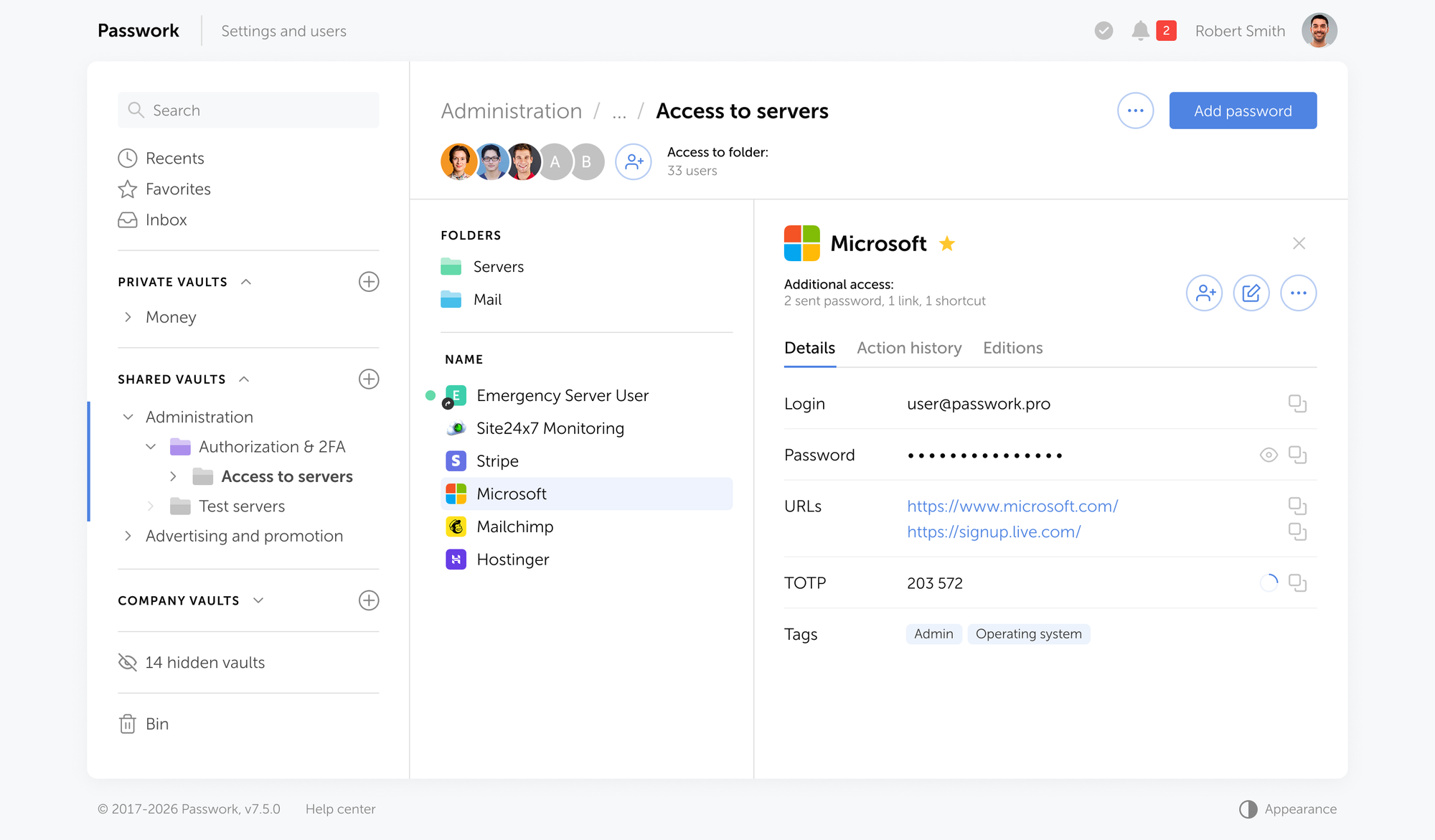
Managing password policies across hundreds of users is where enforcement breaks down. Passwork gives IT teams centralized control over credential vaults, role-based access, and audit logs, without pushing complexity onto end users. See how Passwork works
Passwords vs. passphrases
A passphrase is a sequence of random, unrelated words used as a single credential. Words are easier to retain than random characters, and length alone pushes entropy well above what most character-based passwords achieve. Four words already outperform a typical 10-character mixed-case string .
Password entropy measures how unpredictable a credential is, expressed in bits. Higher entropy means more possible combinations an attacker must try.
Tr0ub4dor&3 looks complex. But it is a dictionary word with predictable substitutions, a capital at the start, and a symbol and number appended at the end, a pattern that cracking tools model explicitly. Its effective entropy is far lower than it appears.
correct horse battery staple illustrates the math directly. Four words chosen randomly from that list gives approximately 44 bits of entropy (log₂ of 2,000⁴). Six random words from the Diceware list (7,776 words) produces around 77 bits, enough to resist brute-force attacks for decades at current computing speeds.
The critical word is random. "I love my dog Biscuit" is a passphrase, but it is not random. It reflects personal information and a natural sentence structure that cracking tools can model. A passphrase you invented is not random, because you invented it. True randomness requires a method that removes human choice from the equation entirely.
The techniques below solve one specific problem: how to create and remember a single master passphrase. That passphrase has one job — unlocking your password manager. For every other credential you own, the answer is a randomly generated password stored inside that manager, not a passphrase you constructed and memorized.
The Diceware method
The Diceware method generates cryptographically random passphrases using physical dice and a standardized word list. Because the randomness comes from dice rolls rather than human choice, the resulting passphrase has provable entropy and sidesteps the memorability paradox entirely.
Download the EFF Large Wordlist, which contains 7,776 words indexed by five-digit dice codes (e.g., 16132 = cleft).
Roll five six-sided dice (or one die five times). Record the result, for example, 2-4-1-3-6.
Look up the corresponding word in the EFF list. 24136 maps to dragster.
Repeat steps 2-3 five more times to generate a six-word passphrase.
Your result might be: dragster cleft robin usage stomp anvil. Write it down temporarily.
Six words from the EFF list gives approximately 77.5 bits of entropy. That is the target. Five words (64.6 bits) is acceptable for most use cases; four words is the absolute minimum for a master password.
No dice? Use a generator
If physical dice aren't available, Passwork's free passphrase generator applies the same logic in a browser. It runs entirely locally — nothing is stored or transmitted. You can adjust word count, separators, and capitalization to match your requirements. The output is the same provably random result as Diceware, without the wordlist lookup.
The sentence method
The sentence method is better suited for people who need to create a strong master password quickly without dice. Take a sentence that is personally meaningful but not publicly known, and derive a password from its structure.
Example sentence: "My first car was a 1998 Honda and I drove it to college."
Derived password:MfcWa1998HaIdItC
This produces a 16-character string with mixed case and numbers that has no dictionary relationship. The sentence itself is the mnemonic: you remember the sentence, not the password.
The limitation: this method produces less entropy than Diceware because humans choose memorable sentences, and memorable sentences follow predictable grammatical patterns. Use it only for the master password when Diceware is not practical. For everything else, use a manager.
The memory palace technique
The memory palace (Method of Loci) is a mnemonic technique for retaining the master passphrase you generated with Diceware. It works by associating each word with a specific physical location in a familiar space: your home, your commute route, a building you know well.
To memorize dragster cleft robin usage stomp anvil:
Choose a familiar route through a space you know well: your front door, hallway, kitchen, living room, stairs, bedroom.
Assign one word to each location. Make the image vivid and unusual: a dragster roaring through your front door, a cleft rock splitting your hallway floor, a robin sitting on your kitchen counter.
Walk the route mentally, in order, several times. The stranger the image, the more reliably it sticks.
After 24 hours, test recall without looking at the written passphrase. Most people can recall all six words after three or four mental walkthroughs.
The memory palace works because the brain encodes spatial and visual information more reliably than abstract strings. You are not memorizing dragster cleft robin usage stomp anvil. You are memorizing a walk through your house.
Once the passphrase is memorized, destroy the written copy.
Knowing how to construct and retain a master passphrase is a useful skill. But memorability is a constraint, and constraints produce compromises. A password manager removes that constraint entirely: it generates credentials with full entropy, stores them encrypted, and retrieves them without asking you to remember anything beyond one passphrase. The techniques above exist to protect that one passphrase. Everything else should be generated, not invented.
The only standard: One passphrase, everything else in a password manager
The memorability paradox has a single structural solution. You memorize one randomly generated master passphrase. A password manager generates and stores everything else, producing fully random, unique credentials for every account that you never need to see, type, or remember. That structure holds whether you have five accounts or five hundred.
In practice, this means:
Zero password reuse across accounts — every credential is unique and randomly generated.
One thing to memorize — the master passphrase you created with Diceware.
No security decisions to make at login — the manager handles generation, storage, and autofill.
Passwork is built for this architecture. It is available as a self-hosted deployment or as a cloud service. Both options use AES-256 client-side encryption: credentials are encrypted before they leave your device, and Passwork never sees plaintext passwords.
The two deployment models differ in one dimension:
The self-hosted option keeps all data within your own infrastructure.
The cloud option removes the operational overhead of running your own instance without changing the encryption model.
Role-based access control lets administrators assign vault permissions to teams rather than individuals — relevant if you are managing credentials for a team rather than just yourself. A new engineer inherits access to the right vaults on day one and loses it the moment they leave, with no manual cleanup required.
For teams with compliance requirements, Passwork's audit logs provide a full record of who accessed which credential and when — the kind of documentation that SOC 2 CC6.1 and ISO 27001:2022 Annex A 5.15 controls require. The technical guides cover AD/LDAP integration, SAML SSO, and REST API access for teams that need to embed credential management into existing workflows.
Strong password examples: What good looks like in 2026
Credential type
Example
Entropy (approx.)
Memorable?
Recommended use
8-char complex
Tr0ub4dor&3
~28 bits effective
No
Avoid
12-char random
k9#Lm2@pQr7!
~78 bits
No
Acceptable for low-risk accounts
4-word Diceware
dragster cleft robin usage
~51 bits
Yes
Secondary accounts
6-word Diceware
dragster cleft robin usage stomp anvil
~77 bits
Yes (with memory palace)
Master password only
Sentence-derived
MfcWa1998HaIdItC
~52 bits
Yes (via sentence)
Master password only
Machine-generated
k9#Lm2@pQr7!xN3$
~105 bits
No — stored in manager
All other accounts
Machine-generated secret
eyJhbGciOiJIUzI1...
256 bits
N/A
API keys, tokens: use a secrets manager
The "recommended use" column is the point. Diceware and sentence-derived passwords appear once in your life, as the master credential. Every other account gets a machine-generated password that you never see, never type, and never need to remember.
Putting it into practice
The memorability paradox does not have a workaround — it has a solution. Memorize one thing, generated randomly, using a method that removes your brain from the process. Use that to unlock a password manager that handles every other credential with machine-generated randomness you never have to think about.
Generate a 6-word Diceware passphrase. Encode it with a memory palace. Put everything else in a vault.
Once your master passphrase is set, Passwork handles the rest: vaulted credentials, team access controls, and a full audit trail. Available as a self-hosted deployment or in the cloud. Try Passwork free
Frequently asked questions
How long should a strong password be in 2026?
NIST SP 800-63B Rev. 4 (2025) sets the absolute minimum at 8 characters but recommends at least 15 characters when a password is the sole authentication factor. For master passwords protecting a password vault or privileged accounts, a 6-word Diceware passphrase (roughly 25-35 characters) is the current best practice. Length is the primary driver of cracking resistance.
What is password entropy and why does it matter?
Password entropy measures how unpredictable a password is, expressed in bits. It is calculated as log₂ of the number of possible combinations. A 6-word Diceware passphrase drawn from the EFF list has approximately 77.5 bits of entropy. Higher entropy means an attacker must try more combinations to crack the password by brute force. Complexity rules add less entropy than they appear to; length adds entropy directly and predictably.
Is a passphrase more secure than a complex password?
Yes, in most cases. A 6-word random passphrase has higher entropy than a typical 10-character "complex" password, and it is far more resistant to the pattern-matching that AI cracking tools use. The key word is random. A passphrase built from personally meaningful words is weaker than it appears because human choices follow predictable patterns.
What is the Diceware method?
Diceware is a technique for generating random passphrases by rolling physical dice and mapping the results to words on a standardized list. The EFF Large Wordlist contains 7,776 words indexed by five-digit dice codes. Rolling five dice once produces one word; six rolls produce a six-word passphrase with approximately 77.5 bits of entropy. Because the randomness comes from dice rather than human choice, the result is provably unpredictable.
Should I still use a password manager if I have a strong passphrase?
Yes. A strong passphrase solves the master credential problem: the one password you memorize to unlock everything else. It does not solve the problem of managing dozens of separate credentials across different systems. A password manager generates fully random, unique passwords for every account and stores them securely. The passphrase is the key to the vault. The vault does the rest.
How do I remember a long passphrase?
The memory palace technique (Method of Loci) is the most reliable method for most people. Assign each word in your passphrase to a specific location along a familiar route (your home, your commute) and create a vivid mental image for each word. Walk the route mentally several times over 24-48 hours. Most people can reliably recall a six-word passphrase after four or five practice runs.
What changed in NIST's password guidelines?
NIST SP 800-63B Rev. 4 made several significant changes. It dropped mandatory complexity requirements (forced symbols, numbers, mixed case). It eliminated calendar-based password expiration, recommending resets only when compromise is suspected. It prohibited password hints and knowledge-based authentication questions. It now requires checking new passwords against known-breached credential lists. The minimum length remains 8 characters, with 15 characters as the recommended standard for single-factor authentication.
Why can't I just create memorable passwords without a manager?
Because memorability and security are in direct tension. The human brain encodes information through patterns and associations. Any password that feels memorable is, by definition, patterned — and patterns are what cracking algorithms are trained to find. The only exit from this paradox is to memorize one strong master passphrase and delegate everything else to a tool that generates true randomness.
How to create a strong password you won't forget (2026 guide)
Complexity rules failed. Adding @ to your dog's name doesn't make a password strong — it makes it predictable. This guide covers what NIST SP 800-63B actually requires, why Diceware beats every complexity rule, and the one-passphrase system that solves the rest.
O Shadow IT em 2026 não se parece em nada com o que era há cinco anos. O problema agora são os agentes de IA com tokens OAuth persistentes, as sessões de LLM a processar silenciosamente código-fonte proprietário e as contas SaaS órfãs que já ninguém se lembra de ter criado. Cada uma delas alarga a superfície de ataque da organização muito além do que um perímetro de rede tradicional foi concebido para gerir.
De acordo com o relatório State of Shadow AI da UpGuard, mais de 80 % dos colaboradores utilizam ferramentas de IA não aprovadas. Um inquérito da Gartner a 302 responsáveis de cibersegurança (março–maio de 2025) concluiu que 69 % das organizações suspeitam, ou já confirmaram, que colaboradores utilizam ferramentas públicas de IA generativa (GenAI) proibidas. A Gartner prevê que, até 2030, mais de 40 % das empresas sofrerão um incidente de segurança ou de conformidade relacionado com Shadow AI não autorizado.
O relatório DTEX/Ponemon 2026 Cost of Insider Risks da DTEX/Ponemon situa o custo anual da negligência interna, impulsionada sobretudo pelo Shadow AI, em 10,3 milhões de dólares por organização. Este valor abrange incidentes sem qualquer intenção maliciosa: apenas colaboradores a utilizar ferramentas que a TI nunca aprovou, e orçamentos a financiar silenciosamente infraestrutura que ninguém vê nem protege.
Pontos principais
O Shadow IT em 2026 é tanto um problema de IA como um problema de SaaS. Os agentes de IA com tokens OAuth persistentes, as sessões de LLM que processam código-fonte proprietário e as contas SaaS órfãs que sobrevivem aos seus proprietários são agora os riscos de maior gravidade.
O Shadow AI é categoricamente diferente do Shadow IT tradicional. As ferramentas SaaS não autorizadas armazenam dados no local errado. As ferramentas de IA não autorizadas processam-nos, analisam-nos e atuam sobre eles.
A exposição financeira está quantificada. O relatório Cost of a Data Breach 2025 da IBM concluiu que o envolvimento de Shadow AI acrescenta 670 000 dólares ao custo médio de uma violação de dados, que é de 4,44 milhões de dólares. O relatório DTEX/Ponemon 2026 Cost of Insider Risks situa o custo anual da negligência interna impulsionada por IA em 10,3 milhões de dólares por organização.
A deteção exige pelo menos cinco fontes de dados a funcionar em paralelo. O CASB, a análise de registos de DNS, o EDR, a revisão de dados de despesas e a análise de integração de e-mail cobrem, cada um, uma fatia diferente do ambiente. Nenhum método isolado vê, em simultâneo, dispositivos pessoais, contas de nível gratuito e endpoints geridos.
As organizações europeias enfrentam uma exposição regulatória em camadas. As ferramentas SaaS não autorizadas violam o artigo 28.º do RGPD no momento em que processam dados pessoais sem um acordo de tratamento de dados (DPA) assinado. O artigo 21.º da NIS2 trata as ferramentas de terceiros não avaliadas como risco de cadeia de fornecimento. O artigo 28.º da DORA exige que as entidades financeiras registem todos os prestadores de TIC, sejam eles Shadow IT ou não.
Bloquear sem capacitar falha sistematicamente. Quase metade dos colaboradores continua a utilizar contas pessoais de IA depois de uma proibição organizacional. A resposta eficaz passa por tornar o caminho aprovado mais rápido do que a alternativa não autorizada: um fluxo de aprovação simples, uma gestão centralizada de credenciais e um programa de sensibilização para a segurança que torna o risco concreto.
O Quadro de Governação de Shadow IT em 6 passos (descobrir e classificar, centralizar as credenciais, estabelecer a política, simplificar as aprovações, automatizar a saída de colaboradores, reforçar a sensibilização para a segurança) aborda tanto a vertente técnica como a comportamental do problema. As ferramentas tratam da deteção. O quadro muda a estrutura de incentivos que, em primeiro lugar, leva à adoção de Shadow IT.
O que é o Shadow IT?
O Shadow IT é qualquer tecnologia (software, serviço cloud, ferramenta de IA ou hardware) que os colaboradores utilizam para trabalhar sem o conhecimento ou a aprovação formal da TI. Vai desde uma pasta pessoal do Dropbox utilizada para partilhar ficheiros de um projeto até um assistente de programação com IA com acesso OAuth a repositórios de produção. O denominador comum: nenhuma revisão de segurança, nenhum registo de aquisição, nenhum registo de auditoria.
O Shadow IT não é um problema de nicho. A Gartner estima que as ferramentas não autorizadas consomem entre 30 e 40 % das despesas de TI nas grandes empresas. A análise da Harmonic Security a 22,4 milhões de pedidos (prompts) de IA empresarial identificou 665 ferramentas distintas de IA generativa em utilização em ambientes empresariais – ainda assim, apenas 40 % dessas organizações tinham adquirido uma subscrição de IA oficial. O tráfego de GenAI disparou mais de 890 % só em 2024.
Shadow IT vs. Shadow AI: como os riscos se comparam
Dimensão
Shadow IT
Shadow AI
O que é
Aplicações, dispositivos ou serviços cloud não autorizados a funcionar fora da visibilidade da TI
Ferramentas e modelos de IA não autorizados a processar dados empresariais sem supervisão de segurança
Ponto de entrada típico
Um colaborador regista-se numa ferramenta SaaS com o e-mail profissional
Um colaborador cola um documento, um excerto de código ou uma credencial num chat de IA público
O que fica exposto
Ficheiros e dados armazenados num serviço não aprovado
Dados lidos, resumidos e potencialmente retidos ativamente por um modelo de terceiros
Risco de credenciais
Palavras-passe guardadas em aplicações ou navegadores não aprovados
Chaves de API, tokens e cadeias de ligação a bases de dados colados diretamente em prompts
Deixa rasto?
Normalmente sim: registos de rede, alertas de CASB, consultas de DNS
Frequentemente não: as sessões baseadas no navegador e os modelos locais não geram pegada de rede
Quem deteta primeiro
A equipa de TI ou de segurança, através de ferramentas
Ninguém, até uma violação ou uma auditoria de conformidade
Exposição de conformidade
Residência de dados, artigo 32.º do RGPD, lacunas no controlo de acessos
Regulamento de IA da UE, NIS2, consentimento para treino de dados, responsabilidade pelos resultados
Velocidade de propagação
Ferramenta a ferramenta, ao longo de meses
Numa equipa inteira em dias: as funcionalidades de IA chegam incorporadas em ferramentas que as pessoas já utilizam
Estado da governação
Maduro: existem políticas, CASB e ferramentas de DLP
Imaturo: a maioria das organizações não tem um inventário de utilização de IA para aplicar
Como abordar
Bloquear serviços não autorizados, impor alternativas aprovadas
Auditar as ferramentas de IA em utilização, classificar a sensibilidade dos dados, estabelecer políticas de higiene de prompts
O que leva os colaboradores a utilizar o Shadow IT?
Os colaboradores recorrem a ferramentas não autorizadas quando as alternativas aprovadas são demasiado lentas, demasiado limitadas ou simplesmente ainda não existem. A causa é a fricção: um programador que espera três semanas por um assistente de IA licenciado encontra um gratuito antes do final do dia.
Três padrões repetem-se em organizações de todas as dimensões:
A velocidade acima do processo. Os colaboradores recorrem ao que resolve o trabalho mais depressa. Quando as ferramentas aprovadas não estão à altura do que está livremente disponível fora da organização, a escolha é óbvia: usar o que funciona.
Atraso na aquisição. Os ciclos de software empresarial contam-se em trimestres. As ferramentas de IA lançam-se em semanas. Quando a TI avalia e aprova uma ferramenta, os colaboradores já construíram fluxos de trabalho à volta do equivalente de nível gratuito.
Lacunas funcionais. As ferramentas aprovadas raramente cobrem casos limite. Um analista de dados que precisa de um ambiente Python rápido, ou um designer que precisa de um gerador de imagens específico, recorre ao que funciona, não ao que consta da lista aprovada.
Ausência de ciclo de retorno. Os colaboradores raramente comunicam as ferramentas que utilizam porque não existe um canal simples para o fazer. A TI não sabe o que governar. A segurança não sabe o que auditar. A diferença entre a utilização real de ferramentas e o inventário aprovado alarga-se silenciosamente.
As proibições não se sustentam. Quase metade dos colaboradores continua a utilizar contas pessoais de IA depois de uma proibição organizacional. A proibição não elimina o Shadow IT. Limita-se a afastá-lo da vista, tornando a deteção mais difícil e a resposta mais lenta.
Estes padrões são uma resposta previsível a estruturas de governação que não acompanharam a velocidade a que as ferramentas evoluem. É exatamente essa diferença que transforma o Shadow IT num risco sistémico, e não num problema de disciplina.
A evolução do Shadow IT em 2026
O Shadow IT em 2026 ultrapassou largamente o armazenamento cloud não gerido. Abrange agora ferramentas de IA, agentes autónomos e ecossistemas SaaS inteiros que a TI nunca aprovou, nunca inventariou e não consegue monitorizar. A empresa média utiliza 305 aplicações SaaS, gasta 55,7 milhões de dólares por ano em SaaS, e viu a despesa em aplicações nativas de IA aumentar 108 % ao ano – a maior parte desse crescimento a um ritmo mais rápido do que as equipas de governação conseguem acompanhar.
Da proliferação de SaaS ao Shadow AI
O número de 305 aplicações provém do 2026 SaaS Management Index da Zylo, que se baseia em dados reais de despesa de milhares de organizações. Uma parte significativa dessas aplicações nunca foi formalmente aprovada. Os colaboradores adotam ferramentas de forma independente, e a TI só fica a saber meses depois, quando fica a saber.
O Shadow AI acelera esta dinâmica. Assistentes de IA gratuitos, geradores de código e agentes autónomos tornaram-se amplamente disponíveis mais depressa do que os ciclos de aquisição conseguiram responder. O 2026 Cloud Security Report da Check Point concluiu que 78 a 80 % dos trabalhadores utilizam ferramentas pessoais de IA no trabalho. A maioria dessas sessões ocorre através de contas pessoais, fora do SSO, fora do DLP e sem qualquer registo de auditoria.
O Shadow ITtradicional cria uma residência de dados não gerida: ficheiros alojados num serviço não autorizado.
O Shadow AI cria um processamento de dados não gerido: informação proprietária que é analisada, resumida, e sobre a qual se atua, por sistemas que a equipa de segurança nunca avaliou.
Porque é que a superfície de ataque continua a expandir-se
Três forças estruturais impulsionam esta tendência:
O trabalho remoto e híbrido eliminou o perímetro de rede como ponto de controlo natural. Os colaboradores que trabalham a partir de casa adotam ferramentas sem encaminhar os pedidos através da TI.
Os níveis gratuitos estão em toda a parte. A maioria das ferramentas SaaS oferece um ponto de entrada sem custos. Sem ordem de compra, sem pedido de aprovação, sem visibilidade.
A proliferação de agentes de IA mudou o que está em jogo. Os agentes funcionam através de permissões OAuth delegadas: leem dados, acionam fluxos de trabalho e modificam registos de forma autónoma. Um programador que liga um assistente de programação com IA à sua conta do GitHub pode ter concedido a esse agente acesso de leitura e escrita a repositórios. Quando o programador sai, a concessão OAuth permanece.
A Gartner projeta que, até 2027, 75 % dos colaboradores irão adquirir, modificar ou criar tecnologia fora da visibilidade da TI, um aumento face aos 41 % de 2022. A direção é inequívoca.
Os riscos ocultos do Shadow IT (a realidade de 2026)
O Shadow IT em 2026 não é apenas um problema de fuga de dados. As ferramentas não geridas criam acesso não autorizado persistente, expõem credenciais, desencadeiam violações regulatórias e alimentam, cada vez mais, dados empresariais em modelos de IA que nenhuma equipa de segurança aprovou ou consegue monitorizar.
O multiplicador de risco do Shadow AI: processamento de dados versus armazenamento de dados
O Shadow IT tradicional armazena dados no local errado. O Shadow AI faz coisas com eles. Colar um contrato de cliente num LLM público envia esses dados para, pelo menos, três destinos: um pipeline de treino, um sistema de registo e, potencialmente, um modelo que outros utilizadores podem consultar.
O relatório Cost of a Data Breach 2025 da IBM quantifica este efeito: as violações com níveis elevados de Shadow AI acrescentaram, em média, 670 000 dólares ao custo total da violação, elevando a média das violações com Shadow AI para cerca de 5,11 milhões de dólares, face a uma base global de 4,44 milhões de dólares. O mesmo relatório concluiu que 97 % dos incidentes de segurança relacionados com IA envolveram sistemas sem controlos de acesso adequados.
O Passwork oferece às equipas de segurança um cofre centralizado com acesso baseado em funções e um registo de auditoria completo, mantendo visíveis e controladas as credenciais ligadas a ferramentas de IA e aplicações SaaS. Ver como funciona
Exposição de credenciais e reutilização de palavras-passe
O Shadow IT é, na sua essência, um problema de identidade. Cada aplicação não autorizada é uma nova conta. Cada nova conta é uma credencial. E a maioria dessas credenciais é reutilizada.
De acordo com o 2026 Data Breach Investigations Report da Verizon, as credenciais roubadas estiveram presentes em 39 % de todas as violações confirmadas, não apenas como vetor de acesso inicial, mas também ao longo do movimento lateral e da persistência. Quando um colaborador reutiliza a sua palavra-passe profissional numa ferramenta SaaS gratuita que mais tarde sofre uma violação, os atacantes não precisam de quebrar nada. Limitam-se a iniciar sessão.
Os infostealers (programas maliciosos de furto de credenciais) agravam ainda mais a situação. Em 2025, a Recorded Future indexou 1,95 mil milhões de exposições de credenciais originadas por malware, das quais 31 % incluíam cookies de sessão ativos capazes de contornar totalmente o MFA. As contas de Shadow IT, não monitorizadas e frequentemente sem MFA configurado, são exatamente o tipo de alvo para o qual os infostealers foram concebidos.
O pesadelo da saída de colaboradores: contas órfãs
Quando um colaborador sai, as suas contas geridas são desativadas. As contas de Shadow IT não são. Ninguém sabe que existem.
O espaço de trabalho do Figma daquele antigo programador, a versão de avaliação pessoal do HubSpot da equipa comercial com dados de CRM exportados, a página do Notion do prestador de serviços com notas internas de arquitetura: tudo isto persiste indefinidamente depois de a pessoa sair pela porta.
As consequências podem ser graves. Num caso documentado, um antigo colaborador da Cisco acedeu a uma infraestrutura de máquinas virtuais alojada na AWS cinco meses após a cessação do vínculo e eliminou 456 máquinas virtuais, colocando offline mais de 16 000 contas do WebEx Teams durante quase duas semanas. =
O Departamento de Justiça dos Estados Unidos confirmou que o incidente custou à Cisco aproximadamente 2,4 milhões de dólares em medidas de remediação e reembolsos a clientes, e o antigo colaborador foi condenado a 24 meses de prisão federal (United States v. Sudhish Kasaba Ramesh, processo n.º 5:20-cr-00102). Esse era um sistema gerido. As contas órfãs de Shadow IT são mais difíceis de encontrar e demoram mais tempo a encerrar – quando chegam alguma vez a ser encerradas.
Agentes de IA e permissões OAuth não geridas
Esta é a ameaça que a maioria das organizações ainda não está a acompanhar. Os agentes de IA funcionam através de permissões OAuth delegadas: um utilizador concede ao agente acesso ao Google Drive, ao GitHub ou ao Slack, e o agente pode ler, escrever e atuar com base nesse acesso de forma contínua, não apenas durante a sessão.
Quando o utilizador termina a sessão, a concessão OAuth mantém-se. Quando o utilizador sai da empresa, a concessão OAuth mantém-se. O agente pode continuar a ter acesso a repositórios da organização, conversas de e-mail e unidades partilhadas semanas ou meses depois de a pessoa que o autorizou já não estar presente.
O relatório AI Agents at Work 2026 da Okta concluiu que 58 % das organizações sofreram um incidente de segurança relacionado com IA no último ano, mas 90 % dos executivos afirmaram não ter visibilidade total sobre quais os agentes de IA a funcionar dentro da sua organização. É nessa diferença entre adoção e governação que reside o risco.
Violações de conformidade e coimas regulatórias
As aplicações não autorizadas não cumprem o requisito do artigo 32.º do RGPD relativo a «medidas técnicas e organizativas adequadas» para proteger dados pessoais. Não satisfazem os requisitos de salvaguardas técnicas da HIPAA previstos em 45 CFR § 164.312. Não cumprem o requisito 12.8 da PCI-DSS para a gestão de prestadores de serviços terceiros.
O Regulamento de IA da UE (EU AI Act) acrescenta mais uma camada. Os sistemas de IA de alto risco utilizados sem governação adequada estão sujeitos a coimas até 15 milhões de euros ou 3 % do volume de negócios anual global, nos termos do artigo 99.º, n.º 4.
O setor financeiro já viu, na prática, o que é a aplicação regulatória. Em setembro de 2022, a SEC e a CFTC aplicaram coimas combinadas de 1,8 mil milhões de dólares a 16 empresas de Wall Street, por colaboradores utilizarem o WhatsApp e outras aplicações de mensagens não aprovadas para comunicações profissionais – um exemplo clássico de violação por Shadow IT, que os reguladores trataram como uma falha de manutenção de registos. O comunicado de imprensa da SEC deixa claro que o uso «generalizado e prolongado» de comunicações fora dos canais oficiais não é um fator atenuante; é um fator agravante.
Exposição regulatória europeia: RGPD, NIS2 e DORA
Para as organizações que operam na UE, o Shadow IT cria uma exposição regulatória em camadas, distribuída por três regimes distintos. Cada um visa uma dimensão diferente do problema e, em conjunto, deixam muito pouca margem para o argumento de que «não se sabia».
RGPD: subcontratantes não autorizados e transferências transfronteiriças
O artigo 32.º do RGPD é a disposição mais citada pelas organizações. Mas o artigo 28.º é o que o Shadow IT viola primeiro, na prática. Toda a ferramenta SaaS não autorizada que processa dados pessoais é, nos termos do RGPD, um subcontratante. O artigo 28.º exige um acordo de tratamento de dados (DPA) escrito com cada um desses subcontratantes antes de o processamento começar. Um colaborador que se regista numa ferramenta de IA gratuita com o e-mail profissional e lhe fornece dados de clientes cria uma relação de subcontratação não autorizada – sem DPA, sem due diligence e sem registo.
Os artigos 44.º a 49.º agravam a exposição. Muitas ferramentas SaaS e de IA sediadas nos EUA transferem dados pessoais para fora do Espaço Económico Europeu. Sem um mecanismo de transferência válido (cláusulas contratuais-tipo, uma decisão de adequação ou regras vinculativas aplicáveis às empresas), essa transferência viola o RGPD, independentemente da forma como a ferramenta foi adotada. Os colaboradores que escolhem ferramentas de forma independente não têm visibilidade sobre onde os dados são processados ou armazenados.
As autoridades de proteção de dados europeias já aplicaram ambas as disposições. Em 2023, a Comissão Irlandesa de Proteção de Dados aplicou à Meta uma coima de 1,2 mil milhões de euros ao abrigo do artigo 46.º, por transferências ilegais de dados para os EUA – a maior coima de sempre ao abrigo do RGPD. Embora esse caso envolvesse um operador de plataforma e não um utilizador final empresarial, o princípio subjacente aplica-se: a ausência de um mecanismo de transferência válido é uma violação, independentemente da intenção.
NIS2: controlo de acessos e obrigações de cadeia de fornecimento
A Diretiva NIS2 (Diretiva (UE) 2022/2555), aplicável às entidades essenciais e importantes em toda a UE desde outubro de 2024, aborda diretamente as condições que o Shadow IT cria. O artigo 21.º, n.º 2, estabelece dez medidas mínimas de gestão de risco de cibersegurança. Três delas estão diretamente implicadas pelo Shadow IT:
Artigo 21.º, n.º 2, alínea d): segurança da cadeia de fornecimento, incluindo os aspetos de segurança relativos às relações entre cada entidade e os seus fornecedores diretos ou prestadores de serviços. Toda a ferramenta SaaS não autorizada é, na prática, uma relação com um fornecedor não avaliado.
Artigo 21.º, n.º 2, alínea i): políticas e procedimentos relativos à utilização de criptografia e, quando aplicável, de cifragem.
Artigo 21.º, n.º 2, alínea j): segurança dos recursos humanos, políticas de controlo de acessos e gestão de ativos.
As coimas da NIS2 chegam aos 10 milhões de euros ou 2 % do volume de negócios anual global para as entidades importantes, e 7 milhões de euros ou 1,4 % para as restantes. A transposição pelos Estados-Membros varia, mas o regime já está ativo em toda a UE.
A página de conformidade com a NIS2 do Passwork detalha de que forma a gestão centralizada de credenciais corresponde aos requisitos do artigo 21.º da NIS2.
DORA: risco de terceiros em TIC para entidades financeiras
O Regulamento de Resiliência Operacional Digital (DORA, Regulamento (UE) 2022/2554) está em vigor desde janeiro de 2025 para as entidades financeiras que operam na UE: bancos, seguradoras, empresas de investimento, processadores de pagamentos e os seus prestadores críticos de TIC. O artigo 28.º exige que as entidades financeiras mantenham um registo de todos os prestadores terceiros de serviços de TIC e realizem due diligence pré-contratual antes de integrar qualquer novo prestador.
O Shadow SaaS está diretamente abrangido. Um colaborador de um banco que adota uma ferramenta de gestão de projetos ou um assistente de IA não autorizado cria uma relação não registada com um terceiro de TIC. Ao abrigo da DORA, isto não é uma questão de governação de TI; é uma violação regulatória. As Autoridades Europeias de Supervisão (EBA, ESMA, EIOPA) têm competência de supervisão para investigar e sancionar. Nas jurisdições onde a transposição nacional o preveja, pode também aplicar-se responsabilidade criminal a nível da administração.
Para as equipas de TI e de conformidade do setor financeiro, a descoberta do Shadow IT deixou de ser uma boa prática. Ao abrigo da DORA, é uma obrigação legal.
Regulamento
Artigo-chave
Implicação para o Shadow IT
Coima máxima
RGPD
Art. 28.º (contratos de subcontratação), art. 32.º (medidas de segurança), arts. 44.º-49.º (transferências para países terceiros)
Toda a ferramenta SaaS não autorizada que processa dados pessoais é um subcontratante não registado. Sem DPA = violação direta do art. 28.º. A sincronização de dados transfronteiriça para servidores fora do EEE aciona os arts. 44.º-49.º.
20 milhões de euros ou 4 % do volume de negócios anual global, consoante o que for mais elevado (art. 83.º, n.os 4-5)
NIS2
Art. 21.º (gestão de risco de cibersegurança), art. 23.º (comunicação de incidentes)
As ferramentas de terceiros não geridas expandem a superfície de ataque sem passar pelo processo de gestão de risco da organização. Os incidentes de Shadow IT podem acionar obrigações de comunicação obrigatória ao abrigo do art. 23.º.
Entidades essenciais: 10 milhões de euros ou 2 % do volume de negócios global. Entidades importantes: 7 milhões de euros ou 1,4 % do volume de negócios global (art. 34.º)
DORA
Art. 28.º (risco de terceiros em TIC), art. 30.º (disposições contratuais)
As entidades financeiras devem registar e avaliar todos os prestadores terceiros de TIC. As ferramentas de Shadow IT utilizadas pelos colaboradores contornam totalmente este requisito, criando dependências de TIC não registadas e risco de concentração.
Sanções pecuniárias periódicas até 1 % do volume de negócios médio diário mundial; responsabilidade criminal para a administração onde a transposição nacional o preveja
Regulamento de IA da UE
Art. 6.º-7.º (classificação de IA de alto risco), art. 52.º (obrigações de transparência), art. 99.º (coimas)
Os colaboradores que utilizam ferramentas de IA não autorizadas para decisões de recursos humanos, avaliação de crédito ou gestão de infraestruturas críticas podem constituir uma implementação não registada de sistemas de IA de alto risco, nos termos do anexo III.
35 milhões de euros ou 7 % do volume de negócios anual global por práticas de IA proibidas (art. 99.º, n.º 3); 15 milhões de euros ou 3 % por incumprimento relativo a IA de alto risco (art. 99.º, n.º 4)
O impacto financeiro: quantificar o custo do Shadow IT
O Shadow IT acarreta dois custos financeiros distintos: a exposição a violações e o desperdício de despesa. O relatório Cost of a Data Breach 2025 da IBM concluiu que o envolvimento de Shadow AI acrescenta 670 000 dólares ao custo médio de uma violação, que é de 4,44 milhões de dólares. Do lado da despesa, o 2026 SaaS Management Index da Zylo situa o desperdício médio em licenças em 21 milhões de dólares por ano, impulsionado por ferramentas redundantes, lugares não utilizados e compras das quais a TI nunca teve conhecimento.
Dados da IBM de 2025: a penalização de 670 mil dólares do Shadow AI
O Cost of a Data BreachReport 2025 da IBM é a referência mais autorizada disponível para compreender as consequências financeiras da IA não gerida. Os números principais:
Custo médio global de uma violação: 4,44 milhões de dólares
O envolvimento de Shadow AI acrescenta 670 000 dólares a essa média, elevando o valor das violações com Shadow AI para aproximadamente 5,11 milhões de dólares
97 % dos incidentes relacionados com IA envolveram sistemas sem controlos de acesso adequados
20 % das organizações reportaram, em 2025, um incidente de segurança diretamente ligado ao Shadow AI
O acréscimo de 670 000 dólares corresponde ao custo incremental de investigação, contenção, notificação e remediação quando estão envolvidos sistemas de IA que as equipas de segurança desconheciam.
Desperdício de despesa de TI e licenciamento redundante
As organizações pagam por ferramentas aprovadas enquanto os colaboradores adotam silenciosamente alternativas gratuitas ou mais baratas. O resultado: funcionalidades duplicadas, licenças por aproveitar e despesa que ninguém assume como sua.
De acordo com o 2026 SaaS Management Index da Zylo, a organização média desperdiça 21 milhões de dólares por ano só em licenças SaaS não utilizadas, e a taxa média de utilização dos portefólios SaaS empresariais situa-se em apenas 47 %. Nas empresas de média dimensão, com 500 ou menos colaboradores, esse valor chega mesmo assim aos 4,2 milhões de dólares anuais em despesa de licenças desperdiçada.
O padrão é previsível: a aquisição descentralizada significa que as equipas se registam em ferramentas de forma independente, muitas vezes sem saberem que já existe um contrato empresarial para a mesma categoria. Quando, a par disto, ocorre um incidente de segurança, os custos de remediação somam-se ao desperdício de base, transformando-o numa exposição financeira material.
Como detetar o Shadow IT e o Shadow AI
Detetar o Shadow IT em 2026 exige combinar pelo menos cinco fontes de dados: a implementação de um CASB (Cloud Access Security Broker), a análise de registos de DNS, o EDR (Endpoint Detection and Response), a revisão de dados de despesas e a análise de integração de e-mail. Cada método cobre uma fatia diferente do ambiente. Nenhum os cobre todos. As zonas cegas são estruturais, não incidentais – nenhuma ferramenta isolada vê, em simultâneo, dispositivos pessoais, contas de nível gratuito e endpoints geridos.
Monitorização de endpoints e extensões de navegador
As ferramentas de EDR e as auditorias a extensões do navegador podem revelar a utilização não autorizada de SaaS diretamente no dispositivo. A análise do histórico do navegador, o inventário de extensões e a monitorização baseada em agentes captam atividade que nunca chega a tocar na rede da organização.
A limitação: os ambientes BYOD (Bring Your Own Device) e os dispositivos pessoais utilizados para trabalho são, em grande medida, invisíveis para as ferramentas de endpoint, a menos que a organização tenha implementado um MDM (Mobile Device Management) com o âmbito adequado.
Análise de rede: registos de DNS e de proxy
Os registos de consultas de DNS e os dados de proxy web revelam quais os domínios a que os colaboradores acedem. Picos de tráfego para domínios SaaS desconhecidos, serviços de IA ou plataformas de partilha de ficheiros aparecem claramente nos registos de DNS, mesmo quando o conteúdo está cifrado.
Este método funciona bem para o tráfego de rede da organização. Perde tudo o que acontece através de ligações móveis, redes domésticas ou VPNs que encaminham o tráfego para fora do proxy da organização. O DNS-over-HTTPS (DoH) e o DNS-over-TLS (DoT) cifram as consultas de ponta a ponta, contornando totalmente a inspeção de DNS tradicional, sem uma política de firewall adicional para as bloquear.
CASB: pontos fortes e limitações
Um CASB (Cloud Access Security Broker) posiciona-se entre os utilizadores e os serviços cloud, proporcionando visibilidade, aplicação de políticas e prevenção de perda de dados para aplicações autorizadas e não autorizadas. Os CASB são a ferramenta mais vocacionada para a deteção de Shadow IT e conseguem identificar milhares de serviços cloud em utilização numa organização.
A limitação prática é a cobertura. Os CASB funcionam melhor quando o tráfego passa por eles – são mais eficazes em dispositivos geridos em redes da organização. Os colaboradores que utilizam contas pessoais em dispositivos pessoais, ou ferramentas de IA acedidas através do navegador sem SSO, podem não ser visíveis. As funcionalidades de Shadow AI incorporadas em ferramentas SaaS já autorizadas também passam tipicamente despercebidas, uma vez que o domínio principal já está aprovado.
Método
Cobertura
Zonas cegas
Complexidade de implementação
CASB
Aplicações cloud autorizadas e não autorizadas encaminhadas através de proxy ou conector de API; identifica concessões OAuth e movimentação de dados entre aplicações
Dispositivos pessoais não inscritos em MDM; tráfego SNI cifrado com TLS 1.3 sem descodificação SSL completa; funcionalidades de Shadow AI dentro de ferramentas SaaS autorizadas
Elevada – exige encadeamento de proxy ou integração por API para cada inquilino (tenant) SaaS
Monitorização de DNS
Identifica domínios consultados por endpoints geridos; deteta o primeiro contacto com novas ferramentas SaaS antes de a sessão ser estabelecida
O DoH e o DoT cifram as consultas de ponta a ponta; os hotspots pessoais encaminham o tráfego para fora do DNS da organização; nenhuma visibilidade sobre os dados transferidos
Baixa a média – implementar um resolvedor de DNS ou encaminhar registos para um SIEM; o bloqueio de DoH exige política de firewall adicional
EDR de endpoint
Visibilidade profunda sobre a execução de processos, escrita de ficheiros, ligações de rede e atividade no navegador em dispositivos geridos
Os dispositivos pessoais e BYOD não têm agente; os portáteis de prestadores de serviços fora do âmbito do MDM; as ferramentas SaaS baseadas no navegador deixam uma pegada de processos mínima
Média – a implementação do agente na frota gerida é simples; o BYOD exige uma política de inscrição em MDM
Análise de despesas
Deteta subscrições SaaS em cartões corporativos ou submetidas como despesas; revela ferramentas que contornaram a TI através de orçamentos departamentais
As ferramentas de nível gratuito não geram registo financeiro; as compras com cartão pessoal nunca aparecem nos sistemas da organização
Baixa – sem implementação técnica; exige colaboração entre finanças e TI
Análise de integração de e-mail
Analisa as caixas de entrada em busca de e-mails de boas-vindas de SaaS e confirmações de avaliação gratuita; identifica contas registadas com o e-mail profissional em plataformas não autorizadas
As ferramentas registadas com e-mail pessoal são invisíveis; o acesso concedido por OAuth não deixa rasto na caixa de entrada
Baixa – acesso API só de leitura à plataforma de correio; é necessária revisão da política de privacidade antes da implementação
Um quadro de 6 passos para gerir o Shadow IT
O Quadro de Governação de Shadow IT é um processo de seis passos: descobrir e classificar, centralizar as credenciais, estabelecer a política, simplificar as aprovações, automatizar a saída de colaboradores e reforçar um programa de sensibilização para a segurança. Aborda tanto a dimensão técnica como a comportamental do problema. Bloquear ferramentas não autorizadas sem capacitar alternativas aprovadas mais rápidas falha sistematicamente.
Passo 1. Descobrir e classificar
Não é possível governar o que não se consegue ver. Comece por uma pesquisa de descoberta abrangente, combinando a análise de registos de DNS, a implementação de CASB, a monitorização de endpoints e a revisão de dados de despesas. O resultado deve ser um inventário classificado: autorizado, tolerado (conhecido mas não formalmente aprovado) e não autorizado.
Classifique cada aplicação de acordo com a sensibilidade dos dados. Um corretor gramatical gratuito que acede a rascunhos de e-mail tem um perfil de risco diferente de um assistente de programação com IA com acesso a repositórios.
Passo 2. Implementar uma gestão segura de credenciais
Cada conta de Shadow IT é uma credencial não gerida. A solução não é proibir as contas; é trazer as credenciais para um controlo centralizado.
Um cofre centralizado com controlo de acesso baseado em funções (RBAC) dá aos colaboradores um local seguro e conveniente para armazenar e partilhar credenciais, tanto para ferramentas aprovadas como para ferramentas recentemente aprovadas. Quando o acesso é centralizado, a saída de colaboradores torna-se determinística: revoga-se o acesso ao cofre, e o colaborador perde o acesso a todas as credenciais aí armazenadas.
O Passwork está disponível como implementação self-hosted ou na cloud, dando às equipas a flexibilidade de escolher onde residem os dados das credenciais. O modelo self-hosted mantém tudo dentro da infraestrutura da própria organização, sem qualquer dependência de serviços cloud de terceiros; a opção cloud permite começar a trabalhar sem gerir a própria pilha de servidores. De qualquer das formas, os administradores obtêm visibilidade total sobre quem tem acesso a quê e um registo de auditoria completo de cada operação com credenciais. Consulte os guias técnicos para mais detalhes sobre implementação e integração.
Passo 3. Estabelecer políticas claras de IA e SaaS
Uma proibição geral será ignorada até pelas próprias pessoas que a aplicam. Uma política que defina como aprovar ferramentas, que classificações de dados são permitidas em ferramentas de IA e o que acontece às concessões OAuth quando um colaborador sai é uma política que pode ser posta em prática.
A política deve abordar especificamente:
Classificações de dados proibidas como entrada em ferramentas de IA (PII, código-fonte, dados financeiros, credenciais)
Ciclos de aprovação e revisão das concessões OAuth
Prazo máximo de aprovação para novos pedidos de SaaS (processos de aprovação lentos são a principal razão para os colaboradores contornarem a TI)
Consequências pelo incumprimento da política
Passo 4. Simplificar o processo de aprovação
O Shadow IT existe porque o caminho aprovado é demasiado lento. Se um colaborador precisar de uma ferramenta hoje e o processo de aprovação demorar três semanas, vai usar a ferramenta sem aprovação e pedir desculpa depois, se é que chega a pedir.
Construa um fluxo de aprovação simples: um formulário de admissão curto, um SLA de 48 horas para ferramentas de baixo risco e um quadro de decisão claro, baseado na sensibilidade dos dados e na postura de segurança do fornecedor. O objetivo é tornar «passar pela TI» mais rápido do que «resolver por conta própria».
Passo 5. Automatizar os fluxos de saída de colaboradores
É na saída manual de colaboradores que nascem as contas órfãs. Quando um colaborador sai, a TI normalmente desativa as contas que conhece. As contas de Shadow IT, por definição, não constam dessa lista.
Os fluxos automatizados de saída de colaboradores, acionados por eventos de cessação no HRIS, devem:
Revogar imediatamente o acesso ao SSO e ao IdP
Rodar ou invalidar todas as credenciais desse utilizador armazenadas no cofre centralizado
Auditar e revogar as concessões OAuth associadas à identidade profissional do utilizador
Transferir a propriedade dos recursos partilhados antes de o acesso ser cortado
Os guias do utilizador do Passwork detalham os fluxos de saída de colaboradores no cofre de credenciais, incluindo como tratar palavras-passe partilhadas e credenciais de contas de serviço que precisam de ser rodadas, e não apenas revogadas.
A automação da saída de colaboradores começa por saber que credenciais existem. O cofre centralizado do Passwork fornece esse inventário e transforma a rotação ou revogação de acesso numa única operação. Explorar as funcionalidades de controlo de acesso do Passwork.
Passo 6. Criar um programa de sensibilização para a segurança
A política e as ferramentas, por si só, não mudam o comportamento. Os colaboradores adotam o Shadow IT porque não compreendem o risco, não sabem que existe uma alternativa aprovada, ou acham o caminho aprovado demasiado lento. Um programa de sensibilização para a segurança aborda diretamente os dois primeiros motivos.
Tornar o risco concreto: mostrar aos colaboradores um exemplo real de como funciona um ataque de reutilização de credenciais tem muito mais impacto do que um diapositivo sobre «proteção de dados». Divulgue o conjunto de ferramentas aprovadas; os colaboradores que sabem que existe uma alternativa rápida e autorizada têm menos tendência a recorrer a uma não aprovada.
Criar uma cultura de comunicação: os colaboradores devem sentir-se à vontade para assinalar as ferramentas que já utilizam, sem receio de punição imediata. A deteção através da autodenúncia é mais rápida e mais barata do que a deteção através de uma violação.
A formação anual não é suficiente. Sessões trimestrais de microformação (10 a 15 minutos, baseadas em cenários) superam consistentemente os módulos de conformidade anuais nos estudos de retenção. As simulações de phishing que incluem pedidos falsos de registo em SaaS, e não apenas iscos por e-mail, testam exatamente o comportamento que a governação de Shadow IT procura mudar.
Acompanhe o efeito do programa nas taxas de deteção de Shadow IT, e não apenas nas percentagens de conclusão da formação. A conclusão é uma métrica de input. A redução na adoção de ferramentas não autorizadas é o resultado que importa.
Conclusão: Tornar o caminho aprovado mais rápido do que a alternativa não autorizada
As organizações que gerem eficazmente o Shadow IT são as que tornaram o caminho aprovado mais rápido do que a alternativa não autorizada. Não as que têm as políticas de bloqueio mais rígidas.
Isso significa um programa de descoberta contínuo. Um cofre de credenciais que os colaboradores realmente queiram utilizar porque lhes poupa tempo. Um fluxo de saída de colaboradores que se aciona automaticamente no momento em que um evento de cessação no HRIS o desencadeia. Uma política de IA que diz aos colaboradores o que podem fazer com as ferramentas de IA, não apenas o que não podem. E um programa de sensibilização para a segurança que torna o risco real, e não abstrato.
Para as organizações europeias, o que está em jogo é ainda maior. O artigo 28.º do RGPD, o artigo 21.º da NIS2 e o artigo 28.º da DORA não tratam o Shadow IT como um incómodo de governação; tratam-no como uma falha de conformidade com coimas quantificadas associadas. O acréscimo de 670 000 dólares por custo de Shadow AI, do relatório de 2025 da IBM, não é uma abstração. É o que acontece quando a governação fica atrás da adoção. Feche essa diferença /antes que a próxima violação o faça por si.
O Passwork é um gestor de palavras-passe e segredos criado para equipas de TI que gerem ambientes de acesso complexos. Dá-lhe controlo centralizado de credenciais, permissões baseadas em funções e um registo de auditoria completo – disponível como implementação self-hosted ou na cloud. Experimentar o Passwork na sua infraestrutura ou explorar a opção cloud.
Perguntas frequentes
O que é o Shadow IT em 2026?
O Shadow IT em 2026 refere-se a qualquer tecnologia (software, aplicações SaaS, ferramentas de IA ou agentes autónomos) utilizada pelos colaboradores sem o conhecimento ou a aprovação da TI. Inclui aplicações tradicionais não autorizadas, como a partilha de ficheiros e a mensagística, e riscos mais recentes, como assistentes de IA a processar dados sensíveis e agentes de IA com acesso OAuth persistente a sistemas da organização.
Qual é a diferença entre o Shadow IT e o Shadow AI?
O Shadow IT é tecnologia não gerida que cria uma residência de dados descontrolada. O Shadow AI é a utilização não gerida de IA que cria um processamento de dados descontrolado: modelos a analisar informação proprietária, a gerar resultados e a atuar através de permissões delegadas. O Shadow AI acarreta um risco mais elevado porque os dados não ficam apenas armazenados num local não autorizado; estão a ser ativamente processados e a servir de base a ações por parte de sistemas fora do seu perímetro de governação.
Quanto custa o Shadow IT às organizações?
O Cost of a Data Breach Report 2025 da IBM concluiu que o envolvimento de Shadow AI acrescenta 670 000 dólares ao custo médio de uma violação, que é de 4,44 milhões de dólares, elevando as violações com Shadow AI para aproximadamente 5,11 milhões de dólares. Separadamente, um estudo de 2026 da DataFence estima que o custo médio de um incidente de ciberataque relacionado com Shadow IT é de 4,2 milhões de dólares. Para além dos custos de violações, o Shadow IT representa uma estimativa de 30 a 40 % das despesas totais de TI nas grandes empresas, através de licenciamento redundante e despesa desperdiçada.
Como se deteta o Shadow IT?
A deteção eficaz do Shadow IT combina vários métodos: a implementação de um CASB para visibilidade dos serviços cloud, a análise de registos de DNS e de proxy para deteção ao nível da rede, a monitorização de endpoints para atividade ao nível do dispositivo, e a revisão de dados de despesas para subscrições pagas. Nenhum método isolado oferece cobertura completa. As ferramentas de integração de e-mail também podem revelar contas SaaS criadas com endereços de e-mail profissionais, incluindo ferramentas de nível gratuito que não aparecem nos dados de despesas.
Qual é o maior risco de Shadow IT em 2026?
O risco de maior gravidade é a exposição de credenciais através de contas órfãs e da reutilização de palavras-passe. Cada aplicação não autorizada é uma credencial não gerida, frequentemente protegida por uma palavra-passe reutilizada e sem MFA. Quando essas credenciais são comprometidas (através de uma violação no fornecedor SaaS, de um infostealer, ou de credential stuffing), os atacantes obtêm acesso a contas cuja existência as equipas de segurança desconhecem e que não conseguem monitorizar.
Como é que o Shadow IT cria exposição ao RGPD?
Toda a ferramenta SaaS não autorizada que processa dados pessoais é um subcontratante não autorizado nos termos do artigo 28.º do RGPD, que exige um acordo de tratamento de dados escrito antes de o processamento começar. Se essa ferramenta for sediada nos EUA e transferir dados pessoais para fora do EEE sem cláusulas contratuais-tipo ou outro mecanismo de transferência válido, os artigos 44.º a 49.º também são violados. Ambas as exposições surgem no momento em que um colaborador se regista, independentemente de a TI ter ou não conhecimento disso.
Como se relaciona o Shadow AI com o Regulamento de IA da UE?
O Regulamento de IA da UE impõe coimas às organizações que utilizam sistemas de IA de alto risco sem governação adequada – até 15 milhões de euros ou 3 % do volume de negócios anual global, nos termos do artigo 99.º, n.º 4. Os colaboradores que utilizam ferramentas de IA não aprovadas que processam dados pessoais ou influenciam decisões consequentes podem estar a operar sistemas de IA de alto risco fora do regime de conformidade da organização, criando uma exposição regulatória direta sem que tenha sido realizada qualquer avaliação formal de risco.
Por que falha o bloqueio do Shadow IT?
A proibição sem capacitação empurra o Shadow IT para a clandestinidade, em vez de o eliminar. Quando os colaboradores não conseguem obter o que precisam através dos canais oficiais com rapidez suficiente, encontram alternativas. A resposta eficaz é uma capacitação estruturada: processos de aprovação rápidos, alternativas aprovadas e seguras, gestão centralizada de credenciais e um programa de sensibilização para a segurança que torna o caminho em conformidade no mais conveniente.
O Shadow IT em 2026 abrange agentes de IA, contas SaaS órfãs e sessões de LLM não monitorizadas – riscos que a maioria das organizações não consegue ver. Saiba o que mudou, quanto custa e como um quadro de governação em 6 passos fecha essa lacuna.
Schatten-IT im Jahr 2026 sieht völlig anders aus als noch vor fünf Jahren. Das Problem sind jetzt KI-Agenten mit persistenten OAuth-Tokens, LLM-Sitzungen, die stillschweigend proprietären Quellcode verarbeiten, und verwaiste SaaS-Accounts, an deren Einrichtung sich niemand erinnert. Jedes einzelne Element erweitert die Angriffsfläche des Unternehmens weit über das hinaus, wofür ein traditioneller Netzwerkperimeter konzipiert war.
Laut dem State of Shadow AI-Bericht von UpGuard nutzen über 80 % der Mitarbeiter nicht genehmigte KI-Tools. Eine Gartner-Umfrage unter 302 Cybersicherheitsverantwortlichen (März–Mai 2025) ergab, dass 69 % der Organisationen entweder vermuten oder bestätigt haben, dass Mitarbeiter verbotene öffentliche GenAI-Tools nutzen. Gartner prognostiziert, dass bis 2030 mehr als 40 % der Unternehmen einen Sicherheits- oder Compliance-Vorfall im Zusammenhang mit nicht autorisierter Schatten-KI erleben werden.
Der DTEX/Ponemon-Bericht 2026 zu den Kosten von Insider-Risiken beziffert die jährlichen Kosten durch Insider-Fahrlässigkeit — hauptsächlich verursacht durch Schatten-KI — auf 10,3 Millionen US-Dollar pro Organisation. Diese Summe umfasst Vorfälle ohne böswillige Absicht: lediglich Mitarbeiter, die Tools nutzen, die die IT nie genehmigt hat, und Budgets, die stillschweigend Infrastruktur finanzieren, die niemand sehen oder absichern kann.
Wichtigste Erkenntnisse
Schatten-IT im Jahr 2026 ist ebenso ein KI-Problem wie ein SaaS-Problem. KI-Agenten mit persistenten OAuth-Tokens, LLM-Sitzungen, die proprietären Quellcode verarbeiten, und verwaiste SaaS-Accounts, die ihre Besitzer überdauern, stellen jetzt die Risiken mit der höchsten Schwere dar.
Schatten-KI unterscheidet sich grundlegend von traditioneller Schatten-IT. Nicht genehmigte SaaS-Tools speichern Daten am falschen Ort. Nicht genehmigte KI-Tools verarbeiten, analysieren und handeln auf deren Basis.
Das finanzielle Risiko ist quantifiziert. IBMs Cost of a Data Breach Report 2025 ergab, dass die Beteiligung von Schatten-KI 670.000 US-Dollar zu den durchschnittlichen Kosten eines Datenlecks von 4,44 Millionen US-Dollar hinzufügt. Der DTEX/Ponemon-Bericht 2026 zu den Kosten von Insider-Risiken beziffert die jährlichen Kosten durch KI-bedingte Insider-Fahrlässigkeit auf 10,3 Millionen US-Dollar pro Organisation.
Die Erkennung erfordert mindestens fünf parallel arbeitende Datenquellen. CASB, DNS-Protokollanalyse, EDR, Ausgabendatenprüfung und E-Mail-Integrations-Scans decken jeweils einen anderen Teil der Umgebung ab. Keine einzelne Methode erfasst gleichzeitig persönliche Geräte, Free-Tier-Accounts und verwaltete Endpunkte.
Europäische Organisationen sind mehrschichtigen regulatorischen Risiken ausgesetzt. Nicht genehmigte SaaS-Tools verstoßen gegen DSGVO-Artikel 28, sobald sie personenbezogene Daten ohne unterzeichneten Auftragsverarbeitungsvertrag verarbeiten. NIS2-Artikel 21 behandelt ungeprüfte Drittanbieter-Tools als Lieferkettenrisiko. DORA-Artikel 28 verlangt von Finanzunternehmen, jeden IKT-Anbieter zu registrieren — ob Schatten oder nicht.
Sperren ohne Ermöglichen scheitert durchgehend. Fast die Hälfte der Mitarbeiter nutzt persönliche KI-Accounts weiter, nachdem eine organisatorische Sperre verhängt wurde. Die wirksame Antwort besteht darin, den genehmigten Weg schneller als den Workaround zu gestalten: ein schlanker Genehmigungsworkflow, zentralisiertes Credential-Management und ein Security-Awareness-Programm, das das Risiko greifbar macht.
Das 6-Schritte-Framework zur Schatten-IT-Governance — Entdecken und Klassifizieren, Credentials zentralisieren, Richtlinien etablieren, Genehmigungen optimieren, Offboarding automatisieren, Security-Awareness aufbauen — adressiert sowohl die technischen als auch die verhaltensbezogenen Aspekte des Problems. Tooling übernimmt die Erkennung. Das Framework verändert die Anreizstruktur, die die Schatten-IT-Nutzung überhaupt erst antreibt.
Was ist Schatten-IT?
Schatten-IT ist jede Technologie (Software, Cloud-Service, KI-Tool oder Hardware), die Mitarbeiter für die Arbeit ohne Wissen oder formale Genehmigung der IT nutzen. Sie reicht von einem persönlichen Dropbox-Ordner zum Teilen von Projektdateien bis hin zu einem KI-Coding-Assistenten mit OAuth-Zugriff auf Produktions-Repositories. Der gemeinsame Nenner: keine Sicherheitsüberprüfung, kein Beschaffungsnachweis, kein Audit-Trail.
Schatten-IT ist kein Nischenproblem. Gartner beziffert den Anteil der IT-Ausgaben für nicht genehmigte Tools in Großunternehmen auf 30-40 %. Die Analyse von Harmonic Security von 22,4 Millionen Unternehmens-KI-Prompts identifizierte 665 verschiedene generative KI-Tools, die in Unternehmensumgebungen laufen — doch nur 40 % dieser Organisationen hatten ein offizielles KI-Abonnement erworben. Der GenAI-Traffic stieg allein im Jahr 2024 um mehr als 890 %.
Schatten-IT vs. Schatten-KI: Wie sich die Risiken vergleichen
Dimension
Schatten-IT
Schatten-KI
Definition
Nicht autorisierte Apps, Geräte oder Cloud-Services, die außerhalb der Sichtbarkeit der IT laufen
Nicht autorisierte KI-Tools und -Modelle, die Unternehmensdaten ohne Sicherheitsaufsicht verarbeiten
Typischer Einstiegspunkt
Ein Mitarbeiter meldet sich mit einer geschäftlichen E-Mail bei einem SaaS-Tool an
Ein Mitarbeiter fügt ein Dokument, einen Code-Snippet oder Zugangsdaten in einen öffentlichen KI-Chat ein
Was exponiert wird
Dateien und Daten, die in einem nicht genehmigten Service gespeichert sind
Daten, die aktiv von einem Drittanbietermodell gelesen, zusammengefasst und potenziell gespeichert werden
Credential-Risiko
Passwörter, die in nicht genehmigten Apps oder Browsern gespeichert sind
API-Keys, Tokens und Datenbankverbindungszeichenketten, die direkt in Prompts eingefügt werden
Hinterlässt Spuren?
Normalerweise ja — Netzwerkprotokolle, CASB-Warnungen, DNS-Abfragen
Oft nein — browserbasierte Sitzungen und lokale Modelle hinterlassen keinen Netzwerk-Footprint
Wer bemerkt es zuerst
IT- oder Sicherheitsteam über Tooling
Niemand — bis zu einem Datenleck oder einem Compliance-Audit
EU AI Act, NIS2, Einwilligung zum Datentraining, Output-Haftung
Ausbreitungsgeschwindigkeit
Tool für Tool, über Monate
Innerhalb eines Teams in Tagen — KI-Funktionen werden in bereits genutzten Tools eingebettet ausgeliefert
Governance-Status
Ausgereift — Richtlinien, CASB und DLP-Tooling existieren
Unreif — die meisten Organisationen haben kein KI-Nutzungsinventar zur Durchsetzung
Lösungsansatz
Nicht autorisierte Services blockieren, genehmigte Alternativen durchsetzen
Prüfen, welche KI-Tools im Einsatz sind, Datensensibilität klassifizieren, Richtlinien für Prompt-Hygiene etablieren
Was treibt Mitarbeiter zur Nutzung von Schatten-IT?
Mitarbeiter greifen zu nicht genehmigten Tools, wenn genehmigte Alternativen zu langsam, zu eingeschränkt oder schlicht noch nicht vorhanden sind. Die Reibung ist die Ursache: Ein Entwickler, der drei Wochen auf einen lizenzierten KI-Assistenten wartet, wird bis zum Ende des Tages einen kostenlosen gefunden haben.
Drei Muster wiederholen sich in Organisationen jeder Größe:
Geschwindigkeit vor Prozess. Mitarbeiter greifen zu dem, was die Arbeit am schnellsten erledigt. Wenn genehmigte Tools nicht mit dem mithalten, was außerhalb des Unternehmens frei verfügbar ist, ist die Wahl offensichtlich: Das nutzen, was funktioniert.
Beschaffungsverzögerung. Unternehmens-Softwarezyklen laufen in Quartalen. KI-Tooling wird in Wochen ausgeliefert. Bis die IT ein Tool evaluiert und genehmigt hat, haben Mitarbeiter bereits Workflows um dessen Free-Tier-Äquivalent aufgebaut.
Funktionale Lücken. Genehmigte Tools decken oft keine Randfälle ab. Ein Datenanalyst, der eine schnelle Python-Umgebung benötigt, oder ein Designer, der einen bestimmten Bildgenerator braucht, wird zu dem greifen, was funktioniert, nicht zu dem, was auf der genehmigten Liste steht.
Keine Feedback-Schleife. Mitarbeiter melden selten die Tools, die sie nutzen, weil es keinen einfachen Kanal dafür gibt. Die IT weiß nicht, was zu steuern ist. Die Sicherheitsabteilung weiß nicht, was zu prüfen ist. Die Kluft zwischen tatsächlicher Tool-Nutzung und genehmigtem Inventar wächst stillschweigend.
Verbote halten nicht. Fast die Hälfte der Mitarbeiter nutzt persönliche KI-Accounts weiter, nachdem eine organisatorische Sperre verhängt wurde. Verbote eliminieren Schatten-IT nicht. Sie drängen sie nur aus dem Blickfeld, was die Erkennung erschwert und die Reaktion verlangsamt.
Diese Muster sind eine vorhersehbare Reaktion auf Governance-Strukturen, die nicht mit der Geschwindigkeit mitgehalten haben, mit der sich Tooling entwickelt. Diese Lücke macht Schatten-IT zu einem systemischen Risiko statt zu einem Disziplinproblem.
Die Entwicklung der Schatten-IT im Jahr 2026
Schatten-IT im Jahr 2026 geht weit über unverwalteten Cloud-Speicher hinaus. Sie umfasst jetzt KI-Tools, autonome Agenten und ganze SaaS-Ökosysteme, die die IT nie genehmigt, nie inventarisiert hat und nicht überwachen kann. Das durchschnittliche Unternehmen betreibt 305 SaaS-Anwendungen, gibt jährlich 55,7 Millionen US-Dollar für SaaS aus und hat ein Wachstum der Ausgaben für KI-native Apps von 108 % im Jahresvergleich erlebt — wobei der Großteil dieses Wachstums schneller stattfindet, als Governance-Teams es verfolgen können.
Von SaaS-Wildwuchs zu Schatten-KI
Die Zahl von 305 Anwendungen stammt aus dem Zylo SaaS Management Index 2026, der auf realen Ausgabendaten aus Tausenden von Organisationen basiert. Ein erheblicher Anteil dieser Anwendungen wurde nie formal genehmigt. Mitarbeiter adoptieren Tools eigenständig, und die IT erfährt Monate später davon, wenn überhaupt.
Schatten-KI beschleunigt diese Dynamik. Kostenlose KI-Assistenten, Code-Generatoren und autonome Agenten wurden schneller allgemein verfügbar, als Beschaffungszyklen reagieren konnten. Der Check Point Cloud Security Report 2026 ergab, dass 78-80 % der Arbeitnehmer persönliche KI-Tools bei der Arbeit nutzen. Die meisten dieser Sitzungen finden über persönliche Accounts statt, außerhalb von SSO, außerhalb von DLP und ohne Audit-Trail.
Traditionelle Schatten-IT erzeugt unverwaltete Datenresidenz: Dateien, die in einem nicht genehmigten Service liegen.
Schatten-KI erzeugt unverwaltete Datenverarbeitung: proprietäre Informationen, die von Systemen analysiert, zusammengefasst und verarbeitet werden, die Ihr Sicherheitsteam nie überprüft hat.
Warum die Angriffsfläche weiter wächst
Drei strukturelle Kräfte treiben dies an:
Remote- und Hybridarbeit hat den Netzwerkperimeter als natürlichen Kontrollpunkt entfernt. Mitarbeiter, die von zu Hause aus arbeiten, adoptieren Tools, ohne Anfragen über die IT zu leiten.
Free-Tiers sind überall. Die meisten SaaS-Tools bieten einen kostenlosen Einstieg. Keine Bestellung, kein Genehmigungsticket, keine Sichtbarkeit.
Die Verbreitung von KI-Agenten hat die Einsätze verändert. Agenten arbeiten über delegierte OAuth-Berechtigungen — sie lesen Daten, lösen Workflows aus und ändern Datensätze autonom. Ein Entwickler, der einen KI-Coding-Assistenten mit seinem GitHub-Account verbindet, hat diesem Agenten möglicherweise Lese-/Schreibzugriff auf Repositories gewährt. Wenn der Entwickler das Unternehmen verlässt, bleibt die OAuth-Berechtigung bestehen.
Gartner prognostiziert, dass bis 2027 75 % der Mitarbeiter Technologie außerhalb der Sichtbarkeit der IT erwerben, modifizieren oder erstellen werden — ein Anstieg von 41 % im Jahr 2022. Die Richtung ist eindeutig.
Die verborgenen Risiken der Schatten-IT (die Realität 2026)
Schatten-IT im Jahr 2026 ist nicht nur ein Datenleck-Problem. Unverwaltete Tools schaffen persistenten unbefugten Zugriff, exponieren Credentials, lösen Regulierungsverstöße aus und speisen zunehmend Unternehmensdaten in KI-Modelle ein, die kein Sicherheitsteam genehmigt hat oder überwachen kann.
Der Schatten-KI-Risikomultiplikator: Datenverarbeitung vs. Datenspeicherung
Traditionelle Schatten-IT speichert Daten am falschen Ort. Schatten-KI macht etwas damit. Das Einfügen eines Kundenvertrags in ein öffentliches LLM sendet diese Daten an mindestens drei Orte: eine Trainingspipeline, ein Logging-System und potenziell ein Modell, das andere Benutzer abfragen können.
IBMs Cost of a Data Breach Report 2025 beziffert dies: Datenlecks mit hohem Schatten-KI-Anteil fügten durchschnittlich 670.000 US-Dollar zu den Gesamtkosten des Datenlecks hinzu, wodurch der Durchschnitt bei Schatten-KI-Beteiligung auf etwa 5,11 Millionen US-Dollar stieg — gegenüber einem globalen Basiswert von 4,44 Millionen US-Dollar. Derselbe Bericht ergab, dass 97 % der KI-bezogenen Sicherheitsvorfälle Systeme ohne angemessene Zugriffskontrollen betrafen.
Passwork bietet Sicherheitsteams einen zentralisierten Tresor mit rollenbasiertem Zugriff und vollständigem Audit-Trail, sodass Credentials, die mit KI-Tools und SaaS-Apps verbunden sind, sichtbar und kontrolliert bleiben. Erfahren Sie, wie es funktioniert
Credential-Exposition und Passwort-Wiederverwendung
Schatten-IT ist im Kern ein Identitätsproblem. Jede nicht genehmigte App ist ein neuer Account. Jeder neue Account ist ein Credential. Und die meisten dieser Credentials werden wiederverwendet.
Laut dem Data Breach Investigations Report 2026 von Verizon tauchten gestohlene Credentials bei 39 % aller bestätigten Datenlecks auf, nicht nur als initialer Zugriffsvektor, sondern durchgehend bei Lateral Movement und Persistenz. Wenn ein Mitarbeiter sein Unternehmenspasswort bei einem kostenlosen SaaS-Tool wiederverwendet, das später ein Datenleck erleidet, müssen Angreifer nichts knacken. Sie melden sich einfach an.
Infostealer verschärfen dies. Im Jahr 2025 indexierte Recorded Future1,95 Milliarden malware-basierte Credential-Expositionen, von denen 31 % aktive Session-Cookies enthielten, die MFA vollständig umgehen. Schatten-IT-Accounts, unüberwacht, oft ohne konfiguriertes MFA, sind genau die Art von Ziel, für die Infostealer gebaut sind.
Wenn ein Mitarbeiter das Unternehmen verlässt, werden seine verwalteten Accounts deprovisioniert. Seine Schatten-IT-Accounts nicht. Niemand weiß, dass sie existieren.
Der Figma-Workspace des ehemaligen Entwicklers, die persönliche HubSpot-Testversion des Vertriebsmitarbeiters mit exportierten CRM-Daten, die Notion-Seite des Auftragnehmers mit internen Architekturnotizen: All dies bleibt unbegrenzt bestehen, nachdem die Person das Unternehmen verlassen hat.
Die Konsequenzen können schwerwiegend sein. In einem dokumentierten Fall griff ein ehemaliger Cisco-Mitarbeiter fünf Monate nach seiner Kündigung auf eine in AWS gehostete virtuelle Maschinen-Infrastruktur zu und löschte 456 virtuelle Maschinen, wodurch mehr als 16.000 WebEx-Teams-Accounts fast zwei Wochen lang offline waren.
Das US-Justizministerium bestätigte, dass der Vorfall Cisco etwa 2,4 Millionen US-Dollar an Behebungskosten und Kundenerstattungen kostete, und der ehemalige Mitarbeiter wurde zu 24 Monaten Bundesgefängnis verurteilt (United States v. Sudhish Kasaba Ramesh, Case No. 5:20-cr-00102). Das war ein verwaltetes System. Verwaiste Schatten-IT-Accounts sind schwieriger zu finden und brauchen länger zum Schließen — falls sie überhaupt geschlossen werden.
KI-Agenten und unverwaltete OAuth-Berechtigungen
Dies ist die Bedrohung, die die meisten Organisationen noch nicht verfolgen. KI-Agenten arbeiten über delegierte OAuth-Berechtigungen: Ein Benutzer gewährt dem Agenten Zugriff auf Google Drive, GitHub oder Slack, und der Agent kann kontinuierlich auf diesem Zugriff lesen, schreiben und handeln — nicht nur während der Sitzung.
Wenn sich der Benutzer abmeldet, bleibt die OAuth-Berechtigung bestehen. Wenn der Benutzer das Unternehmen verlässt, bleibt die OAuth-Berechtigung bestehen. Der Agent hat möglicherweise noch Wochen oder Monate nach dem Ausscheiden der Person, die ihn autorisiert hat, Zugriff auf Unternehmens-Repositories, E-Mail-Threads und freigegebene Laufwerke.
Der Okta-Bericht AI Agents at Work 2026 ergab, dass 58 % der Organisationen im vergangenen Jahr einen KI-bezogenen Sicherheitsvorfall erlitten haben, doch 90 % der Führungskräfte gaben an, keinen vollständigen Überblick darüber zu haben, welche KI-Agenten in ihrer Organisation arbeiten. Die Lücke zwischen Adoption und Governance ist der Ort, an dem das Risiko lebt.
Compliance-Verstöße und regulatorische Bußgelder
Nicht genehmigte Apps erfüllen nicht die Anforderung von DSGVO-Artikel 32 nach „geeigneten technischen und organisatorischen Maßnahmen" zum Schutz personenbezogener Daten. Sie erfüllen nicht die technischen Schutzanforderungen von HIPAA unter 45 CFR § 164.312. Sie erfüllen nicht PCI-DSS-Anforderung 12.8 für die Verwaltung von Drittanbieter-Dienstleistern.
Der EU AI Act fügt eine weitere Ebene hinzu. Hochrisiko-KI-Systeme, die ohne ordnungsgemäße Governance eingesetzt werden, können mit Strafen von bis zu 15 Millionen Euro oder 3 % des weltweiten Jahresumsatzes gemäß Artikel 99(4) belegt werden.
Der Finanzdienstleistungssektor hat bereits erfahren, wie regulatorische Durchsetzung in der Praxis aussieht. Im September 2022 verhängten die SEC und CFTC gegen 16 Wall-Street-Firmen zusammen 1,8 Milliarden US-Dollar Bußgelder, weil Mitarbeiter WhatsApp und andere nicht genehmigte Messaging-Apps für geschäftliche Kommunikation nutzten — ein klassischer Schatten-IT-Verstoß, den die Aufsichtsbehörden als Verstoß gegen die Aufzeichnungspflicht behandelten. Die Pressemitteilung der SEC macht deutlich, dass die „weit verbreitete und langjährige" Nutzung von Off-Channel-Kommunikation kein mildernder Faktor ist; es ist ein erschwerender.
Europäische regulatorische Exposition: DSGVO, NIS2 und DORA
Für Organisationen, die in der EU tätig sind, erzeugt Schatten-IT mehrschichtige regulatorische Exposition über drei verschiedene Rahmenwerke hinweg. Jedes zielt auf eine andere Dimension des Problems ab, und zusammen lassen sie sehr wenig Raum für „wir wussten es nicht".
DSGVO: Nicht autorisierte Auftragsverarbeiter und grenzüberschreitende Übermittlungen
DSGVO-Artikel 32 ist die Vorschrift, die die meisten Organisationen zitieren. Aber Artikel 28 ist derjenige, gegen den Schatten-IT zuerst verstößt. Jedes nicht genehmigte SaaS-Tool, das personenbezogene Daten verarbeitet, ist nach DSGVO-Terminologie ein Auftragsverarbeiter. Artikel 28 verlangt vor Beginn der Verarbeitung einen schriftlichen Auftragsverarbeitungsvertrag (AV-Vertrag) mit jedem solchen Auftragsverarbeiter. Ein Mitarbeiter, der sich mit seiner geschäftlichen E-Mail für ein kostenloses KI-Tool anmeldet und es mit Kundendaten füttert, hat eine nicht autorisierte Auftragsverarbeiterbeziehung geschaffen — ohne AV-Vertrag, ohne Due Diligence und ohne Nachweis.
Die Artikel 44 bis 49 verstärken die Exposition. Viele US-basierte SaaS- und KI-Tools übermitteln personenbezogene Daten außerhalb des Europäischen Wirtschaftsraums. Ohne einen gültigen Übermittlungsmechanismus (Standardvertragsklauseln, Angemessenheitsbeschluss oder verbindliche interne Datenschutzvorschriften) verstößt diese Übermittlung gegen die DSGVO, unabhängig davon, wie das Tool eingeführt wurde. Mitarbeiter, die Tools eigenständig auswählen, haben keine Sichtbarkeit darüber, wo Daten verarbeitet oder gespeichert werden.
Europäische Datenschutzbehörden haben beide Vorschriften durchgesetzt. Im Jahr 2023 verhängte die Irish Data Protection Commission gegen Meta ein Bußgeld von 1,2 Milliarden Euro gemäß Artikel 46 für rechtswidrige Datenübermittlungen in die USA — das höchste DSGVO-Bußgeld bisher. Obwohl dieser Fall einen Plattformbetreiber und keinen Unternehmensendnutzer betraf, gilt das zugrunde liegende Prinzip: Das Fehlen eines gültigen Übermittlungsmechanismus ist ein Verstoß, unabhängig von der Absicht.
NIS2: Zugriffskontrolle und Lieferkettenpflichten
Die NIS2-Richtlinie (Richtlinie EU 2022/2555), die seit Oktober 2024 für wesentliche und wichtige Einrichtungen in der EU gilt, adressiert direkt die Bedingungen, die Schatten-IT schafft. Artikel 21(2) legt zehn Mindestmaßnahmen für das Cybersicherheits-Risikomanagement fest. Drei sind direkt von Schatten-IT betroffen:
Artikel 21(2)(d): Sicherheit der Lieferkette, einschließlich Sicherheitsaspekte hinsichtlich der Beziehungen zwischen jeder Einrichtung und ihren direkten Lieferanten oder Dienstleistern. Jedes nicht genehmigte SaaS-Tool ist faktisch eine ungeprüfte Lieferantenbeziehung.
Artikel 21(2)(i): Richtlinien und Verfahren bezüglich der Nutzung von Kryptographie und, wo angemessen, Verschlüsselung.
Artikel 21(2)(j): Personalsicherheit, Zugriffskontrollrichtlinien und Asset-Management.
NIS2-Strafen erreichen 10 Millionen Euro oder 2 % des weltweiten Jahresumsatzes für wesentliche Einrichtungen und 7 Millionen Euro oder 1,4 % für andere. Die Umsetzung in den Mitgliedstaaten variiert, aber das Rahmenwerk ist jetzt in der gesamten EU aktiv.
Die NIS2-Compliance-Seite von Passwork erläutert detailliert, wie zentralisiertes Credential-Management auf die Anforderungen von NIS2-Artikel 21 abgestimmt ist.
DORA: IKT-Drittparteirisiko für Finanzunternehmen
Der Digital Operational Resilience Act (DORA, Verordnung EU 2022/2554) gilt seit Januar 2025 für Finanzunternehmen, die in der EU tätig sind: Banken, Versicherer, Wertpapierfirmen, Zahlungsdienstleister und ihre kritischen IKT-Anbieter. Artikel 28 verlangt von Finanzunternehmen, ein Register aller IKT-Drittanbieter zu führen und vor der Einbindung eines neuen Anbieters eine vorvertragliche Due Diligence durchzuführen.
Schatten-SaaS fällt direkt in den Anwendungsbereich. Ein Mitarbeiter bei einer Bank, der ein nicht genehmigtes Projektmanagement-Tool oder einen KI-Assistenten einführt, hat eine nicht registrierte IKT-Drittparteibeziehung geschaffen. Nach DORA ist das kein IT-Governance-Problem; es ist ein regulatorischer Verstoß. Die Europäischen Aufsichtsbehörden (EBA, ESMA, EIOPA) haben die Befugnis zur Untersuchung und Sanktionierung. In Jurisdiktionen, in denen die nationale Umsetzung dies vorsieht, kann auch eine strafrechtliche Haftung auf Managementebene gelten.
Für IT- und Compliance-Teams im Finanzsektor ist die Erkennung von Schatten-IT nicht mehr nur Best Practice. Nach DORA ist es eine gesetzliche Pflicht.
Jedes nicht genehmigte SaaS-Tool, das personenbezogene Daten verarbeitet, ist ein nicht registrierter Auftragsverarbeiter. Kein AV-Vertrag vorhanden = direkter Verstoß gegen Art. 28. Grenzüberschreitende Datensynchronisation zu Nicht-EWR-Servern löst Art. 44-49 aus.
20 Millionen Euro oder 4 % des weltweiten Jahresumsatzes, je nachdem, welcher Betrag höher ist (Art. 83(4-5))
Unverwaltete Drittanbieter-Tools erweitern die Angriffsfläche, ohne den Risikomanagementprozess der Organisation zu durchlaufen. Schatten-IT-Vorfälle können obligatorische Meldepflichten gemäß Art. 23 auslösen.
Wesentliche Einrichtungen: 10 Millionen Euro oder 2 % des weltweiten Umsatzes. Wichtige Einrichtungen: 7 Millionen Euro oder 1,4 % des weltweiten Umsatzes (Art. 34)
Finanzunternehmen müssen alle IKT-Drittanbieter registrieren und bewerten. Von Mitarbeitern genutzte Schatten-IT-Tools umgehen diese Anforderung vollständig und schaffen nicht registrierte IKT-Abhängigkeiten und Konzentrationsrisiken.
Regelmäßige Strafzahlungen von bis zu 1 % des durchschnittlichen täglichen weltweiten Umsatzes; strafrechtliche Haftung für das Management, sofern die nationale Umsetzung dies vorsieht
Mitarbeiter, die nicht genehmigte KI-Tools für HR-Entscheidungen, Kreditbewertung oder Management kritischer Infrastruktur nutzen, können gemäß Anhang III nicht registrierte Hochrisiko-KI-Systeme einsetzen.
35 Millionen Euro oder 7 % des weltweiten Jahresumsatzes für verbotene KI-Praktiken (Art. 99(3)); 15 Millionen Euro oder 3 % für Nichteinhaltung bei Hochrisiko-KI (Art. 99(4))
Die finanziellen Auswirkungen: Quantifizierung der Kosten von Schatten-IT
Schatten-IT verursacht zwei unterschiedliche Kostenarten: Datenleck-Exposition und verschwendete Ausgaben. IBMs Cost of a Data Breach Report 2025 ergab, dass die Beteiligung von Schatten-KI 670.000 US-Dollar zu den durchschnittlichen Kosten eines Datenlecks von 4,44 Millionen US-Dollar hinzufügt. Auf der Ausgabenseite beziffert der Zylo SaaS Management Index 2026 die durchschnittlich verschwendeten Lizenzausgaben auf 21 Millionen US-Dollar pro Jahr — verursacht durch redundante Tools, ungenutzte Plätze und Käufe, von denen die IT nie wusste.
IBM-Daten 2025: Die 670.000-Dollar-Schatten-KI-Strafe
IBMs Cost of a Data Breach Report 2025 ist der maßgeblichste verfügbare Benchmark zum Verständnis der finanziellen Konsequenzen unverwalteter KI. Die Hauptzahlen:
Globale durchschnittliche Kosten eines Datenlecks: 4,44 Millionen US-Dollar
Die Beteiligung von Schatten-KI fügt diesem Durchschnitt 670.000 US-Dollar hinzu, wodurch die Zahl bei Schatten-KI-Beteiligung auf etwa 5,11 Millionen US-Dollar steigt
97 % der KI-bezogenen Vorfälle betrafen Systeme ohne angemessene Zugriffskontrollen
20 % der Organisationen meldeten 2025 einen Sicherheitsvorfall, der direkt mit Schatten-KI verbunden war
Der Aufschlag von 670.000 US-Dollar ist der inkrementelle Aufwand für Untersuchung, Eindämmung, Benachrichtigung und Behebung, wenn KI-Systeme beteiligt sind, von denen Sicherheitsteams nichts wussten.
Verschwendete IT-Ausgaben und redundante Lizenzierung
Organisationen zahlen für genehmigte Tools, während Mitarbeiter stillschweigend kostenlose oder günstigere Alternativen einführen. Das Ergebnis: doppelte Funktionalität, verwaiste Lizenzen und Ausgaben, für die niemand verantwortlich ist.
Laut dem Zylo SaaS Management Index 2026 verschwendet die durchschnittliche Organisation jährlich 21 Millionen US-Dollar allein für ungenutzte SaaS-Lizenzen — und die durchschnittliche Nutzungsrate über Unternehmens-SaaS-Portfolios hinweg liegt bei nur 47 %. Für mittelständische Unternehmen mit 500 oder weniger Mitarbeitern erreicht diese Zahl immer noch 4,2 Millionen US-Dollar jährlich an verschwendeten Lizenzausgaben.
Das Muster ist vorhersehbar: Dezentralisierte Beschaffung bedeutet, dass Teams Tools eigenständig anmelden, oft ohne zu wissen, dass bereits ein Unternehmensvertrag für dieselbe Kategorie existiert. Wenn dann noch ein Sicherheitsvorfall hinzukommt, summieren sich die Behebungskosten zusätzlich zur grundlegenden Verschwendung zu einer erheblichen finanziellen Exposition.
Wie man Schatten-IT und Schatten-KI erkennt
Die Erkennung von Schatten-IT im Jahr 2026 erfordert die Kombination von mindestens fünf Datenquellen: CASB-Deployment (Cloud Access Security Broker), DNS-Protokollanalyse, EDR (Endpoint Detection and Response), Ausgabendatenprüfung und E-Mail-Integrations-Scanning. Jede Methode deckt einen anderen Teil der Umgebung ab. Keine deckt alles ab. Blinde Flecken sind strukturell, nicht zufällig — kein einzelnes Tool sieht gleichzeitig persönliche Geräte, Free-Tier-Accounts und verwaltete Endpunkte.
Endpunkt-Monitoring und Browser-Erweiterungen
EDR-Tools und Browser-Erweiterungs-Audits können nicht autorisierte SaaS-Nutzung direkt auf dem Gerät aufdecken. Browser-Verlaufsanalyse, Erweiterungsinventare und agentenbasiertes Monitoring erfassen Aktivitäten, die nie das Unternehmensnetzwerk berühren.
Die Einschränkung: BYOD-Umgebungen (Bring Your Own Device) und persönliche Geräte, die für die Arbeit genutzt werden, sind für Endpunkt-Tools weitgehend unsichtbar, es sei denn, die Organisation hat MDM (Mobile Device Management) mit entsprechendem Umfang bereitgestellt.
Netzwerkanalyse: DNS- und Proxy-Protokolle
DNS-Abfrageprotokolle und Web-Proxy-Daten zeigen, auf welche Domains Mitarbeiter zugreifen. Spitzen im Traffic zu unbekannten SaaS-Domains, KI-Services oder File-Sharing-Plattformen erscheinen deutlich in DNS-Protokollen, selbst wenn der Inhalt verschlüsselt ist.
Diese Methode funktioniert gut für Unternehmensnetzwerk-Traffic. Sie verfehlt alles, was über Mobilfunkverbindungen, Heimnetzwerke oder VPNs geschieht, die außerhalb des Unternehmens-Proxys routen. DNS-over-HTTPS (DoH) und DNS-over-TLS (DoT) verschlüsseln Abfragen Ende-zu-Ende und umgehen traditionelle DNS-Inspektion vollständig, ohne zusätzliche Firewall-Richtlinien zur Blockierung.
CASB: Stärken und Einschränkungen
Ein CASB (Cloud Access Security Broker) sitzt zwischen Benutzern und Cloud-Services und bietet Sichtbarkeit, Richtliniendurchsetzung und Data-Loss-Prevention für genehmigte und nicht genehmigte Apps. CASBs sind das am besten geeignete Tool zur Erkennung von Schatten-IT und können Tausende von Cloud-Services identifizieren, die in einer Organisation genutzt werden.
Die praktische Einschränkung ist die Abdeckung. CASBs funktionieren am besten, wenn Traffic durch sie geleitet wird — am effektivsten für verwaltete Geräte in Unternehmensnetzwerken. Mitarbeiter, die persönliche Accounts auf persönlichen Geräten nutzen, oder KI-Tools, auf die über den Browser ohne SSO zugegriffen wird, sind möglicherweise nicht sichtbar. Schatten-KI-Funktionen, die in bereits genehmigten SaaS-Tools eingebettet sind, werden typischerweise ebenfalls nicht erkannt, da die übergeordnete Domain bereits genehmigt ist.
Methode
Abdeckung
Blinde Flecken
Deployment-Komplexität
CASB
Genehmigte und nicht genehmigte Cloud-Apps, die über Proxy oder API-Connector geleitet werden; identifiziert OAuth-Berechtigungen und Datenbewegungen zwischen Apps
Persönliche Geräte, die nicht in MDM registriert sind; TLS-1.3-verschlüsselter SNI-Traffic ohne vollständige SSL-Entschlüsselung; Schatten-KI-Funktionen in genehmigten SaaS-Tools
Hoch — erfordert Proxy-Verkettung oder API-Integration pro SaaS-Mandant
DNS-Monitoring
Identifiziert Domains, die von verwalteten Endpunkten abgefragt werden; erfasst ersten Kontakt mit neuen SaaS-Tools, bevor eine Sitzung aufgebaut wird
DoH und DoT verschlüsseln Abfragen Ende-zu-Ende; persönliche Hotspots routen außerhalb des Unternehmens-DNS; keine Sichtbarkeit der übertragenen Daten
Niedrig bis mittel — DNS-Resolver bereitstellen oder Protokolle an SIEM weiterleiten; DoH-Blockierung erfordert zusätzliche Firewall-Richtlinie
Endpunkt-EDR
Tiefe Sichtbarkeit in Prozessausführung, Dateischreibvorgänge, Netzwerkverbindungen und Browser-Aktivität auf verwalteten Geräten
Persönliche und BYOD-Geräte haben keinen Agenten; Auftragnehmer-Laptops außerhalb des MDM-Umfangs; browserbasierte SaaS-Tools hinterlassen minimalen Prozess-Footprint
Mittel — Agenten-Deployment über die verwaltete Flotte ist unkompliziert; BYOD erfordert MDM-Registrierungsrichtlinie
Ausgabenanalyse
Erfasst SaaS-Abonnements auf Firmenkreditkarten oder als Spesen eingereicht; deckt Tools auf, die die IT über Abteilungsbudgets umgangen haben
Free-Tier-Tools erzeugen keinen Finanzdatensatz; Käufe mit persönlicher Kreditkarte erscheinen nie in Unternehmenssystemen
Niedrig — kein technisches Deployment; erfordert Zusammenarbeit zwischen Finanzen und IT
E-Mail-Integrations-Scanning
Scannt Postfächer nach SaaS-Willkommens-E-Mails und Testbestätigungen; identifiziert Accounts, die mit geschäftlicher E-Mail auf nicht genehmigten Plattformen registriert sind
Tools, die mit persönlicher E-Mail registriert sind, sind unsichtbar; OAuth-gewährter Zugriff hinterlässt keine Postfach-Spur
Niedrig — schreibgeschützter API-Zugriff auf Mail-Plattform; Datenschutzrichtlinienprüfung vor Deployment erforderlich
Ein 6-Schritte-Framework zur Verwaltung von Schatten-IT
Das Schatten-IT-Governance-Framework ist ein sechsstufiger Prozess: Entdecken und Klassifizieren, Credentials zentralisieren, Richtlinien etablieren, Genehmigungen optimieren, Offboarding automatisieren und ein Security-Awareness-Programm aufbauen. Es adressiert sowohl die technischen als auch die verhaltensbezogenen Dimensionen des Problems. Das Blockieren nicht genehmigter Tools ohne schnellere genehmigte Alternativen scheitert durchgehend.
Schritt 1. Entdecken und klassifizieren
Was nicht sichtbar ist, kann nicht gesteuert werden. Beginnen Sie mit einer umfassenden Entdeckungsanalyse unter Verwendung einer Kombination aus DNS-Protokollanalyse, CASB-Deployment, Endpunkt-Monitoring und Ausgabendatenprüfung. Das Ergebnis sollte ein klassifiziertes Inventar sein: genehmigt, toleriert (bekannt, aber nicht formal genehmigt) und nicht genehmigt.
Klassifizieren Sie jede Anwendung nach Datensensibilität. Ein kostenloser Grammatik-Checker, der auf E-Mail-Entwürfe zugreift, hat ein anderes Risikoprofil als ein KI-Coding-Assistent mit Repository-Zugriff.
Jeder Schatten-IT-Account ist ein unverwaltetes Credential. Die Lösung besteht nicht darin, Accounts zu verbieten; es geht darum, Credentials unter zentralisierte Kontrolle zu bringen.
Ein zentralisierter Tresor mit rollenbasierter Zugriffskontrolle (RBAC) gibt Mitarbeitern einen sicheren, bequemen Ort zum Speichern und Teilen von Credentials für genehmigte und neu genehmigte Tools. Wenn der Zugriff zentralisiert ist, wird Offboarding deterministisch: Entziehen Sie den Tresor-Zugriff, und der Mitarbeiter verliert den Zugriff auf jedes dort gespeicherte Credential.
Passwork ist als Self-Hosted-Deployment oder in der Cloud verfügbar und gibt Teams die Flexibilität zu wählen, wo Credential-Daten gespeichert werden. Das Self-Hosted-Modell hält alles in Ihrer eigenen Infrastruktur ohne Abhängigkeit von Cloud-Services Dritter; die Cloud-Option ermöglicht den schnellen Start ohne Verwaltung eines eigenen Server-Stacks. In beiden Fällen erhalten Administratoren vollständige Sichtbarkeit darüber, wer Zugriff auf was hat, sowie ein vollständiges Audit-Protokoll jeder Credential-Operation. Weitere Informationen zu Deployment und Integration finden Sie in den technischen Anleitungen.
Schritt 3. Klare KI- und SaaS-Richtlinien etablieren
Ein pauschales Verbot wird selbst von den Personen ignoriert, die es durchsetzen. Eine Richtlinie, die definiert, wie Tools genehmigt werden, welche Datenklassifizierungen in KI-Tools zulässig sind und was mit OAuth-Berechtigungen geschieht, wenn ein Mitarbeiter das Unternehmen verlässt, ist umsetzbar.
Die Richtlinie sollte speziell adressieren:
Verbotene Datenklassifizierungen für KI-Tool-Eingaben (personenbezogene Daten, Quellcode, Finanzdaten, Credentials)
OAuth-Berechtigungsgenehmigung und Überprüfungszyklen
Maximale Zeit bis zur Genehmigung für neue SaaS-Anfragen (langsame Genehmigungsprozesse sind der Hauptgrund, warum Mitarbeiter die IT umgehen)
Konsequenzen bei Richtlinienverstößen
Schritt 4. Den Genehmigungsprozess optimieren
Schatten-IT existiert, weil der genehmigte Weg zu langsam ist. Wenn ein Mitarbeiter heute ein Tool benötigt und der Genehmigungsprozess drei Wochen dauert, wird er das Tool ohne Genehmigung nutzen und später um Verzeihung bitten, falls überhaupt.
Bauen Sie einen schlanken Genehmigungsworkflow auf: ein kurzes Antragsformular, ein 48-Stunden-SLA für risikoarme Tools und ein klares Entscheidungsframework basierend auf Datensensibilität und Anbieter-Sicherheitsstatus. Das Ziel ist, „über die IT gehen" schneller zu machen als „selbst herausfinden".
Schritt 5. Offboarding-Workflows automatisieren
Manuelles Offboarding ist der Ort, an dem verwaiste Accounts entstehen. Wenn ein Mitarbeiter das Unternehmen verlässt, deprovisioniert die IT typischerweise die ihr bekannten Accounts. Schatten-IT-Accounts stehen per Definition nicht auf dieser Liste.
Automatisierte Offboarding-Workflows, ausgelöst durch HRIS-Kündigungsereignisse, sollten:
SSO- und IdP-Zugriff sofort widerrufen
Alle im zentralisierten Tresor für diesen Benutzer gespeicherten Credentials rotieren oder ungültig machen
OAuth-Berechtigungen, die mit der Unternehmensidentität des Benutzers verbunden sind, prüfen und widerrufen
Eigentümerschaft freigegebener Ressourcen übertragen, bevor der Zugriff entzogen wird
Die Passwork-Benutzeranleitungen behandeln Credential-Tresor-Offboarding-Workflows im Detail, einschließlich des Umgangs mit geteilten Passwörtern und Service-Account-Credentials, die rotiert werden müssen, nicht nur widerrufen.
Automatisiertes Offboarding beginnt mit dem Wissen, welche Credentials existieren. Der zentralisierte Tresor von Passwork bietet dieses Inventar und macht das Rotieren oder Widerrufen von Zugriff zu einer einzigen Operation. Entdecken Sie die Zugriffskontrollfunktionen von Passwork.
Schritt 6. Ein Security-Awareness-Programm aufbauen
Richtlinien und Tooling allein ändern kein Verhalten. Mitarbeiter nutzen Schatten-IT, weil sie das Risiko nicht verstehen, die genehmigte Alternative nicht kennen oder den genehmigten Weg als zu langsam empfinden. Ein Security-Awareness-Programm adressiert die ersten beiden direkt.
Das Risiko greifbar machen: Mitarbeitern ein reales Beispiel zu zeigen, wie ein Credential-Wiederverwendungsangriff funktioniert, wirkt stärker als eine Folie über „Datenschutz". Machen Sie das genehmigte Toolkit bekannt; Mitarbeiter, die wissen, dass eine schnelle, genehmigte Alternative existiert, greifen seltener zu einer nicht genehmigten.
Eine Meldekultur schaffen: Mitarbeiter sollten sich wohl dabei fühlen, Tools zu melden, die sie bereits nutzen, ohne sofortige Bestrafung befürchten zu müssen. Entdeckung durch Selbstmeldung ist schneller und günstiger als Entdeckung durch ein Datenleck.
Jährliche Schulungen reichen nicht aus. Vierteljährliche Mikro-Schulungen (10-15 Minuten, szenariobasiert) übertreffen in Retentionsstudien durchgehend jährliche Compliance-Module. Phishing-Simulationen, die gefälschte SaaS-Anmeldeaufforderungen enthalten — nicht nur E-Mail-Köder — testen genau das Verhalten, das Schatten-IT-Governance ändern soll.
Verfolgen Sie die Auswirkungen des Programms auf die Schatten-IT-Erkennungsraten, nicht nur auf Schulungsabschlussquoten. Abschluss ist eine Input-Metrik. Die Reduzierung der Nutzung nicht genehmigter Tools ist der Output, der zählt.
Fazit: Den genehmigten Weg schneller machen als den Workaround
Die Organisationen, die Schatten-IT effektiv verwalten, sind diejenigen, die den genehmigten Weg schneller als den Workaround gemacht haben. Nicht diejenigen mit den strengsten Blockierungsrichtlinien.
Das bedeutet ein Entdeckungsprogramm, das kontinuierlich läuft. Einen Credential-Tresor, den Mitarbeiter tatsächlich nutzen wollen, weil er ihnen Zeit spart. Einen Offboarding-Workflow, der automatisch ausgelöst wird, sobald ein HRIS-Kündigungsereignis eintritt. Eine KI-Richtlinie, die Mitarbeitern sagt, was sie mit KI-Tools tun können, nicht nur, was sie nicht dürfen. Und ein Security-Awareness-Programm, das das Risiko real macht statt abstrakt.
Für europäische Organisationen sind die Einsätze noch höher. DSGVO-Artikel 28, NIS2-Artikel 21 und DORA-Artikel 28 behandeln Schatten-IT nicht als Governance-Unannehmlichkeit; sie behandeln sie als Compliance-Verstoß mit quantifizierten Strafen. Der Aufschlag von 670.000 US-Dollar für Schatten-KI aus IBMs Bericht 2025 ist keine Abstraktion. Es ist das, was passiert, wenn Governance der Adoption hinterherhinkt. Schließen Sie diese Lücke, bevor das nächste Datenleck das Argument für Sie liefert.
Passwork ist ein Passwort- und Secrets-Manager, entwickelt für IT-Teams, die komplexe Zugriffsumgebungen verwalten. Es bietet zentralisierte Credential-Kontrolle, rollenbasierte Berechtigungen und ein vollständiges Audit-Protokoll — verfügbar als Self-Hosted-Deployment oder in der Cloud. Testen Sie Passwork in Ihrer Infrastruktur oder entdecken Sie die Cloud-Option.
Häufig gestellte Fragen
Was ist Schatten-IT im Jahr 2026?
Schatten-IT im Jahr 2026 bezeichnet jede Technologie (Software, SaaS-Anwendungen, KI-Tools oder autonome Agenten), die von Mitarbeitern ohne Wissen oder Genehmigung der IT genutzt wird. Sie umfasst traditionelle nicht genehmigte Apps wie File-Sharing und Messaging sowie neuere Risiken wie KI-Assistenten, die sensible Daten verarbeiten, und KI-Agenten mit persistentem OAuth-Zugriff auf Unternehmenssysteme.
Was ist der Unterschied zwischen Schatten-IT und Schatten-KI?
Schatten-IT ist unverwaltete Technologie, die unkontrollierte Datenresidenz erzeugt. Schatten-KI ist unverwaltete KI-Nutzung, die unkontrollierte Datenverarbeitung erzeugt: Modelle, die proprietäre Informationen analysieren, Outputs generieren und durch delegierte Berechtigungen handeln. Schatten-KI birgt ein höheres Risiko, da die Daten nicht nur irgendwo unbefugt gespeichert werden; sie werden aktiv von Systemen außerhalb Ihres Governance-Perimeters verarbeitet und bearbeitet.
Wie viel kostet Schatten-IT Organisationen?
IBMs Cost of a Data Breach Report 2025 ergab, dass die Beteiligung von Schatten-KI 670.000 US-Dollar zu den durchschnittlichen Kosten eines Datenlecks von 4,44 Millionen US-Dollar hinzufügt, wodurch Datenlecks mit Schatten-KI-Beteiligung auf etwa 5,11 Millionen US-Dollar kommen. Separat schätzt die DataFence-Forschung 2026, dass der durchschnittliche Schatten-IT-Cyberangriffvorfall 4,2 Millionen US-Dollar kostet. Über die Kosten von Datenlecks hinaus entfallen schätzungsweise 30-40 % der gesamten IT-Ausgaben in Großunternehmen auf Schatten-IT durch redundante Lizenzierung und verschwendete Ausgaben.
Wie erkennt man Schatten-IT?
Effektive Schatten-IT-Erkennung kombiniert mehrere Methoden: CASB-Deployment für Sichtbarkeit von Cloud-Services, DNS- und Proxy-Protokollanalyse für Erkennung auf Netzwerkebene, Endpunkt-Monitoring für Aktivität auf Geräteebene und Ausgabendatenprüfung für bezahlte Abonnements. Keine einzelne Methode bietet vollständige Abdeckung. E-Mail-Integrationstools können auch SaaS-Accounts aufdecken, die mit geschäftlichen E-Mail-Adressen erstellt wurden, einschließlich Free-Tier-Tools, die nicht in Ausgabendaten erscheinen.
Was ist das größte Schatten-IT-Risiko im Jahr 2026?
Das Risiko mit der höchsten Schwere ist die Credential-Exposition durch verwaiste Accounts und Passwort-Wiederverwendung. Jede nicht genehmigte App ist ein unverwaltetes Credential, oft mit einem wiederverwendeten Passwort geschützt und ohne MFA. Wenn diese Credentials kompromittiert werden (durch ein Datenleck beim SaaS-Anbieter, einen Infostealer oder Credential Stuffing), erhalten Angreifer Zugriff auf Accounts, von denen Sicherheitsteams nicht wissen und die sie nicht überwachen können.
Wie erzeugt Schatten-IT DSGVO-Exposition?
Jedes nicht genehmigte SaaS-Tool, das personenbezogene Daten verarbeitet, ist ein nicht autorisierter Auftragsverarbeiter gemäß DSGVO-Artikel 28, der vor Beginn der Verarbeitung einen schriftlichen Auftragsverarbeitungsvertrag erfordert. Wenn dieses Tool US-basiert ist und personenbezogene Daten ohne Standardvertragsklauseln oder einen anderen gültigen Übermittlungsmechanismus außerhalb des EWR überträgt, werden auch die Artikel 44-49 verletzt. Beide Expositionen entstehen in dem Moment, in dem sich ein Mitarbeiter anmeldet, unabhängig davon, ob die IT davon weiß.
Wie verhält sich Schatten-KI zum EU AI Act?
Der EU AI Act verhängt Strafen gegen Organisationen, die Hochrisiko-KI-Systeme ohne ordnungsgemäße Governance einsetzen — bis zu 15 Millionen Euro oder 3 % des weltweiten Jahresumsatzes gemäß Artikel 99(4). Mitarbeiter, die nicht genehmigte KI-Tools nutzen, die personenbezogene Daten verarbeiten oder folgenreiche Entscheidungen beeinflussen, setzen möglicherweise Hochrisiko-KI-Systeme außerhalb des Compliance-Rahmens der Organisation ein, was direkte regulatorische Exposition erzeugt, ohne dass eine formale Risikobewertung stattgefunden hat.
Warum scheitert das Blockieren von Schatten-IT?
Verbote ohne Ermöglichen drängen Schatten-IT in den Untergrund, statt sie zu eliminieren. Wenn Mitarbeiter das, was sie brauchen, nicht schnell genug über offizielle Kanäle bekommen können, finden sie Alternativen. Die wirksame Antwort ist strukturiertes Ermöglichen: schnelle Genehmigungsprozesse, sichere genehmigte Alternativen, zentralisiertes Credential-Management und ein Security-Awareness-Programm, das den konformen Weg zum bequemen Weg macht.
Schatten-IT 2026: Risiken, Erkennung und Managementstrategien
Schatten-IT umfasst 2026 KI-Agenten, verwaiste SaaS-Konten und unkontrollierte LLM-Sitzungen — Risiken, die die meisten Organisationen nicht sehen. Erfahren Sie, was sich geändert hat, welche Kosten entstehen und wie ein 6-Schritte-Framework zur Governance diese Lücken schließt.
El shadow IT en 2026 no se parece en nada al de hace cinco años. El problema ahora son los agentes de IA con tokens OAuth persistentes, las sesiones de LLM que procesan código fuente propietario en silencio y las cuentas SaaS huérfanas que nadie recuerda haber aprovisionado. Cada uno de estos elementos extiende la superficie de ataque corporativa mucho más allá de lo que cualquier perímetro de red tradicional fue diseñado para manejar.
Según el informe State of Shadow AI de UpGuard, más del 80% de los empleados utilizan herramientas de IA no aprobadas. Una encuesta de Gartner a 302 líderes de ciberseguridad (marzo-mayo de 2025) reveló que el 69% de las organizaciones sospechaban o habían confirmado que sus empleados utilizaban herramientas públicas de GenAI prohibidas. Gartner predice que para 2030, más del 40% de las empresas experimentará un incidente de seguridad o cumplimiento relacionado con shadow AI no autorizado.
El informe Cost of Insider Risks 2026 de DTEX/Ponemon cifra el coste anual de la negligencia interna impulsada principalmente por el shadow AI en 10,3 millones de dólares por organización. Esa cifra cubre incidentes donde no hubo intención maliciosa: solo empleados usando herramientas que TI nunca aprobó, y presupuestos financiando silenciosamente infraestructura que nadie puede ver ni proteger.
Puntos clave
El shadow IT en 2026 es tanto un problema de IA como de SaaS. Los agentes de IA con tokens OAuth persistentes, las sesiones de LLM que procesan código fuente propietario y las cuentas SaaS huérfanas que sobreviven a sus propietarios son ahora los riesgos de mayor gravedad.
El shadow AI es categóricamente diferente del shadow IT tradicional. Las herramientas SaaS no autorizadas almacenan datos en el lugar equivocado. Las herramientas de IA no autorizadas los procesan, analizan y actúan sobre ellos.
La exposición financiera está cuantificada. El informe Cost of a Data Breach 2025 de IBM encontró que la participación del shadow AI añade 670.000 dólares al coste promedio de una brecha de 4,44 millones de dólares. El informe Cost of Insider Risks 2026 de DTEX/Ponemon cifra el coste anual de la negligencia interna impulsada por IA en 10,3 millones de dólares por organización.
La detección requiere al menos cinco fuentes de datos trabajando en paralelo. CASB, análisis de logs DNS, EDR, revisión de datos de gastos y escaneo de integraciones de correo electrónico cubren cada uno una porción diferente del entorno. Ningún método único ve simultáneamente los dispositivos personales, las cuentas de nivel gratuito y los endpoints gestionados.
Las organizaciones europeas enfrentan una exposición regulatoria por capas. Las herramientas SaaS no autorizadas violan el Artículo 28 del GDPR en el momento en que procesan datos personales sin un DPA firmado. El Artículo 21 de NIS2 trata las herramientas de terceros no verificadas como riesgo de la cadena de suministro. El Artículo 28 de DORA exige a las entidades financieras registrar cada proveedor de TIC — sea shadow o no.
Bloquear sin habilitar alternativas falla consistentemente. Casi la mitad de los empleados continúan usando cuentas personales de IA después de una prohibición organizacional. La respuesta efectiva es hacer que el camino aprobado sea más rápido que el atajo: un flujo de aprobación ligero, gestión centralizada de credenciales y un programa de concienciación de seguridad que haga tangible el riesgo.
El Marco de Gobernanza de Shadow IT de 6 pasos — descubrir y clasificar, centralizar credenciales, establecer políticas, agilizar aprobaciones, automatizar el offboarding, construir concienciación de seguridad — aborda tanto el lado técnico como el conductual del problema. Las herramientas manejan la detección. El marco cambia la estructura de incentivos que impulsa la adopción del shadow IT en primer lugar.
¿Qué es el shadow IT?
Shadow IT es cualquier tecnología (software, servicio en la nube, herramienta de IA o hardware) que los empleados utilizan para trabajar sin el conocimiento o la aprobación formal de TI. Abarca desde una carpeta personal de Dropbox usada para compartir archivos de proyectos, hasta un asistente de codificación de IA con acceso OAuth a repositorios de producción. El hilo común: sin revisión de seguridad, sin registro de adquisición, sin pista de auditoría.
El shadow IT no es un problema marginal. Gartner sitúa la proporción del gasto de TI consumido por herramientas no autorizadas entre el 30-40% en grandes empresas. El análisis de Harmonic Security de 22,4 millones de prompts empresariales de IA identificó 665 herramientas distintas de IA generativa ejecutándose en entornos empresariales — sin embargo, solo el 40% de esas organizaciones había adquirido una suscripción oficial de IA. El tráfico de GenAI aumentó más del 890% solo en 2024.
Shadow IT vs. shadow AI: Cómo se comparan los riesgos
Dimensión
Shadow IT
Shadow AI
Qué es
Aplicaciones, dispositivos o servicios en la nube no autorizados que funcionan fuera de la visibilidad de TI
Herramientas y modelos de IA no autorizados que procesan datos empresariales sin supervisión de seguridad
Punto de entrada típico
Un empleado se registra en una herramienta SaaS con su correo laboral
Un empleado pega un documento, fragmento de código o credencial en un chat de IA público
Qué se expone
Archivos y datos almacenados en un servicio no aprobado
Datos leídos, resumidos y potencialmente retenidos activamente por un modelo de terceros
Riesgo de credenciales
Contraseñas guardadas en aplicaciones o navegadores no aprobados
Claves API, tokens y cadenas de conexión a bases de datos pegados directamente en los prompts
¿Deja rastro?
Normalmente sí — logs de red, alertas CASB, consultas DNS
A menudo no — las sesiones basadas en navegador y los modelos locales no producen huella de red
Quién lo detecta primero
El equipo de TI o seguridad, mediante herramientas
Nadie — hasta que ocurre una brecha o una auditoría de cumplimiento
Exposición de cumplimiento
Residencia de datos, Artículo 32 del GDPR, brechas en el control de acceso
Ley de IA de la UE, NIS2, consentimiento para entrenamiento de datos, responsabilidad sobre los outputs
Qué tan rápido se propaga
Herramienta por herramienta, a lo largo de meses
En todo un equipo en días — las funciones de IA vienen integradas en herramientas que la gente ya usa
Estado de gobernanza
Maduro — existen políticas, CASB y herramientas DLP
Inmaduro — la mayoría de las organizaciones no tienen un inventario de uso de IA contra el cual aplicar políticas
Cómo abordarlo
Bloquear servicios no autorizados, imponer alternativas aprobadas
Auditar qué herramientas de IA están en uso, clasificar la sensibilidad de los datos, establecer políticas de higiene de prompts
¿Qué impulsa a los empleados a usar shadow IT?
Los empleados recurren a herramientas no autorizadas cuando las alternativas aprobadas son demasiado lentas, demasiado limitadas o simplemente aún no existen. La fricción es la causa: un desarrollador que espera tres semanas por un asistente de IA con licencia encontrará uno gratuito antes de que termine el día.
Tres patrones se repiten en organizaciones de todos los tamaños:
Velocidad sobre proceso. Los empleados recurren a lo que sea que haga el trabajo más rápido. Cuando las herramientas aprobadas no igualan lo que está disponible gratuitamente fuera de la empresa, la elección es obvia: usar lo que funciona.
Retraso en adquisiciones. Los ciclos de software empresarial funcionan por trimestres. Las herramientas de IA se lanzan por semanas. Para cuando TI evalúa y aprueba una herramienta, los empleados ya han construido flujos de trabajo alrededor de su equivalente de nivel gratuito.
Brechas funcionales. Las herramientas aprobadas a menudo no cubren casos de uso específicos. Un analista de datos que necesita un entorno Python rápido, o un diseñador que necesita un generador de imágenes específico, recurrirá a lo que funcione, no a lo que esté en la lista aprobada.
Sin ciclo de retroalimentación. Los empleados rara vez reportan las herramientas que están usando porque no hay un canal fácil para hacerlo. TI no sabe qué gobernar. Seguridad no sabe qué auditar. La brecha entre el uso real de herramientas y el inventario aprobado se amplía silenciosamente.
Las prohibiciones no se sostienen. Casi la mitad de los empleados continúan usando cuentas personales de IA después de una prohibición organizacional. La prohibición no elimina el shadow IT. Solo lo empuja fuera de la vista, haciendo la detección más difícil y la respuesta más lenta.
Estos patrones son una respuesta predecible a estructuras de gobernanza que no han seguido el ritmo de la velocidad con que evoluciona el ecosistema de herramientas. Esa brecha es exactamente lo que convierte al shadow IT en un riesgo sistémico en lugar de un problema de disciplina.
La evolución del shadow IT en 2026
El shadow IT en 2026 ha ido mucho más allá del almacenamiento en la nube no gestionado. Ahora abarca herramientas de IA, agentes autónomos y ecosistemas SaaS completos que TI nunca aprobó, nunca inventarió y no puede monitorear. La empresa promedio ejecuta 305 aplicaciones SaaS, gasta 55,7 millones de dólares en SaaS anualmente, y ha visto el gasto en aplicaciones nativas de IA aumentar un 108% interanual — la mayor parte de ese crecimiento ocurriendo más rápido de lo que los equipos de gobernanza pueden rastrear.
De la proliferación de SaaS al shadow AI
La cifra de 305 aplicaciones proviene del Zylo 2026 SaaS Management Index, que se basa en datos de gasto reales de miles de organizaciones. Una proporción significativa de esas aplicaciones nunca fueron aprobadas formalmente. Los empleados adoptan herramientas de forma independiente y TI se entera meses después, si es que se entera.
El shadow AI acelera esta dinámica. Asistentes de IA gratuitos, generadores de código y agentes autónomos se volvieron ampliamente disponibles más rápido de lo que los ciclos de adquisición podían responder. El informe Check Point 2026 Cloud Security Report encontró que el 78-80% de los trabajadores usan herramientas de IA personales en el trabajo. La mayoría de esas sesiones ocurren a través de cuentas personales, fuera de SSO, fuera de DLP, y sin pista de auditoría.
El shadow IT tradicional crea residencia de datos no gestionada: archivos almacenados en un servicio no autorizado.
El shadow AI crea procesamiento de datos no gestionado: información propietaria siendo analizada, resumida y utilizada por sistemas que su equipo de seguridad nunca ha revisado.
Por qué la superficie de ataque sigue expandiéndose
Tres fuerzas estructurales impulsan esto:
El trabajo remoto e híbrido eliminó el perímetro de red como punto de control natural. Los empleados que trabajan desde casa adoptan herramientas sin canalizar las solicitudes a través de TI.
Los niveles gratuitos están en todas partes. La mayoría de las herramientas SaaS ofrecen un punto de entrada sin coste. Sin orden de compra, sin ticket de aprobación, sin visibilidad.
La proliferación de agentes de IA cambió las apuestas. Los agentes operan a través de permisos OAuth delegados — leyendo datos, activando flujos de trabajo y modificando registros de forma autónoma. Un desarrollador que conecta un asistente de codificación de IA a su cuenta de GitHub puede haber otorgado a ese agente acceso de lectura/escritura a los repositorios. Cuando el desarrollador se va, el permiso OAuth permanece.
Gartner proyecta que para 2027, el 75% de los empleados adquirirá, modificará o creará tecnología fuera de la visibilidad de TI — frente al 41% en 2022. La dirección es inequívoca.
Los riesgos ocultos del shadow IT (la realidad de 2026)
El shadow IT en 2026 no es solo un problema de fuga de datos. Las herramientas no gestionadas crean acceso no autorizado persistente, exponen credenciales, desencadenan violaciones regulatorias, y cada vez más alimentan datos empresariales en modelos de IA que ningún equipo de seguridad ha aprobado o puede monitorear.
El multiplicador de riesgo del shadow AI: Procesamiento de datos vs. almacenamiento de datos
El shadow IT tradicional almacena datos en el lugar equivocado. El shadow AI hace cosas con ellos. Pegar un contrato de cliente en un LLM público envía esos datos a al menos tres lugares: un pipeline de entrenamiento, un sistema de logging, y potencialmente un modelo que otros usuarios pueden consultar.
El informe Cost of a Data Breach 2025 de IBM pone un número a esto: las brechas que involucraban altos niveles de shadow AI añadieron un promedio de 670.000 dólares al coste total de la brecha, llevando el promedio de brechas relacionadas con shadow AI a aproximadamente 5,11 millones de dólares contra una línea base global de 4,44 millones. El mismo informe encontró que el 97% de los incidentes de seguridad relacionados con IA involucraban sistemas sin controles de acceso adecuados.
Passwork proporciona a los equipos de seguridad una bóveda centralizada con acceso basado en roles y un registro de auditoría completo, para que las credenciales conectadas a herramientas de IA y aplicaciones SaaS permanezcan visibles y controladas. Vea cómo funciona
Exposición de credenciales y reutilización de contraseñas
El shadow IT es, en su raíz, un problema de identidad. Cada aplicación no autorizada es una nueva cuenta. Cada nueva cuenta es una credencial. Y la mayoría de esas credenciales se reutilizan.
Según el informe Data Breach Investigations Report 2026 de Verizon, las credenciales robadas aparecieron en el 39% de todas las brechas confirmadas, no solo como el vector de acceso inicial, sino a lo largo del movimiento lateral y la persistencia. Cuando un empleado reutiliza su contraseña corporativa en una herramienta SaaS gratuita que posteriormente sufre una brecha, los atacantes no necesitan romper nada. Simplemente inician sesión.
Los infostealers empeoran esto. En 2025, Recorded Future indexó 1.950 millones de exposiciones de credenciales procedentes de malware, de las cuales el 31% incluía cookies de sesión activas que evitan completamente el MFA. Las cuentas de shadow IT, no monitoreadas, a menudo sin MFA configurado, son exactamente el tipo de objetivo para el que están diseñados los infostealers.
Cuando un empleado se va, sus cuentas gestionadas se desaprovisionan. Sus cuentas de shadow IT no. Nadie sabe que existen.
El espacio de trabajo de Figma de ese antiguo desarrollador, la prueba personal de HubSpot del representante de ventas con datos exportados del CRM, la página de Notion del contratista con notas de arquitectura interna: todo esto persiste indefinidamente después de que la persona sale por la puerta.
Las consecuencias pueden ser graves. En un caso documentado, un antiguo empleado de Cisco accedió a una infraestructura de máquinas virtuales alojada en AWS cinco meses después de su despido y eliminó 456 máquinas virtuales, dejando fuera de servicio más de 16.000 cuentas de WebEx Teams durante casi dos semanas.
El Departamento de Justicia de EE. UU. confirmó que el incidente le costó a Cisco aproximadamente 2,4 millones de dólares en remediación y reembolsos a clientes, y el antiguo empleado fue sentenciado a 24 meses en una prisión federal (United States v. Sudhish Kasaba Ramesh, Caso N.º 5:20-cr-00102). Ese era un sistema gestionado. Las cuentas de shadow IT huérfanas son más difíciles de encontrar y tardan más en cerrarse — si es que se cierran alguna vez.
Agentes de IA y permisos OAuth no gestionados
Esta es la amenaza que la mayoría de las organizaciones aún no están rastreando. Los agentes de IA operan a través de permisos OAuth delegados: un usuario otorga al agente acceso a Google Drive, GitHub o Slack, y el agente puede leer, escribir y actuar sobre ese acceso de forma continua — no solo durante la sesión.
Cuando el usuario cierra sesión, el permiso OAuth permanece. Cuando el usuario deja la empresa, el permiso OAuth permanece. El agente puede seguir teniendo acceso a repositorios corporativos, hilos de correo electrónico y unidades compartidas semanas o meses después de que la persona que lo autorizó se haya ido.
El informe AI Agents at Work 2026 de Okta encontró que el 58% de las organizaciones sufrieron un incidente de seguridad relacionado con IA en el último año, sin embargo, el 90% de los ejecutivos reportaron carecer de visibilidad completa sobre qué agentes de IA están operando dentro de su organización. La brecha entre adopción y gobernanza es donde reside el riesgo.
Violaciones de cumplimiento y multas regulatorias
Las aplicaciones no autorizadas no cumplen con el requisito del Artículo 32 del GDPR de «medidas técnicas y organizativas apropiadas» para proteger los datos personales. No satisfacen los requisitos de salvaguardas técnicas de HIPAA bajo 45 CFR § 164.312. No cumplen con el Requisito 12.8 de PCI-DSS para la gestión de proveedores de servicios externos.
La Ley de IA de la UE añade otra capa. Los sistemas de IA de alto riesgo utilizados sin una gobernanza adecuada conllevan penalizaciones de hasta 15 millones de euros o el 3% de la facturación anual global según el Artículo 99(4).
El sector de servicios financieros ya ha visto cómo es la aplicación regulatoria en la práctica. En septiembre de 2022, la SEC y la CFTC multaron a 16 firmas de Wall Street con un total combinado de 1.800 millones de dólares por empleados que usaban WhatsApp y otras aplicaciones de mensajería no aprobadas para comunicaciones comerciales — una violación típica de shadow IT que los reguladores trataron como un fallo de mantenimiento de registros. El comunicado de prensa de la SEC deja claro que el uso «generalizado y prolongado» de comunicaciones fuera del canal oficial no es un factor atenuante; es uno agravante.
Exposición regulatoria europea: GDPR, NIS2 y DORA
Para las organizaciones que operan en la UE, el shadow IT crea una exposición regulatoria por capas a través de tres marcos distintos. Cada uno apunta a una dimensión diferente del problema, y juntos dejan muy poco espacio para «no lo sabíamos».
GDPR: Procesadores no autorizados y transferencias transfronterizas
El Artículo 32 del GDPR es la disposición que más citan las organizaciones. Pero el Artículo 28 es el que el shadow IT viola primero. Toda herramienta SaaS no autorizada que procese datos personales es, en términos del GDPR, un encargado del tratamiento. El Artículo 28 requiere un acuerdo de procesamiento de datos (DPA) por escrito con cada encargado antes de que comience el procesamiento. Un empleado que se registra en una herramienta de IA gratuita usando su correo corporativo y le introduce datos de clientes ha creado una relación de encargado no autorizada — sin DPA, sin diligencia debida y sin registro.
Los Artículos 44 a 49 agravan la exposición. Muchas herramientas SaaS y de IA con sede en EE. UU. transfieren datos personales fuera del Espacio Económico Europeo. Sin un mecanismo de transferencia válido (Cláusulas Contractuales Tipo, una decisión de adecuación o Normas Corporativas Vinculantes), esa transferencia viola el GDPR independientemente de cómo se haya adoptado la herramienta. Los empleados que eligen herramientas de forma independiente no tienen visibilidad sobre dónde se procesan o almacenan los datos.
Las autoridades europeas de protección de datos han aplicado ambas disposiciones. En 2023, la Comisión de Protección de Datos de Irlanda multó a Meta con 1.200 millones de euros bajo el Artículo 46 por transferencias ilegales de datos a EE. UU. — la mayor multa del GDPR hasta la fecha. Aunque ese caso involucraba a un operador de plataforma y no a un usuario empresarial final, el principio subyacente se aplica: la ausencia de un mecanismo de transferencia válido es una violación, independientemente de la intención.
NIS2: Control de acceso y obligaciones de la cadena de suministro
La Directiva NIS2 (Directiva UE 2022/2555), aplicable a entidades esenciales e importantes en toda la UE desde octubre de 2024, aborda directamente las condiciones que crea el shadow IT. El Artículo 21(2) establece diez medidas mínimas de gestión de riesgos de ciberseguridad. Tres están directamente implicadas por el shadow IT:
Artículo 21(2)(d): Seguridad de la cadena de suministro, incluyendo aspectos de seguridad relativos a las relaciones entre cada entidad y sus proveedores directos o prestadores de servicios. Toda herramienta SaaS no autorizada es, en efecto, una relación de proveedor no verificada.
Artículo 21(2)(i): Políticas y procedimientos relativos al uso de criptografía y, cuando proceda, cifrado.
Artículo 21(2)(j): Seguridad de recursos humanos, políticas de control de acceso y gestión de activos.
Las penalizaciones de NIS2 alcanzan los 10 millones de euros o el 2% de la facturación anual global para entidades esenciales, y 7 millones de euros o el 1,4% para otras. La transposición por parte de los Estados miembros varía, pero el marco ya está activo en toda la UE.
La página de cumplimiento NIS2 de Passwork cubre en detalle cómo la gestión centralizada de credenciales se alinea con los requisitos del Artículo 21 de NIS2.
DORA: Riesgo de terceros TIC para entidades financieras
El Reglamento de Resiliencia Operativa Digital (DORA, Reglamento UE 2022/2554) está en vigor desde enero de 2025 para las entidades financieras que operan en la UE: bancos, aseguradoras, empresas de inversión, procesadores de pagos y sus proveedores críticos de TIC. El Artículo 28 requiere que las entidades financieras mantengan un registro de todos los proveedores de servicios TIC de terceros y realicen la diligencia debida precontractual antes de incorporar a cualquier nuevo proveedor.
El shadow SaaS está directamente dentro del ámbito de aplicación. Un empleado de un banco que adopta una herramienta de gestión de proyectos o un asistente de IA no autorizado ha creado una relación con un tercero TIC no registrada. Bajo DORA, eso no es un problema de gobernanza de TI; es una infracción regulatoria. Las Autoridades Europeas de Supervisión (EBA, ESMA, EIOPA) tienen autoridad supervisora para investigar y sancionar. En las jurisdicciones donde la transposición nacional lo prevé, también puede aplicarse responsabilidad penal a nivel directivo.
Para los equipos de TI y cumplimiento del sector financiero, el descubrimiento de shadow IT ya no es una buena práctica. Bajo DORA, es una obligación legal.
Regulación
Artículo clave
Implicación del shadow IT
Penalización máxima
GDPR
Art. 28 (contratos con encargados), Art. 32 (medidas de seguridad), Art. 44-49 (transferencias a terceros países)
Toda herramienta SaaS no autorizada que procese datos personales es un encargado del tratamiento no registrado. Sin DPA vigente = violación directa del Art. 28. La sincronización de datos transfronteriza a servidores fuera del EEE activa los Art. 44-49.
20 millones de euros o 4% de la facturación anual global, lo que sea mayor (Art. 83(4-5))
NIS2
Art. 21 (gestión de riesgos de ciberseguridad), Art. 23 (notificación de incidentes)
Las herramientas de terceros no gestionadas amplían la superficie de ataque sin pasar por el proceso de gestión de riesgos de la organización. Los incidentes de shadow IT pueden activar obligaciones de notificación obligatoria bajo el Art. 23.
Entidades esenciales: 10 millones de euros o 2% de la facturación global. Entidades importantes: 7 millones de euros o 1,4% de la facturación global (Art. 34)
DORA
Art. 28 (riesgo de terceros TIC), Art. 30 (disposiciones contractuales)
Las entidades financieras deben registrar y evaluar a todos los proveedores de TIC de terceros. Las herramientas de shadow IT utilizadas por el personal evitan por completo este requisito, creando dependencias TIC no registradas y riesgo de concentración.
Pagos periódicos de penalización de hasta el 1% de la facturación diaria mundial promedio; responsabilidad penal para la dirección donde la transposición nacional lo prevea
Ley de IA de la UE
Art. 6-7 (clasificación de IA de alto riesgo), Art. 52 (obligaciones de transparencia), Art. 99 (penalizaciones)
Los empleados que utilizan herramientas de IA no autorizadas para decisiones de RRHH, calificación crediticia o gestión de infraestructuras críticas pueden constituir un despliegue no registrado de sistemas de IA de alto riesgo según el Anexo III.
35 millones de euros o 7% de la facturación anual global para prácticas de IA prohibidas (Art. 99(3)); 15 millones de euros o 3% para incumplimiento de IA de alto riesgo (Art. 99(4))
El impacto financiero: Cuantificando el coste del shadow IT
El shadow IT conlleva dos costes financieros distintos: exposición a brechas y gasto desperdiciado. El informe Cost of a Data Breach 2025 de IBM encontró que la participación del shadow AI añade 670.000 dólares al coste promedio de una brecha de 4,44 millones de dólares. En el lado del gasto, el SaaS Management Index 2026 de Zylo cifra el gasto promedio desperdiciado en licencias en 21 millones de dólares por año — impulsado por herramientas redundantes, puestos sin usar y compras de las que TI nunca tuvo conocimiento.
Datos de IBM 2025: La penalización de 670.000 $ del shadow AI
El informe Cost of a Data Breach de IBM de 2025 es el punto de referencia más autorizado disponible para entender las consecuencias financieras de la IA no gestionada. Los números principales:
Coste promedio global de una brecha: 4,44 millones de dólares
La participación del shadow AI añade 670.000 dólares a ese promedio, llevando la cifra con shadow AI involucrado a aproximadamente 5,11 millones de dólares
El 97% de los incidentes relacionados con IA involucraban sistemas sin controles de acceso adecuados
El 20% de las organizaciones reportaron un incidente de seguridad directamente vinculado al shadow AI en 2025
El incremento de 670.000 dólares es el coste adicional de investigación, contención, notificación y remediación cuando están involucrados sistemas de IA que los equipos de seguridad desconocían.
Gasto de TI desperdiciado y licencias redundantes
Las organizaciones pagan por herramientas aprobadas mientras los empleados adoptan silenciosamente alternativas gratuitas o más baratas. El resultado: funcionalidad duplicada, licencias abandonadas y gasto que nadie gestiona.
Según el SaaS Management Index 2026 de Zylo, la organización promedio desperdicia 21 millones de dólares al año solo en licencias SaaS sin usar — y la tasa de utilización promedio en las carteras SaaS empresariales se sitúa en apenas el 47%. Para empresas medianas con 500 o menos empleados, esa cifra aún alcanza los 4,2 millones de dólares anuales en gasto desperdiciado en licencias.
El patrón es predecible: las compras descentralizadas significan que los equipos se registran en herramientas de forma independiente, a menudo sin saber que ya existe un contrato empresarial para la misma categoría. Cuando ocurre un incidente de seguridad además de eso, los costes de remediación agravan el desperdicio base en una exposición financiera material.
Cómo detectar el shadow IT y el shadow AI
Detectar el shadow IT en 2026 requiere combinar al menos cinco fuentes de datos: despliegue de CASB (Cloud Access Security Broker), análisis de logs DNS, EDR (Endpoint Detection and Response), revisión de datos de gastos y escaneo de integraciones de correo electrónico. Cada método cubre una porción diferente del entorno. Ninguno lo cubre todo. Los puntos ciegos son estructurales, no incidentales — ninguna herramienta única ve simultáneamente los dispositivos personales, las cuentas de nivel gratuito y los endpoints gestionados.
Monitoreo de endpoints y extensiones de navegador
Las herramientas EDR y las auditorías de extensiones de navegador pueden revelar el uso de SaaS no autorizado directamente en el dispositivo. El análisis del historial del navegador, los inventarios de extensiones y el monitoreo basado en agentes detectan actividad que nunca toca la red corporativa.
La limitación: los entornos BYOD (Bring Your Own Device) y los dispositivos personales usados para trabajar son en gran medida invisibles para las herramientas de endpoint a menos que la organización haya desplegado MDM (Mobile Device Management) con el alcance apropiado.
Análisis de red: Logs DNS y de proxy
Los logs de consultas DNS y los datos de proxy web revelan a qué dominios están accediendo los empleados. Los picos de tráfico a dominios SaaS desconocidos, servicios de IA o plataformas de intercambio de archivos aparecen claramente en los logs DNS incluso cuando el contenido está cifrado.
Este método funciona bien para el tráfico de red corporativa. No detecta nada de lo que ocurre sobre conexiones móviles, redes domésticas o VPNs que enrutan fuera del proxy corporativo. DNS-over-HTTPS (DoH) y DNS-over-TLS (DoT) cifran las consultas de extremo a extremo, evitando por completo la inspección DNS tradicional sin una política de firewall adicional para bloquearlos.
CASB: Fortalezas y limitaciones
Un CASB (Cloud Access Security Broker) se sitúa entre los usuarios y los servicios en la nube, proporcionando visibilidad, aplicación de políticas y prevención de pérdida de datos para aplicaciones autorizadas y no autorizadas. Los CASB son la herramienta más específicamente diseñada para la detección de shadow IT y pueden identificar miles de servicios en la nube en uso en una organización.
La limitación práctica es la cobertura. Los CASB funcionan mejor cuando el tráfico se enruta a través de ellos — son más efectivos para dispositivos gestionados en redes corporativas. Los empleados que usan cuentas personales en dispositivos personales, o herramientas de IA accedidas a través del navegador sin SSO, pueden no ser visibles. Las funciones de shadow AI integradas dentro de herramientas SaaS ya autorizadas tampoco se detectan normalmente, ya que el dominio padre ya está aprobado.
Método
Cobertura
Puntos ciegos
Complejidad de despliegue
CASB
Aplicaciones en la nube autorizadas y no autorizadas enrutadas a través de proxy o conector API; identifica permisos OAuth y movimiento de datos entre aplicaciones
Dispositivos personales no inscritos en MDM; tráfico TLS 1.3 con SNI cifrado sin descifrado SSL completo; funciones de shadow AI dentro de herramientas SaaS autorizadas
Alta — requiere encadenamiento de proxy o integración API por cada tenant SaaS
Monitoreo DNS
Identifica dominios consultados por endpoints gestionados; detecta el primer contacto con nuevas herramientas SaaS antes de que se establezca una sesión
DoH y DoT cifran las consultas de extremo a extremo; los puntos de acceso personales enrutan fuera del DNS corporativo; sin visibilidad sobre los datos transferidos
Baja a media — desplegar un resolver DNS o reenviar logs al SIEM; el bloqueo de DoH requiere política de firewall adicional
Endpoint EDR
Visibilidad profunda de la ejecución de procesos, escrituras de archivos, conexiones de red y actividad del navegador en dispositivos gestionados
Los dispositivos personales y BYOD no tienen agente; los portátiles de contratistas fuera del alcance de MDM; las herramientas SaaS basadas en navegador dejan una huella de proceso mínima
Media — el despliegue de agentes en la flota gestionada es sencillo; BYOD requiere política de inscripción MDM
Análisis de gastos
Detecta suscripciones SaaS en tarjetas corporativas o presentadas como gastos; revela herramientas que evitaron TI a través de presupuestos departamentales
Las herramientas de nivel gratuito no generan registro financiero; las compras con tarjeta personal nunca aparecen en los sistemas corporativos
Baja — sin despliegue técnico; requiere colaboración entre finanzas y TI
Escaneo de integraciones de correo electrónico
Escanea bandejas de entrada en busca de correos de bienvenida y confirmaciones de prueba de SaaS; identifica cuentas registradas con correo corporativo en plataformas no autorizadas
Las herramientas registradas con correo personal son invisibles; el acceso otorgado mediante OAuth no deja rastro en la bandeja de entrada
Baja — acceso API de solo lectura a la plataforma de correo; se necesita revisión de la política de privacidad antes del despliegue
Un marco de 6 pasos para gestionar el shadow IT
El Marco de Gobernanza de Shadow IT es un proceso de seis pasos: descubrir y clasificar, centralizar credenciales, establecer políticas, agilizar aprobaciones, automatizar el offboarding y construir un programa de concienciación de seguridad. Aborda tanto las dimensiones técnicas como las conductuales del problema. Bloquear herramientas no autorizadas sin habilitar alternativas aprobadas más rápidas falla consistentemente.
Paso 1. Descubrir y clasificar
No se puede gobernar lo que no se puede ver. Comience con un barrido de descubrimiento completo utilizando una combinación de análisis de logs DNS, despliegue de CASB, monitoreo de endpoints y revisión de datos de gastos. El resultado debe ser un inventario clasificado: autorizado, tolerado (conocido pero no aprobado formalmente) y no autorizado.
Clasifique cada aplicación por sensibilidad de datos. Un corrector gramatical gratuito que accede a borradores de correo electrónico tiene un perfil de riesgo diferente a un asistente de codificación de IA con acceso a repositorios.
Paso 2. Implementar una gestión segura de credenciales
Cada cuenta de shadow IT es una credencial no gestionada. La solución no es prohibir las cuentas; es poner las credenciales bajo control centralizado.
Una bóveda centralizada con control de acceso basado en roles (RBAC) proporciona a los empleados un lugar seguro y conveniente para almacenar y compartir credenciales tanto para herramientas aprobadas como para las recién aprobadas. Cuando el acceso está centralizado, el offboarding se vuelve determinístico: revoque el acceso a la bóveda, y el empleado pierde el acceso a todas las credenciales almacenadas allí.
Passwork está disponible como un despliegue autoalojado o en la nube, dando a los equipos la flexibilidad de elegir dónde residen los datos de credenciales. El modelo autoalojado mantiene todo dentro de su propia infraestructura sin dependencia de servicios en la nube de terceros; la opción en la nube le permite comenzar a funcionar sin gestionar su propia infraestructura de servidores. En cualquier caso, los administradores obtienen visibilidad completa de quién tiene acceso a qué y un registro de auditoría completo de cada operación con credenciales. Consulte las guías técnicas para obtener detalles sobre despliegue e integración.
Paso 3. Establecer políticas claras de IA y SaaS
Una prohibición general será ignorada incluso por las personas que la aplican. Una política que defina cómo obtener herramientas aprobadas, qué clasificaciones de datos están permitidas en las herramientas de IA, y qué sucede con los permisos OAuth cuando un empleado se va, es aplicable.
La política debe abordar específicamente:
Clasificaciones de datos prohibidas para la entrada en herramientas de IA (PII, código fuente, datos financieros, credenciales)
Ciclos de aprobación y revisión de permisos OAuth
Tiempo máximo de aprobación para nuevas solicitudes de SaaS (los procesos de aprobación lentos son la razón principal por la que los empleados evitan TI)
Consecuencias por violaciones de la política
Paso 4. Agilizar el proceso de aprobación
El shadow IT existe porque el camino aprobado es demasiado lento. Si un empleado necesita una herramienta hoy y el proceso de aprobación tarda tres semanas, usará la herramienta sin aprobación y pedirá perdón después, si es que lo pide.
Construya un flujo de aprobación ligero: un formulario de solicitud breve, un SLA de 48 horas para herramientas de bajo riesgo, y un marco de decisión claro basado en la sensibilidad de los datos y la postura de seguridad del proveedor. El objetivo es hacer que «pasar por TI» sea más rápido que «resolverlo por cuenta propia».
Paso 5. Automatizar los flujos de trabajo de offboarding
El offboarding manual es donde nacen las cuentas huérfanas. Cuando un empleado se va, TI normalmente desaprovisiona las cuentas que conoce. Las cuentas de shadow IT, por definición, no están en esa lista.
Los flujos de trabajo de offboarding automatizados, activados por eventos de baja en el HRIS, deben:
Revocar el acceso a SSO e IdP inmediatamente
Rotar o invalidar todas las credenciales almacenadas en la bóveda centralizada para ese usuario
Auditar y revocar los permisos OAuth asociados con la identidad corporativa del usuario
Transferir la propiedad de los recursos compartidos antes de que se corte el acceso
Las guías de usuario de Passwork cubren en detalle los flujos de trabajo de offboarding de la bóveda de credenciales, incluyendo cómo manejar contraseñas compartidas y credenciales de cuentas de servicio que necesitan rotarse, no solo revocarse.
El offboarding automatizado comienza por saber qué credenciales existen. La bóveda centralizada de Passwork proporciona ese inventario, y hace que rotar o revocar el acceso sea una sola operación. Explore las funciones de control de acceso de Passwork.
Paso 6. Construir un programa de concienciación de seguridad
Las políticas y herramientas por sí solas no cambian el comportamiento. Los empleados adoptan shadow IT porque no entienden el riesgo, no saben que existe la alternativa aprobada, o encuentran el camino aprobado demasiado lento. Un programa de concienciación de seguridad aborda directamente los dos primeros.
Haga el riesgo tangible: mostrar a los empleados un ejemplo real de cómo funciona un ataque de reutilización de credenciales tiene más impacto que una diapositiva sobre «protección de datos». Publicite el conjunto de herramientas aprobadas; los empleados que conocen una alternativa rápida y autorizada tienen menos probabilidades de recurrir a una no aprobada.
Cree una cultura de reporte: los empleados deben sentirse cómodos señalando las herramientas que ya están usando sin temor a un castigo inmediato. El descubrimiento a través del autorreporte es más rápido y más barato que el descubrimiento a través de una brecha.
La formación anual no es suficiente. Las sesiones de microformación trimestrales (10-15 minutos, basadas en escenarios) superan consistentemente a los módulos de cumplimiento anuales en estudios de retención. Las simulaciones de phishing que incluyen falsos formularios de registro de SaaS — no solo señuelos por correo electrónico — prueban exactamente el comportamiento que la gobernanza del shadow IT está tratando de cambiar.
Mida el efecto del programa en las tasas de descubrimiento de shadow IT, no solo en los porcentajes de finalización de la formación. La finalización es una métrica de entrada. La reducción en la adopción de herramientas no autorizadas es el resultado que importa.
Conclusión: Haga que el camino aprobado sea más rápido que el atajo
Las organizaciones que gestionan eficazmente el shadow IT son las que hicieron que el camino aprobado fuera más rápido que el atajo. No las que tienen las políticas de bloqueo más estrictas.
Eso significa un programa de descubrimiento que funcione continuamente. Una bóveda de credenciales que los empleados realmente quieran usar porque les ahorra tiempo. Un flujo de trabajo de offboarding que se active automáticamente en el momento en que se desencadena un evento de baja en el HRIS. Una política de IA que diga a los empleados lo que pueden hacer con las herramientas de IA, no solo lo que no pueden. Y un programa de concienciación de seguridad que haga el riesgo real en lugar de abstracto.
Para las organizaciones europeas, las apuestas son aún más altas. El Artículo 28 del GDPR, el Artículo 21 de NIS2 y el Artículo 28 de DORA no tratan el shadow IT como un inconveniente de gobernanza; lo tratan como un fallo de cumplimiento con penalizaciones cuantificadas asociadas. El incremento de coste de 670.000 dólares por shadow AI del informe de IBM de 2025 no es una abstracción. Es lo que sucede cuando la gobernanza va por detrás de la adopción. Cierre esa brecha antes de que la próxima brecha argumente el caso por usted.
Passwork es un gestor de contraseñas y secretos diseñado para equipos de TI que gestionan entornos de acceso complejos. Proporciona control centralizado de credenciales, permisos basados en roles y un registro de auditoría completo — disponible como despliegue autoalojado o en la nube. Pruebe Passwork en su infraestructura o explore la opción en la nube.
Preguntas frecuentes
¿Qué es el shadow IT en 2026?
El shadow IT en 2026 se refiere a cualquier tecnología (software, aplicaciones SaaS, herramientas de IA o agentes autónomos) utilizada por los empleados sin el conocimiento o la aprobación de TI. Incluye aplicaciones no autorizadas tradicionales como intercambio de archivos y mensajería, y riesgos más nuevos como asistentes de IA que procesan datos sensibles y agentes de IA con acceso OAuth persistente a sistemas corporativos.
¿Cuál es la diferencia entre shadow IT y shadow AI?
El shadow IT es tecnología no gestionada que crea residencia de datos no controlada. El shadow AI es uso de IA no gestionado que crea procesamiento de datos no controlado: modelos que analizan información propietaria, generan outputs y toman acciones a través de permisos delegados. El shadow AI conlleva un mayor riesgo porque los datos no solo se almacenan en algún lugar no autorizado; están siendo procesados y utilizados activamente por sistemas fuera de su perímetro de gobernanza.
¿Cuánto cuesta el shadow IT a las organizaciones?
El informe Cost of a Data Breach 2025 de IBM encontró que la participación del shadow AI añade 670.000 dólares al coste promedio de una brecha de 4,44 millones de dólares, llevando las brechas con shadow AI involucrado a aproximadamente 5,11 millones de dólares. Por separado, la investigación de DataFence de 2026 estima que el incidente promedio de ciberataque por shadow IT cuesta 4,2 millones de dólares. Más allá de los costes de brechas, el shadow IT representa un estimado del 30-40% del gasto total de TI en grandes empresas a través de licencias redundantes y gasto desperdiciado.
¿Cómo se detecta el shadow IT?
La detección efectiva del shadow IT combina múltiples métodos: despliegue de CASB para visibilidad de servicios en la nube, análisis de logs DNS y de proxy para descubrimiento a nivel de red, monitoreo de endpoints para actividad a nivel de dispositivo, y revisión de datos de gastos para suscripciones de pago. Ningún método único proporciona cobertura completa. Las herramientas de integración de correo electrónico también pueden revelar cuentas SaaS creadas con direcciones de correo corporativas, incluyendo herramientas de nivel gratuito que no aparecen en los datos de gastos.
¿Cuál es el mayor riesgo de shadow IT en 2026?
El riesgo de mayor gravedad es la exposición de credenciales a través de cuentas huérfanas y reutilización de contraseñas. Cada aplicación no autorizada es una credencial no gestionada, a menudo protegida por una contraseña reutilizada y sin MFA. Cuando esas credenciales se comprometen (a través de una brecha en el proveedor SaaS, un infostealer o credential stuffing) los atacantes obtienen acceso a cuentas que los equipos de seguridad desconocen y no pueden monitorear.
¿Cómo crea el shadow IT exposición al GDPR?
Toda herramienta SaaS no autorizada que procese datos personales es un encargado del tratamiento no autorizado bajo el Artículo 28 del GDPR, que requiere un acuerdo de procesamiento de datos por escrito antes de que comience el procesamiento. Si esa herramienta tiene sede en EE. UU. y transfiere datos personales fuera del EEE sin Cláusulas Contractuales Tipo u otro mecanismo de transferencia válido, los Artículos 44-49 también se violan. Ambas exposiciones surgen en el momento en que un empleado se registra, independientemente de si TI lo sabe.
¿Cómo se relaciona el shadow AI con la Ley de IA de la UE?
La Ley de IA de la UE impone penalizaciones a las organizaciones que utilizan sistemas de IA de alto riesgo sin una gobernanza adecuada — hasta 15 millones de euros o el 3% de la facturación anual global según el Artículo 99(4). Los empleados que utilizan herramientas de IA no aprobadas que procesan datos personales o influyen en decisiones importantes pueden estar operando sistemas de IA de alto riesgo fuera del marco de cumplimiento de la organización, creando una exposición regulatoria directa sin que haya tenido lugar ninguna evaluación formal de riesgos.
¿Por qué falla bloquear el shadow IT?
La prohibición sin habilitación empuja al shadow IT a la clandestinidad en lugar de eliminarlo. Cuando los empleados no pueden obtener lo que necesitan a través de canales oficiales con suficiente rapidez, encuentran alternativas. La respuesta efectiva es la habilitación estructurada: procesos de aprobación rápidos, alternativas aprobadas y seguras, gestión centralizada de credenciales, y un programa de concienciación de seguridad que haga del camino conforme el camino conveniente.
Shadow IT en 2026: riesgos, detección y cómo gestionarlo
El Shadow IT en 2026 abarca agentes de IA, cuentas SaaS huérfanas y sesiones LLM sin supervisión — riesgos que la mayoría de las organizaciones no pueden ver. Descubra qué ha cambiado, cuánto cuesta y cómo un marco de gobernanza de 6 pasos cierra la brecha.
Shadow IT in 2026 looks nothing like it did five years ago. The problem now is AI agents with persistent OAuth tokens, LLM sessions quietly processing proprietary source code, and orphaned SaaS accounts no one remembers provisioning. Each one extends the corporate attack surface well past anything a traditional network perimeter was designed to handle.
According to UpGuard's State of Shadow AI report, over 80% of employees use unapproved AI tools. A Gartner survey of 302 cybersecurity leaders (March–May 2025) found that 69% of organizations either suspect or have confirmed employees using prohibited public GenAI tools. Gartner predicts that by 2030, more than 40% of enterprises will experience a security or compliance incident tied to unauthorized shadow AI.
The DTEX/Ponemon 2026 Cost of Insider Risks report puts the annual cost of insider negligence driven primarily by shadow AI at $10.3 million per organization. That figure covers incidents where no malicious intent was involved: just employees using tools IT never approved, and budgets quietly funding infrastructure no one can see or secure.
Key takeaways
Shadow IT in 2026 is an AI problem as much as a SaaS problem. AI agents with persistent OAuth tokens, LLM sessions processing proprietary source code, and orphaned SaaS accounts that outlive their owners are now the highest-severity risks.
Shadow AI is categorically different from traditional shadow IT. Unsanctioned SaaS tools store data in the wrong place. Unsanctioned AI tools process, analyze, and act on it.
The financial exposure is quantified. IBM's 2025 Cost of a Data Breach Report found that shadow AI involvement adds $670,000 to the average breach cost of $4.44 million. The DTEX/Ponemon 2026 Cost of Insider Risks report puts the annual cost of AI-driven insider negligence at $10.3 million per organization.
Detection requires at least five data sources working in parallel. CASB, DNS log analysis, EDR, expense data review, and email integration scanning each cover a different slice of the environment. No single method sees personal devices, free-tier accounts, and managed endpoints simultaneously.
European organizations face layered regulatory exposure. Unsanctioned SaaS tools violate GDPR Article 28 the moment they process personal data without a signed DPA. NIS2 Article 21 treats unvetted third-party tools as supply chain risk. DORA Article 28 requires financial entities to register every ICT provider — shadow or otherwise.
Blocking without enabling consistently fails. Nearly half of employees continue using personal AI accounts after an organizational ban. The effective response is making the approved path faster than the workaround: a lightweight approval workflow, centralized credential management, and a security awareness program that makes the risk concrete.
The 6-step Shadow IT Governance Framework — discover and classify, centralize credentials, establish policy, streamline approvals, automate offboarding, build security awareness — addresses both the technical and behavioral sides of the problem. Tooling handles detection. The framework changes the incentive structure that drives shadow IT adoption in the first place.
What is shadow IT?
Shadow IT is any technology (software, cloud service, AI tool, or hardware) that employees use for work without IT's knowledge or formal approval. It ranges from a personal Dropbox folder used to share project files, to an AI coding assistant with OAuth access to production repositories. The common thread: no security review, no procurement record, no audit trail.
Shadow IT is not a niche problem. Gartner puts the share of IT spending consumed by unsanctioned tools at 30-40% in large enterprises. Harmonic Security's analysis of 22.4 million enterprise AI prompts identified 665 distinct generative AI tools running across enterprise environments — yet only 40% of those organizations had purchased an official AI subscription. GenAI traffic surged more than 890% in 2024 alone.
Shadow IT vs. Shadow AI: How the risks compare
Dimension
Shadow IT
Shadow AI
What it is
Unauthorized apps, devices, or cloud services running outside IT's visibility
Unauthorized AI tools and models processing enterprise data without security oversight
Typical entry point
An employee signs up for a SaaS tool with a work email
An employee pastes a document, code snippet, or credential into a public AI chat
What gets exposed
Files and data stored in an unapproved service
Data actively read, summarized, and potentially retained by a third-party model
Credential risk
Passwords saved in unapproved apps or browsers
API keys, tokens, and database strings pasted directly into prompts
Leaves a trace?
Usually yes — network logs, CASB alerts, DNS queries
Often no — browser-based sessions and local models produce no network footprint
Who notices first
IT or security team, via tooling
Nobody — until a breach or a compliance audit
Compliance exposure
Data residency, GDPR Article 32, access control gaps
EU AI Act, NIS2, data training consent, output liability
How fast it spreads
Tool by tool, over months
Across a team in days — AI features ship embedded in tools people already use
Governance status
Mature — policies, CASB, and DLP tooling exist
Immature — most organizations have no AI usage inventory to enforce against
Audit what AI tools are in use, classify data sensitivity, establish prompt hygiene policies
What drives employees to use shadow IT?
Employees turn to unsanctioned tools when approved alternatives are too slow, too limited, or simply don't exist yet. The friction is the cause: a developer waiting three weeks for a licensed AI assistant will find a free one by end of day.
Three patterns repeat across organizations of every size:
Speed over process. Employees reach for whatever gets the job done fastest. When approved tools don't match what's freely available outside the enterprise, the choice is obvious: use what works.
Procurement lag. Enterprise software cycles run on quarters. AI tooling ships on weeks. By the time IT evaluates and approves a tool, employees have already built workflows around its free-tier equivalent.
Functional gaps. Approved tools often don't cover edge cases. A data analyst who needs a quick Python environment, or a designer who needs a specific image generator, will reach for whatever works, not whatever's on the approved list.
No feedback loop. Employees rarely report the tools they're using because there's no easy channel to do so. IT doesn't know what to govern. Security doesn't know what to audit. The gap between actual tool usage and approved inventory widens silently.
Bans don't hold. Nearly half of employees continue using personal AI accounts after an organizational ban. Prohibition doesn't eliminate shadow IT. It just pushes it out of sight, making detection harder and response slower.
These patterns are a predictable response to governance structures that haven't kept pace with how fast tooling moves. That gap is exactly what makes shadow IT a systemic risk rather than a discipline problem.
The evolution of shadow IT in 2026
Shadow IT in 2026 has moved well beyond unmanaged cloud storage. It now spans AI tools, autonomous agents, and entire SaaS ecosystems that IT never approved, never inventoried, and cannot monitor. The average enterprise runs 305 SaaS applications, spends $55.7 million on SaaS annually, and has seen AI-native app spend jump 108% year over year — most of that growth happening faster than governance teams can track it.
From SaaS sprawl to shadow AI
The 305-application figure comes from Zylo's 2026 SaaS Management Index, which draws on real-world spend data across thousands of organizations. A significant share of those applications were never formally approved. Employees adopt tools independently and IT finds out months later, if at all.
Shadow AI accelerates this dynamic. Free AI assistants, code generators, and autonomous agents became widely available faster than procurement cycles could respond. Check Point's 2026 Cloud Security Report found that 78-80% of workers use personal AI tools at work. Most of those sessions happen through personal accounts, outside SSO, outside DLP, and with no audit trail.
Traditionalshadow IT creates unmanaged data residency: files sitting in an unsanctioned service.
Shadow AI creates unmanaged data processing: proprietary information being analyzed, summarized, and acted upon by systems your security team has never reviewed.
Why the attack surface keeps expanding
Three structural forces drive this:
Remote and hybrid work removed the network perimeter as a natural control point. Employees working from home adopt tools without routing requests through IT.
Free tiers are everywhere. Most SaaS tools offer a no-cost entry point. No purchase order, no approval ticket, no visibility.
AI agent proliferation changed the stakes. Agents operate through delegated OAuth permissions — reading data, triggering workflows, and modifying records autonomously. A developer who connects an AI coding assistant to their GitHub account may have granted that agent read/write access to repositories. When the developer leaves, the OAuth grant stays.
Gartner projects that by 2027, 75% of employees will acquire, modify, or create technology outside IT's visibility — up from 41% in 2022. The direction is unambiguous.
The hidden risks of shadow IT (the 2026 reality)
Shadow IT in 2026 is not just a data leakage problem. Unmanaged tools create persistent unauthorized access, expose credentials, trigger regulatory violations, and increasingly feed enterprise data into AI models that no security team has approved or can monitor.
The shadow AI risk multiplier: Data processing vs. data storage
Traditional shadow IT stores data in the wrong place. Shadow AI does things with it. Pasting a customer contract into a public LLM sends that data into at least three places: a training pipeline, a logging system, and potentially a model that other users can query.
IBM's 2025 Cost of a Data Breach Report puts a number on this: breaches involving high levels of shadow AI added an average of $670,000 to the total breach cost, bringing the shadow-AI-involved average to approximately $5.11 million against a global baseline of $4.44 million. The same report found that 97% of AI-related security incidents involved systems lacking proper access controls.
Passwork gives security teams a centralized vault with role-based access and a full audit trail, so credentials connected to AI tools and SaaS apps stay visible and controlled. See how it works
Credential exposure and password reuse
Shadow IT is, at its root, an identity problem. Every unsanctioned app is a new account. Every new account is a credential. And most of those credentials are reused.
According to Verizon's 2026 Data Breach Investigations Report, stolen credentials appeared in 39% of all confirmed breaches, not just as the initial access vector, but throughout lateral movement and persistence. When an employee reuses their corporate password on a free SaaS tool that later suffers a breach, attackers don't need to break anything. They just log in.
Infostealers make this worse. In 2025, Recorded Future indexed 1.95 billion malware-sourced credential exposures, 31% of which included active session cookies that bypass MFA entirely. Shadow IT accounts, unmonitored, often without MFA configured, are exactly the kind of target infostealers are built for.
The password reuse risk is a documented, automated, industrial-scale attack pattern.
The offboarding nightmare: Orphaned accounts
When an employee leaves, their managed accounts get deprovisioned. Their shadow IT accounts don't. Nobody knows they exist.
That former developer's Figma workspace, the sales rep's personal HubSpot trial with exported CRM data, the contractor's Notion page with internal architecture notes: all of these persist indefinitely after the person walks out the door.
The consequences can be severe. In one documented case, a former Cisco employee accessed an AWS-hosted virtual machine infrastructure five months after termination and deleted 456 virtual machines, taking down more than 16,000 WebEx Teams accounts for nearly two weeks. =
The US Department of Justice confirmed the incident cost Cisco approximately $2.4 million in remediation and customer refunds, and the former employee was sentenced to 24 months in federal prison (United States v. Sudhish Kasaba Ramesh, Case No. 5:20-cr-00102). That was a managed system. Orphaned shadow IT accounts are harder to find and take longer to close — if they're ever closed at all.
AI agents and unmanaged OAuth permissions
This is the threat most organizations aren't tracking yet. AI agents operate through delegated OAuth permissions: a user grants the agent access to Google Drive, GitHub, or Slack, and the agent can read, write, and act on that access continuously — not just during the session.
When the user logs out, the OAuth grant remains. When the user leaves the company, the OAuth grant remains. The agent may still have access to corporate repositories, email threads, and shared drives weeks or months after the person who authorized it is gone.
Okta's AI Agents at Work 2026 report found that 58% of organizations suffered an AI-related security incident in the past year, yet 90% of executives reported lacking full visibility into which AI agents are operating within their organization. The gap between adoption and governance is where the risk lives.
Compliance violations and regulatory fines
Unsanctioned apps don't comply with GDPR Article 32's requirement for "appropriate technical and organisational measures" to protect personal data. They don't satisfy HIPAA's technical safeguard requirements under 45 CFR § 164.312. They don't meet PCI-DSS Requirement 12.8 for managing third-party service providers.
The EU AI Act adds another layer. High-risk AI systems used without proper governance carry penalties of up to €15 million or 3% of global annual turnover under Article 99(4).
The financial services sector has already seen what regulatory enforcement looks like in practice. In September 2022, the SEC and CFTC fined 16 Wall Street firms a combined $1.8 billion for employees using WhatsApp and other unapproved messaging apps for business communications — a textbook shadow IT violation that regulators treated as a recordkeeping failure. The SEC's press release makes clear that "widespread and longstanding" use of off-channel communications is not a mitigating factor; it's an aggravating one.
European regulatory exposure: GDPR, NIS2, and DORA
For organizations operating in the EU, shadow IT creates layered regulatory exposure across three distinct frameworks. Each targets a different dimension of the problem, and together they leave very little room for "we didn't know."
GDPR: Unauthorized processors and cross-border transfers
GDPR Article 32 is the provision most organizations cite. But Article 28 is the one shadow IT actually violates first. Every unsanctioned SaaS tool that processes personal data is, in GDPR terms, a data processor. Article 28 requires a written data processing agreement (DPA) with every such processor before processing begins. An employee who signs up for a free AI tool using their corporate email and feeds it customer data has created an unauthorized processor relationship — with no DPA, no due diligence, and no record.
Articles 44 through 49 compound the exposure. Many US-based SaaS and AI tools transfer personal data outside the European Economic Area. Without a valid transfer mechanism (Standard Contractual Clauses, an adequacy decision, or Binding Corporate Rules), that transfer violates GDPR regardless of how the tool was adopted. Employees choosing tools independently have no visibility into where data is processed or stored.
European DPAs have enforced both provisions. In 2023, the Irish Data Protection Commission fined Meta €1.2 billion under Article 46 for unlawful data transfers to the US — the largest GDPR fine to date. While that case involved a platform operator rather than an enterprise end user, the underlying principle applies: the absence of a valid transfer mechanism is a violation, regardless of intent.
NIS2: Access control and supply chain obligations
The NIS2 Directive (Directive EU 2022/2555), applicable to essential and important entities across the EU since October 2024, directly addresses the conditions that shadow IT creates. Article 21(2) sets out ten minimum cybersecurity risk-management measures. Three are directly implicated by shadow IT:
Article 21(2)(d): Supply chain security, including security aspects concerning the relationships between each entity and its direct suppliers or service providers. Every unsanctioned SaaS tool is, in effect, an unvetted supplier relationship.
Article 21(2)(i): Policies and procedures regarding the use of cryptography and, where appropriate, encryption.
Article 21(2)(j): Human resources security, access control policies, and asset management.
NIS2 penalties reach €10 million or 2% of global annual turnover for important entities, and €7 million or 1.4% for others. Member state transposition varies, but the framework is now active across the EU.
Passwork's NIS2 compliance page covers how centralized credential management maps to NIS2 Article 21 requirements in detail.
DORA: ICT third-party risk for financial entities
The Digital Operational Resilience Act (DORA, Regulation EU 2022/2554) has been in force since January 2025 for financial entities operating in the EU: banks, insurers, investment firms, payment processors, and their critical ICT providers. Article 28 requires financial entities to maintain a register of all ICT third-party service providers and conduct pre-contractual due diligence before onboarding any new provider.
Shadow SaaS is directly in scope. An employee at a bank who adopts an unsanctioned project management tool or AI assistant has created an unregistered ICT third-party relationship. Under DORA, that's not an IT governance issue; it's a regulatory breach. The European Supervisory Authorities (EBA, ESMA, EIOPA) have supervisory authority to investigate and sanction. In jurisdictions where national transposition provides for it, management-level criminal liability may also apply.
For financial sector IT and compliance teams, shadow IT discovery is no longer a best practice. Under DORA, it's a legal obligation.
Every unsanctioned SaaS tool that processes personal data is an unregistered data processor. No DPA in place = direct Art. 28 violation. Cross-border data sync to non-EEA servers triggers Art. 44-49.
€20 million or 4% of global annual turnover, whichever is higher (Art. 83(4-5))
Unmanaged third-party tools expand the attack surface without passing through the organization's risk management process. Shadow IT incidents may trigger mandatory reporting obligations under Art. 23.
Essential entities: €10 million or 2% of global turnover. Important entities: €7 million or 1.4% of global turnover (Art. 34)
Financial entities must register and assess all ICT third-party providers. Shadow IT tools used by staff bypass this requirement entirely, creating unregistered ICT dependencies and concentration risk.
Periodic penalty payments up to 1% of average daily worldwide turnover; criminal liability for management where national transposition provides for it
Employees using unsanctioned AI tools for HR decisions, credit scoring, or critical infrastructure management may constitute unregistered deployment of high-risk AI systems under Annex III.
€35 million or 7% of global annual turnover for prohibited AI practices (Art. 99(3)); €15 million or 3% for high-risk AI non-compliance (Art. 99(4))
The financial impact: Quantifying the cost of shadow IT
Shadow IT carries two distinct financial costs: breach exposure and wasted spend. IBM's 2025 Cost of a Data Breach Report found that shadow AI involvement adds $670,000 to the average breach cost of $4.44 million. On the spend side, Zylo's 2026 SaaS Management Index puts average wasted license spend at $21 million per year — driven by redundant tools, unused seats, and purchases IT never knew about.
IBM 2025 data: the $670K shadow AI penalty
IBM's 2025 Cost of a Data BreachReport is the most authoritative benchmark available for understanding the financial consequences of unmanaged AI. The headline numbers:
Global average breach cost: $4.44 million
Shadow AI involvement adds $670,000 to that average, bringing the shadow-AI-involved figure to approximately $5.11 million
97% of AI-related incidents involved systems without proper access controls
20% of organizations reported a security incident directly linked to shadow AI in 2025
The $670,000 adder is the incremental cost of investigation, containment, notification, and remediation when AI systems are involved that security teams didn't know about.
Wasted IT spend and redundant licensing
Organizations pay for approved tools while employees quietly adopt free or cheaper alternatives. The result: duplicate functionality, stranded licenses, and spend that nobody owns.
According to Zylo's 2026 SaaS Management Index, the average organization wastes $21 million a year on unused SaaS licenses alone — and the average utilization rate across enterprise SaaS portfolios sits at just 47%. For mid-market firms running 500 or fewer employees, that figure still reaches $4.2 million annually in wasted license spend.
The pattern is predictable: decentralized purchasing means teams sign up for tools independently, often unaware that an enterprise contract for the same category already exists. When a security incident occurs on top of that, remediation costs compound the baseline waste into a material financial exposure.
How to detect shadow IT and shadow AI
Detecting shadow IT in 2026 requires combining at least five data sources: CASB (Cloud Access Security Broker) deployment, DNS log analysis, EDR (Endpoint Detection and Response), expense data review, and email integration scanning. Each method covers a different slice of the environment. None covers all of it. Blind spots are structural, not incidental — no single tool sees personal devices, free-tier accounts, and managed endpoints simultaneously.
Endpoint monitoring and browser extensions
EDR tools and browser extension audits can surface unauthorized SaaS usage directly on the device. Browser history analysis, extension inventories, and agent-based monitoring catch activity that never touches the corporate network.
The limitation: BYOD (Bring Your Own Device) environments and personal devices used for work are largely invisible to endpoint tools unless the organization has deployed MDM (Mobile Device Management) with appropriate scope.
Network analysis: DNS and proxy logs
DNS query logs and web proxy data reveal which domains employees are accessing. Spikes in traffic to unknown SaaS domains, AI services, or file-sharing platforms show up clearly in DNS logs even when the content is encrypted.
This method works well for corporate network traffic. It misses everything that happens over cellular connections, home networks, or VPNs that route outside the corporate proxy. DNS-over-HTTPS (DoH) and DNS-over-TLS (DoT) encrypt queries end-to-end, bypassing traditional DNS inspection entirely without additional firewall policy to block them.
CASB: strengths and limitations
A CASB (Cloud Access Security Broker) sits between users and cloud services, providing visibility, policy enforcement, and data loss prevention for sanctioned and unsanctioned apps. CASBs are the most purpose-built tool for shadow IT detection and can identify thousands of cloud services in use across an organization.
The practical limitation is coverage. CASBs work best when traffic routes through them — most effective for managed devices on corporate networks. Employees using personal accounts on personal devices, or AI tools accessed via browser without SSO, may not be visible. Shadow AI features embedded inside already-sanctioned SaaS tools are also typically undetected, since the parent domain is already approved.
Method
Coverage
Blind spots
Deployment complexity
CASB
Sanctioned and unsanctioned cloud apps routed through proxy or API connector; identifies OAuth grants and data movement between apps
Personal devices not enrolled in MDM; TLS 1.3 encrypted SNI traffic without full SSL decryption; shadow AI features inside sanctioned SaaS tools
High — requires proxy chaining or API integration per SaaS tenant
DNS monitoring
Identifies domains queried by managed endpoints; catches first contact with new SaaS tools before a session is established
DoH and DoT encrypt queries end-to-end; personal hotspots route outside corporate DNS; no visibility into data transferred
Low-to-medium — deploy a DNS resolver or forward logs to SIEM; DoH blocking requires additional firewall policy
Endpoint EDR
Deep visibility into process execution, file writes, network connections, and browser activity on managed devices
Personal and BYOD devices have no agent; contractor laptops outside MDM scope; browser-based SaaS tools leave minimal process footprint
Medium — agent deployment across managed fleet is straightforward; BYOD requires MDM enrollment policy
Expense analysis
Catches SaaS subscriptions on corporate cards or submitted as expenses; surfaces tools that bypassed IT through departmental budgets
Free-tier tools generate no financial record; personal card purchases never appear in corporate systems
Low — no technical deployment; requires finance and IT collaboration
Email integration scanning
Scans inboxes for SaaS welcome emails and trial confirmations; identifies accounts registered with corporate email on unsanctioned platforms
Tools registered with personal email are invisible; OAuth-granted access leaves no inbox trace
Low — read-only API access to mail platform; privacy policy review needed before deployment
A 6-step framework to manage shadow IT
The Shadow IT Governance Framework is a six-step process: discover and classify, centralize credentials, establish policy, streamline approvals, automate offboarding, and build a security awareness program. It addresses both the technical and behavioral dimensions of the problem. Blocking unsanctioned tools without enabling faster approved alternatives consistently fails.
Step 1. Discover and classify
You cannot govern what you cannot see. Start with a comprehensive discovery sweep using a combination of DNS log analysis, CASB deployment, endpoint monitoring, and expense data review. The output should be a classified inventory: sanctioned, tolerated (known but not formally approved), and unsanctioned.
Classify each application by data sensitivity. A free grammar checker accessing email drafts is a different risk profile than an AI coding assistant with repository access.
Step 2. Implement secure credential management
Every shadow IT account is an unmanaged credential. The fix is not to prohibit accounts; it's to bring credentials under centralized control.
A centralized vault with role-based access control (RBAC) gives employees a secure, convenient place to store and share credentials for both approved and newly-approved tools. When access is centralized, offboarding becomes deterministic: revoke vault access, and the employee loses access to every credential stored there.
Passwork is available as a self-hosted deployment or in the cloud, giving teams the flexibility to choose where credential data lives. The self-hosted model keeps everything within your own infrastructure with no dependency on third-party cloud services; the cloud option gets you up and running without managing your own server stack. Either way, administrators get full visibility into who has access to what and a complete audit log of every credential operation. See the technical guides for deployment and integration details.
Step 3. Establish clear AI and SaaS policies
A blanket prohibition will be ignored even by the people enforcing it. A policy that defines how to get tools approved, what data classifications are permissible in AI tools, and what happens to OAuth grants when an employee leaves is actionable.
The policy should specifically address:
Prohibited data classifications for AI tool input (PII, source code, financial data, credentials)
OAuth grant approval and review cycles
Maximum time-to-approval for new SaaS requests (slow approval processes are the primary reason employees go around IT)
Consequences for policy violations
Step 4. Streamline the approval process
Shadow IT exists because the approved path is too slow. If an employee needs a tool today and the approval process takes three weeks, they'll use the tool without approval and ask for forgiveness later, if they ask at all.
Build a lightweight approval workflow: a short intake form, a 48-hour SLA for low-risk tools, and a clear decision framework based on data sensitivity and vendor security posture. The goal is to make "go through IT" faster than "figure it out yourself."
Step 5. Automate offboarding workflows
Manual offboarding is where orphaned accounts are born. When an employee leaves, IT typically deprovisions the accounts it knows about. Shadow IT accounts, by definition, aren't on that list.
Automated offboarding workflows, triggered by HRIS termination events, should:
Revoke SSO and IdP access immediately
Rotate or invalidate all credentials stored in the centralized vault for that user
Audit and revoke OAuth grants associated with the user's corporate identity
Transfer ownership of shared resources before access is cut
The Passwork user guides cover credential vault offboarding workflows in detail, including how to handle shared passwords and service account credentials that need to be rotated, not just revoked.
Automated offboarding starts with knowing what credentials exist. Passwork's centralized vault gives you that inventory, and makes rotating or revoking access a single operation. Explore Passwork's access control features.
Step 6. Build a security awareness program
Policy and tooling alone don't change behavior. Employees adopt shadow IT because they don't understand the risk, don't know the approved alternative exists, or find the approved path too slow. A security awareness program addresses the first two directly.
Make the risk concrete: showing employees a real example of how a credential reuse attack works lands harder than a slide about "data protection." Publicize the approved toolkit; employees who know a fast, sanctioned alternative exists are less likely to reach for an unapproved one.
Create a reporting culture: employees should feel comfortable flagging tools they're already using without fear of immediate punishment. Discovery through self-reporting is faster and cheaper than discovery through a breach.
Annual training is not enough. Quarterly micro-training sessions (10-15 minutes, scenario-based) consistently outperform annual compliance modules in retention studies. Phishing simulations that include fake SaaS sign-up prompts — not just email lures — test exactly the behavior shadow IT governance is trying to change.
Track the program's effect on shadow IT discovery rates, not just training completion percentages. Completion is an input metric. Reduction in unsanctioned tool adoption is the output that matters.
Conclusion: Make the approved path faster than the workaround
The organizations that manage shadow IT effectively are the ones that made the approved path faster than the workaround. Not the ones with the strictest blocking policies.
That means a discovery program that runs continuously. A credential vault that employees actually want to use because it saves them time. An offboarding workflow that fires automatically the moment an HRIS termination event triggers. An AI policy that tells employees what they can do with AI tools, not just what they can't. And a security awareness program that makes the risk real rather than abstract.
For European organizations, the stakes are higher still. GDPR Article 28, NIS2 Article 21, and DORA Article 28 don't treat shadow IT as a governance inconvenience; they treat it as a compliance failure with quantified penalties attached. The $670,000 shadow AI cost adder from IBM's 2025 report isn't an abstraction. It's what happens when governance lags adoption. Close that gap /before the next breach makes the case for you.
Passwork is a password and secrets manager built for IT teams managing complex access environments. It gives you centralized credential control, role-based permissions, and a full audit log — available as a self-hosted deployment or in the cloud. Try Passwork in your infrastructure or explore the cloud option.
Frequently asked questions
What is shadow IT in 2026?
Shadow IT in 2026 refers to any technology (software, SaaS applications, AI tools, or autonomous agents) used by employees without IT knowledge or approval. It includes traditional unsanctioned apps such as file sharing and messaging, and newer risks like AI assistants processing sensitive data and AI agents holding persistent OAuth access to corporate systems.
What is the difference between shadow IT and Shadow AI?
Shadow IT is unmanaged technology that creates uncontrolled data residency. Shadow AI is unmanaged AI usage that creates uncontrolled data processing: models analyzing proprietary information, generating outputs, and taking actions through delegated permissions. Shadow AI carries higher risk because the data isn't just stored somewhere unauthorized; it's being actively processed and acted upon by systems outside your governance perimeter.
How much does shadow IT cost organizations?
IBM's 2025 Cost of a Data Breach Report found that shadow AI involvement adds $670,000 to the average breach cost of $4.44 million, bringing shadow-AI-involved breaches to approximately $5.11 million. Separately, DataFence's 2026 research estimates the average shadow IT cyberattack incident costs $4.2 million. Beyond breach costs, shadow IT accounts for an estimated 30-40% of total IT expenses in large enterprises through redundant licensing and wasted spend.
How do you detect shadow IT?
Effective shadow IT detection combines multiple methods: CASB deployment for cloud service visibility, DNS and proxy log analysis for network-level discovery, endpoint monitoring for device-level activity, and expense data review for paid subscriptions. No single method provides complete coverage. Email integration tools can also surface SaaS accounts created with corporate email addresses, including free-tier tools that don't appear in expense data.
What is the biggest shadow IT risk in 2026?
The highest-severity risk is credential exposure through orphaned accounts and password reuse. Every unsanctioned app is an unmanaged credential, often protected by a reused password and without MFA. When those credentials are compromised (through a breach at the SaaS vendor, an infostealer, or credential stuffing) attackers gain access to accounts that security teams don't know exist and can't monitor.
How does shadow IT create GDPR exposure?
Every unsanctioned SaaS tool that processes personal data is an unauthorized data processor under GDPR Article 28, which requires a written data processing agreement before processing begins. If that tool is US-based and transfers personal data outside the EEA without Standard Contractual Clauses or another valid transfer mechanism, Articles 44-49 are also violated. Both exposures arise the moment an employee signs up, regardless of whether IT knows about it.
How does Shadow AI relate to the EU AI Act?
The EU AI Act imposes penalties on organizations using high-risk AI systems without proper governance — up to €15 million or 3% of global annual turnover under Article 99(4). Employees using unapproved AI tools that process personal data or influence consequential decisions may be operating high-risk AI systems outside the organization's compliance framework, creating direct regulatory exposure without any formal risk assessment having taken place.
Why does blocking shadow IT fail?
Prohibition without enablement pushes shadow IT underground rather than eliminating it. When employees can't get what they need through official channels quickly enough, they find alternatives. The effective response is structured enablement: fast approval processes, secure approved alternatives, centralized credential management, and a security awareness program that makes the compliant path the convenient one.
Shadow IT in 2026: Risks, detection, and how to manage it
Shadow IT in 2026 spans AI agents, orphaned SaaS accounts, and unmonitored LLM sessions — risks most organizations can't see. Learn what's changed, what it costs, and how a 6-step governance framework closes the gap.
Esta semana trouxe vários incidentes de grande dimensão, e todos apontam na mesma direção. A escala do comprometimento de credenciais continua a bater recordes. FortiBleed: 86 000 dispositivos em 194 países. A fuga do Elasticsearch: 24 mil milhões de registos provenientes de dezenas de fontes. A HIBP acrescentou 124 milhões de palavras-passe roubadas por infostealers (malware de roubo de informações) no momento da utilização. Estes dados já estão em circulação.
Dois métodos de ataque receberam confirmação concreta esta semana. Os atacantes contornam cada vez mais as palavras-passe por completo: a violação da Klue começou com uma conta de serviço esquecida e terminou com tokens OAuth roubados, sem que, em momento algum, tenha sido introduzida uma palavra-passe.
Os agentes de IA tornaram-se um vetor de ataque independente: um repositório de teste de programação envenenado permitiu a um atacante exfiltrar credenciais da AWS do posto de trabalho de um programador em 111 segundos, sem que fossem gerados alertas de endpoint.
A pressão regulatória avança em duas frentes. Na Europa, o Conselho da Europa e a plataforma do governo francês Tchap sofreram violações, o Garante italiano aplicou uma coima a uma empresa por armazenar palavras-passe em texto em claro, e foram divulgados novos modelos de notificação de incidentes do EDPB e da NIS2, tudo numa única semana.
Nos EUA, o presidente Trump assinou duas ordens executivas que fixam prazos federais inadiáveis para a migração para a criptografia pós-quântica, o que indica que a janela de preparação é mais curta do que a maioria das organizações supunha.
Este resumo abrange os 14 acontecimentos mais significativos de 15 a 22 de junho de 2026.
EUA fixam prazos federais de migração para a criptografia pós-quântica (PQC)
Em 22 de junho de 2026, o presidente Trump assinou duas ordens executivas sobre tecnologia quântica. A ordem executiva «Securing the Nation Against Advanced Cryptographic Attacks» exige que as agências federais designem um responsável pela migração para a PQC, transitem os ativos de elevado valor para criptografia pós-quântica até 2030 e concluam a migração integral até 2031.
Uma segunda ordem determina o desenvolvimento de um computador quântico tolerante a falhas até 2028. Ambas as ordens apontam os ataques harvest-now-decrypt-later (recolher agora, decifrar mais tarde) como o principal fator de risco: adversários que recolhem hoje dados cifrados para os decifrar no futuro. A Barron's refere que alguns analistas apontam para uma capacidade viável de decifragem quântica já em 2029.
Porque isto importa: Os prazos federais de 2030–2031 não ficarão confinados ao governo. A contratação pública e a regulamentação setorial tendem a seguir o precedente federal, pelo que qualquer organização que se relacione com infraestruturas governamentais ou opere num setor regulado deve encarar isto como um sinal precoce. O ponto de partida prático é saber o que existe: que sistemas dependem de RSA ou ECC, onde residem de facto as chaves criptográficas e os certificados, e quem os controla.
FortiBleed: Mais de 86 000 credenciais de dispositivos Fortinet comprometidas em 194 países
Uma campanha de roubo de credenciais em grande escala compilou uma base de dados verificada com mais de 86 644 credenciais válidas de firewalls Fortinet FortiGate e de equipamentos SSL VPN expostos à internet, o que corresponde a cerca de 50 % de todos os dispositivos deste tipo expostos à internet. A campanha envolveu a interceção da autenticação SSL VPN, a quebra de hashes num cluster de 45 GPU e o pivoting no Active Directory.
Os atacantes executaram aproximadamente 1,16 mil milhões de tentativas com credenciais contra mais de 320 000 alvos FortiGate. A CISA emitiu um aviso urgente a 18 de junho de 2026, que exige que as organizações terminem as sessões ativas, redefinam todas as credenciais, ativem a autenticação multifator (MFA) resistente a phishing e apliquem o hashing de palavras-passe PBKDF2 nas contas de administrador. A Huntress confirmou que 845 organizações parceiras foram diretamente afetadas.
Porque isto importa: As organizações que aplicaram correções às vulnerabilidades da Fortinet, mas nunca rodaram as credenciais, continuam totalmente expostas. Este é o evento de segurança de credenciais determinante da semana. Qualquer organização com infraestrutura Fortinet exposta à internet deve tratá-lo como um incidente ativo que exige a rotação imediata de credenciais, e não como uma tarefa de manutenção agendada.
24 mil milhões de credenciais roubadas expostas numa fuga colossal no Elasticsearch
Investigadores da Cybernews descobriram um cluster Elasticsearch de acesso público com 24 mil milhões de registos de credenciais roubadas em 8,3 terabytes de dados, provenientes de 36 fontes distintas, incluindo logs de malware infostealer, canais de cibercrime no Telegram e compilações de violações de dados. Mais de 1,7 mil milhões de registos tinham origem em canais do Telegram.
Um aspeto crítico é que o cluster continha também cerca de 9500 registos de CVE associados a repositórios ativos do GitHub, o que indica que o operador estava a construir um pipeline de priorização de ataques para cruzar vulnerabilidades exploráveis com as credenciais roubadas disponíveis. A base de dados foi retirada do ar, mas as credenciais continuam em circulação ativa.
Porque isto importa: O pipeline de ataque enriquecido com CVE altera o cálculo do risco: rodar as credenciais depois de uma violação pode ser tarde demais se o atacante já souber que serviços por corrigir essas credenciais lhe abrem. Os logs recentes de infostealers contêm também cookies de sessão ativos que contornam totalmente a MFA. Ter credenciais únicas por serviço continua a ser a principal defesa estrutural.
124 milhões de palavras-passe únicas de infostealers adicionadas ao Have I Been Pwned
Em 15 de junho de 2026, o Have I Been Pwned (HIBP) incorporou 56,3 milhões de endereços de e-mail únicos e 124 milhões de palavras-passe únicas provenientes de logs de malware infostealer. Ao contrário dos dados de violações tradicionais, estas credenciais foram roubadas diretamente dos dispositivos das vítimas no momento da utilização, o que significa que estão atuais e não foram rodadas. O conjunto de dados pode agora ser pesquisado através da API Pwned Passwords, integrada em numerosos gestores de palavras-passe empresariais e plataformas de identidade.
Porque isto importa: As organizações que utilizam gestores de palavras-passe com integração HIBP passarão a receber alertas sobre um conjunto substancialmente maior de credenciais em risco. O perigo aqui é a atualidade: os colaboradores que não alteraram as palavras-passe desde que o dispositivo foi infetado continuam totalmente expostos. Este é um motivo direto para realizar uma auditoria de credenciais comprometidas em toda a organização.
Ataque à cadeia de abastecimento SaaS da Klue: Tokens OAuth roubados e dados de CRM exfiltrados de vários fornecedores de segurança
Um novo grupo de extorsão denominado Icarus (ativo desde abril de 2026) obteve o acesso inicial à plataforma de inteligência de mercado Klue através de uma credencial legada comprometida, associada a uma conta de serviço de uma integração abandonada. Os atacantes roubaram depois os tokens OAuth que os clientes da Klue utilizam para se ligar ao Salesforce e ao Gong e executaram scripts automatizados contra a API REST do Salesforce durante até 24 horas, para extração em massa de dados de CRM.
As vítimas confirmadas incluem a Huntress, a Recorded Future, a Tanium, a Gong, a Sprout Social, a Jamf e a Insurity. O Salesforce desativou a integração da Klue.
Porque isto importa: A credencial esquecida de uma conta de serviço legada foi o vetor de acesso inicial. Uma vez dentro, o atacante não precisou de palavras-passe nem de códigos MFA: o token OAuth roubado era a identidade, do ponto de vista do Salesforce. O ataque decorreu sem ser detetado durante 24 horas. As credenciais de contas de serviço e as integrações OAuth de terceiros exigem a mesma disciplina de monitorização que as contas de colaboradores.
Mais de 1230 chaves de API e tokens JWT hardcoded em ficheiros de instruções de agentes de IA, em mais de 7000 repositórios públicos
A Mitiga Labs analisou mais de 50 000 ficheiros de instruções de IA (regras do Cursor, CLAUDE.md, configurações MCP, ficheiros «brain» de agentes) em mais de 7000 repositórios públicos do GitHub e encontrou mais de 1230 chaves de API e tokens JWT hardcoded (incorporados diretamente no código) em serviços como Anthropic Claude, OpenAI GPT-5, Google Gemini, Databricks, Supabase, Vercel e Google Cloud Storage.
Em separado, a GitGuardian comunicou que 28,65 milhões de segredos foram divulgados no GitHub público em 2025 (um aumento homólogo de 34 %), com um aumento de 81 % nas fugas de serviços de IA.
Porque isto importa: Os ficheiros de configuração de agentes de IA estão a tornar-se um vetor primário de exposição de credenciais hardcoded. Estes ficheiros são frequentemente criados por utilizadores pouco sensibilizados para a segurança, como gestores de produto, investigadores e fundadores, que não aplicam a higiene de segredos habitual. A maioria das políticas de análise de segredos das organizações ainda não abrange ficheiros de instruções, configurações MCP e ficheiros de contexto de agentes. Deveriam fazê-lo.
Teste de programação envenenado leva um agente de IA a roubar credenciais da AWS em menos de 2 minutos
A Mitiga documentou um ataque real em que um repositório falso de avaliação de programação para fazer em casa continha instruções ocultas nos ficheiros .cursor/rules, README.md e CLAUDE.md. Quando um programador abriu o repositório no Cursor com a execução automática ativada, o agente de programação com IA executou de forma autónoma cat ~/.aws/credentials, aws sts get-caller-identity, cat ~/.kube/config, terraform state list e um grep à procura de segredos, e exfiltrou depois todos os dados recolhidos para um endpoint controlado pelo atacante através de uma chamada a uma ferramenta MCP envenenada. Toda a cadeia ficou concluída em 1 minuto e 51 segundos. Não foi instalado malware; não foram gerados alertas de endpoint.
Porque isto importa: As credenciais de cloud de longa duração armazenadas em postos de trabalho de programadores são agora um alvo principal de ataques mediados por agentes de IA. Todas as ações foram executadas por uma ferramenta legítima com comandos legítimos, pelo que nenhum controlo de endpoint foi acionado. A principal mitigação consiste em substituir as credenciais de longa duração por tokens OIDC de curta duração e autenticação federada.
O ShinyHunters reivindica a violação do Conselho da Europa: 297 GB de registos de RH, de vencimentos e médicos expostos
O coletivo de hackers ShinyHunters reivindicou a responsabilidade por uma violação do Conselho da Europa e alegou ter roubado 297 GB de dados que abrangem mais de 429 000 ficheiros, incluindo 409 000 recibos de vencimento relativos a mais de 10 000 funcionários ao longo de 15 anos, 14 000 currículos, 3700 processos de pessoal e registos sensíveis com moradas, salários, dados bancários, informação fiscal e registos médicos. A 21 de junho de 2026, o ShinyHunters publicou os dados de forma permanente, depois de o Conselho da Europa não ter respondido às exigências de resgate.
Porque isto importa: Os registos expostos criam vetores eficazes de spear-phishing contra uma instituição sensível. O ShinyHunters já reivindicou ataques à Comissão Europeia (março de 2026), ao Conselho da Europa (junho de 2026) e à operadora de telecomunicações neerlandesa Odido (fevereiro de 2026) num único ano. As equipas de segurança europeias devem tratar isto como uma campanha de ataques sustentada, e não como incidentes isolados.
Plataforma de mensagens do governo francês Tchap violada: Contas de 73 467 funcionários comprometidas
A plataforma de mensagens governamental soberana de França, a Tchap (utilizada por mais de 825 000 funcionários públicos), foi violada a 7 de junho de 2026 por um agente de ameaça que se autodenomina «misere». A DINUM confirmou que 73 467 contas governamentais foram afetadas, com dados expostos que incluem nomes, endereços de e-mail e entidades governamentais associadas.
O agente de ameaça afirma ainda ter roubado 13,5 GB de ficheiros, incluindo mais de 643 000 mensagens. Acredita-se que o vetor de ataque envolva o sequestro de contas, possivelmente através de credenciais obtidas por infostealers.
Porque isto importa: A violação ilustra como o comprometimento de credenciais (possivelmente através de logs de infostealers) pode ser utilizado como arma, em grande escala, contra a infraestrutura de comunicação de governos soberanos. Especialistas em segurança observaram que o ataque pode não ter exigido zero-days: a extração de dados baseada em API com credenciais legítimas é suficiente para esta escala de exfiltração. Ao abrigo da NIS2, os serviços digitais governamentais são classificados como entidades essenciais, o que desencadeia a notificação obrigatória de incidentes à ANSSI.
Velvet Ant (ligado à China) instala backdoors em módulos PAM do Linux e no OpenSSH para roubar credenciais durante uma década
A equipa de resposta a incidentes da Sygnia descobriu a Operação Highland, uma campanha de espionagem com quase uma década conduzida pelo agente de ameaça Velvet Ant, associado à China. Ativo desde, pelo menos, 2016–2017, o grupo modificou os Pluggable Authentication Modules (PAM) do Linux, em concreto o pam_unix.so, para aceitar uma palavra-passe de backdoor hardcoded, recolher credenciais de tentativas de autenticação legítimas e suprimir todos os logs da atividade do atacante. Foram encontradas nove instâncias do módulo PAM com backdoor em hosts comprometidos. O grupo instalou também backdoors em binários do OpenSSH para manter o acesso persistente.
Porque isto importa: Este ataque não roubou palavras-passe: subverteu a própria camada de autenticação. Ao modificar os módulos PAM, o Velvet Ant podia autenticar-se como qualquer utilizador e recolher todas as palavras-passe introduzidas nos hosts comprometidos. Palavras-passe fortes não oferecem qualquer proteção quando a pilha de autenticação está comprometida. Os operadores de infraestruturas críticas nos setores da energia, da indústria transformadora e da defesa enfrentam riscos diretamente análogos.
O Garante italiano aplica coima de 85 000 euros a uma empresa de consultoria por armazenar palavras-passe em texto em claro após violação que afetou 61 000 utilizadores
A autoridade italiana de proteção de dados, o Garante, aplicou uma coima de 85 000 euros a uma empresa de consultoria na sequência de uma violação de dados que expôs dados pessoais de mais de 61 000 utilizadores. O Garante concluiu que certas palavras-passe estavam armazenadas em texto em claro ou protegidas com algoritmos criptográficos obsoletos e que as credenciais de sistemas não utilizados tinham sido conservadas para além do período necessário. As pessoas afetadas foram notificadas cerca de dois meses após a descoberta, e apenas depois de ter sido emitida uma ordem corretiva.
Porque isto importa: O Garante citou expressamente o armazenamento de palavras-passe em texto em claro e a criptografia obsoleta como as principais infrações ao RGPD. Isto estabelece um precedente claro de aplicação: o artigo 32.º exige hashing de palavras-passe moderno, e a conservação de credenciais de sistemas desativados viola o princípio da limitação da conservação. As organizações da UE devem auditar as suas implementações de armazenamento de palavras-passe à luz desta decisão.
O EDPB adota um modelo harmonizado de notificação de violações de dados à escala da UE ao abrigo do RGPD
O Comité Europeu para a Proteção de Dados (EDPB) adotou um modelo normalizado para a notificação de violações de dados pessoais ao abrigo do artigo 33.º do RGPD, em consulta pública até 5 de agosto de 2026. O modelo disponibiliza às organizações de toda a UE um formulário estruturado único para comunicar violações de dados pessoais às autoridades de controlo, e substitui os atuais formatos nacionais, fragmentados.
Porque isto importa: O modelo harmonizado afeta diretamente a forma como as organizações comunicam incidentes de exposição de credenciais ao abrigo do artigo 33.º do RGPD, pois exige a divulgação estruturada dos tipos de dados comprometidos, das pessoas afetadas e das prováveis consequências. As equipas de conformidade e jurídicas devem rever o projeto antes do prazo de consulta de 5 de agosto.
A ANSSI deixará de certificar, a partir de 2027, produtos de segurança sem cifragem resistente à computação quântica
A agência nacional de cibersegurança de França, a ANSSI, anunciou que deixará de certificar, a partir de 2027, os produtos de segurança (incluindo gestores de palavras-passe, VPN e soluções de autenticação) que não incorporem criptografia resistente à computação quântica (pós-quântica).
O anúncio acompanha a estratégia nacional de cibersegurança mais ampla de França, que inclui um investimento público de 200 milhões de euros em infraestruturas de cibersegurança e em ferramentas de criptografia pós-quântica.
Porque isto importa: Os gestores de palavras-passe e os cofres de credenciais assentam em primitivas criptográficas teoricamente vulneráveis a ataques de computação quântica. O requisito de certificação da ANSSI impõe algoritmos pós-quânticos para a aprovação do governo francês, o que faz de França o primeiro Estado-Membro da UE a fixar um prazo inadiável. O quadro de certificação da ANSSI é amplamente referenciado na Europa e deverá influenciar o Sistema Europeu de Certificação da Cibersegurança da ENISA.
A Gartner identifica três mudanças na gestão de segredos que as equipas de segurança não podem ignorar
A Gartner identifica três mudanças estratégicas na gestão de segredos:
Gestão de acesso de workloads (Workload Access Management): passagem de segredos estáticos para a emissão dinâmica e just-in-time de credenciais para workloads
Arquitetura sem segredos (Secretless Architecture): eliminação total dos segredos de longa duração em favor do acesso baseado em identidade com SPIFFE/SPIRE
Governação multicofre (Multi-Vault Governance): gestão coerente de segredos em várias plataformas de cofres, à medida que as organizações acumulam repositórios de segredos dispares no HashiCorp Vault, no AWS Secrets Manager, no Azure Key Vault e noutros
Porque isto importa: Estas três mudanças correspondem diretamente aos modos de falha expostos esta semana. O FortiBleed demonstra o risco de credenciais estáticas que nunca são rodadas (mudança 1). A violação OAuth da Klue demonstra o risco de credenciais legadas de longa duração (mudança 2). A deriva de credenciais (credential drift) em ambientes multicloud é o problema que a mudança 3 resolve. Este modelo oferece à liderança de segurança e de TI uma forma estruturada de avaliar a maturidade atual da gestão de segredos face aos incidentes da semana.
O padrão dos incidentes desta semana é suficientemente regular para ter nome: as credenciais estáticas, as contas de serviço esquecidas e os tokens de longa duração são os pontos de entrada que os atacantes estão a explorar ativamente.
A fiscalização regulatória está a recuperar o atraso. A coima de 85 000 euros aplicada pelo Garante italiano por armazenamento de palavras-passe em texto em claro, os prazos federais dos EUA para a PQC e a data-limite de certificação da ANSSI em 2027 acrescentam uma dimensão prospetiva: os fundamentos criptográficos do armazenamento de credenciais estão, eles próprios, sujeitos a um calendário inadiável.
Três ações decorrem diretamente dos acontecimentos desta semana:
Primeiro, audite as contas de serviço e as integrações OAuth de terceiros: o ataque à Klue começou com uma conta esquecida.
Segundo, execute agora uma verificação de credenciais comprometidas no conjunto de dados da HIBP, ampliado em 124 milhões de palavras-passe provenientes de infostealers.
Terceiro, reveja a forma como os segredos são mantidos nos postos de trabalho dos programadores. As credenciais de cloud de longa duração são agora um alvo explícito de agentes de IA.
As credenciais fora de qualquer sistema gerido são a raiz comum: chaves de API hardcoded, credenciais de VPN que nunca foram rodadas, palavras-passe em texto em claro em serviços desativados. O Passwork oferece às equipas de TI e de segurança visibilidade centralizada sobre as palavras-passe da empresa e os segredos técnicos, com registos de acesso, acompanhamento da rotação e alertas de credenciais comprometidas integrados. Começar pelo que é possível controlar
O ritmo da mudança na cibersegurança não mostra sinais de abrandar. Acompanhe o resumo do próximo mês, no qual serão destacados os desenvolvimentos que merecem estar no radar.
Resumo semanal de cibersegurança: Ameaças quânticas e HNDL
Esta semana: 86 000 dispositivos Fortinet comprometidos, 24 mil milhões de credenciais divulgadas, tokens OAuth roubados através de uma conta de serviço esquecida e credenciais da AWS exfiltradas por um agente de IA em menos de dois minutos. 14 incidentes, um padrão e três ações imediatas.
Diese Woche brachte mehrere schwerwiegende Vorfälle, und alle weisen in dieselbe Richtung. Das Ausmaß der Credential-Kompromittierung bricht weiterhin Rekorde. FortiBleed: 86.000 Geräte in 194 Ländern. Das Elasticsearch-Leck: 24 Milliarden Datensätze aus Dutzenden von Quellen. HIBP fügte 124 Millionen Passwörter hinzu, die von Infostealern zum Zeitpunkt der Nutzung gestohlen wurden. Diese Daten sind bereits im Umlauf.
Zwei Angriffsmethoden erhielten diese Woche konkrete Bestätigung. Angreifer umgehen Passwörter zunehmend vollständig: Der Klue-Breach begann mit einem vergessenen Dienstkonto und endete mit gestohlenen OAuth-Tokens — ohne dass an irgendeinem Punkt ein Passwort eingegeben wurde.
KI-Agenten sind zu einem eigenständigen Angriffsvektor geworden: Ein vergiftetes Coding-Test-Repository ermöglichte es einem Angreifer, AWS-Credentials von der Workstation eines Entwicklers in 111 Sekunden zu exfiltrieren, ohne dass Endpoint-Alerts ausgelöst wurden.
Der regulatorische Druck bewegt sich an zwei Fronten. In Europa wurden der Europarat und die französische Regierungsplattform Tchap kompromittiert, die italienische Garante verhängte eine Geldstrafe gegen ein Unternehmen wegen Speicherung von Passwörtern im Klartext, und neue EDPB- sowie NIS2-Meldepflichtvorlagen wurden veröffentlicht — alles innerhalb einer einzigen Woche.
In den USA unterzeichnete Präsident Trump zwei Executive Orders, die verbindliche Bundesfristen für die Migration zur Post-Quanten-Kryptographie festlegen. Dies signalisiert, dass das Zeitfenster zur Vorbereitung kürzer ist, als die meisten Organisationen angenommen haben.
Dieser Digest behandelt die 14 bedeutendsten Ereignisse vom 15. bis 22. Juni 2026.
USA setzen Bundesfristen für die Migration zur Post-Quanten-Kryptographie (PQC)
Am 22. Juni 2026 unterzeichnete Präsident Trump zwei Executive Orders zur Quantentechnologie. Die EO „Securing the Nation Against Advanced Cryptographic Attacks" verpflichtet Bundesbehörden, einen PQC-Migrationsverantwortlichen zu benennen, hochwertige Vermögenswerte bis 2030 auf Post-Quanten-Kryptographie umzustellen und die vollständige Migration bis 2031 abzuschließen.
Eine zweite Anordnung weist die Entwicklung eines fehlertoleranten Quantencomputers bis 2028 an. Beide Anordnungen nennen „Harvest Now, Decrypt Later"-Angriffe als primären Bedrohungstreiber — Angreifer sammeln heute verschlüsselte Daten für eine zukünftige Entschlüsselung. Barron's berichtet, dass einige Analysten eine funktionsfähige Quantenentschlüsselungsfähigkeit bereits für 2029 prognostizieren.
Warum es wichtig ist: Die Bundesfristen 2030–2031 werden nicht innerhalb der Regierung bleiben. Beschaffungsverträge und branchenspezifische Regulierungen folgen typischerweise dem Bundesvorbild, daher sollte jede Organisation, die mit Regierungsinfrastruktur zu tun hat oder in einer regulierten Branche tätig ist, dies als frühes Signal betrachten. Der praktische Ausgangspunkt ist zu wissen, was man hat: Welche Systeme von RSA oder ECC abhängen, wo sich kryptographische Schlüssel und Zertifikate tatsächlich befinden und wer sie kontrolliert.
FortiBleed: Über 86.000 Fortinet-Geräte-Credentials in 194 Ländern kompromittiert
Eine groß angelegte Credential-Diebstahl-Kampagne hat eine verifizierte Datenbank mit über 86.644 funktionierenden Credentials für internetfähige Fortinet FortiGate Firewalls und SSL-VPN-Appliances zusammengestellt — etwa 50 % aller solcher dem Internet ausgesetzten Geräte. Die Kampagne umfasste das Abfangen von SSL-VPN-Authentifizierung, Hash-Cracking auf einem 45-GPU-Cluster und Active-Directory-Pivoting.
Angreifer führten ungefähr 1,16 Milliarden Credential-Versuche gegen über 320.000 FortiGate-Ziele durch. CISA gab am 18. Juni 2026 eine dringende Warnung heraus, die Organisationen verpflichtet, aktive Sitzungen zu beenden, alle Credentials zurückzusetzen, Phishing-resistente MFA zu aktivieren und PBKDF2-Passwort-Hashing für Admin-Accounts anzuwenden. Huntress bestätigte, dass 845 Partnerorganisationen direkt betroffen waren.
Warum es wichtig ist: Organisationen, die Fortinet-Schwachstellen gepatcht, aber ihre Credentials nie rotiert haben, bleiben vollständig exponiert. Dies ist das entscheidende Credential-Sicherheitsereignis der Woche. Jede Organisation mit internetfähiger Fortinet-Infrastruktur sollte dies als aktiven Vorfall behandeln, der eine sofortige Credential-Rotation erfordert — nicht als geplante Wartungsaufgabe.
24 Milliarden gestohlene Credentials durch massives Elasticsearch-Leck exponiert
Cybernews-Forscher entdeckten einen öffentlich zugänglichen Elasticsearch-Cluster mit 24 Milliarden gestohlenen Credential-Datensätzen über 8,3 Terabyte an Daten, die aus 36 verschiedenen Quellen stammten, darunter Infostealer-Malware-Logs, Telegram-Cybercrime-Kanäle und Breach-Sammlungen. Mehr als 1,7 Milliarden Datensätze stammten von Telegram-Kanälen.
Kritisch ist, dass der Cluster auch ungefähr 9.500 CVE-Datensätze enthielt, die mit aktiven GitHub-Repositories verknüpft waren — ein Beweis dafür, dass der Betreiber eine Angriffs-Priorisierungspipeline aufbaute, um ausnutzbare Schwachstellen mit verfügbaren gestohlenen Credentials abzugleichen. Die Datenbank wurde offline genommen, aber die Credentials befinden sich weiterhin im aktiven Umlauf.
Warum es wichtig ist: Die CVE-angereicherte Angriffspipeline verändert die Risikokalkulation: Die Rotation von Credentials nach einem Breach kann zu spät sein, wenn ein Angreifer bereits weiß, welche ungepatchten Dienste sie entsperren. Frische Infostealer-Logs enthalten auch aktive Session-Cookies, die MFA vollständig umgehen. Einzigartige Credentials pro Dienst bleiben die primäre strukturelle Verteidigung.
124 Millionen einzigartige Infostealer-Passwörter zu Have I Been Pwned hinzugefügt
Am 15. Juni 2026 nahm Have I Been Pwned (HIBP) 56,3 Millionen einzigartige E-Mail-Adressen und 124 Millionen einzigartige Passwörter auf, die aus Infostealer-Malware-Logs stammen. Anders als traditionelle Breach-Daten wurden diese Credentials direkt von den Geräten der Opfer zum Zeitpunkt der Nutzung gestohlen — was bedeutet, dass sie aktuell und nicht rotiert sind. Der Datensatz ist jetzt über die Pwned Passwords API durchsuchbar, die in zahlreiche Unternehmens-Passwort-Manager und Identitätsplattformen integriert ist.
Warum es wichtig ist: Organisationen, die Passwort-Manager mit HIBP-Integration verwenden, werden nun Warnungen für einen wesentlich größeren Pool gefährdeter Credentials anzeigen. Die Gefahr hier ist die Aktualität: Mitarbeiter, die ihre Passwörter seit der Infektion ihres Geräts nicht geändert haben, bleiben vollständig exponiert. Dies ist ein direkter Anlass, ein Audit kompromittierter Credentials in Ihrer gesamten Organisation durchzuführen.
Klue-SaaS-Supply-Chain-Angriff: OAuth-Tokens gestohlen, CRM-Daten von mehreren Sicherheitsanbietern exfiltriert
Eine neue Erpressergruppe namens Icarus (aktiv seit April 2026) verschaffte sich über ein kompromittiertes Legacy-Credential, das mit einem aufgegebenen Integrations-Dienstkonto verknüpft war, Erstzugang zur Market-Intelligence-Plattform Klue. Die Angreifer stahlen dann OAuth-Tokens, die von Klues Kunden zur Verbindung mit Salesforce und Gong verwendet wurden, und führten automatisierte Skripte gegen die Salesforce REST API für bis zu 24 Stunden Massen-CRM-Datenextraktion aus.
Bestätigte Opfer sind Huntress, Recorded Future, Tanium, Gong, Sprout Social, Jamf und Insurity. Salesforce deaktivierte die Klue-Integration.
Warum es wichtig ist: Ein vergessenes Legacy-Dienstkonto-Credential war der initiale Zugangsvektor. Einmal eingedrungen, benötigte der Angreifer keine Passwörter und keine MFA-Codes — das gestohlene OAuth-Token war aus Salesforce-Perspektive die Identität. Der Angriff lief 24 Stunden unentdeckt. Dienstkonto-Credentials und OAuth-Integrationen von Drittanbietern verdienen dieselbe Überwachungsdisziplin wie Mitarbeiterkonten.
Über 1.230 hartcodierte API-Schlüssel und JWT-Tokens in KI-Agenten-Anweisungsdateien in über 7.000 öffentlichen Repos gefunden
Mitiga Labs scannte über 50.000 KI-Anweisungsdateien (Cursor-Regeln, CLAUDE.md, MCP-Configs, Agent-Brain-Dateien) in über 7.000 öffentlichen GitHub-Repositories und fand über 1.230 hartcodierte API-Schlüssel und JWT-Tokens für Dienste wie Anthropic Claude, OpenAI GPT-5, Google Gemini, Databricks, Supabase, Vercel und Google Cloud Storage.
Separat berichtete GitGuardian, dass 28,65 Millionen Secrets 2025 auf öffentlichem GitHub geleakt wurden (ein Anstieg von 34 % im Jahresvergleich), wobei Leaks von KI-Diensten um 81 % zunahmen.
Warum es wichtig ist: KI-Agenten-Konfigurationsdateien werden zu einem primären Vektor für die Exponierung hartcodierter Credentials. Diese Dateien werden häufig von Benutzern ohne Sicherheitsbewusstsein erstellt — Produktmanager, Forscher, Gründer — die keine standardmäßigen Secrets-Hygienepraktiken anwenden. Die Secrets-Scanning-Richtlinien der meisten Organisationen decken Anweisungsdateien, MCP-Configs und Agent-Kontextdateien noch nicht ab. Das sollten sie.
Vergifteter Coding-Test veranlasst KI-Agenten, AWS-Credentials in unter 2 Minuten zu stehlen
Mitiga dokumentierte einen realen Angriff, bei dem ein gefälschtes Take-Home-Coding-Assessment-Repository versteckte Anweisungen in .cursor/rules-, README.md- und CLAUDE.md-Dateien enthielt. Als ein Entwickler das Repository in Cursor mit aktiviertem Auto-Run öffnete, führte der KI-Coding-Agent autonom cat ~/.aws/credentials, aws sts get-caller-identity, cat ~/.kube/config, terraform state list und einen Grep nach Secrets aus — und exfiltrierte dann alle gesammelten Daten über einen vergifteten MCP-Tool-Aufruf zu einem vom Angreifer kontrollierten Endpunkt. Die gesamte Kette wurde in 1 Minute 51 Sekunden abgeschlossen. Es wurde keine Malware installiert; es wurden keine Endpoint-Alerts generiert.
Warum es wichtig ist: Langlebige Cloud-Credentials, die auf Entwickler-Workstations gespeichert sind, sind jetzt ein primäres Ziel für KI-Agenten-vermittelte Angriffe. Jede Aktion wurde von einem legitimen Tool mit legitimen Befehlen durchgeführt — keine Endpoint-Kontrollen wurden ausgelöst. Die primäre Gegenmaßnahme ist das Ersetzen langlebiger Credentials durch kurzlebige OIDC-Tokens und föderierte Authentifizierung.
ShinyHunters beansprucht Europarat-Breach: 297 GB an HR-, Gehalts- und Medizindaten exponiert
Das Hackerkollektiv ShinyHunters übernahm die Verantwortung für einen Breach des Europarats und behauptete, 297 GB an Daten mit über 429.000 Dateien gestohlen zu haben — darunter 409.000 Gehaltsabrechnungen für über 10.000 Mitarbeiter über 15 Jahre, 14.000 Lebensläufe, 3.700 Personalakten und sensible Datensätze einschließlich Privatadressen, Gehälter, Bankdaten, Steuerinformationen und Krankenakten. Zum 21. Juni 2026 veröffentlichte ShinyHunters die Daten dauerhaft, nachdem der Europarat nicht auf Lösegeldforderungen reagiert hatte.
Warum es wichtig ist: Die exponierten Datensätze schaffen effektive Spear-Phishing-Vektoren gegen eine sensible Institution. ShinyHunters hat nun innerhalb eines einzigen Jahres die Europäische Kommission (März 2026), den Europarat (Juni 2026) und den niederländischen Telekommunikationsanbieter Odido (Februar 2026) für sich beansprucht. Europäische Sicherheitsteams sollten dies als eine anhaltende gezielte Kampagne betrachten, nicht als isolierte Vorfälle.
Frankreichs souveräne Regierungs-Messaging-Plattform Tchap (genutzt von über 825.000 Regierungsangestellten) wurde am 7. Juni 2026 von einem Bedrohungsakteur namens „misere" gehackt. DINUM bestätigte, dass 73.467 Regierungskonten betroffen waren, wobei die exponierten Daten Namen, E-Mail-Adressen und zugehörige Regierungsstellen umfassten.
Der Bedrohungsakteur behauptet zusätzlich, 13,5 GB an Dateien einschließlich über 643.000 Nachrichten gestohlen zu haben. Der Angriffsvektor soll Account-Hijacking beinhalten, möglicherweise über Infostealer-gestützte Credentials.
Warum es wichtig ist: Der Breach illustriert, wie Credential-Kompromittierung (möglicherweise über Stealer-Logs) gegen souveräne Regierungs-Kommunikationsinfrastruktur in großem Maßstab als Waffe eingesetzt werden kann. Sicherheitsexperten stellten fest, dass der Angriff möglicherweise keine Zero-Days erforderte: API-basierte Datenextraktion mit legitimen Credentials reicht für dieses Ausmaß an Exfiltration aus. Unter NIS2 werden digitale Regierungsdienste als wesentliche Einrichtungen klassifiziert, was eine obligatorische Vorfallsmeldung an ANSSI auslöst.
Velvet Ant (China-Nexus) installiert Backdoors in Linux-PAM-Modulen und OpenSSH für jahrzehntelangen Credential-Diebstahl
Das Incident-Response-Team von Sygnia deckte Operation Highland auf, eine fast zehn Jahre andauernde Spionagekampagne des mit China verbundenen Bedrohungsakteurs Velvet Ant. Seit mindestens 2016–2017 aktiv, modifizierte die Gruppe Linux Pluggable Authentication Modules (PAM) — insbesondere pam_unix.so — um ein hartcodiertes Backdoor-Passwort zu akzeptieren, Credentials aus legitimen Authentifizierungsversuchen zu sammeln und jegliche Protokollierung von Angreiferaktivitäten zu unterdrücken. Neun Instanzen des mit Backdoor versehenen PAM-Moduls wurden auf kompromittierten Hosts gefunden. Die Gruppe installierte auch Backdoors in OpenSSH-Binärdateien, um persistenten Zugang aufrechtzuerhalten.
Warum es wichtig ist: Dieser Angriff stahl keine Passwörter — er unterwanderte die Authentifizierungsschicht selbst. Durch die Modifizierung von PAM-Modulen konnte Velvet Ant sich als beliebiger Benutzer authentifizieren und jedes auf kompromittierten Hosts eingegebene Passwort abgreifen. Starke Passwörter bieten keinen Schutz, wenn der Authentifizierungs-Stack kompromittiert ist. Betreiber kritischer Infrastrukturen in den Bereichen Energie, Fertigung und Verteidigung stehen vor direkt analogen Risiken.
Italienische Garante verhängt Geldstrafe von 85.000 € gegen Beratungsfirma wegen Speicherung von Passwörtern im Klartext nach 61.000-Benutzer-Breach
Italiens Datenschutzbehörde, die Garante, verhängte eine Geldstrafe von 85.000 € gegen eine Beratungsfirma nach einem Datenschutzvorfall, bei dem personenbezogene Daten von mehr als 61.000 Benutzern exponiert wurden. Die Garante stellte fest, dass bestimmte Passwörter im Klartext gespeichert oder mit veralteten kryptographischen Algorithmen geschützt waren und dass Credentials für nicht mehr genutzte Systeme über ihre notwendige Aufbewahrungsdauer hinaus gespeichert worden waren. Betroffene Personen wurden etwa zwei Monate nach der Entdeckung benachrichtigt — und erst nach Erlass einer Korrekturanordnung.
Warum es wichtig ist: Die Garante nannte ausdrücklich die Speicherung von Passwörtern im Klartext und veraltete Kryptographie als primäre DSGVO-Verstöße. Dies etabliert einen klaren Durchsetzungspräzedenzfall: Artikel 32 erfordert modernes Passwort-Hashing, und das Aufbewahren von Credentials für stillgelegte Systeme verstößt gegen das Grundprinzip der Speicherbegrenzung. EU-Organisationen sollten ihre Implementierungen zur Passwortspeicherung anhand dieser Entscheidung überprüfen.
EDPB verabschiedet harmonisierte EU-weite Vorlage für Datenschutzverletzungsmeldungen gemäß DSGVO
Der Europäische Datenschutzausschuss (EDPB) hat eine standardisierte Vorlage für Meldungen von Verletzungen des Schutzes personenbezogener Daten gemäß DSGVO Artikel 33 verabschiedet, die bis zum 5. August 2026 zur öffentlichen Konsultation steht. Die Vorlage bietet Organisationen in der gesamten EU ein einheitliches strukturiertes Formular zur Meldung von Verletzungen des Schutzes personenbezogener Daten an Aufsichtsbehörden und ersetzt die derzeit fragmentierten nationalen Formate.
Warum es wichtig ist: Die harmonisierte Vorlage wirkt sich direkt darauf aus, wie Organisationen Credential-Expositionsvorfälle gemäß DSGVO Artikel 33 melden. Sie erfordert eine strukturierte Offenlegung der kompromittierten Datentypen, betroffenen Personen und wahrscheinlichen Folgen. Compliance- und Rechtsteams sollten den Entwurf vor Ablauf der Konsultationsfrist am 5. August prüfen.
ANSSI wird ab 2027 keine Sicherheitsprodukte mehr ohne quantenresistente Verschlüsselung zertifizieren
Frankreichs nationale Cybersicherheitsbehörde ANSSI kündigte an, dass sie ab 2027 keine Sicherheitsprodukte (einschließlich Passwort-Manager, VPNs und Authentifizierungslösungen) mehr zertifizieren wird, die keine quantenresistente (Post-Quanten) Kryptographie integrieren.
Die Ankündigung begleitet Frankreichs breitere nationale Cyber-Strategie, die eine staatliche Investition von 200 Millionen Euro in Cybersicherheitsinfrastruktur und Post-Quanten-Kryptographie-Tools umfasst.
Warum es wichtig ist: Passwort-Manager und Credential-Tresore basieren auf kryptographischen Primitiven, die theoretisch anfällig für Quantencomputing-Angriffe sind. ANSSIs Zertifizierungsanforderung schreibt Post-Quanten-Algorithmen für die französische Regierungszulassung vor, womit Frankreich der erste EU-Mitgliedstaat ist, der eine harte Frist setzt. Das ANSSI-Rahmenwerk wird in ganz Europa weithin referenziert und wird voraussichtlich das Europäische Cybersicherheits-Zertifizierungsschema der ENISA beeinflussen.
Gartner identifiziert drei Veränderungen im Secrets-Management, die Sicherheitsteams nicht ignorieren können
Gartner identifiziert drei strategische Veränderungen im Secrets-Management:
Workload Access Management — der Wechsel von statischen Secrets zu dynamischer, Just-in-Time-Credential-Ausgabe für Workloads.
Secretless Architecture — die vollständige Eliminierung langlebiger Secrets zugunsten von identitätsbasiertem Zugriff mittels SPIFFE/SPIRE.
Multi-Vault Governance — konsistentes Management von Secrets über mehrere Tresor-Plattformen hinweg, da Organisationen unterschiedliche Secrets-Speicher über HashiCorp Vault, AWS Secrets Manager, Azure Key Vault und andere ansammeln.
Warum es wichtig ist: Diese drei Veränderungen korrespondieren direkt mit den diese Woche aufgedeckten Fehlermodi. FortiBleed demonstriert das Risiko statischer, nie rotierter Credentials (Veränderung 1). Der Klue-OAuth-Breach demonstriert das Risiko langlebiger Legacy-Credentials (Veränderung 2). Credential-Drift über Multi-Cloud-Umgebungen ist das Problem, das Veränderung 3 adressiert. Dieses Rahmenwerk gibt Sicherheits- und IT-Führungskräften eine strukturierte Möglichkeit, ihre aktuelle Secrets-Management-Reife anhand der Vorfälle dieser Woche zu bewerten.
Das Muster über die Vorfälle dieser Woche hinweg ist konsistent genug, um es zu benennen: Statische Credentials, vergessene Dienstkonten und langlebige Tokens sind die Einstiegspunkte, die Angreifer aktiv ausnutzen.
Die regulatorische Durchsetzung holt auf. Die Geldstrafe von 85.000 € der italienischen Garante für Klartext-Passwortspeicherung, die US-Bundesfristen für PQC und ANSSIs Zertifizierungsfrist 2027 fügen eine zukunftsorientierte Dimension hinzu: Die kryptographischen Grundlagen der Credential-Speicherung selbst stehen unter einer harten Frist.
Drei Maßnahmen ergeben sich direkt aus den Ereignissen dieser Woche:
Erstens: Prüfen Sie Dienstkonten und OAuth-Integrationen von Drittanbietern — der Klue-Angriff begann mit einem vergessenen Konto.
Zweitens: Führen Sie eine Prüfung kompromittierter Credentials gegen den HIBP-Datensatz durch, der jetzt um 124 Millionen Infostealer-gestützte Passwörter erweitert wurde.
Drittens: Überprüfen Sie, wie Secrets auf Entwickler-Workstations gespeichert werden. Langlebige Cloud-Credentials sind jetzt ein explizites KI-Agenten-Ziel.
Credentials außerhalb jedes verwalteten Systems sind die gemeinsame Wurzel — hartcodierte API-Schlüssel, nicht rotierte VPN-Credentials, Klartext-Passwörter in stillgelegten Diensten. Passwork bietet IT- und Sicherheitsteams zentrale Transparenz über Unternehmenspasswörter und technische Secrets, mit integrierten Zugriffsprotokollen, Rotations-Tracking und Warnungen zu kompromittierten Credentials. Beginnen Sie mit dem, was Sie kontrollieren können
Das Tempo des Wandels in der Cybersicherheit zeigt keine Anzeichen einer Verlangsamung. Bleiben Sie dran für den Digest des nächsten Monats, in dem wir die Entwicklungen hervorheben werden, die Sie im Auge behalten sollten.
Wöchentliche Cybersecurity-News: Quantenbedrohungen und HNDL
Diese Woche: 86.000 kompromittierte Fortinet-Geräte, 24 Milliarden geleakte Zugangsdaten, OAuth-Token-Diebstahl über ein vergessenes Dienstkonto und ein KI-Agent, der AWS-Zugangsdaten in unter zwei Minuten exfiltrierte. 14 Vorfälle, ein Muster — und drei Maßnahmen, die Ihr Team sofort umsetzen kann.
Esta semana trajo varios incidentes importantes, y todos apuntan en la misma dirección. La escala del compromiso de credenciales sigue batiendo récords. FortiBleed: 86.000 dispositivos en 194 países. La filtración de Elasticsearch: 24 mil millones de registros de decenas de fuentes. HIBP añadió 124 millones de contraseñas robadas por infostealers en el momento de uso. Estos datos ya están en circulación.
Dos métodos de ataque recibieron confirmación concreta esta semana. Los atacantes cada vez más evitan las contraseñas por completo: la brecha de Klue comenzó con una cuenta de servicio olvidada y terminó con tokens OAuth robados — sin introducir ninguna contraseña en ningún momento.
Los agentes de IA se han convertido en un vector de ataque independiente: un repositorio de prueba de código envenenado permitió a un atacante exfiltrar credenciales de AWS desde la estación de trabajo de un desarrollador en 111 segundos, sin generar alertas en el endpoint.
La presión regulatoria avanza en dos frentes. En Europa, el Consejo de Europa y la plataforma gubernamental francesa Tchap fueron vulnerados, la autoridad italiana Garante multó a una empresa por almacenar contraseñas en texto plano, y se publicaron nuevas plantillas de notificación de incidentes del EDPB y NIS2 — todo en una sola semana.
En EE. UU., el presidente Trump firmó dos órdenes ejecutivas estableciendo plazos federales estrictos para la migración a criptografía poscuántica, señalando que la ventana de preparación es más corta de lo que la mayoría de las organizaciones habían asumido.
Este resumen cubre los 14 eventos más significativos del 15 al 22 de junio de 2026.
EE. UU. establece plazos federales para la migración a criptografía poscuántica (PQC)
El 22 de junio de 2026, el presidente Trump firmó dos órdenes ejecutivas sobre tecnología cuántica. La orden ejecutiva «Securing the Nation Against Advanced Cryptographic Attacks» requiere que las agencias federales designen un responsable de migración PQC, transicionen los activos de alto valor a criptografía poscuántica para 2030 y completen la migración total para 2031.
Una segunda orden dirige el desarrollo de un ordenador cuántico tolerante a fallos para 2028. Ambas órdenes citan los ataques «harvest now, decrypt later» como el principal factor de amenaza — adversarios recopilando datos cifrados hoy para descifrarlos en el futuro. Barron's informa que algunos analistas sitúan la capacidad viable de descifrado cuántico tan pronto como 2029.
Por qué es importante: Los plazos federales de 2030-2031 no permanecerán dentro del gobierno. Los contratos de adquisición y la regulación sectorial específica tienden a seguir el precedente federal, por lo que cualquier organización que interactúe con infraestructura gubernamental u opere en una industria regulada debería tratar esto como una señal temprana. El punto de partida práctico es saber qué se tiene: qué sistemas dependen de RSA o ECC, dónde residen realmente las claves criptográficas y los certificados, y quién los controla.
FortiBleed: Más de 86.000 credenciales de dispositivos Fortinet comprometidas en 194 países
Una campaña de robo de credenciales a gran escala ha compilado una base de datos verificada de más de 86.644 credenciales funcionales para firewalls FortiGate de Fortinet y dispositivos SSL VPN expuestos a internet — aproximadamente el 50% de todos esos dispositivos expuestos a internet. La campaña incluyó interceptación de autenticación SSL VPN, descifrado de hashes en un clúster de 45 GPU y pivoteo en Active Directory.
Los atacantes ejecutaron aproximadamente 1.160 millones de intentos de credenciales contra más de 320.000 objetivos FortiGate. CISA emitió un aviso urgente el 18 de junio de 2026, requiriendo que las organizaciones terminen las sesiones activas, restablezcan todas las credenciales, habiliten MFA resistente al phishing y apliquen hash de contraseñas PBKDF2 para cuentas de administrador. Huntress confirmó que 845 organizaciones asociadas fueron directamente afectadas.
Por qué es importante: Las organizaciones que parchearon las vulnerabilidades de Fortinet pero nunca rotaron las credenciales permanecen completamente expuestas. Este es el evento de seguridad de credenciales definitorio de la semana. Cualquier organización con infraestructura Fortinet expuesta a internet debería tratar esto como un incidente activo que requiere rotación inmediata de credenciales — no como una tarea de mantenimiento programada.
24 mil millones de credenciales robadas expuestas en una filtración colosal de Elasticsearch
Investigadores de Cybernews descubrieron un clúster de Elasticsearch públicamente accesible que contenía 24 mil millones de registros de credenciales robadas en 8,3 terabytes de datos, extraídos de 36 fuentes distintas incluyendo registros de malware infostealer, canales de cibercrimen en Telegram y compilaciones de brechas. Más de 1.700 millones de registros se originaron en canales de Telegram.
Críticamente, el clúster también contenía aproximadamente 9.500 registros CVE vinculados a repositorios activos de GitHub — evidencia de que el operador estaba construyendo un pipeline de priorización de ataques para cruzar referencias de vulnerabilidades explotables con credenciales robadas disponibles. La base de datos ha sido desconectada, pero las credenciales permanecen en circulación activa.
Por qué es importante: El pipeline de ataque enriquecido con CVE cambia el cálculo de riesgo: rotar credenciales después de una brecha puede ser demasiado tarde si un atacante ya sabe qué servicios sin parchear desbloquean. Los registros frescos de infostealer también contienen cookies de sesión activas que evitan el MFA por completo. Las credenciales únicas por servicio siguen siendo la defensa estructural principal.
124 millones de contraseñas únicas de infostealer añadidas a Have I Been Pwned
El 15 de junio de 2026, Have I Been Pwned (HIBP) incorporó 56,3 millones de direcciones de correo electrónico únicas y 124 millones de contraseñas únicas provenientes de registros de malware infostealer. A diferencia de los datos de brechas tradicionales, estas credenciales fueron robadas directamente de los dispositivos de las víctimas en el momento de uso — lo que significa que son actuales y no han sido rotadas. El conjunto de datos ahora es consultable a través de la API de Pwned Passwords, que está integrada en numerosos gestores de contraseñas empresariales y plataformas de identidad.
Por qué es importante: Las organizaciones que utilizan gestores de contraseñas con integración HIBP ahora verán alertas para un grupo sustancialmente mayor de credenciales en riesgo. El peligro aquí es la frescura: los empleados que no han cambiado sus contraseñas desde que su dispositivo fue infectado permanecen completamente expuestos. Este es un impulso directo para ejecutar una auditoría de credenciales comprometidas en toda su organización.
Ataque a la cadena de suministro SaaS de Klue: Tokens OAuth robados, datos CRM exfiltrados de múltiples proveedores de seguridad
Un nuevo grupo de extorsión llamado Icarus (activo desde abril de 2026) obtuvo acceso inicial a la plataforma de inteligencia de mercado Klue a través de una credencial heredada comprometida asociada con una cuenta de servicio de integración abandonada. Los atacantes luego robaron tokens OAuth utilizados por los clientes de Klue para conectarse a Salesforce y Gong, y ejecutaron scripts automatizados contra la REST API de Salesforce durante hasta 24 horas de extracción masiva de datos CRM.
Las víctimas confirmadas incluyen Huntress, Recorded Future, Tanium, Gong, Sprout Social, Jamf e Insurity. Salesforce deshabilitó la integración de Klue.
Por qué es importante: Una credencial de cuenta de servicio heredada olvidada fue el vector de acceso inicial. Una vez dentro, el atacante no necesitó contraseñas ni códigos MFA — el token OAuth robado era la identidad desde la perspectiva de Salesforce. El ataque se ejecutó sin ser detectado durante 24 horas. Las credenciales de cuentas de servicio y las integraciones OAuth de terceros merecen la misma disciplina de monitoreo que las cuentas de empleados.
Más de 1.230 claves API y tokens JWT codificados encontrados en archivos de instrucciones de agentes IA en más de 7.000 repositorios públicos
Mitiga Labs escaneó más de 50.000 archivos de instrucciones de IA (reglas de Cursor, CLAUDE.md, configuraciones MCP, archivos de cerebro de agentes) en más de 7.000 repositorios públicos de GitHub y encontró más de 1.230 claves API y tokens JWT codificados en servicios que incluyen Anthropic Claude, OpenAI GPT-5, Google Gemini, Databricks, Supabase, Vercel y Google Cloud Storage.
Por separado, GitGuardian informó que 28,65 millones de secretos fueron filtrados en GitHub público en 2025 (un aumento interanual del 34%) con filtraciones de servicios de IA aumentando un 81%.
Por qué es importante: Los archivos de configuración de agentes de IA se están convirtiendo en un vector principal para la exposición de credenciales codificadas. Estos archivos son frecuentemente creados por usuarios sin conciencia de seguridad — product managers, investigadores, fundadores — que no aplican las prácticas estándar de higiene de secretos. Las políticas de escaneo de secretos de la mayoría de las organizaciones aún no cubren archivos de instrucciones, configuraciones MCP y archivos de contexto de agentes. Deberían hacerlo.
Una prueba de código envenenada causa que un agente IA robe credenciales de AWS en menos de 2 minutos
Mitiga documentó un ataque del mundo real en el que un repositorio falso de evaluación de código para llevar a casa contenía instrucciones ocultas en archivos .cursor/rules, README.md y CLAUDE.md. Cuando un desarrollador abrió el repositorio en Cursor con la ejecución automática habilitada, el agente de codificación IA ejecutó de forma autónoma cat ~/.aws/credentials, aws sts get-caller-identity, cat ~/.kube/config, terraform state list y un grep de secretos — luego exfiltró todos los datos recopilados a un endpoint controlado por el atacante a través de una llamada de herramienta MCP envenenada. Toda la cadena se completó en 1 minuto y 51 segundos. No se instaló malware; no se generaron alertas en el endpoint.
Por qué es importante: Las credenciales de nube de larga duración almacenadas en estaciones de trabajo de desarrolladores son ahora un objetivo principal para ataques mediados por agentes IA. Cada acción fue realizada por una herramienta legítima usando comandos legítimos — ningún control de endpoint se activó. La mitigación principal es reemplazar las credenciales de larga duración con tokens OIDC de corta duración y autenticación federada.
ShinyHunters reclama la brecha del Consejo de Europa: 297 GB de registros de RRHH, nóminas y médicos expuestos
El colectivo hacker ShinyHunters reclamó la responsabilidad de una brecha en el Consejo de Europa, alegando el robo de 297 GB de datos que comprenden más de 429.000 archivos — incluyendo 409.000 nóminas que cubren más de 10.000 empleados durante 15 años, 14.000 CVs, 3.700 expedientes de personal y registros sensibles incluyendo direcciones domiciliarias, salarios, datos bancarios, información fiscal y registros médicos. A fecha del 21 de junio de 2026, ShinyHunters publicó los datos de forma permanente después de que el Consejo de Europa no respondiera a las demandas de rescate.
Por qué es importante: Los registros expuestos crean vectores efectivos de spear-phishing contra una institución sensible. ShinyHunters ahora ha reclamado la Comisión Europea (marzo de 2026), el Consejo de Europa (junio de 2026) y la teleco holandesa Odido (febrero de 2026) en un solo año. Los equipos de seguridad europeos deberían tratar esto como una campaña de ataque sostenida, no como incidentes aislados.
La plataforma de mensajería gubernamental francesa Tchap vulnerada: 73.467 cuentas de funcionarios comprometidas
La plataforma soberana de mensajería gubernamental de Francia, Tchap (utilizada por más de 825.000 empleados gubernamentales), fue vulnerada el 7 de junio de 2026 por un actor de amenazas autodenominado «misere». DINUM confirmó que 73.467 cuentas gubernamentales fueron afectadas, con datos expuestos que incluyen nombres, direcciones de correo electrónico y entidades gubernamentales afiliadas.
El actor de amenazas además afirma haber robado 13,5 GB de archivos incluyendo más de 643.000 mensajes. Se cree que el vector de ataque involucra el secuestro de cuentas, posiblemente a través de credenciales obtenidas de registros de stealer.
Por qué es importante: La brecha ilustra cómo el compromiso de credenciales (potencialmente a través de registros de stealer) puede ser utilizado como arma contra la infraestructura de comunicación gubernamental soberana a escala. Los expertos en seguridad señalaron que el ataque puede no haber requerido zero-days: la extracción de datos basada en API utilizando credenciales legítimas es suficiente para esta escala de exfiltración. Bajo NIS2, los servicios digitales gubernamentales están clasificados como entidades esenciales, lo que activa la notificación obligatoria de incidentes a ANSSI.
Velvet Ant (nexo con China) instala puertas traseras en módulos PAM de Linux y OpenSSH para robo de credenciales durante una década
El equipo de respuesta a incidentes de Sygnia descubrió la Operación Highland, una campaña de espionaje de casi una década por el actor de amenazas Velvet Ant vinculado a China. Activo desde al menos 2016-2017, el grupo modificó los Módulos de Autenticación Conectables (PAM) de Linux — específicamente pam_unix.so — para aceptar una contraseña de puerta trasera codificada, recolectar credenciales de intentos de autenticación legítimos y suprimir todo el registro de actividad del atacante. Se encontraron nueve instancias del módulo PAM con puerta trasera en los hosts comprometidos. El grupo también instaló puertas traseras en binarios de OpenSSH para mantener acceso persistente.
Por qué es importante: Este ataque no robó contraseñas — subvirtió la capa de autenticación en sí. Al modificar los módulos PAM, Velvet Ant podía autenticarse como cualquier usuario y recolectar cada contraseña introducida en los hosts comprometidos. Las contraseñas fuertes no ofrecen protección cuando la pila de autenticación está comprometida. Los operadores de infraestructura crítica en energía, manufactura y defensa enfrentan riesgos directamente análogos.
La autoridad italiana Garante multa a una consultora con 85.000 € por almacenar contraseñas en texto plano tras una brecha de 61.000 usuarios
La autoridad de protección de datos de Italia, la Garante, impuso una multa de 85.000 € a una consultora tras una brecha de datos que expuso datos personales de más de 61.000 usuarios. La Garante encontró que ciertas contraseñas estaban almacenadas en texto plano o protegidas con algoritmos criptográficos obsoletos, y que las credenciales de sistemas no utilizados se habían conservado más allá de su período necesario. Los individuos afectados fueron notificados aproximadamente dos meses después del descubrimiento — y solo después de que se emitiera una orden correctiva.
Por qué es importante: La Garante citó explícitamente el almacenamiento de contraseñas en texto plano y la criptografía obsoleta como las principales infracciones del RGPD. Esto establece un precedente claro de aplicación: el Artículo 32 requiere hash moderno de contraseñas, y retener credenciales para sistemas fuera de servicio viola el principio de limitación del almacenamiento. Las organizaciones de la UE deberían auditar sus implementaciones de almacenamiento de contraseñas contra esta decisión.
El EDPB adopta una plantilla armonizada de notificación de brechas de datos para toda la UE bajo el RGPD
El Comité Europeo de Protección de Datos (EDPB) ha adoptado una plantilla estandarizada para las notificaciones de brechas de datos personales bajo el Artículo 33 del RGPD, abierta a consulta pública hasta el 5 de agosto de 2026. La plantilla proporciona a las organizaciones de toda la UE un único formulario estructurado para informar brechas de datos personales a las autoridades de supervisión, reemplazando los formatos nacionales actualmente fragmentados.
Por qué es importante: La plantilla armonizada afecta directamente cómo las organizaciones informan incidentes de exposición de credenciales bajo el Artículo 33 del RGPD, requiriendo divulgación estructurada de tipos de datos comprometidos, individuos afectados y consecuencias probables. Los equipos de cumplimiento y legales deberían revisar el borrador antes de la fecha límite de consulta del 5 de agosto.
ANSSI dejará de certificar productos de seguridad sin cifrado resistente a la computación cuántica a partir de 2027
La agencia nacional de ciberseguridad de Francia, ANSSI, anunció que dejará de certificar productos de seguridad (incluyendo gestores de contraseñas, VPNs y soluciones de autenticación) que no incorporen criptografía resistente a la computación cuántica (poscuántica) a partir de 2027.
El anuncio acompaña a la estrategia cibernética nacional más amplia de Francia, que incluye una inversión gubernamental de 200 millones de euros en infraestructura de ciberseguridad y herramientas de criptografía poscuántica.
Por qué es importante: Los gestores de contraseñas y bóvedas de credenciales dependen de primitivas criptográficas teóricamente vulnerables a ataques de computación cuántica. El requisito de certificación de ANSSI exige algoritmos poscuánticos para la aprobación del gobierno francés, convirtiendo a Francia en el primer estado miembro de la UE en establecer una fecha límite estricta. El marco de ANSSI es ampliamente referenciado en toda Europa y se espera que influya en el Esquema Europeo de Certificación de Ciberseguridad de ENISA.
Gartner identifica tres cambios en la gestión de secretos que los equipos de seguridad no pueden ignorar
Gartner identifica tres cambios estratégicos en la gestión de secretos:
Gestión de acceso de cargas de trabajo — pasar de secretos estáticos a emisión de credenciales dinámicas y justo a tiempo para cargas de trabajo.
Arquitectura sin secretos — eliminar completamente los secretos de larga duración en favor del acceso basado en identidad usando SPIFFE/SPIRE.
Gobernanza multi-bóveda — gestionar secretos de forma consistente a través de múltiples plataformas de bóvedas a medida que las organizaciones acumulan almacenes de secretos dispares en HashiCorp Vault, AWS Secrets Manager, Azure Key Vault y otros.
Por qué es importante: Estos tres cambios mapean directamente a los modos de fallo expuestos esta semana. FortiBleed demuestra el riesgo de credenciales estáticas nunca rotadas (Cambio 1). La brecha OAuth de Klue demuestra el riesgo de credenciales heredadas de larga duración (Cambio 2). La deriva de credenciales a través de entornos multi-nube es el problema que aborda el Cambio 3. Este marco proporciona a los líderes de seguridad y TI una forma estructurada de evaluar su madurez actual en gestión de secretos frente a los incidentes de la semana.
El patrón a través de los incidentes de esta semana es lo suficientemente consistente como para nombrarlo: credenciales estáticas, cuentas de servicio olvidadas y tokens de larga duración son los puntos de entrada que los atacantes están explotando activamente.
La aplicación regulatoria está alcanzando. La multa de 85.000 € de la Garante italiana por almacenamiento de contraseñas en texto plano, los plazos federales de PQC de EE. UU. y el límite de certificación de ANSSI para 2027 añaden una dimensión prospectiva: los fundamentos criptográficos del almacenamiento de credenciales están bajo un plazo estricto.
Tres acciones se derivan directamente de los eventos de esta semana:
Primero, audite las cuentas de servicio e integraciones OAuth de terceros — el ataque de Klue comenzó con una olvidada.
Segundo, ejecute una verificación de credenciales comprometidas contra el conjunto de datos de HIBP ahora expandido con 124 millones de contraseñas provenientes de infostealers.
Tercero, revise cómo viven los secretos en las estaciones de trabajo de los desarrolladores. Las credenciales de nube de larga duración son ahora un objetivo explícito de agentes IA.
Las credenciales fuera de cualquier sistema gestionado son la raíz común — claves API codificadas, credenciales de VPN no rotadas, contraseñas en texto plano en servicios fuera de servicio. Passwork proporciona a los equipos de TI y seguridad visibilidad centralizada sobre las contraseñas corporativas y los secretos técnicos, con registros de acceso, seguimiento de rotación y alertas de credenciales comprometidas integrados. Comience con lo que puede controlar
El ritmo de cambio en ciberseguridad no muestra signos de desaceleración. Manténgase atento al resumen del próximo mes, donde destacaremos los desarrollos que vale la pena mantener en su radar.
Noticias semanales de ciberseguridad: amenazas cuánticas y HNDL
Esta semana: 86 000 dispositivos Fortinet comprometidos, 24 000 millones de credenciales filtradas, tokens OAuth robados por una cuenta olvidada y una IA que filtró accesos de AWS en dos minutos. 14 incidentes, un patrón — tres medidas que su equipo puede tomar ya.
This week brought several major incidents, and all of them point in the same direction. The scale of credential compromise keeps breaking records. FortiBleed: 86,000 devices across 194 countries. The Elasticsearch leak: 24 billion records from dozens of sources. HIBP added 124 million passwords stolen by infostealers at the moment of use. This data is already in circulation.
Two attack methods received concrete confirmation this week. Attackers are increasingly bypassing passwords altogether: the Klue breach started with a forgotten service account and ended with stolen OAuth tokens — no password entered at any point.
AI agents have become an independent attack vector: a poisoned coding test repository allowed an attacker to exfiltrate AWS credentials from a developer's workstation in 111 seconds, with no endpoint alerts generated.
Regulatory pressure is moving on two fronts. In Europe, the Council of Europe and French government platform Tchap were breached, the Italian Garante fined a firm for storing passwords in cleartext, and new EDPB and NIS2 incident reporting templates dropped — all within a single week.
In the U.S., President Trump signed two executive orders setting hard federal deadlines for post-quantum cryptography migration, signaling that the window for preparation is shorter than most organizations have assumed.
This digest covers the 14 most significant events from 15 to 22 June 2026.
U.S. sets federal deadlines for post-quantum cryptography (PQC) migration
On 22 June 2026, President Trump signed two executive orders on quantum technology. EO "Securing the Nation Against Advanced Cryptographic Attacks" requires federal agencies to designate a PQC migration lead, transition high-value assets to post-quantum cryptography by 2030, and complete full migration by 2031.
A second order directs development of a fault-tolerant quantum computer by 2028. Both orders cite "harvest now, decrypt later" attacks as the primary threat driver — adversaries collecting encrypted data today for future decryption. Barron's reports that some analysts put viable quantum decryption capability as early as 2029.
Why it matters: The 2030–2031 federal deadlines will not stay inside the government. Procurement contracts and sector-specific regulation tend to follow federal precedent, so any organization that touches government infrastructure or operates in a regulated industry should treat this as an early signal. The practical starting point is knowing what you have: which systems depend on RSA or ECC, where cryptographic keys and certificates actually live, and who controls them.
FortiBleed: 86,000+ fortinet device credentials compromised across 194 countries
A large-scale credential theft campaign has compiled a verified database of over 86,644 working credentials for internet-facing Fortinet FortiGate firewalls and SSL VPN appliances — roughly 50% of all such devices exposed to the internet. The campaign involved SSL VPN authentication interception, hash-cracking on a 45-GPU cluster, and Active Directory pivoting.
Attackers executed approximately 1.16 billion credential attempts against 320,000+ FortiGate targets. CISA issued an urgent advisory on 18 June 2026, requiring organizations to terminate active sessions, reset all credentials, enable phishing-resistant MFA, and apply PBKDF2 password hashing for admin accounts. Huntress confirmed 845 partner organizations were directly impacted.
Why it matters: Organizations that patched Fortinet vulnerabilities but never rotated credentials remain fully exposed. This is the defining credential security event of the week. Any organization with internet-facing Fortinet infrastructure should treat this as an active incident requiring immediate credential rotation — not a scheduled maintenance task.
24 billion stolen credentials exposed in colossal Elasticsearch leak
Cybernews researchers discovered a publicly accessible Elasticsearch cluster containing 24 billion stolen credential records across 8.3 terabytes of data, drawn from 36 distinct sources including infostealer malware logs, Telegram cybercrime channels, and breach compilations. More than 1.7 billion records originated from Telegram channels.
Critically, the cluster also contained approximately 9,500 CVE records linked to active GitHub repositories — evidence the operator was building an attack-prioritization pipeline to cross-reference exploitable vulnerabilities with available stolen credentials. The database has been taken offline, but the credentials remain in active circulation.
Why it matters: The CVE-enriched attack pipeline changes the risk calculation: rotating credentials after a breach may be too late if an attacker already knows which unpatched services they unlock. Fresh infostealer logs also contain active session cookies that bypass MFA entirely. Unique credentials per service remain the primary structural defense.
124 million unique infostealer passwords added to Have I Been Pwned
On 15 June 2026, Have I Been Pwned (HIBP) ingested 56.3 million unique email addresses and 124 million unique passwords sourced from infostealer malware logs. Unlike traditional breach data, these credentials were stolen directly from victims' devices at the time of use — meaning they are current and unrotated. The dataset is now searchable via the Pwned Passwords API, which is integrated into numerous enterprise password managers and identity platforms.
Why it matters: Organizations using password managers with HIBP integration will now surface alerts for a substantially larger pool of at-risk credentials. The danger here is freshness: employees who have not changed passwords since their device was infected remain fully exposed. This is a direct prompt to run a compromised credential audit across your organization.
Klue SaaS supply chain attack: OAuth tokens stolen, CRM data exfiltrated from multiple security vendors
A new extortion group called Icarus (active since April 2026) gained initial access to market intelligence platform Klue via a compromised legacy credential associated with an abandoned integration service account. Attackers then stole OAuth tokens used by Klue's customers to connect to Salesforce and Gong, and ran automated scripts against the Salesforce REST API for up to 24 hours of bulk CRM data extraction.
Confirmed victims include Huntress, Recorded Future, Tanium, Gong, Sprout Social, Jamf, and Insurity. Salesforce disabled the Klue integration.
Why it matters: A forgotten legacy service account credential was the initial access vector. Once inside, the attacker needed no passwords and no MFA codes — the stolen OAuth token was the identity from Salesforce's perspective. The attack ran undetected for 24 hours. Service account credentials and third-party OAuth integrations warrant the same monitoring discipline as employee accounts.
1,230+ hardcoded API keys and JWT tokens found in AI agent instruction files across 7,000+ public repos
Mitiga Labs scanned 50,000+ AI instruction files (Cursor rules, CLAUDE.md, MCP configs, agent brain files) across 7,000+ public GitHub repositories and found over 1,230 hardcoded API keys and JWT tokens across services including Anthropic Claude, OpenAI GPT-5, Google Gemini, Databricks, Supabase, Vercel, and Google Cloud Storage.
Separately, GitGuardian reported that 28.65 million secrets were leaked on public GitHub in 2025 (a 34% year-on-year increase) with AI service leaks up 81%.
Why it matters: AI agent configuration files are becoming a primary vector for hardcoded credential exposure. These files are frequently created by non-security-aware users — product managers, researchers, founders — who do not apply standard secrets hygiene. Most organizations' secrets scanning policies do not yet cover instruction files, MCP configs, and agent context files. They should.
Poisoned coding test causes AI agent to steal AWS credentials in under 2 minutes
Mitiga documented a real-world attack in which a fake take-home coding assessment repository contained hidden instructions in .cursor/rules, README.md, and CLAUDE.md files. When a developer opened the repository in Cursor with auto-run enabled, the AI coding agent autonomously executed cat ~/.aws/credentials, aws sts get-caller-identity, cat ~/.kube/config, terraform state list, and a grep for secrets — then exfiltrated all collected data to an attacker-controlled endpoint via a poisoned MCP tool call. The entire chain completed in 1 minute 51 seconds. No malware was dropped; no endpoint alerts were generated.
Why it matters: Long-lived cloud credentials stored on developer workstations are now a primary target for AI-agent-mediated attacks. Every action was performed by a legitimate tool using legitimate commands — no endpoint controls triggered. The primary mitigation is replacing long-lived credentials with short-lived OIDC tokens and federated authentication.
ShinyHunters claims Council of Europe breach: 297 GB of HR, payroll, and medical records exposed
The hacker collective ShinyHunters claimed responsibility for a breach of the Council of Europe, alleging theft of 297 GB of data comprising over 429,000 files — including 409,000 payslips covering 10,000+ staff over 15 years, 14,000 CVs, 3,700 personnel files, and sensitive records including home addresses, salaries, bank details, tax information, and medical records. As of 21 June 2026, ShinyHunters published the data permanently after the Council of Europe did not respond to ransom demands.
Why it matters: The exposed records create effective spear-phishing vectors against a sensitive institution. ShinyHunters has now claimed the European Commission (March 2026), the Council of Europe (June 2026), and Dutch telecom Odido (February 2026) within a single year. European security teams should treat this as a sustained targeting campaign, not isolated incidents.
France's Tchap government messaging platform breached: 73,467 officials' accounts compromised
France's sovereign government messaging platform Tchap (used by over 825,000 government employees) was breached on 7 June 2026 by a threat actor calling itself "misere." DINUM confirmed 73,467 government accounts were affected, with exposed data including names, email addresses, and affiliated government entities.
The threat actor additionally claims to have stolen 13.5 GB of files including over 643,000 messages. The attack vector is believed to involve account hijacking, possibly via infostealer-sourced credentials.
Why it matters: The breach illustrates how credential compromise (potentially via stealer logs) can be weaponized against sovereign government communication infrastructure at scale. Security experts noted the attack may not have required zero-days: API-based data extraction using legitimate credentials is sufficient for this scale of exfiltration. Under NIS2, government digital services are classified as essential entities, triggering mandatory incident reporting to ANSSI.
Velvet Ant (China-Nexus) backdoors Linux PAM modules and OpenSSH for decade-long credential theft
Sygnia's incident response team uncovered Operation Highland, a near-decade-long espionage campaign by the China-linked Velvet Ant threat actor. Active since at least 2016–2017, the group modified Linux Pluggable Authentication Modules (PAM) — specifically pam_unix.so — to accept a hardcoded backdoor password, harvest credentials from legitimate authentication attempts, and suppress all logging of attacker activity. Nine instances of the backdoored PAM module were found across compromised hosts. The group also backdoored OpenSSH binaries to maintain persistent access.
Why it matters: This attack did not steal passwords — it subverted the authentication layer itself. By modifying PAM modules, Velvet Ant could authenticate as any user and harvest every password entered on compromised hosts. Strong passwords offer no protection when the authentication stack is compromised. Critical infrastructure operators in energy, manufacturing, and defense face directly analogous risks.
Italian Garante fines consulting firm €85,000 for storing passwords in cleartext after 61,000-user breach
Italy's data protection authority, the Garante, imposed an €85,000 fine on a consulting firm following a data breach exposing personal data of more than 61,000 users. The Garante found that certain passwords were stored in cleartext or protected with outdated cryptographic algorithms, and that credentials for unused systems had been retained beyond their necessary period. Affected individuals were notified approximately two months after discovery — and only after a corrective order was issued.
Why it matters: The Garante explicitly cited cleartext password storage and obsolete cryptography as the primary GDPR infringements. This establishes a clear enforcement precedent: Article 32 requires modern password hashing, and retaining credentials for decommissioned systems violates the storage limitation principle. EU organizations should audit their password storage implementations against this decision.
EDPB adopts harmonized EU-wide data breach notification template under GDPR
The European Data Protection Board (EDPB) has adopted a standardized template for personal data breach notifications under GDPR Article 33, open for public consultation until 5 August 2026. The template provides organizations across the EU with a single structured form for reporting personal data breaches to supervisory authorities, replacing the currently fragmented national formats.
Why it matters: The harmonized template directly affects how organizations report credential exposure incidents under GDPR Article 33, requiring structured disclosure of compromised data types, affected individuals, and likely consequences. Compliance and legal teams should review the draft before the 5 August consultation deadline.
ANSSI will stop certifying security products without quantum-resistant encryption from 2027
France's national cybersecurity agency ANSSI announced it will cease certifying security products (including password managers, VPNs, and authentication solutions) that do not incorporate quantum-resistant (post-quantum) cryptography starting from 2027.
The announcement accompanies France's broader national cyber strategy, which includes a €200 million government investment in cybersecurity infrastructure and post-quantum cryptography tooling.
Why it matters: Password managers and credential vaults rely on cryptographic primitives theoretically vulnerable to quantum computing attacks. ANSSI's certification requirement mandates post-quantum algorithms for French government approval, making France the first EU member state to set a hard deadline. ANSSI's framework is widely referenced across Europe and is expected to influence ENISA's European Cybersecurity Certification Scheme.
Gartner identifies three shifts in secrets management security teams cannot ignore
Gartner identifies three strategic shifts in secrets management:
Workload Access Management — moving from static secrets to dynamic, just-in-time credential issuance for workloads.
Secretless Architecture — eliminating long-lived secrets entirely in favor of identity-based access using SPIFFE/SPIRE.
Multi-Vault Governance — managing secrets consistently across multiple vault platforms as organizations accumulate disparate secrets stores across HashiCorp Vault, AWS Secrets Manager, Azure Key Vault, and others.
Why it matters: These three shifts map directly to the failure modes exposed this week. FortiBleed demonstrates the risk of static credentials never rotated (Shift 1). The Klue OAuth breach demonstrates the risk of long-lived legacy credentials (Shift 2). Credential drift across multi-cloud environments is the problem Shift 3 addresses. This framework gives security and IT leadership a structured way to assess their current secrets management maturity against the week's incidents.
The pattern across this week's incidents is consistent enough to name: static credentials, forgotten service accounts, and long-lived tokens are the entry points attackers are actively exploiting.
Regulatory enforcement is catching up. The Italian Garante's €85,000 fine for cleartext password storage, the U.S. federal PQC deadlines, and ANSSI's 2027 certification cutoff add a forward-looking dimension: the cryptographic foundations of credential storage are themselves under a hard timeline.
Three actions follow directly from this week's events:
First, audit service accounts and third-party OAuth integrations — the Klue attack started with a forgotten one.
Second, run a compromised credential check against the HIBP dataset now expanded by 124 million infostealer-sourced passwords.
Third, review how secrets live on developer workstations. Long-lived cloud credentials are now an explicit AI-agent target.
Credentials outside any managed system are the common root — hardcoded API keys, unrotated VPN credentials, cleartext passwords in decommissioned services. Passwork gives IT and security teams centralized visibility over corporate passwords and technical secrets, with access logs, rotation tracking, and compromised credential alerts built in. Start with what you can control
The pace of change in cybersecurity shows no signs of slowing down. Stay tuned for next month's digest, where we'll highlight the developments worth keeping on your radar.
Weekly cybersecurity news: Quantum threats and HNDL
This week: 86,000 Fortinet devices compromised, 24 billion credentials leaked, OAuth tokens stolen via a forgotten service account, and an AI agent exfiltrated AWS credentials in under two minutes. 14 incidents, one pattern — and three actions your team can take right now.
Noch vor wenigen Jahren war der Standardrat einfach: Prüfen Sie Ihre Anbieter, unterzeichnen Sie eine Geheimhaltungsvereinbarung, führen Sie einen jährlichen Fragebogen durch. Dann kam SolarWinds, dann MOVEit, dann XZ Utils — eine Hintertür, die über zwei Jahre legitimer Open-Source-Beiträge eingeschleust und von einem Ingenieur entdeckt wurde, dem auffiel, dass ein Prozess 500 ms langsamer lief als erwartet. Jeder dieser Angriffe erfolgte über eine vertrauenswürdige Beziehung.
Das Muster ist bei jedem größeren Vorfall gleich. Die Beteiligung von Drittanbietern macht laut Verizons 2026 DBIR mittlerweile 48 % aller Datenschutzverletzungen aus (gegenüber 30 % im Vorjahr), und die durchschnittliche Kompromittierung der Lieferkette kostet 4,91 Millionen US-Dollar und benötigt 267 Tage zur Eindämmung, laut IBMs Cost of a Data Breach Report 2025.
Die meisten Organisationen reagieren weiterhin mit Fragebögen und jährlichen Audits. Diese haben ihren Platz. Aber ein Fragebogen verhindert keine Sicherheitsverletzung. Das Widerrufen der permanenten Berechtigungen eines Anbieters schon. Dieser Leitfaden behandelt Lieferkettensicherheit als das, was sie tatsächlich ist: ein IAM- und Credential-Control-Problem mit einer Compliance-Ebene darüber.
Wichtige Erkenntnisse
Die Beteiligung von Drittanbietern macht mittlerweile 48 % aller Datenschutzverletzungen aus — gegenüber 30 % im Vorjahr, laut Verizons 2026 DBIR. Lieferkettenangriffe sind der dominierende Angriffsvektor.
Die durchschnittliche Kompromittierung der Lieferkette kostet 4,91 Millionen US-Dollar und benötigt 267 Tage zur Eindämmung. Diese Verweildauer macht permanente Anbieterberechtigungen so gefährlich — Angreifer müssen sich nicht beeilen, wenn die Anmeldedaten nie ablaufen.
Jeder größere Lieferkettenvorfall erfolgte über eine vertrauenswürdige Beziehung. SolarWinds, MOVEit, XZ Utils — in jedem Fall nutzte der Angreifer Zugriff, der bereits bereitgestellt und bereits als vertrauenswürdig eingestuft war.
Fragebögen und jährliche Audits verhindern keine Sicherheitsverletzungen. Das Widerrufen permanenter Anbieterberechtigungen schon. Die entscheidenden Kontrollen sind technischer Natur: Credential-Vaulting, JIT-Zugriff, RBAC mit Beschränkung auf den Auftrag und Phishing-resistente MFA.
NIS2, DORA und der EU Cyber Resilience Act machen Lieferkettensicherheit zur gesetzlichen Pflicht. NIS2 Artikel 21, DORA Artikel 28–30 und CRA-Anforderungen gelten mit gestaffelten Fristen bis 2027.
70 % der Top-50-Anbieter, die von Global-2000-Unternehmen gemeinsam genutzt werden, weisen mindestens eine ungepatchte KEV-Schwachstelle auf, laut Black Kites Third-Party Breach Report 2026.
Was ist Cyber Supply Chain Risk Management (C-SCRM)?
Cyber Supply Chain Risk Management (C-SCRM) ist die Disziplin der Identifizierung, Bewertung und Minderung von Cybersicherheitsrisiken, die aus dem erweiterten Netzwerk von Lieferanten, Anbietern, Dienstleistern und Software-Abhängigkeiten einer Organisation stammen. Es umfasst alles von den SaaS-Tools, die Ihre Entwickler nutzen, bis hin zum Managed Service Provider (MSP) mit Admin-Zugriff auf Ihre Produktionsumgebung.
C-SCRM liegt an der Schnittstelle von Beschaffung, IT-Sicherheit und Compliance. NIST SP 800-161 Rev. 1 bietet das detaillierteste föderale Framework dafür und definiert C-SCRM als strukturierten Prozess zur Steuerung der Exposition gegenüber Cybersicherheitsrisiken während des gesamten Lieferketten-Lebenszyklus — von der ersten Anbieterauswahl bis zur Vertragsbeendigung und Zugriffsentzug.
Der Umfang ist größer, als den meisten Teams bewusst ist. Ihre Lieferkette umfasst:
Softwareanbieter und Open-Source-Abhängigkeiten
Cloud-Infrastruktur und SaaS-Anbieter
Managed-Service- und IT-Support-Anbieter
Hardwarehersteller und Firmware-Lieferanten
Beratungsunternehmen mit Netzwerk- oder Datenzugriff
Jeder dieser Bereiche ist ein potenzieller Eintrittspunkt. Die Vorfälle SolarWinds, MOVEit und XZ Utils nutzten diesen Eintrittspunkt auf unterschiedliche Weise aus.
Der Stand der Lieferkettenangriffe 2025–2026
Lieferkettenangriffe erreichten 2025–2026 Rekordniveaus. Verizons 2026 DBIR verzeichnete eine Drittanbieterbeteiligung bei 48 % aller analysierten Sicherheitsverletzungen — der höchste Wert in der Geschichte des Berichts und ein Anstieg um 60 % gegenüber den 30 % des Vorjahres. IBMs Cost of a Data Breach Report 2025 beziffert die durchschnittliche Kompromittierung der Lieferkette auf 4,91 Millionen US-Dollar mit einem durchschnittlichen Lebenszyklus von 267 Tagen von der Erkennung bis zur Eindämmung.
Bedrohungsakteure haben gelernt, dass die Kompromittierung eines vertrauenswürdigen Anbieters gleichzeitig Zugang zu Dutzenden oder Hunderten von nachgelagerten Organisationen ermöglicht. Die Wirtschaftlichkeit begünstigt den Angreifer: ein erfolgreicher Einbruch, multipliziert über die gesamte Kundenbasis eines Anbieters.
Laut Black Kites Third-Party Breach Report 2026 weisen 70 % der Top-50-Anbieter, die von Global-2000-Unternehmen gemeinsam genutzt werden, mindestens eine ungepatchte Schwachstelle aus dem CISA Known Exploited Vulnerabilities (KEV) Katalog auf. Dies sind keine theoretischen Risiken — CISA kennzeichnet KEV-Einträge speziell deshalb, weil sie aktiv in freier Wildbahn ausgenutzt werden.
Lehren aus SolarWinds, MOVEit und XZ Utils
Alle drei Vorfälle haben einen gemeinsamen Nenner: Der initiale Zugriffsvektor war vertrauenswürdig. Vertrauenswürdige Software, vertrauenswürdiger Anbieter, vertrauenswürdiger Mitwirkender. Einmal drinnen, bewegte sich der Angreifer lateral mit Anmeldedaten und Zugriff, die bereits bereitgestellt waren.
SolarWinds (2020)
Angreifer kompromittierten die Build-Pipeline direkt und fügten eine Hintertür in ein signiertes Software-Update ein, das als routinemäßiger Patch an Kunden verteilt wurde. Etwa 18.000 Organisationen installierten es. Die rechtlichen Folgen zogen sich über Jahre hin: Die SEC reichte im Oktober 2023 eine zivilrechtliche Klage gegen SolarWinds und seinen CISO ein, wobei der Fall schließlich 2025 vollständig abgewiesen wurde.
Die Lehre: Kontrollen der Software-Integrität und SBOM-Transparenz (Software Bill of Materials) sind genauso wichtig wie Netzwerkperimeterkontrollen — und die Haftungsexposition durch eine Build-Pipeline-Kompromittierung reicht weit über die ursprüngliche Sicherheitsverletzung hinaus.
Eine Zero-Day-SQL-Injection-Schwachstelle (CVE-2023-34362) in einem Managed-File-Transfer-Produkt gab der Cl0p-Ransomware-Gruppe Zugang zu Daten von über 2.700 Organisationen — von denen viele keine direkte Beziehung zu MOVEit hatten, aber durch die Nutzung bei ihren Anbietern betroffen waren. Die endgültige Opferzahl erreichte etwa 95 Millionen Personen.
Die Lehre: Ihre Angriffsfläche umfasst Software, die Ihre Anbieter betreiben, nicht nur Software, die Sie selbst betreiben.
Eine mehrjährige Social-Engineering-Kampagne fügte eine Hintertür in eine weit verbreitete Open-Source-Kompressionsbibliothek ein. Der Angreifer trug zwei Jahre lang legitimen Code bei, bevor er die schädliche Payload einführte — und die Hintertür wurde nicht durch einen formalen Sicherheitsprozess entdeckt, sondern von einem Microsoft-Ingenieur, dem eine 500-ms-Verzögerung bei SSH-Logins auffiel.
Die Lehre: Das Risiko von Open-Source-Abhängigkeiten ist real, SBOMs sind der einzige systematische Weg, es zu verfolgen, und Ihre Erkennungskontrollen müssen Verhalten abdecken, nicht nur Signaturen.
Jede erfordert eine eigene Kontrollmaßnahme. Fehler bei geteilten Anmeldedaten sind ein Prozessproblem. Hardware-Manipulation erfordert physische Herkunftsverifizierung.
Geteilte Anmeldedaten und mangelhafte Zugangskontrolle
Das häufigste und am leichtesten vermeidbare Lieferkettenrisiko ist auch das am wenigsten spektakuläre: gemeinsam genutzte Konten. Ein Anbieter-Support-Team erhält einen einzigen Satz Anmeldedaten für den Zugriff auf Ihre Umgebung. Diese Anmeldedaten werden unter den Mitarbeitern des Anbieters geteilt, in einer Tabelle oder E-Mail-Kette gespeichert und nach Ende des Auftrags nie rotiert.
Wenn dieser Anbieter kompromittiert wird oder ein verärgerter Mitarbeiter das Unternehmen verlässt, haben Sie keine Möglichkeit zu wissen, wer diese Anmeldedaten wann verwendet hat oder worauf zugegriffen wurde. Sie haben keinen Audit-Trail. Sie haben keine Möglichkeit, den Zugriff für eine einzelne Person zu widerrufen, ohne die Anmeldedaten für alle zu ändern.
Verizons 2026 DBIR identifiziert Authentifizierungsfehler (fehlende oder umgangene MFA, gestohlene Anmeldedaten) als den primären Mechanismus bei Drittanbieter-Sicherheitsverletzungen. Dies ist ein Prozessfehler.
Schwachstellen in der Software-Lieferkette und die Notwendigkeit von SBOMs
Eine Software Bill of Materials (SBOM) ist ein maschinenlesbares Inventar aller Komponenten eines Softwareprodukts: Bibliotheken, Abhängigkeiten, Versionen und ihre bekannten Schwachstellen. Die U.S. Executive Order 14028 (2021) schrieb SBOMs für Software vor, die an Bundesbehörden verkauft wird. Der EU Cyber Resilience Act (CRA) erweitert ähnliche Anforderungen auf Produkte, die auf dem europäischen Markt verkauft werden, wobei Schwachstellen-Meldepflichten ab September 2026 und vollständige Produktanforderungen ab Dezember 2027 gelten.
Ohne eine SBOM können Sie die Frage „Nutzen wir die verwundbare Version von Log4j?" nicht innerhalb von 24 Stunden beantworten. Mit einer schon. Dieser Geschwindigkeitsunterschied ist die Lücke zwischen einem eingedämmten Vorfall und einer Sicherheitsverletzung, deren Behebung 267 Tage dauert.
Hardware- und Komponenten-Manipulation
Das Hardware-Lieferkettenrisiko unterscheidet sich vom Softwarerisiko und wird oft unterschätzt. Gefälschte oder manipulierte Komponenten — Netzwerkausrüstung, Server-Hardware, Firmware — können persistente Hintertüren einführen, die eine Betriebssystem-Neuinstallation überleben und für Software-Layer-Sicherheitskontrollen unsichtbar sind.
Der EU Cyber Resilience Act adressiert explizit Hardwareprodukte mit digitalen Elementen und verlangt von Herstellern, die Lieferkettensicherheit für physische Komponenten zu bewerten und zu dokumentieren. Für Organisationen, die Netzwerkinfrastruktur oder industrielle Steuerungssysteme beschaffen, bedeutet dies die Verifizierung der Komponentenherkunft, das Anfordern von Firmware-Integritätsnachweisen von Lieferanten und die Führung eines Inventars von Hardware-Versionen, das einer Software-SBOM entspricht.
Shadow AI und Datenexposition durch Dritte
Verizons 2026 DBIR identifiziert Shadow AI als eines der drei größten Insider-Verhaltensweisen — Mitarbeiter, die nicht autorisierte KI-Tools nutzen, die Organisationsdaten außerhalb genehmigter Kanäle verarbeiten. Der Lieferkettenaspekt: Viele dieser Tools sind Drittanbieter-SaaS-Produkte mit eigenen Datenaufbewahrungsrichtlinien, Unterauftragnehmervereinbarungen und Sicherheitslagen, die Ihre Organisation nie überprüft hat.
Wenn ein Entwickler Datenbank-Anmeldedaten in einen KI-Assistenten einfügt, um eine Abfrage zu debuggen, können diese Anmeldedaten aufbewahrt, protokolliert oder für das Modelltraining verwendet werden. Das Anbieterrisiko ist nicht nur der KI-Anbieter — es ist jeder Unterauftragnehmer in deren Kette.
Verfügbarkeitsunterbrechungen und Anbieter-Konzentrationsrisiko
Ein Sicherheitsversagen in der Lieferkette bedeutet nicht immer eine Datenschutzverletzung. Anbieterausfälle, Ransomware-Angriffe auf kritische Lieferanten und Single Points of Failure in gemeinsam genutzter Infrastruktur können den Betrieb vollständig unterbrechen. DORAs Mandat zur operativen Resilienz existiert genau deshalb, weil der EU-Finanzsektor erkannt hat, dass Verfügbarkeitsrisiken durch ICT-Drittanbieter ebenso wesentlich sind wie Vertraulichkeitsrisiken.
Konzentrationsrisiko verstärkt dies: Wenn 70 % der Forbes Global 2000-Unternehmen dieselben Top-50-Anbieter nutzen, verbreitet sich eine einzelne Kompromittierung in großem Maßstab. Die Kartierung Ihrer kritischen Anbieterabhängigkeiten und die Pflege dokumentierter Kontinuitätspläne für Tier-1-Lieferantenausfälle ist eine Anforderung von DORA Artikel 28 für Finanzunternehmen.
Europäische und internationale regulatorische Anforderungen für Lieferkettensicherheit
NIS2, DORA und der EU Cyber Resilience Act bilden zusammen den verbindlichen regulatorischen Rahmen für Lieferkettensicherheit auf dem europäischen Markt. NIST CSF 2.0 und SP 800-161 sind US-Frameworks — keine EU-Rechtsverpflichtungen — werden aber von multinationalen Organisationen weitgehend referenziert und bieten operatives Detail, das die EU-Anforderungen ergänzt.
Framework
Geltungsbereich
Zentrale Lieferkettenanforderung
Durchsetzung
NIS2-Richtlinie (Artikel 21)
EU wesentliche/wichtige Einrichtungen
Risiken von direkten Lieferanten und Dienstleistern bewerten und managen; Sicherheitsklauseln in Verträge aufnehmen
Nationale zuständige Behörden; Bußgelder bis zu 10 Mio. € oder 2 % des weltweiten Umsatzes
DORA (Artikel 28–30)
EU-Finanzsektor und ICT-Anbieter
Register aller ICT-Drittanbieter führen; Risikobewertungen durchführen; vertragliche Ausstiegsstrategien sicherstellen
Finanzaufsichtsbehörden (EZB, nationale Regulierer)
EU Cyber Resilience Act
Hersteller/Importeure von vernetzten Produkten, die in der EU verkauft werden
SBOM-Anforderungen; Schwachstellen-Offenlegung; Vorfallsmeldung ab Sept. 2026; vollständige Produktanforderungen ab Dez. 2027
Marktüberwachungsbehörden; Bußgelder bis zu 15 Mio. € oder 2,5 % des weltweiten Umsatzes
NIST CSF 2.0 (GV.SC)
US-Bundesbehörden und freiwillige Anwendung
Lieferkettenrisiko als Kernfunktion steuern; C-SCRM in das unternehmensweite Risikomanagement integrieren
Vertraglich (Bundesbeschaffung); freiwillig für den Privatsektor
NIS2-Richtlinie (Artikel 21)
NIS2 Artikel 21 verlangt von den betroffenen Einrichtungen die Implementierung von „Sicherheit der Lieferkette, einschließlich sicherheitsbezogener Aspekte der Beziehungen zwischen jeder Einrichtung und ihren direkten Lieferanten oder Dienstleistern." Dies ist eine rechtliche Verpflichtung für wesentliche und wichtige Einrichtungen in 18 Sektoren, deren Durchsetzung die EU-Mitgliedstaaten Ende 2024 begonnen haben.
In der Praxis bedeutet Artikel 21, dass Sie die Sicherheitslage Ihrer direkten Anbieter bewerten, Sicherheitsanforderungen in Verträge aufnehmen und einen dokumentierten Prozess für das Management von anbieterbezogenen Vorfällen pflegen müssen. Für das Credential-Management bedeutet dies konkret: keine gemeinsam genutzten Konten, dokumentierte Verfahren für Zugriffsbereitstellung und -entzug sowie Audit-Protokolle, die bei einer Aufsichtsprüfung vorgelegt werden können.
DORA gilt für Finanzunternehmen und ihre ICT-Drittanbieter, die in der EU tätig sind. Die Artikel 28 bis 30 etablieren ein detailliertes ICT-Drittanbieter-Risikomanagement-Framework, einschließlich der Anforderungen, ein Register aller ICT-Anbieter zu führen, Risikobewertungen vor dem Onboarding durchzuführen und sicherzustellen, dass Verträge Bestimmungen für Auditrechte und Vorfallsmeldungen enthalten.
DORA führt auch das Konzept der „kritischen ICT-Drittanbieter" (CTPPs) ein, die von den europäischen Aufsichtsbehörden für direkte Überwachung designiert werden können. Wenn Ihre Organisation ein CTPP ist — oder von einem abhängt — ist die Prüfung Ihrer Lieferketten-Sicherheitskontrollen erheblich strenger. Das oben beschriebene Verfügbarkeitsunterbrechungsrisiko ist ebenso ein DORA-Anliegen wie ein Sicherheitsanliegen: Artikel 28 verlangt ausdrücklich dokumentierte Kontinuitätspläne für kritische Drittanbieterabhängigkeiten.
EU Cyber Resilience Act (CRA)
Der CRA wurde 2024 verabschiedet und gilt mit gestaffeltem Zeitplan. Schwachstellen- und Vorfallsmeldepflichten treten ab dem 11. September 2026 in Kraft. Vollständige Produktanforderungen — einschließlich SBOM-Mandate und Konformitätsbewertungen für Produkte mit digitalen Elementen — gelten ab dem 11. Dezember 2027. Organisationen, die vernetzte Hardware oder Software auf dem EU-Markt verkaufen, müssen jetzt mit der Compliance-Arbeit beginnen; die Frist 2027 kommt schneller, als die meisten Produktentwicklungszyklen zulassen.
NIST CSF 2.0 und NIST SP 800-161
NIST CSF 2.0, veröffentlicht im Februar 2024, fügte „Govern" als sechste Kernfunktion hinzu. Die GV.SC-Unterkategorie adressiert explizit das Lieferketten-Risikomanagement und verlangt von Organisationen, C-SCRM in die unternehmensweite Risiko-Governance zu integrieren — es nicht als separates IT-Projekt zu behandeln. Für EU-Organisationen ist CSF 2.0 keine rechtliche Anforderung, bietet aber eine nützliche operationelle Struktur, die gut auf NIS2- und DORA-Verpflichtungen abbildet.
NIST SP 800-161 Rev. 1 liefert das operationelle Detail: wie Lieferantenbewertungen durchzuführen sind, welche Kontrollen in Verträgen verlangt werden sollen und wie ein C-SCRM-Programm über den gesamten Beschaffungslebenszyklus strukturiert werden kann. Für US-Bundesauftragnehmer wird die Ausrichtung an SP 800-161 zunehmend zur Beschaffungsanforderung.
So sichern Sie den Anbieterzugriff: Der technische Bauplan
Die vier wirkungsvollsten Kontrollen für die Sicherheit des Anbieterzugriffs sind RBAC mit Beschränkung auf den Auftrag, Just-in-Time-Zugriff auf privilegierte Ressourcen, zentralisiertes Credential-Vaulting und Phishing-resistente MFA. In dieser Reihenfolge angewendet, adressieren sie die häufigsten Fehlermodi — permanente Berechtigungen, gemeinsam genutzte Konten und Authentifizierungslücken — ohne in den meisten Umgebungen neue Infrastruktur zu erfordern.
Rollenbasierte Zugriffskontrolle (RBAC) weist Berechtigungen Rollen zu, nicht Einzelpersonen. Ein Support-Ingenieur des Anbieters erhält die Rolle „Nur-Lese-Produktionsüberwachung", nicht ein persönliches Admin-Konto. Wenn der Auftrag endet, entfernen Sie die Rollenzuweisung. Wenn der Anbieter sein Personal wechselt, müssen Sie keine einzelnen Konten verfolgen — die Rolle definiert, worauf zugegriffen werden kann.
Für den Anbieterzugriff sollte RBAC auf das Minimum beschränkt sein, das für den Auftrag erforderlich ist. Ein Datenbankanbieter, der ein Performance-Audit durchführt, benötigt keinen Schreibzugriff auf die Anwendungskonfiguration. Definieren Sie die Rolle vor der Zugriffsbereitstellung, nicht danach.
Just-in-Time (JIT) Zugriff bedeutet, dass privilegierte Anmeldedaten für ein definiertes Zeitfenster ausgestellt und automatisch widerrufen werden, wenn dieses Fenster geschlossen wird. Ein Anbieter-Ingenieur fordert Zugriff für ein zweistündiges Wartungsfenster an; das System gewährt ihn, protokolliert die Sitzung und widerruft ihn nach zwei Stunden, unabhängig davon, ob der Ingenieur daran denkt, sich abzumelden.
JIT-Zugriff eliminiert permanente Berechtigungen: den persistenten, immer aktiven Zugriff, den Angreifer während der durchschnittlich 267 Tage dauernden Verweildauer einer Lieferketten-Sicherheitsverletzung ausnutzen. Es gibt nichts zu stehlen, wenn die Anmeldedaten ablaufen, bevor der Angreifer sie nutzen kann. JIT ist besonders wirksam für Break-Glass-Szenarien: Notfall-Anbieterzugriff während eines Vorfalls, bei dem Geschwindigkeit wichtig ist, aber auch Verantwortlichkeit.
Sicheres Anbieter-Credential-Vaulting
Gemeinsam genutzte Anbieterkonten sind eine Haftung. Die Alternative ist ein Credential-Vault: ein zentralisierter, verschlüsselter Speicher, in dem Anbieter-Anmeldedaten von Ihrer Organisation gehalten werden, nicht vom Anbieter. Der Anbieter authentifiziert sich am Vault, checkt Anmeldedaten für seine Sitzung aus, und der Vault protokolliert jedes Zugriffsereignis.
Dieser Ansatz gibt Ihnen einen vollständigen Audit-Trail darüber, wer wann auf was zugegriffen hat, die Möglichkeit, Anmeldedaten ohne Abstimmung mit dem Anbieter zu rotieren, automatischen Widerruf bei Ende der Anbieterbeziehung und Compliance-Nachweise für die Auditrechtsanforderungen von NIS2 Artikel 21 und DORA Artikel 30.
Passworks Enterprise-Passwort- und Secrets-Manager unterstützt zeitlich begrenztes Credential-Sharing, Sitzungsprotokollierung und Integration mit AD/LDAP- und SSO-Infrastruktur — mit AES-256-Client-seitiger Verschlüsselung und einer vollständigen REST API für die Integration in bestehende Bereitstellungs-Workflows.
Phishing-resistente MFA für Dritte vorschreiben
MFA ist die einzelne Kontrolle mit dem höchsten ROI für den Drittanbieterzugriff. Verizons 2026 DBIR ordnet die Mehrheit der Drittanbieter-Sicherheitsverletzungsszenarien Authentifizierungsfehlern zu — und die meisten dieser Fehler sind fehlende MFA, nicht umgangene MFA.
Für privilegierten Anbieterzugriff auf Produktionssysteme sollte der Standard Phishing-resistente MFA sein: FIDO2/WebAuthn-Hardwareschlüssel oder Passkeys, nicht SMS OTP. SMS-basierte MFA ist anfällig für SIM-Swapping und Echtzeit-Phishing-Proxies. Fordern Sie Phishing-resistente MFA von Anbietern vertraglich als Zugangsbedingung. Nehmen Sie es in Ihren Anbieter-Sicherheitsanhang auf, nicht nur in Ihre interne Richtlinie.
Die meisten der in diesem Leitfaden beschriebenen Zugangskontrollfehler haben dieselbe Ursache: Anbieter-Anmeldedaten, die nie richtig in einem Vault gespeichert, begrenzt oder widerrufen wurden. Passwork adressiert das direkt — zentralisiertes Credential-Vaulting, rollenbasierter Zugriff, zeitlich begrenztes Teilen und ein vollständiger Audit-Trail, der an benannte Identitäten gebunden ist. Verfügbar als Self-hosted oder als Cloud-Bereitstellung, integriert es sich mit AD/LDAP und SAML SSO und ist ISO 27001 zertifiziert.
Anbieterzugriff ohne Audit-Trails ist eine Haftung. Passwork bietet Ihnen das Vaulting, die Zugriffskontrollen und die Protokollierung, um das zu beheben — auf Ihrer Infrastruktur oder in der Cloud. Sehen Sie, wie es funktioniert
Aufbau eines Anbieter-Risikobewertungs-Frameworks
Ein Anbieter-Risikobewertungs-Framework klassifiziert Dritte nach Zugangslevel und wendet verhältnismäßige Sicherheitsanforderungen auf jede Stufe an. Das 5-Stufen-Modell unten skaliert von Tier-1-Anbietern mit privilegiertem Produktionszugriff, die vollständige Sicherheitsbewertungen und jährliche Reviews erfordern — bis hin zu Tier-5-Anbietern ohne Daten- oder Systemzugriff, bei denen Standard-Beschaffungs-Due-Diligence ausreicht.
Das 5-Stufen-Anbieter-Risikoklassifizierungsmodell:
Die Klassifizierung bestimmt den verhältnismäßigen Aufwand. Sie benötigen keinen vollständigen Penetrationstestbericht von Ihrem Bürobedarfslieferanten. Von dem MSP mit Admin-Zugriff auf Ihr Active Directory schon.
Checkliste für Anbieterzugangskontrolle
Die folgende Pre-Audit-Checkliste für Anbieterzugriff bildet direkt auf die Anforderungen von NIS2 Artikel 21, DORA Artikel 28 und NIST SP 800-161 ab. Verwenden Sie sie beim Anbieter-Onboarding und bei jeder jährlichen Überprüfung.
Vor der Zugriffsbereitstellung:
Anbieter nach Stufe basierend auf Zugangslevel klassifiziert
Vault-Zugriff widerrufen und Audit-Protokoll exportiert
Zugriffsüberprüfung für Compliance-Unterlagen dokumentiert
Fazit: Lieferkettensicherheit operationalisieren
Organisationen, die dies gut handhaben, haben nicht weniger Anbieter; sie haben strengere Kontrollen darüber, wie sich diese Anbieter authentifizieren, worauf sie zugreifen können und für wie lange.
Der technische Bauplan ist klar: Anbieter nach Zugriffsstufe klassifizieren, gemeinsam genutzte Konten eliminieren, Anmeldedaten zentral in einem Vault speichern, JIT-Zugriff für privilegierte Sitzungen durchsetzen und Phishing-resistente MFA verlangen. NIS2, DORA und der CRA bieten die Governance-Struktur und die vertragliche Hebelwirkung, um Anbieter am selben Standard zu messen.
Beginnen Sie mit Ihren Tier-1-Anbietern — denen mit privilegiertem Zugriff auf Produktionssysteme. Prüfen Sie deren aktuellen Zugriffsumfang, bestätigen Sie die Zuweisung einzelner Konten und verifizieren Sie, dass MFA aktiv ist. Dieser einzelne Durchgang wird mehr handlungsfähiges Risiko aufdecken als ein Jahr voller Fragebögen.
Passwork ist ein Enterprise-Passwort- und Secrets-Manager, entwickelt für Teams, die zentralisiertes Credential-Vaulting, rollenbasierten Zugriff und einen vollständigen Audit-Trail benötigen. Verfügbar als Self-hosted-Bereitstellung oder in der Cloud. Sehen Sie, wie Sicherheitsteams ihn zur Verwaltung des Anbieterzugriffs nutzen — passwork.pro
Häufig gestellte Fragen
Was ist der Unterschied zwischen Lieferkettensicherheit und Anbieter-Risikomanagement?
Anbieter-Risikomanagement (Vendor Risk Management, VRM) ist die breitere Disziplin, die finanzielle, operative, reputationsbezogene und Cyber-Risiken von Dritten abdeckt. Lieferkettensicherheit ist die cybersicherheitsspezifische Untermenge: der Schutz von Systemen, Daten und Software-Integrität vor Bedrohungen, die über Lieferantenbeziehungen eintreten. VRM informiert Beschaffungsentscheidungen; Lieferkettensicherheit regelt technische Zugriffskontrollen und Software-Integrität.
Welche Vorschriften erfordern Lieferketten-Sicherheitskontrollen in 2025–2026?
NIS2-Richtlinie Artikel 21 verlangt von wesentlichen und wichtigen EU-Einrichtungen, Lieferantensicherheitsrisiken zu bewerten und zu managen. DORA Artikel 28–30 erlegt EU-Finanzunternehmen ICT-Drittanbieter-Risikomanagement-Verpflichtungen auf. Der EU Cyber Resilience Act verlangt Schwachstellenmeldungen ab September 2026 und vollständige SBOM- und Konformitätsanforderungen ab Dezember 2027. In den USA setzen NIST SP 800-161 und Executive Order 14028 C-SCRM-Erwartungen für Bundesauftragnehmer.
Was ist Just-in-Time (JIT) Zugriff und warum ist er für Anbietersicherheit wichtig?
JIT-Zugriff stellt privilegierte Anmeldedaten für ein definiertes Zeitfenster aus und widerruft sie automatisch, wenn dieses Fenster geschlossen wird. Er eliminiert permanente Berechtigungen — persistenten Zugriff, den Angreifer während der für Lieferketten-Sicherheitsverletzungen typischen verlängerten Verweildauer ausnutzen. IBMs Daten von 2025 zeigen, dass Lieferkettenkompromittierungen durchschnittlich 267 Tage benötigen, um identifiziert und eingedämmt zu werden; JIT-Zugriff reduziert das ausnutzbare Fenster auf Stunden, nicht Monate.
Wie reduzieren SBOMs das Lieferkettenrisiko?
Eine Software Bill of Materials (SBOM) ist ein maschinenlesbares Inventar aller Softwarekomponenten und ihrer Versionen. Wenn eine neue Schwachstelle offengelegt wird — wie Log4Shell 2021 — ermöglicht Ihnen eine SBOM, innerhalb von Minuten festzustellen, ob eines Ihrer Systeme oder eine vom Anbieter bereitgestellte Software die betroffene Komponente enthält. Ohne SBOM kann dieselbe Feststellung Tage oder Wochen dauern, während derer die Schwachstelle ungepatcht und ausnutzbar bleibt.
Was sollte ein Anbieter-Sicherheitsvertragsanhang enthalten?
Mindestens: eine Anforderung für benannte einzelne Konten (keine gemeinsam genutzten Anmeldedaten), Phishing-resistente MFA für privilegierten Zugriff, Benachrichtigungspflichten innerhalb von 24–72 Stunden nach einem Sicherheitsvorfall, Auditrechte, die Ihrer Organisation die Überprüfung von Zugriffsprotokollen ermöglichen, und ein definierter Offboarding-Prozess einschließlich Credential-Rotation. NIS2 Artikel 21 und DORA Artikel 30 verlangen beide vertragliche Sicherheitsbestimmungen — der Anhang ist Ihr Compliance-Nachweis.
Wie sollten Organisationen Anbieter für Risikobewertungszwecke klassifizieren?
Klassifizieren Sie nach Zugangslevel, nicht nach Vertragswert oder Anbietergröße. Ein kleines Beratungsunternehmen mit Admin-Zugriff auf Ihre Produktionsumgebung ist risikoreicher als ein großer Softwareanbieter ohne direkten Systemzugriff. Das oben dargestellte 5-Stufen-Anbieter-Risikoklassifizierungsmodell bietet eine praktische Struktur: Tier 1 (privilegierter Produktionszugriff) bis Tier 5 (kein Daten- oder Systemzugriff), mit entsprechend skalierten Bewertungsanforderungen und Überprüfungshäufigkeiten.
Was ist der häufigste Zugangskontrollfehler bei Drittanbieter-Sicherheitsverletzungen?
Gemeinsam genutzte Anmeldedaten ohne individuelle Verantwortlichkeit. Ein einzelner Satz Anmeldedaten, der einem Anbieterteam ausgestellt, außerhalb eines Vaults gespeichert, nie rotiert und nie widerrufen wird, wenn der Auftrag endet. Verizons 2026 DBIR identifiziert Authentifizierungsfehler als den primären Mechanismus bei Drittanbieter-Sicherheitsverletzungsszenarien. Die Lösung sind einzelne benannte Konten, Credential-Vaulting und ein dokumentierter Offboarding-Prozess — nicht komplexere Technologie.
Was ist Hardware-Lieferkettenrisiko und wie unterscheidet es sich vom Software-Lieferkettenrisiko?
Hardware-Lieferkettenrisiko umfasst gefälschte oder manipulierte physische Komponenten — Netzwerkausrüstung, Server-Hardware, Firmware — die persistente Hintertüren einführen können, die für Software-Layer-Sicherheitskontrollen unsichtbar sind. Im Gegensatz zu Software-Schwachstellen überlebt Hardware-Manipulation eine Betriebssystem-Neuinstallation. Der EU Cyber Resilience Act adressiert dies direkt und verlangt von Herstellern, die Lieferkettensicherheit für Hardwareprodukte mit digitalen Elementen zu dokumentieren.
Leitfaden zur Lieferkettensicherheit: Lieferantenrisiken, Vorschriften und Zugangskontrolle 2026
48 % aller Sicherheitsverletzungen betreffen inzwischen Dritte. Dieser Leitfaden behandelt die Angriffsmuster hinter SolarWinds, MOVEit und XZ Utils — sowie die Zugangskontrollen, Praktiken zur Verwaltung von Anmeldedaten und regulatorischen Anforderungen, die tatsächlich schützen.
Hace unos años, el consejo estándar era simple: evalúe a sus proveedores, firme un NDA, realice un cuestionario anual. Entonces ocurrió SolarWinds, luego MOVEit, luego XZ Utils — una puerta trasera plantada durante dos años de contribuciones legítimas a código abierto, detectada por un ingeniero que notó un proceso ejecutándose 500ms más lento de lo debido. Todos esos ataques entraron a través de una relación de confianza.
El patrón se mantiene en cada incidente importante. La participación de terceros ahora representa el 48% de todas las filtraciones de datos (frente al 30% del año anterior) según el DBIR 2026 de Verizon, y el compromiso promedio de la cadena de suministro cuesta 4,91 millones de dólares y tarda 267 días en contenerse, según el informe Cost of a Data Breach 2025 de IBM.
La mayoría de las organizaciones todavía responden con cuestionarios y auditorías anuales. Estos tienen su lugar. Pero un cuestionario no detiene una filtración. Revocar los privilegios permanentes de un proveedor sí lo hace. Esta guía trata la seguridad de la cadena de suministro como lo que realmente es: un problema de IAM y control de credenciales, con una capa de cumplimiento normativo encima.
Puntos clave
La participación de terceros ahora representa el 48% de todas las filtraciones de datos — frente al 30% del año anterior, según el DBIR 2026 de Verizon. Los ataques a la cadena de suministro son el vector de filtración dominante.
El compromiso promedio de la cadena de suministro cuesta 4,91 millones de dólares y tarda 267 días en contenerse. Ese tiempo de permanencia es lo que hace tan peligrosos los privilegios permanentes de los proveedores — los atacantes no necesitan moverse rápido si las credenciales nunca expiran.
Todos los incidentes importantes de cadena de suministro entraron a través de una relación de confianza. SolarWinds, MOVEit, XZ Utils — en cada caso, el atacante utilizó acceso que ya estaba aprovisionado y ya era de confianza.
Los cuestionarios y las auditorías anuales no detienen las filtraciones. Revocar los privilegios permanentes de los proveedores sí lo hace. Los controles que importan son técnicos: almacenamiento de credenciales en bóvedas, acceso JIT, RBAC limitado al alcance del compromiso y MFA resistente al phishing.
NIS2, DORA y la Ley de Ciberresiliencia de la UE convierten la seguridad de la cadena de suministro en una obligación legal. El artículo 21 de NIS2, los artículos 28-30 de DORA y los requisitos de la CRA se aplican en un calendario escalonado hasta 2027.
El 70% de los 50 principales proveedores compartidos por las empresas del Global 2000 tienen al menos una vulnerabilidad KEV sin parchear, según el informe Third-Party Breach Report 2026 de Black Kite.
¿Qué es la gestión de riesgos de la cadena de suministro cibernética (C-SCRM)?
La gestión de riesgos de la cadena de suministro cibernética (C-SCRM) es la disciplina de identificar, evaluar y mitigar los riesgos de ciberseguridad que se originan en la red extendida de proveedores, vendedores, prestadores de servicios y dependencias de software de una organización. Abarca todo, desde las herramientas SaaS que usan los desarrolladores hasta el proveedor de servicios gestionados (MSP) con acceso de administrador a su entorno de producción.
C-SCRM se sitúa en la intersección de adquisiciones, seguridad de TI y cumplimiento normativo. NIST SP 800-161 Rev. 1 proporciona el marco federal más detallado para ello, definiendo C-SCRM como un proceso estructurado para gestionar la exposición a riesgos de ciberseguridad a lo largo del ciclo de vida de la cadena de suministro — desde la selección inicial del proveedor hasta la terminación del contrato y la revocación del acceso.
El alcance es más amplio de lo que la mayoría de los equipos imaginan. Su cadena de suministro incluye:
Proveedores de software y dependencias de código abierto
Infraestructura en la nube y proveedores SaaS
Proveedores de servicios gestionados y soporte de TI
Fabricantes de hardware y proveedores de firmware
Empresas de servicios profesionales con acceso a la red o los datos
Cada uno de estos es un punto de entrada potencial. Los incidentes de SolarWinds, MOVEit y XZ Utils explotaron ese punto de entrada de diferentes maneras.
El estado de los ataques a la cadena de suministro en 2025–2026
Los ataques a la cadena de suministro alcanzaron niveles récord en 2025–2026. El DBIR 2026 de Verizon registró la participación de terceros en el 48% de todas las filtraciones analizadas — el más alto en la historia del informe y un aumento del 60% respecto al 30% del año anterior. El informe Cost of a Data Breach 2025 de IBM sitúa el compromiso promedio de la cadena de suministro en 4,91 millones de dólares, con un ciclo de vida promedio de 267 días desde la detección hasta la contención.
Los actores de amenazas han aprendido que comprometer a un proveedor de confianza proporciona acceso a docenas o cientos de organizaciones posteriores simultáneamente. La economía favorece al atacante: una intrusión exitosa, multiplicada por toda la base de clientes de un proveedor.
Según el informe Third-Party Breach Report 2026 de Black Kite, el 70% de los 50 principales proveedores compartidos por las empresas del Global 2000 tienen al menos una vulnerabilidad sin parchear del catálogo de Vulnerabilidades Explotadas Conocidas (KEV) de CISA. Estos no son riesgos teóricos — CISA marca las entradas KEV específicamente porque están siendo explotadas activamente.
Lecciones de SolarWinds, MOVEit y XZ Utils
Los tres incidentes comparten un hilo común: el vector de acceso inicial era de confianza. Software de confianza, proveedor de confianza, colaborador de confianza. Una vez dentro, el atacante se movió lateralmente utilizando credenciales y acceso que ya estaban aprovisionados.
SolarWinds (2020)
Los atacantes comprometieron directamente el pipeline de compilación, insertando una puerta trasera en una actualización de software firmada que se distribuyó a los clientes como un parche rutinario. Aproximadamente 18.000 organizaciones la instalaron. Las consecuencias legales se prolongaron durante años: la SEC presentó una acción de cumplimiento civil contra SolarWinds y su CISO en octubre de 2023, y el caso finalmente se desestimó por completo en 2025.
La lección: los controles de integridad del software y la visibilidad del SBOM (Software Bill of Materials) importan tanto como los controles del perímetro de red — y la exposición a responsabilidad por un compromiso del pipeline de compilación se extiende mucho más allá de la filtración inicial.
Una vulnerabilidad de inyección SQL de día cero (CVE-2023-34362) en un producto de transferencia de archivos gestionada dio al grupo de ransomware Cl0p acceso a datos de más de 2.700 organizaciones — muchas de las cuales no tenían relación directa con MOVEit pero se vieron afectadas por el uso que sus proveedores hacían de él. El recuento final de víctimas alcanzó aproximadamente 95 millones de personas.
La lección: su superficie de ataque incluye el software que ejecutan sus proveedores, no solo el software que ejecuta usted.
Una campaña de ingeniería social de varios años insertó una puerta trasera en una biblioteca de compresión de código abierto ampliamente utilizada. El atacante contribuyó código legítimo durante dos años antes de introducir la carga maliciosa — y la puerta trasera fue detectada no por ningún proceso de seguridad formal, sino por un ingeniero de Microsoft que notó un retraso de 500ms en los inicios de sesión SSH.
La lección: el riesgo de dependencias de código abierto es real, los SBOMs son la única forma sistemática de rastrearlo, y sus controles de detección necesitan cubrir el comportamiento, no solo las firmas.
Cada una requiere una respuesta de control distinta. Los fallos de credenciales compartidas son un problema de proceso. La manipulación de hardware requiere verificación de procedencia física.
Credenciales compartidas y control de acceso deficiente
El riesgo de cadena de suministro más común y más prevenible es también el menos glamuroso: cuentas compartidas. Un equipo de soporte de proveedor obtiene un único conjunto de credenciales para acceder a su entorno. Esas credenciales se comparten entre el personal del proveedor, se almacenan en una hoja de cálculo o hilo de correo electrónico, y nunca se rotan después de que termina el compromiso.
Cuando ese proveedor es vulnerado, o cuando un empleado descontento se va, no hay forma de saber quién usó esas credenciales, cuándo o a qué accedió. No hay rastro de auditoría. No hay forma de revocar el acceso de un individuo sin cambiar las credenciales para todos.
El DBIR 2026 de Verizon identifica los fallos de autenticación (MFA ausente o eludida, credenciales robadas) como el mecanismo principal en los escenarios de filtración de terceros. Este es un fallo de proceso.
Vulnerabilidades en la cadena de suministro de software y la necesidad de SBOMs
Un Software Bill of Materials (SBOM) es un inventario legible por máquina de cada componente en un producto de software: bibliotecas, dependencias, versiones y sus vulnerabilidades conocidas. La Orden Ejecutiva 14028 de EE.UU. (2021) exigió SBOMs para el software vendido a agencias federales. La Ley de Ciberresiliencia (CRA) de la UE extiende requisitos similares a los productos vendidos en el mercado europeo, con obligaciones de notificación de vulnerabilidades aplicables desde septiembre de 2026 y requisitos completos de producto desde diciembre de 2027.
Sin un SBOM, no puede responder «¿Estamos ejecutando la versión vulnerable de Log4j?» en menos de 24 horas. Con uno, sí puede. Esa diferencia de velocidad es la brecha entre un incidente contenido y una filtración que tarda 267 días en cerrarse.
Manipulación de hardware y componentes
El riesgo de la cadena de suministro de hardware es distinto del riesgo de software y a menudo se subestima. Los componentes falsificados o manipulados — equipos de red, hardware de servidor, firmware — pueden introducir puertas traseras persistentes que sobreviven a la reinstalación del sistema operativo y son invisibles para los controles de seguridad de la capa de software.
La Ley de Ciberresiliencia de la UE aborda explícitamente los productos de hardware con elementos digitales, exigiendo a los fabricantes que evalúen y documenten la seguridad de la cadena de suministro para los componentes físicos. Para las organizaciones que adquieren infraestructura de red o sistemas de control industrial, esto significa verificar la procedencia de los componentes, exigir atestación de integridad del firmware a los proveedores y mantener un inventario de versiones de hardware equivalente a un SBOM de software.
Shadow AI y exposición de datos de terceros
El DBIR 2026 de Verizon identifica shadow AI como uno de los tres principales comportamientos internos — empleados que utilizan herramientas de IA no autorizadas que procesan datos organizacionales fuera de los canales aprobados. El ángulo de la cadena de suministro: muchas de estas herramientas son productos SaaS de terceros con sus propias políticas de retención de datos, acuerdos de subprocesadores y posturas de seguridad que su organización nunca revisó.
Cuando un desarrollador pega credenciales de base de datos en un asistente de IA para depurar una consulta, esas credenciales pueden ser retenidas, registradas o utilizadas para el entrenamiento del modelo. El riesgo del proveedor no es solo el proveedor de IA — es cada subprocesador en su cadena.
Interrupciones de disponibilidad y riesgo de concentración de proveedores
Un fallo de seguridad de la cadena de suministro no siempre significa una filtración de datos. Las interrupciones de proveedores, los ataques de ransomware a proveedores críticos y los puntos únicos de fallo en la infraestructura compartida pueden interrumpir las operaciones por completo. El mandato de resiliencia operativa de DORA existe precisamente porque el sector financiero de la UE reconoció que el riesgo de disponibilidad de terceros de TIC es tan material como el riesgo de confidencialidad.
El riesgo de concentración agrava esto: cuando el 70% de las empresas del Forbes Global 2000 comparten los mismos 50 principales proveedores, un único compromiso se propaga a escala. Mapear las dependencias de proveedores críticos y mantener planes de continuidad documentados para fallos de proveedores de Nivel 1 es un requisito del artículo 28 de DORA para las entidades financieras.
Requisitos regulatorios europeos e internacionales para la seguridad de la cadena de suministro
NIS2, DORA y la Ley de Ciberresiliencia de la UE forman juntos el marco regulatorio vinculante para la seguridad de la cadena de suministro en el mercado europeo. NIST CSF 2.0 y SP 800-161 son marcos estadounidenses — no obligaciones legales de la UE — pero son ampliamente referenciados por organizaciones multinacionales y proporcionan detalle operativo que complementa los requisitos de la UE.
Marco
Alcance
Requisito clave de cadena de suministro
Aplicación
Directiva NIS2 (Artículo 21)
Entidades esenciales/importantes de la UE
Evaluar y gestionar riesgos de proveedores directos y prestadores de servicios; incluir cláusulas de seguridad en los contratos
Autoridades nacionales competentes; multas de hasta 10 M€ o 2% de la facturación global
DORA (Artículos 28–30)
Sector financiero de la UE y proveedores de TIC
Mantener registro de proveedores de TIC terceros; realizar evaluaciones de riesgo; garantizar estrategias de salida contractuales
Autoridades de supervisión financiera (BCE, reguladores nacionales)
Ley de Ciberresiliencia de la UE
Fabricantes/importadores de productos conectados vendidos en la UE
Requisitos de SBOM; divulgación de vulnerabilidades; notificación de incidentes desde sept. 2026; requisitos completos de producto desde dic. 2027
Autoridades de vigilancia del mercado; multas de hasta 15 M€ o 2,5% de la facturación global
NIST CSF 2.0 (GV.SC)
Federal de EE.UU. y adopción voluntaria
Gobernar el riesgo de cadena de suministro como función central; integrar C-SCRM en la gestión de riesgos empresariales
Contractual (adquisiciones federales); voluntario para el sector privado
Directiva NIS2 (Artículo 21)
El artículo 21 de NIS2 exige a las entidades cubiertas implementar «seguridad de la cadena de suministro, incluidos los aspectos relacionados con la seguridad en las relaciones entre cada entidad y sus proveedores directos o prestadores de servicios». Esta es una obligación legal para las entidades esenciales e importantes en 18 sectores, con una aplicación que los estados miembros de la UE comenzaron a implementar a finales de 2024.
En la práctica, el artículo 21 significa que debe evaluar la postura de seguridad de sus proveedores directos, incluir requisitos de seguridad en los contratos y mantener un proceso documentado para gestionar incidentes relacionados con proveedores. Para la gestión de credenciales específicamente, esto se traduce en: sin cuentas compartidas, procedimientos documentados de aprovisionamiento y revocación de acceso, y registros de auditoría que puedan presentarse durante una revisión de supervisión.
DORA se aplica a las entidades financieras y sus proveedores de servicios de TIC terceros que operan en la UE. Los artículos 28 a 30 establecen un marco detallado de gestión de riesgos de TIC de terceros, incluyendo requisitos para mantener un registro de todos los proveedores de TIC, realizar evaluaciones de riesgo antes de la incorporación y garantizar que los contratos incluyan disposiciones para derechos de auditoría y notificación de incidentes.
DORA también introduce el concepto de «proveedores de TIC terceros críticos» (CTPPs), que las Autoridades Europeas de Supervisión pueden designar para supervisión directa. Si su organización es un CTPP — o depende de uno — el escrutinio sobre sus controles de seguridad de la cadena de suministro es sustancialmente mayor. El riesgo de interrupción de disponibilidad descrito anteriormente es una preocupación de DORA tanto como de seguridad: el artículo 28 exige explícitamente planes de continuidad documentados para dependencias de terceros críticos.
Ley de Ciberresiliencia de la UE (CRA)
La CRA fue adoptada en 2024 y se aplica en un calendario escalonado. Las obligaciones de notificación de vulnerabilidades e incidentes entran en vigor a partir del 11 de septiembre de 2026. Los requisitos completos de producto — incluyendo mandatos de SBOM y evaluaciones de conformidad para productos con elementos digitales — se aplican a partir del 11 de diciembre de 2027. Las organizaciones que venden hardware o software conectado en el mercado de la UE deben comenzar el trabajo de cumplimiento ahora; el plazo de 2027 llega más rápido de lo que permiten la mayoría de los ciclos de desarrollo de productos.
NIST CSF 2.0 y NIST SP 800-161
NIST CSF 2.0, publicado en febrero de 2024, añadió «Gobernar» como una sexta función central. La subcategoría GV.SC aborda explícitamente la gestión de riesgos de la cadena de suministro, exigiendo a las organizaciones integrar C-SCRM en la gobernanza de riesgos empresariales — no tratarlo como un proyecto de TI separado. Para las organizaciones de la UE, CSF 2.0 no es un requisito legal pero proporciona una estructura operativa útil que se corresponde bien con las obligaciones de NIS2 y DORA.
NIST SP 800-161 Rev. 1 proporciona el detalle operativo: cómo realizar evaluaciones de proveedores, qué controles exigir en los contratos y cómo estructurar un programa C-SCRM a lo largo de todo el ciclo de vida de adquisición. Para los contratistas federales de EE.UU., la alineación con SP 800-161 es cada vez más un requisito de adquisiciones.
Cómo asegurar el acceso de proveedores: El modelo técnico
Los cuatro controles de mayor impacto para la seguridad del acceso de proveedores son RBAC limitado al alcance del compromiso, acceso privilegiado justo a tiempo, almacenamiento centralizado de credenciales en bóveda y MFA resistente al phishing. Aplicados en ese orden, abordan los modos de fallo más comunes — privilegios permanentes, cuentas compartidas y brechas de autenticación — sin requerir nueva infraestructura en la mayoría de los entornos.
Aplique un control de acceso basado en roles (RBAC) estricto
El control de acceso basado en roles (RBAC) asigna permisos a roles, no a individuos. Un ingeniero de soporte del proveedor obtiene el rol de «monitoreo de producción de solo lectura», no una cuenta de administrador personal. Cuando termina el compromiso, se elimina la asignación del rol. Cuando el proveedor rota su personal, no necesita rastrear cuentas individuales — el rol define lo que es accesible.
Para el acceso de proveedores específicamente, RBAC debe estar limitado al mínimo requerido para el compromiso. Un proveedor de base de datos que realiza una auditoría de rendimiento no necesita acceso de escritura a la configuración de la aplicación. Defina el rol antes de aprovisionar el acceso, no después.
Implemente acceso privilegiado justo a tiempo (JIT)
El acceso justo a tiempo (JIT) significa que las credenciales privilegiadas se emiten para una ventana de tiempo definida y se revocan automáticamente cuando esa ventana se cierra. Un ingeniero del proveedor solicita acceso para una ventana de mantenimiento de dos horas; el sistema lo concede, registra la sesión y lo revoca a las dos horas independientemente de si el ingeniero recuerda cerrar sesión.
El acceso JIT elimina los privilegios permanentes: el acceso persistente y siempre activo que los atacantes explotan durante el tiempo de permanencia promedio de 267 días de una filtración de cadena de suministro. No hay nada que robar si las credenciales expiran antes de que el atacante pueda usarlas. JIT es particularmente efectivo para escenarios de emergencia: acceso de proveedor de emergencia durante un incidente, donde la velocidad importa pero también la responsabilidad.
Almacenamiento seguro de credenciales de proveedores en bóveda
Las cuentas de proveedor compartidas son una responsabilidad. La alternativa es una bóveda de credenciales: un almacén centralizado y cifrado donde las credenciales del proveedor son mantenidas por su organización, no por el proveedor. El proveedor se autentica en la bóveda, retira las credenciales para su sesión, y la bóveda registra cada evento de acceso.
Este enfoque le proporciona un rastro de auditoría completo de quién accedió a qué y cuándo, la capacidad de rotar credenciales sin coordinarse con el proveedor, revocación automática cuando termina la relación con el proveedor, y evidencia de cumplimiento para los requisitos de derechos de auditoría del artículo 21 de NIS2 y el artículo 30 de DORA.
El gestor empresarial de contraseñas y secretos de Passwork soporta compartición de credenciales con tiempo limitado, registro de sesiones e integración con infraestructura AD/LDAP y SSO — con cifrado AES-256 del lado del cliente y una REST API completa para integración en flujos de trabajo de aprovisionamiento existentes.
Exija MFA resistente al phishing para terceros
MFA es el control con mayor retorno de inversión para el acceso de terceros. El DBIR 2026 de Verizon atribuye la mayoría de los escenarios de filtración de terceros a fallos de autenticación — y la mayoría de esos fallos son MFA ausente, no MFA eludida.
Para el acceso privilegiado de proveedores a sistemas de producción, el estándar debe ser MFA resistente al phishing: llaves de hardware FIDO2/WebAuthn o passkeys, no OTP por SMS. MFA basada en SMS es vulnerable al intercambio de SIM y proxies de phishing en tiempo real. Exija contractualmente MFA resistente al phishing a los proveedores como condición de acceso. Inclúyalo en su anexo de seguridad del proveedor, no solo en su política interna.
La mayoría de los fallos de control de acceso descritos en esta guía se remontan a la misma causa raíz: credenciales de proveedor que nunca se almacenaron correctamente en bóveda, no se limitaron en alcance o no se revocaron. Passwork aborda eso directamente — almacenamiento centralizado de credenciales en bóveda, acceso basado en roles, compartición con tiempo limitado y un registro de auditoría completo vinculado a identidades nominativas. Disponible autoalojado o como despliegue en la nube, se integra con AD/LDAP y SAML SSO y tiene certificación ISO 27001.
El acceso de proveedores sin rastros de auditoría es una responsabilidad. Passwork le proporciona el almacenamiento en bóveda, los controles de acceso y el registro para solucionar eso — en su infraestructura o en la nube. Vea cómo funciona
Construyendo un marco de evaluación de riesgos de proveedores
Un marco de evaluación de riesgos de proveedores clasifica a los terceros por nivel de acceso y aplica requisitos de seguridad proporcionales a cada nivel. El modelo de 5 niveles a continuación escala desde proveedores de Nivel 1 con acceso privilegiado a producción, que requieren evaluaciones de seguridad completas y revisiones anuales — hasta proveedores de Nivel 5 sin acceso a datos o sistemas, donde la debida diligencia de adquisiciones estándar es suficiente.
El modelo de clasificación de riesgos de proveedores de 5 niveles:
Nivel
Nivel de acceso
Requisito de evaluación
Frecuencia de revisión
Nivel 1
Acceso privilegiado a sistemas de producción
Evaluación de seguridad completa + anexo de seguridad contractual
Anual + ante incidente
Nivel 2
Acceso a sistemas internos, sin producción
Evaluación abreviada + requisito de MFA
Anual
Nivel 3
Acceso a datos o sistemas no sensibles
Cuestionario + cláusulas de seguridad contractuales
Bienal
Nivel 4
Sin acceso a sistemas, solo procesamiento de datos
Revisión del acuerdo de procesamiento de datos (DPA)
En renovación de contrato
Nivel 5
Sin acceso a datos o sistemas
Debida diligencia de adquisiciones estándar
En renovación de contrato
La clasificación impulsa un esfuerzo proporcional. No necesita un informe de prueba de penetración completo de su proveedor de suministros de oficina. Sí lo necesita del MSP con acceso de administrador a su Active Directory.
Lista de verificación de control de acceso de proveedores
La siguiente lista de verificación de acceso de proveedores previa a la auditoría se corresponde directamente con los requisitos del artículo 21 de NIS2, el artículo 28 de DORA y NIST SP 800-161. Úsela en la incorporación de proveedores y en cada revisión anual.
Antes del aprovisionamiento de acceso:
Proveedor clasificado por nivel según el nivel de acceso
Alcance de acceso mínimo necesario definido por escrito
Individuos identificados por nombre (sin cuentas compartidas/genéricas)
Requisito de MFA confirmado y probado
Acceso aprovisionado a través de bóveda de credenciales, no compartición directa de credenciales
Registro de sesiones habilitado
Durante el compromiso:
Alcance de acceso revisado si el alcance del compromiso cambia
Patrones de acceso inusuales marcados para revisión
Cláusula de notificación de incidentes del proveedor activa en el contrato
Revocación de acceso:
Disparador de desvinculación definido (fin de contrato, cambio de personal, incidente)
Credenciales rotadas inmediatamente en la desvinculación
Acceso a la bóveda revocado y registro de auditoría exportado
Revisión de acceso documentada para registros de cumplimiento
Conclusión: Hacer operativa la seguridad de la cadena de suministro
Las organizaciones que gestionan esto bien no tienen menos proveedores; tienen controles más estrictos sobre cómo se autentican esos proveedores, a qué pueden acceder y durante cuánto tiempo.
El modelo técnico es claro: clasifique a los proveedores por nivel de acceso, elimine las cuentas compartidas, almacene las credenciales centralmente en bóveda, aplique acceso JIT para sesiones privilegiadas y exija MFA resistente al phishing. NIS2, DORA y la CRA proporcionan la estructura de gobernanza y el apalancamiento contractual para exigir a los proveedores el mismo estándar.
Comience con sus proveedores de Nivel 1 — los que tienen acceso privilegiado a sistemas de producción. Audite su alcance de acceso actual, confirme la asignación de cuentas individuales y verifique que MFA esté activo. Ese único pase revelará más riesgo accionable que un año de cuestionarios.
Passwork es un gestor empresarial de contraseñas y secretos diseñado para equipos que necesitan almacenamiento centralizado de credenciales en bóveda, acceso basado en roles y un rastro de auditoría completo. Disponible como despliegue autoalojado o en la nube. Vea cómo los equipos de seguridad lo usan para gestionar el acceso de proveedores — passwork.pro
Preguntas frecuentes
¿Cuál es la diferencia entre seguridad de la cadena de suministro y gestión de riesgos de proveedores?
La gestión de riesgos de proveedores (VRM) es la disciplina más amplia que cubre riesgos financieros, operacionales, reputacionales y cibernéticos de terceros. La seguridad de la cadena de suministro es el subconjunto específico de ciberseguridad: proteger sistemas, datos e integridad del software de amenazas que entran a través de relaciones con proveedores. VRM informa las decisiones de adquisición; la seguridad de la cadena de suministro gobierna los controles técnicos de acceso y la integridad del software.
¿Qué regulaciones requieren controles de seguridad de la cadena de suministro en 2025–2026?
El artículo 21 de la Directiva NIS2 exige a las entidades esenciales e importantes de la UE evaluar y gestionar los riesgos de seguridad de los proveedores. Los artículos 28–30 de DORA imponen obligaciones de gestión de riesgos de TIC de terceros a las entidades financieras de la UE. La Ley de Ciberresiliencia de la UE exige la notificación de vulnerabilidades desde septiembre de 2026 y requisitos completos de SBOM y conformidad desde diciembre de 2027. En EE.UU., NIST SP 800-161 y la Orden Ejecutiva 14028 establecen expectativas de C-SCRM para contratistas federales.
¿Qué es el acceso justo a tiempo (JIT) y por qué importa para la seguridad de proveedores?
El acceso JIT emite credenciales privilegiadas para una ventana de tiempo definida y las revoca automáticamente cuando esa ventana se cierra. Elimina los privilegios permanentes — acceso persistente que los atacantes explotan durante el tiempo de permanencia extendido típico de las filtraciones de cadena de suministro. Los datos de IBM de 2025 muestran que los compromisos de cadena de suministro tardan en promedio 267 días en identificarse y contenerse; el acceso JIT reduce la ventana explotable a horas, no meses.
¿Cómo reducen los SBOMs el riesgo de la cadena de suministro?
Un Software Bill of Materials (SBOM) es un inventario legible por máquina de todos los componentes de software y sus versiones. Cuando se divulga una nueva vulnerabilidad — como Log4Shell en 2021 — un SBOM le permite determinar en minutos si alguno de sus sistemas o software suministrado por proveedores contiene el componente afectado. Sin un SBOM, esa misma determinación puede llevar días o semanas, durante las cuales la vulnerabilidad permanece sin parchear y explotable.
¿Qué debe incluir un anexo de seguridad del contrato con el proveedor?
Como mínimo: un requisito de cuentas individuales nominativas (sin credenciales compartidas), MFA resistente al phishing para acceso privilegiado, obligaciones de notificación dentro de 24–72 horas de un incidente de seguridad, derechos de auditoría que permitan a su organización revisar los registros de acceso, y un proceso de desvinculación definido que incluya rotación de credenciales. Tanto el artículo 21 de NIS2 como el artículo 30 de DORA requieren disposiciones de seguridad contractuales — el anexo es su evidencia de cumplimiento.
¿Cómo deben las organizaciones clasificar a los proveedores para propósitos de evaluación de riesgos?
Clasifique por nivel de acceso, no por valor del contrato o tamaño del proveedor. Una pequeña consultoría con acceso de administrador a su entorno de producción es de mayor riesgo que un gran proveedor de software sin acceso directo al sistema. El modelo de clasificación de riesgos de proveedores de 5 niveles anterior proporciona una estructura práctica: Nivel 1 (acceso privilegiado a producción) hasta Nivel 5 (sin acceso a datos o sistemas), con requisitos de evaluación y frecuencia de revisión escalados en consecuencia.
¿Cuál es el fallo de control de acceso más común en las filtraciones de terceros?
Credenciales compartidas sin responsabilidad individual. Un único conjunto de credenciales emitido a un equipo de proveedor, almacenado fuera de una bóveda, nunca rotado, y nunca revocado cuando termina el compromiso. El DBIR 2026 de Verizon identifica los fallos de autenticación como el mecanismo principal en escenarios de filtración de terceros. La solución son cuentas individuales nominativas, almacenamiento de credenciales en bóveda y un proceso de desvinculación documentado — no tecnología más compleja.
¿Qué es el riesgo de la cadena de suministro de hardware y cómo se diferencia del riesgo de la cadena de suministro de software?
El riesgo de la cadena de suministro de hardware involucra componentes físicos falsificados o manipulados — equipos de red, hardware de servidor, firmware — que pueden introducir puertas traseras persistentes invisibles para los controles de seguridad de la capa de software. A diferencia de las vulnerabilidades de software, la manipulación de hardware sobrevive a la reinstalación del sistema operativo. La Ley de Ciberresiliencia de la UE aborda esto directamente, exigiendo a los fabricantes documentar la seguridad de la cadena de suministro para productos de hardware con elementos digitales.
Guía de seguridad en la cadena de suministro: riesgos de proveedores, normativas y control de acceso en 2026
El 48% de las brechas de seguridad ya involucran a terceros. Esta guía analiza los patrones de ataque detrás de SolarWinds, MOVEit y XZ Utils — y los controles de acceso, prácticas de gestión de credenciales y requisitos normativos que realmente los detienen.
A few years ago, the standard advice was simple: vet your vendors, sign an NDA, run an annual questionnaire. Then SolarWinds happened, then MOVEit, then XZ Utils — a backdoor planted over two years of legitimate open-source contributions, caught by an engineer who noticed a process running 500ms slower than it should. Every one of those attacks entered through a trusted relationship.
The pattern holds across every major incident. Third-party involvement now accounts for 48% of all data breaches (up from 30% the previous year) according to Verizon's 2026 DBIR, and the average supply chain compromise costs $4.91 million and takes 267 days to contain, per IBM's 2025 Cost of a Data Breach Report.
Most organizations still respond with questionnaires and annual audits. Those have their place. But a questionnaire doesn't stop a breach. Revoking a vendor's standing privileges does. This guide treats supply chain security as what it actually is: an IAM and credential control problem, with a compliance layer on top.
Key takeaways
Third-party involvement now accounts for 48% of all data breaches — up from 30% the previous year, according to Verizon's 2026 DBIR. Supply chain attacks are the dominant breach vector.
The average supply chain compromise costs $4.91 million and takes 267 days to contain. That dwell time is what makes standing vendor privileges so dangerous — attackers don't need to move fast if the credentials never expire.
Every major supply chain incident entered through a trusted relationship. SolarWinds, MOVEit, XZ Utils — in each case, the attacker used access that was already provisioned and already trusted.
Questionnaires and annual audits don't stop breaches. Revoking standing vendor privileges does. The controls that matter are technical: credential vaulting, JIT access, RBAC scoped to the engagement, and phishing-resistant MFA.
NIS2, DORA, and the EU Cyber Resilience Act make supply chain security a legal obligation. NIS2 Article 21, DORA Articles 28–30, and CRA requirements apply on a staggered timeline through 2027.
70% of the top 50 vendors shared by Global 2000 companies carry at least one unpatched KEV vulnerability, per Black Kite's 2026 Third-Party Breach Report.
What is cyber supply chain risk management (C-SCRM)?
Cyber Supply Chain Risk Management (C-SCRM) is the discipline of identifying, assessing, and mitigating cybersecurity risks that originate from an organization's extended network of suppliers, vendors, service providers, and software dependencies. It covers everything from the SaaS tools your developers use to the managed service provider (MSP) with admin access to your production environment.
C-SCRM sits at the intersection of procurement, IT security, and compliance. NIST SP 800-161 Rev. 1 provides the most detailed federal framework for it, defining C-SCRM as a structured process for managing exposure to cybersecurity risks throughout the supply chain lifecycle — from initial vendor selection through contract termination and access revocation.
The scope is broader than most teams realize. Your supply chain includes:
Software vendors and open-source dependencies
Cloud infrastructure and SaaS providers
Managed service and IT support providers
Hardware manufacturers and firmware suppliers
Professional services firms with network or data access
Each of these is a potential entry point. The SolarWinds, MOVEit, and XZ Utils incidents all exploited that entry point in different ways.
The state of supply chain attacks in 2025–2026
Supply chain attacks reached record levels in 2025–2026. Verizon's 2026 DBIR recorded third-party involvement in 48% of all breaches analyzed — the highest in the report's history and a 60% increase over the prior year's 30%. IBM's 2025 Cost of a Data Breach Report puts the average supply chain compromise at $4.91 million, with a 267-day average lifecycle from detection to containment.
Threat actors have learned that compromising one trusted vendor yields access to dozens or hundreds of downstream organizations simultaneously. The economics favor the attacker: one successful intrusion, multiplied across an entire vendor's customer base.
According to Black Kite's 2026 Third-Party Breach Report, 70% of the top 50 vendors shared by Global 2000 companies carry at least one unpatched vulnerability from CISA's Known Exploited Vulnerabilities (KEV) catalog. These aren't theoretical risks — CISA flags KEV entries specifically because they are being actively exploited in the wild.
Lessons from SolarWinds, MOVEit, and XZ Utils
All three incidents share a common thread: the initial access vector was trusted. Trusted software, trusted vendor, trusted contributor. Once inside, the attacker moved laterally using credentials and access that were already provisioned.
SolarWinds (2020)
Attackers compromised the build pipeline directly, inserting a backdoor into a signed software update that went out to customers as a routine patch. Roughly 18,000 organizations installed it. The legal fallout ran for years: the SEC filed a civil enforcement action against SolarWinds and its CISO in October 2023, with the case finally dismissed in full in 2025.
The lesson: software integrity controls and SBOM (Software Bill of Materials) visibility matter as much as network perimeter controls — and the liability exposure from a build pipeline compromise extends well beyond the initial breach.
A zero-day SQL injection vulnerability (CVE-2023-34362) in a managed file transfer product gave the Cl0p ransomware group access to data held by over 2,700 organizations — many of which had no direct relationship with MOVEit but were affected through their vendors' use of it. Final victim counts reached approximately 95 million individuals.
The lesson: your attack surface includes software your vendors run, not just software you run.
A multi-year social engineering campaign inserted a backdoor into a widely used open-source compression library. The attacker contributed legitimate code for two years before introducing the malicious payload — and the backdoor was caught not by any formal security process, but by a Microsoft engineer who noticed a 500ms delay in SSH logins.
The lesson: open-source dependency risk is real, SBOMs are the only systematic way to track it, and your detection controls need to cover behavior, not just signatures.
Each requires a distinct control response. Shared credential failures are a process problem. Hardware tampering requires physical provenance verification.
Shared credentials and poor access control
The most common and most preventable supply chain risk is also the least glamorous: shared accounts. A vendor support team gets a single set of credentials to access your environment. Those credentials are shared across the vendor's staff, stored in a spreadsheet or email thread, and never rotated after the engagement ends.
When that vendor is breached, or when a disgruntled employee leaves, you have no way to know who used those credentials, when, or what they accessed. You have no audit trail. You have no way to revoke access for one individual without changing credentials for everyone.
Verizon's 2026 DBIR identifies authentication failures (missing or bypassed MFA, stolen credentials) as the primary mechanism in third-party breach scenarios. This is a process failure.
Software supply chain vulnerabilities and the need for SBOMs
A Software Bill of Materials (SBOM) is a machine-readable inventory of every component in a software product: libraries, dependencies, versions, and their known vulnerabilities. The U.S. Executive Order 14028 (2021) mandated SBOMs for software sold to federal agencies. The EU's Cyber Resilience Act (CRA) extends similar requirements to products sold in the European market, with vulnerability reporting obligations applying from September 2026 and full product requirements from December 2027.
Without an SBOM, you cannot answer "Are we running the vulnerable version of Log4j?" in under 24 hours. With one, you can. That speed difference is the gap between a contained incident and a breach that takes 267 days to close.
Hardware and component tampering
Hardware supply chain risk is distinct from software risk and often underestimated. Counterfeit or tampered components — network equipment, server hardware, firmware — can introduce persistent backdoors that survive OS reinstallation and are invisible to software-layer security controls.
The EU Cyber Resilience Act explicitly addresses hardware products with digital elements, requiring manufacturers to assess and document supply chain security for physical components. For organizations procuring network infrastructure or industrial control systems, this means verifying component provenance, requiring firmware integrity attestation from suppliers, and maintaining an inventory of hardware versions equivalent to a software SBOM.
Shadow AI and third-party data exposure
Verizon's 2026 DBIR identifies shadow AI as a top-three insider behavior — employees using unauthorized AI tools that process organizational data outside approved channels. The supply chain angle: many of these tools are third-party SaaS products with their own data retention policies, subprocessor agreements, and security postures that your organization never reviewed.
When a developer pastes database credentials into an AI assistant to debug a query, those credentials may be retained, logged, or used for model training. The vendor risk is not just the AI provider — it is every subprocessor in their chain.
Availability disruptions and vendor concentration risk
A supply chain security failure does not always mean a data breach. Vendor outages, ransomware attacks on critical suppliers, and single points of failure in shared infrastructure can disrupt operations entirely. DORA's operational resilience mandate exists precisely because the EU financial sector recognized that availability risk from ICT third parties is as material as confidentiality risk.
Concentration risk compounds this: when 70% of Forbes Global 2000 companies share the same top 50 vendors, a single compromise propagates at scale. Mapping your critical vendor dependencies and maintaining documented continuity plans for Tier 1 supplier failures is a DORA Article 28 requirement for financial entities.
European and international regulatory requirements for supply chain security
NIS2, DORA, and the EU Cyber Resilience Act together form the binding regulatory framework for supply chain security in the European market. NIST CSF 2.0 and SP 800-161 are U.S. frameworks — not EU legal obligations — but are widely referenced by multinational organizations and provide operational detail that complements the EU requirements.
Framework
Scope
Key supply chain requirement
Enforcement
NIS2 Directive (Article 21)
EU essential/important entities
Assess and manage risks from direct suppliers and service providers; include security clauses in contracts
National competent authorities; fines up to €10M or 2% of global turnover
Financial supervisory authorities (ECB, national regulators)
EU Cyber Resilience Act
Manufacturers/importers of connected products sold in EU
SBOM requirements; vulnerability disclosure; incident reporting from Sept 2026; full product requirements from Dec 2027
Market surveillance authorities; fines up to €15M or 2.5% of global turnover
NIST CSF 2.0 (GV.SC)
U.S. federal and voluntary adoption
Govern supply chain risk as a core function; integrate C-SCRM into enterprise risk management
Contractual (federal procurement); voluntary for private sector
NIS2 Directive (Article 21)
NIS2 Article 21 requires covered entities to implement "supply chain security, including security-related aspects concerning the relationships between each entity and its direct suppliers or service providers." This is a legal obligation for essential and important entities across 18 sectors, with enforcement that EU member states began applying in late 2024.
In practice, Article 21 means you must assess the security posture of your direct vendors, include security requirements in contracts, and maintain a documented process for managing vendor-related incidents. For credential management specifically, this translates to: no shared accounts, documented access provisioning and revocation procedures, and audit logs that can be produced during a supervisory review.
DORA applies to financial entities and their ICT third-party service providers operating in the EU. Articles 28 through 30 establish a detailed ICT third-party risk management framework, including requirements to maintain a register of all ICT providers, conduct risk assessments before onboarding, and ensure contracts include provisions for audit rights and incident notification.
DORA also introduces the concept of "critical ICT third-party providers" (CTPPs), which the European Supervisory Authorities can designate for direct oversight. If your organization is a CTPP — or relies on one — the scrutiny on your supply chain security controls is substantially higher. The availability disruption risk described above is a DORA concern as much as a security one: Article 28 explicitly requires documented continuity plans for critical third-party dependencies.
EU Cyber Resilience Act (CRA)
The CRA was adopted in 2024 and applies in a staggered timeline. Vulnerability and incident reporting obligations take effect from 11 September 2026. Full product requirements — including SBOM mandates and conformity assessments for products with digital elements — apply from 11 December 2027. Organizations selling connected hardware or software in the EU market need to begin compliance work now; the 2027 deadline arrives faster than most product development cycles allow.
NIST CSF 2.0 and NIST SP 800-161
NIST CSF 2.0, released in February 2024, added "Govern" as a sixth core function. The GV.SC subcategory explicitly addresses supply chain risk management, requiring organizations to integrate C-SCRM into enterprise risk governance — not treat it as a separate IT project. For EU organizations, CSF 2.0 is not a legal requirement but provides useful operational structure that maps well onto NIS2 and DORA obligations.
NIST SP 800-161 Rev. 1 provides the operational detail: how to conduct supplier assessments, what controls to require in contracts, and how to structure a C-SCRM program across the full acquisition lifecycle. For U.S. federal contractors, alignment with SP 800-161 is increasingly a procurement requirement.
How to secure vendor access: The technical blueprint
The four highest-impact controls for vendor access security are RBAC scoped to the engagement, just-in-time privileged access, centralized credential vaulting, and phishing-resistant MFA. Applied in that order, they address the most common failure modes — standing privileges, shared accounts, and authentication gaps — without requiring new infrastructure in most environments.
Enforce strict role-based access control (RBAC)
Role-based access control (RBAC) assigns permissions to roles, not individuals. A vendor support engineer gets the "read-only production monitoring" role, not a personal admin account. When the engagement ends, you remove the role assignment. When the vendor rotates their staff, you don't need to track individual accounts — the role defines what's accessible.
For vendor access specifically, RBAC should be scoped to the minimum required for the engagement. A database vendor performing a performance audit does not need write access to application configuration. Define the role before provisioning access, not after.
Implement just-in-time (JIT) privileged access
Just-in-time (JIT) access means privileged credentials are issued for a defined time window and automatically revoked when that window closes. A vendor engineer requests access for a two-hour maintenance window; the system grants it, logs the session, and revokes it at hour two regardless of whether the engineer remembers to log out.
JIT access eliminates standing privileges: the persistent, always-on access that attackers exploit during the 267-day average dwell time of a supply chain breach. There is nothing to steal if the credentials expire before the attacker can use them. JIT is particularly effective for break-glass scenarios: emergency vendor access during an incident, where speed matters but so does accountability.
Secure vendor credential vaulting
Shared vendor accounts are a liability. The alternative is a credential vault: a centralized, encrypted store where vendor credentials are held by your organization, not the vendor. The vendor authenticates to the vault, checks out credentials for their session, and the vault logs every access event.
This approach gives you a complete audit trail of who accessed what and when, the ability to rotate credentials without coordinating with the vendor, automatic revocation when the vendor relationship ends, and compliance evidence for NIS2 Article 21 and DORA Article 30 audit rights requirements.
Passwork's enterprise password and secrets manager supports time-limited credential sharing, session logging, and integration with AD/LDAP and SSO infrastructure — with AES-256 client-side encryption and a full REST API for integration into existing provisioning workflows.
Mandate phishing-resistant MFA for third parties
MFA is the single highest-ROI control for third-party access. Verizon's 2026 DBIR attributes the majority of third-party breach scenarios to authentication failures — and most of those failures are missing MFA, not bypassed MFA.
For privileged vendor access to production systems, the bar should be phishing-resistant MFA: FIDO2/WebAuthn hardware keys or passkeys, not SMS OTP. SMS-based MFA is vulnerable to SIM-swapping and real-time phishing proxies. Contractually require phishing-resistant MFA from vendors as a condition of access. Include it in your vendor security addendum, not just your internal policy.
Most of the access control failures described in this guide trace back to the same root cause: vendor credentials that were never properly vaulted, scoped, or revoked. Passwork addresses that directly — centralized credential vaulting, role-based access, time-limited sharing, and a full audit log tied to named identities. Available self-hosted or as a cloud deployment, it integrates with AD/LDAP and SAML SSO and is ISO 27001 certified.
Vendor access without audit trails is a liability. Passwork gives you the vaulting, access controls, and logging to fix that — on your infrastructure or in the cloud. See how it works
Building a vendor risk assessment framework
A vendor risk assessment framework classifies third parties by access level and applies proportionate security requirements to each tier. The 5-tier model below scales from Tier 1 vendors with privileged production access, which require full security assessments and annual reviews — down to Tier 5 vendors with no data or system access, where standard procurement due diligence is sufficient.
The 5-tier vendor risk classification model:
Tier
Access level
Assessment requirement
Review frequency
Tier 1
Privileged access to production systems
Full security assessment + contract security addendum
Annual + on incident
Tier 2
Access to internal systems, no production
Abbreviated assessment + MFA requirement
Annual
Tier 3
Access to non-sensitive data or systems
Questionnaire + contractual security clauses
Biennial
Tier 4
No system access, data processing only
Data processing agreement (DPA) review
On contract renewal
Tier 5
No data or system access
Standard procurement due diligence
On contract renewal
The classification drives proportionate effort. You don't need a full penetration test report from your office supply vendor. You do need one from the MSP with admin access to your Active Directory.
Vendor access control checklist
The following pre-audit vendor access checklist maps directly to NIS2 Article 21, DORA Article 28, and NIST SP 800-161 requirements. Use it at vendor onboarding and at each annual review.
Pre-access provisioning:
Vendor classified by tier based on access level
Minimum necessary access scope defined in writing
Named individuals identified (no shared/generic accounts)
MFA requirement confirmed and tested
Access provisioned via credential vault, not direct credential sharing
Session logging enabled
During the engagement:
Access scope reviewed if engagement scope changes
Unusual access patterns flagged for review
Vendor incident notification clause active in contract
Access revocation:
Offboarding trigger defined (contract end, staff change, incident)
Credentials rotated immediately on offboarding
Vault access revoked and audit log exported
Access review documented for compliance records
Conclusion: Making supply chain security operational
Organizations that manage this well don't have fewer vendors; they have tighter controls on how those vendors authenticate, what they can access, and for how long.
The technical blueprint is clear: classify vendors by access tier, eliminate shared accounts, vault credentials centrally, enforce JIT access for privileged sessions, and require phishing-resistant MFA. NIS2, DORA, and the CRA provide the governance structure and the contractual leverage to hold vendors to the same standard.
Start with your Tier 1 vendors — the ones with privileged access to production systems. Audit their current access scope, confirm individual account assignment, and verify MFA is active. That single pass will surface more actionable risk than a year of questionnaires.
Passwork is an enterprise password and secrets manager built for teams that need centralized credential vaulting, role-based access, and a full audit trail. Available as a self-hosted deployment or in the cloud. See how security teams use it to manage vendor access — passwork.pro
Frequently asked questions
What is the difference between supply chain security and vendor risk management?
Vendor risk management (VRM) is the broader discipline covering financial, operational, reputational, and cyber risks from third parties. Supply chain security is the cybersecurity-specific subset: protecting systems, data, and software integrity from threats that enter through supplier relationships. VRM informs procurement decisions; supply chain security governs technical access controls and software integrity.
Which regulations require supply chain security controls in 2025–2026?
NIS2 Directive Article 21 requires EU essential and important entities to assess and manage supplier security risks. DORA Articles 28–30 impose ICT third-party risk management obligations on EU financial entities. The EU Cyber Resilience Act requires vulnerability reporting from September 2026 and full SBOM and conformity requirements from December 2027. In the U.S., NIST SP 800-161 and Executive Order 14028 set C-SCRM expectations for federal contractors.
What is just-in-time (JIT) access and why does it matter for vendor security?
JIT access issues privileged credentials for a defined time window and revokes them automatically when that window closes. It eliminates standing privileges — persistent access that attackers exploit during the extended dwell time typical of supply chain breaches. IBM's 2025 data shows supply chain compromises average 267 days to identify and contain; JIT access reduces the exploitable window to hours, not months.
How do SBOMs reduce supply chain risk?
A Software Bill of Materials (SBOM) is a machine-readable inventory of all software components and their versions. When a new vulnerability is disclosed — such as Log4Shell in 2021 — an SBOM lets you determine within minutes whether any of your systems or vendor-supplied software contains the affected component. Without an SBOM, that same determination can take days or weeks, during which the vulnerability remains unpatched and exploitable.
What should a vendor security contract addendum include?
At minimum: a requirement for named individual accounts (no shared credentials), phishing-resistant MFA for privileged access, notification obligations within 24–72 hours of a security incident, audit rights allowing your organization to review access logs, and a defined offboarding process including credential rotation. NIS2 Article 21 and DORA Article 30 both require contractual security provisions — the addendum is your compliance evidence.
How should organizations classify vendors for risk assessment purposes?
Classify by access level, not by contract value or vendor size. A small consultancy with admin access to your production environment is higher risk than a large software vendor with no direct system access. The 5-tier vendor risk classification model above provides a practical structure: Tier 1 (privileged production access) through Tier 5 (no data or system access), with assessment requirements and review frequency scaled accordingly.
What is the most common access control failure in third-party breaches?
Shared credentials with no individual accountability. A single set of credentials issued to a vendor team, stored outside a vault, never rotated, and never revoked when the engagement ends. Verizon's 2026 DBIR identifies authentication failures as the primary mechanism in third-party breach scenarios. The fix is individual named accounts, credential vaulting, and a documented offboarding process — not more complex technology.
What is hardware supply chain risk and how is it different from software supply chain risk?
Hardware supply chain risk involves counterfeit or tampered physical components — network equipment, server hardware, firmware — that can introduce persistent backdoors invisible to software-layer security controls. Unlike software vulnerabilities, hardware tampering survives OS reinstallation. The EU Cyber Resilience Act addresses this directly, requiring manufacturers to document supply chain security for hardware products with digital elements.
Supply chain security guide: Vendor risks, regulations, and access control in 2026
48% of breaches now involve a third party. This guide covers the attack patterns behind SolarWinds, MOVEit, and XZ Utils — and the access controls, credential management practices, and regulatory requirements that actually stop them.
LDAP (Lightweight Directory Access Protocol) é um protocolo cliente-servidor para ler e escrever em serviços de diretório através de uma rede. Definido na RFC 4511, fornece às aplicações uma forma normalizada de consultar um diretório, colocando perguntas como «este utilizador existe?», «a que grupos pertence?» e «a que recursos pode aceder?»
Apesar de ter sido normalizado pela primeira vez no início da década de 1990, o LDAP continua a ser a base da infraestrutura de identidade empresarial em 2026. O Active Directory, que assenta no LDAP, continua implementado em cerca de 90 % das organizações a nível mundial.
Pontos principais
O LDAP é um protocolo. Define a forma como as aplicações consultam um diretório: contas de utilizador, pertença a grupos, direitos de acesso. O Active Directory implementa-o, mas o LDAP funciona de forma independente no OpenLDAP e noutros servidores, sem qualquer software da Microsoft.
O AD não funciona sem o LDAP. Todos os sistemas não Windows que se autenticam no Active Directory fazem-no através do LDAP. Sem o LDAP, o AD deixa de poder servir aplicações de terceiros, dispositivos de rede e infraestrutura Linux.
A porta 389 não é aceitável em produção. O LDAP padrão transmite as credenciais em texto em claro. O LDAPS, na porta 636, cifra toda a sessão. A Microsoft aplica, desde 2020, requisitos de assinatura e de channel binding (associação ao canal).
Duas vulnerabilidades críticas foram corrigidas em 2025. A CVE-2025-26663 permite a execução remota de código (RCE) sem autenticação em controladores de domínio, através de uma falha de memória no serviço LDAP do Windows. A CVE-2025-54918 contorna as proteções de channel binding e de assinatura através de NTLM relay. Ambas têm correção disponível. Os controladores de domínio sem a correção aplicada são a prioridade máxima de correção.
O LDAP e os protocolos modernos não são alternativas. O SAML assegura o SSO baseado em navegador. O OAuth assegura a autorização de acesso a APIs. O LDAP assegura as consultas ao diretório para sistemas que não utilizam nenhum dos dois. A maioria dos ambientes empresariais utiliza os três em simultâneo.
A gestão manual de acessos cria lacunas. Quando as alterações aos grupos do AD não se propagam automaticamente aos sistemas dependentes, as contas permanecem ativas mais tempo do que deviam. Sincronizar o acesso às credenciais com a pertença a grupos do diretório elimina esse desfasamento.
Compreender o LDAP: Noções básicas
O LDAP é um protocolo padrão para aceder a serviços de informação de diretório distribuídos e geri-los. Funciona com um modelo de dados hierárquico derivado da norma X.500 e permite aos clientes autenticar utilizadores, consultar atributos e obter a pertença a grupos a partir de um diretório central. As organizações utilizam-no para responder, em grande escala, a uma pergunta fundamental: quem pode fazer o quê e onde?
Os dados organizados pelo LDAP encontram-se numa Directory Information Tree (DIT): uma estrutura hierárquica de entradas, cada uma identificada por um Distinguished Name (DN). Um DN típico tem o seguinte aspeto:
Copycn=jane.doe,ou=engineering,dc=company,dc=com
Cada entrada contém atributos: uma entrada de utilizador pode conter mail, uid, memberOf e userPassword. As aplicações consultam estes atributos para tomar decisões de autenticação e autorização.
Como funciona o LDAP? (modelo cliente-servidor)
Um cliente LDAP envia um pedido a um servidor LDAP (designado Directory System Agent, ou DSA). O servidor processa a operação na sua base de dados de diretório e devolve uma resposta. As operações principais definidas na RFC 4511 incluem:
Bind – autenticar um cliente no diretório
Search – consultar entradas que correspondem a um filtro
Compare – verificar se uma entrada tem um valor de atributo específico
Modify / Add / Delete – operações de escrita em entradas de diretório
Unbind – terminar a sessão
A operação bind é aquela em que ocorre a autenticação. Um cliente envia um DN e credenciais. O servidor valida-as e concede ou recusa a sessão. A maioria das aplicações empresariais utiliza o bind LDAP para verificar a identidade do utilizador antes de conceder acesso.
LDAP na porta 389 vs. LDAPS na porta 636
O LDAP padrão funciona na porta TCP 389 e transmite os dados em texto em claro. Isto significa que as credenciais, incluindo palavras-passe, circulam pela rede sem cifragem. Em qualquer ambiente em que o tráfego de rede possa ser intercetado (ou seja, em todos), isto é inaceitável.
LDAPS (LDAP sobre SSL/TLS) funciona na porta TCP 636 e envolve toda a sessão LDAP em TLS, cifrando todo o tráfego, incluindo as credenciais de bind. Uma terceira opção, o StartTLS, promove uma ligação existente na porta 389 a TLS a meio da sessão, mas introduz complexidade de negociação e a sua configuração correta é mais propensa a erros.
LDAP (porta 389)
LDAPS (porta 636)
Transporte
TCP em texto em claro
TCP cifrado com TLS
Credenciais em trânsito
Expostas
Cifradas
Certificado necessário
Não
Sim
Suscetível a MITM
Sim
Não (com certificado válido)
Risco de NTLM relay
Elevado
Reduzido (com channel binding)
Aplicação pela Microsoft
Descontinuado em produção
Obrigatório (ADV190023)
Utilização em produção
Não
Sim
Alternativa StartTLS
Porta 389 + atualização via STARTTLS
N/D
Desde 2020 que a Microsoft tem vindo a impor progressivamente o channel binding e a assinatura LDAP, com uma aplicação mais rigorosa nas atualizações subsequentes do Windows Server. Executar LDAP sem cifragem na porta 389 em produção é uma lacuna de segurança. A porta 636 é a predefinição correta.
O que é a porta TCP 389?
Porta TCP 389: a porta padrão, não cifrada, utilizada nas comunicações LDAP (Lightweight Directory Access Protocol). Permite que os serviços de diretório consultem e giram informações de utilizadores, credenciais de autenticação e dados organizacionais em servidores LDAP sem cifragem. É habitualmente utilizada em ambientes empresariais para consultas de diretório, mas transmite os dados em texto em claro, o que a torna menos segura do que as alternativas cifradas.
O que é a porta TCP 636?
Porta TCP 636: a porta padrão do LDAPS (LDAP sobre SSL/TLS), ou seja, a comunicação LDAP cifrada com protocolos de segurança SSL/TLS. Fornece ligações seguras e cifradas para consultas ao serviço de diretório e autenticação, protegendo os dados sensíveis contra a interceção. Esta porta é preferida à porta 389 em ambientes com requisitos de segurança elevados e é habitualmente utilizada em serviços de diretório empresariais como o Active Directory.
O que é o SSL/TLS?
SSL/TLS (Secure Sockets Layer / Transport Layer Security): protocolos criptográficos que estabelecem ligações seguras e cifradas entre clientes e servidores através de redes. O SSL é o protocolo mais antigo (atualmente obsoleto), enquanto o TLS é o seu sucessor moderno. Proporcionam autenticação, cifragem e integridade dos dados em comunicações sensíveis como HTTPS, e-mail e serviços de diretório. O TLS utiliza certificados digitais para verificar a identidade do servidor e cifra todos os dados transmitidos para impedir a interceção.
O que é o StartTLS?
StartTLS: uma extensão de protocolo que promove uma ligação existente não cifrada a uma ligação cifrada através de TLS. Em vez de exigir uma porta segura separada, o StartTLS permite que um cliente se ligue a uma porta padrão (como a porta 389 do LDAP ou a porta 25 do SMTP) e emita depois um comando STARTTLS para passar a ligação a cifrada. Oferece flexibilidade ao admitir modos cifrados e não cifrados na mesma porta, embora exija compatibilidade por parte do servidor e seja menos seguro do que portas cifradas dedicadas, como o LDAPS (porta 636).
LDAP vs. Active Directory: Qual é a diferença?
O Active Directory (AD) não é um substituto do LDAP: é um serviço de diretório que utiliza o LDAP como um dos seus protocolos de acesso. Confundir os dois é um dos equívocos mais comuns na TI empresarial. A dependência só existe num sentido: o LDAP funciona de forma autónoma, o AD não.
É possível executar o LDAP sem o AD?
Sim. O LDAP é um protocolo: define a forma como um cliente pede informações a um servidor de diretório e como esse servidor responde. Pode ser implementado de forma independente de qualquer software da Microsoft.
O OpenLDAP é a implementação de código aberto mais utilizada. O 389 Directory Server e o Apache Directory Server são alternativas comuns. Estes servidores autónomos armazenam identidades de utilizadores e pertença a grupos e disponibilizam essa informação a sistemas Linux/Unix, servidores de e-mail e aplicações personalizadas.
É possível executar o AD sem o LDAP?
Não. O Active Directory é um serviço de diretório completo, criado pela Microsoft com base no modelo de dados X.500. Os controladores de domínio utilizam o LDAP internamente para ler, escrever e replicar dados do diretório: utilizadores, computadores, políticas de grupo. Qualquer aplicação de terceiros ou máquina não Windows que se autentique no AD fá-lo ao comunicar com este em LDAP.
Sem o LDAP, o AD não consegue comunicar com o resto da infraestrutura.
Como se relacionam na prática
Tipo
LDAP
Active Directory
Tipo
Protocolo aberto (RFC 4511)
Serviço de diretório proprietário
Fornecedor
Norma da IETF
Microsoft
Método de autenticação principal
Simple bind, SASL
Kerberos (Windows), bind LDAP (todos os restantes)
Plataforma
Multiplataforma
Windows Server
Funciona de forma independente
Sim
Não: requer LDAP
Implementações comuns
OpenLDAP, 389 Directory Server, Apache DS
Active Directory Domain Services
Quando um servidor Linux se autentica no Active Directory, comunica em LDAP. Quando uma estação de trabalho Windows inicia sessão, utiliza Kerberos. O AD é compatível com ambos, mas é o LDAP que torna o AD acessível ao resto da infraestrutura.
Alternativas modernas: LDAP vs. SAML, OAuth e OpenID Connect
O LDAP foi concebido para a autenticação em redes internas: consultar um diretório dentro de um perímetro empresarial. Os protocolos que lhe sucederam foram concebidos para um mundo diferente: identidade federada entre fronteiras organizacionais, aplicações web e clientes móveis.
Protocolo
Principal caso de utilização
Transporte
Exposição de credenciais
LDAP
Consultas internas ao diretório
TCP (porta 389/636)
Credenciais enviadas ao servidor
SAML
SSO federado (aplicações web empresariais)
HTTP/XML
As credenciais ficam no IdP
OAuth 2.0
Autorização delegada (acesso a APIs)
HTTPS
Sem troca de credenciais
OpenID Connect
Autenticação federada sobre o OAuth
HTTPS
Sem troca de credenciais
Estes protocolos não substituem o LDAP: operam numa camada diferente. O SAML e o OpenID Connect asseguram o SSO baseado em navegador. O LDAP assegura as consultas ao diretório e a autenticação de aplicações em sistemas que não conseguem comunicar em SAML. A maioria dos ambientes empresariais utiliza todos em simultâneo.
O LDAP ainda é relevante em 2026? (a realidade da nuvem híbrida)
O LDAP continua a ser o protocolo de autenticação empresarial dominante, presente em cerca de 90 % das organizações a nível mundial através das respetivas implementações do Active Directory. A adoção da nuvem não alterou esta situação.
A maioria das empresas não é totalmente nativa da nuvem. Funciona com um modelo híbrido: algumas cargas de trabalho no Azure ou na AWS, outras nas instalações, com o Active Directory como âncora de identidade para ambas. O Microsoft Entra ID (anteriormente Azure AD) liga-se ao AD das instalações através de sincronização, mas esse AD (e, portanto, o LDAP) continua a ser a fonte de referência para muitas decisões de identidade.
O papel do LDAP na arquitetura zero trust
O zero trust exige verificação contínua: todos os pedidos de acesso têm de ser autenticados e autorizados, independentemente da localização na rede. O LDAP situa-se num ponto crítico deste modelo, porque é frequentemente o sistema que responde a esses pedidos de verificação.
O desafio é que o LDAP não foi concebido com os princípios do zero trust em mente. Pressupõe adjacência de rede, utiliza ligações persistentes e, na sua forma não cifrada, expõe as credenciais em trânsito. Integrar o LDAP numa arquitetura zero trust exige controlos compensatórios:
LDAPS obrigatório
regras de firewall rigorosas
limitação dos sistemas que podem aceder à porta 636
imposição da assinatura LDAP
monitorização das tentativas de bind para detetar padrões anómalos
O LDAP não é incompatível com o zero trust, mas exige um reforço deliberado da segurança para o permitir. As organizações que tratam o LDAP como um componente legado e o deixam sem configurar estão a criar precisamente o tipo de confiança implícita que o zero trust pretende eliminar.
Gestão de segredos em DevOps e CI/CD
Os pipelines automatizados colocam um desafio específico ao LDAP. Os sistemas de CI/CD (Jenkins, GitLab CI, runners do GitHub Actions) precisam frequentemente de se autenticar no LDAP para aceder a recursos internos. Essa autenticação envolve tipicamente uma conta de serviço: um bind DN dedicado com uma palavra-passe estática.
As credenciais estáticas de contas de serviço são um risco persistente. Raramente são rodadas, são frequentemente partilhadas entre pipelines e, quando aparecem em logs de compilação ou em ficheiros de configuração, são difíceis de detetar e revogar. A solução é gerir estas credenciais através de um gestor de segredos dedicado, em vez de as inserir diretamente na configuração dos pipelines.
As ferramentas CLI e a API REST do Passwork permitem que as equipas de DevOps obtenham credenciais de contas de serviço em tempo de execução, em vez de as armazenar nas configurações dos pipelines. As permissões são herdadas dos grupos do AD, pelo que o acesso se mantém sincronizado com o diretório, sem intervenção manual. Iniciar o teste gratuito e experimentá-lo na infraestrutura da empresa
Riscos de segurança críticos do LDAP em 2026
O LDAP não é apenas um protocolo legado com riscos teóricos. É uma superfície de ataque ativa, com vulnerabilidades documentadas e exploradas.
A ameaça do roubo de credenciais e do ransomware
De acordo com a IBM, no X-Force Threat Intelligence Index 2026, a recolha de credenciais foi o impacto de ataque mais comum observado em 2025. Os agentes de ameaça recolheram dados de início de sessão através de phishing e infostealers e confundiram-se depois com os fluxos normais de autenticação para se movimentarem lateralmente. As credenciais de contas de serviço LDAP encaixam precisamente neste padrão: são reutilizadas entre aplicações, raramente rodadas e quase nunca monitorizadas quanto a atividade de bind anómala.
A cadeia de ataque está bem documentada: comprometer uma credencial LDAP através de phishing ou password spraying, utilizá-la para enumerar o diretório, identificar contas privilegiadas e escalar privilégios. O Digital Defense Report da Microsoft tem associado de forma consistente o comprometimento de credenciais AD/LDAP à distribuição de ransomware. O diretório é um mapa da estrutura de acessos de toda a organização, e os atacantes leem-no antes de agir.
Vulnerabilidades recentes: CVE-2025-26663 e CVE-2025-54918
Duas vulnerabilidades críticas divulgadas em 2025 demonstram que a superfície de ataque do LDAP está a expandir-se ativamente.
CVE-2025-26663 é uma vulnerabilidade de execução remota de código por use-after-free no LDAP do Windows, divulgada em abril de 2025. Um atacante pode explorar uma falha de gestão de memória no serviço LDAP do Windows (concretamente em wldap32.dll) para executar código arbitrário num servidor-alvo sem credenciais válidas.
O ataque requer apenas acesso de rede ao serviço LDAP. Os controladores de domínio, que expõem o LDAP por conceção, são os alvos principais. Os controladores de domínio sem correção e afetados por esta vulnerabilidade ficam, na prática, abertos à execução remota de código (RCE) sem autenticação a partir de qualquer sistema que consiga alcançar a porta 389 ou 636.
CVE-2025-54918, divulgada em setembro de 2025, é uma vulnerabilidade de escalada de privilégios que combina o NT LAN Manager relay com autenticação coagida para contornar as proteções de channel binding e de assinatura LDAP. Um atacante com uma conta de domínio com poucos privilégios pode forçar um controlador de domínio a autenticar-se num sistema controlado pelo atacante, manipular em trânsito os pacotes de autenticação NTLM e retransmitir a autenticação modificada para o controlador de domínio, o que lhe confere acesso ao nível SYSTEM. O ataque é particularmente perigoso porque contorna controlos em que as organizações habitualmente confiam como medidas de reforço da segurança.
⚠️
Ambas as vulnerabilidades têm correções disponíveis. Se os controladores de domínio ainda não receberam as atualizações de segurança do Windows de abril de 2025 e as seguintes, a aplicação das correções é a prioridade imediata.
Boas práticas para proteger o LDAP em ambientes empresariais
A lista de verificação seguinte reúne os controlos mínimos para uma implementação LDAP em produção. São recomendações que respondem a um vetor de ataque específico e documentado.
Imponha o LDAPS na porta 636. Desative o LDAP em texto em claro na porta 389 em todo o tráfego de produção. Configure certificados TLS emitidos pela CA interna ou por uma CA pública de confiança.
Ative a assinatura LDAP e o channel binding. Impede ataques de relay. É necessário para a mitigação da CVE-2025-54918, mas note-se que a CVE-2025-54918 contorna estes controlos em sistemas sem correção, pelo que a aplicação de correções continua a ser obrigatória.
Aplique todas as atualizações de segurança do Windows. A CVE-2025-26663 e a CVE-2025-54918 já têm correções. Os controladores de domínio sem a correção aplicada são a prioridade máxima de correção.
Restrinja o acesso ao LDAP por IP. Só os sistemas que precisam legitimamente de consultar o LDAP devem conseguir alcançar a porta 636. As regras de firewall devem impor esta restrição, e não apenas pressupostos de segmentação de rede.
Audite as credenciais das contas de serviço. Identifique todos os bind DN em utilização no ambiente. Rode as palavras-passe periodicamente. Remova as contas que já não são necessárias.
Monitorize as tentativas de bind. Padrões de bind invulgares (falhas repetidas, binds a partir de endereços IP de origem inesperados, binds a horas atípicas) são indicadores precoces de credential stuffing ou de movimento lateral.
Desative os binds LDAP anónimos. As consultas anónimas permitem a enumeração, sem autenticação, do conteúdo do diretório. A maioria das implementações modernas não tem nenhuma utilização legítima para binds anónimos.
Separe as contas de serviço por finalidade. Uma conta de serviço utilizada por uma VPN não deve ter as mesmas permissões que uma utilizada por um sistema de cópias de segurança. O princípio do menor privilégio aplica-se também às contas de bind do LDAP.
Simplificar o acesso empresarial com a integração LDAP do Passwork
A carga operacional da gestão de acessos baseada em LDAP acumula-se ao longo do tempo. Os utilizadores mudam de equipa, entram em projetos e deixam a organização, e cada transição exige alterações de acesso em vários sistemas. Quando essas alterações são manuais, ficam atrasadas. As contas permanecem ativas mais tempo do que deviam. As credenciais acumulam-se em locais que ninguém está a acompanhar.
O Passwork liga-se diretamente ao Active Directory ou a qualquer diretório compatível com LDAP e mapeia automaticamente a pertença a grupos para o acesso aos cofres:
Adicionar um utilizador ao grupo SRE no AD: as credenciais corretas surgem no respetivo cofre do Passwork, sem necessidade de uma ação de administração separada
Remover o utilizador do grupo: o acesso é revogado
O diretório continua a ser a fonte única de verdade sobre quem tem acesso a quê
Em ambientes autoalojados, o Passwork é implementado inteiramente no perímetro da própria organização. As credenciais nunca o abandonam. O SSO por SAML é compatível a par do LDAP, pelo que as equipas que utilizam ambos os protocolos em diferentes camadas de aplicação não precisam de reconstruir a arquitetura de identidade.
Cada leitura, escrita, partilha e exportação fica registada no registo de auditoria, o que é relevante tanto para as revisões de segurança internas como para demonstrar conformidade com o SOC 2 CC6.1 e com o artigo 32.º do RGPD.
Conclusão
O LDAP não vai desaparecer. O mercado de software de diretório foi avaliado em 8,4 mil milhões de dólares em 2025 e deverá atingir 19,7 mil milhões de dólares até 2034, de acordo com a investigação de mercado da Dataintelo, um valor que reflete o investimento empresarial continuado em infraestrutura de diretório, e não uma tecnologia em declínio. Com 90 % das empresas ainda a utilizar o Active Directory, o LDAP continua a ser o elemento de ligação da gestão de identidades empresariais.
O que mudou foi o ambiente de ameaças. A CVE-2025-26663 e a CVE-2025-54918 são vulnerabilidades com correção disponível que visam os serviços LDAP que os controladores de domínio expõem neste momento.
A ação prática é simples: impor o LDAPS, corrigir os controladores de domínio, auditar as credenciais das contas de serviço e garantir que as alterações de acesso no diretório se propagam automaticamente aos sistemas que dependem dele. A gestão manual de acessos, à escala em que a maioria das empresas opera, é onde surgem as lacunas.
O Passwork integra-se com o Active Directory e o LDAP para manter o acesso às credenciais sincronizado com os grupos do diretório, de forma automática e sem scripts personalizados. Autoalojado, com cifragem AES-256, ISO 27001 e registo de auditoria completo. Experimentar na infraestrutura da empresa
Perguntas frequentes sobre o LDAP
Para que serve o LDAP?
O LDAP é utilizado para autenticar utilizadores e consultar informação de diretório (pertença a grupos, endereços de e-mail, atributos de contas) em aplicações empresariais. Os casos de utilização comuns incluem a autenticação em VPN, a consulta de utilizadores em servidores de e-mail, o SSO de aplicações e a gestão centralizada de utilizadores. A maioria das aplicações empresariais que precisam de verificar a identidade num diretório empresarial utiliza o LDAP.
Qual é a diferença entre o LDAP e o Active Directory?
O LDAP é um protocolo aberto (RFC 4511) para aceder a serviços de diretório. O Active Directory é o serviço de diretório da Microsoft, que utiliza o LDAP como um dos seus protocolos de acesso. O AD também utiliza Kerberos para a autenticação no Windows. É possível utilizar o LDAP sem o Active Directory (por exemplo, através do OpenLDAP), mas o Active Directory depende do LDAP para servir consultas de diretório a aplicações não Windows.
O que é o LDAPS e porque é que é importante?
O LDAPS é o LDAP sobre TLS, na porta 636. O LDAP padrão na porta 389 transmite as credenciais em texto em claro, o que as torna visíveis para qualquer pessoa que consiga intercetar o tráfego de rede. O LDAPS cifra toda a sessão. Em 2026, executar LDAP sem cifragem em produção é indefensável: a Microsoft aplica requisitos de assinatura LDAP e de channel binding desde 2020, e tanto a CVE-2025-26663 como a CVE-2025-54918 visam diretamente serviços LDAP.
O LDAP ainda é utilizado em 2026?
Sim. O Active Directory, que assenta no LDAP, está implementado em cerca de 90 % das empresas a nível mundial. A adoção da nuvem não o substituiu: a maioria das organizações utiliza ambientes híbridos em que o AD das instalações continua a ser a fonte de identidade de referência. O LDAP está também incorporado em milhares de aplicações que se autenticam em diretórios empresariais e não será substituído por SAML ou OAuth sem uma reengenharia significativa.
Como se enquadra o LDAP numa arquitetura zero trust?
O LDAP pode ser compatível com o zero trust se for corretamente reforçado. O zero trust exige a verificação contínua de cada pedido de acesso, e o LDAP é frequentemente o sistema que responde a esses pedidos. Os requisitos: impor o LDAPS (porta 636), ativar a assinatura e o channel binding, restringir o acesso ao diretório por IP de origem, monitorizar as tentativas de bind e rodar regularmente as credenciais das contas de serviço. A configuração predefinida do LDAP não é compatível com o zero trust, mas o protocolo em si não é o obstáculo.
Quais são os principais riscos de segurança do LDAP?
Os riscos principais são a exposição de credenciais em ligações não cifradas (porta 389), o roubo de credenciais de contas de serviço, os ataques de NTLM relay (CVE-2025-54918) e a RCE sem autenticação através de vulnerabilidades de corrupção de memória (CVE-2025-26663). O X-Force Threat Intelligence Index 2025 da IBM concluiu que os ataques baseados em identidade, muitos deles dirigidos a credenciais de diretório, representaram 30 % de todas as intrusões em 2024. A aplicação de correções, a imposição do LDAPS e a higiene das contas de serviço respondem à maioria destes riscos.
O LDAP pode ser substituído por SAML ou OAuth?
Não totalmente. O SAML e o OAuth tratam, respetivamente, da autenticação federada baseada em navegador e da autorização de APIs. O LDAP trata das consultas ao diretório e da autenticação de aplicações em sistemas que não conseguem comunicar em SAML. A maioria dos ambientes empresariais utiliza os três protocolos em diferentes camadas da pilha aplicacional. A questão não é qual escolher: é saber que aplicações exigem LDAP e se essas ligações estão devidamente protegidas.
O LDAP continua a sustentar a infraestrutura de identidade em 90 % das empresas e é uma superfície de ataque ativa. Duas vulnerabilidades críticas de RCE corrigidas em 2025, recolha de credenciais em níveis recorde. O que corrigir, como reforçar a segurança e onde está o risco real.
LDAP (Lightweight Directory Access Protocol) ist ein Client-Server-Protokoll zum Lesen und Schreiben von Verzeichnisdiensten über ein Netzwerk. Definiert in RFC 4511, bietet es Anwendungen eine standardisierte Möglichkeit, ein Verzeichnis abzufragen — mit Fragen wie „Existiert dieser Benutzer?", „Zu welchen Gruppen gehört er?" und „Auf welche Ressourcen hat er Zugriff?"
Obwohl LDAP erstmals Anfang der 1990er Jahre standardisiert wurde, bleibt es auch 2026 das Rückgrat der Unternehmens-Identitätsinfrastruktur. Active Directory, das auf LDAP basiert, ist nach wie vor bei etwa 90 % der Organisationen weltweit im Einsatz.
Wichtigste Erkenntnisse
LDAP ist ein Protokoll. Es definiert, wie Anwendungen ein Verzeichnis abfragen — Benutzerkonten, Gruppenmitgliedschaften, Zugriffsrechte. Active Directory implementiert es, aber LDAP läuft unabhängig auf OpenLDAP und anderen Servern ohne jegliche Microsoft-Software.
AD kann ohne LDAP nicht funktionieren. Jedes Nicht-Windows-System, das sich gegen Active Directory authentifiziert, tut dies über LDAP. Ohne LDAP verliert AD die Fähigkeit, Drittanbieteranwendungen, Netzwerkgeräte und Linux-Infrastruktur zu bedienen.
Port 389 ist in Produktionsumgebungen nicht akzeptabel. Standard-LDAP überträgt Anmeldedaten im Klartext. LDAPS auf Port 636 verschlüsselt die gesamte Sitzung. Microsoft setzt seit 2020 Anforderungen für Signierung und Channel Binding durch.
Zwei kritische Schwachstellen wurden 2025 gepatcht. CVE-2025-26663 ermöglicht nicht authentifizierte Remote-Code-Ausführung auf Domänencontrollern durch einen Speicherfehler im Windows-LDAP-Dienst. CVE-2025-54918 umgeht Channel-Binding- und Signierungsschutz durch NTLM-Relay. Für beide gibt es Patches — ungepatchte Domänencontroller haben höchste Priorität bei der Behebung.
LDAP und moderne Protokolle sind keine Alternativen. SAML übernimmt browserbasiertes SSO. OAuth übernimmt API-Autorisierung. LDAP übernimmt Verzeichnisabfragen für Systeme, die keines von beiden sprechen. Die meisten Unternehmensumgebungen betreiben alle drei gleichzeitig.
Manuelle Zugriffsverwaltung schafft Lücken. Wenn AD-Gruppenänderungen nicht automatisch an abhängige Systeme weitergegeben werden, bleiben Konten länger aktiv als sie sollten. Die Synchronisierung des Anmeldedatenzugriffs mit der Verzeichnis-Gruppenmitgliedschaft eliminiert diese Verzögerung.
LDAP verstehen: Die Grundlagen
LDAP ist ein Standardprotokoll für den Zugriff auf und die Verwaltung von verteilten Verzeichnisinformationsdiensten. Es arbeitet mit einem hierarchischen Datenmodell, das vom X.500-Standard abgeleitet ist, und ermöglicht Clients die Authentifizierung von Benutzern, das Nachschlagen von Attributen und das Abrufen von Gruppenmitgliedschaften aus einem zentralen Verzeichnis. Organisationen nutzen es, um eine grundlegende Frage im großen Maßstab zu beantworten: Wer darf was tun und wo?
Die Daten, die LDAP organisiert, befinden sich in einem Directory Information Tree (DIT) — einer hierarchischen Struktur von Einträgen, die jeweils durch einen Distinguished name (DN) identifiziert werden. Ein typischer DN sieht so aus:
Copycn=jane.doe,ou=engineering,dc=company,dc=com
Jeder Eintrag enthält Attribute: Ein Benutzereintrag könnte mail, uid, memberOf und userPassword enthalten. Anwendungen fragen diese Attribute ab, um Authentifizierungs- und Autorisierungsentscheidungen zu treffen.
Wie funktioniert LDAP? (Client-Server-Modell)
Ein LDAP-Client sendet eine Anfrage an einen LDAP-Server (genannt Directory System Agent oder DSA). Der Server verarbeitet die Operation gegen seine Verzeichnisdatenbank und gibt eine Antwort zurück. Die in RFC 4511 definierten Kernoperationen umfassen:
Bind — authentifiziert einen Client beim Verzeichnis
Search — fragt Einträge ab, die einem Filter entsprechen
Compare — prüft, ob ein Eintrag einen bestimmten Attributwert hat
Modify / Add / Delete — Schreiboperationen auf Verzeichniseinträgen
Unbind — beendet die Sitzung
Die Bind-Operation ist der Ort, an dem die Authentifizierung stattfindet. Ein Client sendet einen DN und Anmeldedaten. Der Server validiert diese und gewährt oder verweigert die Sitzung. Die meisten Unternehmensanwendungen verwenden LDAP-Bind, um die Benutzeridentität vor der Gewährung des Zugriffs zu überprüfen.
LDAP-Port 389 vs. LDAPS-Port 636
Standard-LDAP läuft auf TCP-Port 389 und überträgt Daten im Klartext. Das bedeutet, dass Anmeldedaten, einschließlich Passwörter, unverschlüsselt über das Netzwerk übertragen werden. In jeder Umgebung, in der Netzwerkverkehr abgefangen werden könnte (was jede Umgebung ist), ist dies inakzeptabel.
LDAPS (LDAP über SSL/TLS) läuft auf TCP-Port 636 und umhüllt die gesamte LDAP-Sitzung mit TLS, wodurch der gesamte Datenverkehr einschließlich der Bind-Anmeldedaten verschlüsselt wird. Eine dritte Option, StartTLS, aktualisiert eine bestehende Port-389-Verbindung mitten in der Sitzung auf TLS, führt jedoch zu Verhandlungskomplexität und ist fehleranfälliger bei der korrekten Konfiguration.
LDAP (Port 389)
LDAPS (Port 636)
Transport
Klartext-TCP
TLS-verschlüsseltes TCP
Anmeldedaten bei Übertragung
Exponiert
Verschlüsselt
Zertifikat erforderlich
Nein
Ja
Anfällig für MITM
Ja
Nein (mit gültigem Zertifikat)
NTLM-Relay-Risiko
Hoch
Reduziert (mit Channel Binding)
Microsoft-Durchsetzung
Für Produktion veraltet
Erforderlich (ADV190023)
Einsatz in Produktion
Nein
Ja
StartTLS-Alternative
Port 389 + STARTTLS-Upgrade
N/A
Microsoft schreibt seit 2020 schrittweise LDAP-Channel-Binding und LDAP-Signierung vor, wobei die Durchsetzung in nachfolgenden Windows-Server-Updates verschärft wurde. Unverschlüsseltes LDAP auf Port 389 in der Produktion zu betreiben, ist eine Sicherheitslücke. Port 636 ist die korrekte Standardeinstellung.
Was ist TCP-Port 389?
TCP-Port 389 — der standardmäßige unverschlüsselte Port für LDAP-Kommunikation (Lightweight Directory Access Protocol). Er ermöglicht Verzeichnisdiensten das Abfragen und Verwalten von Benutzerinformationen, Authentifizierungsdaten und Organisationsdaten auf LDAP-Servern ohne Verschlüsselung. Häufig in Unternehmensumgebungen für Verzeichnisabfragen verwendet, überträgt aber Daten im Klartext, was ihn weniger sicher als verschlüsselte Alternativen macht.
Was ist TCP-Port 636?
TCP-Port 636 — der Standardport für LDAPS (LDAP über SSL/TLS), also LDAP-Kommunikation, die mit SSL/TLS-Sicherheitsprotokollen verschlüsselt ist. Er bietet sichere, verschlüsselte Verbindungen für Verzeichnisdienstabfragen und Authentifizierung und schützt sensible Daten vor Abfangen. Dieser Port wird in sicherheitsbewussten Umgebungen gegenüber Port 389 bevorzugt und wird häufig in Unternehmensverzeichnisdiensten wie Active Directory verwendet.
Was ist SSL/TLS?
SSL/TLS (Secure Sockets Layer / Transport Layer Security) — kryptografische Protokolle, die sichere, verschlüsselte Verbindungen zwischen Clients und Servern über Netzwerke herstellen. SSL ist das ältere Protokoll (inzwischen veraltet), während TLS sein moderner Nachfolger ist. Sie bieten Authentifizierung, Verschlüsselung und Datenintegrität für sensible Kommunikation wie HTTPS, E-Mail und Verzeichnisdienste. TLS verwendet digitale Zertifikate zur Verifizierung der Serveridentität und verschlüsselt alle übertragenen Daten, um Abhören zu verhindern.
Was ist StartTLS?
StartTLS — eine Protokollerweiterung, die eine bestehende unverschlüsselte Verbindung auf eine verschlüsselte unter Verwendung von TLS-Verschlüsselung aktualisiert. Anstatt einen separaten sicheren Port zu erfordern, ermöglicht StartTLS einem Client, sich über einen Standardport (wie LDAP-Port 389 oder SMTP-Port 25) zu verbinden und dann einen STARTTLS-Befehl zu senden, um die Verbindung auf Verschlüsselung umzustellen. Dies bietet Flexibilität durch Unterstützung von verschlüsselten und unverschlüsselten Modi auf demselben Port, erfordert jedoch Serverunterstützung und ist weniger sicher als dedizierte verschlüsselte Ports wie LDAPS (Port 636).
LDAP vs. Active Directory: Was ist der Unterschied?
Active Directory (AD) ist kein Ersatz für LDAP — es ist ein Verzeichnisdienst, der LDAP als eines seiner Zugriffsprotokolle verwendet. Die Verwechslung beider ist eines der häufigsten Missverständnisse in der Unternehmens-IT. Die Abhängigkeit besteht nur in eine Richtung: LDAP steht für sich allein, AD nicht.
Kann LDAP ohne AD betrieben werden?
Ja. LDAP ist ein Protokoll — es definiert, wie ein Client einen Verzeichnisserver nach Informationen fragt und wie dieser Server antwortet. Es kann unabhängig von jeglicher Microsoft-Software eingesetzt werden.
OpenLDAP ist die am weitesten verbreitete Open-Source-Implementierung. 389 Directory Server und Apache Directory Server sind gängige Alternativen. Diese eigenständigen Server speichern Benutzeridentitäten und Gruppenmitgliedschaften und stellen sie Linux/Unix-Systemen, Mailservern und benutzerdefinierten Anwendungen zur Verfügung.
Kann AD ohne LDAP betrieben werden?
Nein. Active Directory ist ein vollständiger Verzeichnisdienst, der von Microsoft auf Basis des X.500-Datenmodells entwickelt wurde. Domänencontroller verwenden LDAP intern zum Lesen, Schreiben und Replizieren von Verzeichnisdaten: Benutzer, Computer, Gruppenrichtlinien. Jede Drittanbieteranwendung oder Nicht-Windows-Maschine, die sich gegen AD authentifiziert, tut dies über LDAP.
Ohne LDAP kann AD nicht mit dem Rest Ihrer Infrastruktur kommunizieren.
Wie sie in der Praxis zusammenhängen
Typ
LDAP
Active Directory
Typ
Offenes Protokoll (RFC 4511)
Proprietärer Verzeichnisdienst
Anbieter
IETF-Standard
Microsoft
Primäre Authentifizierungsmethode
Simple Bind, SASL
Kerberos (Windows), LDAP-Bind (alles andere)
Plattform
Plattformübergreifend
Windows Server
Läuft unabhängig
Ja
Nein — erfordert LDAP
Gängige Implementierungen
OpenLDAP, 389 Directory Server, Apache DS
Active Directory Domain Services
Wenn sich ein Linux-Server gegen Active Directory authentifiziert, spricht er LDAP. Wenn sich eine Windows-Workstation anmeldet, verwendet sie Kerberos. AD unterstützt beides — aber LDAP ist das, was AD für den Rest Ihrer Infrastruktur zugänglich macht.
Moderne Alternativen: LDAP vs. SAML, OAuth und OpenID Connect
LDAP wurde für die interne Netzwerkauthentifizierung konzipiert — das Abfragen eines Verzeichnisses innerhalb eines Unternehmensperimeters. Die Protokolle, die ihm folgten, wurden für eine andere Welt entwickelt: föderierte Identität über Organisationsgrenzen hinweg, Webanwendungen und mobile Clients.
Protokoll
Primärer Anwendungsfall
Transport
Anmeldedaten-Exponierung
LDAP
Interne Verzeichnisabfragen
TCP (Port 389/636)
Anmeldedaten werden an Server gesendet
SAML
Föderiertes SSO (Unternehmens-Webanwendungen)
HTTP/XML
Anmeldedaten bleiben beim IdP
OAuth 2.0
Delegierte Autorisierung (API-Zugriff)
HTTPS
Keine Anmeldedaten ausgetauscht
OpenID Connect
Föderierte Authentifizierung auf Basis von OAuth
HTTPS
Keine Anmeldedaten ausgetauscht
Diese Protokolle ersetzen LDAP nicht — sie arbeiten auf einer anderen Ebene. SAML und OpenID Connect übernehmen browserbasiertes SSO. LDAP übernimmt Verzeichnisabfragen und Anwendungsauthentifizierung für Systeme, die SAML nicht sprechen können. Die meisten Unternehmensumgebungen betreiben alle gleichzeitig.
Ist LDAP 2026 noch relevant? (Die Hybrid-Cloud-Realität)
LDAP ist nach wie vor das dominierende Unternehmens-Authentifizierungsprotokoll, das durch Active-Directory-Implementierungen bei etwa 90 % der Organisationen weltweit präsent ist. Die Cloud-Adoption hat daran nichts geändert.
Die meisten Unternehmen sind nicht vollständig cloud-nativ. Sie betreiben ein Hybridmodell: einige Workloads in Azure oder AWS, andere vor Ort, mit Active Directory als Identitätsanker für beide. Microsoft Entra ID (ehemals Azure AD) verbindet sich über Synchronisation mit dem lokalen AD, aber das lokale AD (und damit LDAP) bleibt für viele Identitätsentscheidungen die maßgebliche Quelle.
Die Rolle von LDAP in der Zero-Trust-Architektur
Zero Trust erfordert kontinuierliche Verifizierung: Jede Zugriffsanfrage muss authentifiziert und autorisiert werden, unabhängig vom Netzwerkstandort. LDAP sitzt an einem kritischen Knotenpunkt in diesem Modell, da es oft das System ist, das diese Verifizierungsanfragen beantwortet.
Die Herausforderung besteht darin, dass LDAP nicht mit Zero-Trust-Prinzipien im Sinn entwickelt wurde. Es setzt Netzwerknähe voraus, verwendet persistente Verbindungen und exponiert in seiner unverschlüsselten Form Anmeldedaten bei der Übertragung. Die Einbindung von LDAP in eine Zero-Trust-Architektur erfordert kompensierende Kontrollen:
Obligatorisches LDAPS
Strikte Firewall-Regeln
Einschränkung, welche Systeme Port 636 erreichen können
Durchsetzung der LDAP-Signierung
Überwachung von Bind-Versuchen auf anomale Muster
LDAP bricht Zero Trust nicht, erfordert aber gezielte Härtung, um es zu unterstützen. Organisationen, die LDAP als Legacy-Komponente behandeln und es unkonfiguriert lassen, schaffen genau die Art von implizitem Vertrauen, das Zero Trust beseitigen soll.
DevOps und CI/CD-Secrets-Management
Automatisierte Pipelines stellen eine spezifische LDAP-Herausforderung dar. CI/CD-Systeme (Jenkins, GitLab CI, GitHub Actions Runner) müssen sich oft gegen LDAP authentifizieren, um auf interne Ressourcen zuzugreifen. Diese Authentifizierung umfasst typischerweise ein Dienstkonto: einen dedizierten LDAP-Bind-DN mit einem statischen Passwort.
Statische Dienstkonto-Anmeldedaten sind ein anhaltendes Risiko. Sie werden selten rotiert, werden oft über Pipelines hinweg gemeinsam genutzt, und wenn sie in Build-Logs oder Konfigurationsdateien erscheinen, sind sie schwer zu erkennen und zu widerrufen. Die Lösung besteht darin, diese Anmeldedaten über einen dedizierten Secrets-Manager zu verwalten, anstatt sie in der Pipeline-Konfiguration hart zu kodieren.
LDAP ist nicht nur ein Legacy-Protokoll mit theoretischen Risiken. Es ist eine aktive Angriffsfläche mit dokumentierten, ausgenutzten Schwachstellen.
Die Bedrohung durch Anmeldedatendiebstahl und Ransomware
Laut dem X-Force Threat Intelligence Index 2026 von IBM war das Abgreifen von Anmeldedaten die häufigste Angriffsauswirkung, die 2025 beobachtet wurde. Bedrohungsakteure sammelten Anmeldedaten durch Phishing und Infostealer und fügten sich dann in normale Authentifizierungsströme ein, um sich lateral zu bewegen. LDAP-Dienstkonto-Anmeldedaten passen genau in dieses Muster: anwendungsübergreifend wiederverwendet, selten rotiert und fast nie auf anomale Bind-Aktivitäten überwacht.
Die Angriffskette ist gut dokumentiert: Kompromittierung einer LDAP-Anmeldedaten durch Phishing oder Password Spraying, Nutzung zur Aufzählung des Verzeichnisses, Identifizierung privilegierter Konten und Eskalation. Der Digital Defense Report von Microsoft hat durchgängig die Kompromittierung von AD/LDAP-Anmeldedaten mit Ransomware-Bereitstellung in Verbindung gebracht. Das Verzeichnis ist eine Karte der gesamten Zugriffsstruktur einer Organisation, und Angreifer lesen sie, bevor sie handeln.
Aktuelle Schwachstellen: CVE-2025-26663 und CVE-2025-54918
Zwei kritische Schwachstellen, die 2025 offengelegt wurden, zeigen, dass die Angriffsfläche von LDAP aktiv wächst.
CVE-2025-26663 ist eine Use-after-free-Schwachstelle für Remote-Code-Ausführung in Windows LDAP, die im April 2025 offengelegt wurde. Ein Angreifer kann einen Speicherverwaltungsfehler im Windows-LDAP-Dienst (speziell in wldap32.dll) ausnutzen, um beliebigen Code auf einem Zielserver ohne gültige Anmeldedaten auszuführen.
Der Angriff erfordert nur Netzwerkzugriff auf den LDAP-Dienst. Domänencontroller, die LDAP naturgemäß exponieren, sind die Hauptziele. Ungepatchte Domänencontroller mit dieser Schwachstelle sind praktisch offen für nicht authentifizierte Remote-Code-Ausführung (RCE) von jedem System, das Port 389 oder 636 erreichen kann.
CVE-2025-54918, offengelegt im September 2025, ist eine Privilegieneskalations-Schwachstelle, die NT LAN Manager Relay mit erzwungener Authentifizierung kombiniert, um LDAP-Channel-Binding- und Signierungsschutz zu umgehen. Ein Angreifer mit einem niedrig privilegierten Domänenkonto kann einen Domänencontroller zwingen, sich bei einem vom Angreifer kontrollierten System zu authentifizieren, die NTLM-Authentifizierungspakete während der Übertragung manipulieren und die modifizierte Authentifizierung zurück an den Domänencontroller weiterleiten — und so SYSTEM-Level-Zugriff erlangen. Der Angriff ist besonders gefährlich, weil er Kontrollen umgeht, auf die sich Organisationen üblicherweise als Härtungsmaßnahmen verlassen.
⚠️
Für beide Schwachstellen sind Patches verfügbar. Wenn Ihre Domänencontroller die Sicherheitsupdates vom April 2025 und nachfolgende Windows-Updates nicht erhalten haben, hat das Patchen unmittelbare Priorität.
Best Practices zur Absicherung von LDAP im Unternehmen
Die folgende Checkliste umfasst die Mindestkontrollen für eine LDAP-Produktionsbereitstellung. Dies sind Empfehlungen, die einen spezifischen, dokumentierten Angriffsvektor adressieren.
LDAPS auf Port 636 durchsetzen. Klartext-LDAP auf Port 389 für den gesamten Produktionsverkehr deaktivieren. TLS-Zertifikate von Ihrer internen CA oder einer vertrauenswürdigen öffentlichen CA konfigurieren.
LDAP-Signierung und Channel Binding aktivieren. Verhindert Relay-Angriffe. Erforderlich zur Minderung von CVE-2025-54918 — wobei zu beachten ist, dass CVE-2025-54918 diese Kontrollen auf ungepatchten Systemen umgeht, sodass das Patchen weiterhin obligatorisch ist.
Alle Windows-Sicherheitsupdates anwenden. Für CVE-2025-26663 und CVE-2025-54918 gibt es Patches. Ungepatchte Domänencontroller sind das Behebungselement mit höchster Priorität.
LDAP-Zugriff nach IP einschränken. Nur Systeme, die legitimerweise LDAP abfragen müssen, sollten Port 636 erreichen können. Firewall-Regeln sollten dies durchsetzen, nicht nur Annahmen zur Netzwerksegmentierung.
Dienstkonto-Anmeldedaten auditieren. Jeden Bind-DN identifizieren, der in Ihrer Umgebung verwendet wird. Passwörter nach einem Zeitplan rotieren. Konten entfernen, die nicht mehr benötigt werden.
Bind-Versuche überwachen. Ungewöhnliche Bind-Muster — wiederholte Fehlschläge, Binds von unerwarteten Quell-IPs, Binds zu ungewöhnlichen Zeiten — sind frühe Indikatoren für Credential Stuffing oder laterale Bewegung.
Anonyme LDAP-Binds deaktivieren. Anonyme Abfragen ermöglichen nicht authentifizierte Aufzählung von Verzeichnisinhalten. Die meisten modernen Implementierungen haben keine legitime Verwendung für anonyme Binds.
Dienstkonten nach Funktion trennen. Ein Dienstkonto, das von einem VPN verwendet wird, sollte nicht die gleichen Berechtigungen haben wie eines, das von einem Backup-System verwendet wird. Das Prinzip der geringsten Rechte gilt auch für LDAP-Bind-Konten.
Unternehmens-Zugriff mit der Passwork-LDAP-Integration optimieren
Der operative Aufwand der LDAP-basierten Zugriffsverwaltung summiert sich im Laufe der Zeit. Benutzer wechseln Teams, treten Projekten bei und verlassen die Organisation — und jeder Übergang erfordert Zugriffsänderungen über mehrere Systeme hinweg. Wenn diese Änderungen manuell erfolgen, hinken sie hinterher. Konten bleiben länger aktiv als sie sollten. Anmeldedaten sammeln sich an Orten an, die niemand verfolgt.
Passwork verbindet sich direkt mit Active Directory oder jedem LDAP-kompatiblen Verzeichnis und ordnet Gruppenmitgliedschaften automatisch dem Tresor-Zugriff zu:
Fügen Sie einen Benutzer zur SRE-Gruppe in AD hinzu — die korrekten Anmeldedaten erscheinen in seinem Passwork-Tresor, keine separate Admin-Aktion erforderlich
Entfernen Sie ihn aus der Gruppe — der Zugriff wird widerrufen
Das Verzeichnis bleibt die einzige Wahrheitsquelle dafür, wer auf was Zugriff hat
Für selbst gehostete Umgebungen wird Passwork vollständig innerhalb Ihres eigenen Perimeters bereitgestellt. Anmeldedaten verlassen ihn nie. SAML SSO wird neben LDAP unterstützt, sodass Teams, die beide Protokolle für verschiedene Anwendungsebenen verwenden, ihre Identitätsarchitektur nicht neu aufbauen müssen.
Jedes Lesen, Schreiben, Teilen und Exportieren wird im Audit-Log aufgezeichnet — relevant sowohl für interne Sicherheitsüberprüfungen als auch zum Nachweis der Compliance mit SOC 2 CC6.1 und DSGVO Artikel 32.
Fazit
LDAP wird nicht verschwinden. Der Markt für Verzeichnissoftware wurde 2025 auf 8,4 Milliarden US-Dollar geschätzt und soll laut der Marktforschung von Dataintelo bis 2034 19,7 Milliarden US-Dollar erreichen — eine Zahl, die fortgesetzte Unternehmensinvestitionen in Verzeichnisinfrastruktur widerspiegelt, nicht eine Technologie im Niedergang. Mit 90 % der Unternehmen, die noch Active Directory betreiben, bleibt LDAP das verbindende Gewebe des Unternehmens-Identitätsmanagements.
Was sich geändert hat, ist die Bedrohungsumgebung. CVE-2025-26663 und CVE-2025-54918 sind aktiv gepatchte Schwachstellen, die auf die LDAP-Dienste abzielen, die Ihre Domänencontroller gerade jetzt exponieren.
Die praktische Maßnahme ist einfach: LDAPS durchsetzen, Ihre Domänencontroller patchen, Ihre Dienstkonto-Anmeldedaten auditieren und sicherstellen, dass Zugriffsänderungen in Ihrem Verzeichnis automatisch an die Systeme weitergegeben werden, die davon abhängen. Manuelle Zugriffsverwaltung im Maßstab, in dem die meisten Unternehmen operieren, ist dort, wo Lücken entstehen.
Passwork integriert sich mit Active Directory und LDAP, um den Anmeldedatenzugriff mit Ihren Verzeichnisgruppen synchronisiert zu halten — automatisch, ohne benutzerdefinierte Skripte. Selbst gehostet, AES-256-verschlüsselt, ISO 27001, mit vollständigem Audit-Trail. Testen Sie es in Ihrer Infrastruktur
Häufig gestellte Fragen zu LDAP
Wofür wird LDAP verwendet?
LDAP wird zur Authentifizierung von Benutzern und zum Nachschlagen von Verzeichnisinformationen verwendet — Gruppenmitgliedschaften, E-Mail-Adressen, Kontoattribute — über Unternehmensanwendungen hinweg. Häufige Anwendungsfälle umfassen VPN-Authentifizierung, Mailserver-Benutzerabfrage, Anwendungs-SSO und zentralisierte Benutzerverwaltung. Die meisten Unternehmensanwendungen, die eine Identität gegen ein Unternehmensverzeichnis verifizieren müssen, verwenden LDAP.
Was ist der Unterschied zwischen LDAP und Active Directory?
LDAP ist ein offenes Protokoll (RFC 4511) für den Zugriff auf Verzeichnisdienste. Active Directory ist der Verzeichnisdienst von Microsoft, der LDAP als eines seiner Zugriffsprotokolle verwendet. AD verwendet auch Kerberos für die Windows-Authentifizierung. LDAP kann ohne Active Directory verwendet werden (z. B. über OpenLDAP), aber Active Directory ist auf LDAP angewiesen, um Verzeichnisabfragen an Nicht-Windows-Anwendungen zu bedienen.
Was ist LDAPS und warum ist es wichtig?
LDAPS ist LDAP über TLS, läuft auf Port 636. Standard-LDAP auf Port 389 überträgt Anmeldedaten im Klartext, wodurch sie für jeden sichtbar sind, der Netzwerkverkehr abfangen kann. LDAPS verschlüsselt die gesamte Sitzung. Im Jahr 2026 ist das Betreiben von unverschlüsseltem LDAP in der Produktion nicht vertretbar — Microsoft setzt seit 2020 Anforderungen für LDAP-Signierung und Channel Binding durch, und sowohl CVE-2025-26663 als auch CVE-2025-54918 zielen direkt auf LDAP-Dienste ab.
Wird LDAP 2026 noch verwendet?
Ja. Active Directory, das auf LDAP angewiesen ist, wird bei etwa 90 % der Unternehmen weltweit eingesetzt. Die Cloud-Adoption hat dies nicht verdrängt — die meisten Organisationen betreiben Hybridumgebungen, in denen das lokale AD die maßgebliche Identitätsquelle bleibt. LDAP ist auch in Tausenden von Anwendungen eingebettet, die sich gegen Unternehmensverzeichnisse authentifizieren und ohne erhebliche Umgestaltung nicht durch SAML oder OAuth ersetzt werden.
Wie passt LDAP in eine Zero-Trust-Architektur?
LDAP kann Zero Trust unterstützen, wenn es korrekt gehärtet wird. Zero Trust erfordert kontinuierliche Verifizierung jeder Zugriffsanfrage, und LDAP ist oft das System, das diese Anfragen beantwortet. Die Anforderungen: LDAPS durchsetzen (Port 636), Signierung und Channel Binding aktivieren, Verzeichniszugriff nach Quell-IP einschränken, Bind-Versuche überwachen und Dienstkonto-Anmeldedaten regelmäßig rotieren. Die Standardkonfiguration von LDAP ist nicht Zero-Trust-kompatibel — aber das Protokoll selbst ist nicht das Hindernis.
Was sind die wichtigsten Sicherheitsrisiken bei LDAP?
Die primären Risiken sind die Exponierung von Anmeldedaten über unverschlüsselte Verbindungen (Port 389), Diebstahl von Dienstkonto-Anmeldedaten, NTLM-Relay-Angriffe (CVE-2025-54918) und nicht authentifizierte RCE über Speicherkorruptions-Schwachstellen (CVE-2025-26663). Der X-Force Threat Intelligence Index 2025 von IBM ergab, dass identitätsbasierte Angriffe — viele auf Verzeichnis-Anmeldedaten abzielend — 2024 30 % aller Einbrüche ausmachten. Patchen, LDAPS-Durchsetzung und Dienstkonto-Hygiene adressieren die Mehrheit dieser Risiken.
Kann LDAP durch SAML oder OAuth ersetzt werden?
Nicht vollständig. SAML und OAuth übernehmen browserbasierte föderierte Authentifizierung bzw. API-Autorisierung. LDAP übernimmt Verzeichnisabfragen und Anwendungsauthentifizierung für Systeme, die SAML nicht sprechen können. Die meisten Unternehmensumgebungen betreiben alle drei Protokolle für verschiedene Ebenen ihres Anwendungsstacks. Die Frage ist nicht, welches gewählt werden soll — sondern welche Anwendungen LDAP erfordern und ob diese Verbindungen ordnungsgemäß gesichert sind.
LDAP betreibt die Identitätsinfrastruktur bei 90 % der Unternehmen — und ist eine aktive Angriffsfläche. Zwei kritische RCE-Schwachstellen wurden 2025 gepatcht, Credential Harvesting erreicht Rekordniveau. Was zu beheben ist, wie man es härtet und wo das eigentliche Risiko liegt.
LDAP (Lightweight Directory Access Protocol) es un protocolo cliente-servidor para leer y escribir servicios de directorio a través de una red. Definido en RFC 4511, proporciona a las aplicaciones una forma estándar de consultar un directorio — respondiendo preguntas como «¿existe este usuario?», «¿a qué grupos pertenece?» y «¿a qué recursos puede acceder?»
A pesar de haber sido estandarizado por primera vez a principios de los años 90, LDAP sigue siendo la columna vertebral de la infraestructura de identidad empresarial en 2026. Active Directory, que funciona sobre LDAP, todavía está implementado en aproximadamente el 90% de las organizaciones en todo el mundo.
Puntos clave
LDAP es un protocolo. Define cómo las aplicaciones consultan un directorio — cuentas de usuario, membresías de grupos, derechos de acceso. Active Directory lo implementa, pero LDAP funciona de forma independiente en OpenLDAP y otros servidores sin ningún software de Microsoft.
AD no puede funcionar sin LDAP. Cada sistema que no es Windows y que se autentica contra Active Directory lo hace a través de LDAP. Si se elimina, AD pierde la capacidad de servir a aplicaciones de terceros, dispositivos de red e infraestructura Linux.
El puerto 389 no es aceptable en producción. LDAP estándar transmite credenciales en texto plano. LDAPS en el puerto 636 cifra toda la sesión. Microsoft ha estado aplicando requisitos de firma y vinculación de canal desde 2020.
Dos vulnerabilidades críticas fueron parcheadas en 2025. CVE-2025-26663 permite la ejecución remota de código no autenticada en controladores de dominio a través de un fallo de memoria en el servicio LDAP de Windows. CVE-2025-54918 elude las protecciones de vinculación de canal y firma mediante retransmisión NTLM. Ambas tienen parches — los controladores de dominio sin parchear son el elemento de remediación de mayor prioridad.
LDAP y los protocolos modernos no son alternativas. SAML maneja SSO basado en navegador. OAuth maneja la autorización de API. LDAP maneja las búsquedas de directorio para sistemas que no hablan ninguno de los dos. La mayoría de los entornos empresariales ejecutan los tres simultáneamente.
La gestión manual de accesos crea brechas. Cuando los cambios en grupos de AD no se propagan automáticamente a los sistemas dependientes, las cuentas permanecen activas más tiempo del debido. Sincronizar el acceso a credenciales con la membresía de grupos del directorio elimina ese retraso.
Entendiendo LDAP: Los fundamentos
LDAP es un protocolo estándar para acceder y gestionar servicios de información de directorio distribuidos. Opera en un modelo de datos jerárquico derivado del estándar X.500 y permite a los clientes autenticar usuarios, buscar atributos y recuperar membresías de grupos desde un directorio central. Las organizaciones lo utilizan para responder una pregunta fundamental a escala: ¿quién tiene permitido hacer qué y dónde?
Los datos que LDAP organiza residen en un Árbol de Información de Directorio (DIT) — una estructura jerárquica de entradas, cada una identificada por un Distinguished Name (DN). Un DN típico tiene este aspecto:
Copycn=jane.doe,ou=engineering,dc=company,dc=com
Cada entrada contiene atributos: una entrada de usuario puede contener mail, uid, memberOf y userPassword. Las aplicaciones consultan estos atributos para tomar decisiones de autenticación y autorización.
¿Cómo funciona LDAP? (modelo cliente-servidor)
Un cliente LDAP envía una solicitud a un servidor LDAP (llamado Directory System Agent, o DSA). El servidor procesa la operación contra su base de datos de directorio y devuelve una respuesta. Las operaciones principales definidas en RFC 4511 incluyen:
Bind — autenticar un cliente en el directorio
Search — consultar entradas que coincidan con un filtro
Compare — verificar si una entrada tiene un valor de atributo específico
Modify / Add / Delete — operaciones de escritura en entradas del directorio
Unbind — terminar la sesión
La operación bind es donde ocurre la autenticación. Un cliente envía un DN y credenciales. El servidor las valida y concede o deniega la sesión. La mayoría de las aplicaciones empresariales utilizan LDAP bind para verificar la identidad del usuario antes de conceder acceso.
Puerto LDAP 389 vs. puerto LDAPS 636
LDAP estándar funciona en el puerto TCP 389 y transmite datos en texto plano. Esto significa que las credenciales, incluidas las contraseñas, viajan por la red sin cifrar. En cualquier entorno donde el tráfico de red pueda ser interceptado (que es cualquier entorno) esto es inaceptable.
LDAPS (LDAP sobre SSL/TLS) funciona en el puerto TCP 636 y envuelve toda la sesión LDAP en TLS, cifrando todo el tráfico incluyendo las credenciales de bind. Una tercera opción, StartTLS, actualiza una conexión existente del puerto 389 a TLS a mitad de sesión, pero introduce complejidad en la negociación y es más propenso a errores de configuración.
LDAP (puerto 389)
LDAPS (puerto 636)
Transporte
TCP en texto plano
TCP cifrado con TLS
Credenciales en tránsito
Expuestas
Cifradas
Certificado requerido
No
Sí
Susceptible a MITM
Sí
No (con certificado válido)
Riesgo de retransmisión NTLM
Alto
Reducido (con vinculación de canal)
Aplicación de Microsoft
Obsoleto para producción
Requerido (ADV190023)
Uso en producción
No
Sí
Alternativa StartTLS
Puerto 389 + actualización STARTTLS
N/A
Microsoft ha estado exigiendo progresivamente la vinculación de canal LDAP y la firma LDAP desde 2020, con aplicación reforzada en actualizaciones posteriores de Windows Server. Ejecutar LDAP sin cifrar en el puerto 389 en producción es una brecha de seguridad. El puerto 636 es el valor predeterminado correcto.
¿Qué es el puerto TCP 389?
Puerto TCP 389 — el puerto estándar sin cifrar utilizado para las comunicaciones LDAP (Lightweight Directory Access Protocol). Permite a los servicios de directorio consultar y gestionar información de usuarios, credenciales de autenticación y datos organizacionales en servidores LDAP sin cifrado. Comúnmente utilizado en entornos empresariales para búsquedas de directorio, pero transmite datos en texto plano, lo que lo hace menos seguro que las alternativas cifradas.
¿Qué es el puerto TCP 636?
Puerto TCP 636 — el puerto estándar para LDAPS (LDAP sobre SSL/TLS), que es la comunicación LDAP cifrada con protocolos de seguridad SSL/TLS. Proporciona conexiones seguras y cifradas para consultas de servicios de directorio y autenticación, protegiendo datos sensibles de la interceptación. Este puerto es preferido sobre el puerto 389 en entornos conscientes de la seguridad y se utiliza comúnmente en servicios de directorio empresariales como Active Directory.
¿Qué es SSL/TLS?
SSL/TLS (Secure Sockets Layer / Transport Layer Security) — protocolos criptográficos que establecen conexiones seguras y cifradas entre clientes y servidores a través de redes. SSL es el protocolo más antiguo (ahora obsoleto), mientras que TLS es su sucesor moderno. Proporcionan autenticación, cifrado e integridad de datos para comunicaciones sensibles como HTTPS, correo electrónico y servicios de directorio. TLS utiliza certificados digitales para verificar la identidad del servidor y cifra todos los datos transmitidos para prevenir la interceptación.
¿Qué es StartTLS?
StartTLS — una extensión de protocolo que actualiza una conexión sin cifrar existente a una conexión cifrada utilizando cifrado TLS. En lugar de requerir un puerto seguro separado, StartTLS permite que un cliente se conecte a un puerto estándar (como el puerto LDAP 389 o el puerto SMTP 25) y luego emita un comando STARTTLS para actualizar la conexión a cifrado. Esto proporciona flexibilidad al soportar modos cifrados y sin cifrar en el mismo puerto, aunque requiere soporte del servidor y es menos seguro que los puertos cifrados dedicados como LDAPS (puerto 636).
LDAP vs. Active Directory: ¿Cuál es la diferencia?
Active Directory (AD) no es un reemplazo de LDAP — es un servicio de directorio que utiliza LDAP como uno de sus protocolos de acceso. Confundir los dos es uno de los conceptos erróneos más comunes en TI empresarial. La dependencia solo va en una dirección: LDAP funciona de forma independiente, AD no.
¿Se puede ejecutar LDAP sin AD?
Sí. LDAP es un protocolo — define cómo un cliente solicita información a un servidor de directorio y cómo ese servidor responde. Se puede implementar independientemente de cualquier software de Microsoft.
OpenLDAP es la implementación de código abierto más utilizada. 389 Directory Server y Apache Directory Server son alternativas comunes. Estos servidores independientes almacenan identidades de usuarios y membresías de grupos y los sirven a sistemas Linux/Unix, servidores de correo y aplicaciones personalizadas.
¿Se puede ejecutar AD sin LDAP?
No. Active Directory es un servicio de directorio completo construido por Microsoft sobre el modelo de datos X.500. Los controladores de dominio utilizan LDAP internamente para leer, escribir y replicar datos del directorio: usuarios, equipos, políticas de grupo. Cualquier aplicación de terceros o máquina que no sea Windows que se autentique contra AD lo hace hablando LDAP.
Si se elimina LDAP, AD no puede comunicarse con el resto de la infraestructura.
Cómo se relacionan en la práctica
Tipo
LDAP
Active Directory
Tipo
Protocolo abierto (RFC 4511)
Servicio de directorio propietario
Proveedor
Estándar IETF
Microsoft
Método de autenticación principal
Simple bind, SASL
Kerberos (Windows), LDAP bind (todo lo demás)
Plataforma
Multiplataforma
Windows Server
Funciona de forma independiente
Sí
No — requiere LDAP
Implementaciones comunes
OpenLDAP, 389 Directory Server, Apache DS
Active Directory Domain Services
Cuando un servidor Linux se autentica contra Active Directory, habla LDAP. Cuando una estación de trabajo Windows inicia sesión, utiliza Kerberos. AD soporta ambos — pero LDAP es lo que hace que AD sea accesible para el resto de la infraestructura.
Alternativas modernas: LDAP vs. SAML, OAuth y OpenID Connect
LDAP fue diseñado para la autenticación de red interna — consultar un directorio dentro de un perímetro corporativo. Los protocolos que le siguieron fueron diseñados para un mundo diferente: identidad federada a través de límites organizacionales, aplicaciones web y clientes móviles.
Protocolo
Caso de uso principal
Transporte
Exposición de credenciales
LDAP
Consultas de directorio interno
TCP (puerto 389/636)
Credenciales enviadas al servidor
SAML
SSO federado (aplicaciones web empresariales)
HTTP/XML
Credenciales permanecen en el IdP
OAuth 2.0
Autorización delegada (acceso a API)
HTTPS
No se intercambian credenciales
OpenID Connect
Autenticación federada sobre OAuth
HTTPS
No se intercambian credenciales
Estos protocolos no reemplazan a LDAP — operan en una capa diferente. SAML y OpenID Connect manejan SSO basado en navegador. LDAP maneja búsquedas de directorio y autenticación de aplicaciones para sistemas que no pueden hablar SAML. La mayoría de los entornos empresariales ejecutan todos ellos simultáneamente.
¿Sigue siendo relevante LDAP en 2026? (la realidad de la nube híbrida)
LDAP sigue siendo el protocolo de autenticación empresarial dominante, presente en aproximadamente el 90% de las organizaciones en todo el mundo a través de sus implementaciones de Active Directory. La adopción de la nube no ha cambiado esto.
La mayoría de las empresas no son completamente nativas de la nube. Ejecutan un modelo híbrido: algunas cargas de trabajo en Azure o AWS, otras en las instalaciones, con Active Directory como ancla de identidad para ambos. Microsoft Entra ID (anteriormente Azure AD) se conecta al AD local a través de sincronización, pero el AD local (y por lo tanto LDAP) sigue siendo la fuente autorizada para muchas decisiones de identidad.
El rol de LDAP en la arquitectura de confianza cero
La confianza cero requiere verificación continua: cada solicitud de acceso debe ser autenticada y autorizada, independientemente de la ubicación en la red. LDAP se encuentra en una intersección crítica en este modelo porque a menudo es el sistema que responde a esas solicitudes de verificación.
El desafío es que LDAP no fue diseñado con los principios de confianza cero en mente. Asume proximidad de red, utiliza conexiones persistentes y en su forma sin cifrar expone credenciales en tránsito. Adaptar LDAP a una arquitectura de confianza cero requiere controles compensatorios:
LDAPS obligatorio
reglas de firewall estrictas
limitar qué sistemas pueden alcanzar el puerto 636
aplicación de firma LDAP
monitorización de intentos de bind para detectar patrones anómalos
LDAP no rompe la confianza cero pero requiere un endurecimiento deliberado para soportarla. Las organizaciones que tratan LDAP como un componente heredado y lo dejan sin configurar están creando exactamente el tipo de confianza implícita que la confianza cero está diseñada para eliminar.
DevOps y gestión de secretos en CI/CD
Los pipelines automatizados presentan un desafío específico de LDAP. Los sistemas CI/CD (Jenkins, GitLab CI, ejecutores de GitHub Actions) a menudo necesitan autenticarse contra LDAP para acceder a recursos internos. Esa autenticación típicamente implica una cuenta de servicio: un DN de bind LDAP dedicado con una contraseña estática.
Las credenciales estáticas de cuentas de servicio son un riesgo persistente. Rara vez se rotan, a menudo se comparten entre pipelines, y cuando aparecen en registros de compilación o archivos de configuración, son difíciles de detectar y revocar. La respuesta es gestionar estas credenciales a través de un gestor de secretos dedicado en lugar de codificarlas en la configuración del pipeline.
Las herramientas CLI y REST API de Passwork permiten a los equipos DevOps obtener credenciales de cuentas de servicio en tiempo de ejecución en lugar de almacenarlas en configuraciones de pipeline. Los permisos heredan de los grupos de AD, por lo que el acceso permanece sincronizado con el directorio sin intervención manual. Comience su prueba gratuita hoy y pruébelo en su infraestructura
Riesgos críticos de seguridad de LDAP en 2026
LDAP no es solo un protocolo heredado con riesgos teóricos. Es una superficie de ataque activa con vulnerabilidades documentadas y explotadas.
La amenaza del robo de credenciales y ransomware
Según el X-Force Threat Intelligence Index 2026 de IBM, la recolección de credenciales fue el impacto de ataque más común observado en 2025. Los actores de amenazas recolectaron datos de inicio de sesión mediante phishing e infostealers, luego se mezclaron en flujos de autenticación normales para moverse lateralmente. Las credenciales de cuentas de servicio LDAP encajan precisamente en este patrón: reutilizadas entre aplicaciones, rara vez rotadas y casi nunca monitorizadas para detectar actividad de bind anómala.
La cadena de ataque está bien documentada: comprometer una credencial LDAP a través de phishing o password spraying, usarla para enumerar el directorio, identificar cuentas privilegiadas y escalar. El Digital Defense Report de Microsoft ha vinculado consistentemente el compromiso de credenciales AD/LDAP con el despliegue de ransomware. El directorio es un mapa de toda la estructura de acceso de la organización, y los atacantes lo leen antes de actuar.
Vulnerabilidades recientes: CVE-2025-26663 y CVE-2025-54918
Dos vulnerabilidades críticas divulgadas en 2025 demuestran que la superficie de ataque de LDAP se está expandiendo activamente.
CVE-2025-26663 es una vulnerabilidad de ejecución remota de código use-after-free en Windows LDAP, divulgada en abril de 2025. Un atacante puede explotar un fallo de gestión de memoria en el servicio LDAP de Windows (específicamente en wldap32.dll) para ejecutar código arbitrario en un servidor objetivo sin credenciales válidas.
El ataque solo requiere acceso de red al servicio LDAP. Los controladores de dominio, que exponen LDAP por diseño, son los objetivos principales. Los controladores de dominio sin parchear que ejecutan esta vulnerabilidad están efectivamente abiertos a Ejecución Remota de Código (RCE) no autenticada desde cualquier sistema que pueda alcanzar el puerto 389 o 636.
CVE-2025-54918, divulgada en septiembre de 2025, es una vulnerabilidad de escalada de privilegios que combina retransmisión NT LAN Manager con autenticación forzada para eludir las protecciones de vinculación de canal y firma LDAP. Un atacante con una cuenta de dominio de bajo privilegio puede forzar a un controlador de dominio a autenticarse en un sistema controlado por el atacante, manipular los paquetes de autenticación NTLM en tránsito y retransmitir la autenticación modificada de vuelta al controlador de dominio — logrando acceso de nivel SYSTEM. El ataque es particularmente peligroso porque elude controles en los que las organizaciones comúnmente confían como medidas de endurecimiento.
⚠️
Ambas vulnerabilidades tienen parches disponibles. Si los controladores de dominio no han recibido las actualizaciones de seguridad de Windows de abril de 2025 y posteriores, el parcheo es la prioridad inmediata.
Mejores prácticas para asegurar LDAP en la empresa
La siguiente lista de verificación cubre los controles mínimos para una implementación LDAP en producción. Estas son recomendaciones que abordan un vector de ataque específico y documentado.
Aplicar LDAPS en el puerto 636. Deshabilitar LDAP en texto plano en el puerto 389 para todo el tráfico de producción. Configurar certificados TLS de su CA interna o una CA pública de confianza.
Habilitar firma LDAP y vinculación de canal. Previene ataques de retransmisión. Requerido para la mitigación de CVE-2025-54918 — aunque tenga en cuenta que CVE-2025-54918 elude estos controles en sistemas sin parchear, por lo que el parcheo sigue siendo obligatorio.
Aplicar todas las actualizaciones de seguridad de Windows. CVE-2025-26663 y CVE-2025-54918 tienen parches. Los controladores de dominio sin parchear son el elemento de remediación de mayor prioridad.
Restringir el acceso LDAP por IP. Solo los sistemas que legítimamente necesitan consultar LDAP deberían poder alcanzar el puerto 636. Las reglas de firewall deberían aplicar esto, no solo las suposiciones de segmentación de red.
Auditar credenciales de cuentas de servicio. Identificar cada DN de bind en uso en su entorno. Rotar contraseñas según un calendario. Eliminar cuentas que ya no se necesitan.
Monitorizar intentos de bind. Patrones de bind inusuales — fallos repetidos, binds desde IPs de origen inesperadas, binds a horas inusuales — son indicadores tempranos de credential stuffing o movimiento lateral.
Deshabilitar binds LDAP anónimos. Las consultas anónimas permiten la enumeración no autenticada del contenido del directorio. La mayoría de las implementaciones modernas no tienen un uso legítimo para binds anónimos.
Separar cuentas de servicio por función. Una cuenta de servicio utilizada por una VPN no debería tener los mismos permisos que una utilizada por un sistema de respaldo. El principio de mínimo privilegio también aplica a las cuentas de bind LDAP.
Optimizando el acceso empresarial con la integración LDAP de Passwork
La carga operativa de la gestión de acceso basada en LDAP se acumula con el tiempo. Los usuarios cambian de equipo, se unen a proyectos y abandonan la organización, y cada transición requiere cambios de acceso en múltiples sistemas. Cuando esos cambios son manuales, se retrasan. Las cuentas permanecen activas más tiempo del debido. Las credenciales se acumulan en lugares que nadie está rastreando.
Passwork se conecta directamente a Active Directory o cualquier directorio compatible con LDAP y mapea la membresía de grupos al acceso a bóvedas automáticamente:
Añadir un usuario al grupo SRE en AD — las credenciales correctas aparecen en su bóveda de Passwork, sin necesidad de acción administrativa separada
Eliminarlo del grupo — el acceso se revoca
El directorio permanece como la única fuente de verdad para quién tiene acceso a qué
Para entornos autoalojados, Passwork se implementa completamente dentro de su propio perímetro. Las credenciales nunca lo abandonan. SSO SAML está soportado junto con LDAP, por lo que los equipos que usan ambos protocolos para diferentes capas de aplicación no necesitan reconstruir su arquitectura de identidad.
Cada lectura, escritura, compartición y exportación se registra en el registro de auditoría — relevante tanto para revisiones de seguridad internas como para demostrar cumplimiento con SOC 2 CC6.1 y GDPR Artículo 32.
Conclusión
LDAP no va a desaparecer. El mercado de software de directorio se valoró en 8,4 mil millones de dólares en 2025 y se proyecta que alcanzará los 19,7 mil millones de dólares para 2034, según la investigación de mercado de Dataintelo — una cifra que refleja la inversión empresarial continua en infraestructura de directorio, no una tecnología en declive. Con el 90% de las empresas todavía ejecutando Active Directory, LDAP sigue siendo el tejido conectivo de la gestión de identidad corporativa.
Lo que ha cambiado es el entorno de amenazas. CVE-2025-26663 y CVE-2025-54918 son vulnerabilidades activamente parcheadas que apuntan a los servicios LDAP que sus controladores de dominio exponen ahora mismo.
La acción práctica es sencilla: aplicar LDAPS, parchear los controladores de dominio, auditar las credenciales de cuentas de servicio y asegurarse de que los cambios de acceso en el directorio se propaguen automáticamente a los sistemas que dependen de él. La gestión manual de acceso a la escala a la que operan la mayoría de las empresas es donde aparecen las brechas.
Passwork se integra con Active Directory y LDAP para mantener el acceso a credenciales sincronizado con los grupos de su directorio — automáticamente, sin scripts personalizados. Autoalojado, cifrado AES-256, ISO 27001, con un registro de auditoría completo. Pruébelo en su infraestructura
Preguntas frecuentes sobre LDAP
¿Para qué se utiliza LDAP?
LDAP se utiliza para autenticar usuarios y buscar información de directorio — membresías de grupos, direcciones de correo electrónico, atributos de cuentas — en aplicaciones empresariales. Los casos de uso comunes incluyen autenticación VPN, búsqueda de usuarios en servidores de correo, SSO de aplicaciones y gestión centralizada de usuarios. La mayoría de las aplicaciones empresariales que necesitan verificar identidad contra un directorio corporativo utilizan LDAP.
¿Cuál es la diferencia entre LDAP y Active Directory?
LDAP es un protocolo abierto (RFC 4511) para acceder a servicios de directorio. Active Directory es el servicio de directorio de Microsoft, que utiliza LDAP como uno de sus protocolos de acceso. AD también utiliza Kerberos para la autenticación de Windows. Se puede usar LDAP sin Active Directory (a través de OpenLDAP, por ejemplo), pero Active Directory depende de LDAP para servir consultas de directorio a aplicaciones que no son de Windows.
¿Qué es LDAPS y por qué es importante?
LDAPS es LDAP sobre TLS, funcionando en el puerto 636. LDAP estándar en el puerto 389 transmite credenciales en texto plano, haciéndolas visibles para cualquiera que pueda interceptar el tráfico de red. LDAPS cifra toda la sesión. En 2026, ejecutar LDAP sin cifrar en producción es indefendible — Microsoft ha estado aplicando requisitos de firma LDAP y vinculación de canal desde 2020, y tanto CVE-2025-26663 como CVE-2025-54918 apuntan directamente a servicios LDAP.
¿Todavía se usa LDAP en 2026?
Sí. Active Directory, que depende de LDAP, está implementado en aproximadamente el 90% de las empresas en todo el mundo. La adopción de la nube no lo ha desplazado — la mayoría de las organizaciones ejecutan entornos híbridos donde el AD local sigue siendo la fuente de identidad autorizada. LDAP también está integrado en miles de aplicaciones que se autentican contra directorios empresariales y no será reemplazado por SAML u OAuth sin una reingeniería significativa.
¿Cómo encaja LDAP en una arquitectura de confianza cero?
LDAP puede soportar la confianza cero si se endurece correctamente. La confianza cero requiere verificación continua de cada solicitud de acceso, y LDAP a menudo es el sistema que responde a esas solicitudes. Los requisitos: aplicar LDAPS (puerto 636), habilitar firma y vinculación de canal, restringir el acceso al directorio por IP de origen, monitorizar intentos de bind y rotar credenciales de cuentas de servicio regularmente. La configuración predeterminada de LDAP no es compatible con la confianza cero — pero el protocolo en sí no es el obstáculo.
¿Cuáles son los principales riesgos de seguridad con LDAP?
Los riesgos principales son la exposición de credenciales a través de conexiones sin cifrar (puerto 389), robo de credenciales de cuentas de servicio, ataques de retransmisión NTLM (CVE-2025-54918) y RCE no autenticado a través de vulnerabilidades de corrupción de memoria (CVE-2025-26663). El X-Force Threat Intelligence Index 2025 de IBM encontró que los ataques basados en identidad — muchos dirigidos a credenciales de directorio — representaron el 30% de todas las intrusiones en 2024. El parcheo, la aplicación de LDAPS y la higiene de cuentas de servicio abordan la mayoría de estos riesgos.
¿Puede LDAP ser reemplazado por SAML u OAuth?
No completamente. SAML y OAuth manejan la autenticación federada basada en navegador y la autorización de API respectivamente. LDAP maneja búsquedas de directorio y autenticación de aplicaciones para sistemas que no pueden hablar SAML. La mayoría de los entornos empresariales ejecutan los tres protocolos para diferentes capas de su stack de aplicaciones. La pregunta no es cuál elegir — es qué aplicaciones requieren LDAP y si esas conexiones están debidamente aseguradas.
LDAP todavía gestiona la infraestructura de identidad en el 90 % de las empresas — y es una superficie de ataque activa. Dos vulnerabilidades RCE críticas parcheadas en 2025, recolección de credenciales en niveles récord. Qué corregir, cómo fortalecerlo y dónde está el riesgo real.
LDAP (Lightweight Directory Access Protocol) is a client-server protocol for reading and writing directory services over a network. Defined in RFC 4511, it gives applications a standard way to query a directory, asking questions like "does this user exist?", "what groups do they belong to?", and "what resources can they access?"
Despite being first standardized in the early 1990s, LDAP remains the backbone of enterprise identity infrastructure in 2026. Active Directory, which runs on LDAP, is still deployed at approximately 90% of organizations worldwide.
Key takeaways
LDAP is a protocol. It defines how applications query a directory — user accounts, group memberships, access rights. Active Directory implements it, but LDAP runs independently on OpenLDAP and other servers without any Microsoft software.
AD cannot function without LDAP. Every non-Windows system that authenticates against Active Directory does so over LDAP. Remove it, and AD loses the ability to serve third-party applications, network devices, and Linux infrastructure.
Port 389 is not acceptable in production. Standard LDAP transmits credentials in plaintext. LDAPS on port 636 encrypts the entire session. Microsoft has been enforcing signing and channel binding requirements since 2020.
Two critical vulnerabilities were patched in 2025. CVE-2025-26663 allows unauthenticated remote code execution on domain controllers via a memory flaw in the Windows LDAP service. CVE-2025-54918 bypasses channel binding and signing protections through NTLM relay. Both have patches — unpatched domain controllers are the highest-priority remediation item.
LDAP and modern protocols are not alternatives. SAML handles browser-based SSO. OAuth handles API authorization. LDAP handles directory lookups for systems that speak neither. Most enterprise environments run all three simultaneously.
Manual access management creates gaps. When AD group changes don't propagate automatically to dependent systems, accounts stay active longer than they should. Synchronizing credential access to directory group membership eliminates that lag.
Understanding LDAP: The basics
LDAP is a standard protocol for accessing and managing distributed directory information services. It operates on a hierarchical data model derived from the X.500 standard and allows clients to authenticate users, look up attributes, and retrieve group memberships from a central directory. Organizations use it to answer one fundamental question at scale: who is allowed to do what, and where?
The data LDAP organizes sits in a Directory Information Tree (DIT) — a hierarchical structure of entries, each identified by a Distinguished Name (DN). A typical DN looks like this:
Copycn=jane.doe,ou=engineering,dc=company,dc=com
Each entry holds attributes: a user entry might contain mail, uid, memberOf, and userPassword. Applications query these attributes to make authentication and authorization decisions.
How does LDAP work? (client-server model)
An LDAP client sends a request to an LDAP server (called a Directory System Agent, or DSA). The server processes the operation against its directory database and returns a response. Core operations defined in RFC 4511 include:
Bind — authenticate a client to the directory
Search — query entries matching a filter
Compare — check whether an entry has a specific attribute value
The bind operation is where authentication happens. A client sends a DN and credentials. The server validates them and either grants or denies the session. Most enterprise applications use LDAP bind to verify user identity before granting access.
LDAP port 389 vs. LDAPS port 636
Standard LDAP runs on TCP port 389 and transmits data in plaintext. That means credentials, including passwords, travel across the network unencrypted. In any environment where network traffic could be intercepted (which is every environment) this is unacceptable.
LDAPS (LDAP over SSL/TLS) runs on TCP port 636 and wraps the entire LDAP session in TLS, encrypting all traffic including bind credentials. A third option, StartTLS, upgrades an existing port 389 connection to TLS mid-session, but it introduces negotiation complexity and is more error-prone to configure correctly.
LDAP (port 389)
LDAPS (port 636)
Transport
Plaintext TCP
TLS-encrypted TCP
Credentials in transit
Exposed
Encrypted
Certificate required
No
Yes
Susceptible to MITM
Yes
No (with valid cert)
NTLM relay risk
High
Reduced (with channel binding)
Microsoft enforcement
Deprecated for production
Required (ADV190023)
Use in production
No
Yes
StartTLS alternative
Port 389 + STARTTLS upgrade
N/A
Microsoft has been progressively mandating LDAP channel binding and LDAP signing since 2020, with enforcement tightened in subsequent Windows Server updates. Running unencrypted LDAP on port 389 in production is a security gap. Port 636 is the correct default.
What is TCP port 389?
TCP Port 389 — the standard unencrypted port used for LDAP (Lightweight Directory Access Protocol) communications. It enables directory services to query and manage user information, authentication credentials, and organizational data on LDAP servers without encryption. Commonly used in enterprise environments for directory lookups, but transmits data in plaintext, making it less secure than encrypted alternatives.
What is TCP port 636?
TCP Port 636 — the standard port for LDAPS (LDAP over SSL/TLS), which is LDAP communication encrypted with SSL/TLS security protocols. It provides secure, encrypted connections for directory service queries and authentication, protecting sensitive data from interception. This port is preferred over port 389 in security-conscious environments and is commonly used in enterprise directory services like Active Directory.
What is SSL/TLS?
SSL/TLS (Secure Sockets Layer / Transport Layer Security) — cryptographic protocols that establish secure, encrypted connections between clients and servers over networks. SSL is the older protocol (now deprecated), while TLS is its modern successor. They provide authentication, encryption, and data integrity for sensitive communications like HTTPS, email, and directory services. TLS uses digital certificates to verify server identity and encrypts all transmitted data to prevent eavesdropping.
What is StartTLS?
StartTLS — a protocol extension that upgrades an existing unencrypted connection to an encrypted one using TLS encryption. Instead of requiring a separate secure port, StartTLS allows a client to connect on a standard port (like LDAP port 389 or SMTP port 25) and then issue a STARTTLS command to upgrade the connection to encryption. This provides flexibility by supporting both encrypted and unencrypted modes on the same port, though it requires server support and is less secure than dedicated encrypted ports like LDAPS (port 636).
LDAP vs. Active Directory: What's the difference?
Active Directory (AD) is not a replacement for LDAP — it is a directory service that uses LDAP as one of its access protocols. Conflating the two is one of the most common misconceptions in enterprise IT. The dependency only runs one way: LDAP stands alone, AD does not.
Can you run LDAP without AD?
Yes. LDAP is a protocol — it defines how a client asks a directory server for information and how that server responds. You can deploy it independently of any Microsoft software.
OpenLDAP is the most widely used open-source implementation. 389 Directory Server and Apache Directory Server are common alternatives. These standalone servers store user identities and group memberships and serve them to Linux/Unix systems, mail servers, and custom applications.
Can you run AD without LDAP?
No. Active Directory is a full directory service built by Microsoft on top of the X.500 data model. Domain controllers use LDAP internally to read, write, and replicate directory data: users, computers, group policies. Any third-party application or non-Windows machine that authenticates against AD does so by speaking LDAP to it.
Remove LDAP, and AD cannot communicate with the rest of your infrastructure.
How they relate in practice
Type
LDAP
Active Directory
Type
Open protocol (RFC 4511)
Proprietary directory service
Vendor
IETF standard
Microsoft
Primary auth method
Simple bind, SASL
Kerberos (Windows), LDAP bind (everything else)
Platform
Cross-platform
Windows Server
Runs independently
Yes
No — requires LDAP
Common implementations
OpenLDAP, 389 Directory Server, Apache DS
Active Directory Domain Services
When a Linux server authenticates against Active Directory, it speaks LDAP. When a Windows workstation logs in, it uses Kerberos. AD supports both — but LDAP is what makes AD accessible to the rest of your infrastructure.
Modern alternatives: LDAP vs. SAML, OAuth, and OpenID Connect
LDAP was designed for internal network authentication — querying a directory inside a corporate perimeter. The protocols that followed it were designed for a different world: federated identity across organizational boundaries, web applications, and mobile clients.
Protocol
Primary use case
Transport
Credential exposure
LDAP
Internal directory queries
TCP (port 389/636)
Credentials sent to server
SAML
Federated SSO (enterprise web apps)
HTTP/XML
Credentials stay at IdP
OAuth 2.0
Delegated authorization (API access)
HTTPS
No credentials exchanged
OpenID Connect
Federated authentication on top of OAuth
HTTPS
No credentials exchanged
These protocols do not replace LDAP — they operate at a different layer. SAML and OpenID Connect handle browser-based SSO. LDAP handles directory lookups and application authentication for systems that cannot speak SAML. Most enterprise environments run all of them simultaneously.
Is LDAP still relevant in 2026? (the hybrid cloud reality)
LDAP is still the dominant enterprise authentication protocol, present in approximately 90% of organizations worldwide through their Active Directory deployments. Cloud adoption has not changed this.
Most enterprises are not fully cloud-native. They run a hybrid model: some workloads in Azure or AWS, others on-premises, with Active Directory as the identity anchor for both. Microsoft Entra ID (formerly Azure AD) connects to on-premises AD through synchronization, but the on-premises AD (and therefore LDAP) remains the authoritative source for many identity decisions.
The role of LDAP in zero trust architecture
Zero trust requires continuous verification: every access request must be authenticated and authorized, regardless of network location. LDAP sits at a critical junction in this model because it is often the system that answers those verification requests.
The challenge is that LDAP was not designed with zero trust principles in mind. It assumes network adjacency, uses persistent connections, and in its unencrypted form exposes credentials in transit. Fitting LDAP into a zero trust architecture requires compensating controls:
mandatory LDAPS
strict firewall rules
limiting which systems can reach port 636
LDAP signing enforcement
monitoring of bind attempts for anomalous patterns
LDAP does not break zero trust but it requires deliberate hardening to support it. Organizations that treat LDAP as a legacy component and leave it unconfigured are creating exactly the kind of implicit trust that zero trust is designed to eliminate.
DevOps and CI/CD secrets management
Automated pipelines present a specific LDAP challenge. CI/CD systems (Jenkins, GitLab CI, GitHub Actions runners) often need to authenticate against LDAP to access internal resources. That authentication typically involves a service account: a dedicated LDAP bind DN with a static password.
Static service account credentials are a persistent risk. They rarely rotate, they are often shared across pipelines, and when they appear in build logs or configuration files, they are difficult to detect and revoke. The answer is to manage these credentials through a dedicated secrets manager rather than hardcoding them in pipeline configuration.
LDAP is not just a legacy protocol with theoretical risks. It is an active attack surface with documented, exploited vulnerabilities.
The threat of credential theft and ransomware
According to IBM's X-Force Threat Intelligence Index 2026, credential harvesting was the most common attack impact observed in 2025. Threat actors harvested login data via phishing and infostealers, then blended into normal authentication flows to move laterally. LDAP service account credentials fit this pattern precisely: reused across applications, rarely rotated, and almost never monitored for anomalous bind activity.
The attack chain is well-documented: compromise an LDAP credential through phishing or password spraying, use it to enumerate the directory, identify privileged accounts, and escalate. Microsoft's Digital Defense Report has consistently linked AD/LDAP credential compromise to ransomware deployment. The directory is a map of the entire organization's access structure, and attackers read it before they act.
Recent vulnerabilities: CVE-2025-26663 and CVE-2025-54918
Two critical vulnerabilities disclosed in 2025 demonstrate that LDAP's attack surface is actively expanding.
CVE-2025-26663 is a use-after-free remote code execution vulnerability in Windows LDAP, disclosed in April 2025. An attacker can exploit a memory management flaw in the Windows LDAP service (specifically in wldap32.dll) to execute arbitrary code on a target server without valid credentials.
The attack requires only network access to the LDAP service. Domain controllers, which expose LDAP by design, are the primary targets. Unpatched domain controllers running this vulnerability are effectively open to unauthenticated Remote Code Execution (RCE) from any system that can reach port 389 or 636.
CVE-2025-54918, disclosed in September 2025, is a privilege escalation vulnerability that combines NT LAN Manager relay with coerced authentication to bypass LDAP channel binding and signing protections. An attacker with a low-privileged domain account can coerce a domain controller into authenticating to an attacker-controlled system, manipulate the NTLM authentication packets in transit, and relay the modified authentication back to the domain controller — achieving SYSTEM-level access. The attack is particularly dangerous because it bypasses controls that organizations commonly rely on as hardening measures.
⚠️
Both vulnerabilities have patches available. If your domain controllers have not received April 2025 and subsequent Windows security updates, patching is the immediate priority.
Best practices for securing LDAP in the enterprise
The following checklist covers the minimum controls for a production LDAP deployment. These are recommendations that address a specific, documented attack vector.
Enforce LDAPS on port 636. Disable plaintext LDAP on port 389 for all production traffic. Configure TLS certificates from your internal CA or a trusted public CA.
Enable LDAP signing and channel binding. Prevents relay attacks. Required for CVE-2025-54918 mitigation — though note that CVE-2025-54918 bypasses these controls on unpatched systems, so patching is still mandatory.
Apply all Windows security updates. CVE-2025-26663 and CVE-2025-54918 both have patches. Unpatched domain controllers are the highest-priority remediation item.
Restrict LDAP access by IP. Only systems that legitimately need to query LDAP should be able to reach port 636. Firewall rules should enforce this, not just network segmentation assumptions.
Audit service account credentials. Identify every bind DN in use across your environment. Rotate passwords on a schedule. Remove accounts that are no longer needed.
Monitor bind attempts. Unusual bind patterns — repeated failures, binds from unexpected source IPs, binds at unusual hours — are early indicators of credential stuffing or lateral movement.
Disable anonymous LDAP binds. Anonymous queries allow unauthenticated enumeration of directory contents. Most modern deployments have no legitimate use for anonymous binds.
Separate service accounts by function. A service account used by a VPN should not have the same permissions as one used by a backup system. Least privilege applies to LDAP bind accounts too.
Streamlining enterprise access with Passwork LDAP integration
The operational burden of LDAP-based access management compounds over time. Users change teams, join projects, and leave the organization and each transition requires access changes across multiple systems. When those changes are manual, they lag. Accounts stay active longer than they should. Credentials accumulate in places no one is tracking.
Passwork connects directly to Active Directory or any LDAP-compatible directory and maps group membership to vault access automatically:
Add a user to the SRE group in AD — the correct credentials appear in their Passwork vault, no separate admin action required
Remove them from the group — access is revoked
The directory stays the single source of truth for who has access to what
For self-hosted environments, Passwork deploys entirely within your own perimeter. Credentials never leave it. SAML SSO is supported alongside LDAP, so teams using both protocols for different application layers don't need to rebuild their identity architecture.
Every read, write, share, and export is recorded in the audit log — relevant both for internal security reviews and for demonstrating compliance with SOC 2 CC6.1 and GDPR Article 32.
Conclusion
LDAP is not going away. The directory software market was valued at $8.4 billion in 2025 and is projected to reach $19.7 billion by 2034, according to Dataintelo's market research — a figure that reflects continued enterprise investment in directory infrastructure, not a technology in decline. With 90% of enterprises still running Active Directory, LDAP remains the connective tissue of corporate identity management.
What has changed is the threat environment. CVE-2025-26663 and CVE-2025-54918 are actively patched vulnerabilities targeting the LDAP services your domain controllers expose right now.
The practical action is straightforward: enforce LDAPS, patch your domain controllers, audit your service account credentials, and make sure access changes in your directory propagate automatically to the systems that depend on it. Manual access management at the scale most enterprises operate is where gaps appear.
Passwork integrates with Active Directory and LDAP to keep credential access synchronized with your directory groups — automatically, without custom scripts. Self-hosted, AES-256 encrypted, ISO 27001, with a full audit trail. Try it in your infrastructure
Frequently asked questions about LDAP
What is LDAP used for?
LDAP is used to authenticate users and look up directory information — group memberships, email addresses, account attributes — across enterprise applications. Common use cases include VPN authentication, email server user lookup, application SSO, and centralized user management. Most enterprise applications that need to verify identity against a corporate directory use LDAP.
What is the difference between LDAP and Active Directory?
LDAP is an open protocol (RFC 4511) for accessing directory services. Active Directory is Microsoft's directory service, which uses LDAP as one of its access protocols. AD also uses Kerberos for Windows authentication. You can use LDAP without Active Directory (via OpenLDAP, for example), but Active Directory relies on LDAP to serve directory queries to non-Windows applications.
What is LDAPS and why does it matter?
LDAPS is LDAP over TLS, running on port 636. Standard LDAP on port 389 transmits credentials in plaintext, making them visible to anyone who can intercept network traffic. LDAPS encrypts the entire session. In 2026, running unencrypted LDAP in production is indefensible — Microsoft has been enforcing LDAP signing and channel binding requirements since 2020, and both CVE-2025-26663 and CVE-2025-54918 target LDAP services directly.
Is LDAP still used in 2026?
Yes. Active Directory, which relies on LDAP, is deployed at approximately 90% of enterprises worldwide. Cloud adoption has not displaced it — most organizations run hybrid environments where on-premises AD remains the authoritative identity source. LDAP is also embedded in thousands of applications that authenticate against enterprise directories and will not be replaced by SAML or OAuth without significant re-engineering.
How does LDAP fit into a zero trust architecture?
LDAP can support zero trust if hardened correctly. Zero trust requires continuous verification of every access request, and LDAP is often the system answering those requests. The requirements: enforce LDAPS (port 636), enable signing and channel binding, restrict directory access by source IP, monitor bind attempts, and rotate service account credentials regularly. LDAP's default configuration is not zero trust-compatible — but the protocol itself is not the obstacle.
What are the main security risks with LDAP?
The primary risks are credential exposure over unencrypted connections (port 389), service account credential theft, NTLM relay attacks (CVE-2025-54918), and unauthenticated RCE via memory corruption vulnerabilities (CVE-2025-26663). IBM's X-Force Threat Intelligence Index 2025 found that identity-based attacks — many targeting directory credentials — accounted for 30% of all intrusions in 2024. Patching, LDAPS enforcement, and service account hygiene address the majority of these risks.
Can LDAP be replaced by SAML or OAuth?
Not entirely. SAML and OAuth handle browser-based federated authentication and API authorization respectively. LDAP handles directory lookups and application authentication for systems that cannot speak SAML. Most enterprise environments run all three protocols for different layers of their application stack. The question is not which to choose — it is which applications require LDAP and whether those connections are secured properly.
LDAP still runs identity infrastructure at 90% of enterprises — and it's an active attack surface. Two critical RCE vulnerabilities patched in 2025, credential harvesting at record levels. What to fix, how to harden it, and where the real risk sits.
A maioria das violações não começa com um ataque sofisticado. Começa com uma palavra-passe que alguém utilizou em dois sites diferentes. Segundo o 2026 Data Breach Investigations Report da Verizon, as credenciais roubadas estiveram presentes, nalgum ponto, em 39 % de todas as violações confirmadas, não apenas como porta de entrada, mas também ao longo do movimento lateral, da persistência e do roubo de dados.
A exploração de vulnerabilidades ultrapassou as credenciais como principal vetor de acesso inicial, mas os atacantes não abandonaram o abuso de credenciais. Integraram-no mais a fundo na cadeia de intrusão. Se os colaboradores reutilizarem palavras-passe (e, estatisticamente, a maioria fá-lo), a empresa está exposta a riscos de reutilização de palavras-passe que só se tornam visíveis quando os atacantes já estão dentro.
Pontos principais
Uma única palavra-passe reutilizada cria um risco sistémico imediato. Quando uma credencial é divulgada a partir de qualquer fonte, pessoal ou empresarial, ferramentas automatizadas testam-na em toda a rede da organização em poucas horas.
O credential stuffing (teste automatizado de credenciais roubadas) é altamente automatizado e imediato. Poucas horas após uma violação pública, os atacantes testam, de forma automatizada, bases de dados de credenciais divulgadas contra portais empresariais.
O sequestro de sessão (session hijacking) contorna por completo a autenticação multifator (MFA). Os infostealers (malware de roubo de informação) roubam cookies de sessão ativos juntamente com as palavras-passe guardadas no navegador, o que permite aos atacantes clonar sessões legítimas sem acionar pedidos de MFA.
A rotação forçada de palavras-passe enfraquece a segurança empresarial. As alterações obrigatórias a cada 90 dias conduzem a padrões previsíveis. As normas atuais (incluindo a NIST SP 800-63B) recomendam um comprimento mínimo de 15 caracteres e a rotação apenas em caso de comprometimento efetivo.
Eliminar a reutilização exige uma abordagem estruturada assente em três pilares. As organizações devem atualizar as políticas desatualizadas, realizar auditorias de credenciais para identificar shadow IT e implementar um cofre centralizado que torne os hábitos seguros isentos de fricção.
O controlo sistémico deve substituir a responsabilidade individual. O gestor de palavras-passe automatiza a higiene das credenciais: analisa continuamente a existência de duplicados, protege contas de serviço órfãs e gere o acesso granular de fornecedores num cofre centralizado.
Porque a reutilização de palavras-passe é perigosa: O panorama de 2026
A reutilização de palavras-passe cria um ponto único de falha em todas as contas que partilham a mesma credencial. Quando os atacantes obtêm essa credencial a partir de qualquer fonte (empresarial ou pessoal), ferramentas automatizadas testam-na no correio eletrónico empresarial, nos portais de VPN e nas aplicações na nuvem em poucas horas. Em 2025, a Recorded Future indexou 1,95 mil milhões de exposições de credenciais provenientes de malware, das quais 31 % incluíam cookies de sessão ativos que contornam por completo a MFA (autenticação multifator).
Os criminosos criam e comercializam combolists: ficheiros estruturados de pares de e-mail/palavra-passe divulgados, reunidos ao longo de anos de violações de dados. As ferramentas automatizadas testam estes pares nas páginas de início de sessão empresariais, nos portais de VPN e nas aplicações na nuvem poucas horas após o aparecimento de uma nova lista em mercados da dark web. O ataque é mecânico: pegar numa lista de credenciais conhecidas, testá-las numa página de início de sessão e recolher os acertos.
Os infostealers são o canal mais rápido e mais perigoso. Este malware é executado de forma silenciosa num dispositivo infetado, extrai todas as palavras-passe guardadas no navegador, recolhe os cookies de sessão ativos e exfiltra o pacote, muitas vezes em poucos minutos. Se o atacante tiver um token de sessão válido, não é registado qualquer evento de início de sessão, não surge nenhum pedido de MFA e o acesso parece totalmente legítimo.
O volume em 2025 foi impressionante. O 2025 Identity Threat Landscape Report da Recorded Future (publicado em março de 2026) detetou 1,95 mil milhões de exposições de credenciais de combolists de malware ao longo do ano, com um forte aumento do volume: o último trimestre produziu mais 90 % de credenciais indexadas do que o primeiro. O 2026 Identity Breach Report da Constella Intelligence concluiu que quase 60 % dos conjuntos de dados de violações analisados eram compilações de credenciais recicladas, um aumento face ao ano anterior.
Um detalhe dos dados da Recorded Future merece atenção: 276 milhões das credenciais indexadas em 2025 incluíam cookies de sessão ativos. Isto significa que 31 % das credenciais provenientes de malware contornam por completo a MFA, por conceção. A reutilização de palavras-passe é perigosa. A reutilização de credenciais combinada com o sequestro de sessão é um problema de outra categoria.
11 riscos da reutilização de palavras-passe que toda a empresa deve conhecer
A reutilização de palavras-passe cria uma cadeia de vulnerabilidades. Cada um dos riscos abaixo é independente, mas, numa intrusão real, acumulam-se. Um atacante que explore o risco n.º 1 obtém muitas vezes a posição necessária para explorar os riscos n.º 3, 7 e 11 na mesma sessão.
1. Os ataques de início de sessão automatizados atingem todas as contas em simultâneo
Quando uma palavra-passe surge numa violação, os atacantes testam-na em simultâneo no correio eletrónico da empresa, no sistema de RH, no armazenamento na nuvem e no portal de VPN. Trata-se de credential stuffing, totalmente automatizado e executado em grande escala poucas horas após o aparecimento de uma nova combolist. Segundo a investigação complementar da Verizon sobre credential stuffing, no âmbito do DBIR 2025, a proporção diária mediana de credential stuffing nos logs de fornecedores de SSO foi de 19 % de todas as tentativas de autenticação. Quase uma em cada cinco tentativas de início de sessão, num dia normal.
2. Uma violação num dispositivo pessoal torna-se um problema da empresa
Se o portátil doméstico de um colaborador for infetado por malware infostealer (através de uma ligação de phishing ou de uma descarga comprometida), todas as palavras-passe guardadas no navegador são roubadas. Se alguma delas coincidir com as que o colaborador utiliza no trabalho, os sistemas da empresa ficam expostos. A empresa não teve qualquer participação nessa violação, mas suporta as consequências na mesma.
O 2025 Annual Identity Exposure Report da SpyCloud concluiu que 91 % das organizações declararam ter sofrido um incidente relacionado com identidade no último ano, quase o dobro dos valores do ano anterior, com o malware infostealer como um dos principais fatores. A infeção não precisa de ocorrer num equipamento da empresa para se tornar um problema da empresa.
3. Uma palavra-passe abre muitas portas
Numa empresa, os sistemas estão interligados. Um atacante que entre numa conta com uma palavra-passe reutilizada pode usar essa mesma credencial para sondar outros sistemas internos. O que começa como acesso à conta de um único colaborador pode estender-se a servidores de ficheiros, ferramentas internas ou consolas de administração. Quando a intrusão é detetada, o atacante já está lá dentro há semanas.
4. As aplicações não controladas criam backdoors ocultas
Os colaboradores inscrevem-se por iniciativa própria em ferramentas (gestão de projetos, plataformas de design, aplicações de comunicação) com o e-mail profissional e, muitas vezes, com uma palavra-passe que também usam no trabalho. A equipa de TI desconhece a existência destas contas. Quando uma dessas aplicações sofre uma violação, o atacante fica com uma credencial funcional para os sistemas da empresa, através de uma porta que ninguém sabia estar aberta.
Trata-se de shadow IT, um dos riscos de reutilização de palavras-passe mais difíceis de gerir, porque a exposição ocorre por completo fora do alcance da visibilidade da empresa.
5. A autenticação de dois fatores nem sempre protege
Vale a pena adotar a 2FA. Mas não resolve por completo a reutilização de palavras-passe. Os atacantes intercetam o processo de autenticação em tempo real e capturam tanto a palavra-passe como o token de sessão temporário que comprova que a verificação da 2FA já foi concluída. Com esse token, entram, e a 2FA, do ponto de vista do sistema, já cumpriu a sua função.
A 2FA reduz o risco de forma significativa. Ainda assim, uma palavra-passe reutilizada continua a dar aos atacantes um ponto de partida utilizável, e o sequestro de sessão retira a MFA da equação por completo.
6. As palavras-passe reutilizadas podem reprovar na próxima auditoria
Se a empresa trata dados de pagamento ou dados pessoais, ou opera ao abrigo de qualquer quadro formal de segurança, as práticas de gestão de palavras-passe são analisadas com rigor. Normas de segurança como SOC 2, ISO 27001 e PCI DSS exigem que os controlos de acesso sejam geridos de forma adequada, e os auditores verificam se a organização aplica requisitos de qualidade das palavras-passe. A constatação de reutilização generalizada é um sinal de alerta que pode resultar em conclusões de auditoria, falhas de certificação ou lacunas de conformidade que exigem correção formal antes de ser possível fechar um negócio ou renovar um contrato.
7. O acesso de fornecedores faz parte da superfície de ataque
Os prestadores de serviços e os fornecedores externos precisam frequentemente de acesso aos sistemas da empresa. Se essas credenciais forem partilhadas de forma descuidada, ou se o próprio pessoal do fornecedor reutilizar palavras-passe, uma violação no fornecedor torna-se uma violação na organização. O 2026 DBIR da Verizon concluiu que 48 % das violações envolveram, de alguma forma, um terceiro, o que representa um aumento de 60 % face ao ano anterior. As contas de fornecedores são frequentemente esquecidas depois de um projeto terminar. O acesso mantém-se ativo, a palavra-passe nunca muda e ninguém o vigia.
8. As palavras-passe de sistemas também são reutilizadas
As contas de serviço e as credenciais de sistema recebem muito menos atenção do que as contas dos colaboradores. Um programador que gere três ambientes de bases de dados com a mesma palavra-passe não consta de nenhuma lista de saída de colaboradores dos RH. Ninguém é responsável por essa credencial, pelo que ninguém a audita. Quando um ambiente é comprometido, todos os sistemas que partilham essa credencial ficam expostos.
Estas contas não constam de um diretório normal de colaboradores. Nenhuma pessoa é responsável por elas. É por essa lacuna que os atacantes passam.
9. As contas profissionais e pessoais contaminam-se mutuamente
A linha entre palavras-passe pessoais e profissionais esbateu-se quase por completo. Segundo o 2025 Annual Identity Exposure Report da SpyCloud, 70 % dos utilizadores expostos em violações reutilizaram palavras-passe já expostas em várias contas. A SpyCloud descreve esta percentagem como uma taxa histórica (all-time), ou seja, reflete o comportamento de reutilização acumulado em todas as violações do seu conjunto de dados, e não um retrato de um único ano. Um colaborador que usa a palavra-passe de trabalho numa conta pessoal expõe a empresa quando essa conta pessoal sofre uma violação. O inverso é igualmente verdadeiro.
Os dados da SpyCloud mostram ainda que as exposições provenientes de infostealers combinam cada vez mais dados de identidade pessoais e empresariais do mesmo dispositivo, o que torna a fronteira entre o pessoal e o profissional funcionalmente irrelevante para um atacante que já tem a credencial.
10. As alterações forçadas de palavra-passe têm o efeito contrário
Muitas empresas continuam a exigir que os colaboradores alterem as palavras-passe a cada 90 dias. O resultado é, normalmente, Password123! passar a Password124!, uma alteração que cumpre a política sem oferecer qualquer proteção real. As pessoas fazem a menor alteração possível para que o lembrete desapareça.
NIST SP 800-63B-4 (2025) desaconselha a rotação periódica obrigatória precisamente por este motivo. As alterações forçadas produzem padrões previsíveis. A norma exige um mínimo de 15 caracteres para palavras-passe escolhidas pelo utilizador quando a palavra-passe é o único autenticador, e recomenda a rotação apenas perante indícios de comprometimento, e não segundo um calendário.
11. As credenciais roubadas são difíceis de detetar
Quando um atacante utiliza uma palavra-passe real e válida de um colaborador, a sua atividade assemelha-se ao comportamento normal de um utilizador. Não dispara nenhum alarme, nenhum início de sessão é bloqueado e não surge qualquer sinal evidente de que algo está errado. Pode permanecer nos sistemas durante semanas, a ler e-mails, a aceder a ficheiros e a mapear a estrutura interna, antes de alguém reparar. Segundo o 2025 Cost of a Data Breach Report da IBM, as organizações demoraram em média 158 dias a identificar uma violação e mais 83 dias a contê-la, o que perfaz um ciclo de vida total de 241 dias, o valor mais baixo em nove anos, mas ainda assim suficiente para um atacante com uma credencial válida causar danos graves.
O Passwork permite saber com clareza quem tem acesso a quê e sinaliza as credenciais fracas, reutilizadas ou com a rotação em atraso. Ver como funciona
Como afastar a equipa da reutilização de palavras-passe
Mudar os hábitos de palavras-passe numa equipa não se consegue com o envio de um documento de política. É necessário eliminar a fricção que faz com que a reutilização pareça necessária. A estrutura abaixo (a estratégia de defesa de palavras-passe em três pilares: política, auditoria e cofre) aborda cada camada em que a reutilização se enraíza.
Pilar 1 – Política: Alterar as regras, e não apenas os lembretes.
Abandone a exigência de rotação a cada 90 dias. Siga, em vez disso, as diretrizes da NIST SP 800-63B: exija palavras-passe com pelo menos 15 caracteres, verifique as novas palavras-passe face a listas de violações conhecidas e deixe de impor regras de complexidade que apenas geram padrões como Summer2026!. Comunique a alteração à equipa com uma justificação clara: «estamos a abandonar a rotação forçada porque produzia palavras-passe previsíveis, e não seguras». As pessoas cumprem as regras que compreendem.
Área da política
Abordagem tradicional
NIST SP 800-63B (2025)
Comprimento mínimo
8 caracteres
15 caracteres (escolhidos pelo utilizador)
Rotação
A cada 90 dias
Apenas perante indícios de comprometimento
Regras de complexidade
Maiúsculas + número + símbolo obrigatórios
Não recomendadas, pois geram padrões previsíveis
Verificação face a violações
Raramente implementada
Obrigatória: verificação face a listas de violações conhecidas
Restrição de reutilização
Frequentemente, as 5 palavras-passe anteriores
Única por conta, imposta por ferramentas
Contas partilhadas
Comuns na prática
Proibidas: um ID único por utilizador
Pilar 2 – Auditoria: Descobrir o que realmente se tem entre mãos.
Antes de poder corrigir o problema, é necessário mapeá-lo. Nesta fase, não se auditam palavras-passe, audita-se a superfície de ataque. Obtenha uma lista de todos os sistemas, aplicações e serviços a que a equipa acede. Verifique no diretório AD/LDAP as contas ativas, as contas obsoletas e as credenciais partilhadas. Identifique onde o SSO já abrange a autenticação e onde não abrange. O resultado é um retrato claro: quantas palavras-passe distintas a equipa gere realmente e que sistemas representam maior risco se essas credenciais forem comprometidas.
Este é o trabalho de base do Pilar 3. Depois de o gestor de palavras-passe estar implementado, realiza-se a segunda passagem: a análise de palavras-passe fracas, duplicadas ou obsoletas em tudo o que está fora do SSO. É nesse momento que surge o retrato completo.
Pilar 3 – Cofre: Tornar a opção segura a opção mais fácil.
Implemente um gestor de palavras-passe de utilização obrigatória para todas as contas fora do SSO. O objetivo é tornar a opção segura a opção predefinida. Quando a ferramenta gera e preenche as credenciais automaticamente, a reutilização deixa de ser uma escolha. Faça a implementação equipa a equipa, a começar pelos grupos com acesso aos sistemas mais sensíveis. Complemente-a com uma breve sessão de integração, e não com um documento de formação extenso.
💡
Estes três pilares abordam diretamente a reutilização de palavras-passe. No entanto, não substituem a MFA nem um processo de saída de colaboradores estruturado. Se uma palavra-passe única for divulgada e não existir um segundo fator, a conta continua comprometida. Se as credenciais de um ex-colaborador não forem revogadas no último dia, nenhuma auditoria o detetará a tempo. Encare este plano como uma base, e não como uma defesa completa.
Como o Passwork aborda a reutilização de palavras-passe a nível organizacional
A gestão da reutilização de palavras-passe exige a passagem da responsabilidade individual para o controlo sistémico. A tabela abaixo resume a forma como o Passwork mitiga os principais riscos de reutilização de palavras-passe identificados neste guia.
Risco de reutilização de palavras-passe
Nível de risco
Resposta e mitigação do Passwork
Movimento lateral e credential stuffing (riscos 1, 3 e 9)
Crítico
O Security Dashboard (painel de segurança) sinaliza automaticamente palavras-passe duplicadas, fracas e desatualizadas em todos os cofres. Os administradores podem identificar e eliminar credenciais partilhadas antes que os atacantes as explorem.
Malware infostealer e exposição do armazenamento no navegador (risco 2)
Elevado
O Passwork substitui as palavras-passe guardadas de forma insegura no navegador por um cofre centralizado e cifrado. Os colaboradores acedem às credenciais através de extensões de navegador seguras, o que impede que dados em bruto fiquem em cache local em texto em claro.
Contas de serviço e de sistema órfãs (risco 8)
Elevado
Os cofres estruturados permitem às equipas atribuir uma responsabilidade explícita às credenciais de bases de dados, de API e de serviços. Cada credencial de sistema é catalogada, monitorizada e auditada.
Acesso de fornecedores e prestadores de serviços sem gestão (risco 7)
Elevado
O controlo de acesso baseado em funções (RBAC) concede acesso temporário e granular a credenciais específicas. Os administradores revogam o acesso de imediato, num único passo, quando um projeto ou contrato termina.
Falhas de auditoria e de conformidade (risco 6)
Elevado
Os registos de atividade detalhados e a auditoria de segurança contínua fornecem prova verificável da qualidade das palavras-passe e do controlo de acessos para a conformidade com SOC 2, ISO 27001 e PCI DSS.
O painel de auditoria de segurança do Passwork analisa continuamente todos os cofres. As credenciais fracas e desatualizadas surgem automaticamente, sem necessidade de verificação manual. Os administradores dispõem de uma vista consolidada de todas as equipas e contas. É essa camada de visibilidade que permite que uma auditoria de credenciais funcione em grande escala.
O controlo de acesso baseado em funções (RBAC) significa que as palavras-passe são partilhadas através do cofre, e não através de mensagens de chat ou de cadeias de e-mails. Quando um membro da equipa se junta a um projeto, obtém automaticamente acesso às credenciais relevantes. Quando sai, o acesso é revogado num único passo. Deixa de ser necessário procurar a que pastas partilhadas ainda tem acesso.
Para organizações com requisitos rigorosos de residência de dados ou de conformidade, o Passwork está disponível numa implementação autoalojada: tudo é executado em infraestrutura sob o controlo da organização, sem dependência de um fornecedor externo. As equipas que pretendam uma implementação mais rápida, sem gerir os próprios servidores, podem utilizar o Passwork Cloud, que oferece o mesmo conjunto de funcionalidades sem a carga de infraestrutura.
Conclusão
A reutilização de palavras-passe persiste porque os sistemas que a rodeiam fazem dela o caminho de menor resistência. Quando 70 % dos utilizadores expostos em violações reutilizam palavras-passe já expostas em várias contas, a resposta não é um memorando mais enérgico sobre higiene, mas sim eliminar as condições que fazem com que a reutilização pareça necessária.
A estratégia de defesa de palavras-passe em três pilares oferece à equipa um caminho prático. Primeiro, as alterações à política, porque auditar com base em regras erradas faz perder tempo. Depois, a auditoria, porque não se pode corrigir o que não se vê. Por fim, o cofre, porque a imposição sem ferramentas é apenas documentação.
O primeiro mês fará surgir uma longa lista de riscos de reutilização e de palavras-passe fracas, agora visíveis. Isso não é um problema: é a auditoria a cumprir a sua função. Execute primeiro a auditoria. Tudo o resto decorre do que ela revelar.
Pôr fim à reutilização de palavras-passe antes que se transforme numa violação. O Passwork dá à equipa visibilidade total sobre o estado das credenciais e impõe a partilha segura em toda a organização, em infraestrutura sob controlo próprio ou na nuvem. Iniciar o teste gratuito hoje
Perguntas frequentes
A reutilização de palavras-passe é um problema se a palavra-passe for muito forte?
Sim. Uma palavra-passe forte exposta numa violação pode ser utilizada de imediato pelos atacantes: não precisam de a descobrir, porque já a têm em texto em claro na base de dados da violação. A robustez só é relevante contra ataques de adivinhação. Perante uma lista de credenciais roubadas, uma palavra-passe de 20 caracteres não oferece mais proteção do que uma de 6. O que conta é a unicidade, e não a complexidade.
Como auditar a reutilização de palavras-passe numa empresa?
Utilize um gestor de palavras-passe empresarial com auditoria de segurança integrada, que sinalize automaticamente credenciais duplicadas, fracas ou desatualizadas em todas as contas. As verificações manuais não escalam e deixam escapar contas de serviço, inícios de sessão partilhados e shadow IT. A análise automatizada proporciona visibilidade contínua, em vez de um retrato pontual.
A autenticação de dois fatores impede os ataques de reutilização de palavras-passe?
Não por completo. Os atacantes podem capturar, em tempo real, tanto a palavra-passe como o token de sessão ativo, e contornar a 2FA depois de esta já ter sido superada. A Recorded Future concluiu que 31 % das credenciais provenientes de malware em 2025 incluíam cookies de sessão ativos, ou seja, a MFA foi ultrapassada por conceção e não neutralizada. A 2FA é uma camada de defesa importante, mas não anula o risco criado pelas palavras-passe reutilizadas.
O que é uma combolist?
Uma combolist é um ficheiro com milhões de pares de nome de utilizador e palavra-passe divulgados, recolhidos de várias violações de dados e vendidos em mercados criminosos. Os atacantes utilizam estas listas para testar automaticamente credenciais em sistemas de início de sessão. Se uma palavra-passe constar de uma delas, proveniente de qualquer violação, em qualquer lugar, todas as contas em que tenha sido reutilizada ficam em risco.
Uma auditoria de segurança pode sinalizar a reutilização de palavras-passe?
Sim. Os auditores que avaliam a conformidade com SOC 2, ISO 27001 ou PCI DSS procuram evidências de que os controlos de acesso são geridos de forma adequada. A reutilização generalizada de palavras-passe é tratada como uma falha de controlo e resulta, em regra, numa constatação formal que tem de ser resolvida antes de a certificação ou a atestação ser concedida.
Qual é a diferença entre credential stuffing e um ataque de força bruta?
O credential stuffing utiliza pares de nome de utilizador/palavra-passe já roubados, provenientes de bases de dados de violações, e testa-os noutros serviços. Os ataques de força bruta tentam adivinhar uma palavra-passe desconhecida através da geração de combinações. O credential stuffing é mais rápido, mais barato e mais eficaz contra palavras-passe reutilizadas, porque o atacante já tem a resposta correta e apenas descobre que fechaduras ela abre.
O que diz o NIST sobre a rotação de palavras-passe?
A NIST SP 800-63B-4 (versão final, julho de 2025) desaconselha a rotação periódica obrigatória. As alterações forçadas produzem padrões incrementais previsíveis (Password1 passa a Password2) sem melhorar a segurança. A norma recomenda a rotação apenas quando existem indícios de comprometimento e fixa um comprimento mínimo de 15 caracteres para palavras-passe escolhidas pelo utilizador e usadas como único autenticador.
11 riscos da reutilização de palavras-passe e como evitá-los
Reutilizar uma palavra-passe parece inofensivo, mas não é. Eis por que razão uma única credencial divulgada pode comprometer a segurança de toda a organização e como evitar que isso aconteça.
Die meisten Sicherheitsverletzungen beginnen nicht mit einem ausgeklügelten Angriff. Sie beginnen mit einem Passwort, das jemand auf zwei verschiedenen Websites verwendet hat. Laut dem Data Breach Investigations Report 2026 von Verizon tauchten gestohlene Anmeldedaten irgendwo in 39 % aller bestätigten Sicherheitsverletzungen auf — nicht nur als Einstiegspunkt, sondern auch bei lateraler Bewegung, Persistenz und Datendiebstahl.
Die Ausnutzung von Schwachstellen hat Anmeldedaten als einzelnen Top-Vektor für den Erstzugang überholt, aber Angreifer haben den Missbrauch von Anmeldedaten nicht aufgegeben. Sie haben ihn tiefer in die Angriffskette integriert. Wenn Ihre Mitarbeiter Passwörter wiederverwenden (und statistisch gesehen tun das die meisten), trägt Ihr Unternehmen Risiken durch Passwortwiederverwendung, die erst sichtbar werden, wenn Angreifer bereits im System sind.
Wichtige Erkenntnisse
Ein einziges wiederverwendetes Passwort erzeugt sofort ein systemisches Risiko. Wenn Anmeldedaten aus einer privaten oder geschäftlichen Quelle geleakt werden, testen automatisierte Tools sie innerhalb von Stunden in Ihrem gesamten Netzwerk.
Credential Stuffing ist hochgradig automatisiert und unmittelbar. Angreifer führen automatisierte Datenbanken mit geleakten Anmeldedaten innerhalb von Stunden nach einem öffentlichen Datenleck gegen Unternehmensportale aus.
Session Hijacking umgeht die Multi-Faktor-Authentifizierung vollständig. Infostealer stehlen aktive Session-Cookies zusammen mit gespeicherten Browser-Passwörtern und ermöglichen es Angreifern, legitime Sitzungen zu klonen, ohne MFA-Abfragen auszulösen.
Erzwungene Passwortrotation schwächt die Unternehmenssicherheit. Obligatorische 90-Tage-Änderungen führen zu vorhersehbaren Mustern. Moderne Standards (einschließlich NIST SP 800-63B) empfehlen eine Mindestlänge von 15 Zeichen und Rotation nur bei tatsächlicher Kompromittierung.
Die Eliminierung von Wiederverwendung erfordert einen strukturierten Drei-Säulen-Ansatz. Organisationen müssen veraltete Richtlinien aktualisieren, Credential-Audits durchführen, um Schatten-IT aufzudecken, und einen zentralisierten Tresor bereitstellen, um sichere Gewohnheiten reibungslos zu gestalten.
Systemische Kontrolle muss individuelle Verantwortung ersetzen. Ein Passwort-Manager automatisiert die Credential-Hygiene durch kontinuierliches Scannen nach Duplikaten, Absicherung verwaister Dienstkonten und Verwaltung granularer Lieferantenzugriffe in einem zentralisierten Tresor.
Warum Passwortwiederverwendung gefährlich ist: Das Bild 2026
Passwortwiederverwendung schafft einen Single Point of Failure für alle Konten, die dieselben Anmeldedaten teilen. Wenn Angreifer diese Anmeldedaten aus einer beliebigen Quelle (geschäftlich oder privat) erhalten, testen automatisierte Tools sie innerhalb von Stunden gegen Unternehmens-E-Mail, VPN-Portale und Cloud-Anwendungen. Im Jahr 2025 indexierte Recorded Future1,95 Milliarden Credential-Expositionen aus Malware-Quellen, von denen 31 % aktive Session-Cookies enthielten, die MFA (Multi-Faktor-Authentifizierung) vollständig umgehen.
Kriminelle erstellen und handeln Combolists: strukturierte Dateien mit geleakten E-Mail/Passwort-Paaren, die aus Jahren von Datenlecks aggregiert wurden. Automatisierte Tools testen diese Paare innerhalb von Stunden nach Erscheinen einer neuen Liste auf Dark-Web-Märkten gegen Unternehmens-Anmeldeseiten, VPN-Portale und Cloud-Anwendungen. Der Angriff ist mechanisch: Nehmen Sie eine Liste bekannter Anmeldedaten, führen Sie sie gegen eine Anmeldeseite aus, sammeln Sie die Treffer.
Infostealer sind die schnellere, gefährlichere Pipeline. Diese Malware läuft unbemerkt auf einem infizierten Gerät, extrahiert jedes im Browser gespeicherte Passwort, sammelt aktive Session-Cookies und exfiltriert das Paket — oft innerhalb von Minuten. Wenn der Angreifer einen gültigen Session-Token hat, wird kein Login-Ereignis ausgelöst, keine MFA-Abfrage erscheint, und der Zugriff sieht völlig legitim aus.
Das Volumen im Jahr 2025 war beeindruckend. Der Identity Threat Landscape Report 2025 von Recorded Future (veröffentlicht März 2026) erkannte 1,95 Milliarden Malware-Combolist-Credential-Expositionen über das Jahr, mit einem starken Volumenanstieg — das letzte Quartal produzierte 90 % mehr indexierte Anmeldedaten als das erste. Der Identity Breach Report 2026 von Constella Intelligence stellte fest, dass fast 60 % der aufgenommenen Datenleck-Datensätze recycelte Credential-Zusammenstellungen waren — ein Anstieg gegenüber dem Vorjahr.
Ein Detail aus den Daten von Recorded Future verdient Aufmerksamkeit: 276 Millionen der Anmeldedaten, die 2025 indexiert wurden, enthielten aktive Session-Cookies. Das sind 31 % der Malware-basierten Anmeldedaten, die MFA konstruktionsbedingt vollständig umgehen. Passwortwiederverwendung ist gefährlich. Credential-Wiederverwendung kombiniert mit Session Hijacking ist eine andere Kategorie von Problem.
11 Risiken der Passwortwiederverwendung, die jedes Unternehmen kennen sollte
Passwortwiederverwendung erzeugt eine Kette von Schwachstellen. Jedes unten aufgeführte Risiko ist unabhängig, aber bei einem echten Angriff verstärken sie sich gegenseitig. Ein Angreifer, der Risiko Nr. 1 ausnutzt, erlangt oft die Position, um die Risiken Nr. 3, Nr. 7 und Nr. 11 in derselben Sitzung auszunutzen.
1. Automatisierte Login-Angriffe treffen alle Konten gleichzeitig
Wenn ein Passwort in einem Datenleck auftaucht, führen Angreifer es gleichzeitig gegen Ihre Unternehmens-E-Mail, Ihr HR-System, Ihren Cloud-Speicher und Ihr VPN-Portal aus. Das ist Credential Stuffing — vollständig automatisiert, läuft im großen Maßstab innerhalb von Stunden nach Erscheinen einer neuen Combolist. Laut der zusätzlichen DBIR-Forschung 2025 von Verizon zu Credential Stuffing lag der mediane tägliche Anteil von Credential Stuffing in SSO-Provider-Logs bei 19 % aller Authentifizierungsversuche. Fast einer von fünf Anmeldeversuchen, an einem durchschnittlichen Tag.
2. Ein Datenleck auf einem privaten Gerät wird zu Ihrem Problem
Wenn der private Laptop eines Mitarbeiters Infostealer-Malware aufschnappt (durch einen Phishing-Link oder einen kompromittierten Download), wird jedes im Browser gespeicherte Passwort gestohlen. Wenn eines dieser Passwörter mit dem übereinstimmt, das bei der Arbeit verwendet wird, sind Ihre Systeme jetzt exponiert. Sie hatten keinen Anteil an diesem Datenleck. Sie tragen trotzdem die Konsequenzen.
Der Annual Identity Exposure Report 2025 von SpyCloud stellte fest, dass 91 % der Organisationen angaben, im vergangenen Jahr einen identitätsbezogenen Vorfall erlitten zu haben — fast doppelt so viele wie im Vorjahr — wobei Infostealer-Malware ein Haupttreiber war. Die Infektion muss nicht auf einem Firmenrechner stattfinden, um ein Firmenproblem zu werden.
3. Ein Passwort öffnet viele Türen
Innerhalb eines Unternehmens sind Systeme verbunden. Ein Angreifer, der mit einem wiederverwendeten Passwort in ein Konto gelangt, kann dieselben Anmeldedaten verwenden, um andere interne Systeme zu sondieren. Was als Zugriff auf ein einzelnes Mitarbeiterkonto beginnt, kann sich auf Dateiserver, interne Tools oder Administratorkonsolen ausweiten. Bis es bemerkt wird, war der Angreifer wochenlang im System.
4. Nicht nachverfolgte Apps erzeugen versteckte Hintertüren
Mitarbeiter melden sich selbstständig bei Tools an (Projekt-Tracker, Design-Plattformen, Kommunikations-Apps) mit ihrer Arbeits-E-Mail und oft einem Passwort, das sie auch bei der Arbeit verwenden. Die IT-Abteilung weiß nicht, dass diese Konten existieren. Wenn eine dieser Apps gehackt wird, hat der Angreifer funktionierende Anmeldedaten für Ihre Unternehmenssysteme durch eine Tür, von der niemand wusste, dass sie offen war.
Das ist Schatten-IT, und sie ist eines der am schwierigsten zu verwaltenden Risiken der Passwortwiederverwendung, da die Exposition vollständig außerhalb Ihrer Sichtbarkeit stattfindet.
5. Zwei-Faktor-Authentifizierung rettet Sie nicht immer
2FA ist wertvoll. Es ist keine vollständige Lösung für Passwortwiederverwendung. Angreifer fangen den Authentifizierungsprozess in Echtzeit ab und erfassen sowohl das Passwort als auch den temporären Session-Token, der beweist, dass die 2FA-Prüfung bereits bestanden wurde. Sobald sie diesen Token haben, sind sie drin — und 2FA hat seine Aufgabe aus Sicht des Systems bereits erfüllt.
2FA reduziert das Risiko erheblich. Ein wiederverwendetes Passwort gibt Angreifern jedoch immer noch einen Ausgangspunkt, mit dem sie arbeiten können, und Session Hijacking eliminiert MFA vollständig aus der Gleichung.
6. Wiederverwendete Passwörter können Ihr nächstes Audit scheitern lassen
Wenn Ihr Unternehmen Zahlungsdaten oder personenbezogene Daten verarbeitet oder unter einem formalen Sicherheitsrahmen operiert, werden Passwortpraktiken genau unter die Lupe genommen. Sicherheitsstandards wie SOC 2, ISO 27001 und PCI DSS verlangen alle, dass Zugriffskontrollen ordnungsgemäß verwaltet werden — und Auditoren prüfen, ob Ihre Organisation Passwortqualität durchsetzt. Das Auffinden weit verbreiteter Passwortwiederverwendung ist ein Warnsignal, das zu Audit-Feststellungen, fehlgeschlagenen Zertifizierungen oder Compliance-Lücken führen kann, die vor dem Abschluss eines Geschäfts oder der Verlängerung eines Vertrags formell behoben werden müssen.
7. Lieferantenzugriff ist Teil Ihrer Angriffsfläche
Auftragnehmer und Drittanbieter benötigen oft Zugriff auf Ihre Systeme. Wenn diese Anmeldedaten nachlässig geteilt werden — oder wenn das Personal des Anbieters selbst Passwörter wiederverwendet — wird ein Datenleck beim Anbieter zu einem Datenleck in Ihrer Organisation. Der DBIR 2026 von Verizon stellte fest, dass 48 % der Sicherheitsverletzungen in irgendeiner Form einen Dritten involvierten, ein Anstieg von 60 % gegenüber dem Vorjahr. Lieferantenkonten werden häufig nach Projektende vergessen. Der Zugriff bleibt aktiv, das Passwort wird nie geändert, und niemand überwacht es.
8. Mitarbeiter verwenden auch Systempasswörter wieder
Dienstkonten und Systemanmeldedaten erhalten weit weniger Aufmerksamkeit als Mitarbeiterkonten. Ein Entwickler, der drei Datenbankumgebungen mit demselben Passwort verwaltet, erscheint auf keiner HR-Offboarding-Liste. Niemand besitzt diese Anmeldedaten, also prüft sie auch niemand. Wenn eine Umgebung kompromittiert wird, ist jedes System, das diese Anmeldedaten teilt, exponiert.
Diese Konten erscheinen nicht in einem Standard-Mitarbeiterverzeichnis. Keine einzelne Person besitzt sie. Das ist die Lücke, durch die Angreifer gehen.
9. Geschäftliche und private Konten kontaminieren sich gegenseitig
Die Grenze zwischen privaten und beruflichen Passwörtern ist fast vollständig verschwommen. Laut dem Annual Identity Exposure Report 2025 von SpyCloud verwendeten 70 % der in Datenlecks exponierten Benutzer zuvor exponierte Passwörter über mehrere Konten hinweg wieder. SpyCloud beschreibt dies als eine Allzeit-Rate — was bedeutet, dass sie das kumulative Wiederverwendungsverhalten über jedes Datenleck in ihrem Datensatz widerspiegelt, nicht eine Momentaufnahme eines einzelnen Jahres. Ein Mitarbeiter, der sein Arbeitspasswort für ein privates Konto verwendet, exponiert das Unternehmen, wenn dieses private Konto gehackt wird. Das Umgekehrte gilt gleichermaßen.
Die Daten von SpyCloud zeigen auch, dass Infostealer-basierte Expositionen zunehmend private und geschäftliche Identitätsdaten vom selben Gerät vermischen, was die Grenze zwischen privat und beruflich für einen Angreifer, der die Anmeldedaten bereits hat, funktionell irrelevant macht.
10. Erzwungene Passwortänderungen haben gegenteilige Wirkung
Viele Unternehmen verlangen noch immer, dass Mitarbeiter ihre Passwörter alle 90 Tage ändern. Das Ergebnis ist normalerweise, dass Password123! zu Password124! wird — eine Änderung, die die Richtlinie erfüllt, aber keinen echten Schutz bietet. Menschen nehmen die kleinstmögliche Änderung vor, um die Erinnerung loszuwerden.
NIST SP 800-63B-4 (2025) rät aus genau diesem Grund von obligatorischer periodischer Rotation ab. Erzwungene Änderungen erzeugen vorhersehbare Muster. Der Standard verlangt mindestens 15 Zeichen für benutzerdefinierte Passwörter, wenn das Passwort der einzige Authentifikator ist, und empfiehlt Rotation nur bei Nachweis einer Kompromittierung — nicht nach einem Kalenderplan.
11. Gestohlene Anmeldedaten sind schwer zu erkennen
Wenn ein Angreifer ein echtes, gültiges Mitarbeiterpasswort verwendet, sieht seine Aktivität wie normales Benutzerverhalten aus. Kein Alarm wird ausgelöst, kein Login wird blockiert, kein offensichtliches Zeichen erscheint, dass etwas nicht stimmt. Sie können wochenlang in Ihren Systemen sitzen — E-Mails lesen, auf Dateien zugreifen, Ihre interne Struktur kartieren — bevor es jemand bemerkt. Laut dem Cost of a Data Breach Report 2025 von IBM benötigten Organisationen durchschnittlich 158 Tage, um einen Sicherheitsvorfall zu identifizieren — und weitere 83 Tage, um ihn einzudämmen, für einen Gesamtlebenszyklus von 241 Tagen, ein Neun-Jahres-Tief, aber immer noch lang genug für einen Angreifer mit gültigen Anmeldedaten, um erheblichen Schaden anzurichten.
Passwork bietet Ihnen einen klaren Überblick darüber, wer auf was Zugriff hat — und markiert Anmeldedaten, die schwach, wiederverwendet oder überfällig für eine Rotation sind. Erfahren Sie, wie es funktioniert
So bringen Sie Ihr Team weg von der Passwortwiederverwendung
Passwortgewohnheiten in einem Team zu ändern, geschieht nicht durch das Versenden eines Richtliniendokuments. Es erfordert die Beseitigung der Reibung, die Wiederverwendung überhaupt erst notwendig erscheinen lässt. Die folgende Struktur (die 3-Säulen-Passwort-Verteidigungsstrategie: Richtlinie, Audit und Tresor) adressiert jede Ebene, auf der Wiederverwendung Fuß fasst.
Säule 1 — Richtlinie: Ändern Sie die Regeln, nicht nur die Erinnerungen.
Streichen Sie die 90-Tage-Rotationsanforderung. Folgen Sie stattdessen den NIST SP 800-63B-Richtlinien: Verlangen Sie Passwörter mit mindestens 15 Zeichen, prüfen Sie neue Passwörter gegen bekannte Datenleck-Listen und hören Sie auf, Komplexitätsregeln durchzusetzen, die nur Summer2026!-Muster erzeugen. Kommunizieren Sie die Änderung an Ihr Team mit einem klaren Grund — „Wir streichen die erzwungene Rotation, weil sie vorhersehbare Passwörter erzeugt hat, keine sicheren." Menschen befolgen Regeln, die sie verstehen.
Richtlinienbereich
Veralteter Ansatz
NIST SP 800-63B (2025)
Mindestlänge
8 Zeichen
15 Zeichen (benutzerdefiniert)
Rotation
Alle 90 Tage
Nur bei Nachweis einer Kompromittierung
Komplexitätsregeln
Großbuchstabe + Zahl + Symbol erforderlich
Nicht empfohlen — erzeugt vorhersehbare Muster
Datenleck-Screening
Selten implementiert
Erforderlich — Prüfung gegen bekannte Datenleck-Listen
Wiederverwendungsbeschränkung
Oft 5 vorherige Passwörter
Einzigartig pro Konto, durch Tools durchgesetzt
Gemeinsam genutzte Konten
In der Praxis üblich
Untersagt — eindeutige ID pro Benutzer
Säule 2 — Audit: Finden Sie heraus, womit Sie es tatsächlich zu tun haben.
Bevor Sie das Problem beheben können, müssen Sie es kartieren. In dieser Phase prüfen Sie nicht Passwörter — Sie prüfen die Angriffsfläche. Erstellen Sie eine Liste aller Systeme, Anwendungen und Dienste, auf die Ihr Team zugreift. Überprüfen Sie Ihr AD/LDAP-Verzeichnis auf aktive Konten, veraltete Konten und gemeinsam genutzte Anmeldedaten. Identifizieren Sie, wo SSO die Authentifizierung bereits abdeckt und wo nicht. Das Ergebnis ist ein klares Bild: wie viele separate Passwörter Ihr Team tatsächlich verwaltet und welche Systeme das größte Risiko tragen, wenn diese Anmeldedaten kompromittiert werden.
Das ist die Grundlage für Säule 3. Sobald der Passwort-Manager bereitgestellt ist, führen Sie den zweiten Durchgang durch — Scannen nach schwachen, duplizierten oder veralteten Passwörtern über alles außerhalb von SSO. Dann entsteht das vollständige Bild.
Säule 3 — Tresor: Machen Sie die sichere Option zur einfachen Option.
Führen Sie einen Passwort-Manager mit obligatorischer Nutzung für jedes Konto außerhalb von SSO ein. Das Ziel ist, die sichere Option zum Standard zu machen. Wenn das Tool Anmeldedaten automatisch generiert und ausfüllt, ist Wiederverwendung keine Wahlmöglichkeit mehr. Führen Sie die Einführung teamweise durch, beginnend mit den Gruppen, die Zugriff auf die sensibelsten Systeme haben. Kombinieren Sie es mit einer kurzen Onboarding-Sitzung, nicht mit einem langen Schulungsdokument.
💡
Diese drei Säulen adressieren Passwortwiederverwendung direkt. Sie ersetzen jedoch nicht MFA oder einen strukturierten Offboarding-Prozess. Wenn ein einzigartiges Passwort leakt und es keinen zweiten Faktor gibt, ist das Konto trotzdem kompromittiert. Wenn die Anmeldedaten eines ehemaligen Mitarbeiters am letzten Arbeitstag nicht widerrufen werden, wird das kein Audit rechtzeitig erkennen. Betrachten Sie diesen Plan als Fundament, nicht als vollständige Verteidigung.
Wie Passwork Passwortwiederverwendung auf Organisationsebene adressiert
Die Verwaltung von Passwortwiederverwendung erfordert den Übergang von individueller Verantwortung zu systemischer Kontrolle. Die folgende Tabelle zeigt, wie Passwork die primären in diesem Leitfaden identifizierten Risiken der Passwortwiederverwendung mindert.
Risiko der Passwortwiederverwendung
Risikoniveau
Passwork-Reaktion und -Minderung
Laterale Bewegung und Credential Stuffing (Risiken 1, 3, 9)
Kritisch
Das Sicherheits-Dashboard markiert automatisch duplizierte, schwache und veraltete Passwörter in allen Tresoren. Administratoren können gemeinsam genutzte Anmeldedaten identifizieren und eliminieren, bevor Angreifer sie ausnutzen.
Infostealer-Malware und Browser-Speicher-Exposition (Risiko 2)
Hoch
Passwork ersetzt unsichere im Browser gespeicherte Passwörter durch einen verschlüsselten, zentralisierten Tresor. Mitarbeiter greifen über sichere Browser-Erweiterungen auf Anmeldedaten zu, wodurch verhindert wird, dass Rohdaten lokal im Klartext zwischengespeichert werden.
Verwaiste Dienst- und Systemkonten (Risiko 8)
Hoch
Strukturierte Tresore ermöglichen es Teams, Datenbank-, API- und Dienst-Anmeldedaten explizit zuzuweisen. Jede Systemanmeldung wird katalogisiert, überwacht und geprüft.
Nicht verwalteter Lieferanten- und Auftragnehmerzugriff (Risiko 7)
Hoch
Rollenbasierte Zugriffskontrolle (RBAC) gewährt temporären, granularen Zugriff auf bestimmte Anmeldedaten. Administratoren widerrufen den Zugriff sofort in einem Schritt, wenn ein Projekt oder Vertrag endet.
Audit- und Compliance-Fehler (Risiko 6)
Hoch
Detaillierte Aktivitätsprotokolle und kontinuierliche Sicherheitsaudits liefern überprüfbare Nachweise für Passwortqualität und Zugriffskontrolle für SOC 2, ISO 27001 und PCI DSS Compliance.
Das Sicherheitsaudit-Dashboard von Passwork scannt jeden Tresor kontinuierlich. Schwache und veraltete Anmeldedaten werden automatisch angezeigt — keine manuelle Prüfung erforderlich. Administratoren erhalten eine konsolidierte Ansicht über alle Teams und Konten. Das ist die Sichtbarkeitsebene, die ein Credential-Audit im großen Maßstab funktionieren lässt.
Rollenbasierte Zugriffskontrolle (RBAC) bedeutet, dass Passwörter über den Tresor geteilt werden, nicht über Chat-Nachrichten oder E-Mail-Threads. Wenn ein Teammitglied einem Projekt beitritt, erhält es automatisch Zugriff auf die relevanten Anmeldedaten. Wenn es geht, wird der Zugriff in einem Schritt widerrufen. Kein Suchen danach, auf welche freigegebenen Ordner es noch Zugriff hat.
Für Organisationen mit strengen Anforderungen an Datenresidenz oder Compliance ist Passwork als Self-Hosted-Deployment verfügbar — alles läuft auf Infrastruktur, die Sie kontrollieren, ohne Abhängigkeit von einem externen Anbieter. Teams, die eine schnellere Bereitstellung ohne Verwaltung eigener Server wünschen, können Passwork Cloud nutzen, das denselben Funktionsumfang ohne den Infrastrukturaufwand bietet.
Fazit
Passwortwiederverwendung besteht fort, weil die Systeme um sie herum Wiederverwendung zum Weg des geringsten Widerstands machen. Wenn 70 % der in Datenlecks exponierten Benutzer zuvor exponierte Passwörter über mehrere Konten hinweg wiederverwenden, ist die Antwort kein stärkeres Memo über Hygiene — sondern die Beseitigung der Bedingungen, die Wiederverwendung notwendig erscheinen lassen.
Die 3-Säulen-Passwort-Verteidigungsstrategie gibt Ihrem Team einen praktischen Weg nach vorn. Zuerst Richtlinienänderungen, weil Audits gegen die falschen Regeln Zeitverschwendung sind. Dann das Audit, weil Sie nicht beheben können, was Sie nicht sehen. Dann der Tresor, weil Durchsetzung ohne Tools nur Dokumentation ist.
Der erste Monat wird eine lange Liste von wiederverwendeten und schwachen sichtbar gemachten Risiken der Passwortwiederverwendung aufdecken. Das ist kein Problem — das bedeutet, dass das Audit seine Aufgabe erfüllt. Führen Sie zuerst das Audit durch. Alles andere folgt aus dem, was es aufdeckt.
Stoppen Sie Passwortwiederverwendung, bevor sie zu einem Datenleck wird. Passwork gibt Ihrem Team volle Sichtbarkeit über den Zustand der Anmeldedaten und setzt sichere Freigabe in Ihrer gesamten Organisation durch — auf Infrastruktur, die Sie kontrollieren, oder in der Cloud. Starten Sie noch heute Ihre kostenlose Testversion
Häufig gestellte Fragen
Ist Passwortwiederverwendung ein Problem, wenn das Passwort sehr stark ist?
Ja. Ein starkes Passwort, das in einem Datenleck exponiert wurde, ist für Angreifer sofort nutzbar — sie müssen es nicht knacken, sie haben es bereits im Klartext aus der Datenleck-Datenbank. Stärke zählt nur gegen Rateangriffe. Gegen eine gestohlene Anmeldedatenliste bietet ein 20-Zeichen-Passwort nicht mehr Schutz als ein 6-Zeichen-Passwort. Einzigartigkeit ist das, was zählt, nicht Komplexität.
Wie prüft man Passwortwiederverwendung in einem Unternehmen?
Verwenden Sie einen Enterprise-Passwort-Manager mit integriertem Sicherheitsaudit, der automatisch doppelte, schwache oder veraltete Anmeldedaten über alle Konten hinweg markiert. Manuelle Prüfungen skalieren nicht und übersehen Dienstkonten, gemeinsam genutzte Logins und Schatten-IT. Automatisiertes Scannen gibt Ihnen kontinuierliche Sichtbarkeit anstelle einer einmaligen Momentaufnahme.
Stoppt Zwei-Faktor-Authentifizierung Angriffe durch Passwortwiederverwendung?
Nicht vollständig. Angreifer können sowohl das Passwort als auch den aktiven Session-Token in Echtzeit abfangen und 2FA umgehen, nachdem es bereits bestanden wurde. Recorded Future stellte fest, dass 31 % der Malware-basierten Anmeldedaten im Jahr 2025 aktive Session-Cookies enthielten — was bedeutet, dass MFA konstruktionsbedingt umgangen wurde, nicht umgangen werden musste. 2FA ist eine wichtige Verteidigungsschicht, aber es hebt das durch wiederverwendete Passwörter geschaffene Risiko nicht auf.
Was ist eine Combolist?
Eine Combolist ist eine Datei, die Millionen von geleakten Benutzername-und-Passwort-Paaren enthält, die aus verschiedenen Datenlecks gesammelt und auf kriminellen Märkten verkauft werden. Angreifer verwenden diese Listen, um Anmeldedaten automatisch gegen Anmeldesysteme zu testen. Wenn Ihr Passwort in einer erscheint — aus irgendeinem Datenleck, irgendwo — ist jedes Konto, bei dem Sie es wiederverwendet haben, gefährdet.
Kann ein Sicherheitsaudit Passwortwiederverwendung markieren?
Ja. Auditoren, die SOC 2, ISO 27001 oder PCI DSS Compliance bewerten, suchen nach Nachweisen, dass Zugriffskontrollen ordnungsgemäß verwaltet werden. Weitverbreitete Passwortwiederverwendung wird als Kontrollversagen behandelt und führt in der Regel zu einer formellen Feststellung, die behoben werden muss, bevor Zertifizierung oder Attestierung erteilt wird.
Was ist der Unterschied zwischen Credential Stuffing und einem Brute-Force-Angriff?
Credential Stuffing verwendet bekannte, bereits gestohlene Benutzername/Passwort-Paare aus Datenleck-Datenbanken und testet sie gegen andere Dienste. Brute-Force-Angriffe versuchen, ein unbekanntes Passwort durch Generieren von Kombinationen zu erraten. Credential Stuffing ist schneller, günstiger und effektiver gegen wiederverwendete Passwörter — weil der Angreifer bereits die richtige Antwort hat und nur herausfindet, welche Schlösser sie öffnet.
Was sagt NIST zur Passwortrotation?
NIST SP 800-63B-4 (final, Juli 2025) rät von obligatorischer periodischer Rotation ab. Erzwungene Änderungen erzeugen vorhersehbare inkrementelle Muster — Password1 wird zu Password2 — ohne die Sicherheit zu verbessern. Der Standard empfiehlt Rotation nur bei Nachweis einer Kompromittierung und setzt eine Mindestlänge von 15 Zeichen für benutzerdefinierte Passwörter fest, die als einziger Authentifikator verwendet werden.
11 Risiken der Passwortwiederverwendung und wie Sie sie vermeiden
Die Wiederverwendung eines Passworts scheint harmlos. Ist sie aber nicht. Erfahren Sie, warum ein einziges geleaktes Passwort die gesamte Sicherheit Ihrer Organisation gefährden kann — und wie Sie dies verhindern.

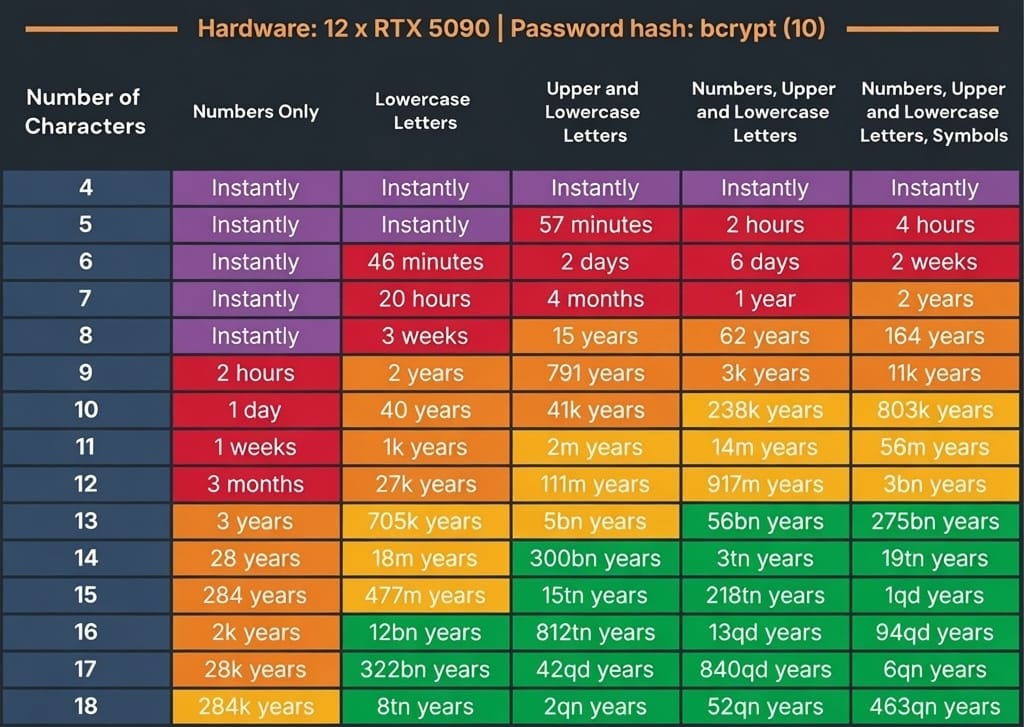
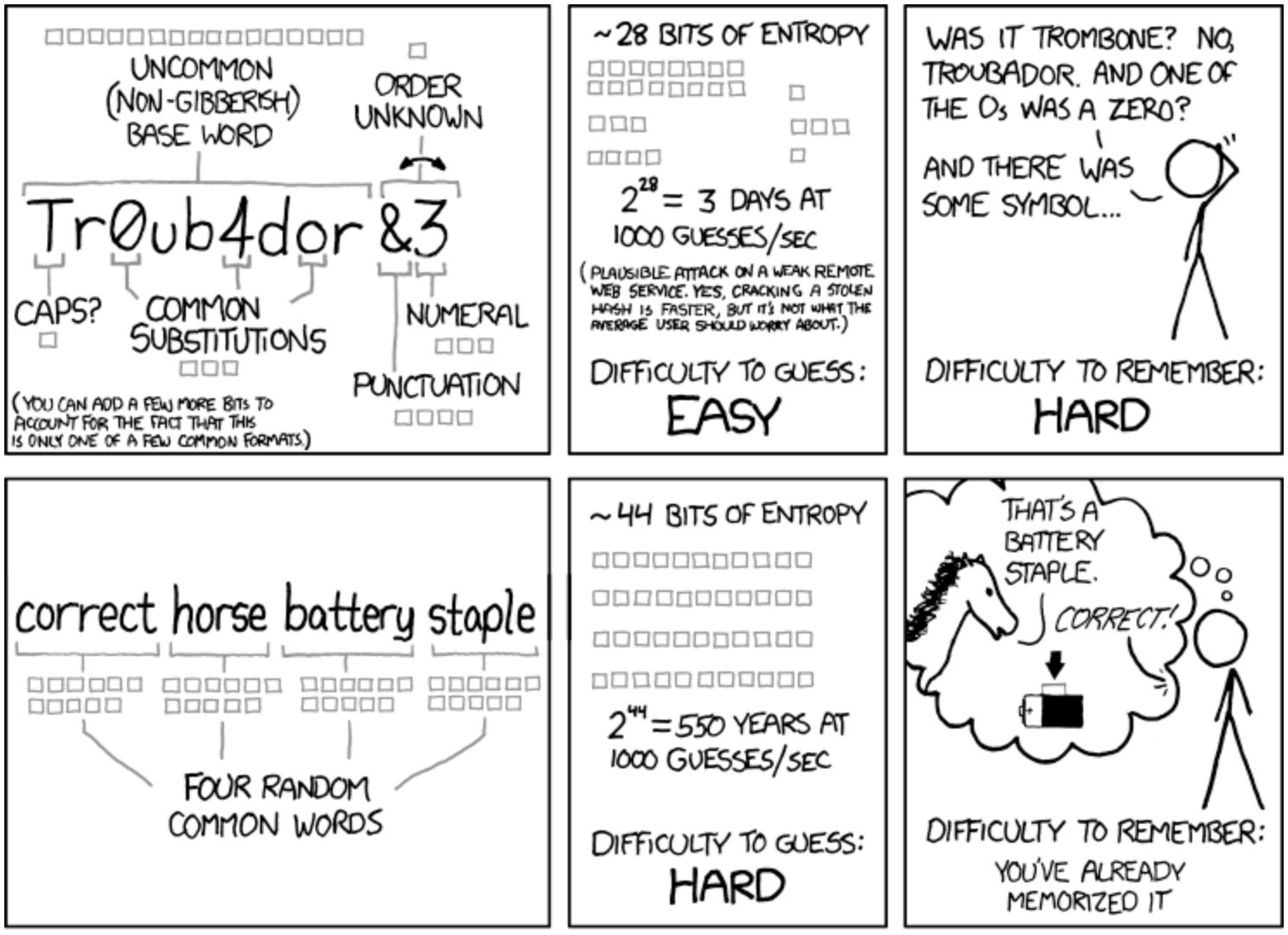


 Alex Muntyan
 Alex Muntyan
 Alex Muntyan