Imagine you’re a system administrator at Home Depot. Just as you’re about to head home, you notice that your network has just authorized the connection of a new air-conditioner. Nothing too peculiar, right? The next morning, you wake up to find that terabytes of data including logins, passwords and customer credit card information have been transferred to hackers. Well, that’s exactly what happened in 2014, when a group of hackers, under the guise of an unassuming HVAC system, landed an attack that cost Home Depot over $17.5 million dollars, all over an incorrectly configured PKI. In this article, we’ll be conducting a crash course in PKI management.
So, what’s a PKI?
‘Public key infrastructure’ is a term that relates to a set of measures and policies that allow one to deploy and manage one of the most common forms of online encryption – public-key encryption. Apart from being a key-keeper for your browser, the PKI also secures a variety of different infrastructures, including internal communication within organizations, Internet of Things (IoT), peer to peer connection, and so on. There are two main types of PKIs:
• The Web PKI, also known as the “Internet PKI”, has been defined by RFC 5280 and refined by the CA/Browser Forum. It works by default with browsers and pretty much everything else that uses TLS (you probably use it every day).
• An Internal PKI – is the one you run for your own needs. We’re talking about encrypted local networks, data containers, enterprise IT applications or corporate endpoints like laptops and phones. Generally speaking, it can be used for anything that you want to identify.
At its core, PKI has a public cryptographic key that is used not to encrypt your data, but rather to authenticate the identities of the communicating parties. It’s like the bouncer outside an up-market club in Mayfair – you’re not getting in if you’re not on the list. However, without this ‘bouncer’, the concept of trustworthy online communication would be thrown to the wind.
So, how does it work?
PKI is built around two main concepts – keys and certificates. As with an Enigma machine, where the machine’s settings are used to encrypt a message (or establish a secure protocol), a key within a PKI is a long string of bits used to encrypt or decrypt encoded data. The main difference between the Enigma machine and a PKI is that with the latter, you have to somehow let your recipient know the settings used to encode the encrypted message.
The PKI gets its name because each party in a secured connection has two keys: public and private. A generic cipher protocol on the other hand, usually only uses a private one.
The public key is known to everyone and is used throughout the network to encode data, but the data cannot be accessed without a private key, which is used for decoding. These two keys are bound by complex mathematical functions which are difficult to reverse-engineer or crack by brute force. By the way, this principle is an epitome of asymmetrical cryptography.
So, this is how data is encrypted within a public key infrastructure. But let’s not forget that identity verification is just as important when dealing with PKIs – that’s where certificates come into play.
Digital Identity
PKI certificates are most commonly seen as digital passports containing lots of assigned data. One of the most important pieces of information in such a certificate relates to the public key: the certificate is the mechanism by which that key is shared – just like your Taxpayer Identification Number (TIN) or driver’s license, for instance.
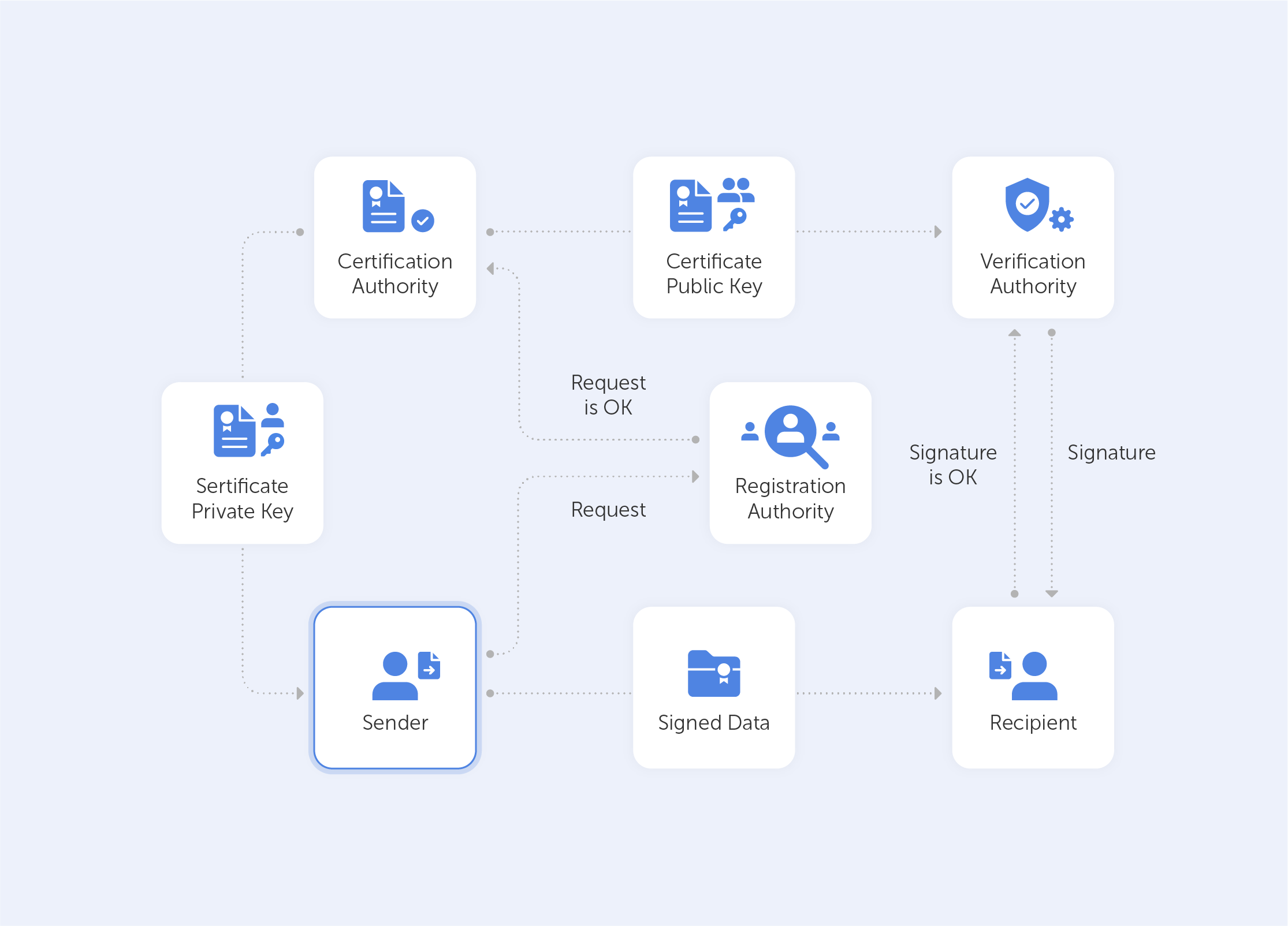
But it’s not really valid unless it has been issued by some kind of entrusted authority. In our case, this is the certificate authority (CA). Here, there is an attestation from a trusted source that the entity is who they claim to be.
With this in mind, it becomes very easy to grasp what the PKI consists of:
• A certificate authority, which issues digital certificates, signs them with its public key and stores them in a repository for reference;
• A registration authority, which verifies the identities of those requesting digital certificates. A CA can act as its registration authority or can use a third party to do so;
• A certificate database that stores both the certificates, their metadata and, most importantly, their expiration dates;
• A certificate policy outlining the PKI's procedures (this is basically a set of instructions that allows others to judge how trustworthy a PKI is).
What is a PKI used for?
A PKI is great for securing web traffic – data flowing through the open internet can be easily intercepted and read if it isn't encrypted. Moreover, it can be difficult to trust a sender’s identity if there isn’t some kind of verification procedure in place.
But even though SSL/TLS certificates (that secure browsing activities) may demonstrate the most widespread implementation of PKI, the list doesn’t end there. PKI can also be used for:
• Digital signatures on software;
• Restricted access to enterprise intranets and VPNs;
• Password-free Wi-fi access based on device ownership;
• Email and data encryption procedures.
PKI use is taking off exponentially; even a microwave can connect to Instagram nowadays. This emerging world of IoT devices brings us new challenges and even devices seemingly existing in closed environments now require security. Taking the ‘evil air conditioner’ that we spoke about in the introduction as an example – gone are the days where we can take a piece of kit for face value. Some of the most compelling PKI use cases today center around IoT. Auto manufacturers and medical device manufacturers are two prime examples of industries currently introducing PKI for IoT devices. Edison’s Electronic Health Check-up System would be a very good example here, but we’ll save that for a future deep-dive.
Is PKI a cure-all?
As with any technology – execution is sometimes more important than the design itself. A recent study by the Ponemon Institute surveyed nearly 603 IT and security professionals across 14 industries to understand the current state of PKI and digital certificate management practices. This study revealed widespread gaps and challenges, for example:
• 73% of security professionals admit that digital certificates still cause unplanned downtime and application outages;
• 71% of security professionals state that migration to the cloud demands significant changes to their PKI practices;
• 76% of security professionals say that failure to secure keys and certificates undermines the trust their organization relies upon to operate.
The biggest issue, however, is that most organizations lack the resources to support PKI. Moreover, only 38% of respondents claim they have the staff to properly maintain PKI. So for most organizations PKI maintenance becomes a burden rather than a cure-all.
To sum up, PKI is a silent guard that secures the privacy of ordinary online content consumers. However, in the hands of true professionals, it becomes a power tool that creates an encryption infrastructure that is almost infinitely scalable. It lives in your browser, your phone, your Wi-fi access point, throughout the web and beyond. Most importantly, however, a correctly-configured PKI is the distance between your business and an imposter air conditioner that wants your hard-earned cash.
Why do employees ignore cybersecurity policies?
Employees often ignore cybersecurity rules not out of laziness, but because they feel generic, irrelevant, or disconnected from real work. True change starts with empathy, leadership, and context-driven policies. Read the full article to learn how to make security stick.
 Iliya Garakh, CTO
Passwork: Secrets management and automation for DevOps
Introduction In corporate environment, the number of passwords, keys, and digital certificates is rapidly increasing, and secrets management is becoming one of the critical tasks for IT teams. Secrets management addresses the complete lifecycle of sensitive data: from secure generation and encrypted storage to automated rotation and audit trails. As
 Eirik Salmi
Cyber insurance: A false sense of security?
Introduction As cyber threats and data breaches become more frequent and sophisticated, many organizations are looking to cyber insurance as a way to manage risk. But is cyber insurance a true safety net — or is it just a false sense of security? This question was at the core of the
 Iliya Garakh, CTO
What is PKI? A Public Key Infrastructure definitive guide
Why password managers matter and how they work
Password managers are a game-changer when it comes to security, convenience and efficiency. If you're new to them, you might be wondering what is the purpose of a password manager? The answer lies in avoiding the risks that come with weak or reused passwords. Managing passwords securely can be a real challenge. Cyber threats like identity theft, data breaches and more are all too real. The safest way to store passwords is with a personal password keeper.
Think of it as a simple password vault for all your login credentials. Rather than relying on your memory or insecure methods like writing them down, the safest place to keep passwords is using a password manager ensuring that all your credentials are stored in an encrypted database, accessible only through a master password. With a password manager, you can secure your password and create strong, unique passwords — no more worrying about remembering them all.
What do password managers do? They securely store passwords, and many also help in automatically filling in your credentials on websites, reducing the risk of phishing attacks. They also help with keeping passwords securely across all your devices — that means your credentials are safe wherever you access them.
Why a password manager is essential for security
The human factor in digital security
The more digital we become — the COVID-19 pandemic has certainly accelerated that — the more online accounts we have. And with that comes more passwords to keep track of. Unfortunately, human error is a leading cause of data breaches. People still use weak passwords or reuse the same credentials across multiple sites. That makes it far too easy for cybercriminals to get in. Password managers enhance your password practices to prevent vulnerabilities.
Phishing attacks have become incredibly common, and weak password practices expose businesses to risks. Is it safe to use password managers? Yes, a password manager eliminates the risk of human error and keeps your credentials safe by storing them in an encrypted database. It can automatically fill in your credentials only when a legitimate site is detected. That stops you from unknowingly entering passwords on phishing sites. And because it eliminates the risk of human error, protecting your passwords becomes much easier.
Security audits
Security audits are a key part of any business's security strategy. Weak, outdated, or compromised credentials can lead to security vulnerabilities. Businesses that fail to enforce strong password policies risk non-compliance with industry regulations.
One of the key benefits of password managers is that it can automatically alert users when passwords need updating. It also provides an audit trail, making it easier to track and manage password changes efficiently. Additionally, password managers ensure quick password rotation when an employee leaves the company, minimizing the risk of data leaks — this proactive security measure helps companies comply with industry standards and pass audits with ease.
Managing absences and staff changes
Temporary absences and staff turnover can disrupt business workflows. A business password manager ensures employees with the necessary permissions can access credentials securely. That prevents bottlenecks and inefficiencies.
For example, if a key team member is on vacation or out sick, other employees may need access to shared accounts. With a password manager, authorized team members can securely retrieve credentials without compromising security.
Disaster recovery is another critical aspect. In the unfortunate event of an emergency where key personnel are unavailable, having a secure and structured password management system ensures continuity. Companies can avoid business disruptions by ensuring authorized personnel can access critical information without compromising security policies.
Seamless access across devices and browsers
A key advantage of password managers is that they work seamlessly across multiple browsers and devices. Solutions like Passwork are where flexibility really shines. Whether you’re using a desktop, laptop, or smartphone, you can securely store your passwords and access them anywhere. That's especially useful for remote teams, who need smooth and secure login experiences.
Browser extensions fill in credentials automatically, cutting down on login friction. You can use Chrome, Firefox, Safari or Edge — your choice. Many password managers support cross-platform synchronization, changes made on one device are instantly available on another.
Password manager pricing and what to expect
Password managers come in all shapes and sizes, and so do the costs. You can get a basic version for free, with the essentials, while premium plans offer advanced security features like two-factor authentication, encrypted password sharing and audit logs. Choosing an easy to use password manager is essential for keeping things simple and secure. Business solutions often include features for multiple users, ensuring secure credential management across the board.
While a free password manager may be sufficient for individuals, businesses should consider paid options to benefit from enterprise-grade security and administrative controls. Scalable plans that grow with your organization's needs can be a cost-effective way to manage security. And the cost of investing in a password manager is often much lower than the financial and reputational damage caused by a data breach.
Organizations that proactively invest in password security mitigate risks and reduce the likelihood of costly security incidents. When you're shopping for the best way to store passwords, consider what matters most to you: encryption, ease of use, and the ability to store passwords securely across different platforms. Look for features like two-factor authentication and secure password sharing for optimal protection.
Getting started with a password manager
How to use a password manager? It’s pretty straightforward — choose a password manager that fits your needs. Consider factors such as encryption strength, compatibility with devices, and business-oriented features if you need them.
- Install the software or use a web-based version for cloud-based access
- Create a strong master password that will grant access to all your stored credentials
- Start storing passwords securely by importing existing credentials or generating new, strong passwords
- Enable auto-fill and auto-change to save time and reduce the risk of phishing attacks
- Set up two-factor authentication (2FA) for extra security layer against unauthorized access
Password managers also allow users to categorize passwords into folders or groups, making it easier to manage credentials efficiently. Businesses can take advantage of role-based access control (RBAC) to ensure employees only have access to the passwords relevant to their job responsibilities.
Different types of password managers
Cloud-based
Cloud-based solutions store encrypted passwords on remote servers, allowing you to access your credentials from any device. They offer convenience and accessibility, but you have to trust the provider's security measures. Passwork Cloud ensures high-level encryption and secure access, giving businesses full control over their password management while maintaining ease of use.
Self-hosted
Self-hosted solutions store passwords on a company servers rather than the cloud. While they reduce the risk of cloud-based attacks. Self-hosted password managers provide organizations with complete data control, allowing them to implement their own security policies and compliance measures. This makes them ideal for companies that prioritize on-premises data security.
Browser-based
Many web browsers offer built-in password management tools, but they often lack the advanced security features of dedicated solutions. Web browser password manager is better suited for casual users rather than businesses handling sensitive data. These managers may also be vulnerable to browser-based threats or device compromises. A standalone password manager is a more robust choice for organizations that require enterprise-grade security.
Essential features of a reliable password manager
Strong encryption
A secure password manager should use AES-256 encryption to protect stored credentials from cyber threats. This ensures that even if your data is intercepted, it remains unreadable to unauthorized users.
Auto-fill and auto-change
These features simplify login processes and improve password security by automatically updating passwords when needed. Auto-change is particularly useful for regularly updating credentials without manual effort.
Two-factor authentication
Adds an extra layer of security, ensuring that even if a master password is compromised, unauthorized access is prevented. Many password managers support biometric authentication, such as fingerprint or facial recognition, for added protection.
Intuitive and user-friendly interface
A password manager should be easy to navigate, making it simple for users to store, retrieve, and manage credentials effectively.
Stay safe and secure your data with a password manager
Secure password management is a must. If you haven't started using a password manager yet, now is the time to take control of your online security. If you use a password manager what do you as the user need to remember is just a single master password — that's it. Protect your passwords with the help of a password manager and keep them safe from cyber threats.
Passwork is where security and convenience meet-the necessities for businesses that are serious about staying ahead. That means more than just a password manager. It means a robust security system that reduces the risk of human error. By automating password management and giving you secure, centralized access to sensitive data Passwork helps you protect your business in real-time.
Whatever your company size, investing in secure password management just makes sense. Don't wait for a data breach to happen. Take the next step now with Passwork and start protecting what matters most.
8 Things You Should Consider Before Selecting A Corporate Password Manager
A couple of guesses... your mother’s maiden name, your date of birth, your pet’s name. And Bam! It’s stolen.
Password theft has become increasingly common.
 Iliya Garakh, CTO
Four ways to make users love password security
Four ways to make users love password security
 Iliya Garakh, CTO
The future of password security
Whenever the word ‘cybersecurity’ appears, the word ‘password’ springs to mind
in parallel. People use them everywhere, from mobile phone locks to the
protection of personal and state data stored on individual devices or websites.
Everyone knows that a strong and secure password is able to save our sensitive
information,
 Iliya Garakh, CTO
Why do I need a password manager?
Password managers protect your accounts by encrypting credentials, generating strong passwords, and blocking phishing attacks. They help individuals and businesses streamline password management, minimizing risks from weak or reused passwords. Discover their key features in the full article.
A couple of guesses — your mother's maiden name, your date of birth, your pet's name. And Bam! Your password is stolen.
Password theft is becoming more common every day. While one of the most notorious incidents was the 2014 Russian hacker incident that compromised more than 1.2 billion passwords, this is far from an isolated event. There are news stories about password-related breaches almost every day. And yet, many people continue to use weak, easily guessable passwords.
Why? Because they’re easy to remember. But as simple as these passwords are for you, they’re even easier for hackers to crack. This is a serious concern for businesses, where cybersecurity is paramount.
Why security policies alone aren't enough
Large enterprises often implement password policies requiring employees to use strong passwords. However, since it's easier to remember short passwords, many employees disregard the policies and choose weak passwords. A policy alone isn’t much help here.
The solution? A corporate password manager that ensures strong, unguessable passwords are used across the company. By using the right technology, you can significantly reduce the risk of a data breach.
While a corporate password manager can choose passwords for you, how do you choose the right one for your business? Here are some tips to help you find the best software for your enterprise.
Tip #1: Choose the right solution for your company
Password management solutions typically come in two forms: SaaS (cloud-based) or on-premise. Both have their advantages, depending on your company’s needs.
- SaaS (Software-as-a-Service): This option is managed by the provider, and you typically pay a subscription fee based on the number of users or the level of service. SaaS solutions are great for small- to mid-sized businesses, as they offer flexibility, scalability, and minimal setup costs.
- On-Premise: With an on-premise solution, the software is hosted on your company’s own servers. While there’s a higher upfront cost for hardware and software licenses, this option is ideal for larger enterprises that require full control over their data for compliance or security reasons.
Both options have their merits, so choose a vendor that offers both SaaS and on-premise solutions. This way, you can make a decision based on your company’s specific needs, ensuring you have the right balance between cost, security, and scalability.
Tip #2: Identify potential vulnerabilities
A critical feature of any corporate password manager is its ability to safeguard your data against vulnerabilities. Before committing to a solution, take the time to identify any weak points in the software.
Here’s a quick test: Sign in to the password manager and press F12 to open the browser’s developer console. In the “Network” tab, check for any external requests, like analytics scripts or third-party integrations. A secure password manager should not allow external third-party scripts that could expose you to cross-site scripting (XSS) or other attacks.
When third parties are allowed to call into the system, they can make the system vulnerable. Whether you prefer a SaaS password manager or an on-premise password manager, it should hold all sensitive information in such a way that external applications cannot access them.
Tip #3: Verify encryption standards
The password manager should store all passwords in an encrypted form. To verify this, use the browser’s developer tools again (F12 → Network tab). Now open any website where you need to sign in. Save the password in the password manager. Check whether the password appears as plain text or in encrypted form.
If it’s stored in plain text, the system is vulnerable to hacks. Strong encryption is essential. Look for password managers that use AES-256 encryption combined with an RSA handshake, which is the gold standard for secure data encryption.
Different password managers have different encryption standards. The highest cipher is AES-256 with an RSA handshake. This is military-grade encryption and is virtually unhackable. If your corporate password manager provides this level of encryption and owns its own servers, you don’t have to worry about the security of your information.
Tip #4: Choose a vendor with transparent policies
When selecting a password manager, transparency is key. Check the vendor’s website for whitepapers and documentation on the algorithms and cryptography they use. Vendors with open-source or auditable code are preferable, as they demonstrate a commitment to transparency and security.
Zero-knowledge encryption is another critical feature. This means that the vendor has no access to your master password or any of your sensitive data. For instance, Passwork ensures all passwords are stored in encrypted vaults using a 256-bit cipher, making them accessible only to the user.
Opting for an open-source solution is a smart move, as it allows you to inspect the code and confirm that the cryptography being used is reliable and secure.
Tip #5: Ensure auditability
If you opt for an on-premise solution, auditability is important. You should be able to inspect and audit the internal code to verify that it meets your company’s security standards.
Regular password audits are also essential for maintaining a secure system. A good password manager will automatically notify you when passwords need to be updated due to age or reuse across multiple services. This feature helps maintain optimal security across your entire organization.
If the code is open-source, you may even have the ability to customize it. However, be cautious, as making changes to the code can introduce instability. Always consult with the vendor before making any significant modifications.
Tip #6: Implement two-factor authentication (2FA)
A reliable corporate password manager should support strong two-factor authentication (2FA) options to enhance security. Passwords alone aren’t always enough to safeguard sensitive data, as they can be stolen or cracked. 2FA ensures that even if a password is compromised, an additional authentication factor—such as a code sent to your phone or an authentication app—protects your accounts.
When selecting a password manager, ensure it integrates with a variety of 2FA methods, such as time-based one-time passwords (TOTP) or SMS codes. Implementing 2FA will greatly reduce the risk of unauthorized access to your corporate accounts, making it an essential security measure for any business.
Tip #7: Test the SSL security
Advanced corporate password management tools use Secure Sockets Layer (SSL). The SSL transfers data securely between the client and the server. Passwork uses SSL along with AES-256 bit encryption and RSA handshake to ensure your data is encrypted according to the highest standards.
There are several online tools to check if there are any potential issues with the SSL quality of the password manager. With tools such as SSL Labs and SSL Checker, you can find out if the SSL certificates of the password manager are valid.
Tip #8: Look for flexibility across platforms
A good corporate password manager should work seamlessly across all platforms and devices your employees use. Whether it’s desktop or mobile, macOS, Windows, iOS, or Android, the solution should offer compatibility with all major operating systems.
Additionally, ensure the password manager offers browser extensions for popular web browsers such as Chrome, Firefox, Safari, and Edge. Syncing across devices is another crucial feature. If an employee saves a password on their desktop browser, it should automatically be available when they log in on their mobile device.
The bottom line
There are several corporate password managers available, but make sure you choose the best one. Your password manager should not only be secure but also adaptable to your company’s needs. If you find a password manager that meets all the criteria listed above and is affordable, choose it to safeguard your passwords.
Remember, security isn’t an area where you can afford to cut corners. Your enterprise passwords are extremely important so don’t compromise on quality. Choose password manager that meets all your security requirements, including strong encryption, transparency, auditability, and two-factor authentication.
As the saying goes, “If you’re not paying for the product, you are the product.” Make the right choice by selecting software that keeps your company’s details safe. It not only simplifies things for your employees but also ensures your valuable information remains secure from prying eyes.
How to create a secure password
Of course you want to keep your data safe. So why are so many security precautions frequently overlooked? Many accounts, for example, are protected by weak passwords, making it easy for hackers to do their work. There is a fine line between selecting a password that no one can guess
 Iliya Garakh, CTO
Why do I need a password manager?
Password managers protect your accounts by encrypting credentials, generating strong passwords, and blocking phishing attacks. They help individuals and businesses streamline password management, minimizing risks from weak or reused passwords. Discover their key features in the full article.
 Iliya Garakh, CTO
GDPR password security: Guide to effective staff training
Learn proven strategies to train employees for GDPR password security compliance. Reduce breach risks with practical training methods.
 Ana Moore