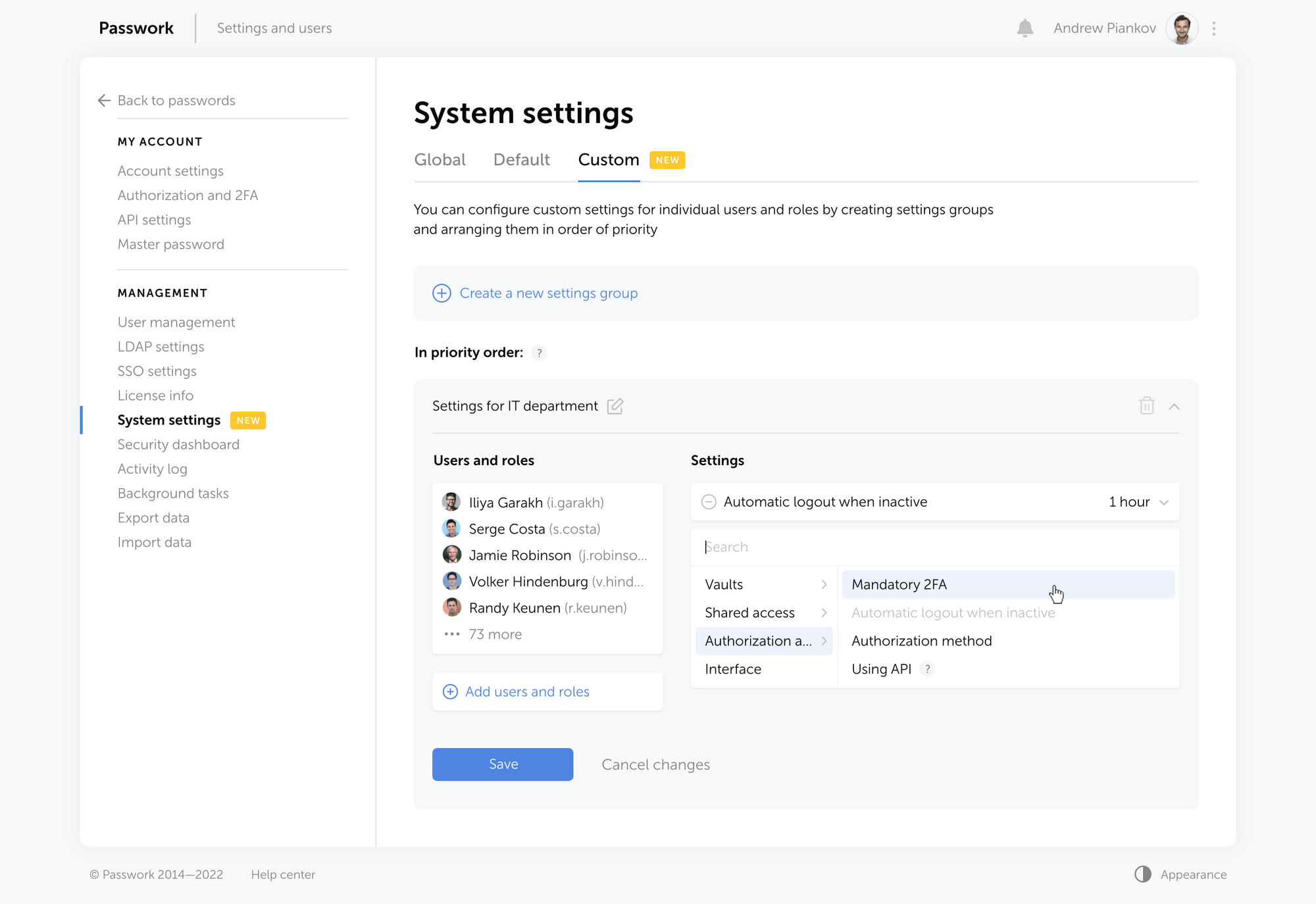
In the new version of Passwork, we have completely redesigned the System settings. They are now divided into three sections:
- Global — organization settings that determine the operations of most of the Passwork functions
- Default — the values of the settings that will be used if no other custom settings are specified
- Custom — settings that can be set for individual users and roles
Now you can set up different interface languages, configure authorization methods, and enable mandatory two-factor authentication for individual users and roles.
To do this, click "Create a new settings group" in Сustom settings, add users or roles and select your desired settings. The newly created group will be added to the top of the list and will get the highest priority.
The following settings are now available:
- Ability to create organization vaults and private vaults
- Ability to create links to passwords
- Mandatory 2FA
- Time of automatic logout when inactive
- Authorization method (by local password, LDAP password or SSO)
- API usage
- Interface language
We're already working to add new settings.
If you are already using Passwork — update your Passwork
Or request a free demo at passwork.pro
The 2025 small business cybersecurity checklist: A complete guide | Passwork
Passwork’s 2025 cybersecurity checklist, based on the NIST framework, provides actionable steps to prevent data breaches and financial loss.
 Eirik Salmi
How to protect your online business from cyberattacks
Protect your online business from cyber threats with actionable strategies, from employee education to advanced tools like Passwork. Learn about phishing, ransomware, and more while discovering how to enhance security with simple yet effective measures. Stay protected — read the full article!
 Eirik Salmi
Why do employees ignore cybersecurity policies?
Employees often ignore cybersecurity rules not out of laziness, but because they feel generic, irrelevant, or disconnected from real work. True change starts with empathy, leadership, and context-driven policies. Read the full article to learn how to make security stick.
 Iliya Garakh, CTO