Data breaches have become routine: millions of users worldwide face the consequences of compromised passwords. The scale is staggering: billions of credentials are exposed, fueling automated attacks and credential stuffing on a massive scale. Services like "Have I Been Pwned" now track over 12 billion breached accounts, and that number keeps growing.
Security professionals and users face a direct challenge: how can we check if a password has been compromised in a data breach without revealing the password itself to the checking service? The task sounds simple, but in reality, it requires a delicate balance between privacy, security, and performance.
Traditional approaches force a trade-off. Direct hash lookups are fast but unsafe: they expose the full hash, risking password leaks. More sophisticated cryptographic protocols offer strong privacy guarantees but come with significant computational overhead and implementation complexity that makes them impractical for many real-world applications.
We’re introducing a solution that bridges this gap: Private password breach checking using obfuscated deterministic bloom filter indices. This innovative approach provides strong privacy guarantees while maintaining the efficiency needed for practical deployment in password managers, authentication systems, and enterprise security infrastructure.
Existing solutions and their tradeoffs
To understand the significance of our new approach, it's important to examine the current methods for password breach checking and their inherent limitations.
Direct hash lookup: Simple but insecure
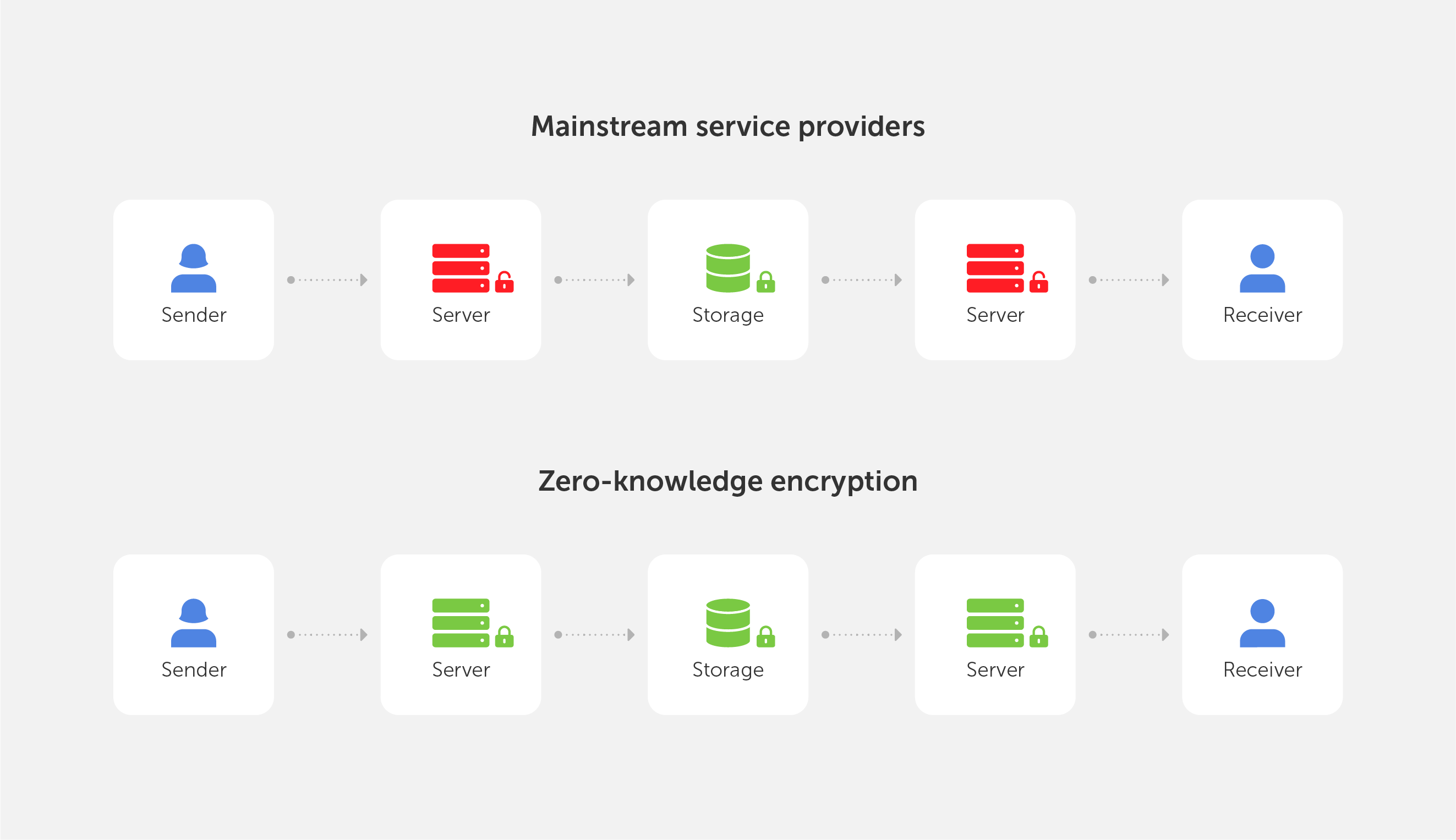
The earliest password breach checking services, such as LeakedSource, employed a straightforward approach: users would submit the SHA-1 hash of their password, and the service would check if that exact hash appeared in their breach database. Although simple to deploy and very fast to apply, this method is insecure and prone to potential attacks.
When a user submits their password hash directly, they're essentially handing over a cryptographic fingerprint of their password to the service. This creates several attack vectors: malicious actors could perform rainbow table attacks against the submitted hash, launch focused dictionary attacks targeting that specific hash, or correlate the same password across multiple services. The fundamental problem is that the hash itself becomes a valuable piece of information that can be exploited.
K-anonymity: A step forward with remaining vulnerabilities
Recognizing the security issues with direct hash submission, Troy Hunt introduced the k-anonymity approach for the "Have I Been Pwned" service, which has since been adopted by major companies including Cloudflare and Microsoft. This method represents a significant improvement in privacy protection while maintaining reasonable performance characteristics.
In the k-anonymity approach, instead of sending the full password hash, the client computes the SHA-1 hash of their password and sends only the first 5 hexadecimal characters (representing 20 bits) to the server. The server then returns all hashes in its database that begin with that prefix, typically between 400 and 800 hashes. The client then checks locally whether their full hash appears in the returned list.
This approach offers several advantages: it's simple to implement, provides reasonable privacy protection, and uses bandwidth efficiently. However, recent security analysis has revealed significant vulnerabilities. The method still leaks 20 bits of entropy about the password, and research has demonstrated that this partial information can increase password cracking success rates by an order of magnitude when attackers have access to the leaked prefixes. The approach is particularly vulnerable to targeted attacks against highvalue accounts, where even partial information can be valuable to sophisticated adversaries.
Cryptographic protocols: Strong privacy at a high cost
At the other end of the spectrum, advanced cryptographic protocols offer robust privacy guarantees but come with substantial implementation and performance costs. Two primary approaches have emerged in this category: Oblivious Pseudorandom Functions (OPRF) and Private Set Intersection (PSI).
The OPRF approach, used in Google's Password Checkup service and Apple's iCloud Keychain, employs a sophisticated cryptographic dance. The client first "blinds" its password hash using a random value, creating a masked version that reveals nothing about the original password. The server then applies a pseudorandom function to this blinded value without learning anything about the underlying password. Finally, the client "unblinds" the result and checks if the final value exists in a pre-downloaded set of breached identifiers.
Private Set Intersection protocols take a different approach, using advanced cryptographic techniques like homomorphic encryption or garbled circuits. These protocols allow a client to learn the intersection of its password set and the server's breach database without either party revealing their complete set to the other.
While these cryptographic approaches provide excellent privacy guarantees with no information leakage, they come with significant drawbacks. They require complex implementations involving elliptic curve cryptography, impose high computational costs that can be 100 to 1000 times slower than simple hash operations, and in some PSI protocols, require substantial bandwidth for large breach sets. These factors make them impractical for many real-world applications, particularly those requiring real-time password validation or deployment on resource-constrained devices.
Local and offline approaches: Perfect privacy with practical limitations
Some organizations have opted for local or offline approaches to achieve perfect privacy. There are services like "Have I Been Pwned" that offer downloadable password lists, allowing organizations to download the entire breach database (approximately 25GB uncompressed, 11GB compressed) and perform searches locally. Organizations can also build local Bloom filters from these datasets, reducing storage requirements to around 860MB for 500 million passwords with a 0.1% false positive rate.
While local approaches provide perfect privacy since no network communication is required, they present their own challenges. Storage requirements can be prohibitive, especially for mobile applications. Keeping the local database synchronized with new breaches requires regular updates, and the approach is generally impractical for most enduser applications, particularly on mobile devices with limited storage capacity.
Our innovation: Obfuscated deterministic bloom filter indices
Ournew algorithm represents a fundamental breakthrough in password breach checking by introducing a new approach that combines the efficiency of Bloom filters with sophisticated obfuscation techniques. The result is a system that provides strong privacy guarantees while maintaining the performance characteristics needed for real-world deployment.
Understanding bloom filters: The foundation
To understand our approach, it's helpful to first grasp the concept of a Bloom filter. A Bloom filter is a space-efficient probabilistic data structure designed to test whether an element is a member of a set. Think of it as a highly compressed representation of a large dataset that can quickly answer the question "Is this item definitely not in the set?" or "This item might be in the set."
The beauty of Bloom filters lies in their efficiency. Instead of storing the actual password hashes, a Bloom filter represents the breach database as a large array of bits. When a password hash is added to the filter, multiple hash functions are applied to generate several index positions in the bit array, and those positions are set to 1. To check if a password might be compromised, the same hash functions are applied to generate the same index positions, and if all those positions contain 1, the password might be in the breach database.
The probabilistic nature of Bloom filters means they can produce false positives (indicating a password might be breached when it actually isn't) but never false negatives (they will never miss a password that is actually breached). This characteristic makes them perfect for security applications where it's better to err on the side of caution.
The core innovation: Deterministic obfuscation
The key insight behind our algorithm is that while Bloom filters are efficient, directly querying specific bit positions would still reveal information about the password being checked. Our solution introduces a sophisticated obfuscation mechanism that hides the real query among carefully crafted noise.
The algorithm operates on a simple but powerful principle: when checking a password, instead of requesting only the bit positions that correspond to that password, the client also requests additional "noise" positions that are generated deterministically but appear random to the server. This creates a situation where the server cannot distinguish between the real query positions and the fake ones, effectively hiding the password being checked.
What makes this approach particularly elegant is the use of deterministic noise generation. Unlike random noise, which would create different query patterns each time the same password is checked, our deterministic approach ensures that checking the same password always generates the same set of noise positions. This consistency is crucial for both security and efficiency reasons.
How the algorithm works: A three-phase process
Our algorithm operates through three distinct phases, each designed to maintain privacy while ensuring efficient operation.
Phase 1: Server setup The server begins by taking a comprehensive set of compromised password hashes from known data breaches. These hashes are then used to populate a large Bloom filter bit array. For each compromised password hash, multiple hash functions are applied to generate several index positions in the bit array, and those positions are marked as 1. The result is a compact representation of millions or billions of compromised passwords that can be queried efficiently.
Phase 2: Client query generation When a client wants to check a password, the process begins by computing a cryptographic hash of the password. The client then generates two sets of indices: the "true indices" that correspond to the password being checked, and "noise indices" that serve as decoys.
The true indices are generated by applying the same hash functions used by the server to the password hash. These are the positions in the Bloom filter that would need to be checked to determine if the password is compromised.
The noise indices are generated using a pseudorandom function keyed with a secret that only the client knows. This secret ensures that the noise appears random to the server but is deterministic for the client. The number of noise indices is carefully chosen to provide strong privacy guarantees while maintaining efficiency.
Once both sets of indices are generated, they are combined and shuffled in a deterministic but unpredictable manner. This shuffling ensures that the server cannot distinguish between real and fake indices based on their position in the query.
Phase 3: Query processing and response The client sends the shuffled set of indices to the server, which responds with the bit values at each requested position. The server has no way to determine which indices correspond to the actual password being checked and which are noise.
Upon receiving the response, the client examines only the bit values corresponding to the true indices. If any of these positions contains a 0, the password is definitively not compromised. If all true index positions contain 1, the password may be compromised, though there's a small possibility of a false positive due to the probabilistic nature of Bloom filters.
The power of deterministic noise
The deterministic nature of our noise generation provides several crucial advantages over alternative approaches. When the same password is checked multiple times, the exact same query is sent to the server each time. This consistency prevents correlation attacks where an adversary might try to identify patterns across multiple queries for the same password.
In contrast, if random noise were used, repeated queries for the same password would generate different noise patterns each time. A sophisticated adversary could potentially analyze multiple queries and identify the common elements, gradually narrowing down the true indices. Our deterministic approach eliminates this vulnerability entirely.
The deterministic noise also provides computational efficiency benefits. Since the same password always generates the same query, clients can cache results, and the system can optimize for repeated queries without compromising security.
Key benefits: Bridging the privacy-performance gap
Our algorithm delivers a unique combination of benefits that address the fundamental challenges in password breach checking, offering a practical solution that doesn't force users to choose between privacy and performance.
Strong privacy guarantees
The algorithm provides robust privacy protection through several mechanisms. The deterministic obfuscation ensures that queries for different passwords are computationally indistinguishable to the server. Even with access to vast computational resources and knowledge of common passwords, an adversarial server cannot determine which password is being checked based solely on the query pattern.
The system is specifically designed to resist correlation attacks, where an adversary attempts to learn information by analyzing multiple queries over time. Because the same password always generates the same query pattern, repeated checks don't provide additional information that could compromise privacy. This stands in stark contrast to systems using random noise, where multiple queries for the same password would eventually reveal the true query pattern.
Operating under an honest-but-curious threat model, the algorithm assumes the server will follow the protocol yet may attempt to extract information from observed queries. Our approach ensures that even a sophisticated adversary with access to public breach databases and the ability to store and analyze all queries over time cannot extract meaningful information about the passwords being checked.
Exceptional performance characteristics
One of the most compelling aspects of our algorithm is its performance profile. Experimental evaluation demonstrates that the system achieves sub-millisecond query times, making it suitable for real-time password validation scenarios. This performance is achieved through the efficient nature of Bloom filter operations and the streamlined query process.
The bandwidth overhead is minimal, typically requiring less than 1KB per query. This efficiency makes the algorithm practical for mobile applications and environments with limited network connectivity. The low bandwidth requirements also reduce server costs and improve scalability for service providers.
The computational overhead on both client and server sides is minimal. Clients need only perform basic cryptographic hash operations and simple bit manipulations. Servers can respond to queries with straightforward bit array lookups. This simplicity stands in stark contrast to cryptographic protocols that require complex elliptic curve operations or homomorphic encryption computations.
Scalability and practical deployment
Built for real-world deployment, the algorithm ensures that server-side infrastructure can efficiently process millions of concurrent queries while keeping response times consistent. The Bloom filter representation allows for compact storage of massive breach databases, making it economically feasible to maintain comprehensive breach checking services.
The system supports easy updates as new breaches are discovered. New compromised passwords can be added to the Bloom filter without requiring changes to the client-side implementation or forcing users to update their software. This flexibility is crucial for maintaining up-to-date protection against emerging threats.
Robust resistance to denial-of-service attacks is another advantage. The lightweight nature of query processing means that servers can handle high query volumes without significant resource consumption. Because queries are deterministic, effective caching can further boost performance and reduce server load.
Compatibility and integration
Our approach is designed to integrate seamlessly with existing security infrastructure. The algorithm can be implemented as a drop-in replacement for existing password breach checking mechanisms without requiring significant changes to client applications. Password managers, authentication systems, and enterprise security tools can adopt the algorithm with minimal modification to their existing codebases.
The system is compatible with various deployment models, from cloud-based services to on-premises installations. Organizations can choose to operate their own breach checking infrastructure using our algorithm while maintaining the same privacy and performance benefits.
The algorithm also supports various customization options to meet specific security requirements. Organizations can adjust the noise levels, Bloom filter parameters, and other configuration options to balance privacy, performance, and storage requirements according to their specific needs.
The practical benefits of our algorithm translate into significant improvements across a wide range of security applications and use cases. The combination of strong privacy guarantees and high performance opens up new possibilities for password security that were previously impractical or impossible.
Password managers: Enhanced security without compromise
Password managers represent one of the most compelling applications for our algorithm. These tools are responsible for generating, storing, and managing passwords for millions of users, making them a critical component of modern digital security. However, traditional password managers have faced challenges in implementing comprehensive breach checking due to privacy and performance constraints.
With our algorithm, password managers can now offer real-time breach checking for all stored passwords without compromising user privacy. When users save a new password or during periodic security audits, the password manager can instantly verify whether the password has appeared in known data breaches. This capability enables password managers to provide immediate feedback to users, encouraging them to change compromised passwords before they can be exploited.
The low latency and minimal bandwidth requirements make it practical to check passwords in real-time as users type them during password creation. This immediate feedback can guide users toward stronger, uncompromised passwords without creating friction in the user experience. The privacy guarantees ensure that even the password manager service provider cannot learn about the specific passwords being checked, maintaining the trust that is essential for these security tools.
Modern authentication systems can leverage our algorithm to implement proactive security measures that protect users from credential-based attacks. During login attempts, authentication systems can check submitted passwords against breach databases in real time, identifying potentially compromised credentials before they can be used maliciously.
This capability enables authentication systems to implement adaptive security policies. For example, if a user attempts to log in with a password that has been found in a data breach, the system can require additional authentication factors, prompt for a password change, or temporarily restrict account access until the user updates their credentials. These measures can significantly reduce the success rate of credential stuffing attacks and other password-based threats.
The algorithm's performance characteristics make it suitable for high-volume authentication scenarios, such as enterprise login systems or consumer web services with millions of users. The sub-millisecond query times ensure that breach checking doesn't introduce noticeable delays in the authentication process, maintaining a smooth user experience while enhancing security.
Large organizations face unique challenges in password security due to the scale and complexity of their IT environments. Our algorithm provides enterprise security teams with powerful tools for implementing comprehensive password security policies across their organizations.
Enterprise security systems can use the algorithm to continuously monitor employee passwords against breach databases, identifying compromised credentials before they can be exploited by attackers. This monitoring can be integrated with existing identity and access management systems, automatically triggering password reset requirements when compromised credentials are detected.
The algorithm also supports compliance requirements by providing organizations with the ability to demonstrate that they are actively monitoring for compromised credentials. Many regulatory frameworks and security standards require organizations to implement measures for detecting and responding to credential compromise, and our algorithm provides a practical, privacy-preserving solution for meeting these requirements. For organizations with strict data privacy requirements, the algorithm's privacy guarantees ensure that sensitive password information never leaves the organization's control. This capability is particularly important for organizations in regulated industries or those handling sensitive personal information.
Consumer applications: Democratizing security
The efficiency and simplicity of our algorithm make it practical to implement in consumer applications that previously couldn't afford the overhead of comprehensive breach checking. Mobile applications, web browsers, and other consumer software can now offer enterprise-grade password security features without requiring significant computational resources or complex cryptographic implementations.
Web browsers can integrate the algorithm to provide real-time feedback when users create or update passwords on websites. This integration can help users avoid reusing compromised passwords across multiple sites, reducing their exposure to credential stuffing attacks. The low bandwidth requirements make this practical even on mobile networks with limited connectivity.
Consumer applications can also use the algorithm to implement security dashboards that help users understand and improve their overall password security posture. By checking all of a user's passwords against breach databases, these applications can provide personalized recommendations for improving security without compromising the privacy of individual passwords.
Service providers: Enabling privacy-preserving security services
Our algorithm creates new opportunities for service providers to offer privacy-preserving security services. Companies can build breach checking services that provide strong privacy guarantees to their customers, enabling new business models and service offerings that were previously impractical due to privacy concerns.
The algorithm's efficiency makes it economically viable to operate large-scale breach checking services. The low computational and bandwidth requirements reduce operational costs, making it possible to offer these services at scale while maintaining reasonable pricing. The ability to handle high query volumes also enables service providers to serve large customer bases without significant infrastructure investments.
Service providers can also offer the algorithm as a component of broader security platforms, integrating breach checking with other security services such as threat intelligence, vulnerability management, and security monitoring. This integration can provide customers with comprehensive security solutions that address multiple aspects of cybersecurity while maintaining strong privacy protections.
Conclusion: A new era in password security
The introduction of our Private password breach checking algorithm using obfuscated deterministic bloom filter indices represents a significant advancement in the field of password security. By successfully bridging the gap between privacy and performance, we have created a solution that makes comprehensive password breach checking practical for a wide range of applications and use cases.
The algorithm's key innovations — deterministic noise generation, efficient Bloom filter operations, and sophisticated obfuscation techniques — combine to deliver a system that provides strong privacy guarantees while maintaining the performance characteristics needed for real-world deployment. With sub-millisecond query times and minimal bandwidth overhead, the algorithm makes it possible to implement real-time password breach checking in applications ranging from consumer password managers to enterprise authentication systems.
The privacy guarantees provided by our algorithm are particularly significant in today's regulatory environment, where data protection and user privacy are increasingly important considerations. By ensuring that password information never needs to be revealed to checking services, our algorithm enables organizations to implement comprehensive security measures while maintaining compliance with privacy regulations and user expectations.
The practical impact of this technology extends far beyond technical improvements. By making privacy-preserving password breach checking accessible and efficient, we are enabling a new generation of security tools and services that can better protect users from the growing threat of credential-based attacks. The algorithm's compatibility with existing infrastructure and ease of implementation mean that these benefits can be realized quickly and broadly across the security ecosystem.
As cyber threats continue to evolve and data breaches become increasingly common, the need for effective password security measures will only grow. Our algorithm provides a foundation for building more secure, privacy-preserving systems that can adapt to meet these challenges while maintaining the usability and performance that users expect.
The development of this algorithm represents just the beginning of our work in privacy-preserving security technologies. We are committed to continuing research and development in this area, exploring new applications and improvements that can further enhance the security and privacy of digital systems.
We believe that the future of cybersecurity lies in solutions that don't force users to choose between security and privacy. Our Private password breach checking algorithm demonstrates that it is possible to achieve both goals simultaneously, providing a model for future innovations in security technology.
For organizations and developers interested in implementing this technology, we encourage you to explore the detailed technical specifications and implementation guidance provided in our comprehensive research paper. The paper includes formal security analysis, detailed implementation recommendations, and comprehensive performance evaluations that provide the foundation for successful deployment of this algorithm in production environments.
For complete technical details, implementation guidance, and formal security analysis, please refer to our full research paper: Private password breach-checking using obfuscated deterministic bloom filter indices. * The research paper includes detailed mathematical proofs, comprehensive performance benchmarks, and complete implementation examples for developers interested in integrating this technology into their applications.
Private password breach checking: A new algorithm for secure password validation
Aug 8, 2023 — 5 min read
This latest update demonstrates our focus on refining user experience and enhancing collaborative password management.
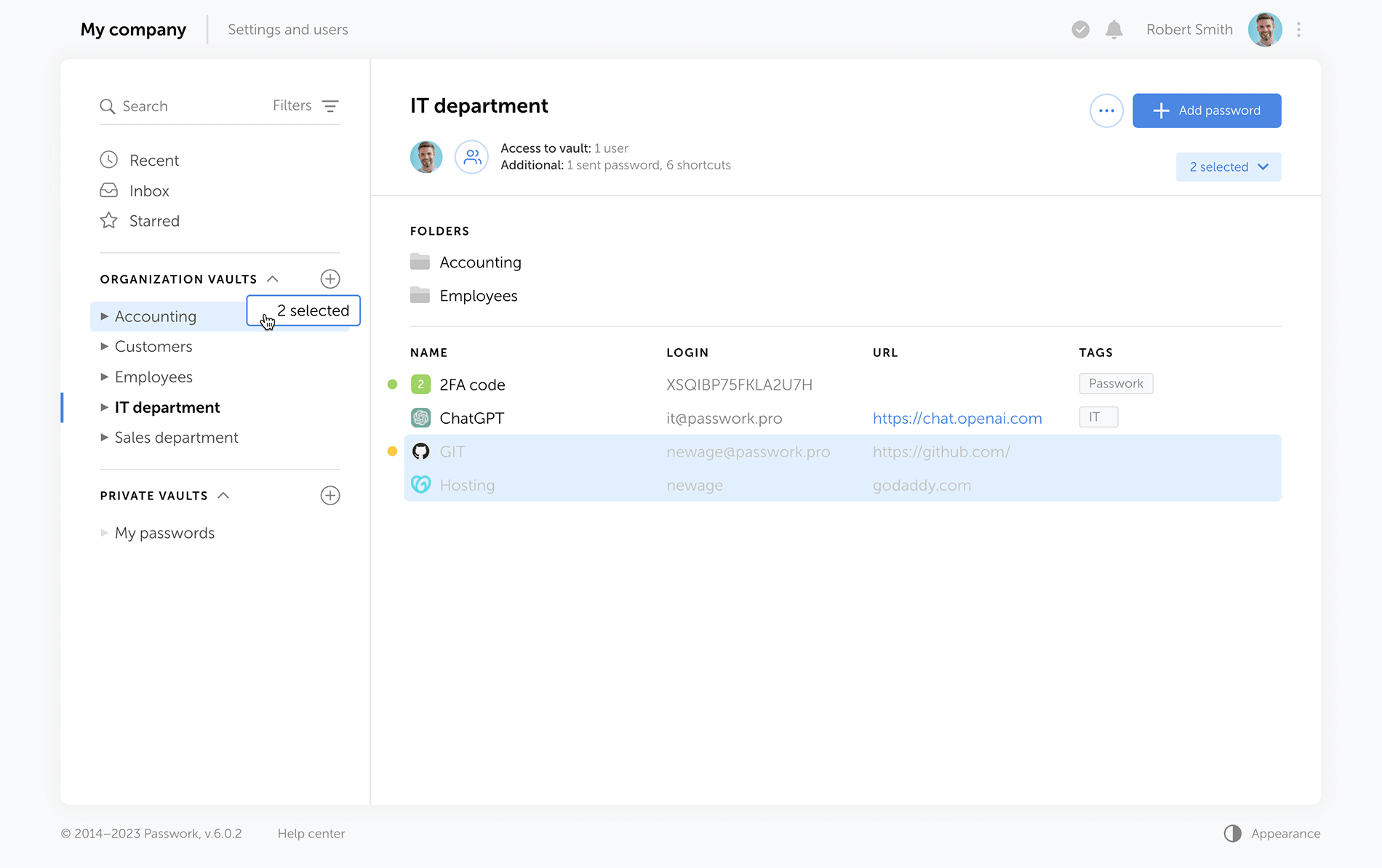
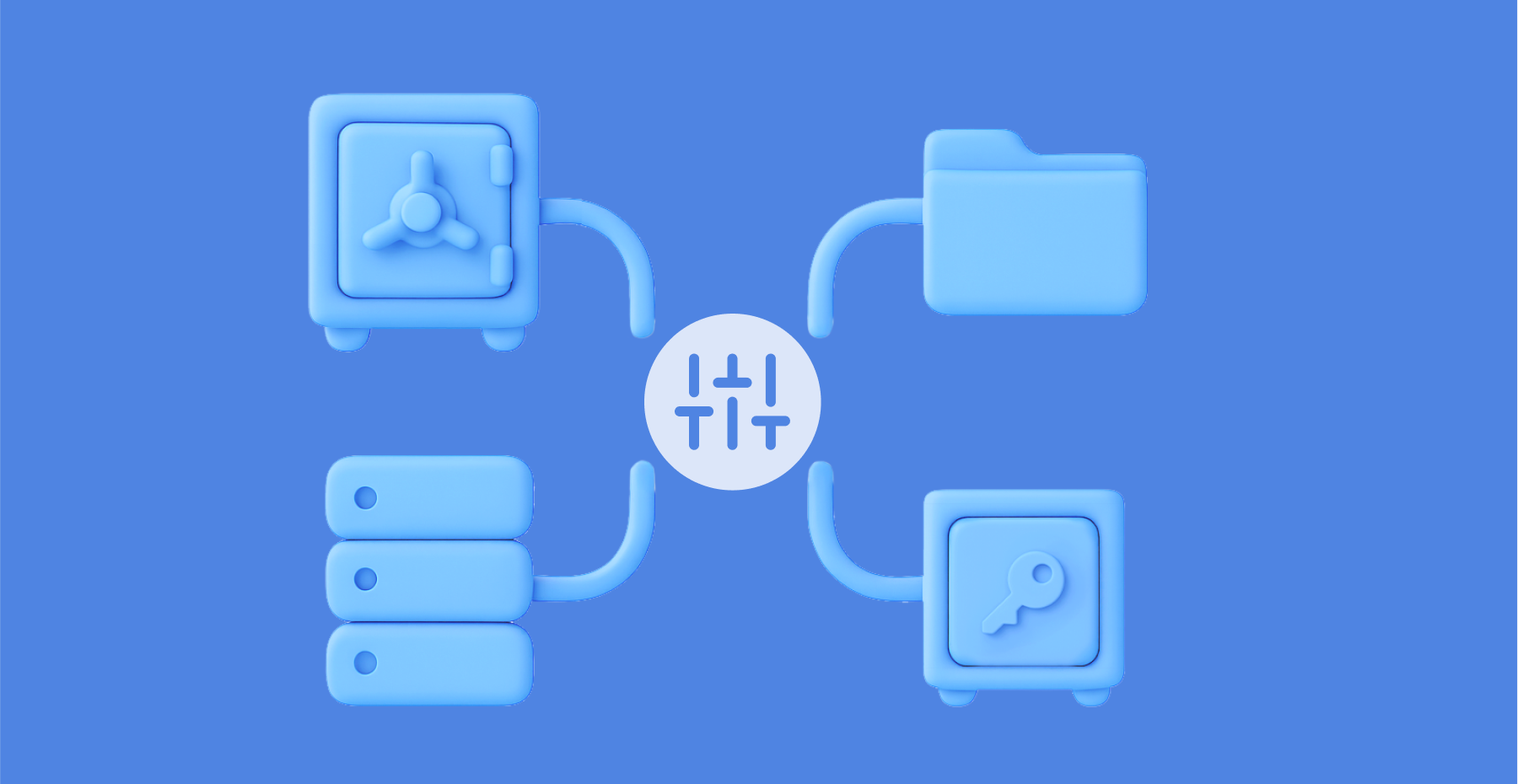
No longer will you need to create password copies in various vaults — we've introduced shortcuts. With these handy labels, you can easily organize access to passwords from different directories.
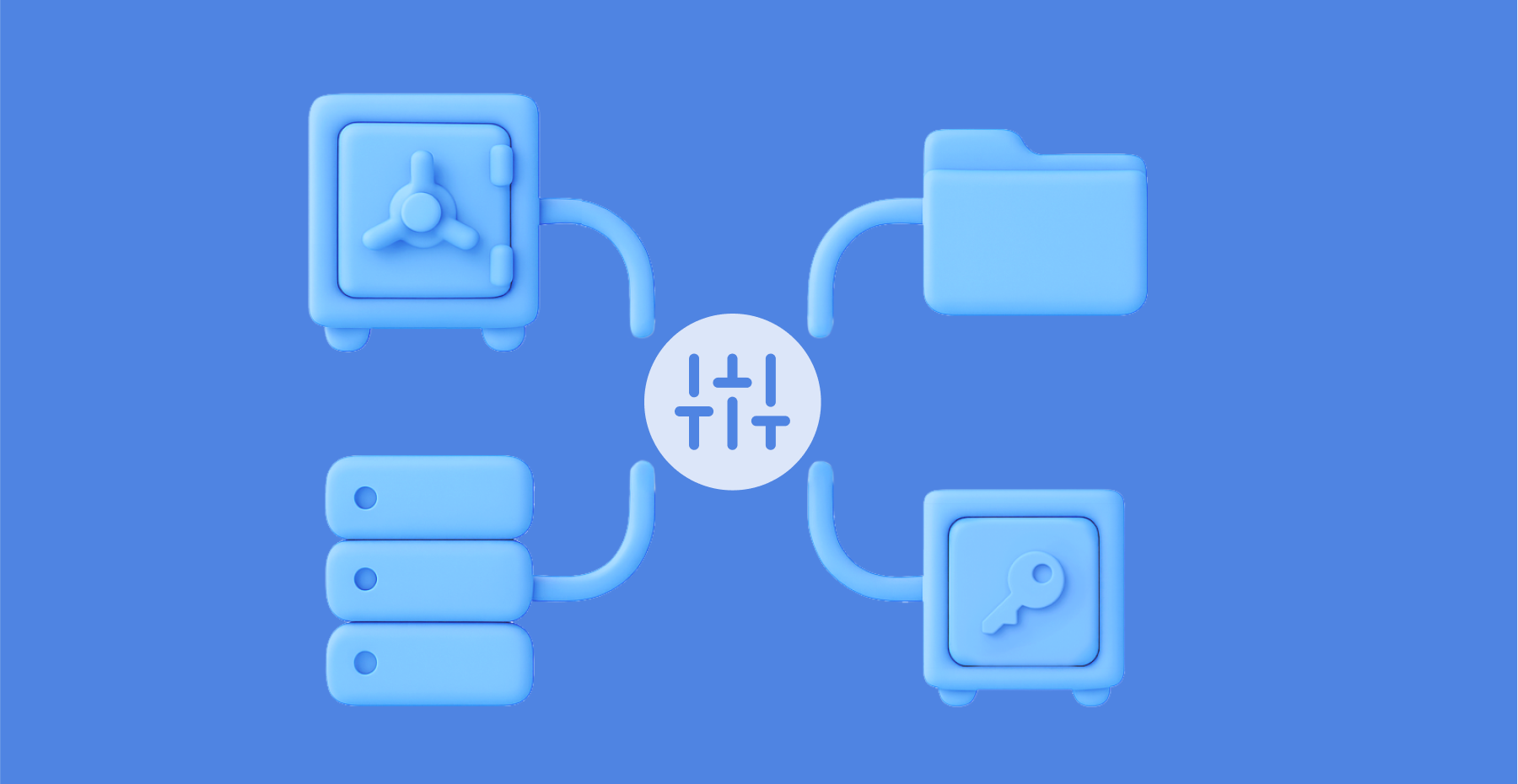
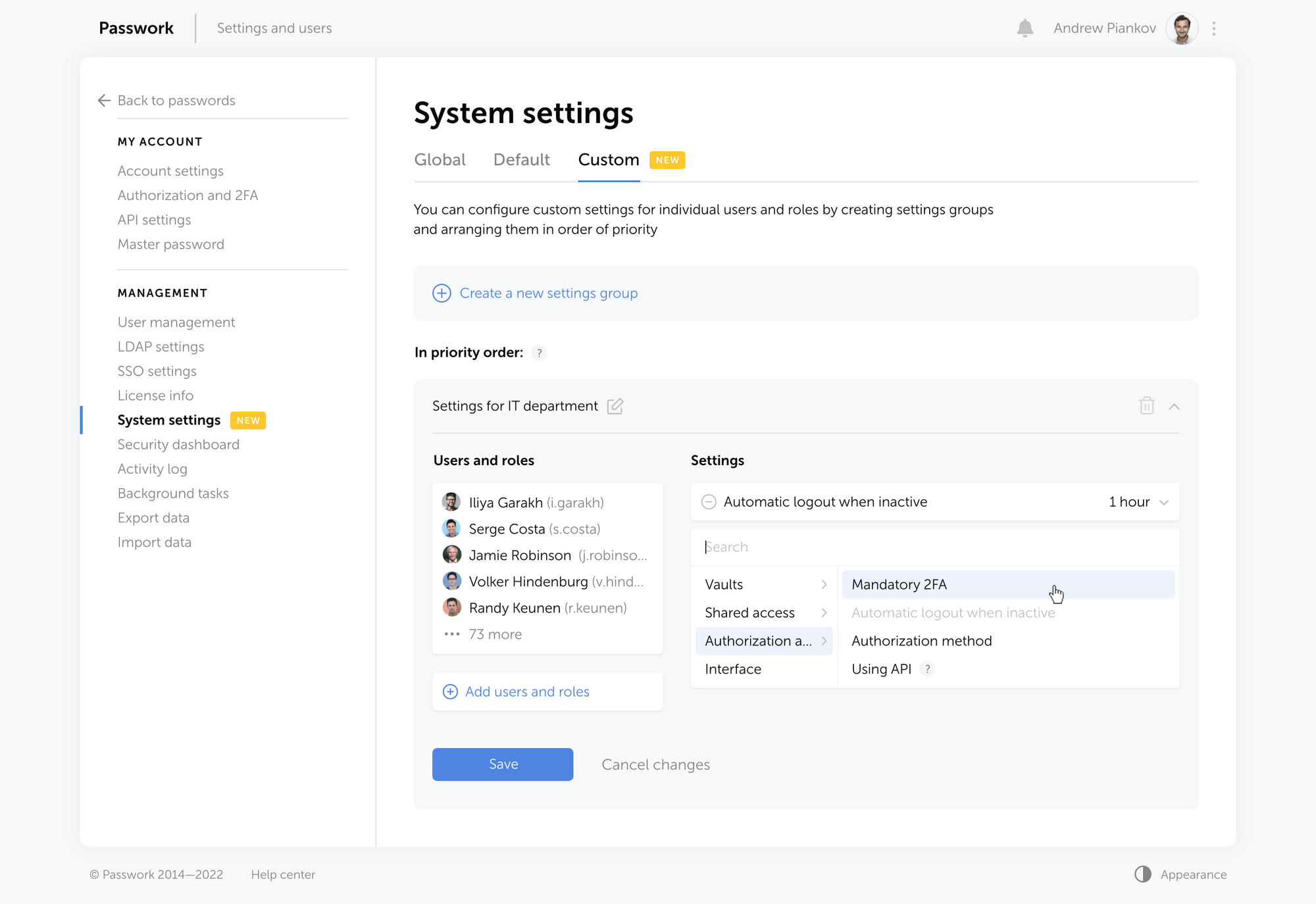
The new enhanced settings provide administrators with more control over configurations and user rights, and all changes require approvals, preventing any unintentional actions.
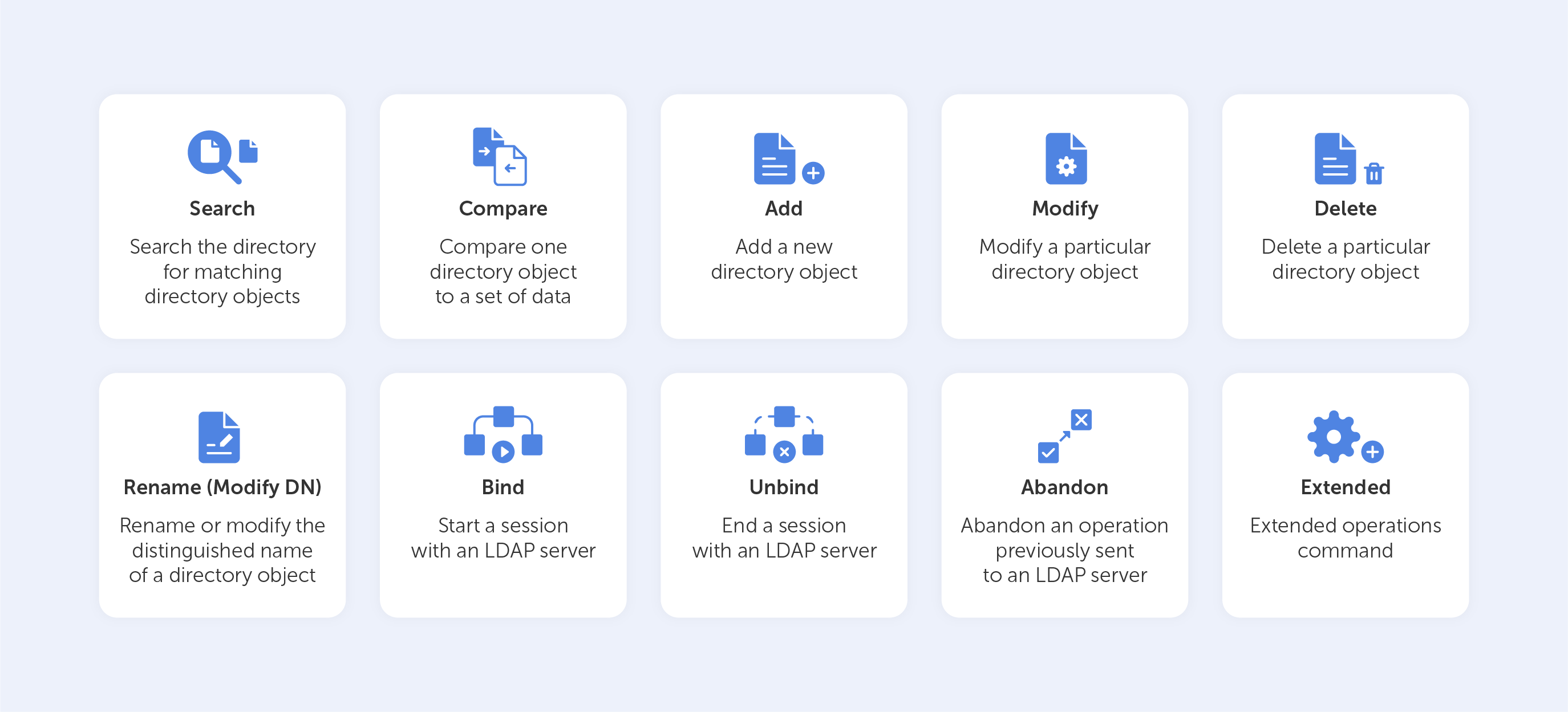
LDAP user management has now become simpler with its cleaner interface and background data updates.
In addition to that, Passwork 6.0 brings new notifications and interface improvements. All these enhancements contribute to a more comfortable user experience while ensuring the security of passwords and sensitive data.
Shortcuts
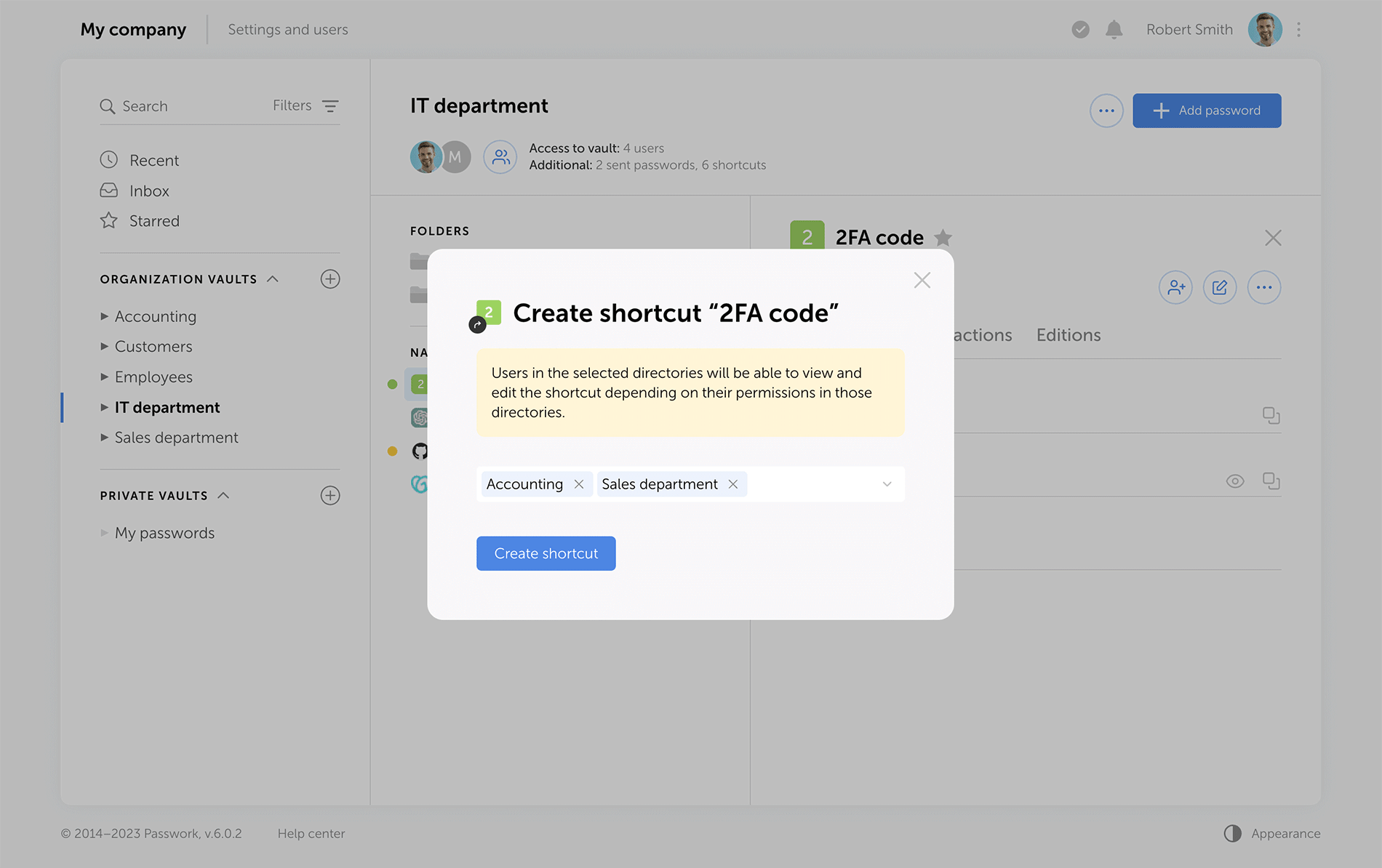
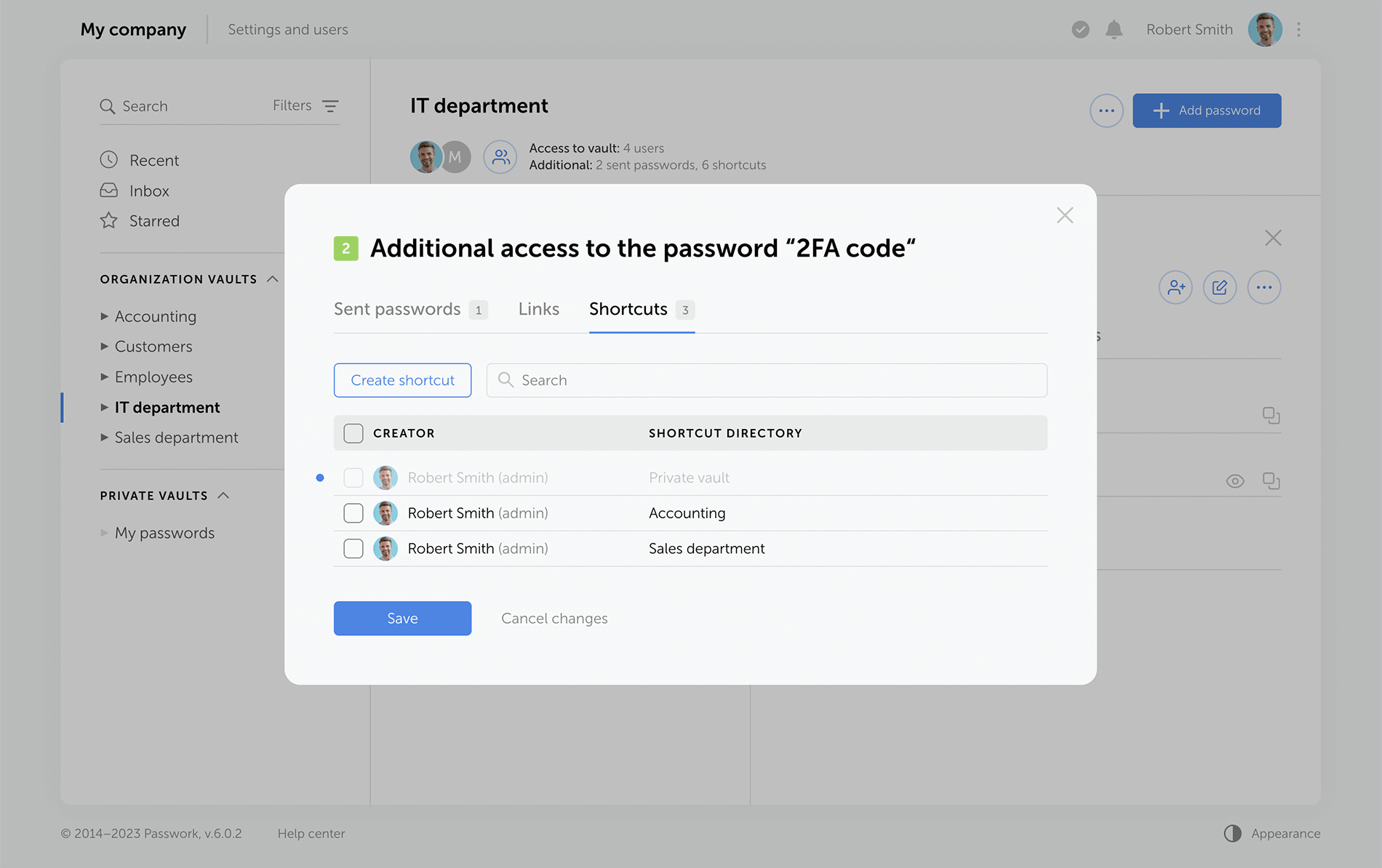
Shortcuts are a new way to share passwords, enhancing collaboration flexibility. There's no need for creating password duplicates in different vaults — instead, create multiple shortcuts in required directories. All changes to original passwords are reflected in shortcuts, keeping your team up to date. Users can view or edit data via shortcuts according to their access rights.
Choose the directories where you would like to create shortcutsView the complete list of shortcuts to passwords created in a specific vault
Sending passwords without granting partial access to vaults
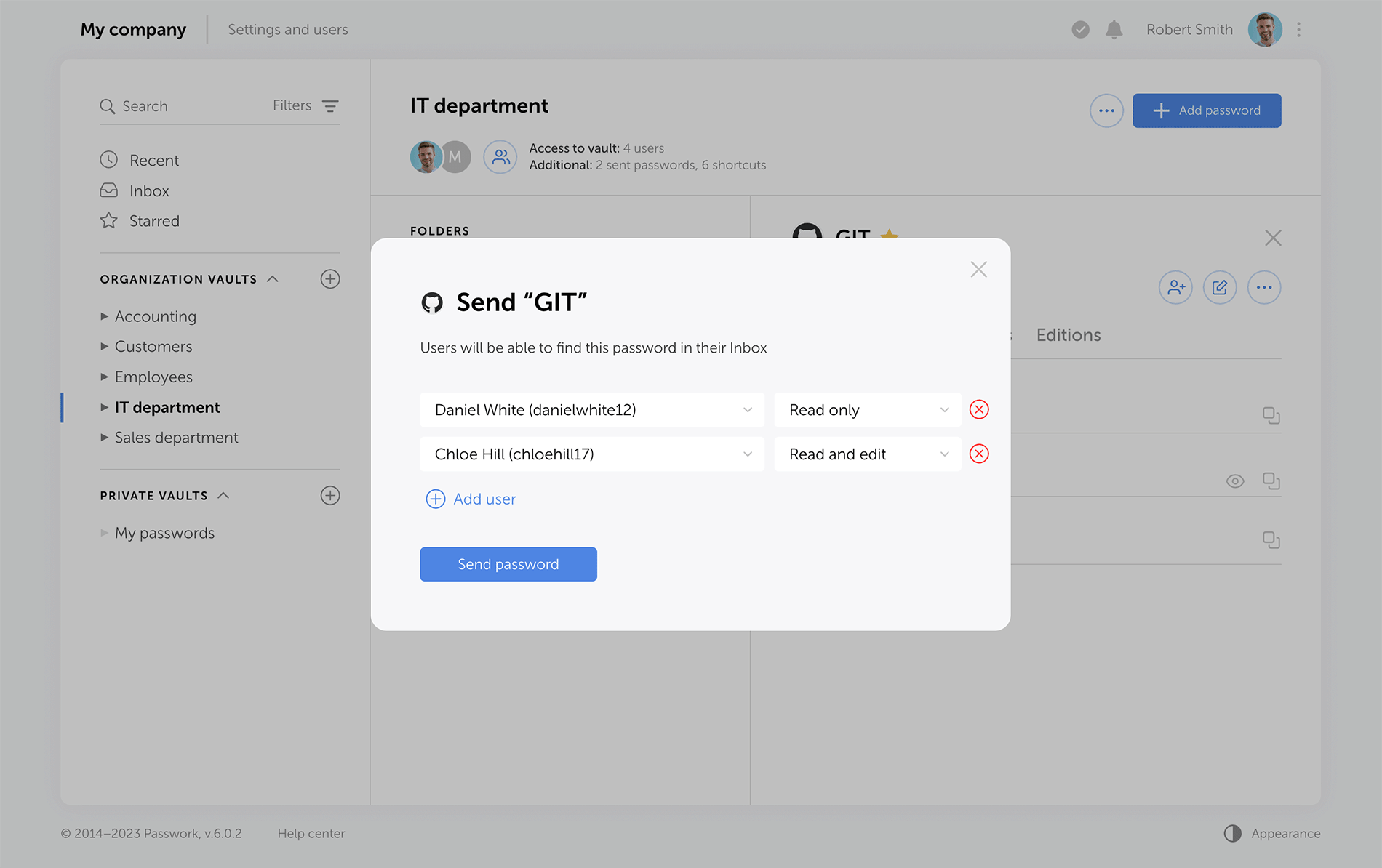
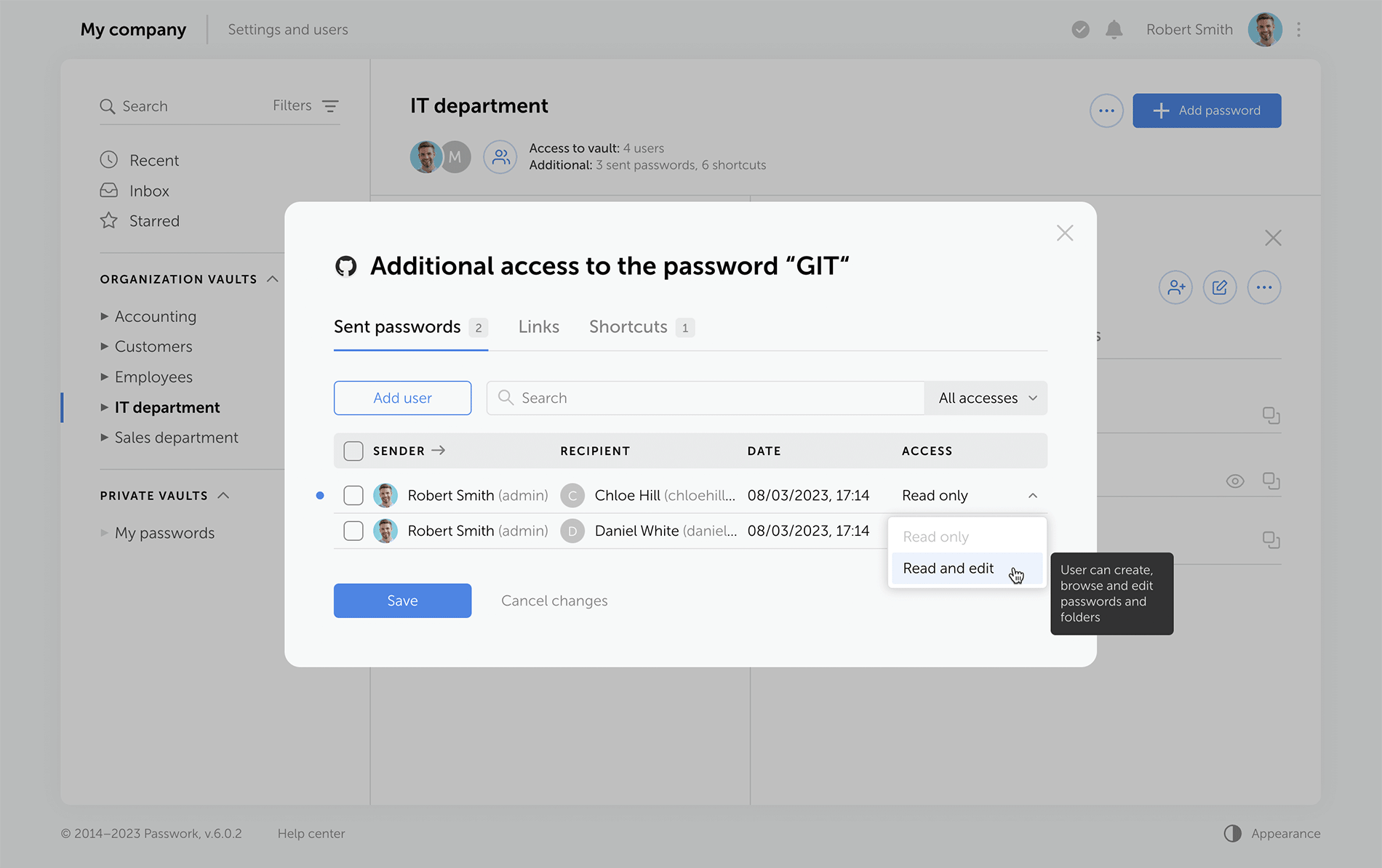
Previous versions of Passwork encrypt passwords at the vault level. This type of encryption gives users partial access to vaults even when a single password is shared with them. Now, when users access passwords via their "Inbox" or a shortcut, they receive keys to specific passwords, but not their vaults.
Administrators can clearly see who has vault access rights, and who can only work with specific passwords.
Send passwords to users with necessary access rightsView the complete list of all passwords that were sent from a specific vault
LDAP
The LDAP interface is now cleaner and more intuitive, with a reimagined user management logic. Adding new LDAP users is simpler and safer, especially with the client-side encryption enabled.
Previously, admins had to add an employee and provide a master password. Now, users set their master passwords upon the first login, and admins confirm them afterwards.
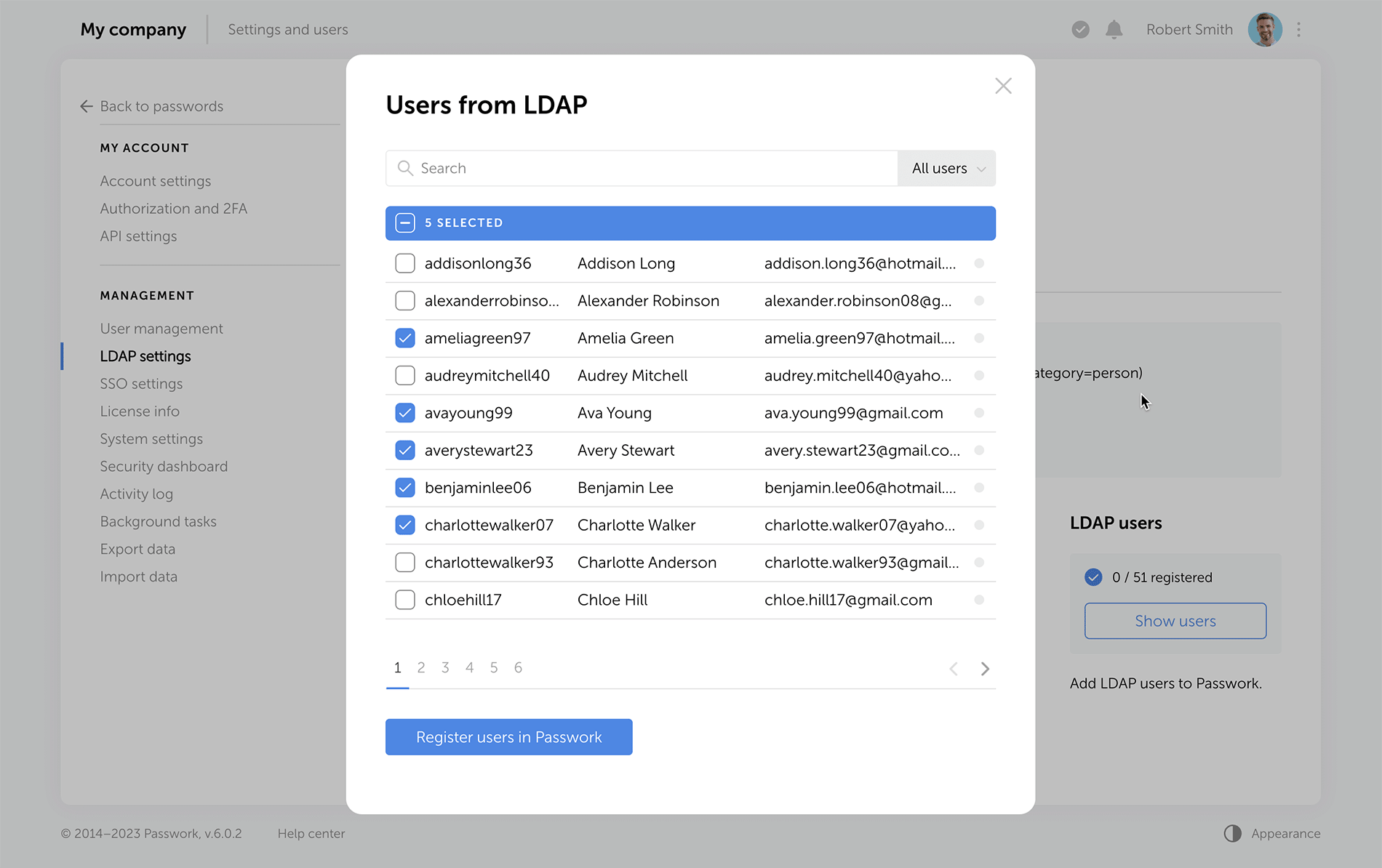
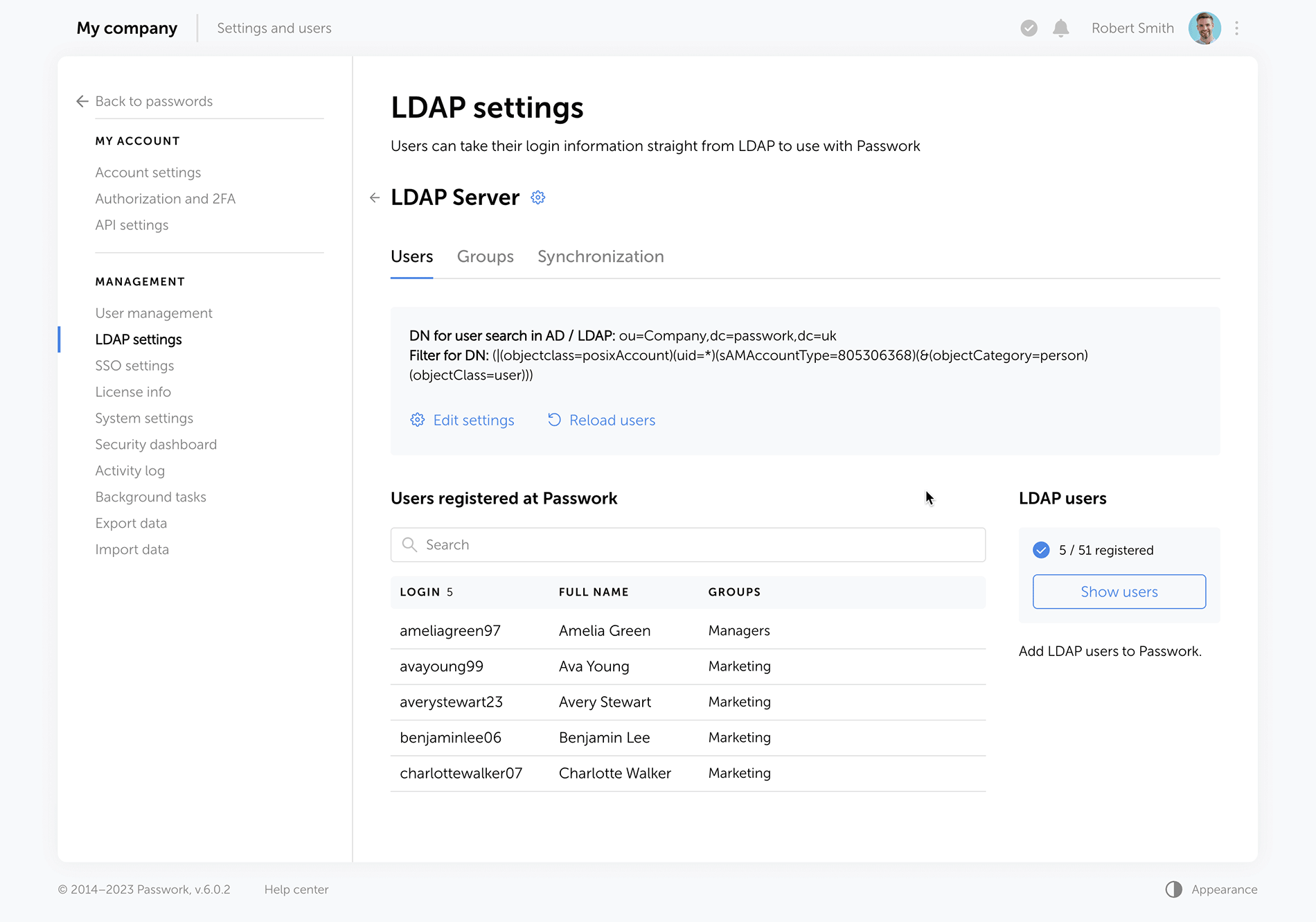
The "Users" tab shows registered users, and there is a separate window for adding new ones. LDAP user data updates take place in the background, allowing admins to navigate elsewhere without waiting for data refresh.
View your LDAP user list and add users to PassworkSet up your LDAP integration in the updated interface
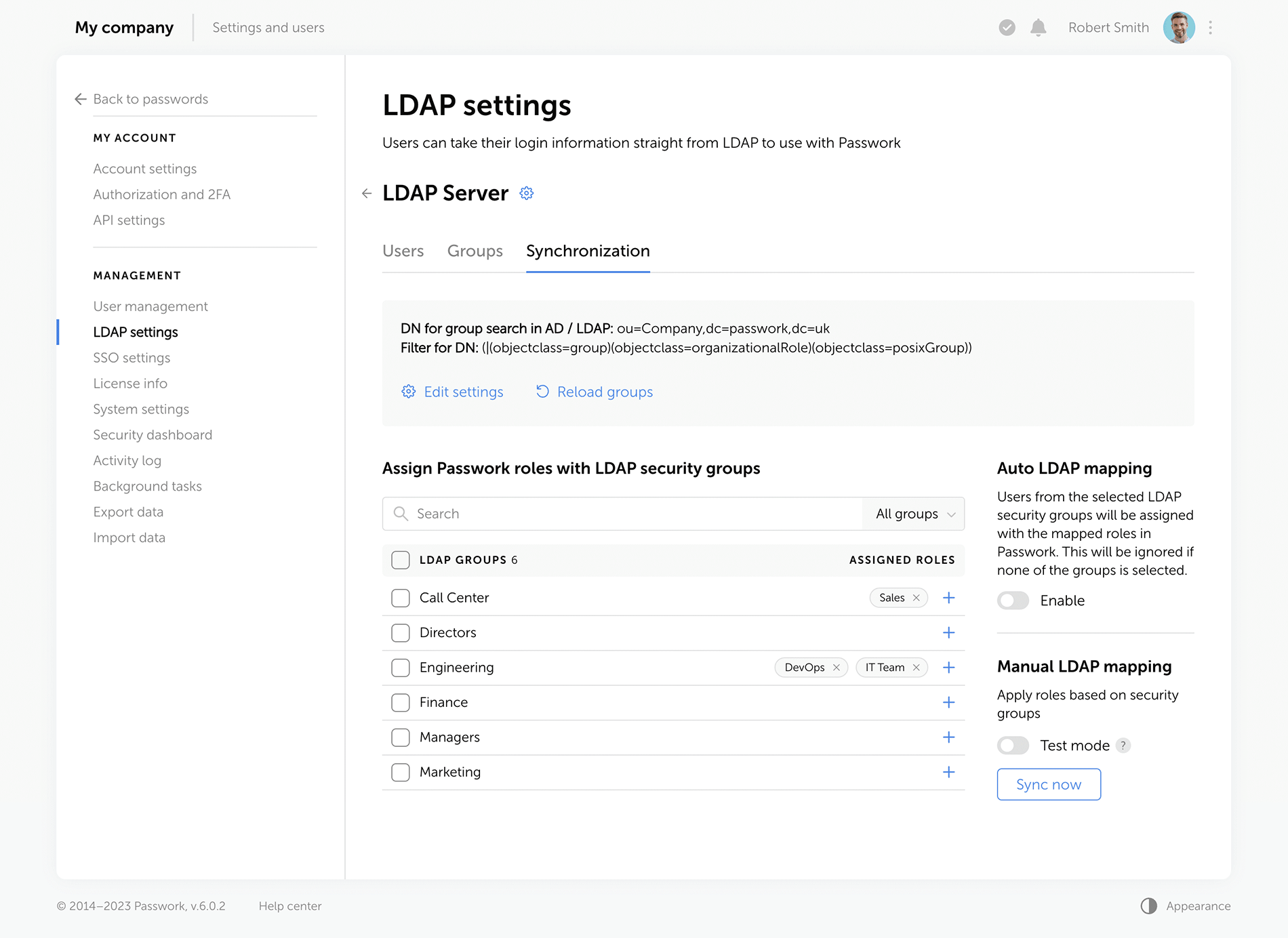
Passwork now provides more detailed security group information. The groups that are linked to roles are marked with special tags, and the groups which were not loaded from LDAP during the last update are marked as "Deleted", alerting admins to adjust the search settings or remove such groups. Also, you can now see the members of each security group.
Map your LDAP groups with Passwork roles and set up their automatic synchronization
Improved settings
We've redesigned all settings sections for a unified visual style and enhanced functionality, reimagined the logics of some settings.
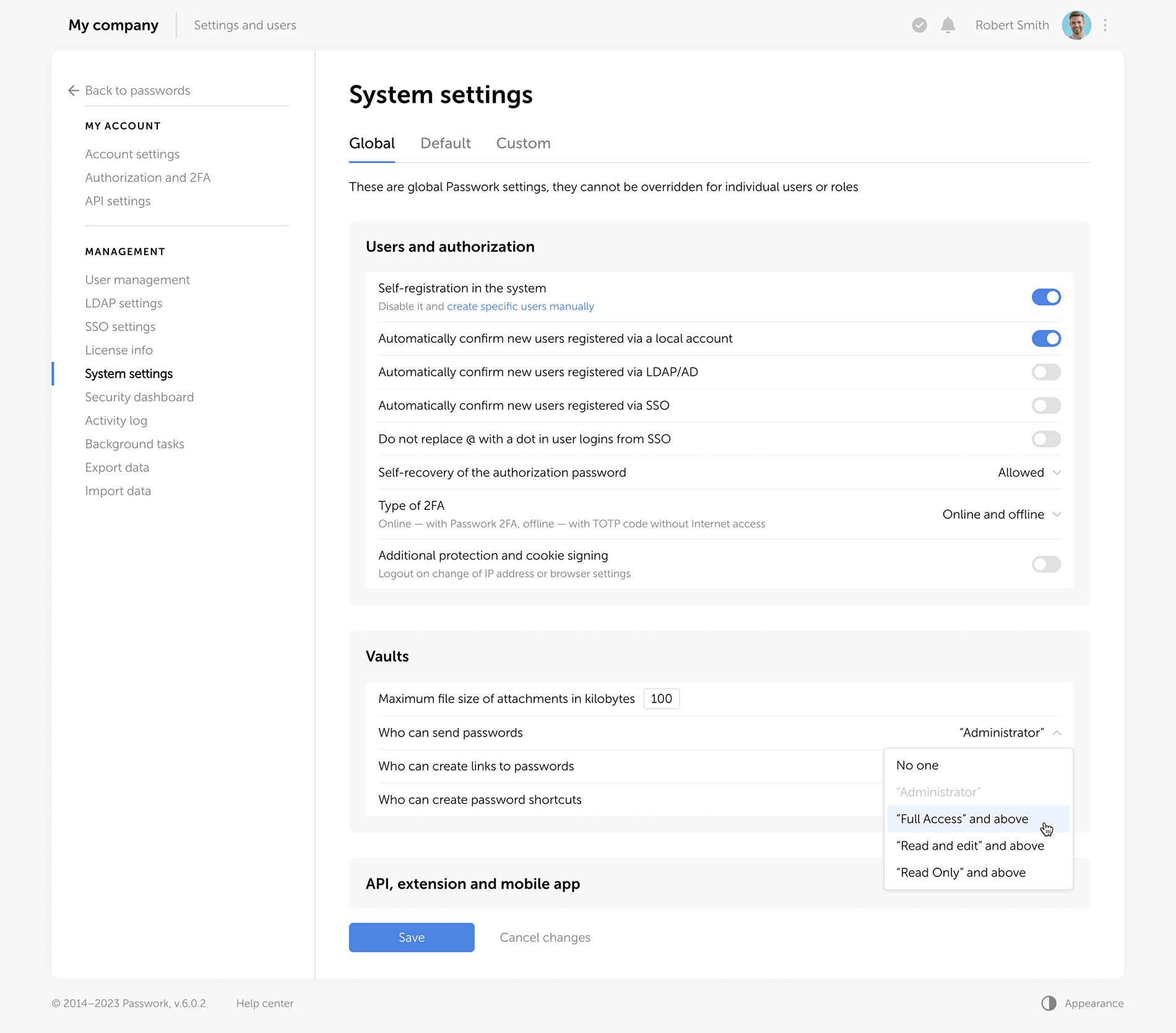
Rights for links, tags, and password sharing Previously, these settings were applied individually to each user. Now, they are applied to everyone with a certain level of vault access. For example, anyone with the “Edit” access rights or higher can create hyperlinks to passwords. These parameters are located in the system settings under the “Global” tab.
Change confirmation We've added “Save” and “Cancel changes” buttons in system settings. Now, any changes to settings must be confirmed — this helps to prevent accidental actions.
Custom auto-logout time Users can now set these parameters individually, and admins specify the maximum inactivity time period before automatic logout.
Language selection In the new version of Passwork, admins can allow employees to choose their interface language.
Choose the required access level which will make it possible to send passwords, create links and shortcuts
Interface enhancements
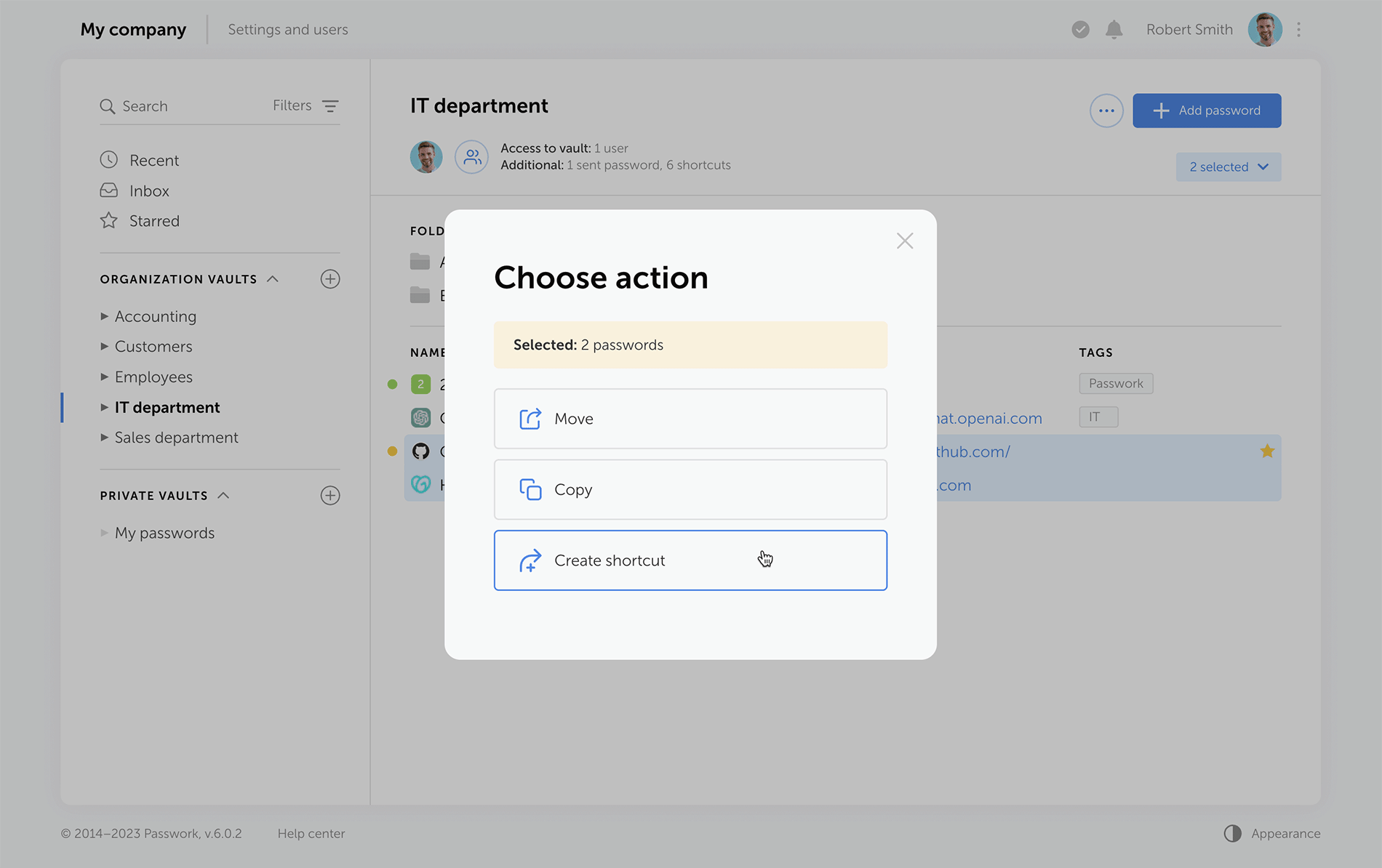
Improved drag and drop Now, when dragging and dropping passwords and folders into desired directories, Passwork displays selectable actions — move, copy, or create a shortcut.
Select folders and passwords, then drag and drop them to the required directoryChoose actions for the selected objects: move, copy, create shortcuts
Other improvements
Separate windows for access to the vault and additional access Vault access info is now split into two easy-to-read windows. One window shows users who has access to a specific vault, and the other displays alternative ways passwords from this vault can be accessed — shortcuts, hyperlinks, or shared passwords.
Redesigned password action buttons On the password panel, we've added the "Edit" button and grouped together all actions for additional password access via shortcuts, links, or direct user sharing.
Additional fields for password import and export Passwork 6.0 supports the use of custom fields, that means you can transfer not only login and password but also additional information stored within password cards.
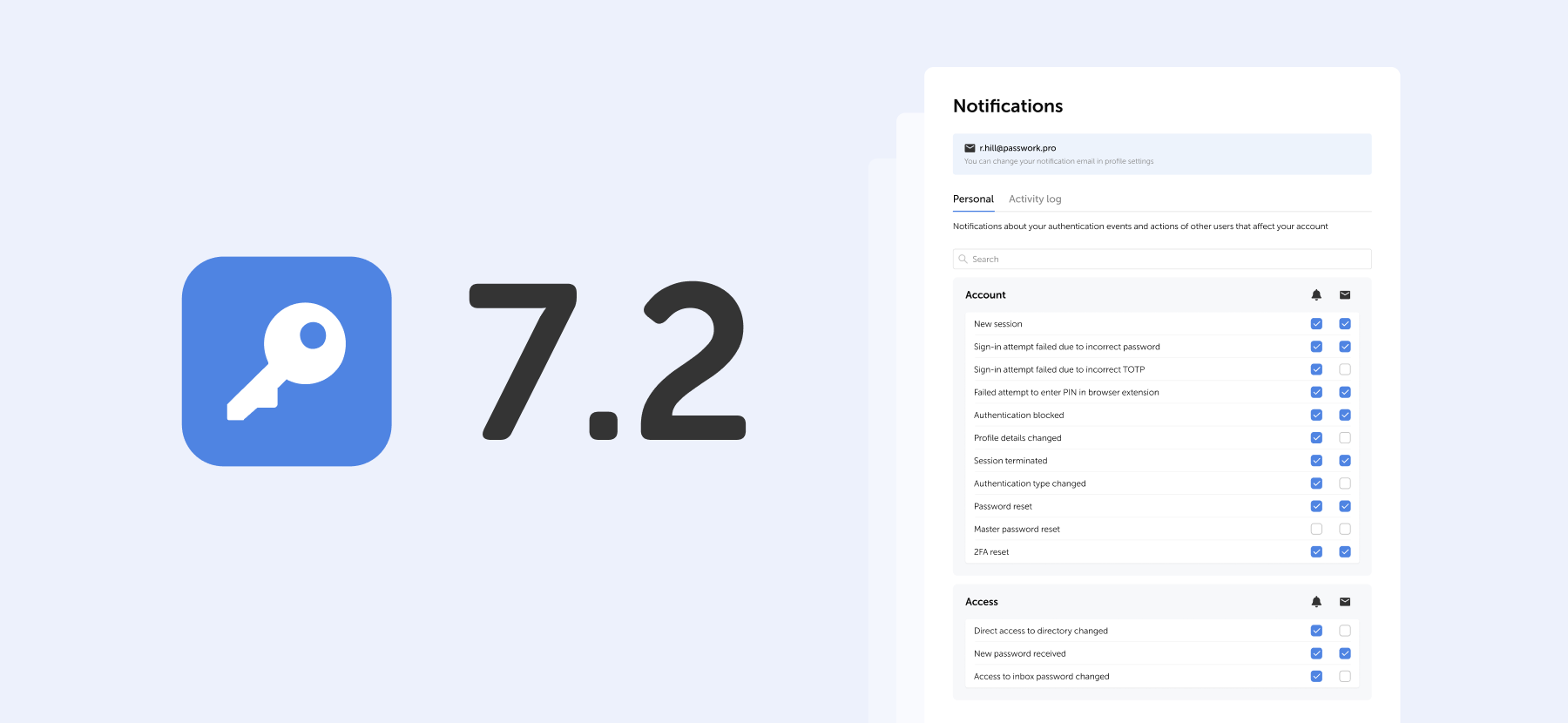
New notifications Administrators will receive notifications about new unconfirmed users, and employees will be notified of new passwords in the "Incoming" section.
A Security Operations Center (SOC) is a critical hub for cybersecurity within organizations. It combines people, processes, and technologies to detect, analyze, and respond to security incidents. In this article, we will delve into the components that make up a SOC, starting with its basic systems, then moving on to heavier software tools, and finally exploring emerging technologies that hold promise for the future of SOC operations.
Basic systems
The foundation of any SOC lies in its basic systems, which provide fundamental capabilities for monitoring, analysis, and incident response. These systems include:
A Security Information and Event Management (SIEM) system: A SIEM tool collects and correlates data from various sources, such as logs, network traffic, and endpoint events. It helps identify security incidents and generates alerts for further investigation. SIEM systems provide a centralized view of security events, allowing SOC analysts to detect patterns and anomalies.
Intrusion Detection Systems (IDS) and Intrusion Prevention Systems (IPS): IDS and IPS monitor network traffic, searching for suspicious patterns or known attack signatures. IDS detects intrusions, while IPS can actively block or mitigate threats in real time. These systems play a crucial role in detecting and preventing unauthorized access and malicious activities within the network.
Vulnerability management systems: Vulnerability management systems scan and assess the organization's network, applications, and systems for vulnerabilities. They enable proactive identification and remediation of security weaknesses, reducing the risk of exploitation by attackers. These systems play a vital role in maintaining a secure infrastructure.
Log management systems: Logs are critical for forensic analysis and incident response. Log management systems collect, store, and analyze logs from various sources, providing valuable insights into security events. They help SOC teams investigate incidents, identify the root cause of security breaches, and ensure compliance with regulatory requirements.
Network Traffic Analysis (NTA) tools: NTA tools analyze network traffic at a granular level, identifying anomalies and potential threats. By monitoring and analyzing network traffic patterns, these tools help SOC teams detect and respond to suspicious activities. NTA tools enhance visibility into network behavior, allowing SOC analysts to identify sophisticated threats that traditional security systems may miss.
Heavier software
As threats become more sophisticated, SOC teams require advanced software tools to combat them effectively. Let’s take a look at some examples.
Threat intelligence platforms: Threat intelligence platforms aggregate data from various sources to provide up-to-date information about known threats, vulnerabilities, and indicators of compromise. They enhance incident detection and response capabilities by enabling SOC teams to proactively identify and mitigate potential risks. Threat intelligence platforms allow organizations to stay informed about emerging threats and adopt appropriate defense measures.
Endpoint Detection and Response (EDR): EDR solutions monitor endpoint devices for suspicious activities and potential threats. They provide real-time visibility, investigation, and response capabilities, helping SOC teams swiftly identify and contain incidents. EDR tools leverage behavioral analysis and threat intelligence to detect and respond to advanced threats, such as file-less malware and insider threats, at the endpoint level.
Security Orchestration, Automation, and Response (SOAR): SOAR platforms streamline and automate SOC processes, integrating various tools and technologies. They facilitate incident triage, investigation, and response, enabling faster and more efficient security operations. SOAR platforms automate routine tasks, allowing SOC analysts to focus on high-value activities like threat hunting and incident response.
User and Entity Behavior Analytics (UEBA): UEBA tools leverage machine learning algorithms to establish baseline behaviors for users and entities within an organization. They detect anomalous activities, such as insider threats or compromised accounts, by analyzing behavior patterns. UEBA tools provide insights into user activities, helping SOC teams identify potential security incidents and mitigate risks.
Deception technologies: Deception technologies create decoys and traps within a network, luring attackers and diverting their attention. By interacting with deception assets, SOC teams can gather valuable threat intelligence and gain insights into attackers' techniques. Deception technologies complement traditional security measures by providing early detection and response capabilities.
Looking forward
The evolving threat landscape calls for constant innovation in the field of cybersecurity. Several technologies show promise for enhancing SOC capabilities in the future. Let’s take a look at a few.
Artificial Intelligence (AI) and Machine Learning (ML): AI and ML techniques are already being utilized in various aspects of cybersecurity. They can aid in threat detection, anomaly detection, and behavior analysis, enabling more proactive and accurate identification of security incidents. AI and ML algorithms can analyze vast amounts of data and identify patterns that human analysts may miss, improving the efficiency and effectiveness of SOC operations.
Advanced analytics: Advanced analytics techniques, such as predictive analytics and behavioral analytics, can provide deeper insights into security events and help identify emerging threats. By analyzing historical and real-time data, SOC teams can uncover hidden connections and predict future attack trends. Advanced analytics empower SOC analysts to make informed decisions, prioritize threats, and allocate resources effectively.
Cloud-based security: As organizations increasingly adopt cloud infrastructure, SOC operations will need to adapt accordingly. Cloud-native security solutions, including Cloud Access Security Brokers (CASBs) and Cloud Security Posture Management (CSPM) tools, are emerging to address the unique challenges of cloud environments. These solutions provide visibility, control, and compliance assurance across cloud services, ensuring that organizations can protect their data and applications effectively.
Internet of Things (IoT) security: With the proliferation of IoT devices, SOC teams will face the challenge of securing these endpoints. Future SOC technologies should incorporate specialized IoT security solutions that monitor and protect connected devices. IoT security platforms can detect and mitigate IoT-specific threats, such as device tampering, unauthorized access, and data exfiltration. These technologies enable SOC teams to secure the expanding landscape of IoT devices within organizations.
Quantum computing: Quantum computing has the potential to revolutionize cryptography and threat intelligence analysis. With its immense computational power, quantum computers may help SOC teams tackle complex cryptographic algorithms and facilitate faster threat analysis. Quantum-resistant encryption algorithms and quantum-enabled threat detection techniques may become crucial components of future SOC operations.
Conclusion
A well-equipped SOC comprises basic systems, advanced software, and future technologies. The basic systems form the foundation, providing essential monitoring and analysis capabilities. Heavier software tools enhance incident response and detection, allowing SOC teams to stay ahead of evolving threats. Looking ahead, emerging technologies like AI, advanced analytics, cloud-based security, IoT security solutions, and quantum computing hold the potential to revolutionize SOC operations, enabling organizations to protect their assets and data more effectively in an ever-changing cybersecurity landscape.
Exploring the components of a Security Operations Center (SOC): Basic systems, advanced software, and future technologies
Jul 19, 2023 — 5 min read
Symmetric algorithms, forming the backbone of modern cryptography, offer a secure method of encrypting and decrypting data utilizing a single shared key. They have been widely adopted for their unmatched speed and efficiency. Like any other technology, symmetric algorithms come with their own set of benefits and drawbacks. This article seeks to offer a comprehensive review of the pros and cons of symmetric algorithms, providing a deeper understanding of their integral role in data security and the potential challenges they entail.
Pros of symmetric algorithms
Unrivaled efficiency
Symmetric algorithms are best known for their superior efficiency in handling large volumes of data for encryption and decryption. The use of a single key significantly reduces the demand for computational resources, setting symmetric algorithms apart from their asymmetric counterparts. This makes them an excellent fit for applications that demand high-speed data processing, including secure communication channels and real-time data transfers.
Impressive speed
Symmetric algorithms, by virtue of their simplicity, can process data at a much faster rate than asymmetric algorithms. Without the need for complex mathematical operations, such as prime factorization or modular arithmetic, symmetric algorithms can encrypt and decrypt data rapidly, reducing latency. This speed advantage is particularly beneficial for applications requiring swift data encryption, including secure cloud storage and virtual private networks (VPNs).
Key distribution
Symmetric algorithms simplify the key distribution process. Given that both the sender and receiver utilize the same key, they only need to execute a secure key exchange once. This offers increased convenience in scenarios where multiple parties need to communicate securely, such as within large organizations, military operations, or corporate communications.
Computational simplicity
Symmetric algorithms are relatively straightforward to implement due to their computational simplicity. This allows for efficient coding, making them ideally suited for resource-constrained devices that possess limited computational capabilities, such as embedded systems or Internet of Things (IoT) devices. This simplicity also contributes to easier maintenance and debugging, reducing the potential for implementation errors that could compromise security.
Cons of symmetric algorithms
Complex key management
The management and distribution of shared keys are significant challenges inherent to symmetric algorithms. The security of these algorithms is closely tied to the confidentiality of the key. Any unauthorized access or compromise of the key can lead to a total breach of data security. Consequently, robust key management protocols are essential, including secure storage, key rotation, and secure key exchange mechanisms, to mitigate this risk.
Lack of authentication
Symmetric algorithms do not inherently provide authentication mechanisms. The absence of additional measures, such as digital signatures or message authentication codes, can make it challenging to verify the integrity and authenticity of the encrypted data. This opens the door for potential data tampering or unauthorized modifications, posing a considerable security risk.
Scalability
Symmetric algorithms face challenges when it comes to scalability. Since each pair of communicating entities requires a unique shared key, the number of required keys increases exponentially with the number of participants. This can be impractical for large-scale networks or systems that involve numerous users, as managing a vast number of keys becomes complex and resource-intensive.
Lack of perfect forward secrecy
Symmetric algorithms lack perfect forward secrecy, meaning that if the shared key is compromised, all previous and future communications encrypted with that key become vulnerable. This limitation makes symmetric algorithms less suitable for scenarios where long-term confidentiality of data is crucial, such as secure messaging applications.
An in-depth analysis of symmetric algorithms
Symmetric algorithms, including the widely adopted AES, DES, and Blowfish, are favored for their speed and efficiency. However, their robustness is largely dependent on the size of the key and the security of the key during transmission and storage. While larger keys can enhance security, they also increase the computational load. Thus, selecting the appropriate key size is a critical decision that requires a careful balance between security and performance requirements.
One of the standout strengths of symmetric encryption is its application in bulk data encryption. Because of their speed, symmetric algorithms are ideally suited for scenarios where large amounts of data need to be encrypted quickly. However, they may not always be the best solution. In many cases, asymmetric encryption algorithms, despite their higher computational demands, are preferred because of their additional security benefits.
It's also crucial to note that cryptographic needs often go beyond just encryption and decryption. Other security aspects, such as data integrity, authentication, and non-repudiation, are not inherently provided by symmetric algorithms. Therefore, a comprehensive security scheme often uses symmetric algorithms in conjunction with other cryptographic mechanisms, such as hash functions and digital signatures, to provide a full suite of security services.
Final thoughts
Symmetric algorithms occupy a pivotal place in the realm of cryptography. Their efficiency and speed make them an invaluable asset for many applications, especially those involving large-scale data encryption. However, the limitations inherent in symmetric algorithms, including key management complexities, lack of authentication, and absence of perfect forward secrecy, necessitate meticulous implementation and the incorporation of additional security measures. Therefore, the decision to utilize symmetric algorithms should be made based on a thorough understanding of these pros and cons, as well as the specific requirements of the system in question.
Pros and cons of symmetric algorithms: Ensuring security and efficiency
May 16, 2023 — 7 min read
In an era where cybercrime is rampant, businesses must take a proactive approach to safeguard their confidential information. In 2021 alone, over 118 million people have been affected by data breaches, and this number is expected to rise exponentially.
In this post, we’ll discuss some of the best practices for businesses to protect themselves from cyber threats.
Always have a back-up
A good backup system is one of the best ways to maintain computers’ security and protect your business’s data. Regularly backing up important files can help ensure that you don’t lose any information if a cyber incident or computer issue occurs. Here are some tips on how to effectively back up your data:
Use multiple backup methods. Have an effective backup system by using daily incremental backups to portable devices or cloud storage, end-of-week server backups, quarterly server backups, and yearly server backups. Remember to regularly check and test whether you can restore your data from these backups.
Use portable devices. Consider using external drives or portable devices such as USB sticks to store your data. Store the devices separately offsite, and make sure they are not connected to the computer when not in use to prevent malicious attacks.
Utilize cloud storage solutions. Cloud storage solutions are a great way of backing up all your important information. Choose a solution that provides encryption for transferring and storing your data and multi-factor authentication for access.
Practice safe backup habits. Make it a habit to regularly back up your data, not just once but multiple times throughout the week or month, depending on the type of information you’re backing up. Additionally, it’s important to practice safe backup habits, such as keeping your devices away from computers when not in use and regularly testing that your data is properly backed up.
Train your employees
To protect your business from cyber threats, educating your employees about the risks and how to stay safe is essential. Training should focus on identifying phishing emails, using strong passwords, and reporting any suspicious activity immediately to the IT department.
Ensure that everyone is up-to-date with the latest threats and strategies for protection by conducting regular cybersecurity training sessions with all of your employees. Provide helpful resources such as tips for creating secure passwords, methods for spotting phishing attempts, and steps for safely sharing confidential information online.
Putting this emphasis on education and training will help create an environment of alertness so that any potential risk can be identified quickly and addressed appropriately.
Password management
Weak passwords are one of the most common entry points for cyber attackers, so using a secure password and password manager is essential to keep your business safe.
A password manager is a tool that allows you to store and manage all your passwords securely, with only one strong master password needed to access them all. Here are some tips for creating strong passwords and using a reliable password manager:
Create strong passwords. Choose passwords that include numbers, symbols, upper-case letters, and lower-case letters. Avoid using personal information like birthdays or pet names in your passwords. Additionally, avoid using the same username/password combination for multiple accounts.
Use a password manager. A reliable password manager will help you create and store secure passwords. Be sure to select a trustworthy provider, as they will be responsible for protecting your data.
An on-premise password manager like Passwork is an excellent option for businesses that need to store passwords on their own servers. Passwork provides the advantage of having full control over your data and features like password sharing and a secure audit log.
Enable multi-factor authentication. Adding an extra layer of security to your accounts is easy with multi-factor authentication (MFA). MFA requires two or more pieces of evidence to authenticate the user's identity, such as passwords and biometric data. Most password managers can enable MFA for all your accounts, so be sure to take advantage of this feature.
Finally, make sure you update your passwords regularly and always keep them private. Following these tips will help ensure that you are protecting your business from cyber threats.
Securing your network
Using a Virtual Private Network (VPN) effectively protects your business's sensitive data and prevents unauthorized access to your network. A VPN creates an encrypted connection between your device and the internet, making it more difficult for hackers or malicious actors to intercept and access confidential information. Here are some tips on how to leverage a VPN for optimal security:
Research the best VPN providers for features that best suit the needs of your organization
Ensure that the provider meets industry standards such as AES 256-bit encryption
Set up two-factor authentication with users’ login credentials
Configure the VPN for reliable and secure connections
Monitor your network for any suspicious activity or unauthorized access attempts
Make sure to update the VPN software with new security patches regularly
Train users on the proper internet safety and best practices when using a VPN
Use an antivirus program and scan all devices connected to the network for malware threats
VPNs are not only important for protecting data and preventing unauthorized access but also for maintaining user privacy. By encrypting the data sent and received over the internet, your organization can ensure that any information stays secure and confidential.
Consistent vulnerability assessments are crucial
Organizations of all sizes must remain vigilant in mitigating cyber threats — and one of the best ways to do this is by conducting regular vulnerability assessments. This will help identify any potential weaknesses or vulnerabilities that could be used by malicious actors to gain access to your system, allowing you to patch and address them before they become a problem.
Here are a few steps to help get you started:
Develop an assessment plan for your organization
Before starting, it’s important to understand the scope and objectives of the vulnerability assessment. Define the overall goals and objectives before identifying any assets or systems that should be included in the assessment.
Identify and document threats
Once you have developed a plan, it’s time to begin searching for potential vulnerabilities within your system. You can use various open-source intelligence techniques, such as scanning public databases and researching known security issues with similar software versions or operating systems that are present in your system.
Create a testing environment
After potential threats have been identified and documented, you should create a safe testing environment to validate the vulnerability assessment results. Doing so will help ensure that any tests conducted do not adversely affect production systems.
Run automated scans
Following the creation of your secure test environment, it’s time to run automated scans on your organization's target systems or assets. This should include both internal and external scanning tools, such as port scanners, web application scanners, or configuration management tools, depending on the scope of the assessment.
Analyze scan results
Once the automated scans have been completed, it’s time to analyze the results and identify any potential issues or vulnerabilities. Assess any weaknesses present in order to prioritize and address them more effectively.
Develop a remediation plan
After identifying potential security issues, you should develop a remediation plan based on the risk level of each issue. This could include patching vulnerable systems, implementing new security measures, or restricting access to certain areas of your system, depending on the severity of the threat.
By conducting regular vulnerability assessments, organizations can stay ahead of cyber threats and ensure their systems remain secure.
Bottom line
Protecting your business from cyber threats should be a top priority for any organization. With the increasing prevalence of cybercrime and data breaches, implementing effective cybersecurity practices is more important than ever.
By regularly backing up important files, training employees on identifying and reporting potential threats, using a secure password manager, utilizing a VPN, and conducting consistent vulnerability assessments, businesses can significantly reduce their risk of falling victim to cyber-attacks.
5 ways to keep your business safe from cyber threats
Feb 27, 2023 — 5 min read
We live in a digital age, and children must learn about internet safety as a first port of call. They are constantly on their phones and tablets, and many of them complete their coursework online. To secure personal information, all of these services require a password, but the passwords are frequently pre-set for youngsters, who do not get to create their own.
Children will never learn how to create secure passwords if such passwords are never changed. This renders them vulnerable to hacking. It is our responsibility as parents to educate our children about internet safety. This includes not only stopping kids from accessing improper information, but also explaining why. The greatest method for children to learn about computer security is to see adults who are skilled in the field. Continue reading to learn how to teach your children about password security fast and effortlessly.
Make unique and fun passwords
Passwords should be easy for your children to remember but tough for others to guess. That may appear to be an oxymoron, but if you make it fun, your child will be more likely to remember their passwords. Here are some easy ideas to get their creative juices flowing:
• Make up your own sentences or words. If they had a favorite stuffed animal as a youngster, try to integrate it, but don't make it the sole word. Use three or more to create complexity.
• Use basic, popular passwords such as ABCDE, 123455, or "password" instead. Hackers can easily breach them and obtain access to your accounts.
• Use passwords that are at least eight characters long
• Use numbers, uppercase letters, and symbols as needed. Also, avoid using them in apparent ways. Avoid substituting letters for vowels, such as an exclamation point (!) for I and an at symbol (@) for a. These are basic replacements that are easy to understand.
• Create unique passwords for each website. If your password is hacked and you use it in several places, hackers will have access to your children's sensitive information in multiple areas.
Passwords should not be shared
This one may be difficult for your children to grasp. They do, after all, know your phone's password! However, it is critical that your children do not share their passwords with anyone other than their parents—including their siblings. The more people who know their password, the more likely it is that people who should not have access to their accounts will.
Explain some of the scenarios that could occur to your children to ensure that they understand why they should not share their passwords. Listed below are a few examples:
• Someone could steal their identity
• Someone could send hurtful messages and jeopardize friendships
• Someone could open accounts on questionable platforms using their identity
• Someone could change their passwords and keep them from accessing their accounts
• If there are bank accounts attached, someone could spend their money
These are just a few examples, but they should be enough to convince your children not to share their passwords. If they do, they must inform you of who they shared it with and why. You can then decide whether or not to change their passwords.
Remember, as a parent, this does not apply to you. As a precaution, you should have all of your children's passwords who are under the age of 18. This will give you peace of mind because you will know you can monitor their online activity for their safety and security. There are many frightening people out there, and not just those looking to steal their passwords.
Avoid using the same password in multiple places
It may be difficult to keep track of so many different passwords, but it is critical that you and your child develop a unique password for each website, platform, or program. This will assist to safeguard their data:
• If there is a data breach in one place, they simply need to be concerned about that one location
• If you use the same password, they may have access to far more information, which might be harmful
Your child may not be able to use a password manager at school, but there are security services that can assist you in storing passwords across various platforms. They can also generate secure passwords that are difficult to decipher. These are useful tools, but you should not rely only on them for all of your passwords in case you are locked out.
What does a strong password look like?
You may be asking what makes a password strong now that you know what to do and what to avoid while teaching your children password safety. There are several approaches to constructing a secure password, and you must ensure that passwords are simple for your youngster to remember.
One method is to speak to their interests or their sense of humor.
• Use their passions as a source of inspiration. If they enjoy magic, you may perform something like AbramagiCkadabrA#7. This is an excellent password since it includes random capitalization, a number, and a distinctive character.
• Use something amusing for them. For example, because little children are typically delighted by potty humor, you may establish their username @uniFARTcorn3. Again, you've covered all of the possible factors for password requirements, and your kids will have a good time inputting it.
• Make use of meals and pastimes. You might, for example, create their password Apple3picking! EAO. They enjoy apple harvesting, their favorite number, a special character, and strange apple orchard letters or abbreviations.
You want to make your password difficult to guess but easy to remember, so choosing items that will activate your memory or make you smile when your child enters it will increase the likelihood that they will remember it.
It is not suggested to keep a digital file of passwords on your computer, but if necessary, you may write them down for your children until they learn them. Just be careful not to lose track of where you wrote them!
How to teach children about password security: Tips for parents
Feb 6, 2023 — 5 min read
We have made enormous leaps forward in terms of technology over the past decade. However, the growth of cyberspace brings with it new challenges for cybersecurity; cybercriminals have adapted their techniques to the new environment. Nevertheless, there is a solution to every challenge.
In light of this, let's take a look at some of the most serious cybersecurity threats and the solutions that have been offered for them in 2023.
The biggest threats to cybersecurity today and how to combat them
Adaptation to a remote workforce
Employees encounter one of the most common security threats when working from home. Employees may mistakenly let hackers access their computers or corporate files due to inattention, weariness, or ignorance. However, protecting remote and hybrid working environments will remain the most difficult tasks in the world of cyber security.
Cloud-based cybersecurity solutions that safeguard the user's identity, devices, and the cloud are essential for secure remote working.
Blockchain and cryptocurrency attacks
Attacks on blockchain-based systems can be launched by both outsiders and insiders. Many of these assaults use well-known tactics such as phishing, social engineering, data-in-transit attacks, and those that focus on coding faults.
To defend organizations against cyberattacks, stronger technological infrastructure may be constructed using blockchain-powered cybersecurity controls and standards. Combining the blockchain with other cutting-edge technologies like AI, IoT, and machine learning may also be required.
Ransomware development
Ransomware is a type of virus that encrypts files on a victim's computer until a ransom is paid. Historically, organizations could keep their data fairly safe by using a standard backup procedure. The organization may be able to restore the data held hostage without paying the ransom, but this does not guarantee that the bad guys will not try to take over the data.
As a result, users must prioritize frequently backing up their devices, employing cutting-edge anti-malware and anti-phishing solutions, and keeping them up to date at all times
BYOD policies
Personal devices are more likely to be used to breach company networks, whether or not BYOD is permitted by IT, because they are less secure and more likely to contain security weaknesses than corporate devices. As a result, businesses of all sizes must understand and address BYOD security.
Among the management options are BYOD services, and the process begins with enrollment software that adds a device to the network. Company-owned devices can be configured individually or in bulk.
The dangers involved with serverless apps
For some developers, the event-driven nature of serverless computing and the lack of permanent states are drawbacks. Developers that need persistent data may encounter problems since the values of local variables may not survive between instantiations.
Enlisting the support of your company's cybersecurity expertise may be the best line of action for those who use serverless architectures.
Supply chain attacks are increasing
An attack on the supply chain happens when someone breaches your digital infrastructure by leveraging an external supplier or partner who has access to your data and systems. This type of attack is known as a supply chain assault.
Upkeep and maintenance of a highly secure build infrastructure, fast software security upgrades, and the creation of safe software updates as part of the software development life cycle are all essential.
Preventive social engineering measures
Cybercriminals use social engineering to get critical information from their targets by influencing their psychology. It causes users to make security mistakes and steal sensitive information such as banking passwords, login information, system access, and other similar information.
To avoid cyberattacks, organizations should employ a technology-and-training-based strategy. There is no one-size-fits-all solution to defeating these social engineers; instead, you must adopt an integrated approach that includes multi-factor authentication, email gateways, respected antivirus software, staff training, and other components to thwart such social engineering assaults.
Cyber security challenges in different industries
Cybersecurity issues are common anywhere cyberspace is used. Some significant industries that face specific cybersecurity challenges in business are listed below.
Vehicular communications
As Vehicle-to-Everything (V2X) communication technologies evolve and current cars are able to interface with external infrastructure, the necessity of securing communications becomes increasingly apparent. There is a very real possibility that the vehicles of today may be the targets of cyberattacks that are directed at vehicular communications.
Cybersecurity challenges in the healthcare industry
Cybercriminals continue to develop new methods to attack healthcare cybersecurity policies, whether it be high-value patient data or a low tolerance for downtime that might interfere with patient care. Both of these vulnerabilities present opportunities for cybercriminals. Hackers now have access to a market worth $13.2 billion thanks to the 55% rise in cyberattacks on healthcare providers that have occurred over the past several years. This has turned the healthcare industry into a veritable gold mine.
Banking
Threats are constantly evolving and the cybersecurity landscape is constantly changing. With huge sums of money and the potential for significant economic shocks at stake in the banking and financial business, the stakes are high in this area. A significant hacking assault on banks and other financial institutions might result in severe economic consequences.
Online retailing
Retailers present a favorable and low-risk target environment for those who commit cybercrime. These businesses are responsible for the processing, storage, and protection of the data and sensitive information of their customers. This information may include financial credentials, usernames, and passwords. These details are susceptible to being attacked because of the ease with which they might be utilized in both online and offline operations.
Conclusion
Recent years have demonstrated how the key cyber security issues and threat actors are adapting their techniques to a changing global environment. The greatest strategy to safeguard your organization and plan for cybersecurity in 2023 is to be proactive. A single data breach can cost millions of dollars in lost data, penalties, and regulatory action. Understanding the hazards that are on the horizon will allow you to account for them in your procedures and stay one step ahead of attackers.
The most serious cybersecurity threats and solutions in 2023
Jan 12, 2023 — 6 min read
Of course you want to keep your data safe. So why are so many security precautions frequently overlooked? Many accounts, for example, are protected by weak passwords, making it easy for hackers to do their work. There is a fine line between selecting a password that no one can guess and selecting a password that is easy to remember. As a result, we will examine this topic in depth today and ensure that you no longer need to click on the "lost password" link.
What exactly is a strong password?
So let's begin with a definition. A secure password is one that cannot be guessed or broken by an intruder.
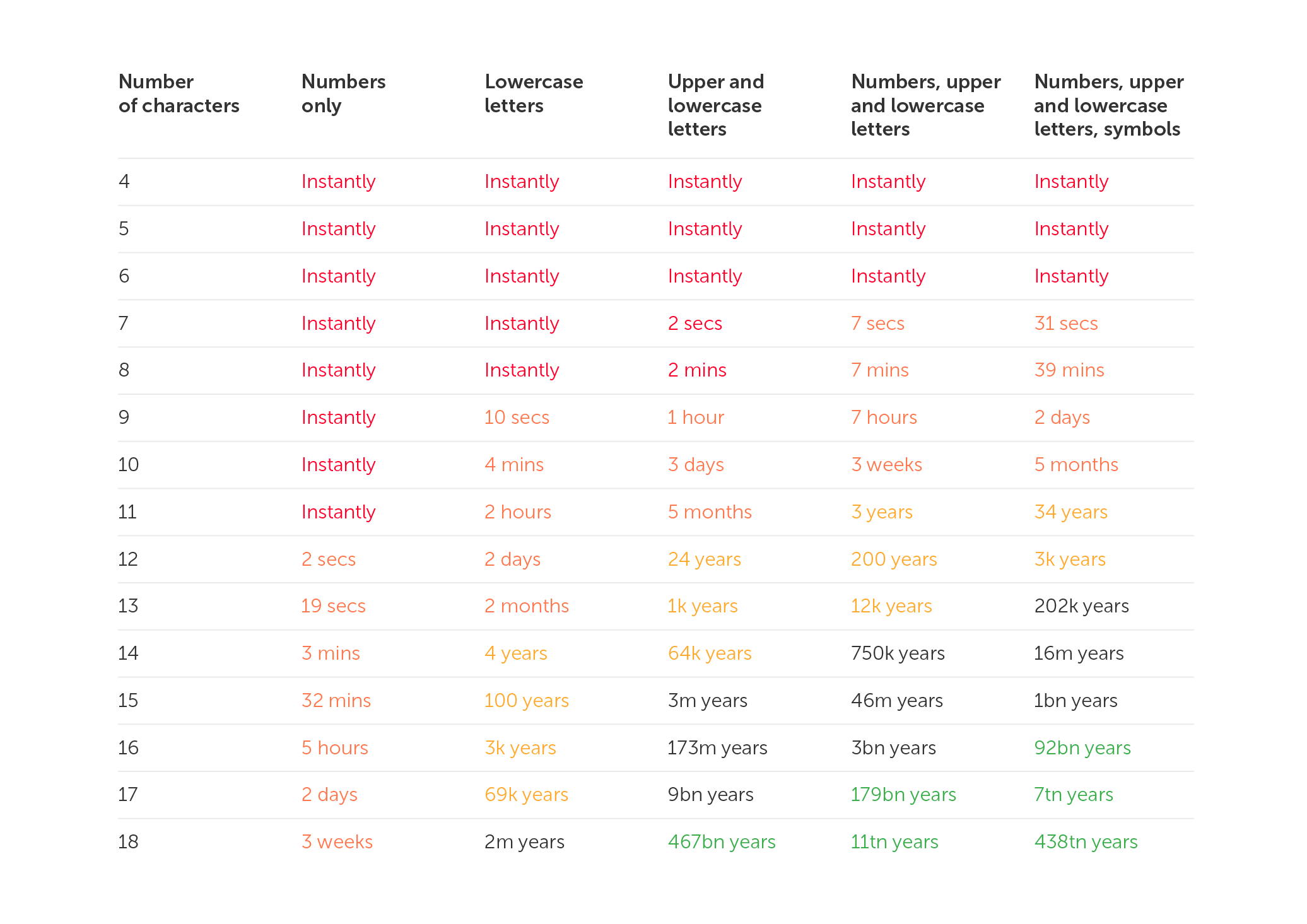
Computers are utilized by hackers in order to try out various combinations of letters, numbers, and symbols. Passwords that are only a few characters long and consist entirely of letters and digits are easy for modern computers to crack in a couple of seconds. Because of this, it is vital to utilize robust combinations of capital and lowercase letters, numbers, and special characters in one password. There is a minimum length requirement of 12 characters for passwords, although using a longer password is strongly encouraged.
To summarize the attributes of a secure password, they are as follows:
• At least 12 characters are required. The more complicated your password, the better.
• Upper and lower case letters, numbers, and special characters are included. Such passwords are more difficult to crack.
• Does not contain keyboard paths
• It is not based on your personal information
• Each of your accounts has its own password
You have undoubtedly observed that a variety of websites "care" about the security level of your password. When you are making an account, you will frequently see tooltips that remind you to include a particular amount of characters, as well as numbers and letters. Weak passwords have a far higher chance of being disapproved by the system. Keep in mind that, for reasons related to your security, you should never use the same password for several accounts.
A secure password should be unique
You may use a strong password for all of your accounts after you've created one. However, doing so will leave you more exposed to assaults. If a hacker obtains your password, they will be able to access whatever account you used it for, including email, social media, and work accounts.
According to surveys, many people use the same password because it is easier to remember. Don't worry, there are several tools available to assist you with managing multiple passwords. We'll get to them later.
While adding special characters in passwords is an excellent approach to increase their security, not all accounts accept all characters. However, in most scenarios, the following are used: ! " #% & *, / : | $ ; ': _? ().
Here are some examples of strong passwords that make use of special characters:
• P7j12$# eBT1cL@Kfg
• $j2kr^ALpr!Kf#ZjnGb#
Ideas for creating a strong password
Fortunately, there are several methods for creating unique and secure passwords for each of your accounts. Let's go over each one in detail:
1. Use a password generator/password manager
If you don't have the time to come up with secure passwords, a password generator that can also serve as a manager is a very simple and straightforward solution that you may use.
2. Choose a phrase, not a word
Passwords are significantly less secure than passphrases since they are often lengthier and more difficult to guess or crack. Instead of a word, pick a phrase and use the first letters, digits, and punctuation from that phrase to generate an apparently random combination of characters. Experiment with different wording and punctuation.
Here are some examples of how the passphrases technique may be used to generate secure passwords:
• I first went to Disneyland when I was four years old and it made me happy: I1stw2DLwIw8yrs&immJ
• My friend Matt ate six donuts at a bakery cafe and it cost him £10: MfMa6d@tbc&ich£10
3. Pick a more unique option
Open a dictionary or book and select a random word, or better yet, many. Combine them with numbers and symbols to make it far more difficult for a hacker to decipher.
If you need a password that is difficult for others to guess but easy for you to remember, try variants on a phrase or statement that means something to you. Simply choose a memorable sentence and replace parts of the letters with numbers and symbols.
For example:
• “For the first time in forever”: Disney’s Frozen: 4da1stTymein4eva-Frozen
5. Make use of emojis
You may always use emoticons to add symbols to your passwords without making them difficult to remember. You can't add emojis, but you can attempt emoticons made out of punctuation marks, characters, and/or numbers.
For example:
• \_(ツ)_/¯
• (>^_^)> <(^_^<)
• (~.~) (o_O)
What should I do after I have created a password?
1. Set passwords for specific accounts You'll still need to generate a unique password for each of your accounts once you've created a strong password that you can remember. Instead of creating several new ones, you may include the name of the platform you use at the end. For example, if your password was nHd3#pHAuFP8, just add the word EMa1l to the end of your email address to get nHd3#pHAuFP8EMa1l.
2. Make your password a part of your muscle memory If you want to be able to recall your password, typing it out several times can help you do so. You will be able to memorize information far more easily as a result of the muscle memory that you will develop.
How to keep your passwords safe?
1. Choose a good password manager Use a trustworthy password manager whether you're setting your own safe passwords or looking for an internet service to handle it for you. It creates, saves, and manages all of your passwords in a single safe online account. All you have to do is put all your account passwords in the application and then safeguard them with one "master password". This means you just have to remember a single strong password.
2. Use two-factor authentication You've heard it before, but we'll say it again. Two-factor authentication (2FA) adds an additional level of protection. Even if someone steals your password, you can prevent them from accessing your account. This is often a one-time code supplied to you by text message or other means. Receiving an SMS, by the way, is not the most secure method since a hacker might obtain your mobile phone number in a SIM swap fraud and gain access to your verification code.
Apps using two-factor authentication are far more secure. Google Authenticator, for example, or Microsoft Authenticator.
3. Passwords should not be saved on your phone, tablet, or computer Although it might not be immediately visible, this is a common approach for people to save their passwords. That should not be done. Your files, emails, messenger conversations, and notes may all be hacked.
4. Keep your password confidential Even if you completely trust the person to whom you are handing your password, sending it in a text message or email is risky. Even if you speak it aloud or write it down on paper, someone who is interested can overhear you and take notes behind you.
Ransomware assaults are something that all of us have been keeping an eye on for some time. According to the most recent findings, over 21 percent of companies throughout the world were victims of ransomware attacks in 2022. 43% of these had a substantial influence on the way in which their business activities were carried out.
It’s true that cybercrime is on the rise, and those who commit these crimes are going after both individuals and businesses. In order to maintain a competitive advantage, it is essential to have a solid understanding of the types of cyber threats that will be prevalent in 2023.
The purpose of this article is to familiarize you with the most important developments in the field of cybersecurity that are expected to take place in 2023. There are a lot of different things to keep an eye on here, from emerging malware to security solutions based on artificial intelligence. In this section, we will discuss the potential effects of these trends on the future of cybersecurity and the steps you can take to better defend yourself.
Top 5 cybersecurity trends for 2023
1. The Internet of Things (IoT) and cloud security
It's critical to stay up to date on the newest cybersecurity developments in an ever-changing technological context. As more firms utilize cloud computing and Internet of Things (IoT) technology, the importance of adequate security measures grows.
When it comes to IoT and cloud security, it is critical to recognize the particular dangers that these technologies entail. One of the most serious concerns about IoT devices, for example, is that they are frequently "always on," leaving them exposed to external assaults. Similarly, if security mechanisms are not adequately established, cloud services might be accessible to hackers.
It is critical to have robust security procedures for your IoT devices and cloud services in order to keep your organization secure. This includes adopting strong passwords on all devices, enabling multi-factor authentication for access control, and ensuring that any data saved in the cloud is encrypted.
2. SaaS security solutions are becoming increasingly popular
As businesses and consumers rely more on cloud computing and software solutions, the requirement for effective security becomes even more critical. When compared to traditional on-premises solutions, SaaS security solutions provide rapid scale-up or scale-out based on demand and cost savings. These solutions are also well suited for working with remote or dispersed teams where several business components may be located all over the world.
Data protection, identity and access management, web application firewalls, and mobile device security are all available through Security as a Service (SECaaS) solutions. They also provide managed services, which allow customers to delegate the monitoring and maintenance of their cloud security systems to qualified specialists. This helps guard against dangers like malware and ransomware while also keeping businesses up to date on the newest security developments.
3. Increased security for remote and hybrid employees
As the world continues to migrate to remote and hybrid work arrangements, cybersecurity must change to meet these new needs. Organizations must safeguard their systems and train their staff with cyberthreat defenses as their dependence on technology and access to sensitive data grows.
Multi-factor authentication (MFA), which requires multiple authentication stages to validate a user's identity before giving access to systems or data, is one security protocol that organizations should consider using. MFA can offer an extra degree of security against attackers who use stolen credentials to gain access to accounts.
Businesses should also consider adopting rules and processes to ensure the security of their workers' devices. This may involve offering safe antivirus software and encrypted virtual private networks (VPNs) for remote connectivity to employees. Employees must also be trained on the significance of using strong and unique passwords for each account, alongside the risks of connecting to public networks.
4. Machine learning and artificial intelligence
Artificial intelligence and machine learning have grown in popularity in the realm of cybersecurity in recent years. AI and machine learning (ML) offer automated threat detection and enhanced security processes, making them effective instruments in the battle against cyberattacks. Organizations may employ AI and machine learning to proactively detect and avoid dangers as these technologies evolve.
AI and machine learning can assist in the rapid and accurate analysis of vast volumes of data, enabling more effective threat identification and prevention. For example, AI may detect harmful or suspicious network activities, such as increased traffic from a certain source or trends in user behavior. Organizations can also use machine learning algorithms to identify abnormalities and prioritize warnings that may signal a possible breach.
Furthermore, AI and machine learning can automate key cybersecurity operations like patch management, malware detection, and compliance checks. Organizations can save time and money that would otherwise be spent on manual processes. Furthermore, the application of AI and machine learning may assist businesses in lowering the risk of false positives and ensuring that only the most critical security incidents are highlighted.
5. Creating a Safe Culture
Businesses in today's environment must cultivate a culture of safety. Security cannot be handled after the fact or as a one-time job. It should be the organization's fundamental value, ingrained in all parts of its operations. This implies that everyone in the business must be informed of current cybersecurity trends and understand how to secure their data.
Employee training and checks and balances should be part of a safe culture. All personnel should be trained in the fundamentals of Internet security, as well as how to utilize systems and software safely. Policies, systems, and processes should be evaluated on a regular basis to ensure they are in compliance with the most up-to-date security guidelines.
Conclusion
As technology advances, cybersecurity risks and patterns will alter. Businesses must keep ahead of the curve by monitoring emerging trends and updating their security measures as needed. Organizations can secure their data and networks from intruders by staying up to date with the newest 5 cybersecurity trends in 2023.
Organizations may maintain the security of their data by keeping with the times on trends and implementing the required safeguards. Furthermore, they should work to educate their personnel on the need to adhere to best practices in cybersecurity. This will aid in the creation of a secure environment and reduce the likelihood of hacking.
The most frequently-used password globally is "123456”. However, analyzing passwords by country can yield some quite fascinating results.
We frequently choose weak passwords such as "123456" since they are easy to remember and input. The differences between such passwords can sometimes be found in the language itself. For example, if the English have "password" at the top of their list, the Germans prefer "passwort", and the French use "azerty" instead of "qwerty" due to the peculiarities of the French keyboard layout, which has the letter A instead of the usual Q.
When a weak password is driven by culture, things get much more intriguing. The password "Juventus" is likely to appeal to fans of the Italian football team Juventus. This password is also the fourth most popular option among Italian Internet users. The club is from Turin, Piedmont, and is supported by about 9 million people. At first look, the unique password "Anathema" appears to be a typical occurrence in Turkey, where the British band Anathema's name is among the top ten most common passwords.
A weak password is widespread
ExpressVPN together with Pollfish interviewed 1,000 customers about their password preferences in order to learn more about how individuals approach password formation.
Here are some of their findings:
• The typical internet-goer uses the same password for six different websites and/or platforms
• Relatives are likely to be able to guess their passwords from internet accounts, according to 43% of respondents
• When generating passwords, two out of every five people utilize different variants of their first and/or last name
These findings demonstrate a lack of cybersecurity knowledge, despite the fact that 81% of respondents feel confident in the security and privacy of their existing passwords.
According to the survey results, passwords frequently contain personal information. Below, you will find the most shared personal information with the percentage of respondents who revealed that their passwords contained personal information.
• First Name (42.3%)
• Surname (40%)
• Middle Name (31.6%)
• Date of birth (43.9%)
• Social security number (30.3%)
• Phone number (32.2%)
• Pet name (43.8%)
• Child's name (37.5%)
• Ex-partner's name (26.1%)
The most common passwords in various countries
Based on an infographic from ExpressVPN, the picture below illustrates the most often used passwords in various nations, practically all of which are in the top ten in their respective countries. Many are exclusive to these nations and demonstrate how cultural influences impact password creation.
Much of the information presented comes from a third-party study of stolen credentials (which were made public by Github user Ata Hakç). These datasets are based on the language of the individual sites, allowing the information to be distributed by country.
Let's have a look at some interesting variations of passwords. For instance, the phrase "I love you forever" may be deciphered from the password "5201314," which is commonly used by people from Hong Kong. In contrast, users in Croatia make use of the password “Dinamo”, which is derived from the name of an illustrious football team based in Zagreb. Martin is the password that is used by people from Slovakia. In Slovakia, the name Martin has a position as the fourth most common name. The Greeks, on the other hand, chose not to put undue effort into themselves and instead went with the most straightforward password out of the list, which was 212121. On the other hand, Ukrainians use the pretty difficult password Pov1mLy727. Apart from Ukraine, there are other countries where users more often than not create strong passwords. Let’s take a look.
These 10 countries create the strongest passwords
According to the results of the National Privacy Test that was carried out by NordVPN, the greatest marks were obtained by Italians in regard to their understanding of robust passwords. The following is a list of the top ten nations in which people come up with the most complicated passwords.
1. Italy 94.3 (points out of 100)
2. Switzerland 94
3. Spain 93.5
4. Germany 93.3
5. France 92.3
6. Denmark 91.8
7. UK 90.7
8. Belgium 90.4
9. Canada 89.4
10. USA 89.3
The top 10 did not include Australia (88.9), South Africa (86.2), Saudi Arabia (85.7), Russia (81.4), Brazil (81.2), Turkey (73.9), and India (78.4).
"This study demonstrates that individuals from all around the world are aware of how to generate secure passwords. The information is there, but people aren't using it in the right ways," says Chad Hammond, a security specialist at NordPass.
Also in November 2022, NordPass published a study that found out which passwords network users use most often. According to the findings of the survey, the majority of individuals still rely on simple passwords such as their own names, the names of their favorite sports teams or foods, simple numerical combinations, and other straightforward options.
NordPass security specialist Chad Hammond also stated, "Using unique passwords is really crucial, and it's scary that so many individuals still don't." It is critical to generate distinct passwords for each account. "We put all accounts with the same password in danger when we reuse passwords: in the case of a data breach, one account at risk can compromise the others."To summarize, it is reasonable to state that it does not matter where you were born, where you live, or what you are passionate about; you must always use unique passwords. We recommend that you make your password difficult to guess by making it more complicated or by using a password generator. This will increase the level of security provided by your password. In addition to this, we strongly suggest that you take advantage of two-factor authentication wherever it is an option. If you add an additional layer of protection to your accounts, be it in the form of an app, biometrics, or a physical security key, you will notice a significant increase in their level of security.
Global password patterns: enterprise security culture analysis
Nov 24, 2022 — 6 min read
There is no good reason, from a technical standpoint, why passwords can't contain scripts in Chinese, Japanese, Korean, or any other language for that matter. If you are able to write in this script, then it is entirely appropriate for you to employ it in whatever endeavors you undertake.
However, if you put this theory to the test, you will discover that many websites, including well-known ones like Google, prevent you from entering a password that contains characters other than A-Z, 0-9, and common special characters.
This brings to mind the early days of the internet when certain websites forbade the use of capitalization and prohibited the use of Latin letters for no discernible reason.
Site issues with passwords including Chinese characters
Users often make use of passwords that are longer than 30 characters, include all of the various character kinds that are usually suggested, and are created at random. If you use a password manager, you should probably make the password as difficult and as lengthy as it can possibly be.
However, if you visit more than 150 websites and change your password each time, you may find that many websites have password rules that do nothing but lower their level of security rather than increase it. This is because these rules are designed to protect users from themselves.
For instance, several websites impose arbitrary restrictions on the maximum length of passwords. They will typically demand passwords with less than 20 characters, in many instances. In certain cases, you can only use a maximum of 12 characters.
Even though it makes the password less secure, certain websites require that you include a number and a special character. This is despite the fact that doing so decreases the entropy of the password. On other pages, one may be restricted to using just the Latin letters; numerals and punctuation are not allowed. On certain websites, one may use punctuation, but you have to choose it from a drop-down menu first, and characters like "&" are not permitted.
This last point ought to give you significant cause for worry. Are these websites capable of sanitizing the password before inserting it into the database? Your database should not be used to store passwords in any way. I'm curious how many times this has been the cause when we consider severe breaches of privacy. You are required to hash the password before saving it.
In any event, the end effect of all of this is that a significant number of websites still verify passwords in an erroneous manner, excluding characters that really should be fully allowed. There is no valid reason why "您未设置安保问题" can’t serve as your password.
So, how safe is such a password?
Entropy is a term used to describe both the difficulty of breaking a password and the complexity of the password itself. In the next paragraphs, we will examine how to compute the entropy of a password.
If we expand the character set to cover everything from a to Z, digits from 0 to 9, punctuation marks, and so on, then we have a pool of 90 characters. This results in an entropy per character of log2(90), which is equivalent to 6.49 bits. If, on the other hand, we expand our character pool to include all Chinese, Japanese, and Korean (CJK) characters (presuming that our character pool has 74,605 characters), then we can calculate the entropy of each character as log2 (74605) = 16.19 bits of entropy per character.
Therefore, a 7-character CJK password such as "正确的马电池钉" would give you 16.19 bits of entropy times 7, which equals 113.33 bits total. I would need a password consisting of 18 characters if I wanted to match this using Latin letters, numbers, and special characters.
The vast majority of people are Chinese-illiterate. They have decided against using any characters that include CJK in their passwords. On the other hand, the effectiveness of a complicated password is comparable to that of vaccination in that it confers herd immunity. Crackers will only conduct brute force or dictionary attacks based on the letter as if individuals only use passwords that include those letters. If people have a habit of using numbers and punctuation, it forces attackers to incorporate those elements into their vocabulary, which in turn slows down their attack. The attacker needs to try all of these additional possible combinations, regardless of whether or not your own password used any of them.
Because roughly one-third of the world's population is able to read and write CJK characters (the populations of China and Japan are enormous), if we permit people to use CJK characters in their passwords, then even if I don't use CJK characters myself, we can all benefit from the increased complexity that this provides.
To reiterate, knowledge of Chinese is not required in order to work with CJK characters. You can keep track of all of your passwords by using a password manager, as was previously suggested. It does not matter whether you are unable to read or write the password as long as the password manager is able to save it and accurately copy and paste it into the password box when it is required.
Conclusion
We’d like to remind everyone that your name, birth date, or any other identifying information should never be used as a password, regardless of the language you use.
In addition, the passwords that are established on other websites might somewhat vary from one another, which makes them easier to remember and prevents the same issue from occurring. In this scenario, it is essential to connect your mobile phone number or email address so that you may easily recover the account in the event that the mobile phone number is lost or stolen.
On the other hand, many people feel that passwords are becoming outdated and that there are now more efficient methods to handle computer security and authentication than by using passwords. Perhaps now is the moment for people to begin shifting their attention to other approaches. In the not-too-distant future, we will find out.
How secure is a password that uses Chinese characters?
Nov 23, 2022 — 2 min read
In the new version of Passwork, we have completely redesigned the System settings. They are now divided into three sections:
Global — organization settings that determine the operations of most of the Passwork functions
Default — the values of the settings that will be used if no other custom settings are specified
Custom — settings that can be set for individual users and roles
Now you can set up different interface languages, configure authorization methods, and enable mandatory two-factor authentication for individual users and roles.
To do this, click "Create a new settings group" in Сustom settings, add users or roles and select your desired settings. The newly created group will be added to the top of the list and will get the highest priority.
The following settings are now available:
Ability to create organization vaults and private vaults
Ability to create links to passwords
Mandatory 2FA
Time of automatic logout when inactive
Authorization method (by local password, LDAP password or SSO)
Multi-factor authentication (often known as MFA for short), refers to the process of confirming the identity of a user who is attempting to log in to a website, application, or another type of resource using more than one piece of information. Indeed, multi-factor authentication is the difference between entering a password to gain access to a resource and entering a password plus a one-time password (OTP), or a password plus the answer to a security question. Another example of multi-factor authentication is entering a password plus the answer to a security question.
Multi-factor authentication provides greater assurance that individuals are who they claim to be by requiring them to confirm their identity in more than one way. This, in turn, reduces the risk of unauthorised access to sensitive data. Multi-factor authentication requires individuals to confirm their identity in more than one way. After all, entering a stolen password to get access is one thing; it is quite another to enter a stolen password and then be needed to additionally input an OTP that was sent to the smartphone of the real user.
Multi-factor authentication can be achieved through the use of any combination of two or more factors. Two-factor authentication is another name for the practice of using only two factors to verify a user's identity.
How Does MFA work?
MFA is effective because it necessitates the collection of extra verification information (factors). One-time passwords are one of the multi-factor authentication mechanisms that consumers encounter most frequently (OTP). OTPs are the four-digit to eight-digit codes that you frequently receive through email, SMS, or a mobile application of some kind. When using OTPs, a fresh code will be created at predetermined intervals or whenever an authentication request is sent in. The code is created based on a seed value that is assigned to the user when they first register and some other component, which might simply be a counter that is incremented or a time value. This seed value is used in conjunction with some other factor to generate the code.
The three categories of multi-factor authentication methods
Generally speaking, a technique of multi-factor authentication will fall into one of these three categories:
• Something you are familiar with: a PIN, password, or the solution to a security question
• Something you own: an OTP, a token, a trusted device, a smart card, or a badge
• Something you are, such as your face, fingerprint, retinal scan, or other biometric information
Methods of multi-factor authentication
In order to accomplish multi-factor authentication, you will need to utilize at least one of the following methods in addition to a password.
Biometrics
A method of verification that depends on a piece of hardware or software being able to recognize biometric data, such as a person's fingerprint, facial characteristics, or the retina or iris of their eye.
Push to approve
A notice is shown on someone's smartphone that prompts the user to tap their screen in order to accept or deny a request for access to their device.
One-time password (OTP)
A collection of characters that are created automatically and are used to authenticate a user for a single login session or transaction only.
An SMS
A method for sending a One-Time Password (OTP) to the user's smartphone or other devices.
Hardware token
A compact, portable OTP-generating device that is sometimes referred to as a key fob.
Software token
A token that does not exist in the form of a physical token but rather as a software program that can be downloaded onto a smartphone or other device.
The advantages of multi-factor authentication
Enhancing the level of safety
Authentication that takes into account many factors is more secure. After all, when there is only one mechanism defending a point of access, such as a password, all a malicious actor needs to do to get admission is figure out a means to guess or steal that password. This is the only thing that needs to be done in order to acquire access. However, if admittance additionally needs a second (or perhaps a second and a third) element of authentication, then it becomes far more difficult to obtain access, particularly if the requirement is for something that is more difficult to guess or steal, such as a biometric characteristic.
Providing support for various digital initiatives
Multi-factor authentication is a key enabler in today's business world, where more companies are keen to deploy remote workforces, more customers want to purchase online rather than in shops, and more companies are migrating apps and other resources to the cloud. In this day and age, it can be difficult to ensure the safety of organisational and e-commerce resources. Multi-factor authentication can be an extremely useful tool for assisting in the protection of online interactions and financial transactions.
Are there any disadvantages to multi-factor authentication?
It is feasible to establish a less easy-to-access environment while building a more secure one — and this might be a disadvantage (this is especially true as zero trust, which sees everything as a possible threat, including the network and any apps or services running on it, gains acceptance as a safe access basis). No employee wants to spend additional time each day dealing with several impediments to getting on and accessing resources, and no consumer wants to be slowed down by multiple authentication procedures. The objective is to strike a balance between security and convenience so that access is secure but not so onerous that it causes excessive hardship for those who legitimately require it.
The role of risk-based authentication in multi-factor authentication
One technique to achieve a balance between security and convenience is to increase or decrease authentication requirements based on the risk associated with an access request. This is what risk-based authentication entails. The risk might be associated with either what is being accessed or who is requesting access.
The risk presented by what is accessed
For example, if someone seeks digital access to a bank account, is it to initiate a money transfer or simply to verify the status of an existing transfer? Or, if someone interacts with an online shopping website or app, is it to place an order or to monitor the progress of an existing purchase? For the latter, a username and password may be sufficient, but multi-factor authentication makes sense when a high-value item is at stake.
The risk is presented by the person requesting access
When a remote employee or contractor seeks access to the corporate network from the same city, on the same laptop, day after day, there's little reason to assume it's not that person. But what happens when a request from Mary in Minneapolis arrives from Moscow unexpectedly one morning? A request for extra authentication is warranted due to the possible danger – is it really her?
The future of Multi-Factor Authentication: AI, Machine Learning and more
Multi-factor authentication is always improving to provide enterprises with access that is both more secure and less unpleasant for individuals. Biometrics is an excellent example of this concept. It's more secure, since stealing a fingerprint or a face is difficult, and it's more convenient because the user doesn't have to remember anything (such as a password) or make any other substantial effort. The following are some of the current advancements in multi-factor authentication.
Machine learning (ML) and artificial intelligence (AI)
AI and ML may be used to identify characteristics that indicate if a particular access request is "normal" and as such, does not require extra authentication (or, conversely, to recognize anomalous behaviour that does warrant it).
Online Quick Identity (FIDO)
The FIDO Alliance's free and open standards serve as the foundation for FIDO authentication. It facilitates the replacement of password logins with safe and quick login experiences across websites and applications.
Authentication without a password
Rather than utilizing a password as the primary means of identity verification and complementing it with alternative non-password methods, passwordless authentication does away with passwords entirely.
Be certain that multi-factor authentication will continue to evolve and develop in the pursuit of methods for individuals to show they are who they say they are — reliably and without having to jump through an endless number of hoops.
What exactly is multi-factor authentication (MFA) and how does it work?
Nov 10, 2022 — 6 min read
It's possible that you've become familiar with the term "time-based one-time passwords" (TOTP) in relation to "two-factor authentication" (FA) or "multi-factor authentication" (MFA).
However, do you really understand TOTP and how they work?
The Meaning of TOTP
"Time-Based One-Time Passwords” refer to passwords that are only valid for 30-90 seconds after they have been formed with a shared secret value and the current time on the system.
Passwords are almost always composed of six-digit sequences that are changed every thirty seconds. On the other hand, some implementations of TOTP make use of four-digit codes that become invalid after a period of 90 seconds.
An open standard is used in the TOTP algorithm, and this standard is detailed in RFC 6238.
What is a shared secret?
TOTP authentication uses a shared secret in the form of a secret key that is shared between the client and the server.
To the naked eye, the Shared Secret seems to be a string with a representation in Base32 that is similar to the following:
Computers are able to comprehend and make sense of information even if it is not legible by humans in the manner in which it is presented.
The client and the server both have a copy of the shared secret safely stored on their respective systems after a single transmission of the secret.
If an adversary is able to discover the value of the shared secret, then they will be able to construct their own unique one-time passcodes that are legitimate. Because of this, every implementation of TOTP needs to pay particular attention to securely storing the shared secret in a safe manner.
What is system time?
There is a clock that is integrated into every computer and mobile phone that measures what is referred to as Unix time.
Unix time is measured in terms of the number of seconds that have passed since January 1, 1970, at 00:00:00 UTC.
Unix time appears to be nothing more than a string of numbers:
1643788666
This small number, however, is excellent for the generation of an OTP since the majority of electrical devices using Unix time clocks are sufficiently synced with one another.
Implementations of the TOTP Authentication Protocol
The use of passwords is not recommended. However, you may increase security by combining a traditional password with a time-sensitive one-time password (TOTP). This combination is known as two-factor authentication or 2FA, and it may be used to authenticate your accounts, virtual private networks (VPNs), and apps securely.
TOTP can be implemented in hardware and software tokens:
• The TOTP hardware token is a physical keychain that displays the current code on a small screen
• The TOTP soft token is a mobile application that displays a code on a phone’s screen
It makes no difference whether you use software tokens or hardware tokens. The purpose of using two different forms of authentication is to increase the level of protection afforded to your online accounts. You have access to a one-time password generator that you may use during two-factor authentication to obtain access to your account. This generator is available to you regardless of whether you have a key fob or a smartphone with an authentication app.
How does a time-based one-time password work?
The value of the shared secret is included in the generation of each time-based one-time password (TOTP), which is dependent on the current time.
To produce a one-time password, the TOTP method takes into account both the current Unix time and the shared secret value.
The counter in the HMAC-based one-time password (HOTP) method is swapped out for the value of the current time in the time-based one-time password algorithm, which is a version of the HOTP algorithm.
The one-time password (TOTP) technique is based on a hash function that, given an input of indeterminate length, generates a short character string of fixed length. This explanation avoids getting too bogged down in technical language. If you simply have the result of a hash function, you will not be able to recreate the original parameters that were used to generate it. This is one of the hash function's strengths.
It is essential to keep in mind that TOTP offers a higher level of security than HOTP. Every 30 seconds, a brand new password is produced while using TOTP. When using HOTP, a new password is not created until after the previous one has been entered and used. The fact that the one-time password for HOTP continues to work even after it has been used for authentication leaves hackers with a significant window of opportunity to mount a successful assault.
Authentication using Multiple Factors (MFA)
A user must first register their TOTP token in any multi-factor authentication (MFA) system that supports a time-based one-time password before they can use the device to connect to their account.
Some TOTP soft tokens need the registration of a different OTP generator for each account. This effectively implies that if you add two accounts to your authenticator app, the program will produce two temporary passwords, one for each account, every 30 seconds. A single TOTP soft token (authenticator program) may support an infinite number of one-time password generators. Individual one-time password generators safeguard the security of all other accounts in the case where the security of an account is compromised.
To use 2FA, a secret must be created and shared between the TOTP token and the security system. The security system's secret must then be passed to the token.
How is the shared secret sent to the token?
Typically, the security system creates a QR code and requests that the user scan it using an authenticator app.
A QR code of this type is a visual depiction of a lengthy string of letters. The shared secret is, roughly speaking, part of this lengthy sequence.
The software will string the image and extract the secret when the user scans the QR code using the authenticator app. The authenticator program may now utilize the shared secret to generate one-time passwords.
When registering a TOTP token, the secret is only sent once. Many of the concerns about stealing the private key are alleviated. An adversary can still steal the secret, but they must first physically steal the token.
It works even when you're not connected to the internet!
To use the TOTP technique, you do not need an active internet connection on your smartphone or a physical key.
The TOTP token only needs to obtain the shared secret value once. The security system and the OTP generator may thus produce successive password values without needing to communicate. As a consequence, time-based one-time passwords (TOTP) operate even when the computer is turned off.
1.1 What Are ‘Certificates’ and Why Are They Needed?
Certificates are text files on a web server, the placement and content of which confirms the identity of the responsible owner of a web resource. Owner confirmation is carried out by specially authorized companies or divisions of an organization – Certification Centers (also referred to as the CC, Certificate Authority, CA).
Additionally, certificates contain the public key required to establish an encrypted connection to work on a network in order to prevent data interception by intruders. The protocols by which this connection is established end with the letter "S", from the English word "Secure" — see HTTP(S), FTP(S), etc. This means that standard internet protocols, such as HTTP and FTP, are used over an encrypted TLS connection, whereas ordinary messages are exchanged over TCP/IP without encryption. TLS (which stands for Transport Layer Security is a protocol that ensures secure data transfer based on SSL (Secure Sockets Layer), which is another cryptographic protocol. This uses asymmetric cryptography to authenticate exchange keys so that a session can be established, symmetric encryption to further preserve the confidentiality of the session, and the cryptographic signature of messages to guarantee the delivery of information without loss. Despite the fact that it is the only TLS protocol that is actually used, due to habit, the entire family of these protocols is called SSL, and the accompanying certificates are SSL certificates.
The use of SSL certificates primarily allows you to prevent data theft by using clones of sites of well-known services, when attackers duplicate the main pages of said sites, employ similar domain names, and forge personal information forms. The user may input personal information about themselves, their documents, and payment details on fake websites. As a result, users' personal information may subsequently be used to gain unauthorized access to other resources or social networks so it can be resold, or used to steal funds from a bank account. Service owners can help customers avoid these problems by configuring HTTPS on their resource and demonstrating the authenticity of their web pages to their users directly in the browser address bar.
As mentioned above, TLS/SSL is used to encrypt traffic from the client to the web server, and this prevents intruders from intercepting traffic on public unsecured networks.
1.2 How Do They Work?
When it comes to TLS /SSL, three parties are involved: the client – the consumer of services or goods on the internet; the server – the provider of these services or goods; and the Certification Center, whose duties include ensuring that the domain name and resource belong to the organization specified in the registration information of the certificate.
The TLS/SSL algorithm works as follows:
1. The owners of the service contact the Certification Center through partners and provide information about themselves.
2. The Certification Center makes inquiries about the owners of the service. If the primary information is verified, the Certification Center issues the owners of the service with a certificate which includes the verified information and a public key.
3. The user launches a browser on a personal device and goes to the service page.
4. The browser, along with other standard operations, requests the SSL certificate while the service page is loading.
5. The service sends the browser a copy of the certificate in response.
6. The browser checks the validity period and validity of the copy of the certificate using the Certificate Centers’ pre-installed root certificates. If everything is approved, the browser sends the corresponding response to the service, signed with the client's key.
7. The service receives confirmation of the client’s verification with their digital signature and they begin an encrypted session.
Session encryption is carried out using PKI (Public Key Infrastructure). PKI is based on the following principles:
1. There is a related pair of non-interchangeable control sequences of almost random characters called keys: public or public and private, also referred to as private.
2. Any dataset can be encrypted with a public key. Because of this, the public key can be freely transmitted over the network, and an attacker will not be able to use it to harm users.
3. The private key is known only to its owner and can decrypt the received data stream into structured information that has been encrypted with a public key paired with it. The private key should be stored on the service and used only for local decryption of messages that have been received. If an attacker is able to gain access to a private key, then procedures for revoking and reissuing the certificate must be initiated to make the previous certificate useless. A leak of a private key is called a compromise.
An SSL certificate from a Certificate Authority is one way of distributing a server’s public key to clients in unsecured networks. After verifying the validity of the certificate, the client encrypts all outgoing messages with the public key attached to the certificate and decrypts incoming messages with the private one, thereby ensuring a secure communication channel.
1.3 Who Releases Them?
Certificates are issued by Certification Centers upon the request of customers. The Certification Center is an independent third–party organization that officially verifies the information specified in a certificate request: i.e. whether the domain name is valid, whether a network resource with this name belongs to a specific company or individual to whom it is registered; whether the site of the company or individual to whom the SSL certificate was issued is genuine, and other checks. The most famous international Certification Centers are Comodo, Geotrust, GoDaddy, GlobalSign, Symantec. The root SSL certificates of these Certification Authorities are pre-installed as trusted in all popular browsers and operating systems.
It is often more cost-effective to purchase certificates not directly from the Certification Center but from their partners instead, as they offer wholesale discounts. In Russia, many companies and hosting providers that have their own tariffs for the SSL certificate service sell certificates from well-known Certification Centers.
2. Advanced Information about Certificates
2.1 Which Crypto Algorithms Are Used?
The following algorithms are used to establish a secure connection:
Encryption algorithm
Hashing algorithms
Authentication algorithms
The most commonly used encryption algorithms for cryptographic operations in TLS/SSL are combinations of the algorithms RSA (an initialism of the names of the creators Rivest, Shamir and Adleman), DSA (which stands for Digital Signature Algorithm, patented by the National Institute of Standards and Technology of the USA) and several variations of the Diffie–Hellman algorithm or DH, such as a one-time DH (Ephemeral Diffie–Hellman, EDH) and DH based on elliptic curves (Elliptic curve Diffie–Hellman, ECDH). These Diffie-Hellman variations, unlike the original algorithm, provide progressive secrecy, i.e. when previously recorded data cannot be decrypted after a certain amount of time — even if it was possible to obtain the server's secret key — because the original parameters of the algorithm are generated again when the channel is re-established after a forced break when the connection has timed out.
Hashing algorithms are based on a family of mathematical functions for calculating the hash SHA (Secure Hash Algorithm). The hash function allows you to convert the original data array into a string of a certain length, and this length determines the amount of processing time and the computing power required. All encryption algorithms today support the SHA2 hashing algorithm, most often SHA-256. SHA-512 has a similar structure, but in it the word length is 64 bits rather than 32, the number of rounds in the cycle is 80 rather than 64, and the message is divided into blocks of 1024 bits rather than 512 bits. Previously, SHA1 and MD5 algorithms were used for the same purpose, but today they are considered vulnerable to attack. Modern services use keys 64 bits long and higher. The current version of the SHA-3 algorithm (Keccak), uses an amount necessary to verify the integrity of the transmitted data — MAC (Message Authentication Code). The MAC uses the mapping function to represent message data as a fixed length value, and then hashes the message.
In modern versions of the TLS protocol, HMAC is used (Hashed Message Authentication Code), which uses a hash function immediately with a shared secret key. This key is transmitted along with the flow of information, and to confirm authenticity, both parties must use the same secret keys. This provides greater security.
The General Algorithm of SSL Operation
1. Handshake protocol. The connection confirmation (handshake) protocol is the order of operations performed directly during the initialization of the SSL connection between the client and the server. The protocol allows the server and client to carry out mutual authentication, determine the encryption algorithm and MAC, as well as secret keys to protect data during a further SSL session. The handshake protocol is used by participants at the stage before data exchange. Each message transmitted as part of the handshake protocol contains the following fields:
Type is the category of messages. There are 10 categories of messages.
Length refers to the length of each message in bytes.
The content is the message itself and its parameters.
During the handshake, the following stages take place:
1.1 Determination of supported algorithms. At the first stage, the connection between the client and the server is initiated and the encryption algorithms are selected. First, the client sends a welcome message to the server, before entering response-waiting mode. After receiving the client's welcome message, the server returns its own welcome message to the client to confirm the connection. The client's welcome message includes the following data:
The maximum SSL version number that the client can support
A 32-byte random number used to generate the master secret
Session ID
A list of cipher suites
A list of compression algorithms
The format of the list of cipher suites is as follows:
<1>_<2>_<3>_<4>
Wherein lies:
The name of the protocol, for example, "SSL" or "TLS".
Key exchange algorithm (with an indication of the authentication algorithm).
The encryption algorithm.
Hashing algorithm. For example, the entry "SSL_DHE_RSA_WITH_DES_CBC_SHA" means that the fragment "DHE_RSA" (temporary Diffie-Hellman with RSA digital signature) is defined as a key exchange algorithm; the fragment "DES_CBC" is defined as an encryption algorithm; and the fragment "SHA" is defined as a hashing algorithm. As will be discussed later in TLSv1.3, the key exchange and encryption protocols are combined into an authenticated encryption algorithm with attached data (AEAD), so the entry there will be shorter. Example: TLS_AES_256_GCM_SHA384. The server response includes the following fields:
The SSL version number. On the client side, the lowest version number supported by the client and the largest version number supported by the server are compared. Depending on the server’s settings, selection priority can be given to either the client or server.
A 32-byte random number used to generate the master secret.
Session ID.
A set of ciphers from the list of ciphers supported by the client.
Compression method from the list of compression methods supported by the client.
1.2 Server authentication and key exchange
At the second stage, all messages are sent by the server. This stage is divided into 4 steps:
The sending of a digital certificate to the client so they can use the server's public key for authentication purposes.
Key exchange on the server. Depending on the established algorithm, this step may be skipped.
Client certificate request. Depending on the settings, the server may require the client to send their own certificate.
A message confirming that the server authentication and key exchange stage is complete, before moving on to the next stage.
1.3 Client authentication and key exchange:
At the third stage, all messages are sent by the client. This stage is divided into 3 steps:
The sending of the certificate to the server — if the server requested it (this depends on the established algorithm). If the algorithm includes this, the client can authenticate on the server. For example, in IIS, you can configure mandatory authentication of the client certificate.
Client key exchange (Pre-master-secret) – the sending of the master key to the server, which will later be encrypted using the server key. The client knows the master key and in case of server substitution will be able to terminate the connection.
Signing a random number to confirm ownership of the certificate's public key. This stage also depends on the algorithm chosen.
1.4 Server shutdown
At the fourth stage, messages are exchanged directly and errors are monitored. If an error is detected, the alarm protocol comes into effect. This stage consists of exchanging session messages: the first two messages come from the client, and the last two come from the server.
2. The Key Generation Process
To ensure the integrity and confidentiality of information, SSL requires six encryption secrets: four keys and two values of the initialization vector (IV, see below). The information’s authenticity is guaranteed by an authentication key (for example, HMAC). The data is then encrypted by a public key, and data blocks are created based on IV. The keys required by SSL are unidirectional, so when a client is hacked, the data obtained cannot be used to hack the server.
3. Record Agreement (Record Protocol)
The recording protocol is used after a connection between the client and the server has been successfully established, and when the client and server have passed mutual authentication and have determined the algorithm they will use to exchange information about the algorithms used. The recording protocol implements the following functions:
Confidentiality by using the secret key defined at the handshake stage;
Integrity by analyzing the MAC defined at the handshake.
4. Alarm Protocol
When the client and server detect an error, they send a message recognizing this. If it is a critical error, the algorithm immediately closes the SSL connection, and both sides first delete the session details: the identifier, secret, and key. Each error message is 2 bytes long. The first byte indicates the type of error. If the connection fails, the value is 1, while if a critical error is detected, it is 2. The second byte indicates the nature of the error.
2.2 Versions of SSL (SSL, TLS) — and How They Differ
During the initial installation of a secure connection between the client and the server, the protocol is selected from those supported by both sides from the set of SSLv3, TLSv1, TLSv1.1, TLSv1.2 or TLSv1.3.
Earlier versions of the SSL protocol are not used. The SSLv1 version was never made public. The SSLv2 version was released in February 1995, but it contained many security flaws that led to the development of SSLv3. Various IT companies have begun to attempt to implement their own versions of secure data transfer protocols. In order to prevent disunity and monopolization in the field of network security, the international community of designers, scientists, network operators, and providers (The Internet Engineering Task Force [IETF]), which was created by the Internet Architecture Council in 1986, is involved with developing protocols and organizing the internet, specifically regarding the standardized TLS protocol version 1, slightly different from SSL 3.0.
The technical details of the protocol are recorded by the release of a document called RFC (Request for Comments, working proposal). These documents can be found on the IETF website: www.ietf.org/rfc/rfcXXXX.txt , where XXXX is a four-digit RFC number. Thus, the TLSv1 version is fixed in RFC 2246, the TLSv1.1 version is fixed in RFC 4346, the TLSv1 version.2 in RFC 5246, and the TLSv1 version.3 in RFC 8446. In addition, RFC 3546 defines several extensions for cases when TLS is used in systems with limited bandwidth, such as wireless networks; RFC 6066 defines a number of additional TLS changes made to the extended client greeting format (presented in TLSv1.2); RFC 6961 defines a method for reducing traffic when a client requests information about the status of a certificate from the server; and, finally, RFC 7925 defines what happens to TLS (and DTLS) when it is used in IoT (Internet Of Things) to exchange data between hardware and other physical objects without human intervention.
As mentioned above, the TLSv1 protocol was released as an update to SSLv3. RFC 2246 states that "the differences between this protocol and SSLv3 are not hugely significant, but they are significant enough to exclude interaction between TLSv1 and SSLv3."
In contrast to the TLS Version 1.0, the TLSv1.1 protocol provides:
Added protection against attacks using CBC (Cipher Block Chaining), when each block of plaintext is associated with the previous block of ciphertext before encryption. 1. The implicit initialization vector (the original pseudorandom number initiating the calculation of the further cipher, IV) was replaced by an explicit one which is not secret, but nonetheless cannot be predicted in a reasonable timeframe. 2. A change in the handling of block filling errors when a data packet is expanded to a fixed block size.
Support for registering server IP address parameters and other network information.
The TLS 1.2 protocol is based on the TLS 1.1 specification. This is the most common at the moment. The main differences include:
The combination of MD5–SHA-1 hashing algorithms in a pseudorandom function (PRF) has been replaced by the more secure SHA-256, with the possibility of using a set of ciphers, the specified function.
The hash size in the finished message has become at least 96 bits.
The combination of MD5–SHA-1 hashing algorithms in the digital signature has been replaced by a single hash agreed upon during the handshake, which is SHA-1 by default.
The implementation of the function of selecting encryption and hashing algorithms for the client and server.
The extension of support for authenticated encryption ciphers used mainly for Galois/Counter mode (GCM) and CCM mode for Advanced Encryption Standard (AES).
The addition of TLS extension definitions and AES cipher suites.
The ending of backward compatibility with SSLv2 as part of the 6176 RFC. Thus, TLS sessions have ceased to negotiate the use of SSL version 2.0.
The TLS 1.3 protocol is based on the TLS 1.2 specification. Internet services are gradually transitioning to this protocol. The main differences include:
The separation of key matching and authentication algorithms from cipher suites.
The ending of support for unstable and less-used named elliptic curves.
The ending of support for MD5 and SHA-224 cryptographic hash functions.
The need for digital signatures even when using the previous configuration.
The integration of the HMAC-based key generation function and a semi-ephemeral DH sentence.
The introduction of support for a one-time resumption of the receive-transmit session (Round Trip Time or 1-RTT) handshakes, and initial support for zero time for resuming the receive-transmit session (the name of the 0-RTT mode).
Session keys obtained using a set of long-term keys can no longer be compromised when attackers gain access to them. This property is called perfect direct secrecy (PFS) and is implemented through the use of ephemeral keys during the DH key agreement.
The ending of support for many insecure or outdated functions, including compression, renegotiation, ciphers other than AEAD-block encryption modes (Authenticated Encryption with Associated Data), non-PFS key exchange (including static RSA key exchange and static DH key exchange), configurable EDH groups, elliptic curve point ECDH format negotiation, encryption modification specification protocol, UNIX time welcome message, etc.
The prevention of SSL or RC4 negotiation that was previously possible to ensure backward compatibility.
The ceasing of use of a record-level version number and fixing the number to improve backward compatibility.
The addition of the ChaCha20 stream cipher with the Poly1305 message authentication code.
The addition of digital signature algorithms Ed25519 and Ed448.
The addition of the x25519 and x448 key exchange protocols.
The addition of support for sending multiple responses to the Online Certificate Status Protocol, OCSP.
The encryption of all confirmations of receiving and transmitting a block of data after calling the server.
2.3 What Is PKI (Public Key Infrastructure)?
Public Key Infrastructure (PKI) is a system of software, hardware and regulatory methods that solve cryptographic tasks based on a pair of private and public keys. The PKI is based on the exclusive trust of the exchange participants in the certifying center in the absence of information about each other. The certifying center, in turn, confirms or refutes the ownership of the public key to the specified person who owns the corresponding private key.
The main components of PKI:
The certifying center or Certification Center is an organization that performs, among other things, legal verification of data on participants in a network interaction (client or server). From a technical point of view, the Certification Center is a software and hardware complex that manages the lifecycle of certificates, but not their direct use. It is a trusted third party.
A public key certificate (most often just ‘certificate’) consists of client or server data and public key signed with the electronic signature of the Certifying Center. The issuance of a public key certificate by a Certification Authority ensures that the person specified in the certificate also owns the private part of a single key pair.
Registration Center (RC) is an intermediary of the Certification Center that acts on the basis of trust in the root Certification Center. The Root Certification Center trusts the data received by the Registration Center while verifying the information about the subject. After verifying the authenticity of the information, the Registration Center signs it with its own key and transmits the data it has received to the root Certification Center. The Root Certification Authority verifies the registration authority’s signature and, if successful, issues a certificate. One Registration Center can work with several Certification Centers (in other words, it can consist of several PKIs), just as one Certification Center can work with several Registration Centers. This component may not be present in the corporate infrastructure.
Repository – a repository of valid certificates and a list of revoked certificates that are constantly updated. The list of revoked certificates (Certificate Revocation List, CRL) contains data on issued certificates whose paid period or validity period have elapsed, as well as certificates of resource owners that have been compromised or have not been authenticated.
A Certificate Archive is a repository of all certificates ever issued (including expired certificates) within the current PKI. The certificate archive is used for security incident investigations, which include verifying all data that has ever been signed.
The Request Center is the personal account of the Certification Center’s clients, where end users can request a new certificate or revoke an existing one. It is implemented most often in the form of a web interface for the registration center.
End users are clients, applications, or systems that own a certificate and use the public key management infrastructure.
3. How the Browser Works with SSL Certificates
3.1 What Happens in the Browser When the Certificate Is Checked?
Regardless of any extensions, browsers should always check a certificate’s basic information, such as the signature or the publisher. Steps for verifying Certificate Information:
1. Checking the integrity of the certificate. This is done with the cryptographic Verify operation with a public key. If the signature is invalid, then the certificate is considered fake: it has been modified after it was issued by a third party, so it is rejected.
2. Verifying the validity of the certificate. This is done with the cryptographic Decrypt operation, and by reading the accompanying information. The certificate is considered valid as long as the period for which the client has paid has not elapsed, or the expiration date has not passed. The expiration date of the certificate is the length of time for which the owner’s identity is validated by the Certifying Center that issued the certificate. Browsers reject any certificates with an expiration date that has expired before or started after the date and time of verification.
3. Checking the certificate revocation status. This is done with the cryptographic Decrypt operation, and loading and reconciliation with CRL. A number of circumstances, for example, law enforcement agencies’ appeals, the identification of a change in the source information or confirmation of the fact that the server's private key has been compromised, can make the certificate invalid before its expiration date. To do this, the certificate is added to the CRL on the side of the Certifying Center.
Certification authorities periodically release a new version of the signed CRL, and it is distributed in public repositories. Browsers access the latest version of the CRL when verifying the certificate. The main drawback of this approach is that it limits verification to the CRL issuance period. The browser will be informed of the revocation only after it receives the current CRL. Depending on the policy of the signing Certification Authority, the CRL update period can be calculated in weeks.
When working with TLSv2 and TLSv3, the browser can use the OCSP Network Certificate Status detection protocol described in RFC 6960. OCSP allows the browser to request the revocation status of a particular certificate online (the reply operation). If the OCSP is configured correctly, the verification of certificates in the CRL is much faster and avoids the use of actually revoked certificates until the next CRL update. There is an OCSP Stapling technology that allows you to include a copy of the response to the certificate status request from the Certifying Center in the headers of the HTTP responses of the web server, which in turn increases the performance and speed of data exchange.
4. Verification of the certificate publisher by the certificate chain.
Certificates are usually associated with several Certification Authorities: the root authority, which is the owner of the public key for signing certificates, and a number of intermediary ones, which refer to previous owners of the public key all the way up to the root one.
Browsers check the certificates of each Certifying Authority for being in the chain of trust with the root at the head. For added security, most PKI implementations also verify that the public key of the Certifying Authority matches the key with which the current certificate was signed. Thus, self-signed certificates are determined, because they have the same publisher only on the server where they were issued, or were added to the list of root certificates.
The X.509 v3 format allows you to determine which chain certificates should be checked. These restrictions rarely affect the average Internet user, although they are quite common in corporate systems at the development and debugging stage.
5. Checking the domain name restriction
The certification authority may restrict the validity of the certificate on a server with a specific domain name or a list of the organization's child domains. Domain name restrictions are often used for intermediate Certification Authority certificates purchased from a publicly trusted Certification Authority to exclude the possibility of issuing valid certificates for third-party domains.
6. Checking the certificate issuance policy
The Certificate Issuance Policy is a legal document published by the Certification Authority, which describes in detail the procedures for issuing and managing certificates. Certification authorities can issue a certificate in accordance with one or more policies, links to which are added to the information of the issued certificate so that the verifying parties can validate these policies before deciding whether to trust this certificate. For example, restrictions may be imposed on the region or time frame (for the period of technological maintenance of the Certification Center software).
7. Checking the length of the certificate chain
The X.509 v3 format allows publishers to define the maximum number of intermediate certification authorities that can support a certificate. This restriction was introduced after the possibility of forgery of a valid certificate was demonstrated in 2009 by including a self-signed certificate in a very long chain.
8. Verifying the public key assignment
The browser checks the purpose of the public key contained in the certificate encryption, signatures, certificate signature and so on. Browsers reject certificates, for example, if a server certificate is found with a key intended only for CRL signing.
9. Checking the rest of the chain certificates
The browser checks each certificate of the chain. If the verification data was completed without errors, then the entire operation is considered valid. If any errors occur, the chain is marked as invalid and a secure connection is not established.
3.2 How to View Certificate Information and Check that Everything Is Working Correctly
The security certificate can be checked directly in the browser. All modern browsers display certificate information visibly in the address bar. If a secure connection with a web resource is established, a lock icon is displayed on the left of the browser address bar. In case of an error, the crossed-out word "HTTPS" or an open lock icon will be displayed. Depending on the type of browser and its version, the type of icons and behavior when working with SSL certificates may differ. Below are examples of images for different versions of modern browsers:
Google Chrome
Mozilla Firefox
Opera
Microsoft Edge
Chrome for Android
Safari for iOS
To view the details of the certificate, click on the lock icon and in the subsequent menu, click on the option that outlines the security details. Information about the certificate will appear after clicking on the appropriate button or information link.
Google Chrome
Mozilla Firefox
Microsoft Edge
Chrome for Android
3.3 A Message that the Browser Does Not Trust the Certificate
Most browsers display a security warning. These warnings inform you that the certificate has not been verified by a trusted certificate authority.
There are a number of reasons why an SSL certificate may be considered invalid in the browser. The most common reasons are:
Errors in the certificate chain installation process, the intermediate certificate is missing;
The SSL certificate has expired;
The SSL certificate is valid only for the primary domain, not for subdomains;
A self-signed SSL certificate has been used, or the root certificate of the Certification Authority has not been added to the trusted list on the current device.
4. Certification Centers
4.1 More Details about the Certification Centers
As mentioned above, the main task of the Certification Center is to confirm the authenticity of encryption keys using electronic signature certificates. The overarching operating principle can be described by the phrase "users do not trust each other, but everyone trusts the Certifying Center."
Any HTTPS interaction is based on the fact that one participant has a certificate signed by the Certification Authority, and the other attempts to verify the authenticity of this certificate. Verification will be successful if both participants trust the same Certification Authority. To solve this problem, the Certification Center’s certificates are preinstalled in operating systems and browsers. If the Certification Authority itself has issued a certificate, it is called a root certificate. A certificate issued by a partner of the Certification Authority with which it has a trust relationship is called an intermediate certificate. As a result, a tree of certificates is formed with a chain of trust between them.
By installing the certificate of the Certifying Center in the system, you can trust the certificates that have been signed with it. A certificate (particularly for HTTPS) that is issued but not signed by a root or intermediate Certification authority is called a self-signed certificate and is considered untrusted on all devices where this certificate is not added to the root/intermediate lists.
According to the distribution level of certificates, the Certification Center can be international, regional, and corporate. The public key management infrastructure’s activities are carried out in accordance with the regulations of the appropriate level: i.e. public directives recorded by the international community of Internet users, the legislation of the region, or the relevant provisions of the organization.
The main functions of the certification center are:
verifying the identity of future certificate users;
issuing certificates to users;
revoking certificates;
maintaining and publishing lists of revoked certificates (Certificate Revocation List/CRL), which are used by public key infrastructure clients when they decide whether to trust a certificate.
Additional functions of the certification center are:
Generating key pairs, one of which will be included in the certificate.
Upon request, when resolving conflicts, the UC can verify the authenticity of the electronic signature of the owner of the certificate issued by this UC.
Browsers and operating systems of devices fix the trust of the Certifying Center by accepting the root certificate into their storage – a special database of root certificates of Certifying centers. The storage is placed on the user's device after installing the OS or browser. For example, Windows maintains its root certificate store in operating systems, Apple has a so-called trust store, Mozilla (for its Firefox browser) creates a separate certificate store. Many mobile operators also have their own storage. Regional and corporate should be added either at the stage of software certification in the country, or by contacting the technical support of the organization.
Regional representatives of the world Certification Centers have the authority to make legal requests for the activities of organizations related to the publication of web resources. For corporate Certification Centers, this is not necessary, since they usually have access to the internal information of the organization. For security purposes, Certification Authorities should not issue digital certificates directly from the root certificate transmitted to operators, but only through one or more Intermediate Certificate Authority, ICA. These intermediate Certification Authorities are required to comply with security recommendations in order to minimize the vulnerability of the root Certification authority to hacker attacks, but there are exceptions. For example, GlobalSign is one of the few certification authorities that have always (since 1996) used ICA.
Certificates come in different formats and support not only SSL, but also the authentication of people and devices, as well as certifying the authenticity of code and documents.
The universal algorithm for obtaining a certificate from the Certification Center:
1. Private key generation 2. Creation of a certificate signing request (CSR request) 3. Procurement of a certificate signed by the Certificate Authority’s root certificate after passing the checks 4. Configuration of the web server for your resource
Since browsers have a copy of the international Certification Authority’s root certificate, as well as a number of intermediate certificates from the chain of trust, the browser can check whether a certificate was signed by a trusted certification authority. When users or an organization create a self-signed certificate, the browser does not trust it as it knows nothing about the organization, so the root certificate of the organization must be manually added to all controlled devices. These certificates will become trusted after this.
4.2 What Are Root Certificates?
A root certificate is a file that contains service information about the Certification Authority. Special software or a library that verifies, encrypts and decrypts information is called a crypto provider (a provider of cryptographic functions). The cryptographer gets access to the encrypted information, thereby confirming the authenticity of the personal electronic signature.
A chain of trust for the certificates is then built based on the certifying center’s root certificate. Any electronic signature issued by the Certifying Center only works if there is a root certificate.
The root certificate stores information with the dates of its validity. The cryptographic provider can also get access to the organization's registry through the root certificate.
4.3 What Is a Certificate Chain?
Historically and technologically, certain Certification Centers are widely recognized among SSL users, and as a result, it was agreed that the certificates they issued would be considered root certificates, and they would always be trusted. Regional Certifying certificates, in turn, can be confirmed by the root Certifying center. In turn, they can confirm other certificates, forming a chain of trust to certificates. The Certifying Center acts as a guarantor-certifier which issues an SSL certificate at the request of the owner of a web resource.
The certificate and the web resource to which it is issued are certified by an electronic digital signature (EDS). This signature indicates who the owner of the certificate is and records its contents, that is, it allows you to check whether it has been changed by someone after it was issued and signed.
The list of certificates of root Certifying centers and their public keys is initially placed in the operating system’s software storage on the users' workstation, in the browser, and in other applications that use SSL.
If the chain of sequentially signed certificates ends with the root certificate, all certificates included in this chain are considered confirmed.
Root certificates located on the user's workstation are stored in a container protected by the operating system from accidental access. However, the user can add new root certificates themselves, and this is a source of potential security problems.
By carrying out certain actions and accessing an attacked workstation, an attacker can include their own certificate among the root certificates and use it to decrypt the data that is received.
The Root Certification Center can be formed by the government of a particular country or the leaders of an organization. In these cases, root Certification Centers will not operate everywhere, but they can nonetheless be used quite successfully in a specific country or within a specific enterprise.
At present, the list of root certification authorities on the user's computer can be automatically changed when updating the operating system, software products, or manually by the system administrator.
Certification centers can issue a variety of SSL certificates linked by what is known as a tree structure. The root certificate is the root of the tree, with the secret key with which other certificates are signed. All intermediate certificates that are at a lower level inherit the degree of trust that the root certificate has. SSL certificates located further down the structure receive trust in the same way from the Certifying Centers located higher up the chain. Using the example of the Comodo Certification Center, the structure of SSL certificates can explained as follows:
1. The root certificate of the Comodo Certification Authority: AddTrustExternalCARoot
2. Intermediate Certificates: PositiveSSL CA 2, ComodoUTNSGCCA, UTNAddTrustSGCCA, EssentialSSLCA, Comodo High-Assurance Secure Server CA
3. SSL certificates for individual domains
5. General Information about Certificate Types
5.1 Paid Trusted Certificates
The purchase of trusted certificates, except in some cases, is a paid service.
5.1.1 Where and How to Buy
In most cases in Russia, web resource hosting companies or partner organizations of international Certification centers provide SSL certificate services. It is possible to purchase certificates directly from Certification Centers, but such certificates are usually more expensive than from partners who purchase them in bulk.
The procedure for purchasing an SSL certificate is no different from purchasing other internet services. It entails:
1. Selecting a supplier and going to the SSL certificates order page.
2. Selecting the appropriate SSL certificate and clicking the purchase button.
3. Entering the name of your domain and selecting the protection option — for one domain or Wildcard certificate for a group of subdomains.
4. Paying for the service in whichever way is most convenient.
5. Continue configuring the service in accordance with the following parameters:
a. The number of domains that the certificate protects (i.e. one or more). b. Subdomain support. c. The speed of release. Certificates with domain-only validation are issued the quickest, while certificates with EV validation are issued the slowest. d. Most Certifiers offer unlimited certificate reissues. This is required if there are mistakes in the organization data. e. Warranty – for some certificates there is a $10,000 warranty. This is a guarantee not for the certificate buyer, but rather for the visitor of a site that installs a certificate. If a site visitor with such a certificate suffers from fraud and loses money, the Certification Center undertakes to compensate the stolen funds up to the amount specified in the guarantee. In practice, such cases are extremely rare. f. Free trial period – Symantec Secure Site, Geotrust Rapidssl, Comodo Positive SSL, Thawte SSL Web Server certificates have paid certificates. There are also free certificates. g. Refund – almost all certificates have a 30-day refund policy, although there are certificates without this.
5.1.2 Approximate Cost
SSL certificates can be separated into different groups based on their properties.
1. Regular SSL certificates. These are issued instantly and confirm only one domain name. Cost: from $20 per year.
2. SGC certificates. These support customers with increasing the level of encryption. Server Gated Cryptography technology allows you to forcibly increase the encryption level to 128 bits in older browsers that supported only 40 or 56 bit encryption. Cryptography is used to solve this problem, but it cannot cope with the other vulnerabilities present in unsecure browsers, so there are a number of root Certification centers that do not support this technology. Cost: from $300 per year.
3. Wildcard certificates. They provide encryption of all subdomains of the same domain by mask. For example, there is a domain domain.com; if the same certificate must be installed on support.domain.com, forum.domain.com and billing.domain.com, customers can issue a certificate for *.domain.com. Depending on the number of subdomains that need the certificate, it may be more cost-effective to purchase several ordinary SSL certificates individually. Examples of wildcard certificates: Comodo PositiveSSL Multi-Domain Wildcard and Comodo Multi-Domain Wildcard SSL. Cost: from $180 per year.
4. SAN Certificates Subject Alternative Name technology allows customers to use one certificate for several different domains hosted on the same server. Such certificates are also referred to as UCC (Unified Communication Certificate), MDC (Multi-domain certificate) or EC (Exchange Certificate). Generally, one SAN certificate includes up to 5 domains, but this number can be increased for an additional fee. Cost: from $395 per year.
5. Certificates with IDN support Certificates with national domain support (International Domain Name, such as *.US, *.CN, *.UK). Not all certificates can support IDN. This must be clarified with the Certification Center. Certificates supporting IDN include:
Thawte SSL123 Certificate;
Thawte SSL Web Server;
Symantec Secure Site;
Thawte SGC SuperCerts;
Thawte SSL Web Server Wildcard;
Thawte SSL Web Server with EV;
Symantec Secure Site Pro;
Symantec Secure Site with EV;
Symantec Secure Site Pro with EV.
As is mentioned above, partners of Certification Centers can provide significant discounts on prices — starting at $10 — or offer service packages.
5.1.3. Certificate Validation
Certificates are divided into the following levels of validation:
1. DV
Domain Validation, or certificates with domain validation. The certification authority verifies that the client who requests the certificate controls the domain that needs the certificate. A network service for verifying the ownership of WHOIS web resources is used to do this. This type of certificate is the cheapest and most popular, but it is not completely secure, since it contains only information about the registered domain name in the CN field (CommonName is the common domain name of a web resource).
2. OV
Organization Validation, or certificates with organization verification. The certification center verifies the affiliation of a commercial, non-profit or government organization to the client, who must provide legal information when purchasing. This type of certificate is seen as more reliable, since it meets the RFC standards and also confirms the registration data of the owner company in the following fields:
O (Organization – name of the organization);
OU (Organizational Unit – name of the organization's division);
L (Locality – name of the locality of the organization’s legal address);
S (State or Province Name – name of the territorial and administrative unit of the organization’s legal address);
C (Country Name – the name of the organization's country).
The certification center can contact the company directly to confirm this information. The certificate contains information about the person that confirmed it, but not data about the owner. An OV certificate for a private person is called IV (individual validation/ individual verification) and verifies the identity of the person requesting the certificate.
3. EV
Extended validation, or a certificate with extended validation. The Certification Center verifies the same data as the OV, but in accordance with stricter standards set by CA/Browser Forum. CA/Browser Forum (Certification Authority Browser Forum)is a voluntary consortium of certification authorities, developers of Internet browsers and software for secure email, operating systems, and other applications with PKI support. The Consortium publishes industry recommendations governing the issuing and management of certificates. This type of certificate is considered the most reliable. Previously, when using these certificates in a browser, the color of the address bar changed and the name of the organization was displayed. It is widely used by web resources that conduct financial transactions and require a high level of confidentiality. However, many sites prefer to redirect users to make payments to external resources confirmed by certificates with extended verification, while using OV certificates which are secure enough to protect the rest of the user data.
5.1.4. The Setup Process (General Information, What Is CSR?)
To initiate the certificate issuing process, a CSR request must be made. Technically, a CSR request is a file that contains a small fragment of encrypted data about the domain and the company to which the certificate is issued. The public key is also stored in this file.
The CSR generation procedure depends entirely on the software used on your server, and is most often performed using the settings in the administrative panel of your hosting. If your hosting does not provide this, then you can use online services to generate a CSR request, or alternatively you can turn to specialized software, such as OpenSSL, GnuTLS, Network Security Services, etc. After generating the CSR, the private key will also be generated.
To successfully generate a CSR, you need to enter data about the organization that has requested the certificate. The information must be entered in the Latin alphabet. The following parameters are sufficient:
Country Name — the country of registration of the organization in two-letter format. For the USA — US;
State or Province Name — region, region of registration of the organization. For New York — New York;
Locality Name — the city where the organization is registered. For New York — New York;
Organization Name — the name of the organization. For individuals, "Private Person" is indicated;
Common Name — the domain name of those who have requested the certificate;
Self–signed certificates are SSL certificates created by the service developers themselves. A pair of keys for them is generated through specialized software, for example, OpenSSL. Such a communication channel may well be used for internal purposes, i.e. between devices within your network or applications at the development stage.
5.3. Let’s Encrypt
Let's Encrypt is an Authentication Center that provides free X.509 cryptographic certificates for encrypting HTTPS data transmitted over the Internet and other protocols used by servers on the Internet. The process of issuing certificates is fully automated. The service is provided by the public organization Internet Security Research Group (ISRG).
The Let's Encrypt project was started to translate most of the Internet sites to HTTPS. Unlike commercial Certification centers, this project does not require payment, reconfiguration of web servers, use of e-mail, or the processing of expired certificates. This simplifies the installation and configuration of TLS encryption. For example, on a typical Linux-based web server, you need to run two commands that will configure HTTPS encryption, receive and install a certificate in about 20-30 seconds.
Let's Encrypt root certificates are installed as trusted by major software vendors, including Microsoft, Google, Apple, Mozilla, Oracle and Blackberry.
The Let's Encrypt Certification Authority issues DV certificates with a validity period of 90 days. It has no plans to start issuing OV or EV Certificates, although it began providing support for Wildcard certificates some time ago.
The key to the root certificate of the RSA standard has been stored in the HSM hardware storage since 2015 and is not connected to the network. This root certificate is signed by two intermediate root certificates, which were also signed by the IdenTrust certification authority. One of the intermediate certificates is used to issue sites’ final certificates, while the second is kept as a backup in storage that is not connected to the Internet, in case the first certificate is compromised. Since the root certificate of the IdenTrust center is preinstalled in most operating systems and browsers as a trusted root certificate, the certificates issued by the Let's Encrypt project are verified and accepted by clients — despite the absence of the ISRG root certificate in the trusted list.
The Automated Certificate Management Environment (ACME) authentication protocol is used to automatically issue a certificate to the destination site. In this protocol, a series of requests are made to the web server that seeks a signature for the certificate to confirm the ownership of the domain (DV). To receive requests, the ACME client configures a special TLS server, which is polled by the ACME server using Server Name Indication (Domain Validation using Server Name Indication, DVSNI).
Validation is carried out repeatedly, using different network paths. DNS records are pulled from a variety of geographically distributed locations to prevent DNS spoofing attacks. This is when domain name cache data is changed by an attacker in order to return a false IP address and redirect the intermediary to the attacker's resource (or any other resource on the network)1.
6. Paid Trusted Certificates
6.1 Usage on Windows Server and IIS
6.1.1 What Are the Formats of the Private Key?
These are today’s private key formats:
1. PEM format
This format is most often used by Certification Authorities. PEM certificates most often have extensions *.pem, *.crt, *.cer or *.key (for private keys) and others. For example, the package file SSL.com The CA available in the download table in the order of the certificate has the extension *.ca-bundle. The contents of the files are encrypted using Base64 and contain the strings "--BEGIN CERTIFICATE--" and "--END CERTIFICATE--".
This certificate format is common in Linux OS. Multiple PEM certificates and even a private key can be included in one file, one under the other. But most servers, such as Apache, expect the certificate and private key to be in different files.
2. PKCS#7/P7B format
PKCS#7 or P7B format certificates are usually saved in Base64 ACVII format and have the extension *.p7b or *.p7c. The P7B certificate contains the strings "--BEGIN PKCS7--" and "--END PKCS7--". This format contains only the certificate and certificate chain, but not the private key. Several commonly-used platforms support this format, including Microsoft Windows and Java Tomcat.
3. PKCS#12/PFX format
PKCS#12 or PFX format is a binary format for saving a certificate, any intermediate certificates, and a private key in one encrypted file. PFX files are usually saved with the extension *.pfx or *.p12. As a rule, this format is used on Windows certificates to export/import the certificate and private key 2.
6.1.2 How to Generate a CSR Request
To generate a CSR request in IIS 10, perform the following operations:
1. Run IIS from the iis.msc command line or from the visual interface.
2. Select your server from the Connections list and click the Server Certificates button.
3. On the Server Certificates page, click the Create Certificate Request link in the Actions block.
4. In the Request Certificate window of the wizard, fill in the CSR fields and click Next.
5. In the Cryptographic Service Provider Properties window of the wizard, select the required cryptographic provider, depending on the desired algorithm and the key length, and then click Next.
6. In the File Name window of the wizard, specify the path to the CSR being created, and then click Finish.
To send the finished CSR to the Certification Center, open the file in a text editor and copy the contents to the web form of the certificate provider.
6.1.3 How to Create a Private Key
As a result of creating the CSR, the private key will be created automatically by IIS. Viewing is available on the Certificates console snap-in in the Personal or Web Hosting points of the certificate tree.
The snap-in can be hidden in the console. To add it, run the mmc command in Start menu > Run and in the window that appears, add the Certificates snap-in to the list available on the local machine:
6.1.4 How to Export It
To export a private key for backup purposes or to configure a new server, follow these steps:
1. Find the certificate in the Certificates snap-in of the management console, and right-click on it. In the context menu that appears, click on the menu item All Tasks > Export;
2. In the Welcome to the Certificate Export wizardwindow of the Certificate Export Wizard, click Next and then in the Export Private Key window, set the switch to Yes, export the private key, and then click Next;
3. In the Export File Format window of the wizard, select the type item Personal Information Exchange – PKCS #12 (.PFX) and select the checkbox Include all certificates in the certification path if possible. Then click Next. Be aware that if the Delete the private key if the export is successful checkbox is checked, the private key created on the current server will be deleted after export;
4. In the Security wizard window, fill the Password checkbox and enter the password twice to protect the private key. It will be required for the subsequent import. Additionally, it is recommended that Active Directory users or groups that have the ability to use a private key are restricted. To do this, fill the Group or User Name checkbox and select Required Groups or Users, then click Next;
5. In the File to Export window of the wizard, specify the path to the exported file with the private key and its name. To do this, enter it manually or use the system file search dialog box, then click Next;
6. In the File to Export window of the wizard, specify the path to the exported file with the private key and its name. To do this, enter it manually or use the system file search dialog box, and then click Next. In the next window Completing the Certificate Export Wizard, a list of the installed settings will appear. Click Finish. The exported file will appear in the specified directory.
6.1.5 How to Configure SSL on IIS
To configure SSL in IIS, follow these steps:
1. Run IIS from the iis.msc command line or from the visual interface.
2. Select your server from the Connections list and click on the Bindings... link in the Actions block.
3. In the Site Bindings window, click Add.
4. In the Add Site Bindings window, fill in the following fields and click OK.
IP address – select the IP addresses of the servers with which the certificate will be associated from the drop-down list or click the All Unassigned button to associate the certificate with all servers.
Port – leave the value 443. This is a standard SSL port.
SSL certificate – select the required SSL certificate from the drop-down list.
The setup is finished, you can check the operation of the web service. If the private key is missing, then import it in the Certificates snap-in of the Management console. To do this, select the desired resource and right-click on it. Then, in the context menu that appears, click on the menu item All Tasks > Import, and follow the instructions of the wizard.
6.2 Usage on Linux
6.2.1 How to Create a Private Key
The private key that has been created can be obtained in the interface of the SSL certificate provider after sending the CSR or using specialized software, such as OpenSSL, for example.
Below is a fragment of private key generation in the web interface of the SSL certificate provider.
If the private key was created in the web interface, then the export is carried out by clicking the button there. After clicking on the button, the browser starts downloading the archive with the key file in the desired format.
To create a private RSA key using OpenSSL, one command is enough:
openssl genrsa -out rsaprivkey.pem 2048
This command generates the PEM private key and stores it in the rsaprivkey.pem file. In our example, a 2048-bit key is created, which is suitable for almost all situations.
To create a DSA key, you need to perform two steps:
The first step creates a DSA parameters file (dsaparam.pem), which in this case contains instructions for OpenSSL to create a 2048-bit key in step 2. The dsaparam.pem file is not a key, so it can be deleted after the public and private keys are created. In the second step, a private key is generated (dsaprivkey.pem file), which must be kept secret.
To create a file in the PKCS#12 format used in Windows OS, use the following command:
export – the operation of exporting the private key to the required format;
out – the directory in the file system where the resulting file should be placed;
inkey – private key file in PEM format;
in – file of the certificate received from the Certifying Center;
certfile is a copy of the root certificate and intermediate certificates in the chain. In the example above, they are missing.
6.2.2 How to Generate a CSR Request
To generate a CSR, fill in the suggested fields in the web form of the SSL certificate service provider. The figure above demonstrates an example of this. The set of minimum required fields is the same and is given in the section about CSR description, but some vendors can add their own or change the input method.
To generate CSR using OpenSSL, use the following command:
new – creating a new CSR request by direct input in the console. Without this option, the OpenSSL configuration file data will be used;
key – the name of the private key required for generation. If the option is not specified, a new private key will be created according to the default algorithm;
out – the path to the CSR file being created;
sha256 is an encryption algorithm.
After executing the command, a request to fill in the required fields will appear in the console.
Then send the resulting CSR to the Certifying Center. In response, a personal certificate must be returned.
6.2.3 How to Configure SSL for Apache
Follow these steps to configure SSL in Apache:
1. Add the personal certificate issued by the Certification Authority, the private key, and the root certificate to the /etc/ssl/ directory — along with the rest of the certificates in the chain.
2. Open the Apache configuration file with any text editor: vim, for example. Depending on the server OS, the file may be located in one of the following locations:
for CentOS: /etc/httpd/conf/httpd.conf;
for Debian/Ubuntu: /etc/apache2/apache2.conf;
3. If you are installing an SSL certificate on an OpenServer, use the path to its root folder. At the end of the file, create a copy of the "VirtualHost" block. Specify port 443 for the block and add the following lines inside:
SSLEngine on
SSLCertificateFile /etc/ssl/domain_name.crt
SSLCertificateKeyFile /etc/ssl/private.key
SSLCertificateChainFile /etc/ssl/chain.crt
4. Check the Apache configuration before restarting with the command: apachectl configtest, then restart Apache.
6.2.4 How to configure SSL for Nginx
Follow these steps to configure SSL in Nginx:
1. Open a text editor and add the contents of the personal certificate issued by the Certification Authority, and the root certificate — along with the rest of the certificates in the chain. The resulting file should look like this:
2. Save the resulting file with the *.crt extension to the /etc/ssl/ directory. Please note: the second certificate should come directly after the first, without any empty lines.
3. Save the your_domain file.key with the certificate's private key in the /etc/ssl directory.
4. Open the Nginx configuration file and edit the virtual host of your site that you want to protect with a certificate. Perform the minimum setup for the job by adding the following lines to the file:
/etc/ssl/your_domain.crt — the path to the file created with three certificates;
/etc/ssl/your_domain.key — the path to the file with the private key.
The names of files and directories can be arbitrary.
Additionally, you can configure the operation of the site over HTTP, the type of server cache, the cache update timeout, and the operating time of a single keepalive connection. You can also configure the supported protocols and their level of priority (server set or client set), as well as OCSP responses for certificate validation. Details are given in the Nginx user manual.
5. For the changes to take effect, restart the Nginx server with the following command:
sudo /etc/init.d/nginx restart
7. Self-Signed Certificates
7.1 Usage on Windows Server and IIS
7.1.1 How to Create a Private Key
You can create a private key with IIS by creating a CSR and then actioning the above instructions.
7.1.2 How to Create a Self-Signed Root Certificate
To generate a self-signed root certificate in IIS 10, perform the following operations:
1. Run IIS from the iis.msc command line or from the visual interface.
2. Select your server from the Connections list and click on the Server Certificates button.
3. On the Server Certificates page, click the Create Domain Certificate link in the Actions block.
4. In the Distinguished Name Properties window of the Create Certificate wizard, fill in the Common Name field (the server name specified in the browser), the remaining fields that were filled when creating the CSR, and click Next.
5. In the Online Certification Authority window of the wizard, specify in the Specify Online Certification Authority field the repository where you want to place the root certificate. In the Friendly Name field, specify the name of the certificate, and then click Finish.
7.1.3 How to Create an SSL Certificate Signed by the Root
To generate a self-signed SSL certificate in IIS 10, perform the following operations:
1. Run IIS from the iis.msc command line or from the visual interface.
2. Select your server from the Connections list and click on the Server Certificates button.
3. On the Server Certificates page, click the Create Self-Signed Certificate link in the Actions block.
4. In the ‘Create Self-Signed Certificate’ window in the ‘Friendly Name’ field, specify the name of the certificate in the ‘Select a Certificate Store for the New Certificate’ field. Then, select the repository in which the self-signed certificate will be stored, and click OK.
7.1.4 How to Configure IIS for a Self-Signed Certificate
IIS configuration for Configuring IIS for a self-signed certificate requires the same process as a certificate issued by a Certification Authority.
7.2 Usage on Linux
7.2.1 How to Create a Private Key
Creating a private key using the genrsa command and other similar ones in OpenSSL is described above.
7.2.2. How to Create a Self-Signed Root Certificate
To generate a self-signed root certificate in OpenSSL, run the following command:
7.2.4. How to Configure Apache for a Self-Signed Certificate
Apache configuration for a self-signed certificate is performed in the same way as for a certificate issued by a Certification Authority.
7.2.5. How to Configure Nginx for a Self-Signed Certificate
Nginx configuration for a self-signed certificate requires the same process as a certificate issued by a Certification Authority.
7.3 How to Make Self-Signed Certificates Trusted
7.3.1 On Windows
To make a self-signed certificate trusted, follow these steps:
1. Find the repository of trusted certificates in the Certificates snap-in of the management console. Right-click on it, and then in the Context Menu that appears, click on the menu item All Tasks > Import;
2. In the Welcome to the Certificate Import wizard window of the Certificate Import wizard, click Next. Then, in the File to Import window, specify the path to the imported file with the self-signed certificate. To do this, either enter it manually or use the system file search dialog box. Afterwards, click Next.
3. In the Private Key Protection window of the wizard, enter the password specified when creating the self-signed certificate. Set the checkboxes Mark this key as exportable to allow further export of the certificate for backup purposes, and Include all extended properties, then click Next. Further export will only work if the private key is available.
4. In the Certificate Store window of the wizard, turn on Place all certificates in the following store, select the Trusted Root Certification Authorities repository, and then click Next. In the next window Completing the Certificate Import Wizard, you will see a list of the installed settings. Click Finish. The imported file will appear in the specified repository.
7.3.2 On macOS
To add a self-signed certificate to trusted certificates, follow these steps:
1. Open the Keychain Access application by clicking on the icon below and go to the All Items menu item.
2. Use Finder to find the self-signed certificate file (*.pem, *.p12 or other).
3. Drag the file to the left side of the Keychain Access window.
4. Go to the Certificates menu item, find the self-signed certificate that has been added and double-click on it.
5. Click on the Trust button in the drop-down menu and set the When using this certificate field from System Defaults to Always Trust.
7.3.3 On Linux
To add a self-signed certificate to trusted ones in Linux OS (Ubuntu, Debian), follow these steps:
1. Copy the root self-signed certificate file to the /usr/local/share/ca-certificates/ directory. To do this, run the command sudo cp foo.crt /usr/local/share/ca-certificates/foo.crt, where foo.crt is the personal certificate file.
2. Run the sudo update-ca-certificates command.
To add a self-signed certificate to trusted certificates in Linux OS (CentOS 6), follow these steps:
1. Install the root certificates using the command: yum install ca-certificates.
2. Enable the dynamic configuration mode of root certificates: update-ca-trust force-enable.
3. Add the certificate file to the directory /etc/pki/ca-trust/source/anchors/: cp foo.crt /etc/pki/ca-trust/source/anchors/.
4. Run the command: update-ca-trust extract.
7.3.4 On iOS
To add a self-signed certificate to trusted certificates, follow these steps:
1. Install any web server and place the certificate file in the root of the application directory.
2. Go to the URL of the web server, after which the file will be downloaded to the profile of the current user.
3. Open the Profiles menu and click Install.
4. Go to Settings > General > About-> Certificate Trust Settings and set the switch for the certificate to Enabled.
7.3.5 On Android
To make a self-signed certificate trusted, follow these steps:
1. Download the file to the device.
2. Go to Settings > Security > Credential Storage and tap Install from Device Storage.
3. Find the *.crt that has been downloaded and enter its name in the Certificate Name field. After it has been imported, the certificate will be displayed in Settings > Security > Credential Storage > Trusted Credentials > User.
7.3.6 How to Make a Root Certificate Trusted in Windows AD Group Policies
To make a root certificate trusted in Windows Active Directory Group Policies, follow these steps:
1. Run the Group management snap-in from the gpmc.msc command line.
2. Select the desired domain, right-click on it, and select Create a GPO in this domain and link it here.
3. Specify the name of the group policy in the window that appears and click OK.
4. Right-click on the created group policy and click Edit.... On the next screen, go to Computer Configuration > Policies > Administrative Templates > Windows Components > Windows Update. Select Allow signed content from intranet Microsoft update service location and click Edit Policy Settings.
5. Set the switch to Enabled and click OK.
6. Go to Computer Configuration>Windows Settings >Security Settings>Public Key Policies and trust the required certificate in accordance with the instructions above.
7. Repeat step 4 and close the Group Policy Editor. The policy will be applied shortly. To apply it immediately, run gpupdate /force on the command line.
8. Let’s Encrypt
8.1 Usage on Windows Server and IIS
8.1.1 How to Issue a Certificate
To install the Let's Encrypt certificate, an ACME client must be installed on the server. The following implementations are common for Windows:
The Windows ACME Simple Utility (WACS) is a command–line utility for interactively issuing a certificate and binding it to a specific site on your IIS web server;
The ACMESharp Powershell module is a Powershell library. It has many commands for interacting with Let's Encrypt servers via the ACME API;
Certify is a graphical SSL certificate manager for Windows that allows you to interactively manage certificates via the ACME API.
To issue a Let's Encrypt certificate using WACS, follow these steps:
2. Open a command prompt and run the client wacs.exe from the specified location.
3. Press the N key. This will create a certificate for IIS.
4. Select the certificate type: DV for one domain, DV for all domains in IIS (SAN), domains corresponding to Wildcard, or a manual list of domains in IIS.
5. Depending on the choice, WACS.exe will display a list of sites running on the IIS server and will prompt you to select the desired site.
6. After selecting the site, provide an email address to receive information about problems including site certificate updates (several addresses can be given if they are separated by commas).
7. Agree to the terms of use by pressing the Y key, after which Windows ACME Simple will connect to Let's Encrypt servers and try to automatically generate a new SSL certificate for the site 3.
8.1.2 How to Configure IIS for Let's Encrypt Certificate
The WACS utility saves the certificate's private key (*.pem), the certificate itself, and a number of other files to the directory C:\Users\%username%\AppData\Roaming\letsencrypt-win-simple . It will then install the generated Let's Encrypt SSL certificate in the background and bind it to your IIS site.
To install the Let's Encrypt certificate, the ACME client must be installed on the server. For Linux, this is the Certbot utility.
To issue a Let's Encrypt certificate using Certbot, follow these steps:
1. Install Certbot according to the instructions on the website https://certbot.eff.org / to the server. 2. Execute the certificate issue command: certbot --nginx or certbot --apache. When launching for the first time, an email address for receiving information about problems site certificate updates and other alerts may be required.
Certbot will analyze the ServerName directive that corresponds to the domain name with the requested certificate in the web server’s configuration files. If you need to specify multiple domains or wildcard, use the command line key -d.
8.2.2 How to Configure IIS for a Let's Encrypt Certificate
After executing the certbot command, the web server configuration will be updated automatically. The certbot client will display a successful completion message, and will also show the path to the directory where the certificates are stored.
9. Certificate Renewal for Linux and Windows
9.1 Paid Trusted
When extending the validity of the SSL/TLS certificate, creating a new CSR request is recommended. Generating a new request will create a new unique key pair (public/private) for the updated certificate.
The web interface of many SSL certificate providers allows you to renew the certificate manually or automatically. After renewing, the user will receive a new reissued certificate. This needs to be reconfigured again in accordance with the instructions above.
9.2 Self-Signed
Self-signed certificates are renewed by recreating and configuring the web server in accordance with the instructions described above.
9.3 Let’s Encrypt
9.3.1 On Windows
Windows ACME Simple creates a new rule in the Windows Task Scheduler (called win-acme-renew) to automatically renew the certificate. The task is started every day, and the certificate renewal itself is performed after 60 days. When extending, the scheduler runs the command:
C:\\<path to the WACS directory>\\wacs.exe --renew --baseuri "<https://acme-v02.api.letsencrypt.org >"
You can use the same command to manually update the certificate.
9.3.2 On Linux
To renew the certificate via certbot, you need to run the following command:
certbot Renew --force-Renewal
To specify a specific domain, use the -d parameter.
10. Testing
10.1 Services (SSL Checkers) that Allow You to Check SSL Tinctures on a Public Server
SSL verification is carried out using online services provided by Certification Centers, as well as third-party developers such as:
These services allow you to gain information about certificates, domains, organizations, cities, serial numbers, algorithms used, their parameters (such as key length) and details about the certificate chain.
10.2 Verification of the Entire Certificate Chain
The entire certificate chain is verified by SSL Shopper, Symantec SSL Toolbox and SSL Checker. The links are given above.
10.3 Checking on iOS (via a Special App)
To check certificates on iOS devices, install the SSL Checker app from the App Store. With this application, you can check the current status and validity of the SSL certificate of any server, including self-signed certificates. The application can detect changes in the certificate parameters and send notifications about it.
10.4 Checking on Android
To check certificates on Android devices, install the SSL Certificate Checker application from Google Play. Using this application, you can check the current status and attributes of the SSL certificate of any server, including the certificate chain.
A new mechanism for handling tasks allows you to run them in the background. For example, you can run an LDAP synchronization task and still work in Passwork. Your synchronization task will run in the background.
You can see scheduled and completed tasks on the “Tasks” page. Here you can also find the configuration instructions for your operating system.
Display a favicon in the password list
The Passwork interface has become even more user friendly and convenient. If a password has a URL, a website icon will be displayed next to its name.
Automatic favicon loading can be set up by administrators on the “Company settings” page. In this case background tasks should be set up.
Other changes
Automatic session termination in the mobile app and Passwork extension when API key is changed
Removed white background in the dark theme when loading pages
Fixed bug displaying the results of an outdated search query
Improved validation of TOTP keys
Fixed empty messages in Syslog
Added login validation with UTF-8 encoding
Added automatic LDAP host swap :\\ → ://
Fixed errors in LDAP code related to the migration to PHP 8
Nearly 20 years ago, the National Institute of Standards and Technology (NIST) established guidelines for secure passwords. Indeed, they are still used by many websites, portals, and other services. You’re likely familiar with these password requirements — there ought to be at least 8 characters, both capital and lowercase letters, digits, and special characters. Despite these guidelines, passwords that meet these requirements are no longer safe from modern attackers. The only thing any of us can do to improve the security of our accounts is to make sure that our passwords are lengthy, complicated, and unique for each account. Due to the strict password management requirements, this strategy is, nevertheless, laborious and intimidating for many.
The same password rules do not apply today
In the modern day, password-based security is no longer seen as sufficient. Our digital world is continuously expanding, thus it is more important than ever to make sure that our data is safeguarded from cybercriminals. Cybercriminals perceive an opportunity to target people in a more sophisticated way as a result of the increasing usage of internet services. One explanation is that, although we benefit from technological improvement for our personal, social, or economic growth, cybercriminals have also benefited from the advantages of improved computer graphics cards and machine learning to enhance their attack strategies. In addition to the problem of more sophisticated cyberattacks, there are two interrelated problems with conventional password rules:
The first concern lies in our human nature — keeping track of passwords is tough
You may take a few steps as an individual to increase the security of your passwords. Start by lengthening and making your passwords more complicated. Second, create a unique password for each website you visit. The difficulty of remembering a password increases with its complexity. As a result, we frequently select passwords that are not entirely suitable yet are simple to remember. The difficulty of managing several complicated passwords for every online account leads to the frequent reuse of the same passwords across multiple platforms. As a result, a successful attacker immediately wins big.
However, the high level of password complexity necessary to maintain online safety should not be blamed; rather, it should be pointed out that we can’t improve our inadequate password management skills. Using a password manager to generate and store secure passwords is a useful solution. It is not humanly possible to manage strong passwords for all of our internet accounts without assistance, such as password managers. Because they can't recall the complicated, random sequences of letters, numbers, and special characters, the problem increases the likelihood that individuals will write down their passwords. Passwords are left exposed in digital files stored on a computer or in desk-top notes, making it simple for hackers to hack and read passwords.
The second problem is that passwords have a mathematical limit
There are only ever a finite amount of potential password combinations since a password is a mix of letters, numbers, and symbols. As a result, the best technique for breaking passwords is brute force attacks. Until the correct combination is identified and the password is broken, brute force attacks attempt all possible combinations of letters, numbers, and symbols. Theoretically, a stronger password would be one that is harder to guess due to its length, complexity, and number of possible permutations. However, attackers are now substantially more frequently exploiting Graphic Processing Units (GPUs) to break passwords. GPUs are a component of a computer's graphics card and were first designed to speed up the loading of images and movies. They now show promise for computing hashes (the method used in brute force attacks).
According to studies on password cracking times, passwords may be cracked much more quickly using sophisticated computer graphics cards. Using the most recent computer graphic cards, an 8-character password that used to take 8 hours to crack in 2018 now only takes 39 minutes (see the conclusive 2022 results in the table below). Passwords are gradually getting simpler to crack as a result of recent technical developments, which is a concerning trend. More crucial, however, is the fact that if a password has already been stolen, repeated across sites, or contains basic phrases, attackers may access your accounts right away, regardless of the complexity of the password or the attacker's graphics card.
Consider a 4-character password made up of all 26 letters in the Latin alphabet (case-insensitive) in order to visualize this mathematical example.
26^4 = 456,976 possible password combinations
The number of viable choices rises to when you include digits, uppercase and lowercase letters, and special characters.
95^4 = 81,450,625 possible password combinations
However, because the password must contain at least one special character, one number, one capital letter, and one lowercase letter, the quantity drops to
5,353,920 possible password combinations.
Nevertheless, assuming there are no password-entry security measures, this can be cracked in less than a second by a computer (such as automatic account blocking).
Increase the length and complexity of passwords
Longer or more complicated password phrases are strongly advised when creating new passwords. In this manner, potential attackers will have a harder time breaking the codes. It's crucial to take into account the popularity of the selected password combination in addition to the amount of alternative password combinations. For instance, lists of frequently used passwords or phrases, such as "qwerty," "password," or "12345," are frequently used in brute force assaults.
Therefore, the password should be completely unique or not contain any words at all. For instance, one technique would be to employ acronyms or mnemonics, such as generating a password out of the first few characters of a long text. As an illustration, consider making the password ‘Ilts@7S!’ out of the words I love to ski at Seven Springs.
Password length and complexity alone are insufficient
We are aware that adding length and complexity to passwords is the only method to increase their strength and, consequently, the safety of our accounts. The time it typically takes an attacker to break a password in 2022 using a powerful commercial computer is displayed below. This chart, which has been analysed and periodically updated since 2018, shows how quickly passwords can be broken on current machines. This pattern indicates that, despite our best efforts to create passwords that are longer and more complicated, passwords alone are no longer sufficient to meet the required internet security standards.
In conclusion, password rules increase the complexity of passwords without necessarily enhancing their security.
Whenever the word ‘cybersecurity’ appears, the word ‘password’ springs to mind in parallel. People use them everywhere, from mobile phone locks to the protection of personal and state data stored on individual devices or websites. Everyone knows that a strong and secure password is able to save our sensitive information, however, cybercriminals have invented a huge variety of methods to hack our passwords in order to compromise us. So, modern problems require modern solutions. Now, there are a lot of alternative ways to protect access to personal data. The usual passwords are replaced by multi-layer authentication or just more progressive technologies. These are fingerprints and face recognition functions, keychains, and password vaults. But what is the future of passwords? Will they become an outdated option or stay a necessary part of access.
Why are passwords considered weak?
With the growth of cybercrime, the requirements for passwords are increasing. The first passwords consisted of short, easily-memorized word or numeral combinations, but they were too easy to crack. Now, passwords are sophisticated alpha-numeral combinations, sometimes too long to remember. Nevertheless, it is still possible for hackers to find the solution and get access to your account. Passwords are usually based on some common information like a date of birth, the name of a child, or a home pet, which implies that hackers are able to find out what it is if they have enough time. The other reason why passwords become targets is the fact that they provide unrestricted access to your account. Moreover, many people use the same or similar passwords for many different accounts, so they simplify the process of collecting their sensitive data from multiple sources. Of course, using the same password for every account mitigates the risk of forgetting the password, but reusing the combination is quite risky. Users are sure that they won’t be hacked as the data they store is not valuable enough to be stolen, but it’s a common mistake as almost everyone can be compromised or fall victim to a bot attack that is aimed at spreading spam or malicious links. So, the best way to protect your privacy is not to reuse the same password and exploit multi-layer authentication for your accounts.
The anti-password movement
This movement was established as soon as people understood that usual passwords are more vulnerable than they should be. Passwords are inconvenient and provide multiple avenues for fraudsters to obtain your data and profit from it. The most typical method for hackers to profit from this data is to sell it on the dark web for fast cash. Advanced attacks on logins have been known to shut down entire corporations or launch ransomware campaigns. Credential stuffing is the most well-known form of password hacking, it is based on the reusing of the same password for multiple accounts, pairing it with different email addresses or logins. It is usually aimed at taking over as much information from corporate accounts as possible. Thus, internet users realized that passwords are not the most powerful protection that can be exploited for security goals. So, what was made in addition to, or in place of, the password?
Multi-factor authentication
Single-factor authentication refers to the requirement of only one password to access an account. This method of protection has been used for a long time, but now it’s obsolete. The new practice in authentication is multi-factor access which requires passing two or more layers of authentication before accessing an account. The possible steps of this sophisticated technology could be the PIN code, the server-generated one-time code sent to your email address or mobile phone, or even fingerprints and face recognition.
It makes access more complicated but also serves as an additional barrier to compromise attempts and data thieves. This motivates them to move on to more straightforward targets. While it isn't infallible, it does dissuade attackers from trying anything else, potentially rescuing you from disaster.
Another successful way of protection is the passphrase that is used instead of common password combinations. It is represented as the meaningful or meaningless word combination consisting of up to 100 words. It seems to be hard to remember a long phrase, but it is much easier than remembering alpha-numeric combinations including substitution, capitalization, and different numbers. Hackers will find it incredibly difficult to break into a system since passwords are several words long and can contain an endless number of word combinations. Another good thing about such protection is the lack of necessity to install the special apps or systems required to use this technique. It can be applied to every account without special password character limits.
Is the password dead?
The first hacking attacks were conducted as early as the 80s. Regardless of this, people still use passwords as the main protection force for their private information. So, why can’t we replace it with more modern and convenient technologies?
First of all, it’s related to the ease of creating passwords. The password is generated by the user himself, so there’s no need to create and exploit special services that would be able to provide protection for the account on the user’s behalf. Another point is the privacy of users. The password is one of the more private ways of authentication as it doesn’t require any personal information, it can be a random combination of numbers and lack sense, unlike methods such as biomedical data access, which is connected with personal information that could get out into cyberspace. The last but not the least important point lies in the simplicity of replacing passwords. It can be useful in the event of a major data breach, as it’s easier to change the password than the biomedical options that are used for fingerprints or face recognition.
Conclusion
So what will be the future of passwords? Passwords will definitely be used as one layer of a multi-factor security system for the next few years as there are still no more useful options for saving our privacy than passwords. People are continuing to look for the perfect method of protection, so maybe in a few years, something will finally appear and the world will be able to say goodbye to long sophisticated passwords. Some services have already turned to new systems of access, like one-time codes or fingerprints, but there is still a possibility of being hacked. Indeed, users still believe that a multi-layer system of protection is more convenient than any possible alternative.
The new version of Passwork now runs on PHP 8. Previous versions of PHP are no longer supported.
New access rights window
The window with access settings for vaults and folders has been completely redesigned. All users and roles having access to a vault or folder are now collected here as well as links and sent passwords.
The rights can now be edited on each tab by selecting multiple objects at once. All modified and deleted objects are marked by an indicator until you save changes. Search filters allow you to display all objects with a certain access right.
Ability to quickly view who accessed vaults and folders
When hovering over an icon next to the name of a vault or folder you can see some brief information about the number of users, roles, links and sent passwords.
Clicking on a list opens up the window for access rights management inside a given vault or folder.
Granting access to individual passwords without adding users to a vault
In previous versions of Passwork, it was possible to send a password copy to users. In the new version, users will see the original password in the Inbox, which will be updated when the original vault changes.
That means you can now give access directly to a password without adding users to a vault or folder.
You can send a password and enable users to edit it, then when a user changes this password, it will be updated for you as well.
Ability to add TOTP keys and then generate 2FA codes
When adding and editing a password, you can add a TOTP field and enter a secret code to generate 2FA codes. The generated code is updated every 30 seconds.
The "Password" field is now optional, so you can keep 2FA codes separate from main passwords.
Adding TOTP keys and generating 2FA codes is available in the web version, browser extension, and mobile app.
Failed login attempts are now displayed in the action history
The action history displays all failed user authorization attempts. This allows you to better track unauthorized access attempts and the actions of blocked users.
You can see all failed login attempts on the Activity Log page by enabling a filter in the Action column.
Ability to enable priority authorization using SSO
The new version of Passwork now allows you to enable SSO priority authorization for all users. You can enable it in the "SSO settings" section.
With this option enabled, only the "Sign in via SSO" button is displayed on the authorization page, the login and password fields appear only when switching to the standard authorization.
Optimized work with a large number of users
Passwork has been tested and optimized for 20,000+ users.
Improved LDAP integration
Test mode for LDAP roles and groups linking
Saving LDAP logs to a CSV file
Updating user attributes during synchronization with LDAP directory
Mobile app update
Passwork 5 support
Ability to copy passwords on long press
New home screen view with separating by type of vault
Are you sure that your home is protected in the way that you think? Sure, you can secure it with modern locks or an alarm system to protect yourself from robbers who want to steal your money or furniture, but what about those who are looking at your home as a means of stealing your privacy?
As the number of smart electronic devices we use every day increases, we have to make sure that the personal information that is recorded by these devices is safe.
So let’s talk about home security and how to protect yourself from those that are looking for ways to hack your smart devices.
Which smart devices can be hacked?
Almost every smart system used with modern devices is potentially dangerous as hackers know hundreds of ways to obtain remote access to them. But still, some devices seem too ordinary and primitive to be hacked. Perhaps a robot vacuum cleaner or a smart baby monitor. But there are more sophisticated technologies like a smart TV or smart house security system. They're all vulnerable since they're connected to the internet and are frequently part of your home Wi-Fi network. Recent research showed that every one of them has several serious security flaws.
What are the risks?
Many experts note that when it comes to smart home devices, you should be thinking about ‘when’ they will be hacked, not 'if,' because many are notoriously easy to hack and provide no protection whatsoever. Scientists from the European watchdog Eurovomsumers examined 16 regularly used devices from a variety of manufacturers and discovered 54 vulnerabilities that exposed consumers to hacker attacks, with potential implications ranging from security system deactivation to personal data theft.
According to the results of research, hackers can gain access to highly sensitive information such as banking credentials or even utilise many linked devices to stage enormous distributed denial of service (DDOS) operations, which allows them to ruin banking or other service networks.
Whenever most internet users realise the vulnerabilities associated with the usage of computers connected to the Internet, many people still do not pay enough attention to the fact that their home smart devices also present the same danger. As all home devices are commonly connected to the same Wi-Fi network, it gives an opportunity for hackers to get access to all domestic technologies at the same time.
Security gaps
One of the most significant dangers that are presented by smart home devices is the potential for a ‘deauthentication attack’, in which a hacker orders the device to disconnect from the house Wi-Fi. It may cause the blocking of systems and devices, which won’t be able to respond to users’ requests as a result. It was also discovered that some apps designed for home appliances are able to transfer unencrypted data. It means that if hackers break into their system, they’ll gain access to the owner's personal information, such as Wi-Fi passwords or even listen to what happens around the device if it’s equipped with a microphone. A stolen WiFi password may provide hackers access to phones or computers connected to this network and lead to an eventual data leak.
Due to the gaps in security systems, smart devices often have flaws that make them vulnerable to attack. Designers of these devices focus on the comfort of exploitation and multifunctionality of their products, but not on their security. But now, when almost everything from house alarms to refrigerators can be hacked, it becomes a paramount point.
Recent research that took place in America and Europe has shown that about a half of interviewees use smart home devices, but most of them do nothing to protect themselves from being compromised. Thus, even though people know about the risks, they still do nothing to minimize them. One of the possible reasons for such behavior is the lack of knowledge and accessible information about how to make the usage of smart home devices secure.
How can you secure your home devices?
Of course, the most basic way to protect yourself from the hacking of your smart home devices is just not to use them and replace them with less functional but safer options. But what if you can’t go without such a pleasure? Well, Euroconsumers — one of the most well-known private organizations for consumers — developed a list of recommendations that can help people who want to maintain their privacy while using smart devices:
1. Use an ethernet cable instead of Wi-Fi to connect your devices to the network where possible;
2. Create strong multilayered passwords for your devices and Wi-Fi;
3. After installing your Wi-Fi network, always change the default name;
4. Always keep your devices up-to-date and switch them off if you’re not using them at a certain moment;
5. When you use a device for the first time, always finish the setup procedure;
6. Do not buy cheap devices with a low level of protection.
Conclusion
When we’re talking about smart devices, we’re not just talking about full smart house systems such as alarms. Rather, we’re talking about smart appliances such as TVs, doorbell systems, vacuum cleaners, and other common household things. Using them makes our lives more comfortable and saves time and energy. However, they each have their own flaws, and many are vulnerable when it comes to hacking. So, consumers should pay attention to this point of using smart devices and consider all possible ways to protect their privacy without refusing to exploit such useful appliances. If you use one of these devices, try to get more information regarding what manufacturers pay more attention to regarding the security of their goods. Moreover, make sure to protect your own devices from hacking. It won’t take a lot of time or effort, but it will save your sensitive data and protect you from being compromised.
Among a myriad of different cyberattacks, the brute force attack seems to be the most common and primitive way of hacking. This technique involves guessing login information through trial-and-error, where hackers try all conceivable combinations in the hope of guessing correctly.
The term “brute force" refers to the method itself, being both brutal and forceful. Despite the fact that brute force attacks are a pretty ancient cyberattack approach, they still remain a prominent technique among modern-day hackers.
Types of brute force attacks
A brute force attack can be split into a few different types, each kind employing a variety of techniques that serve to unearth your private data. You should be aware of how cybercriminals apply each type in order to ensure maximum protection.
1. The simple brute force attack — this refers to the process of simply guessing the login credentials via logical deliberation, without the use of any software. Hackers just go through every standard combination of letters and numerals, perhaps combining this with some information that they know about you. This method is cumbersome yet reliable as many people still use primitive and common passwords and PINs like “user1” or “12345” in order to remember it easily. Also, users, who use the same password for every account put themselves in extra danger; if the hacker does guess one password correctly, then it’s likely that they’ll be using that password as the first port of call when it comes to other accounts.
2. A dictionary attack — this is a type of brute force attack that involves the user submitting a very large variety of different password combinations. Although this kind of assault is technically a brute force attack, it takes a significant place in the process of cracking passwords. The name of this technique comes from the actions that a hacker performs during the break-in attempt. The criminals scan through password dictionaries modifying words using different numbers and abbreviations. It usually takes a lot of time and has poor success rates when compared to newer techniques. However, it’s easy to do if you have a computer at your disposal.
3. A hybrid brute force attack — this type combines the two that we’ve just looked at: the brute force attack and the dictionary attack. Combination passwords, which mix common words with random characters, are cracked using these approaches. Usually, it starts with a certain username which is used as a base for the following actions: hackers input a list of words that potentially could be included in the password, then combine them with different characters and numbers until they reach the correct password.
4. Reverse brute force attack — contrasting with other types of brute force attack, the reverse attack starts with a known password. Usually, hackers get these from leaked databases that are freely available on the internet. Attackers choose one password and look through millions of accounts until one matches. Of course, it’s easier for the criminal to locate a match when the password includes a name or a birth date, so it’s better to avoid using such information in your password.
5. Credential staffing — this type of attack is based on users’ cybersecurity illiteracy. Hackers collect and store lists of already cracked or stolen passwords and usernames connected to them and then go through dozens of other websites to see if they can obtain access to other accounts of the same user. Thus if the person utilizes the same password for various social networks, apps and websites, he or she allows the attacker to get every bit of private information contained on each account.
6. Botnets — this type of attack can be combined with any of the above. The main point of a botnet attack is to use extra computational resources to attack the victim. This way, hackers manage to avoid the costs and difficulties associated with running programs on their own systems by exploiting hijacked machines to carry out the brute force attack. Furthermore, the usage of botnets provides an additional layer of anonymity which is also desirable for hackers.
Brute force attack tools
It can take a long time to crack the password of somebody’s email or website, so hackers have created some software to assist them in breaching accounts, which makes the process easier and faster.
1. Aircack-ng is a toolset that provides the hacker with the opportunity to enter various Wi-Fi security systems. They’ll be able to monitor and export data through the use of this software. They can even hack companies using techniques such as spoofing access points and packet injection. Such software is free and can be acquired by anyone.
2. DaveGrohl is a brute-forcing tool that was made to assist in dictionary attacks. It offers a mode that helps hackers to attack a victim using the force of several computers.
3. John the Ripper is a program made for recovering passwords. It supports thousands of encryption systems including those used in macOS, Unix, Windows, various web applications, network traffic, and document files.
These programs can quickly go through all conceivable combinations and choose the correct one to breach a variety of computer protocols, encrypted information storage systems and modems.
Examples of brute force attacks:
Brute force attacks are so common that almost every person or organization has at least once fallen victim. Even worldwide organizations that are known for their robust security systems could be exposed to a brute force attack. For example, in 2018, it was uncovered that Firefox’s master password was quite easy to figure out. Because of this, nobody knows how much personal data was actually leaked into the network. This wasn’t the only brute force attack to occur that year. Unknown hackers compromised the accounts of numerous members of the Parliament of Northern Ireland.
Three years before that, Dunkin Donuts, a doughnut and coffee franchise, became a victim of another brute force attack that resulted in people losing large quantities of money due to a breach that took place in the company’s mobile app. Cybercriminals utilized brute force to obtain illegal access to the credentials of more than 19 thousand people, eventually taking their money. Unfortunately, the company didn’t make users aware of the attack and people couldn’t take the appropriate precautions to protect their personal data and money in the future, so a complaint was eventually filed against it.
Despite most people actually being aware of the measures required for privacy maintenance, a lot of users still disregard the rules of cybersecurity by trying to simplify access to their accounts with a simple, reusable and easily memorable combination. This way, they make themselves potential victims of brute force attacks, which are largely possible thanks to the carelessness of cyber-civilians.
Which words pop into your head when creating a password for your new account on a website or on a social network? Safety? Privacy? Well, there’s some bad news for you here — in our digital world, hackers are clued-up on hacking any kind of password that you can think into existence, and as a matter of fact, it’s a global problem. Users of the internet can never be sure that their accounts are protected enough to prevent data theft. Even global organizations such as Facebook can be the subject of cyber-attacks. And we mention the social giant for good reason too — in March 2020, the British company Comparitech stated that the data of more than 267 million people was leaked.
Ergo, it’s of paramount importance to know which techniques cybercriminals use to hack your password and steal your private information. There are a great number of methods that hackers can use to deceive people in order to steal private credentials and data. That’s why, today, we’re going through the most common techniques that can be used, so you’ll be in the know and much more secure online as a result.
1. Phishing
The easiest and most common way of hacking someone’s password is phishing. There are plenty of techniques here: phishing can take the form of an email, an SMS, a direct message on a social media platform, or a public post on a website. Cybercriminals spread a link or attachment that hooks an internet user in. Pushing leads a victim to a fake log-in page where he or she has to enter their data. After hacking, the hackers get a variety of data that can be used for any purpose. This way, people get their sensitive information served on a silver platter. As this technique is one of the oldest ones in the book, most users are aware of such a ploy. Almost everyone knows that following a suspicious link on the internet is a sure way of compromising yourself. Indeed, that’s why emails from unknown addresses tend to fall straight into the spam box and we’re used to blocking unknown numbers.
2. Social engineering
This type of cyberattack is based on the mistakes and imprudence that come as standard with the human brain. A criminal tricks the victim by acting like he or she is a real agent of an official company. It might be a fake call from your bank or some kind of technical support branch. You’ll likely be asked to provide confidential data so that the ‘agent’ may investigate ‘suspicious activity’ on your bank account. Usually, social engineering is mostly successful in manipulating pensioners due to their often dull mental blade and trusting nature. This technique is quite widespread and is much easier than creating an entire fake website to phish someone’s password.
3. Brute force attack
Brute force attacks are best characterized by the long, heavy method of checking each possible password variant. This way is really time-consuming, so most hackers use special software to automate the process. Most of the time, such attacks are based on knowledge gained from previous cracks as users often reuse their passwords on multiple websites and platforms. Also, cybercriminals might try lists of common variations of letters and numbers. That’s why, to protect yourself from such attacks, you should use as many symbols as possible and create passwords from unconnected words and unpredictable alpha-numerical compilations. Alternatively, you could use a password manager to automate this struggle (nudge nudge).
4. Dictionary attack
The dictionary attack partly resembles the previous method (brute force attack), the main idea of such a cyber attack is to submit all possible password variations by taking words from the dictionary. It makes the process of researching the right combination easier due to the strict structure of the dictionary. Moreover, it takes less time to crack the password If the hacker knows some sensitive information about the victim, like the name of their child, pet, or favorite color, for instance. Indeed, predictable human nature is the reason why this is such an effective method. To eliminate the possibility of such a cyberattack, it’s worth mixing semantically unconnected words, numerals, and other symbols. The best way, of course, is to get a password manager (nudge nudge).
5. Rainbow table attack
Passwords stored on the victim’s computer are usually encrypted. The plain text is replaced by various strings (hashes) to prevent data leaks. This method is named ‘hashing’. However, this method doesn’t guarantee that the password won’t be cracked; hackers are very familiar with such multi-layer security. The ‘rainbow table’ is a list of passwords and their hashes that have already been acquired through previous attacks. Hackers try to decrypt hashes by figuring out the correct combination based on different variations from the rainbow table. As a result, the password’s code may be retrieved from the database, removing the necessity to hack it. A good way to mitigate the risks of such an attack is to use software that includes randomly generated data in the password before hashing it.
6. Spidering
Many companies base their passwords on the names of the products they produce to help their staff remember the credentials that they need to access corporate accounts. Spidering is a type of cyberattack that uses this information to hack the company’s system and exploit the obtained information for malicious purposes. They surf the sites of organizations and learn about their businesses. Then, this knowledge is used to make a list of keywords that can be exploited in brute force attacks. As this process is quite time-consuming, experienced hackers utilize automatic software such as the infamous ‘web crawler’.
7. Malware
Malware is a harmful kind of software created to steal private information from the computer that it has been installed on. The victim gives access to his or her computer by clicking on a link specially made by cybercriminals. While this technique has various forms, the most common are keyloggers and screen scrapers that take a video of a user's screen or screenshots when passwords are being entered. They then send this data to the hacker. Some kinds of malware can encrypt a system’s data and prevent users from accessing certain programs. Others can look through users’ data to find a password dictionary that can be used in a variety of ways.
The amount of techniques being used by hackers to crack our passwords is increasing exponentially. The more ways there are to prevent break-ins, the more work hackers ought to do to get around them. That’s why, you should leave it to us, Passwork, your neighborly password managing wizards, to lift the burden from your shoulders.
If you've heard of ‘SHA’ in various forms but aren't sure what it stands for or why it's essential — you’re in luck! We'll attempt to shed some light on the family of cryptographic hash algorithms today.
But, before we get into SHA, let's go over what a hash function is and how it works. Before you can comprehend what SHA-1 and SHA-2 are, you must first grasp these principles.
Let's get started.
What Is a hash function?
A hash function relates to a set of characters (known as a key) of a certain length. The hash value is a representation of the original string of characters, however, it is usually smaller.
Because the shorter hash value is simpler to search for than the lengthier text, hashing is used for indexing and finding things in databases. Encryption employs hashing as well.
SHA-1, SHA-2, SHA-256… What’s this all about?
There are three types of secure hash algorithms: SHA-1, SHA-2, and SHA-256. The initial iteration of the algorithm was SHA-1, which was followed by SHA-2, an updated and better version of the first. The SHA-2 method produces a plethora of bit-length variables, which are referred to as SHA-256. Simply put, if you see “SHA-2,” “SHA-256” or “SHA-256 bit,” those names are referring to the same thing.
The NIST's Formal Acceptance
FIPS 180-4, published by the National Institute of Standards and Technology, officially defines the SHA-256 standard. Moreover, a set of test vectors is included with standardization and formalization to confirm that developers have correctly implemented the method.
Let’s break down the algorithm and how it works:
1. Append padding bits
The first step in our hashing process is to add bits to our original message to make it the same length as the standard length needed for the hash function. To accomplish so, we begin by adding a few details to the message we already have. The amount of bits we add is determined so that the message's length is precisely 64 bits less than a multiple of 512 after these bits are added. This can be expressed mathematically in the following way:
n x 512 = M + P + 64
M is the original message's length. P stands for padded bits.
2. Append length bits
Now that we've added our padding bits to the original message, we can go ahead and add our length bits, which are equal to 64 bits, to make the whole message an exact multiple of 512.
We know we need to add 64 extra bits, so we'll compute them by multiplying the modulo of the original message (the one without the padding) by 232. We add those lengths to the padded bits in the message and get the complete message block, which must be a multiple of 512.
3. Initialize the buffers
We now have our message block, on which we will begin our calculations in order to determine the final hash. Before we get started, I want to point out that we'll need certain default settings to get started with the steps we'll be taking.
a = 0x6a09e667
b = 0xbb67ae85
c = 0x3c6ef372
d = 0xa54ff53a
e = 0x510e527f
f = 0x9b05688c
g = 0x1f83d9ab
h = 0x5be0cd19
Keep these principles in the back of your mind for now; all will fit together in the following phase. There are a further 64 variables to remember, which will operate as keys and are symbolized by the letter 'k.'
Let's go on to the portion where we calculate the hash using these data.
4. Compression Function
As a result, here is where the majority of the hashing algorithm is found. The whole message block, which is 'n x 512' bits long, is broken into 'n' chunks of 512 bits, each of which is then put through 64 rounds of operations, with the result being provided as input for the next round of operations.
The 64 rounds of operation conducted on a 512-bit message are plainly visible in the figure above. We can see that we send in two inputs: W(i) and K(i). During the first 16 rounds, we further break down the 512-bit message into 16 pieces, each consisting of 32 bits. Indeed, we must compute the value for W(i) at each step.
W(i) = Wⁱ⁻¹⁶ + σ⁰ + Wⁱ⁻⁷ + σ¹
where,
σ⁰ = (Wⁱ⁻¹⁵ ROTR⁷(x)) XOR (Wⁱ⁻¹⁵ ROTR¹⁸(x)) XOR (Wⁱ⁻¹⁵ SHR³(x))
σ¹ = (Wⁱ⁻² ROTR¹⁷(x)) XOR (Wⁱ⁻² ROTR¹⁹(x)) XOR (Wⁱ⁻² SHR¹⁰(x))
ROTRⁿ(x) = Circular right rotation of 'x' by 'n' bits
SHRⁿ(x)  = Circular right shift of 'x' by 'n' bits
5. Output
Every round's output is used as an input for the next round, and so on until just the final bits of the message are left, at which point the result of the last round for the nth portion of the message block will give us the result, i.e. the hash for the whole message. The output has a length of 256 bits.
Conclusion
In a nutshell, the whole principle behind SHA would sound something like this:
We determine the length of the message to be hashed, then add a few bits to it, beginning with '1' and continuing with '0' and then ‘1’ again until the message length is precisely 64 bits less than a multiple of 512. By multiplying the modulo of the original message by 232, we may add the remaining 64 bits. The complete message block may be represented as 'n x 512' bits after the remaining bits are added. Now, we split each of these 512 bits into 16 pieces, each of 32 bits, using the compression function, which consists of 64 rounds of operations. For the first 16 rounds, these 16 sections, each of 32 bits, operate as input, and for the next 48 rounds, we have a technique to compute the W(i). We also include preset buffer settings and 'k' values for each of the 64 rounds. We can now begin computing hashes since we have all of the necessary numbers and formulae. The hashing procedure is then repeated 64 times, with the result of the i round serving as the input for the i+1 round. As a result, the output of the 64th operation of the nth round will be the output, which is the hash of the whole message.
The SHA-256 hashing algorithm is now one of the most extensively used hashing algorithms since it has yet to be cracked and the hashes are generated rapidly when compared to other safe hashes such as the SHA-512. It is well-established, but the industry is working to gradually transition to SHA-512, which is more secure, since experts believe SHA-256 may become susceptible to hacking in the near future.
If the concept of ‘quantum cryptography' sounds complicated to you, you're right. That’s why this ‘encryption tutorial for dummies’ shall demystify the concept and provide an explanation in layman’s terms.
Quantum cryptography, which has been around for a few decades, is becoming more and more important to our daily lives because of its ability to protect essential data in a manner that conventional encryption techniques cannot.
What is it?
Cryptography, as we all know, is a technique that aims to encrypt data by scrambling plain text so that only those with the appropriate ‘key’ can read it. By extension, quantum cryptography encrypts data and transmits it in an unhackable manner using the principles of quantum mechanics.
While such a concept seems straightforward, the intricacy resides in the quantum mechanics that underpin quantum cryptography. For example:
The particles that make up the cosmos are fundamentally unpredictable, and they may exist in several places or states of existence at the same time;
A quantum attribute cannot be measured without causing it to change or be disturbed;
Some quantum attributes of a particle can be cloned, but not the whole particle.
How does it work?
Theoretically, quantum cryptography operates by following a model that was first published in 1984.
Assume there are two people called Alice and Bob who want to communicate a message in a safe manner, according to the model of quantum cryptography. Alice sends Bob a key, which serves as the signal for the communication to begin. One of the most important components is a stream of photons that go in just one direction. Each photon corresponds to a single bit of data — either a 0 or a 1 — in the computer's memory. However, in addition to traveling in a straight path, these photons are oscillating, or vibrating, in a certain fashion as they move.
The photons pass via a polarizer before reaching Alice, the sender, who then commences the transmission. When some photons pass through a polarizer with the same vibrations as before, and when others pass through with different vibrations, the filter is said to be ‘polarized’. There are many polarization states to choose from, including vertical (1 bit), horizontal (0 bit), 45 degrees right (1 bit) and 45 degrees left (0 bit). In whatever system she employs, the broadcast has one of two polarizations, each encoding a single bit, which is either 0 or 1.
From the polarizer to the receiver, the photons are now traveling via optical fiber to Bob. Each photon is analyzed using a beam splitter, which determines the polarization of each photon. After receiving the photon key, Bob does not recognize the right polarization of the photons, so he chooses one polarization at random from a pool of available options. Alice now compares the polarizers Bob used to polarize the key and informs Bob of the polarizer she used to deliver each photon to the receiver. Bob checks to see whether he used the right polarizer at this point. The photons that were read with the incorrect splitter are then eliminated, and the sequence that is left is deemed the key sequence.
Let's pretend there is an eavesdropper present, who goes by the name of Eve. Eve seeks to listen in and has the same tools as Bob in order to do so successfully. However, Bob has the benefit of being able to converse with Alice in order to check which polarizer type was used for each photon, but Eve does not. Eve is ultimately responsible for rendering the final key.
Alice and Bob would also be aware if Eve was listening in on their conversation. After Eve observes the flow of photons, the photon locations that Alice and Bob anticipate to see will be altered as a result of her observations.
Well, that’s all pretty mind-blowing, but for us, the general public, the biggest question is…
Is it really used?
Although the model described above has not yet been fully developed, there have been successful implementations of it, including the following:
The University of Cambridge and the Toshiba Corporation collaborated to develop a high-bit-rate quantum key distribution system based on the BB84 quantum cryptography protocol;
DARPA's Quantum Network, which operated from 2002 to 2007, was a 10-node QKD (Quantum Key Distribution) network constructed by Boston University, Harvard University, and IBM Research. It was operated by the Defense Advanced Research Projects Agency;
Quantum Xchange created the first quantum network in the United States, which is comprised of over 1,000 kilometers of optical fiber;
The development of commercial QKD systems was also carried out by commercial businesses such as ID Quantique, Toshiba, Quintessence Labs, and MagiQ Technologies Inc.
As you can see, these rare implementations are pretty far from what you’d expect to use every day. But hopefully, that will change in the near future.
The pros and cons of quantum cryptography
As with any developing technology, the state of it now (2022), may be very different to its state in the future. Thus, the following table may change dramatically. We do believe, however, that we’ll see fewer points in the ‘Limitations’ column as the years go on.
The need for unbreakable encryption is right there staring us down. The development of quantum computers is on the horizon, and the security of encrypted data is now in jeopardy due to the threat of quantum computing. We are fortunate in that quantum cryptography, in the form of QKD, provides us with the answer we need to protect our information long into the future — all while adhering to the difficult laws of quantum physics.
End-to-end encryption has been introduced by many communication providers in recent years, notably WhatsApp and Zoom. Although those companies have tried to explain the concept to their user base several times, we believe they failed. Whilst it's clear that these platforms have increased security, most don’t know how or why. Well, encryption is a rather simple concept to understand: It converts data into an unreadable format. But what exactly does "end-to-end" imply? What are the advantages and disadvantages of this added layer of security? We'll explain this as simply as possible without diving too much into the underlying math and technical terminology.
What is end-to-end encryption?
End-to-end encryption (E2EE) is a state-of-the-art protocol for communication security. Only the sender and the intended recipient(s) have access to the data in an end-to-end encrypted system. The encrypted data on the server is inaccessible to both hackers and undesirable third parties.
End-to-end encryption is best understood when compared to the encryption-in-transit approach, so let’s perform a quick recap. If a service employs encryption-in-transit, it is usually encrypted on your device before being delivered to the server. It’s then decrypted for processing on the server before it’s re-encrypted and routed to its final destination. When the data is in transit, it’s encrypted, but when it’s ‘at rest’, it’s decrypted. This safeguards the data during the most dangerous stage of the journey, transit — when it’s most exposed to hackers, interception, and theft.
End-to-end encryption, on the other hand, is the process of encrypting data on your device and not decrypting it until it reaches its destination. When your message travels through the server, not even the service that is delivering the data can view the content of your message.
In practice, this means that messengers using 'real' end-to-end encryption, like Signal, know only your phone number and the date of your last login – nothing more.
This is important for users that want to be sure their communication is kept secure from prying eyes. There are also some real-life examples that utilize end-to-end encryption for financial transactions and commercial communication.
How does it work?
The generation of a public-private key pair ensures the security of end-to-end encryption. This method, also known as asymmetric cryptography, encrypts and decrypts the message using distinct cryptographic keys. Public keys are widely distributed and are used to encrypt or ‘lock’ messages. Only the owner has access to the private keys, which are needed to unlock or decrypt the communication.
Whenever the user takes part in any end-to-end encrypted communication, the system automatically generates dedicated public and private keys.
If this sounds too complicated, here is a verysimple metaphor:
You just bought a new Rolex for your buddy, who lives in Australia. Now, it’s already in a fancy green leather box, so you decide to put the stamp directly on it and send it. There is nothing wrong with that approach as long as you trust that the postal workers won’t steal it.
However, if you decide to put the Rolex box inside another box, hiding the nature of the gift from all interacting parties along the way, then you’ve effectively ensured (for all intents and purposes) that the Rolex is only visible to the intended recipient; when your mate from down under gets a hold of the box, he takes his pair of scissors and ‘decrypts’ the present. Indeed, you’ve ensured ‘end-to-end’ encryption.
You’re already using end-to-end encryption, daily
As we mentioned before, during an E2EE interaction, the server that delivers encrypted data between one "end" and the other "end" is unable to decode and read the data it sends. Even the servers' owners are unable to access the information since it is not saved on the servers themselves, only the "endpoints" (or the devices) of the discussion can decode the data.
If you’re daily using messengers like WhatsApp, iMessage, and Signal (where E2EE is enabled by default) or Telegram, Allo, and Facebook's ‘Secret Conversation’ function (where E2EE can be manually activated) – you’re already using end-to-end encryption.
What's more fascinating is that E2EE communication providers don't require you to trust them. And that’s great!
The fact that their systems can be hacked makes no difference to you because the transported data is encrypted and can only be read by the sender and receiver, which has enraged several organizations. There are known cases when such agencies asked for special ‘backdoors’ that would allow them to decrypt messages.
Why isn’t everything end-to-end encrypted?
End-to-end encryption is theoretically sound, but it lacks flexibility, thus it can't be utilized when the "two ends" that communicate data don't exist, such as with cloud storage.
This is why Zero-Knowledge Encryption was created, a solution that overcomes the problem by hiding the encryption key, even from the storage provider, resulting in an authentication request without the requirement for password exchange.
Moreover, end-to-end encryption does not hide information about the message, such as the date and time it was sent or the people who participated in the conversation. This metadata might provide indications on where the 'end-point' might be – not great if you are the target of a hacker.
The biggest problem, however, is that in reality, we never know whether the communication is end-to-end encrypted. Providers may claim to provide end-to-end encryption when what they truly deliver is encryption-in-transit. The information might be kept on a third-party server that can be accessed by anybody who has access to the server.
Conclusion
While it’s obvious that you shouldn’t be shipping Dave’s Rolex in its fancy green box, the reality is, if you’ve nothing to hide and you’re not transporting something incredibly valuable, encryption-in-transit is up to the job.
End-to-end encryption is a wonderful technology that enables a high level of security when properly implemented. But it doesn't really tackle the main issue – the end-user, still, to this day, needs to trust the system that they’re using to communicate. We hope that the next generation of encryption technologies such as ZKP will be able to change that.
In this year of our lord, 2022, the term ‘Zero-Knowledge Encryption’ equates to best-in-class data insurance. We’ve already written an article named “What is Zero-Knowledge Proof?”, so we’re not going to look at definitions here, but rather, we’re going to explore the pros and cons of Zero-Knowledge proof encryption when compared to other technologies.
But for those who don’t want to dive deep into technical details, here’s an explanation of what Zero-Knowledge Encryption means:
It simply implies that no one else (not even the service provider) has access to your password-protected data.
This is important because even if your files are completely encrypted, if the server has access to the keys, a centralized hacker attack can result in a data breach.
In order to gain a better understanding of the factors that led to the development of Zero-Knowledge Encryption, we've decided to present a succinct, yet comprehensive, assessment of the advantages and disadvantages of three existing options:
Encryption-in-transit
Data in-transit, also known as data in motion, is data that is actively flowing from one point to another, such as that over the internet or over a private network. Data protection in transit refers to the security of data while it is being transferred from one network to another or from a local storage device to a cloud storage device. Effective data protection measures for in-transit data are critical because data is often considered less secure while in transit. Think of it like hiring security guards to accompany your cash-in-transit vehicle’s trip to the bank.
This means that, while using this approach, stored docs are 100% decryptable, so vulnerable.
As for our everyday life, the following technologies use the ‘encryption-in-transit’approach:
Any data encryption is the process of converting one type of data into another that cannot be decrypted by unauthorized users. For example, you may have saved a copy of your passport. You obviously don't want this data to be easily accessed. If you store encrypted data on your server, it’s effectively "resting" there (which is why it’s called encryption-at-rest). This is usually accomplished by the use of an algorithm that is incomprehensible to a user who does not have access to the encryption key needed to decode it. Only an authorized person will be able to access the file, ensuring that your data is kept safe.
The Advanced Encryption Standard (AES) is often used to encrypt data at rest.
But, in order to access the data, you need a key — and that’s where the potential vulnerability lies.
Encryption-at-rest is like storing your data in a secret vault, encryption-in-transit is like putting it in an armored vehicle with security guards for transport.
End-to-end encryption
End-to-end encryption is the act of applying encryption to messages on one device so that only the device to which it is sent can decrypt it. The message travels all the way from the sender to the recipient in encrypted form.
In practice, it means that only the communicating users (who have the key) can read the messages.
End-to-end encryption has created an impregnable fortress for communication services (for example, messengers), going beyond the security "façade" of encryption-in-transit and encryption-at-rest solutions.
This is the most common approach when protecting oneself against data breaches nowadays, but it only works from "one end to the other," as the term implies. Even though this all sounds great, end-to-end encryption can only be used for a "communication system" like Whatsapp or Telegram.
While theoretically sound, end-to-end encryption lacks flexibility, so it can’t be used when the "two ends" that share data don't exist, such as for cloud storage.
This is the motivation behind the development of Zero-Knowledge Encryption, a method that solves the problem by hiding the encryption key, even from the storage provider, resulting in an authentication request without the need for password exchange.
Zero-Knowledge encryption
To log in to an account, you usually have to type in the exact password. In today's hyperconnected world, it's normal practice to tell the server your secret key ahead of time and test whether it matches.
Instead, there is another, more secure way, to manage this delicate process and that’s called Zero-Knowledge Encryption.
Without diving deep, The Zero-Knowledge relies on three main requirements:
Completeness — an honest prover will be able to convince the verifier that he has the password by completing some process in the required way;
Soundness — the verifier will almost certainly discover when the prover is lying;
Zero-knowledge — if the prover has a password, the verifier receives no more information other than the fact that the statement is true.
Essentially, the system will check to see if you can demonstrate your knowledge several times by responding to various conditions. It’s like a brute force attack carried out backwards — you perform the same action many times in order to make sure that the prover isn’t lying.
Instead of concluding, let’s round up the pros and cons of Zero-Knowledge proof encryption when compared to the alternatives:
The con here is a clear example of the exceptional security provided by the Zero-Knowledge Encryption solution, which prevents even system administrators from recovering your password. This is why we, at Passwork, rely on this technology in our products. Ultimately, that’s why you can rely on us too.
Many times, we’ve mentioned self-signed certificates and their most common use cases in our blog. After all, the main difference between a regular certificate and a self-signed one is that in the latter case, you act as the CA (Certificate Authority). But there are a variety of services that provide CA services for free, with the most popular being ‘Let’s Encrypt’, which is going to be the subject of this article.
What’s that?
‘Let’s Encrypt’ is a free certificate authority developed by the Internet Security Research Group (ISRG).
It provides free TLS/SSL certificates to any suitable client via the ACME (Automatic Certificate Management Environment) protocol. You can use these certificates to encrypt communication between your web server and your users. ‘Let's Encrypt’ provides two types of certificates. Single-domain SSL and Wildcard SSL, which covers a single domain and all of its subdomains. Both types of SSL certificates have a 90-day validity period. These domain-validated certificates do not require a dedicated IP address. They accomplish this by delivering the client a unique token and then retrieving a key generated from that token via an HTTP or DNS request.
There are dozens of clients available which can be easily integrated with a variety of standard administrative tools, services, and servers. They also come written in a range of different computer languages.
We'll use the win-acme client in this tutorial because it's a basic, open-source, and constantly updated command-line application. It not only produces certificates but also automatically installs and renews them. And yes, this tutorial is for Windows users.
How does it work?
‘Let's Encrypt’ verifies the ownership of your domain before issuing a certificate. On your server, the Let's Encrypt client creates a temporary file (a token) with the required information. The Let's Encrypt validation server then sends an HTTP request to get the file and validates the token, ensuring that your domain's DNS record resolves to the ‘Let's Encrypt’ client-server.
In an HTTP-based challenge, for example, the client will generate a key from a unique token and an account token, then save the results in a file that the web server will serve. The file is then retrieved from the Let's Encrypt servers at: http://passwork.com/.well-known/acme-challenge/token.
The client has demonstrated that it can control resources on example.com if the key is correct, and the server will sign and provide a certificate.
How do I set it up?
Before we start:
Make sure that you’ve downloaded the latest version of the application on the server from its Github release page;
Scroll down to ‘assets’ and download the zip package named win-acme.v2.x.x.x.zip from the release page. If you're having difficulty with Internet Explorer, you may install Chrome on the server following this approach. Once the application has been downloaded, unpack it and save it somewhere safe for future use.
Now let’s Generate the Let’s Encrypt Certificates
Simply run wacs.exe to generate the Let's Encrypt certificates. Because we downloaded the application via the internet, you may receive a notification from Windows Defender claiming that "Windows protected your PC". Because of this, after clicking the "More Info" link, click the "Run Anyway" option. Because it’s open-source and widely utilized, the application is completely safe to use.
Follow these simple steps once the application has started:
Choose N in the main menu to create a new certificate with default settings;
Choose how you want to determine the domain name(s) that you want to include in the certificate. These may be derived from the bindings of an IIS site, or you can input them manually;
A registration is created with the ACME server if no existing one can be found. You will be asked to agree to its terms of service and to provide an email address that the administrators can use to contact you;
The program negotiates with the ACME server to try and prove your ownership of the domain(s) that you want to create the certificate for. By default, the http validation mode is picked and handled by our self-hosting plugin. Getting validation right is often the most tricky part of getting an ACME certificate. If there are problems, please check out some of the common issues for an answer;
After the proof has been provided, the program gets the new certificate from the ACME server and updates or creates IIS bindings as required, according to the logic documented here;
The program remembers all choices that you made while creating the certificate and applies them for each subsequent renewal.
And that’s pretty much it. It will successfully generate an SSL certificate for you if your domain is pointing to your server. It will also include a scheduled task that will renew the certificate when it expires. The SSL certificate will be installed automatically by the application.
Are there other options?
‘Certbot’ is the most widely used kind of ‘Let's Encrypt’ client. We didn’t give it much light in this article because it's “designed for Linux” and also a little more advanced. It comes with easy-to-use automatic configuration features for Apache and Nginx. And yes, there is a Windows version as well.
There are many other clients to choose from – the ACME protocol is open and well-documented. On their website, ‘Let's Encrypt’ keeps track of all ACME clients.
Here’s a list of the best options (n.b. most are for Linux):
lego. Lego is a one-file binary installation written in Go that supports many DNS providers;
acme.sh. Acme.sh is a simple shell script that can run in non-privileged mode and interact with more than 30 different DNS providers;
Caddy. Caddy is a full web server written in Go with built-in support for Let’s Encrypt.
‘Let’s Encrypt’ is just great, there are no other ways to put it. It’s a free, automated, and open certificate authority, run for the public’s benefit. It can be accessed via a variety of tools and services. The best part is, they really keep their motto close to heart:
“We give people the digital certificates they need in order to enable HTTPS (SSL/TLS) for websites, for free, in the most user-friendly way we can. We do this because we want to create a more secure and privacy-respecting Web for all.”
It is rare for technologies to be born from ambitious philosophical concepts or mind games. But, when it comes to security and cryptography – everything is a riddle.
One of such riddles is ‘How can you prove that you know a secret without giving it away?’. Or in other words, ‘how can you tell someone you love them without saying that you love them?’.
The Zero-Knowledge Proof technique, as suggested by the name, uses cryptographic algorithms to allow several parties to verify the authenticity of a piece of information without having to share the material that makes it up. But how is it possible to prove something without supporting evidence? In this article, we’ll try our best to break it down for you as easily as possible.
Why?
We’re asking ourselves day after day – why on Earth would people decide to use such a complicated concept. Well, millions of people use the internet every day, accepting cookies and sharing personal information in exchange for access to services and digital products. Users are gradually becoming more vulnerable to security breaches and unauthorized access to their data. Furthermore, individuals frequently have to give up their privacy in return for digital platform services such as suggestions, consultations, tailored support, and so on, all of which wouldn’t be available when browsing privately. Due to all the above mentioned, there is a certain asymmetry regarding access to information – you give your information in exchange for a service.
In 1985, three great minds noticed ‘a great disturbance in the Force’ ahead of their time and released a paper called "The Knowledge Complexity of Interactive Proof-Systems" which introduced the concept of Zero-Knowledge Proof (ZKP) for the first time.
So what is it?
ZKP is a set of tools that allows an item of data to be evaluated without having to reveal the data that supports it. This is made feasible by a set of cryptographic methods that allow a "tester" to mathematically prove to a "verifier" that a computational statement is valid without disclosing any data.
It is possible to establish that particular facts are correct without having to share them with a third party in this way. For example, a user could demonstrate that he is of legal age to access a product or service without having to reveal his exact age. Or, it’s a bit like showing your friend your driving license instead of proving to him that you can drive by road-tripping to Mexico.
This technique is often used in the digital world to authenticate systems without the risk of information being stolen. Indeed, it’s no longer necessary to provide any personal data in order to establish a person's identity.
Sounds great, but how does it work?
The prover and the verifier are the two most important roles in zero-knowledge proofs. The prover must demonstrate that they are aware of the secret whereas the verifier must be able to determine whether or not the prover is lying.
It works because the verifier asks the prover to do actions that can only be done if the prover is certain that he or she is aware of the secret. If the prover is guessing, the verifier's tests will catch him or her out. If the secret is known, the prover will pass the verifier's exam with flying colors every time. It's similar to when a bank or other institution requests letters from a known secret word in order to authenticate your identity. You're not telling the bank how much money you have in your account; you're simply demonstrating that you know.
Assume that two characters, Alice and Bob, find themselves at the mouth of a cave with two independent entrances leading to two different paths (A and B). A door inside the cave connects both paths, but it can only be unlocked with a secret code. This code belongs to Bob (the 'tester,') and Alice (the 'verifier,') wants to buy it, but first, she wants to make sure Bob isn't lying.
How can Bob demonstrate to Alice that he has the code without divulging its contents? They perform the following to achieve this: Bob enters the cave via one of the entrances at random while Alice waits outside (A or B). Once inside, Alice approaches the front door, summons Bob, and instructs him to use one of the two exits. Bob will always be able to return by the path that Alice used since he knows the secret code.
Bob will always be able to return via the path that Alice directs him to, even if it does not coincide with the one he chose in the first place, because he can unlock the door and depart through the other side with the secret code.
But wait a minute, there is still a 50% chance that both Alice and Bob chose the same path, right? It is correct indeed, however, if this exercise is repeated several times, the likelihood that Bob will escape along the same path chosen by Alice without possessing the code decreases until it is almost impossible. Conclusion? If Bob leaves this path a sufficient number of times, he has unmistakably shown to Alice that his claim of holding the secret code is true. Moreover, there was no need to reveal the actual code in this case.
You can find out more about the Bob and Alice metaphor here.
Got it, so how is it used?
As for right now, ZKP is developing hand in hand with blockchain technology.
Zcash is a crypto platform that uses a unique iteration of zero-knowledge proofs (called zk-SNARKs). It allows native transactions to stay entirely encrypted while still being confirmed under the network's consensus rules. It’s a great example of this technology being used in practice.
Even though zero-knowledge proofs have a lot of potential to change the way today's data systems verify information, the technology is still considered to be in its infancy — primarily because researchers are still figuring out how to best use this concept while identifying any potential flaws. This, however, doesn’t stop us from using this protocol in our products! ;)
For a deeper understanding of the technical aspects and history behind this protocol, we recommend watching this video on YouTube.
Cryptography is both beautiful and terrifying. Perhaps a bit like your ex-wife. Despite this, it represents a vital component of day-to-day internet security; without it, our secrets kept in the digital world would be exposed to everyone, even your employer. I doubt you’d want information regarding your sexual preferences to be displayed to the regional sales manager while at an interview with Goldman Sachs, right?
Computers are designed to do exactly what we ask them to do. But sometimes there are certain things that we don’t want them to do, like expose your data through some kind of backdoor. This is where cryptography comes into play. It transforms useful data into something that can’t be understood without the proper credentials.
Let’s take a look at an example. Most internet services need to store their users’ password data on their own servers. But they can’t store the exact values that people input on their devices because, in the event of a data breach, malevolent intruders would effectively gain access to a simple spreadsheet of all usernames and passwords.
This is where ‘Hash’ and ‘Salt’ help us a lot. Throughout this article, we’re going to explain these two important encryption concepts through simple functions in Node.JS.
What is a ‘hash’?
A ‘hash’ literally means something that has been chopped and mixed, and originally was used to describe a kind of food. Now, chopping and mixing are exactly what the hash function does! You start with some data, you pass it through a hash function where it gets whisked and chopped, and then you watch it get transformed into a fixed-length value (which at first sight seems pretty meaningless). The important nuance here is that, contrary to cooking, an input always produces a corresponding output. For the purposes of cryptography, such a hash function should be easily computable and all values should be unique. It should work in a similar way to mashing potatoes – mashing is a one-way process; the raw potato may not be restored once it has been mashed. Indeed, the result of a hash function should be impenetrable to computer-led reverse engineering efforts.
These properties come in handy when you’re looking to store user passwords on a database – you don’t want anyone to know their real values.
First, let’s import the createHash function from the built-in ‘crypto’ module:
const { createHash } = require ('crypto');
Next, we ought to define the module that we’re naming as the ‘hash’ (which takes a string as the input, and returns a hash as the output):
function hash(input) {
    return createHash();
}
We also need to specify the hashing algorithm that we want to use. In our case, it will be SHA256. SHA stands for Secure Hash Algorithm and it returns a 256-bit digest (output). It is important to architect your code so it is easy to switch between algorithms because at some point in time they won’t be secure anymore. Remember, cryptography is always evolving.
function hash(input) {
    return createHash('sha256');
}
Once we call our hashing function, we may call ‘update’ with the input value and return the output by calling ‘digest’. We should also specify the format of the output (e.g. hex). In our case, we’ll go with Base64.
function hash(input) {
    return createHash('sha256').update(input).digest('base64');
}
Now that we have our hash function, we can provide some input, and console log the result.
let youShallNotPassPass = 'admin1234';
const hashRes1 = hash(youShallNotPassPass);
console.log(hashRes1)
So, how can we use this long, convoluted string of numbers, letters, and symbols? Well, now it’s easy to compare two values while operating with only hashes.
let youShallNotPassPass = 'admin1234';
const hashRes1 = hash(youShallNotPassPass);
const hashRes2 = hash(youShallNotPassPass);
const isThereMatch = hashRes1 === hashRes2;
console.log(isThereMatch ? 'hashes match' : 'hashes do not match’)
As long as hash values are unique object representations, they can be useful for object identification. For example, they might be used to iterate through objects in an array or find a specific one in the database.
But we have a problem. Hash functions are very predictable. On top of that, people don’t use strong passwords that often, so the hacker may just compare the hashes on a database with a precomputed spreadsheet of the most common passwords. If the values match – the password is compromised.
Because of this, it’s insufficient to just use a hash function to store unique ids on a password database.
And that’s where our second topic makes an entrance – Salt.
‘Salt’ is a bit like the mineral salt that you would add to a batch of mashed potatoes – the taste will definitely depend on the amount and type of salt used. This is exactly what salt in cryptography is – random data that is used as an additional input to a hash function. Its use makes it much harder to guess what exact data stands behind a certain hash.
We use ‘Scrypt’ because it’s designed to be expensive computationally and memory-wise in order to make brute-force attacks unrewarding. It’s also used as proof of work in cryptocurrency mining.
Now that we have hashed the password, we need to store the accompanying salt in our database. We can do this by appending it to the hashed password with a semicolon as a separator:
const user = { nickname, password: salt + ':' + hashedPassword}
Here’s our final signup function:
function signup(nickname, password) {
    const salt = randomBytes(16).toString('base64');
    const hashedPassword = scryptSync(password, salt, 64).toString('base64');
    const user = { nickname, password: salt + ':' + hashedPassword};
    users.push(user);
    return user;
}
Now let’s create our login function. When the user wants to log in, we can grab the salt from our database to recreate the original hash:
//We register the user:
const user = signup('Amy', '1234');

//We try to login with the wrong pass:
let isSuccess = login('Amy', '12345');
console.log(isSuccess ? 'Login success' : 'Wrong password!')

//Wrong password!
//We try to login with the correct pass:
isSuccess = login('Amy', '1234')
console.log(isSuccess ? 'Login success' : 'Wrong password!')

//Login success
Our example, hopefully, has provided you with a very simplified explanation of the signup and login process. It’s important to note that our code is not protected against timing attacks and it doesn’t use PKI infrastructure to check hashes, so there are plenty of vulnerabilities for hackers to exploit.
Cryptography itself can be described as the constant war between hackers and cryptographic engineers. Or, that familiar legal battle with your ex-wife over her maintenance payments. After all, what works today may not work tomorrow. A proof of MD5 hash algorithm vulnerability is a very good example.
So if your task is to ensure your users’ data privacy, be ready to constantly update your functions to counteract the recent ‘breakthroughs’.
Let's imagine that you decided to google ‘best sauces for Wagyu steak’. You went through several web pages, and then on page two of the search results, you get this notification from your Chrome browser:
Something went wrong, that's for sure. What happened? Should you proceed to the page without a private connection?
An IT expert would surely reply:
The error that you got here was probably because of an SSL/TLS handshake failure.
SSL? TLS?? Acronyms you’ve no doubt heard before, but ones that nevertheless evoke a dreary sense of confusion in the untrained mind. In this article, we’ll try to explain what SSL/TLS is, how it works and at the very least, you’ll understand what that lock icon on the address bar is.
Where did TLS originate?
TLS stands for Transport Layer Security, and it is right now the most common kind of Web PKI. It’s used not only to encrypt internet browsing but also for end-to-end connection (video calling, messaging, gaming, etc.).
As for now, we expect almost any kind of connection on the internet to be encrypted, and if something is encrypted, we get an alert similar to that seen in figure A. But that wasn't always the case. If you go back to the mid-90s – very little on the internet was encrypted. Maybe that was because fewer people were using the internet back then, or maybe it was because there weren’t credit-card details flying all over the place.
The history of TLS starts with Netscape. In 1994, it developed Secure Socket Layer 1 – the grandfather of modern TLS. Technically, it fits between TCP and HTTP as a security layer. While version 1 was used only internally and was full of bugs, very quickly, they fixed all the issues and released SSL 2. Then, Netscape patented it in 1995 with a view to stopping other people patenting it so they could release it for free. This was a very odd yet generous move, considering what the real-life patent practice was at that time.
In 1995, the world was introduced to Internet Explorer, a browser that used a rival technology called PCT (Private Communications Technology), which was very similar to SSL. But as with any rivalry – there could only be one winner. In November 1996, SSL 3 was released, which, of course, was an improvement on SSL 2. Right after that, the Internet Engineering Task Force created the Transport Layer Security Working Group to decide what the new standard for internet encryption would be. It was subsequently renamed from SSL to TLS (as far as we know, this was because Microsoft didn't want Netscape to have dibs on the name). It actually took three years for the group to release TLS 1. It was so similar to SSL 3 that people began to name it SSL 3.1. But over time, through updates, the security level rose massively; bugs were terminated, ciphers were improved, protocols were updated etc.
How does TLS actually work?
TLS is a PKI protocol that exists between two parties. They effectively have to agree on certain things to identify each other as trustworthy. This process of identification is called a 'handshake'.
Let’s take a look at a TLS 1.2 handshake, as an example.
First, let's load any webpage, then, depending on your browser, press the lock icon near the web address text field. You’ll be shown certificate info and somewhere between the lines you'll find a string like this:
This is called a Cipher Suite. It’s a string-like representation of our 'handshake' recipe.
So, let’s go through some of the things shown here:
First, we have ECDHE (Elliptic-curve Diffie–Hellman), which is a key agreement protocol that allows two parties, each having an elliptic-curve public–private key pair, to establish a shared secret over an insecure channel. In layman’s terms, this is known as key exchange;
The RSA is our Public Key authentication mechanism (remember, we need a Public Key for any PKI);
AES256 refers to the cipher that we’re going to use (AES) and its' key size (256);
Lastly, SHA384 is effectively a building block that is used to perform hash functions.
Now, the trick is to exchange all that data in just several messages via our 'handshake'.
What exactly happens when we go to a new web page?
After we establish a TCP (Transmission Control Protocol) connection, we start our handshake. As always on the web, the user (Client) is requesting data from the Server – so he sends a 'Client Hello' message, which contains a bunch of data including:
The max TLS version that this Client can support so that both parties are able to 'speak the same language;
A random number to protect from replay attacks;
List of the cipher suites that the Client supports.
Assuming the Server is live, it responds with 'Server Hello', containing the Cipher Suite and TLS version it chose to connect with the Client + a random number. If the server can't choose a Suite or TLS version due to version incompatibility – it sends back a TLS Alert with a handshake failure. At this point, both the User and the Server know the communication protocol.
Keep in mind that the server is sending a Public key and a Certificate containing an RSA key. It’s important to know that the Certificate has an expiration date. You’ll understand why by the end of the article.
On top of that, the Server is sending a Server Key Exchange Message containing parameters for ECDHE with a public value. Very importantly, this Exchange Message also contains a digital signature (all previous messages are summarized using a hash function and signed using the private key of the Server). This signature is crucial because it provides proof that the Server is who they say they are.
When the Server is done transmitting all the above-mentioned messages, it sends a 'Server Hello Done' message. In Layman’s terms, that’s an ‘I’m done for the day, I’ll see you at the pub’ kind of message.
The Client, on the other hand, will look at the Certificate and verify it. After that, it will verify the signature using the Certificate (you can't have one without the other). If all goes well, the Client is assured of the Server’s authenticity and sends a Client Key Exchange Message. This message doesn't contain a Certificate but does contain a Premaster Secret. It is then combined with the random numbers that were generated during the ‘Hello’ messages to produce a Master Secret. The Master Secret is going to be used for encryption at the next step.
It may seem very complicated now, but we’re almost done!
The next stage involves the Client sending the ‘Change Cipher Spec’ message, which basically says "I’ve got everything, so I can begin encryption – the next message I'll send you is going to be encrypted with parameters and keys".
After that, the Client proceeds to send the ‘Finished’ message containing a summary of all the messages so far encrypted. This helps to ensure that nobody fiddled with the messages; if the Server can't decrypt the message, it leaves the 'conversation'.
The Server will reply in the same way – with a Change Cipher Spec and a Finished message.
Handshaking is now done, parties can exchange HTTP requests/responses and load data. By the way, the only difference between HTTP and HTTPS is that the last one is secure – that's what the 'S' stands for there.
As you can see, it's incredibly difficult to crack this system open. However, that's exactly what we need to ensure security. Moreover, those two round trips that the data travels take no time at all, which is great; nobody wants their GitHub to take a month and a half to load up. By the way, the more advanced TLS 1.3 does all that in just one round trip!
Your connection is not private
When something goes wrong with TLS, you’ll see the warning that we demonstrated at the very beginning of this article. Usually, those are issues associated with the Certificate and its expiration date. That’s why your internet will refuse to work if you’ve messed around with the time and date settings on your device. But, if everything with the date and time is in check – never proceed to a website that triggers this warning, because most likely, between you and the server, somebody is parsing your private data.
What is Transport Layer Security (TLS) & how does it work?
Nov 2, 2021 — 6 min read
Let’s imagine that somehow you’re in the driver’s seat of a start-up, and a successful one too. You’ve successfully passed several investment rounds and you’re well on your way to success. Now, big resources lead to big data and with big data, there’s a lot of responsibility. Managing data in such a company is a struggle, especially considering that data is usually structured in an access hierarchy – Excel tables and Google Docs just don’t cut the cake anymore. Instead, the company yearns for a protocol well equipped to manage data. The company yearns for LDAP.
What is LDAP?
The story of LDAP starts at the University of Michigan in the early 1990s when a graduate student, Tim Howes, was tasked with creating a campus-wide directory using the X.500 computer networking standard. Unfortunately, accessing X.500 records was impossible without a dedicated server. Additionally, there was no such thing as a ‘client app’. As a result, Howes co-created DIXIE, a directory client for X.500. This work set the foundations for LDAP, a standards-based version of DIXIE for both clients and servers – an acronym for the Lightweight Directory Access Protocol.
It was designed to maintain a data hierarchy for small bits of information. Unlike ‘Finder’ on your Mac, or ‘Windows Explorer’ on your PC, the ‘files’ inside the directory tree, although small, are contained in a very hierarchical order – exactly what you need to organize, for example, your HR structure, or when accessing a file. Compared to good old Excel, it is not a program, but rather a protocol. Essentially, a set of tools that allow users to find the information that they need very quickly.
Importantly, this protocol answers three key questions regarding data management:
— Who? Users must authenticate themselves in order to access directories. — How? A special language is used that provides for query or data manipulations. — Where? Data is stored and organized in a proper manner.
Let’s now go through these key questions in greater detail.
Who?
It’s bad taste to provide internal data to any old Joe. That’s why LDAP users cannot access information without first proving their identity.
LDAP authentication involves verifying provided usernames and passwords by connecting with a directory service that uses the LDAP protocol. All this data is stored in what is referred to as a core user. This is a lot like logging into Facebook, where you’re only able to access a user’s feed and photos if they’ve accepted your friend request, or if their profile has been set to public.
Some companies that require advanced security use a Simple Authentication and Security Layer (SASL), for example, Kerberos, for the authentication process.
In addition, to ensure the maximum safety of LDAP messages, as soon as data is accessed via devices outside the company’s walls, Transport Layer Security (TLS) may be used.
How?
The main task of a data management system is to provide “many things to many users”.
Rather than creating a complex system for each type of information service, LDAP provides a handful of common APIs (LDAP commands) to do this. Supporting applications, of course, have to be written to use these APIs properly. Still, the LDAP provides the basic service of locating information and can thus be used to store information for other system services, such as DNS, DHCP, etc.
Basic LDAP commands
Let’s look at the ‘Search’ LDAP command as an example, if you’d like to know which group a particular user is a part of, you might need to input something like this:
Isn’t it beautiful? Not quite as simple as performing a Google search, that’s for sure. So, your employees will perform all their directory services tasks through a point-and-click management interface like Varonis DatAdvantage.
All those interfaces may vary depending on their configuration, which is why new employees should be trained to use them, even if they’ve used LDAP before.
Where?
As we mentioned before, LDAP has the structure of a tree of information. Starting with the roots, it contains hierarchical nodes relating to a variety of data, by which the query may then be answered.
The root node of the tree doesn't really exist and can't be accessed directly. There is a special entry called the root directory specific entry, or rootDSE, that contains a description of the whole tree, its layout, and its contents. But, this really isn't the root of the tree itself. Each entry contains a set of properties, or attributes, in which data values are stored.
The tree itself is called the directory information tree (DIT). Branches of this tree contain all the data on the LDAP server. Every branch leads to a leaf in the end – a data entry, or directory service entry (DSE). These entries contain actual records that describe objects such as users, computers, settings, etc.
For example, such a tree for your company could start with the description of a position held, starting with you at the top as the director, finishing at the bottom with Joe Bloggs, the intern.
Each position would be tied to a person with a set of attributes, complete with links to subordinates. The attributes for a person may include their name, surname, phone number, email, in addition to their responsibilities. Each attribute would have a value inside, like ‘Joe’ for name and ‘Bloggs’ for surname.
The actual data contents may vary, as they totally depend on use. For example, you could have data issuing rights to certain people regarding the coffee machine. So, no Frappuccino for our intern Joe.
Sure, you can add more sophisticated data regarding each individual – their personal family trees, or even voice samples for instance, but typically, the LDAP would just point to the place where such data can be found.
Is it worth it?
LDAP is able to aggregate information from different sources, making it easier for an enterprise to manage information. But as with any type of data organization, the biggest difficulty is creating a proper design for your tree. There is always trial and error involved while building a directory for a specific corporate structure. Sometimes this process is so difficult that it even results in the reorganization of the company itself in favor of the hierarchical model. Despite this, for almost thirty years, the LDAP has held its title as the most efficient solution for the organization of corporate data.
What is LDAP and how does LDAP authentication work?
Oct 26, 2021 — 6 min read
Imagine you’re a system administrator at Home Depot. Just as you’re about to head home, you notice that your network has just authorized the connection of a new air-conditioner. Nothing too peculiar, right? The next morning, you wake up to find that terabytes of data including logins, passwords and customer credit card information have been transferred to hackers. Well, that’s exactly what happened in 2014, when a group of hackers, under the guise of an unassuming HVAC system, landed an attack that cost Home Depot over $17.5 million dollars, all over an incorrectly configured PKI. In this article, we’ll be conducting a crash course in PKI management.
So, what’s a PKI?
‘Public key infrastructure’ is a term that relates to a set of measures and policies that allow one to deploy and manage one of the most common forms of online encryption – public-key encryption. Apart from being a key-keeper for your browser, the PKI also secures a variety of different infrastructures, including internal communication within organizations, Internet of Things (IoT), peer to peer connection, and so on. There are two main types of PKIs:
• The Web PKI, also known as the “Internet PKI”, has been defined by RFC 5280 and refined by the CA/Browser Forum. It works by default with browsers and pretty much everything else that uses TLS (you probably use it every day).
• An Internal PKI – is the one you run for your own needs. We’re talking about encrypted local networks, data containers, enterprise IT applications or corporate endpoints like laptops and phones. Generally speaking, it can be used for anything that you want to identify.
At its core, PKI has a public cryptographic key that is used not to encrypt your data, but rather to authenticate the identities of the communicating parties. It’s like the bouncer outside an up-market club in Mayfair – you’re not getting in if you’re not on the list. However, without this ‘bouncer’, the concept of trustworthy online communication would be thrown to the wind.
So, how does it work?
PKI is built around two main concepts – keys and certificates. As with an Enigma machine, where the machine’s settings are used to encrypt a message (or establish a secure protocol), a key within a PKIisa long string of bits used to encrypt or decrypt encoded data. The main difference between the Enigma machine and a PKI is that with the latter, you have to somehow let your recipient know the settings used to encode the encrypted message.
The PKI gets its name because each party in a secured connection has two keys: public and private. A generic cipher protocol on the other hand, usually only uses a private one.
The public key is known to everyone and is used throughout the network to encode data, but the data cannot be accessed without a private key, which is used for decoding. These two keys are bound by complex mathematical functions which are difficult to reverse-engineer or crack by brute force. By the way, this principle is an epitome of asymmetrical cryptography.
So, this is how data is encrypted within a public key infrastructure. But let’s not forget that identity verification is just as important when dealing with PKIs – that’s where certificates come into play.
Digital Identity
PKI certificates are most commonly seen as digital passports containing lots of assigned data. One of the most important pieces of information in such a certificate relates to the public key: the certificate is the mechanism by which that key is shared – just like your Taxpayer Identification Number (TIN) or driver’s license, for instance.
But it’s not really valid unless it has been issued by some kind of entrusted authority. In our case, this is the certificate authority (CA). Here, there is an attestation from a trusted source that the entity is who they claim to be.
With this in mind, it becomes very easy to grasp what the PKI consists of:
• A certificate authority, which issues digital certificates, signs them with its public key and stores them in a repository for reference;
• A registration authority, which verifies the identities of those requesting digital certificates. A CA can act as its registration authority or can use a third party to do so;
• A certificate database that stores both the certificates, their metadata and, most importantly, their expiration dates;
• A certificate policy outlining the PKI's procedures (this is basically a set of instructions that allows others to judge how trustworthy a PKI is).
What is a PKI used for?
A PKI is great for securing web traffic – data flowing through the open internet can be easily intercepted and read if it isn't encrypted. Moreover, it can be difficult to trust a sender’s identity if there isn’t some kind of verification procedure in place.
But even though SSL/TLS certificates (that secure browsing activities) may demonstrate the most widespread implementation of PKI, the list doesn’t end there. PKI can also be used for:
• Digital signatures on software;
• Restricted access to enterprise intranets and VPNs;
• Password-free Wi-fi access based on device ownership;
• Email and data encryption procedures.
PKI use is taking off exponentially; even a microwave can connect to Instagram nowadays. This emerging world of IoT devices brings us new challenges and even devices seemingly existing in closed environments now require security. Taking the ‘evil air conditioner’ that we spoke about in the introduction as an example – gone are the days where we can take a piece of kit for face value. Some of the most compelling PKI use cases today center around IoT. Auto manufacturers and medical device manufacturers are two prime examples of industries currently introducing PKI for IoT devices. Edison’s Electronic Health Check-up System would be a very good example here, but we’ll save that for a future deep-dive.
Is PKI a cure-all?
As with any technology – execution is sometimes more important than the design itself. A recent study by the Ponemon Institute surveyed nearly 603 IT and security professionals across 14 industries to understand the current state of PKI and digital certificate management practices. This study revealed widespread gaps and challenges, for example:
• 73% of security professionals admit that digital certificates still cause unplanned downtime and application outages;
• 71% of security professionals state that migration to the cloud demands significant changes to their PKI practices;
• 76% of security professionals say that failure to secure keys and certificates undermines the trust their organization relies upon to operate.
The biggest issue, however, is that most organizations lack the resources to support PKI. Moreover, only 38% of respondents claim they have the staff to properly maintain PKI. So for most organizations PKI maintenance becomes a burden rather than a cure-all.
To sum up, PKI is a silent guard that secures the privacy of ordinary online content consumers. However, in the hands of true professionals, it becomes a power tool that creates an encryption infrastructure that is almost infinitely scalable. It lives in your browser, your phone, your Wi-fi access point, throughout the web and beyond. Most importantly, however, a correctly-configured PKI is the distance between your business and an imposter air conditioner that wants your hard-earned cash.
What is PKI? A Public Key Infrastructure definitive guide
Oct 11, 2021 — 7 min read
Why password managers matter and how they work
Password managers are a game-changer when it comes to security, convenience and efficiency. If you're new to them, you might be wondering what is the purpose of a password manager? The answer lies in avoiding the risks that come with weak or reused passwords. Managing passwords securely can be a real challenge. Cyber threats like identity theft, data breaches and more are all too real. The safest way to store passwords is with a personal password keeper.
Think of it as a simple password vault for all your login credentials. Rather than relying on your memory or insecure methods like writing them down, the safest place to keep passwords is using a password manager ensuring that all your credentials are stored in an encrypted database, accessible only through a master password. With a password manager, you can secure your password and create strong, unique passwords — no more worrying about remembering them all.
What do password managers do? They securely store passwords, and many also help in automatically filling in your credentials on websites, reducing the risk of phishing attacks. They also help with keeping passwords securely across all your devices — that means your credentials are safe wherever you access them.
Why a password manager is essential for security
The human factor in digital security
The more digital we become — the COVID-19 pandemic has certainly accelerated that — the more online accounts we have. And with that comes more passwords to keep track of. Unfortunately, human error is a leading cause of data breaches. People still use weak passwords or reuse the same credentials across multiple sites. That makes it far too easy for cybercriminals to get in. Password managers enhance your password practices to prevent vulnerabilities.
Phishing attacks have become incredibly common, and weak password practices expose businesses to risks. Is it safe to use password managers? Yes, a password manager eliminates the risk of human error and keeps your credentials safe by storing them in an encrypted database. It can automatically fill in your credentials only when a legitimate site is detected. That stops you from unknowingly entering passwords on phishing sites. And because it eliminates the risk of human error, protecting your passwords becomes much easier.
Security audits
Security audits are a key part of any business's security strategy. Weak, outdated, or compromised credentials can lead to security vulnerabilities. Businesses that fail to enforce strong password policies risk non-compliance with industry regulations.
One of the key benefits of password managers is that it can automatically alert users when passwords need updating. It also provides an audit trail, making it easier to track and manage password changes efficiently. Additionally, password managers ensure quick password rotation when an employee leaves the company, minimizing the risk of data leaks — this proactive security measure helps companies comply with industry standards and pass audits with ease.
Managing absences and staff changes
Temporary absences and staff turnover can disrupt business workflows. A business password manager ensures employees with the necessary permissions can access credentials securely. That prevents bottlenecks and inefficiencies.
For example, if a key team member is on vacation or out sick, other employees may need access to shared accounts. With a password manager, authorized team members can securely retrieve credentials without compromising security.
Disaster recovery is another critical aspect. In the unfortunate event of an emergency where key personnel are unavailable, having a secure and structured password management system ensures continuity. Companies can avoid business disruptions by ensuring authorized personnel can access critical information without compromising security policies.
Seamless access across devices and browsers
A key advantage of password managers is that they work seamlessly across multiple browsers and devices. Solutions like Passwork are where flexibility really shines. Whether you’re using a desktop, laptop, or smartphone, you can securely store your passwords and access them anywhere. That's especially useful for remote teams, who need smooth and secure login experiences.
Browser extensions fill in credentials automatically, cutting down on login friction. You can use Chrome, Firefox, Safari or Edge — your choice. Many password managers support cross-platform synchronization, changes made on one device are instantly available on another.
Password manager pricing and what to expect
Password managers come in all shapes and sizes, and so do the costs. You can get a basic version for free, with the essentials, while premium plans offer advanced security features like two-factor authentication, encrypted password sharing and audit logs. Choosing an easy to use password manager is essential for keeping things simple and secure. Business solutions often include features for multiple users, ensuring secure credential management across the board.
While a free password manager may be sufficient for individuals, businesses should consider paid options to benefit from enterprise-grade security and administrative controls. Scalable plans that grow with your organization's needs can be a cost-effective way to manage security. And the cost of investing in a password manager is often much lower than the financial and reputational damage caused by a data breach.
Organizations that proactively invest in password security mitigate risks and reduce the likelihood of costly security incidents. When you're shopping for the best way to store passwords, consider what matters most to you: encryption, ease of use, and the ability to store passwords securely across different platforms. Look for features like two-factor authentication and secure password sharing for optimal protection.
Getting started with a password manager
How to use a password manager? It’s pretty straightforward — choose a password manager that fits your needs. Consider factors such as encryption strength, compatibility with devices, and business-oriented features if you need them.
Install the software or use a web-based version for cloud-based access
Start storing passwords securely by importing existing credentials or generating new, strong passwords
Enable auto-fill and auto-change to save time and reduce the risk of phishing attacks
Set up two-factor authentication (2FA) for extra security layer against unauthorized access
Password managers also allow users to categorize passwords into folders or groups, making it easier to manage credentials efficiently. Businesses can take advantage of role-based access control (RBAC) to ensure employees only have access to the passwords relevant to their job responsibilities.
Different types of password managers
Cloud-based
Cloud-based solutions store encrypted passwords on remote servers, allowing you to access your credentials from any device. They offer convenience and accessibility, but you have to trust the provider's security measures. Passwork Cloud ensures high-level encryption and secure access, giving businesses full control over their password management while maintaining ease of use.
Self-hosted
Self-hosted solutions store passwords on a company servers rather than the cloud. While they reduce the risk of cloud-based attacks. Self-hosted password managers provide organizations with complete data control, allowing them to implement their own security policies and compliance measures. This makes them ideal for companies that prioritize on-premises data security.
Browser-based
Many web browsers offer built-in password management tools, but they often lack the advanced security features of dedicated solutions. Web browser password manager is better suited for casual users rather than businesses handling sensitive data. These managers may also be vulnerable to browser-based threats or device compromises. A standalone password manager is a more robust choice for organizations that require enterprise-grade security.
Essential features of a reliable password manager
Strong encryption
A secure password manager should use AES-256 encryption to protect stored credentials from cyber threats. This ensures that even if your data is intercepted, it remains unreadable to unauthorized users.
Auto-fill and auto-change
These features simplify login processes and improve password security by automatically updating passwords when needed. Auto-change is particularly useful for regularly updating credentials without manual effort.
Two-factor authentication
Adds an extra layer of security, ensuring that even if a master password is compromised, unauthorized access is prevented. Many password managers support biometric authentication, such as fingerprint or facial recognition, for added protection.
Intuitive and user-friendly interface
A password manager should be easy to navigate, making it simple for users to store, retrieve, and manage credentials effectively.
Stay safe and secure your data with a password manager
Secure password management is a must. If you haven't started using a password manager yet, now is the time to take control of your online security. If you use a password manager what do you as the user need to remember is just a single master password — that's it. Protect your passwords with the help of a password manager and keep them safe from cyber threats.
Passwork is where security and convenience meet-the necessities for businesses that are serious about staying ahead. That means more than just a password manager. It means a robust security system that reduces the risk of human error. By automating password management and giving you secure, centralized access to sensitive data Passwork helps you protect your business in real-time.
Whatever your company size, investing in secure password management just makes sense. Don't wait for a data breach to happen. Take the next step now with Passwork and start protecting what matters most.
Password managers protect your accounts by encrypting credentials, generating strong passwords, and blocking phishing attacks. They help individuals and businesses streamline password management, minimizing risks from weak or reused passwords. Discover their key features in the full article.
Jul 30, 2021 — 7 min read
A couple of guesses — your mother's maiden name, your date of birth, your pet's name. And Bam! Your password is stolen.
Password theft is becoming more common every day. While one of the most notorious incidents was the 2014 Russian hacker incident that compromised more than 1.2 billion passwords, this is far from an isolated event. There are news stories about password-related breaches almost every day. And yet, many people continue to use weak, easily guessable passwords.
Why? Because they’re easy to remember. But as simple as these passwords are for you, they’re even easier for hackers to crack. This is a serious concern for businesses, where cybersecurity is paramount.
Why security policies alone aren't enough
Large enterprises often implement password policies requiring employees to use strong passwords. However, since it's easier to remember short passwords, many employees disregard the policies and choose weak passwords. A policy alone isn’t much help here.
The solution? A corporate password manager that ensures strong, unguessable passwords are used across the company. By using the right technology, you can significantly reduce the risk of a data breach.
While a corporate password manager can choose passwords for you, how do you choose the right one for your business? Here are some tips to help you find the best software for your enterprise.
Tip #1: Choose the right solution for your company
Password management solutions typically come in two forms: SaaS (cloud-based) or on-premise. Both have their advantages, depending on your company’s needs.
SaaS (Software-as-a-Service): This option is managed by the provider, and you typically pay a subscription fee based on the number of users or the level of service. SaaS solutions are great for small- to mid-sized businesses, as they offer flexibility, scalability, and minimal setup costs.
On-Premise: With an on-premise solution, the software is hosted on your company’s own servers. While there’s a higher upfront cost for hardware and software licenses, this option is ideal for larger enterprises that require full control over their data for compliance or security reasons.
Both options have their merits, so choose a vendor that offers both SaaS and on-premise solutions. This way, you can make a decision based on your company’s specific needs, ensuring you have the right balance between cost, security, and scalability.
Tip #2: Identify potential vulnerabilities
A critical feature of any corporate password manager is its ability to safeguard your data against vulnerabilities. Before committing to a solution, take the time to identify any weak points in the software.
Here’s a quick test: Sign in to the password manager and press F12 to open the browser’s developer console. In the “Network” tab, check for any external requests, like analytics scripts or third-party integrations. A secure password manager should not allow external third-party scripts that could expose you to cross-site scripting (XSS) or other attacks.
When third parties are allowed to call into the system, they can make the system vulnerable. Whether you prefer a SaaS password manager or an on-premise password manager, it should hold all sensitive information in such a way that external applications cannot access them.
Tip #3: Verify encryption standards
The password manager should store all passwords in an encrypted form. To verify this, use the browser’s developer tools again (F12 → Network tab). Now open any website where you need to sign in. Save the password in the password manager. Check whether the password appears as plain text or in encrypted form.
If it’s stored in plain text, the system is vulnerable to hacks. Strong encryption is essential. Look for password managers that use AES-256 encryption combined with an RSA handshake, which is the gold standard for secure data encryption.
Different password managers have different encryption standards. The highest cipher is AES-256 with an RSA handshake. This is military-grade encryption and is virtually unhackable. If your corporate password manager provides this level of encryption and owns its own servers, you don’t have to worry about the security of your information.
Tip #4: Choose a vendor with transparent policies
When selecting a password manager, transparency is key. Check the vendor’s website for whitepapers and documentation on the algorithms and cryptography they use. Vendors with open-source or auditable code are preferable, as they demonstrate a commitment to transparency and security.
Zero-knowledge encryption is another critical feature. This means that the vendor has no access to your master password or any of your sensitive data. For instance, Passwork ensures all passwords are stored in encrypted vaults using a 256-bit cipher, making them accessible only to the user.
Opting for an open-source solution is a smart move, as it allows you to inspect the code and confirm that the cryptography being used is reliable and secure.
Tip #5: Ensure auditability
If you opt for an on-premise solution, auditability is important. You should be able to inspect and audit the internal code to verify that it meets your company’s security standards.
Regular password audits are also essential for maintaining a secure system. A good password manager will automatically notify you when passwords need to be updated due to age or reuse across multiple services. This feature helps maintain optimal security across your entire organization.
If the code is open-source, you may even have the ability to customize it. However, be cautious, as making changes to the code can introduce instability. Always consult with the vendor before making any significant modifications.
Tip #6: Implement two-factor authentication (2FA)
A reliable corporate password manager should support strong two-factor authentication (2FA) options to enhance security. Passwords alone aren’t always enough to safeguard sensitive data, as they can be stolen or cracked. 2FA ensures that even if a password is compromised, an additional authentication factor—such as a code sent to your phone or an authentication app—protects your accounts.
When selecting a password manager, ensure it integrates with a variety of 2FA methods, such as time-based one-time passwords (TOTP) or SMS codes. Implementing 2FA will greatly reduce the risk of unauthorized access to your corporate accounts, making it an essential security measure for any business.
Tip #7: Test the SSL security
Advanced corporate password management tools use Secure Sockets Layer (SSL). The SSL transfers data securely between the client and the server. Passwork uses SSL along with AES-256 bit encryption and RSA handshake to ensure your data is encrypted according to the highest standards.
There are several online tools to check if there are any potential issues with the SSL quality of the password manager. With tools such as SSL Labs and SSL Checker, you can find out if the SSL certificates of the password manager are valid.
Tip #8: Look for flexibility across platforms
A good corporate password manager should work seamlessly across all platforms and devices your employees use. Whether it’s desktop or mobile, macOS, Windows, iOS, or Android, the solution should offer compatibility with all major operating systems.
Additionally, ensure the password manager offers browser extensions for popular web browsers such as Chrome, Firefox, Safari, and Edge. Syncing across devices is another crucial feature. If an employee saves a password on their desktop browser, it should automatically be available when they log in on their mobile device.
The bottom line
There are several corporate password managers available, but make sure you choose the best one. Your password manager should not only be secure but also adaptable to your company’s needs. If you find a password manager that meets all the criteria listed above and is affordable, choose it to safeguard your passwords.
Remember, security isn’t an area where you can afford to cut corners. Your enterprise passwords are extremely important so don’t compromise on quality. Choose password manager that meets all your security requirements, including strong encryption, transparency, auditability, and two-factor authentication.
As the saying goes, “If you’re not paying for the product, you are the product.” Make the right choice by selecting software that keeps your company’s details safe. It not only simplifies things for your employees but also ensures your valuable information remains secure from prying eyes.


 Eirik Salmi
 Eirik Salmi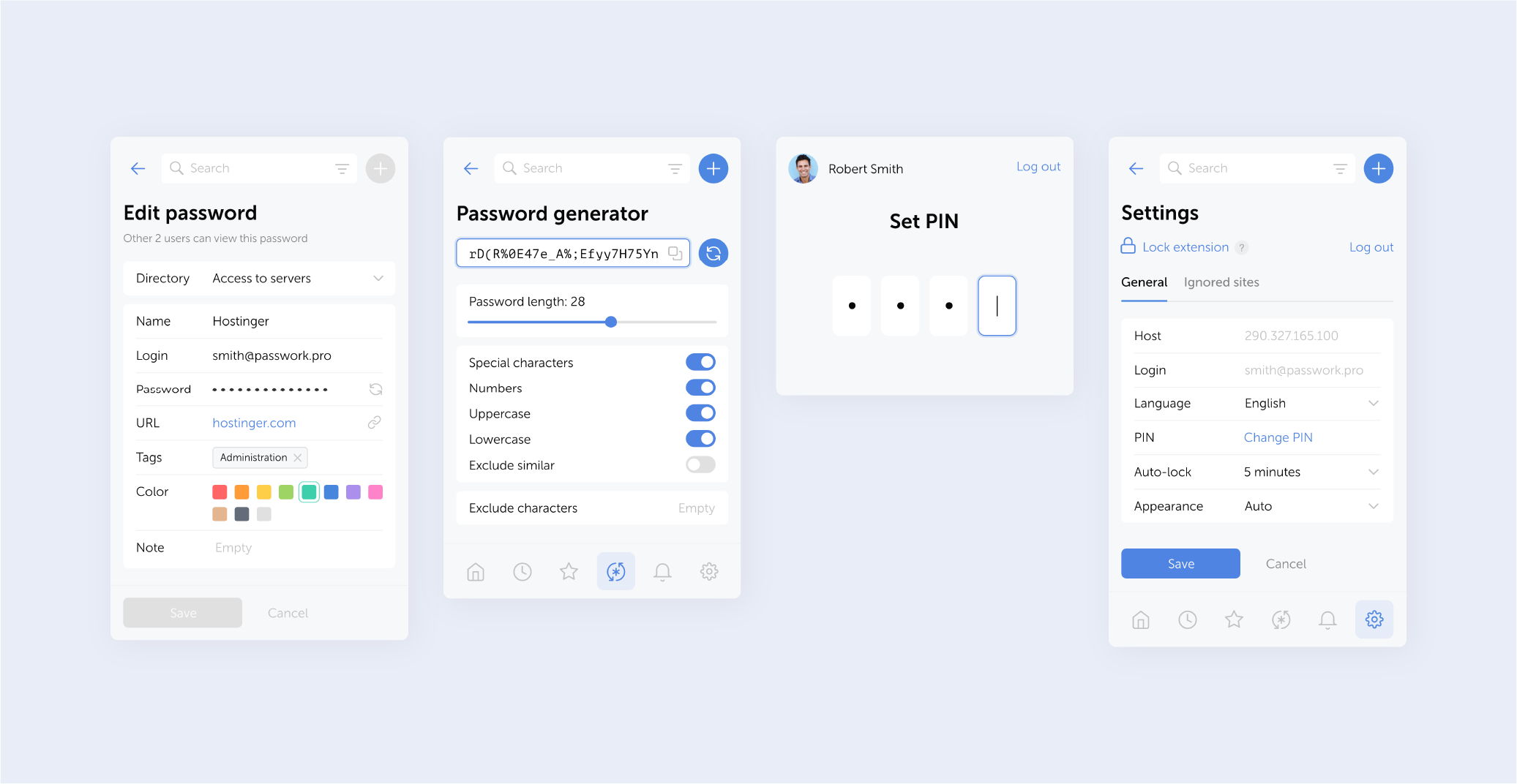
 Eirik Salmi