Glossary: Password management / What is a password manager?
Every day, the average person uses dozens of online accounts — email, banking, social media, work tools, shopping sites. Each requires a password. And not just any password, but a strong, unique one that hackers can't easily crack.
The reality? Most people reuse the same handful of passwords across multiple sites. When one gets breached, all connected accounts become vulnerable. This is where a password manager becomes essential.
A password manager is a software application that securely stores and manages all your login credentials in an encrypted vault. Instead of remembering dozens of complex passwords, you only need to remember one master password. The password manager handles everything else — generating strong passwords, filling them in automatically, and keeping them synchronized across all your devices.
For IT professionals and businesses, password management software goes beyond personal convenience. It becomes a critical security infrastructure component that protects sensitive company data, enforces security policies, and provides visibility into password hygiene across entire organizations.
How does a password manager work?
At its core, a password manager operates on a simple principle: encrypt everything, trust nothing, remember one thing.
When you save a password, the password manager encrypts it using advanced cryptographic algorithms before storing it in a secure vault. This vault can exist locally on your device, on a company server, or in the cloud, depending on the type of solution you choose. Every time you need to log in somewhere, the password manager decrypts the stored credentials and fills them in automatically.
The entire system hinges on two critical security components: the encrypted vault and your master password.
The role of the encrypted vault and master password
The encrypted vault is your digital safe. It contains all your passwords, notes, payment information, and other sensitive data, protected by military-grade encryption (typically AES-256). Without the correct decryption key, this vault is essentially unreadable — even if someone gains access to the encrypted file itself.
Your master password is the key to this vault. It's the single password you create and memorize to unlock access to everything else. When you enter your master password, the password manager uses it to decrypt your vault and make your stored credentials available.
This creates both the greatest strength and the greatest responsibility of password management: your master password must be strong, unique, and memorable. If you forget it, most secure password managers cannot recover it for you — a feature, not a bug, of proper security architecture.
Zero-knowledge architecture explained
The best password managers implement what's called zero-knowledge architecture. This security model ensures that no one — not the password manager company, not their employees, not even system administrators — can access your stored passwords.
Here's how it works: all encryption and decryption happens locally on your device, not on the company's servers. Your master password never leaves your device, and the encryption key derived from it never gets transmitted to the cloud. The password manager provider only stores your encrypted vault, which is useless without your master password.
This approach means that even if the password manager's servers were breached, attackers would only find encrypted data they cannot decrypt. For enterprise password managers deployed on-premise like Passwork, this architecture provides an additional layer of control, as sensitive data never leaves the company's infrastructure.
Key features and benefits of using a password manager
Modern password management software offers far more than simple password storage. These tools have evolved into comprehensive security platforms that actively improve your digital security posture.
Automatic password generation
Creating strong passwords is tedious. Creating unique strong passwords for every account is nearly impossible without help.
A password manager's built-in generator creates cryptographically random passwords with customizable parameters — length, character types, and complexity. These passwords are virtually impossible to guess or crack through brute force attacks. Since you don't need to remember them, they can be as complex as necessary: 20+ characters mixing uppercase, lowercase, numbers, and symbols.
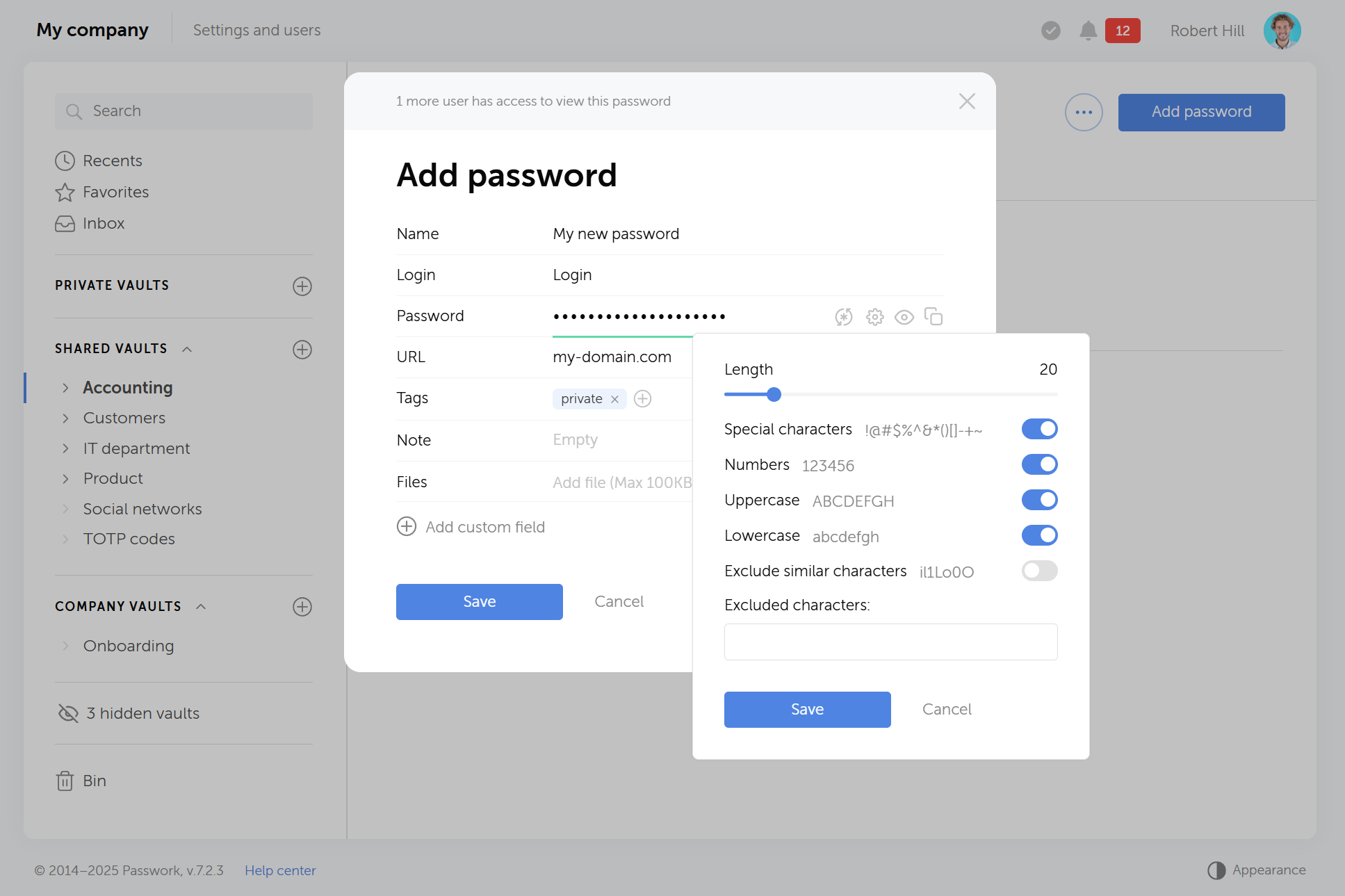
The generator eliminates password reuse — one of the most dangerous security practices. Each account gets its own unique password, so a breach at one service doesn't compromise your other accounts.
Secure password sharing
Teams need to share credentials for shared accounts, but sending passwords through email or chat is fundamentally insecure. An enterprise password manager solves this problem with encrypted sharing mechanisms.
You can share specific passwords or entire folders with colleagues without exposing the actual password in plaintext. Recipients get access through their own encrypted vault, and you maintain control — revoking access instantly when someone leaves the team or no longer needs it.
For businesses, this feature becomes critical for managing shared accounts, service credentials, and client access without creating security vulnerabilities.
Auto-fill and cross-platform sync
The best password managers eliminate friction from your daily workflow. Browser extensions and mobile apps detect login forms and fill credentials automatically with a single click. No more switching between apps, copying and pasting, or typing complex passwords on mobile keyboards.
Cross-platform synchronization keeps your vault updated across all devices — desktop, laptop, phone, tablet. Add a password on your work computer, and it's immediately available on your phone. This seamless experience encourages better security practices because secure behavior becomes easier than insecure shortcuts.
Breach monitoring and password health checks
A password vault app doesn't just store passwords — it actively monitors their security.
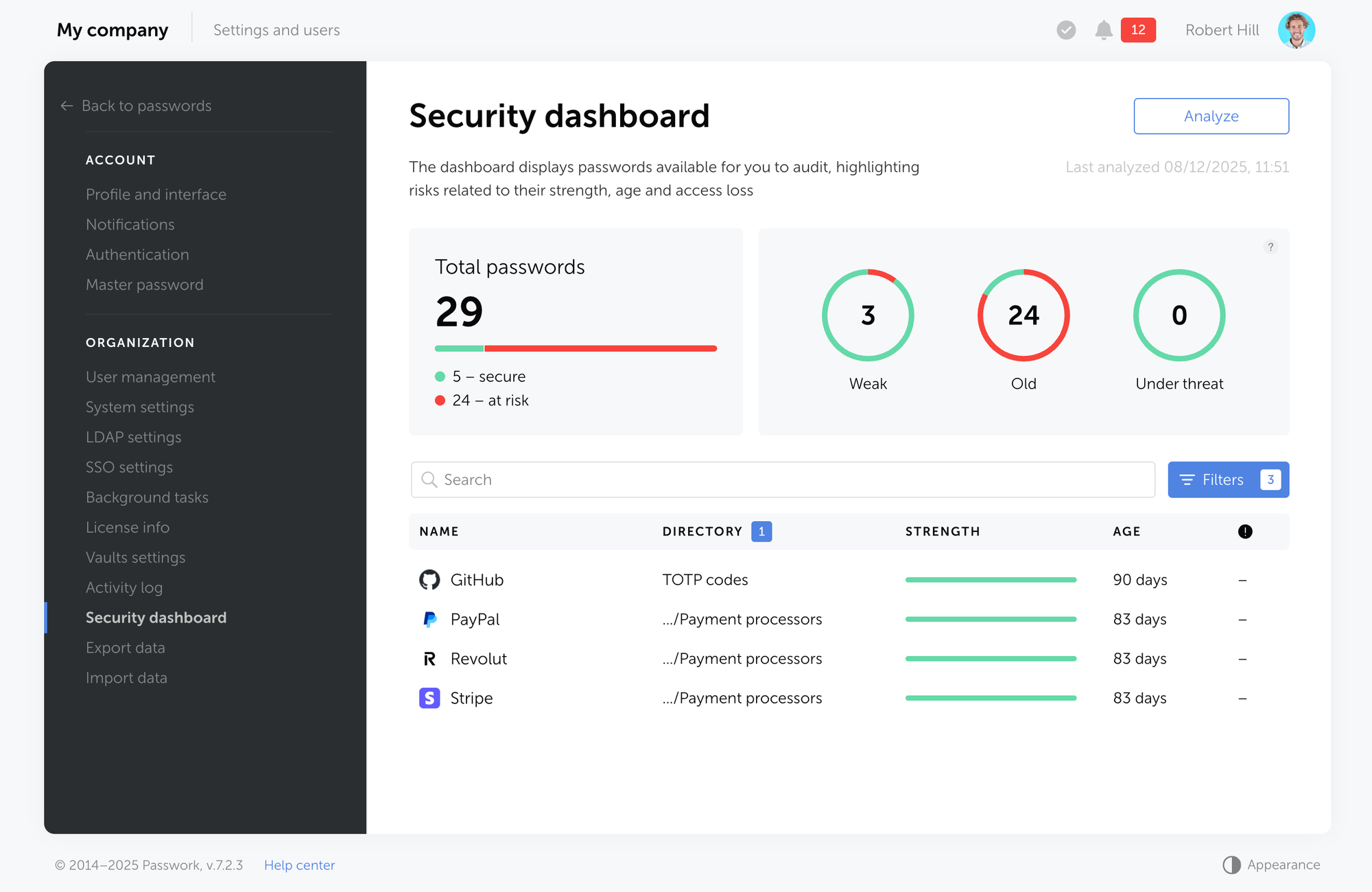
Password security dashboards analyze your entire vault, identifying weak passwords, reused credentials, and old passwords that haven't been changed in months or years. For IT administrators managing an enterprise password manager, these insights provide visibility into organizational password hygiene and help prioritize security improvements.
Types of password managers
Understanding the different types helps you choose the right solution for your specific needs and security requirements.
Cloud-based vs. on-premise solutions
Cloud-based password managers store your encrypted vault on the provider's servers. You access your passwords from anywhere with an internet connection, and synchronization happens automatically. These solutions offer convenience and minimal setup, making them ideal for individuals and small teams.
The trade-off: you're trusting the provider's infrastructure and security practices. While reputable providers implement zero-knowledge architecture, some organizations have compliance requirements or security policies that prohibit storing sensitive data in third-party clouds.
On-premise solutions give you complete control. The password manager runs on your own servers within your infrastructure. Your encrypted vaults never leave your network, and you control all aspects of security, backup, and access.
This approach appeals to enterprises with strict data residency requirements, regulated industries, and organizations that prefer not to depend on external services. The trade-off is increased complexity — you're responsible for server maintenance, updates, and ensuring high availability.
| Feature | Cloud-based | On-premise |
|---|---|---|
| Setup complexity | Minimal | Moderate to high |
| Data location | Provider's servers | Your infrastructure |
| Maintenance | Provider managed | Self-managed |
| Access | Anywhere with internet | Network-dependent |
| Best for | Individuals, small teams | Enterprises, regulated industries |
Personal vs. enterprise password managers
Personal password managers focus on individual users. They offer core features like password storage, generation, and auto-fill, typically with a simple pricing model and user-friendly interface. These solutions work well for managing personal accounts and small-scale password sharing.
Business and enterprise password managers add organizational capabilities: centralized administration, role-based access control, audit logs, policy enforcement, and integration with existing identity management systems. IT administrators can manage user access, monitor security compliance, and respond to security incidents from a central dashboard.
Enterprise solutions also provide advanced features like single sign-on (SSO) integration, Active Directory synchronization, and detailed reporting for compliance audits. These capabilities make them essential infrastructure for organizations where password security affects business continuity and regulatory compliance.
Is it safe to store all your passwords in one place?
This question surfaces in every conversation about password managers. The concern is understandable: if someone compromises your password manager, don't they get access to everything?
The answer requires understanding the threat model.
- Without a password manager, most people reuse passwords or use predictable variations. A single breach exposes multiple accounts. Passwords get written on sticky notes, stored in unencrypted documents, or shared through insecure channels. This scattered approach creates numerous attack vectors, each with varying levels of security.
- With a password manager, all your passwords exist in one place, but that place is protected by multiple layers of security: a strong master password, encryption that makes the data unreadable without the key, and zero-knowledge architecture that ensures even the provider cannot access your passwords.
The single point of entry — your master password — is protected by you alone. No one can reset it, recover it, or bypass it. This makes it significantly more secure than the alternative of weak, reused passwords scattered across dozens of services with varying security standards.
Security experts consistently recommend password managers as the most practical way to maintain unique, strong passwords for every account. The National Institute of Standards and Technology (NIST), SANS Institute, and virtually every cybersecurity organization advocate for their use.
For businesses, the question isn't whether to use a password manager, but which type best fits their security requirements and infrastructure. An enterprise password manager becomes part of a defense-in-depth strategy, working alongside multi-factor authentication, network security, and employee training to create comprehensive protection.
The practical reality: password managers don't eliminate all risk, but they dramatically reduce it compared to any alternative approach to managing dozens or hundreds of passwords.
Frequently Asked Questions

Are password managers safe?
Yes, when properly implemented. Password managers like Passwork use military-grade encryption (AES-256) and zero-knowledge architecture, meaning even the provider cannot access your passwords. The main security requirement is creating a strong, unique master password that you never share or reuse elsewhere.
Can password managers be hacked?
While no system is completely immune to attacks, reputable password managers use military-grade encryption (AES-256) and zero-knowledge architecture, making them extremely difficult to compromise. Even if a password manager's servers were breached, attackers would only access encrypted data they cannot decrypt without your master password. The biggest vulnerability isn't the password manager itself — it's weak master passwords or phishing attacks targeting users directly. Using a strong, unique master password and enabling two-factor authentication significantly reduces risk.
Do I need a password manager if I use my browser's built-in password saving?
Browser password managers offer basic convenience but lack the security features, cross-browser compatibility, and advanced capabilities of dedicated password management software. They typically don't use zero-knowledge encryption, offer limited sharing options, and provide no password health monitoring or breach alerts.
Can I use a password manager for more than just passwords?
Modern password managers function as secure digital vaults for various sensitive information. Beyond login credentials, you can store credit card details, secure notes, software licenses, Wi-Fi passwords, server access keys, API tokens, and confidential documents. Enterprise solutions often include features for storing SSH keys, database credentials, and other technical assets that IT teams need to manage securely. This consolidation reduces the number of places where sensitive information exists unencrypted.
How difficult is it to migrate from one password manager to another?
Most password managers support import and export functionality using standard formats like CSV or encrypted files. The migration process typically involves exporting your data from the old password manager, importing it into the new one, and verifying that everything transferred correctly. The main challenge isn't technical — it's organizational. For enterprises, migration requires planning around user training, policy updates, and ensuring business continuity during the transition. Personal migrations are usually straightforward and can be completed in under an hour.
Conclusion
Password security is a fundamental infrastructure for both personal and professional digital life. The question isn't whether you need a password manager, but which type fits your specific requirements.
For individuals, a password manager transforms security from a burden into a seamless part of your daily routine. You gain stronger passwords, eliminate reuse, and actually reduce the mental overhead of managing dozens of accounts.
For businesses, password management software becomes a critical security control that protects sensitive data, enforces policies, and provides visibility into organizational password hygiene. The cost of a breach — in terms of data loss, regulatory fines, and reputation damage — far exceeds the investment in proper password management infrastructure.
The strongest security systems are the ones people actually use. A password manager succeeds because it makes secure behavior easier than insecure shortcuts. Whether you choose a cloud-based solution for convenience or an on-premise deployment like Passwork for maximum control, implementing a password manager is one of the highest-impact security decisions you can make.
 Eirik Salmi
 Ana Moore
 Eirik Salmi