

A password generator is a software tool that creates random, complex passwords using cryptographic algorithms. Unlike human-created passwords that follow predictable patterns, a random password generator produces combinations of characters that are mathematically difficult to crack. These tools have become essential for anyone serious about online security — from casual internet users to IT professionals managing hundreds of accounts.
The core function of a secure password generator is simple: generate passwords that maximize unpredictability while meeting specific security requirements. Instead of relying on memorable words, dates, or patterns (which hackers exploit), password generators use true randomness to create credentials that resist both automated attacks and human guessing.
How password generators work
A strong password generator operates on principles borrowed from cryptography. When you click generate, the tool doesn't just randomly mash keys — it uses sophisticated algorithms to ensure each character is selected independently and unpredictably.
Most password creation tools follow this process:
- Define parameters — You specify length and character types (uppercase, lowercase, numbers, symbols)
- Generate random values — The algorithm uses a cryptographically secure random number generator (CSPRNG) to select characters
- Assemble the password — Characters are combined according to your specifications
- Verify complexity — The tool ensures the result meets minimum security standards
The entire process happens in milliseconds, producing passwords that would take humans hours to create manually, and with far better security outcomes.
The role of randomness and entropy
Entropy is the measurement of unpredictability in a password. Higher entropy means more possible combinations, which translates directly to stronger security. A password generator maximizes entropy by ensuring each character position is truly random.
Entropy measures the randomness or unpredictability of data — the higher the entropy, the harder it is to guess. In cybersecurity, high entropy is essential for strong passwords, encryption keys, and tokens because it makes brute-force attacks exponentially more difficult, while low entropy creates predictable patterns that attackers can exploit easily.
Consider the difference: A human creating a password might choose Summer2024! — predictable, dictionary-based, with common substitutions. A password generator produces something like 7mK#9pL@2vN$4xR — no patterns, no meaning, maximum entropy.
Mathematically, entropy is calculated based on the character set size and password length. An 8-character password using only lowercase letters has 26^8 possible combinations (about 208 billion). Add uppercase, numbers, and symbols, and that same 8-character password jumps to 95^8 combinations (6.6 quadrillion). A 16-character password with full complexity? The numbers become astronomical.
This is why password complexity matters. Each additional character and character type exponentially increases the time required to crack the password through brute-force methods.
Customizable parameters (length, character types)
Modern password generators offer extensive customization to balance security with usability:
Length — Most security experts recommend minimum 12-16 characters. Some systems require longer passwords for administrative access. The Passwork password generator allows you to specify exact length requirements.
Character types — Toggle uppercase letters, lowercase letters, numbers, and special symbols. Some generators let you exclude ambiguous characters (like 0/O or 1/l/I) that cause confusion when typing passwords manually.
Exclusion rules — Avoid specific characters that certain systems don't accept or that create problems in command-line interfaces.
Pronounceability — Some tools offer "pronounceable" passwords that balance randomness with memorability, though this typically reduces entropy.
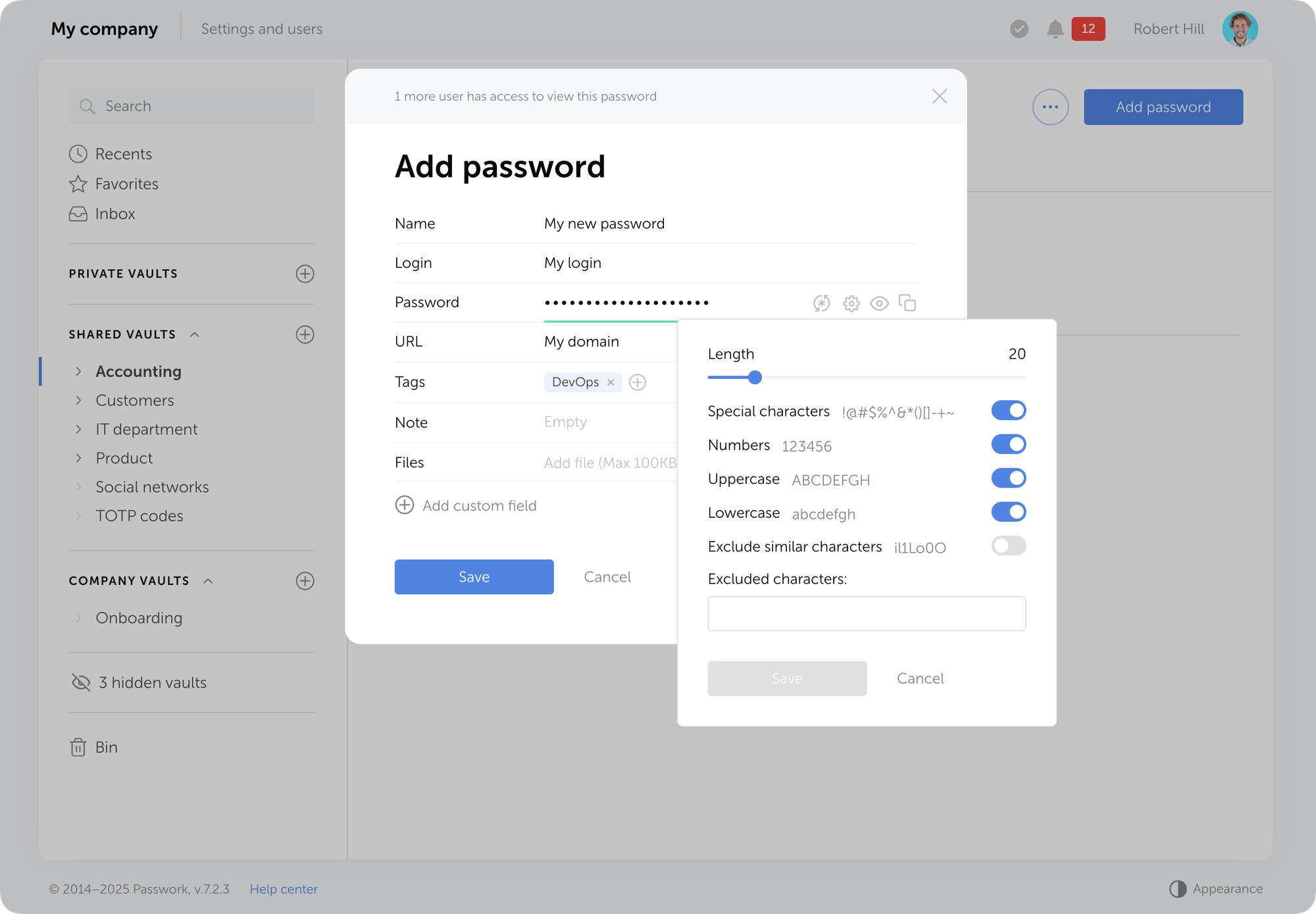
The key is understanding your specific requirements. A password for your bank account should maximize all complexity options. A password for a low-security account might use fewer character types if the system doesn't support them.
Why you should use a password generator
The security gap between human-created and machine-generated passwords is massive. Using a password generator is a necessity in today's threat environment.
The dangers of human-created passwords
Humans are terrible at creating random passwords. Our brains naturally seek patterns, meaning, and memorability — exactly what makes passwords weak.
Research consistently shows that human-created passwords cluster around predictable patterns:
- Dictionary words — password, admin, welcome
- Personal information — Names, birthdays, pet names
- Keyboard patterns — qwerty, 123456, asdfgh
- Common substitutions — @ for a, 3 for e, ! at the end
Hackers know these patterns. Their tools specifically target them. A password like Jennifer1985! feels random to you, but it's among the first combinations an attacker will try. It combines a common name, a likely birth year, and a predictable symbol placement.
Even when people try to be random, they fail. Studies where participants were asked to create "random" passwords showed clear biases toward certain characters, positions, and patterns. True randomness is counterintuitive to human thinking.
Protection against brute-force and dictionary attacks
Password generators create credentials specifically designed to resist the two most common attack methods:
- Dictionary attacks — Attackers use lists of common passwords and words, trying each one systematically. A randomly generated password like
xP9#mK2@vL7$nR4won't appear in any dictionary, rendering this attack useless. - Brute-force attacks — Attackers try every possible character combination. Here, password length and complexity become critical. An 8-character password with only lowercase letters can be cracked in hours with modern hardware. A 16-character password with full complexity would take centuries.
The mathematics are unforgiving. Each additional character multiplies the number of possible combinations. A password generator ensures you're always on the right side of that equation.
Additionally, generated passwords protect against credential stuffing — where attackers use passwords leaked from one breach to access other accounts. Since generated passwords are unique and random, they can't be reused across services, isolating any potential breach.
Features to look for in a password generator
Not all password generators are created equal. When choosing a password creation tool, prioritize these essential features.
Integration with a password manager
A standalone password generator is useful, but integration with a password manager is transformative. Here's why: randomly generated passwords are impossible to remember. If you can't store them securely, you'll either write them down (insecure) or revert to weak, memorable passwords (defeating the purpose).
Passwork combines password generation with secure storage and autofill capabilities. When you create a new account, the built-in generator creates a strong password, saves it encrypted in your vault, and automatically fills it when you return to that site. You never need to see, type, or remember the password — it just works.
This integration eliminates the usability barrier that prevents people from using strong passwords. You get maximum security without any memorization burden.
Cross-platform availability
Your password generator should work everywhere you create accounts — desktop browsers, mobile devices, and web applications. Password managers like Passwork sync your generated passwords across all devices, ensuring you always have access when you need to log in.
Frequently Asked Questions

What makes a password generator more secure than creating passwords myself?
Humans naturally create predictable patterns — dictionary words, personal information, keyboard sequences, and common substitutions like "@" for "a." Hackers specifically target these patterns. Password generators use cryptographically secure random number generators (CSPRNG) to produce truly random combinations without patterns. A password like "Jennifer1985!" feels random to you but is among the first combinations attackers try. A generated password like "xP9#mK2@vL7$nR4" won't appear in any dictionary and resists automated attacks.
What is entropy and why does it matter for password security?
Entropy measures the unpredictability in a password. Higher entropy means more possible combinations, making passwords exponentially harder to crack. An 8-character password using only lowercase letters has 208 billion possible combinations. Add uppercase, numbers, and symbols, and that jumps to 6.6 quadrillion combinations. A 16-character password with full complexity creates astronomical numbers that would take centuries to crack with current computing power.
How long should my generated passwords be?
Security experts recommend minimum 12-16 characters for standard accounts. Administrative access and high-security accounts should use longer passwords. Each additional character exponentially increases the time required to crack the password through brute-force methods. The mathematical advantage is significant — an 8-character password with full complexity might be cracked in hours with modern hardware, while a 16-character password would take centuries.
Can password generators protect against credential stuffing attacks?
Yes. Credential stuffing attacks use passwords leaked from one breach to access other accounts. Since generated passwords are unique and random for each account, they can't be reused across services. This isolates any potential breach — if one service gets compromised, your other accounts remain protected because they use completely different, randomly generated credentials.
What parameters should I customize when generating passwords?
Balance security with system requirements. Maximize all complexity options for high-security accounts like banking — full length (16+ characters), uppercase, lowercase, numbers, and special symbols. For systems with restrictions, adjust accordingly. Some generators let you exclude ambiguous characters (0/O or 1/l/I) that cause confusion when typing manually. The key is understanding your specific requirements while maintaining maximum entropy within those constraints.
Conclusion
Password generators have evolved from optional security tools to essential components of modern digital hygiene. A quality password generator, especially when integrated with a password manager like Passwork, removes the impossible burden of creating and remembering dozens of complex, unique credentials while maximizing your security posture across every account.
The investment in using a password generator is minimal — a few seconds per account — but the protection it provides is substantial. By letting cryptographic algorithms handle password creation, you're making them practically impossible to compromise through password-based attacks.
 Eirik Salmi
 Eirik Salmi
 Eirik Salmi