

A master password is the single credential that secures your entire password vault. It functions as the primary authentication layer — the only barrier between your stored credentials and unauthorized access.
Unlike the dozens of passwords you create for individual websites and apps, your master password never leaves your control. It's not stored on any server, not saved in any database, and not accessible to anyone but you — not even the password manager company itself or your IT team. This makes it simultaneously the most powerful and most vulnerable element of your password security strategy.
Understanding how your master password works, how to create a strong one, and what happens if you lose it is essential for anyone using a password manager.
The role of the master password in a zero-knowledge system
Modern password managers like Passwork operate on a zero-knowledge security architecture. This means the service provider has zero knowledge of your master password or the contents of your vault. Your master password is the foundation of this system, serving as both authentication credential and encryption key.
Your master password is the key to your encrypted vault
When you create a master password, your password manager uses it to generate an encryption key through a process called key derivation. This key encrypts all the data in your vault — every password, note, and piece of sensitive information you store.
Key derivation is a cryptographic process of generating one or more secret keys from an initial secret value (such as a password or master key) using specialized functions called KDFs (Key Derivation Functions)
Each time you enter your master password, the system derives the same encryption key and uses it to decrypt your vault. No password, no key. No key, no access. The mathematics behind this process ensures that without your exact master password, the encrypted data remains computationally infeasible to crack, even with significant resources.
This is why your master password must be both strong and memorable. It serves double purpose as your authentication method and the basis for your vault's encryption.
Why even your password manager can't see it
In a zero-knowledge system, your master password never travels to the password manager's servers in plain text. When you log in, your device performs the key derivation locally, then uses the resulting key to decrypt your vault data.
Passwork, for example, never receives or stores your master password. This architecture protects you even in the unlikely event of a server breach. An attacker who compromises the service's infrastructure would find only encrypted vaults with no way to unlock them.
The trade-off? If you forget your master password, the company genuinely cannot help you recover it. They don't have it, can't reset it, and can't decrypt your vault without it. Your security is entirely in your hands.
Best practices for creating a strong master password
Creating a master password requires balancing two competing needs: security and memorability. A password that's impossible to remember is useless if you can't access your vault. A password that's easy to remember but weak defeats the entire purpose of using a password manager.
Length, complexity, and uniqueness
The most important characteristic of a strong master password is length. Every additional character exponentially increases the time required to crack it through brute force attacks. Security experts recommend a minimum of 12 characters, but 16 or more is ideal.
Complexity matters, but not in the way most people think. A truly random string of characters like K9$mP2#vL5@nQ8 is strong but nearly impossible to remember. You need complexity that serves security without sacrificing usability.
Your master password must be absolutely unique — never used for any other account, never shared with anyone, and never written down in an insecure location. This is the one password that cannot be stored in your password manager, so it must live in your memory.
Using a passphrase for memorability and strength
A passphrase (sequence of random words) offers an elegant solution to the security-memorability problem. Instead of trying to remember K9$mP2#vL5@nQ8, you might use something like correct-horse-battery-staple.
The XKCD comic that popularized this concept demonstrated a crucial insight: four or five random common words create more entropy (randomness) than a shorter complex password, while being far easier to remember. The key word here is "random" — don't use song lyrics, famous quotes, or predictable phrases.
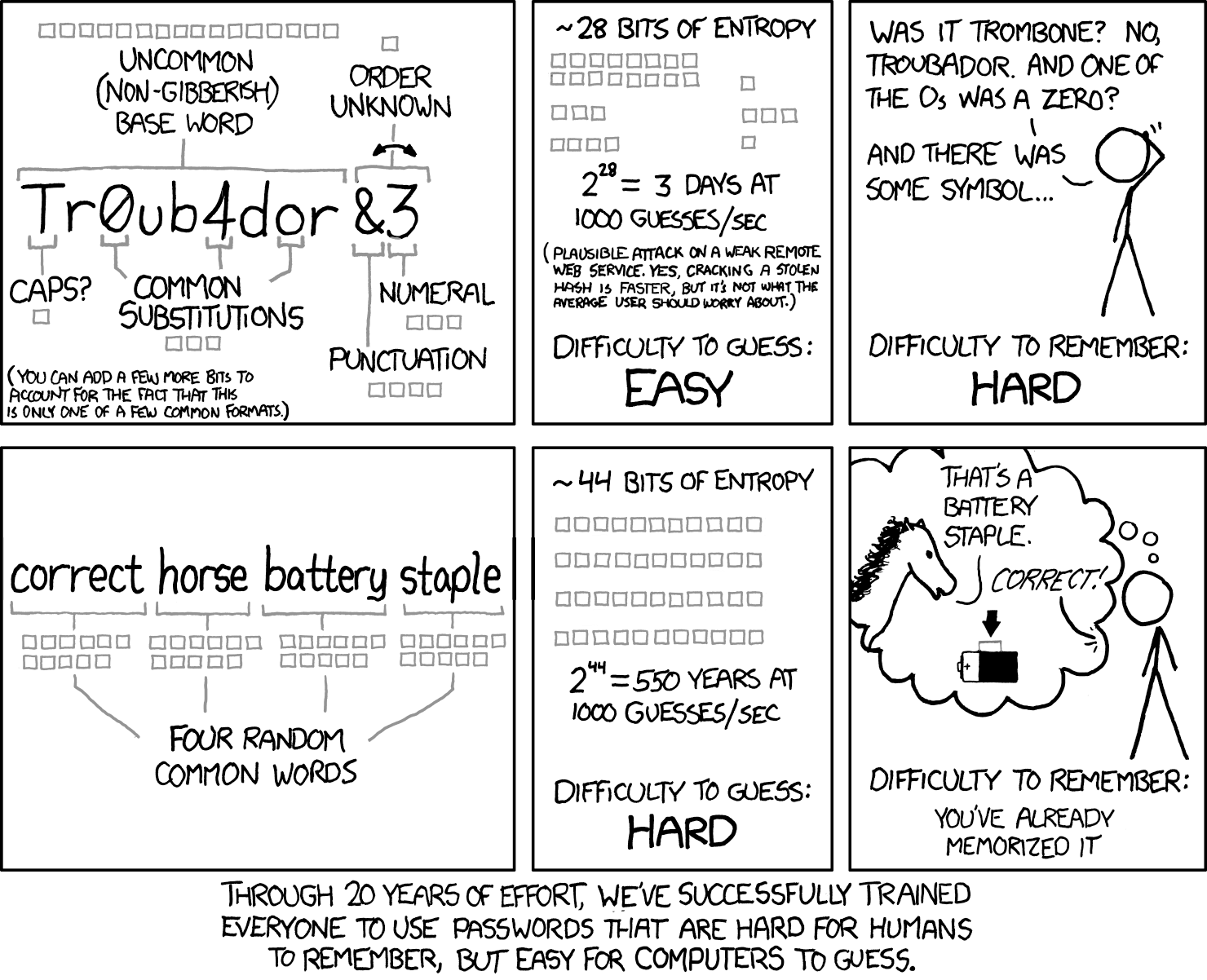
To create a strong passphrase:
- Choose 4-6 random words from a large vocabulary (avoid common phrases)
- Add a number or special character for additional complexity
- Use a separator between words for readability
- Make it personal but not guessable (avoid names, dates, or obvious references)
- Test it: can you remember it after waiting 24 hours?
A passphrase like telescope-harvest-glacier-symphony-42 is both strong and memorable. It contains 40 characters, includes a number, and would take centuries to crack with current technology — yet you can visualize the words to help remember them.
What to do if you forget your master password
Forgetting your master password is the worst-case scenario for any password manager user. Because of the zero-knowledge architecture that protects your security, recovery options are limited by design.
The challenges of master password recovery
The same encryption that protects your vault from hackers also protects it from you if you forget your master password. There's no "forgot password" link that sends a reset email, no customer service representative who can look up your password, and no backdoor that lets you regain access.
This isn't a flaw — it's a feature. Any recovery mechanism that bypasses your master password would create a vulnerability that attackers could exploit. If the company could reset your master password, so could a hacker who compromises their systems or social engineers their support team.
Securing your master password
Creating a strong master password is only half the battle. You must also protect it from theft, shoulder surfing, keyloggers, and your own forgetfulness.
- Never write it down in plain text: Don't store your master password in a text file, email, or note-taking app. If you must write it down while memorizing it, use paper and store it in a physically secure location like a locked safe.
- Beware of keyloggers: Malware that records keystrokes can capture your master password as you type it. Keep your devices secure with updated antivirus software, avoid entering your master password on public or shared computers, and be cautious about what software you install.
- Use two-factor authentication: Enable two-factor authentication (2FA) on your password manager account. This adds a second layer of security beyond your master password, protecting you even if someone discovers your master password.
- Practice typing it regularly: The more frequently you use your master password, the better you'll remember it. Don't rely on biometric unlock features exclusively — periodically log out and log back in with your full master password to keep it fresh in your memory.
- Change it if compromised: If you suspect your master password has been compromised — perhaps you entered it on a device you don't trust — change it immediately. This will re-encrypt your entire vault with a new key.
- Don't share it: Your master password should never be shared with anyone, including family members, IT support, or customer service representatives. Legitimate password manager companies will never ask for your master password.
Frequently Asked Questions

What happens to my data if I forget my master password?
Your data becomes permanently inaccessible unless you've set up a recovery mechanism. Because of zero-knowledge encryption, your master password never reaches any servers, and no one has the ability to decrypt your vault without it. There's no standard password reset option and no customer support workaround. Some services offer recovery keys or emergency access features that you can configure during setup, but if you haven't enabled these options, your data cannot be recovered. The best approach is prevention: create a memorable master password and set up recovery mechanisms when available.
How is a master password different from other passwords I use?
Your master password serves a dual purpose that makes it fundamentally different. First, it authenticates your identity to access your vault. Second, it generates the encryption key that protects all your stored data. Unlike passwords for websites or apps, your master password never leaves your device, isn't stored on any server, and can't be reset by anyone. It's the only password you'll need to remember, but it's also the only one that can't be stored anywhere else.
Is a passphrase really more secure than a complex password?
Yes, when created correctly. A passphrase like "telescope-harvest-glacier-symphony-42" (40 characters) provides more entropy than a shorter complex password like "K9$mP2#vL5@nQ8" (14 characters), while being significantly easier to remember. The key is randomness — your passphrase must use randomly selected words, not song lyrics, quotes, or predictable phrases. Four to six random common words create a password that would take centuries to crack with current technology, yet you can visualize the words to aid memory.
Should I write down my master password?
Only as a temporary measure during memorization, and only if stored in a physically secure location like a locked safe. Never store your master password in a text file, email, note-taking app, or any digital format. The risk of digital theft far outweighs the convenience. If you must write it down initially, use paper, store it securely, and destroy it once you've committed the password to memory. A better long-term strategy is creating a memorable passphrase you can visualize.
How often should I change my master password?
Change it immediately if you suspect compromise — for example, if you entered it on an untrusted device or believe someone may have observed you typing it. Otherwise, routine changes aren't necessary if you've created a strong, unique master password and protect it properly. Frequent changes can actually reduce security by forcing you to choose weaker, more forgettable passwords. Focus on creating one exceptionally strong master password and protecting it through two-factor authentication, device security, and careful usage habits.
Conclusion
Your master password is the foundation of your digital security. Treat it with the importance it deserves — because once it's gone, so is access to everything it protects. The zero-knowledge architecture that makes your master password so secure also makes it irreplaceable, so take the time to create something you won't forget. Choose it carefully, make it strong yet memorable, and guard it with the same vigilance you'd apply to a physical key to your home or office.
 Eirik Salmi
 Eirik Salmi
 Eirik Salmi